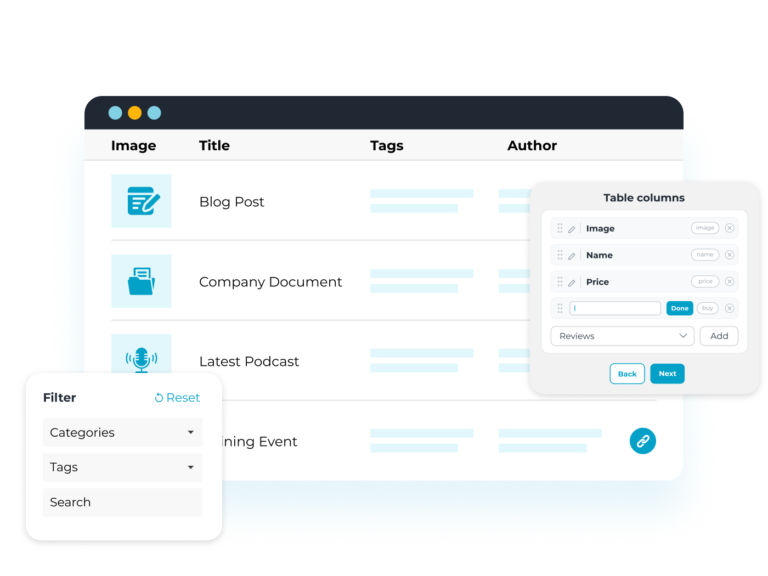
Posts Table Pro is a WordPress plugin that lists posts, pages, custom post types, custom fields and taxonomies. Visitors search, sort and filter the table to find what they need.
Transform posts, pages, and custom content into interactive tables with search and filtering
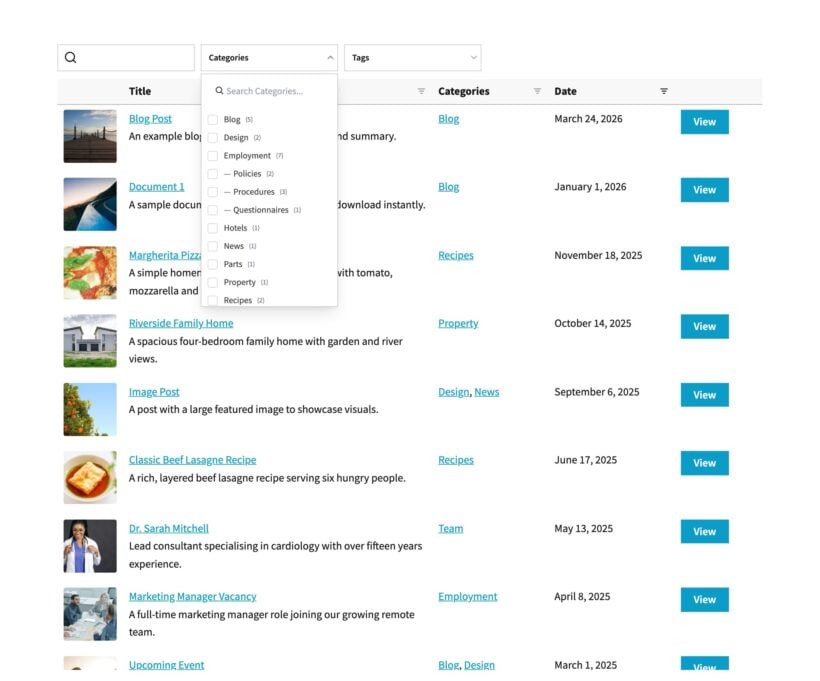
Instant Search, Sort & Filter
Automatically create tables listing WordPress posts, products, or any custom post type
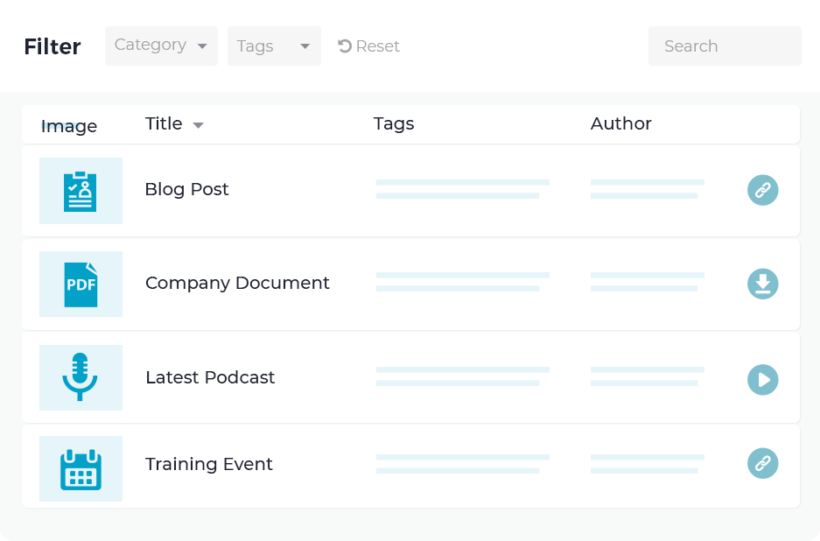
Visitors can search posts by keyword, sortable columns or multi-select filters
List table content by category, tag, ID, post type, author, or other custom field value
List Any WordPress Content
Display resources, media files, images, audio, podcasts, video, ecommerce products, events, portfolio items, articles, and resources
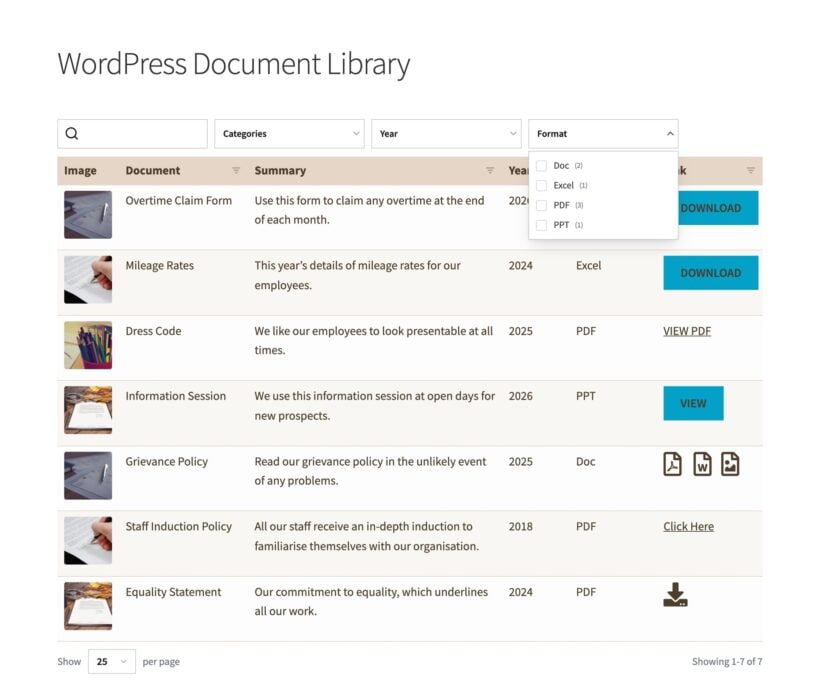
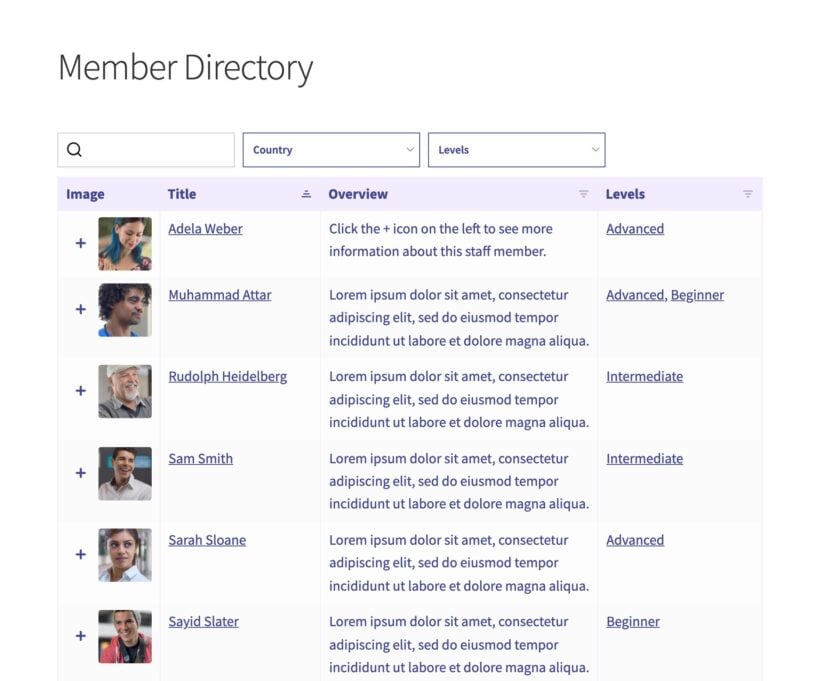
Create a document library, member directory, audio library or list upcoming events – and more
Your WordPress tables update automatically when other content is added or changed
Simple To Setup and Customize
Create interactive tables in seconds
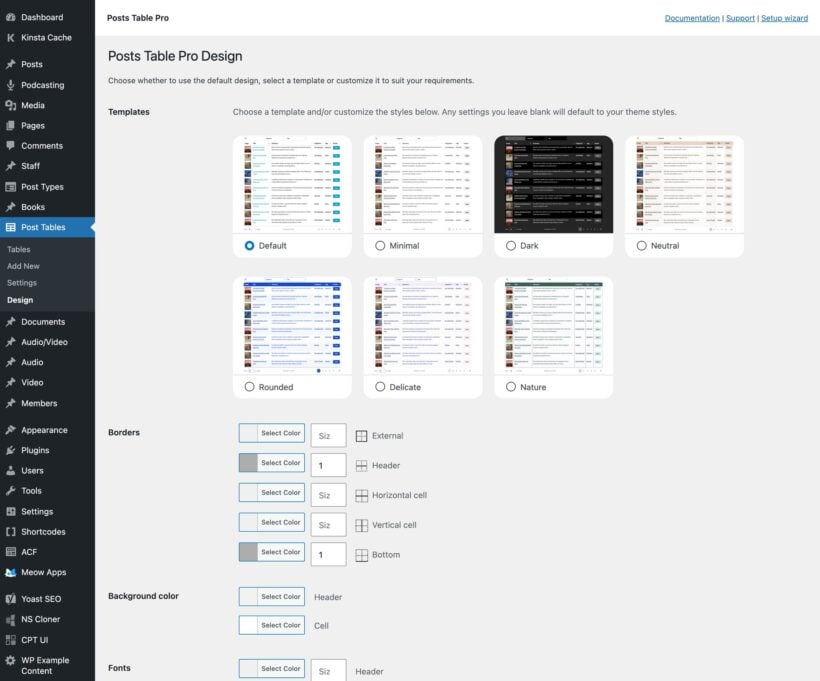
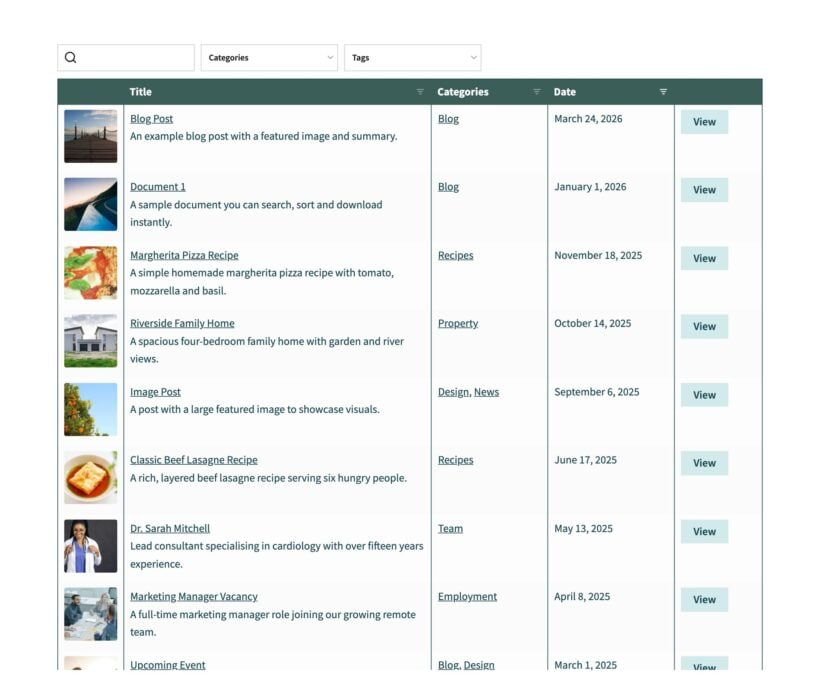
Choose from 7 design templates and customize them to match your brand
Use 50+ options to configure your tables
List unlimited posts with no performance loss
What should a WordPress table plugin do?
Posts Table Pro is a WordPress table plugin that lists any content in a table. It shows posts, pages, custom post types, documents, and media in one place. You choose the columns, add filters and a keyword search, and set the sort order. Large tables load one page at a time, so they stay fast at scale. You add a table anywhere with a block or a shortcode, with no data entry.
What Our Customers Say
The best WordPress table plugin!
★★★★★
“I'm using this plugin to allow searching and filtering of a document reference library, which has a custom post type and taxonomies. Very easy to use and customize.”
Jeff Uetrecht - USA
★★★★★
“Posts Table Pro is a beautiful product! I needed advanced filtering and dynamic search for my music library, without any skills in web development.”
Our Posts Table Pro WordPress table plugin comes with over 50 features, and we constantly add new ones in response to customer feedback. Combine them in 100’s of different ways to create unique tables listing pages, posts, documents, articles, products, events, custom post types, and more.
Click through our full list of features below!
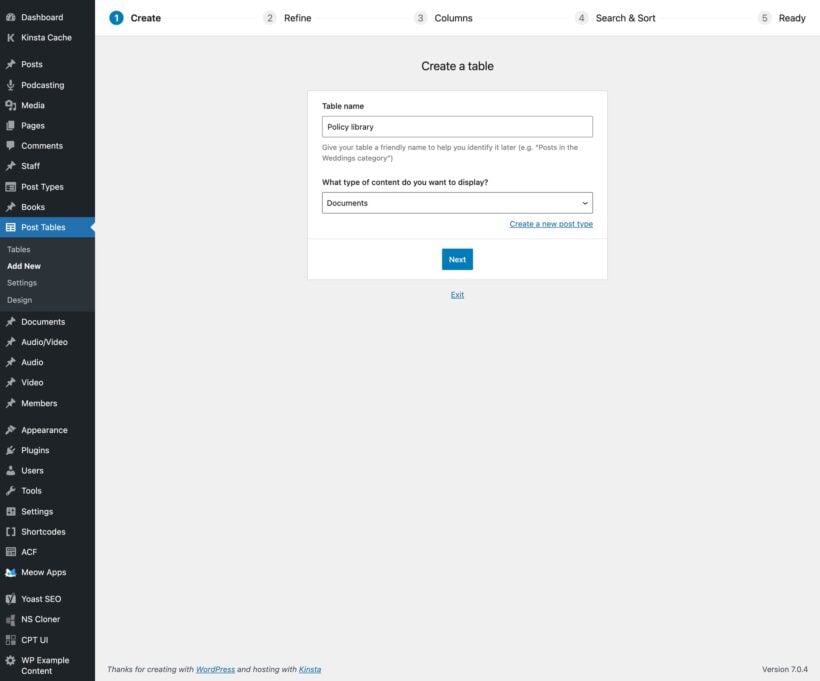
Step-by-step table builder
The table builder is a visual interface that guides you through table creation. Our step-by-step table builder walks you through how to create a table in WordPress.
Add instant tables anywhere on your site
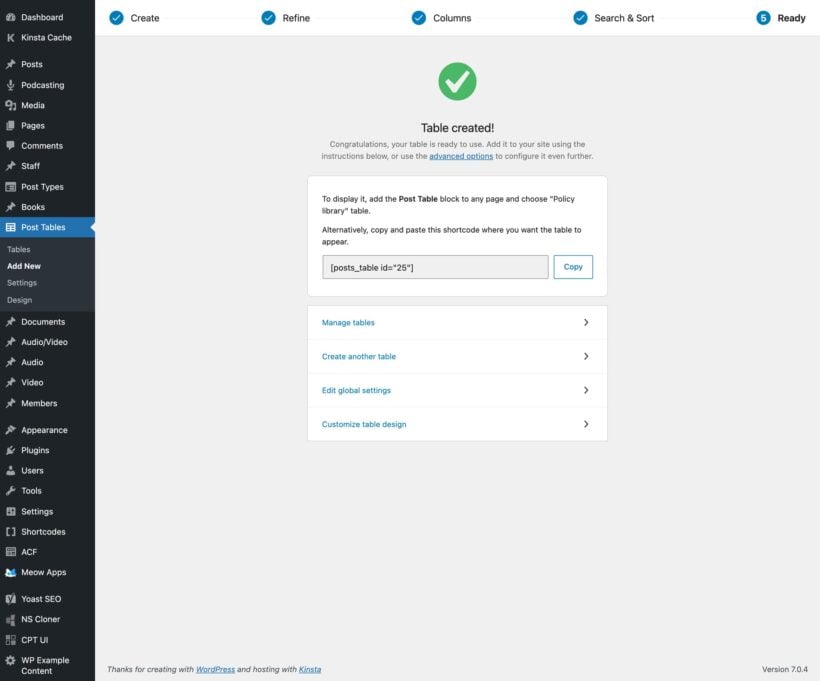
Add tables anywhere using a block or by copying a simple shortcode.
Create multiple tables
Create an unlimited number of tables, each with different content and settings.
Customizable table design
Select from 7 pre-designed table templates, and then use the built-in styling options to customize them to match your exact brand and color scheme.
Add to blog and category pages
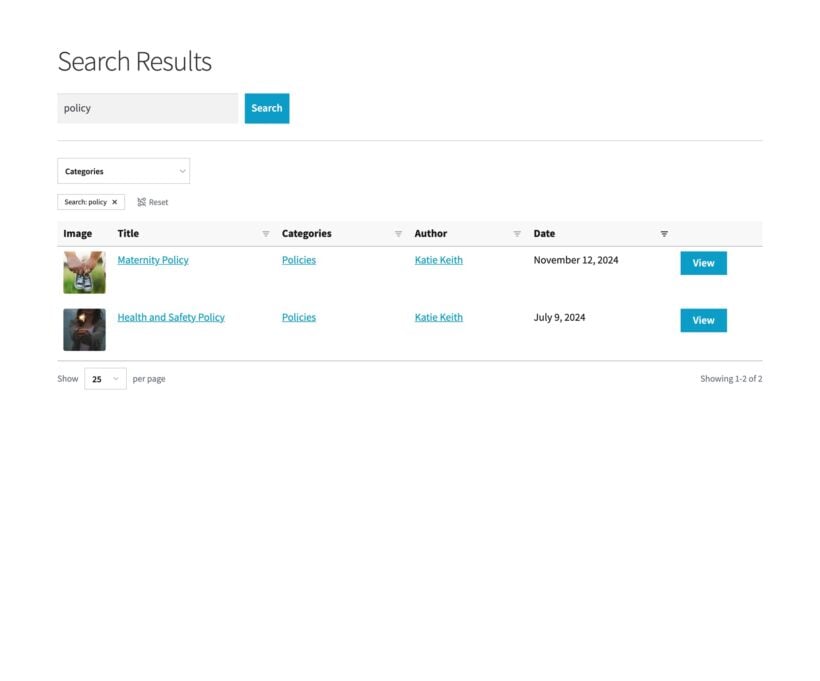
You can also add the table layout directly to your main blog page, category archives and sitewide search results template. (Requires editing template files in your theme, see instructions.)
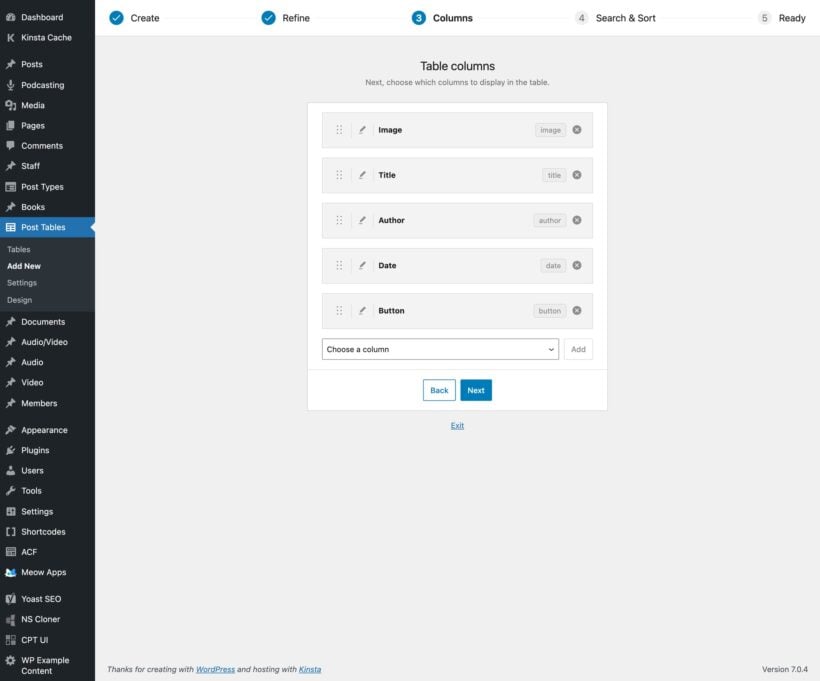
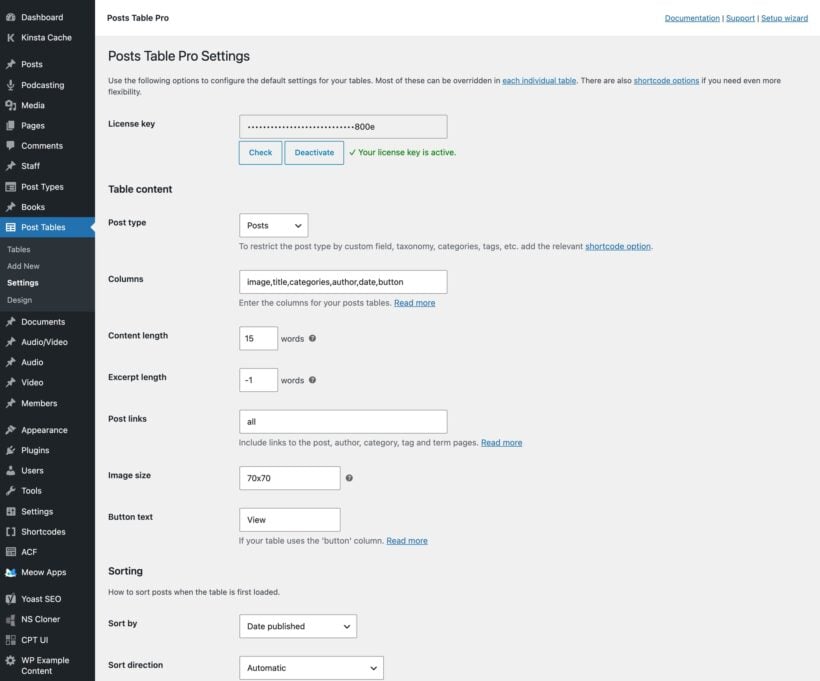
Choose which columns appear in the table
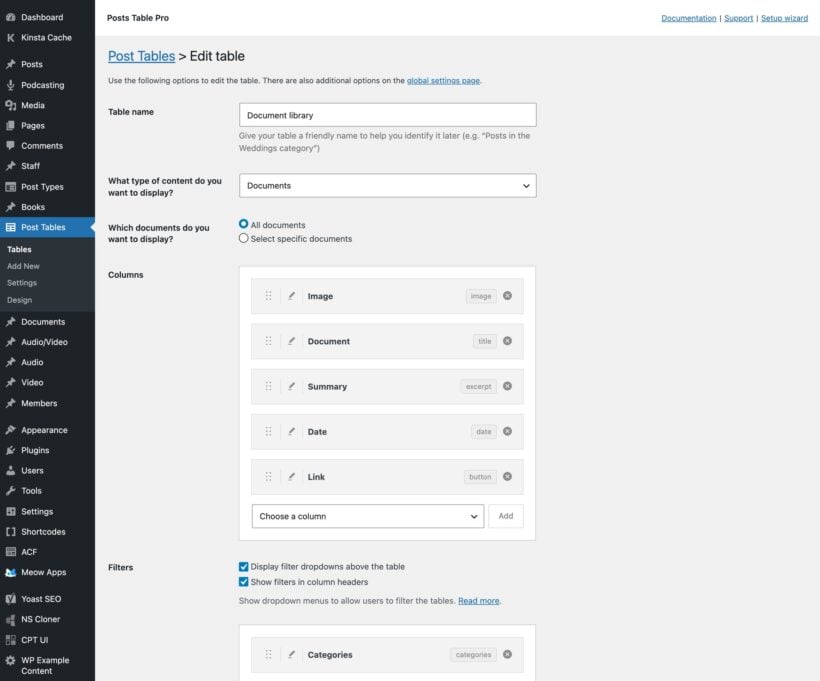
The plugin supports columns for post id, title, content, excerpt, image, date, date modified, author, categories, tags, status, plus a button linking to the post. If that’s not enough, then you can also create columns listing custom fields or taxonomies.
Merge columns
Optionally merge multiple table columns into one with "Combined columns". For example, you could display the post title above the excerpt instead of as separate columns.
Customizable column headings
You can change the column headings to anything you like, or remove them completely.
Sticky table header
A sticky header keeps column headings visible while scrolling through long tables.
Display pages, posts, or any custom post type
Including resources, media files, images, audio, podcasts, video, e-commerce products, events, portfolio items, articles, documents and much more.
List specific posts
Based on category, tag, status, date (based on day, week, and/or month), custom taxonomy term, or custom field value.
Include or exclude specific posts
Include or exclude specific posts based on their ID.
Exclude entire post categories
Exclude entire categories or taxonomies from the table.
Flexible styling options
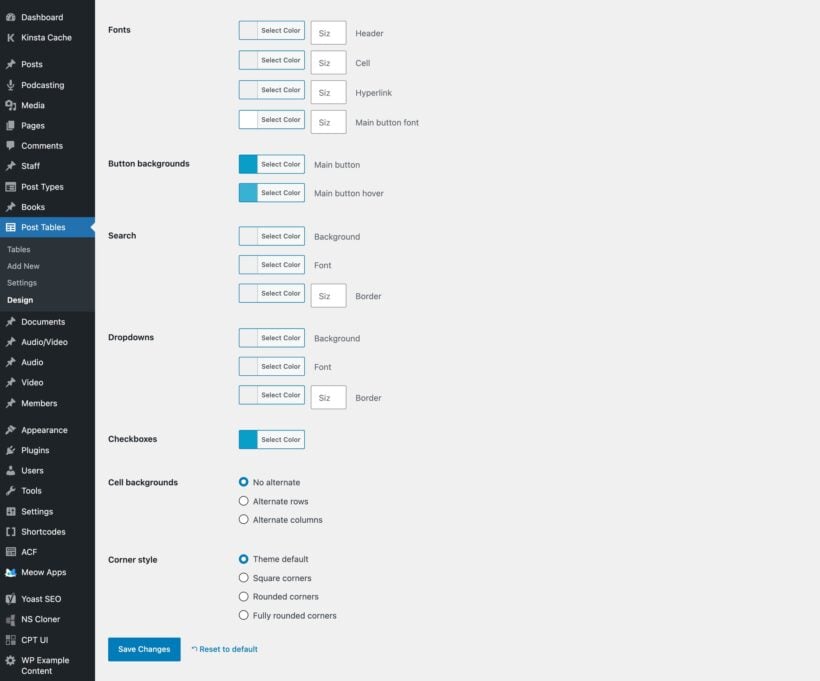
Table styling controls visual appearance including fonts, colors, and spacing. The tables will adapt automatically to suit your theme, and you can fine-tune the design using the built-in styling options.
Column widths
Override the default sizing and control the width of each column.
Rows per page
Pagination divides table content across multiple pages. Control the number of posts shown on each page of the table.
Post limit
Set a maximum number of posts that can appear in the table.
Multiple sort options
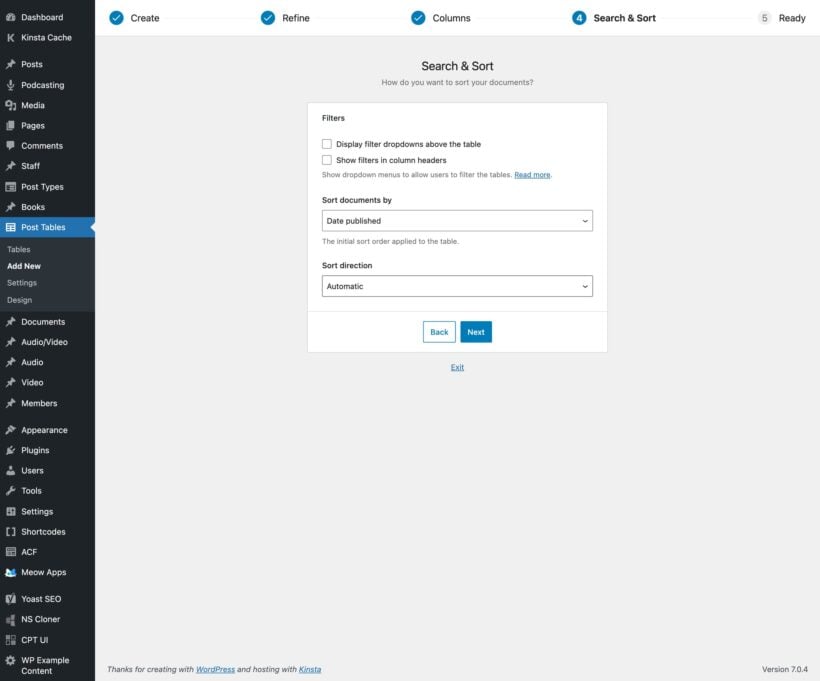
Control how posts are ordered when the table first loads, and the sort direction.
Clickable column headings
Visitors click a column heading to sort by that column. They can also sort by more than one column at a time.
Alphabetical, number or date sorting
Set the "column type" to Text, Number or Date to control how the table is sorted.
Keyword search
Display an instant search box above the table.
Pre-search the table
Filter posts based on a specific search term when the table first loads.
Instant filters
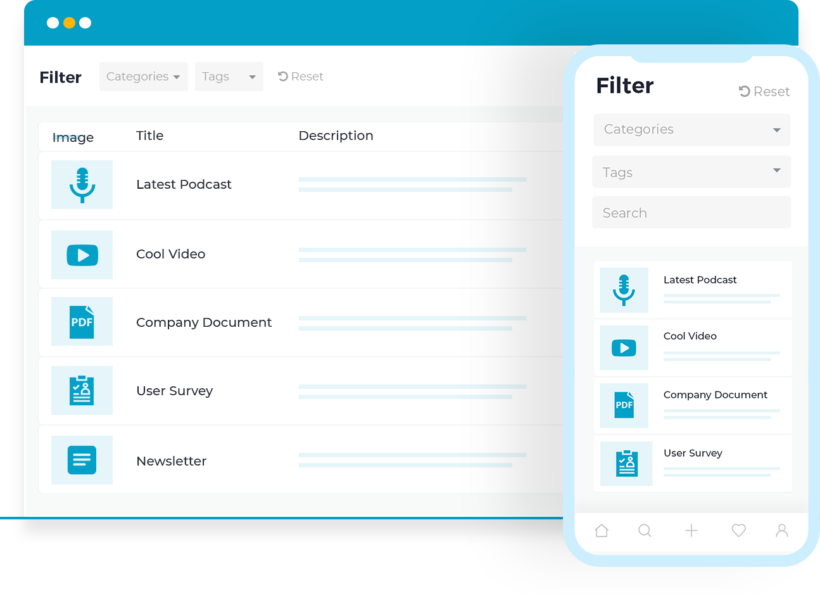
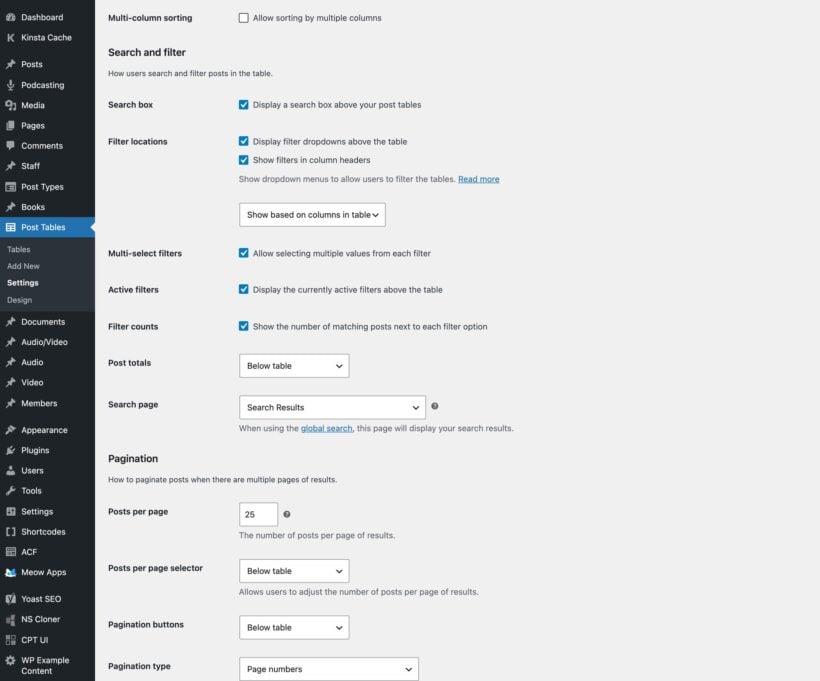
Add filter dropdowns above the table, or put the filters in the column headings. Each dropdown allows multiple selections, has its own search box, and shows how many results each option has. An active filters area shows visitors what they've narrowed the list to.
Customizable column filters
Choose whether clicking on a category, tag or custom taxonomy in the table will perform a filter or load the relevant archive page.
Shareable table URLs
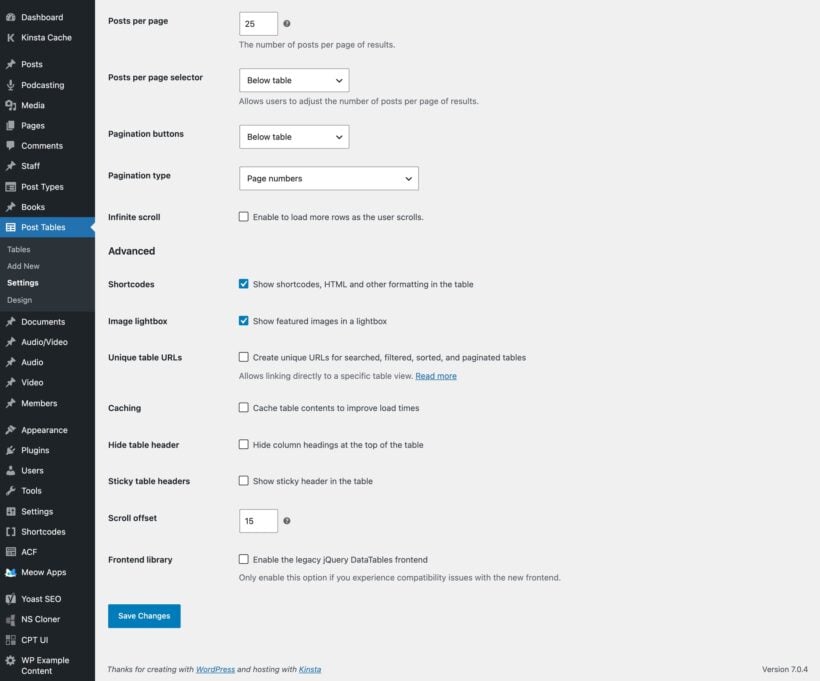
Switch on unique URLs and the address bar updates as visitors search, filter, sort and page through the table. They can then bookmark a view or send the link to someone else.
Set the date format
Choose the format for any date columns.
Specify date columns
If you’re using extra columns such as custom fields to display dates, use this option to ensure that it is sorted correctly in date order. Useful for listing events in the table.
Show, hide or position elements
Such as the search box, reset button, page length dropdown, post totals, and pagination buttons.
4 types of pagination buttons
Choose from 4 different styles to let customers navigate between pages of the WordPress table.
Infinite scroll
Don't like pagination buttons? Switch on infinite scroll instead, and visitors reveal more rows as they scroll. Set a container height so the table scrolls inside a fixed area.
Customizable ‘no posts’ messages
Change the text that appears when there are no items in the table, either when it first loads or after the customer performs a filter.
Image size
Control the size of featured images in the table.
Image lightbox
Choose whether customers can click on featured images to view a bigger version in a lightbox.
Audio and video
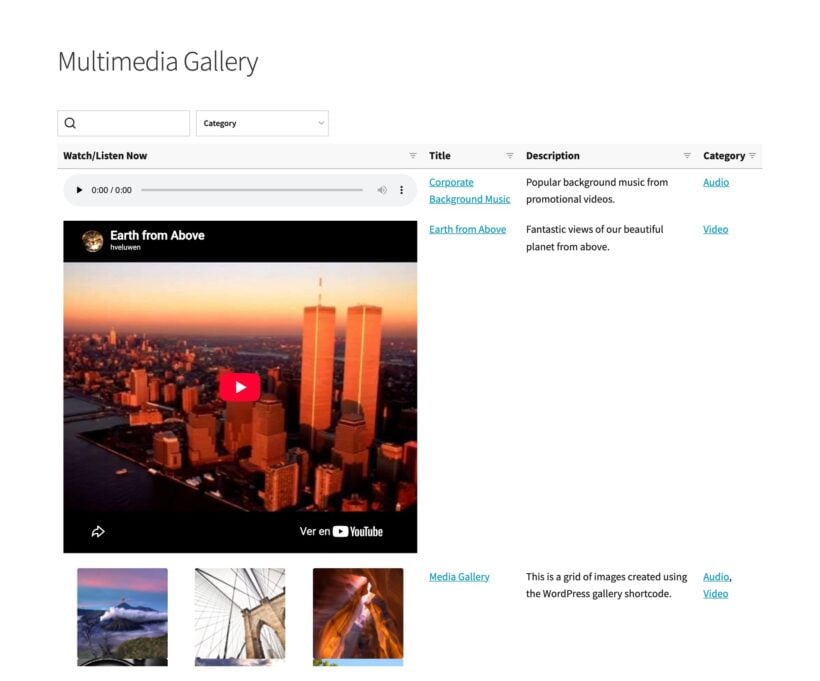
The plugin supports embedded audio files, video and media playlists. Customers can watch or listen to multimedia content directly in the WordPress table.
Content length
Set the length of the post content in the table.
Excerpt length
Set the length of the post excerpts in the table.
Shortcodes & HTML formatting
Choose whether or not the table will display content generated by other shortcodes, such as buttons, hyperlinks or embedded audio and video players.
Links
Control which columns are clickable to the single post page, or disable all links.
100% responsive
The table is fully responsive and will automatically adapt to fit different screen sizes.
Priorities option
Control which columns to hide when there are too many to fit on the page.
Responsive visibility
Use fine-grained control over which columns to show or hide on different devices.
Responsive control
Control the + icon which customers click to view hidden columns.
Responsive display
Choose whether to show or hide hidden columns by default, or whether to open them in a modal window.
Posts Table Pro is coded to load quickly and efficiency, minimizing the load on your server. It also comes with some extra performance features:
Lazy load
Posts Table Pro uses lazy load, which is a performance optimization technique. For particularly large tables, this increases speed by loading the rest of the page before the table, and loading one page of the table at a time via AJAX. The custom indexing system pre-fetches your table content, ensuring lightning-fast load times. As a result, there is no limit on the number of posts you can include in the table.
Built-in caching
Caching stores table data temporarily to reduce server load. Enable the cache option to decrease load times even further.
Multi-language
Posts Table Pro is compatible with multilingual plugins such as WPML, Weglot and TranslatePress.
Wrap
Choose whether columns with multiple lines of text are truncated onto a single line, or wrapped onto multiple lines.
Footer visibility
Decide whether to include a footer row in the table, repeating the column headings.
Scroll offset
If you have a sticky header, then you can change the height that the page scrolls back up to when customers navigate between pages in the table.
Numeric terms
Allows you to use numbers instead of words for your categories or taxonomies.
Integration with other plugins
Plugin compatibility ensures Posts Table Pro works with popular WordPress tools like WPML, ACF, and WooCommerce. We constantly test with other plugins that add extra features to Posts Table Pro. (See the full list of compatible plugins.)
★★★★★
“Posts Table Pro works great for sheet music, sound files and a member directory. Sorting, filtering and searching in the tables works like a charm!”
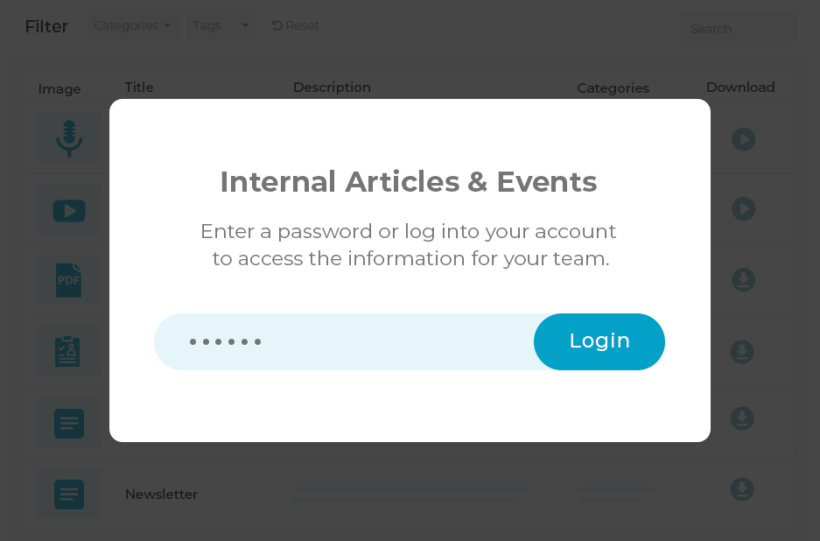
Choose this option if you want to restrict access to any or all of your post table categories.
$148$148$
99
Save$49
Dynamic tables List posts, pages, custom post types, custom fields, taxonomies, and more
Search, sort and filters Visitors can find what they're looking for quickly and easily
Restrict access Control who can access each category and taxonomy on your site - add simple password protection, or restrict based on user or role
One Plugin
Posts Table Pro Plugin
If you just want to create tables without access restrictions, then choose this option.
$
69
Dynamic tables List posts, pages, custom post types, custom fields, taxonomies, and more
Search, sort and filters Visitors can find what they're looking for quickly and easily
Restrict access Control who can access each category and taxonomy on your site - add simple password protection, or restrict based on user or role
All plans include free setup, updates and support. You can upgrade at any time and just pay the difference. If your annual license expires, the plugin will continue working on your site but you must renew to change settings or receive updates, new features or support.
REAL WEBSITES, REAL RESULTS
Take a peek at real websites using Posts Table Pro and see the difference it can make.
Raise Jobs
A fully searchable WordPress jobs board which lists custom post types in a table.
List any type of WordPress content in a searchable table
Select and customize a range of pre-built table designs
Style the WordPress tables to suit your brand
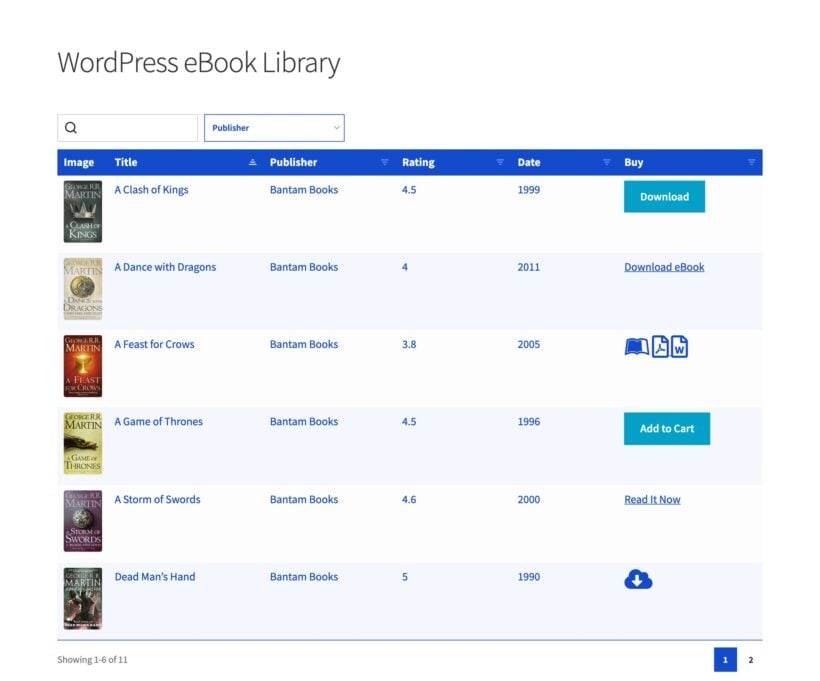
List resources in a flexible table with customizable columns
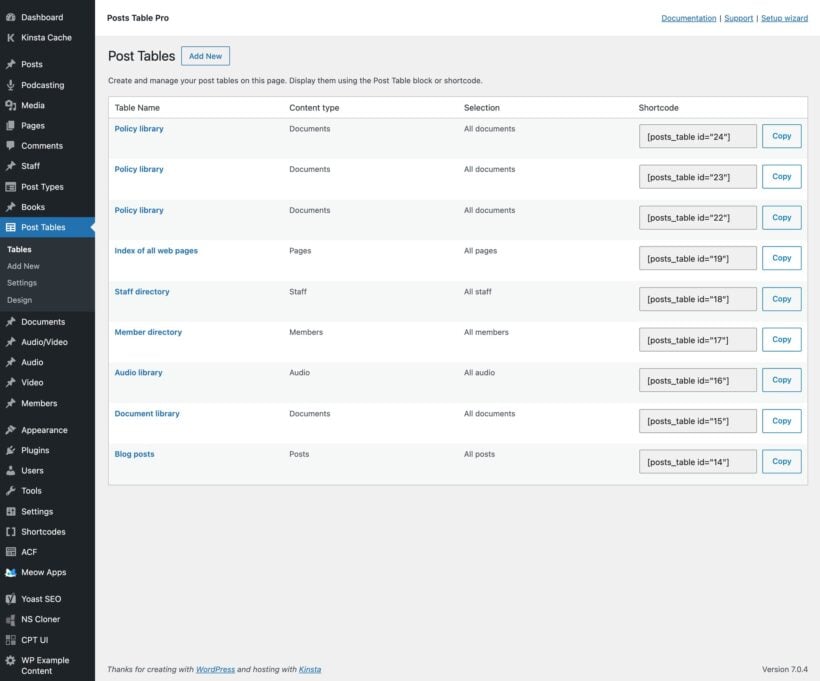
View, edit and manage all your tables from a central page
Easily create tables with the quick table builder
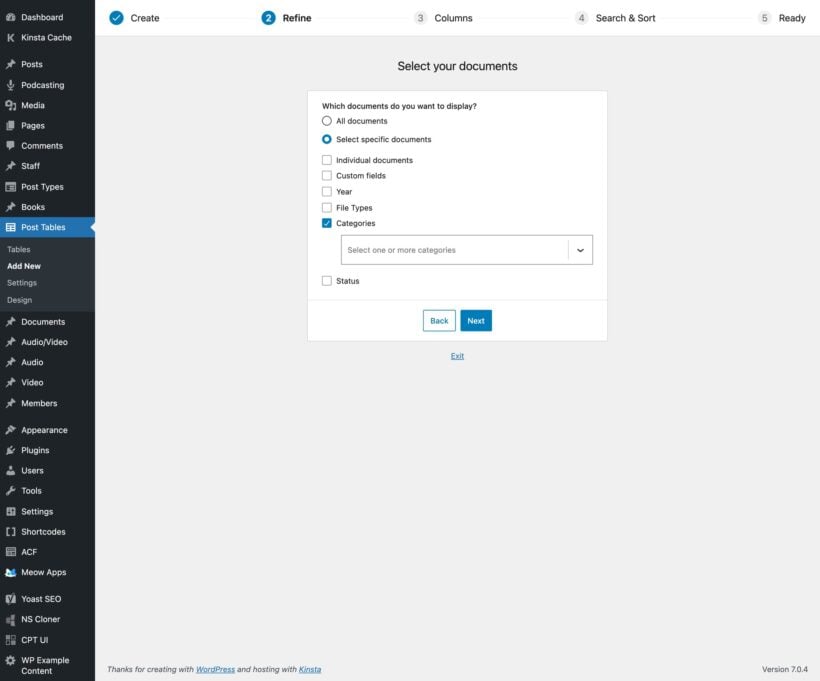
Easily choose which posts to display in the table
Add table columns using a simple drag-and-drop interface
Set up table filters and sorting in one wizard step
Follow the clear instructions to add a table to any page
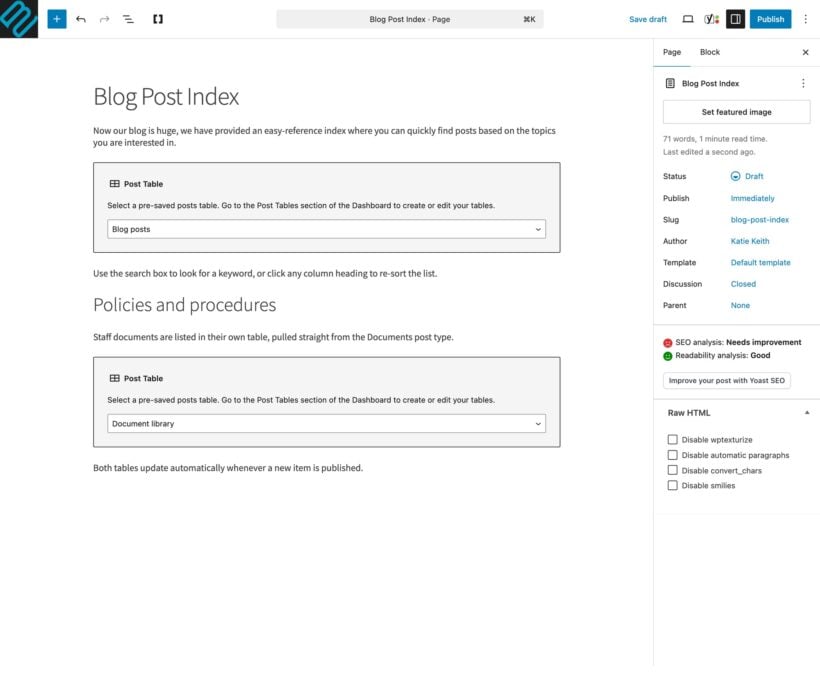
Use the Gutenberg block to add tables to any page or post
Access more options on the Edit Table screen
Set global defaults for your tables on the settings page
Control search, filters and pagination for your tables
Adjust table behavior, URLs and performance settings
Use the styling options to customize the table design
List custom post types such as members or directory listings
Build an audio or video library with embedded media players
Add a Posts Table search box anywhere on your site
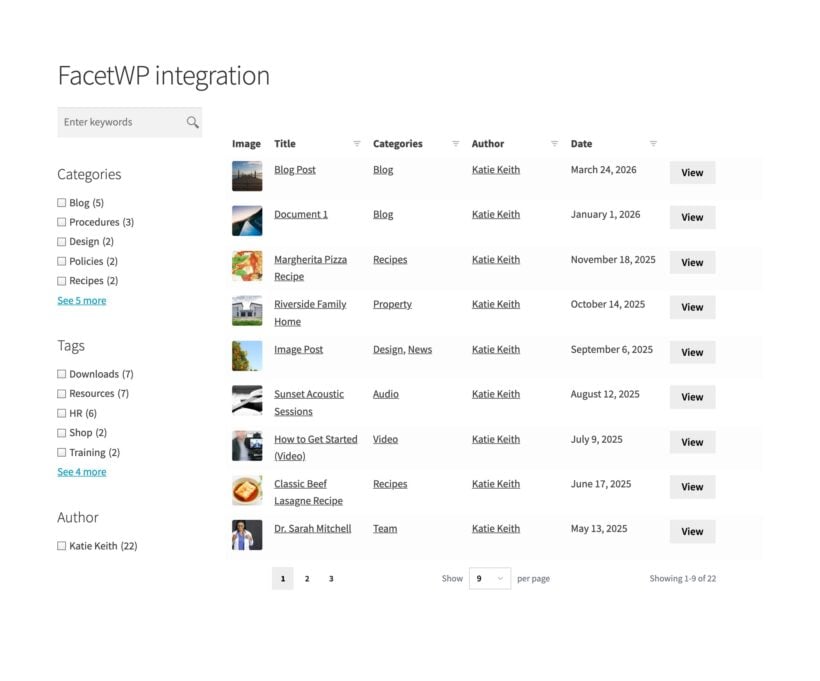
Use it with FacetWP to add checkbox filters and widgets
List items from plugins such as Easy Digital Downloads
Insert tables into page builder plugins to create fancy layouts
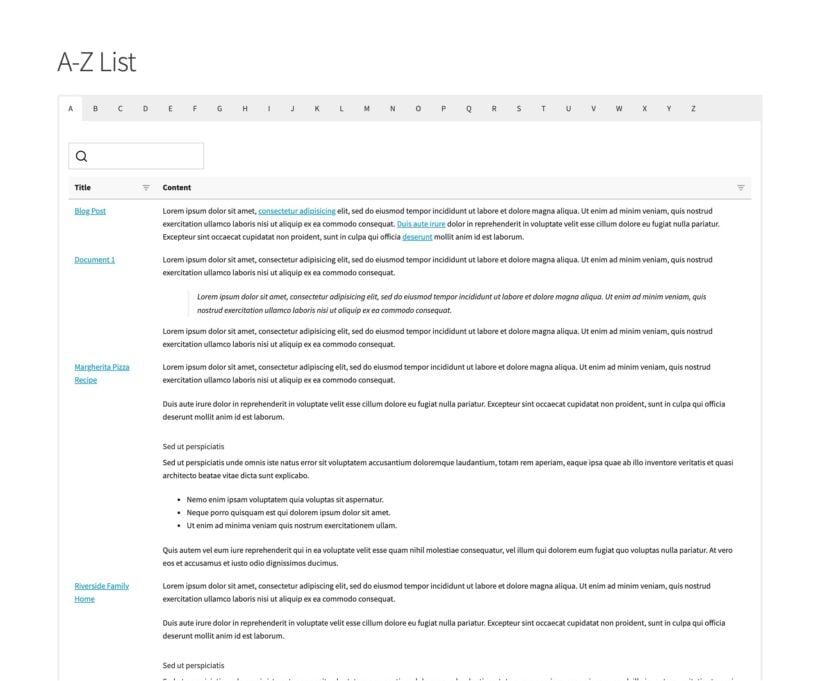
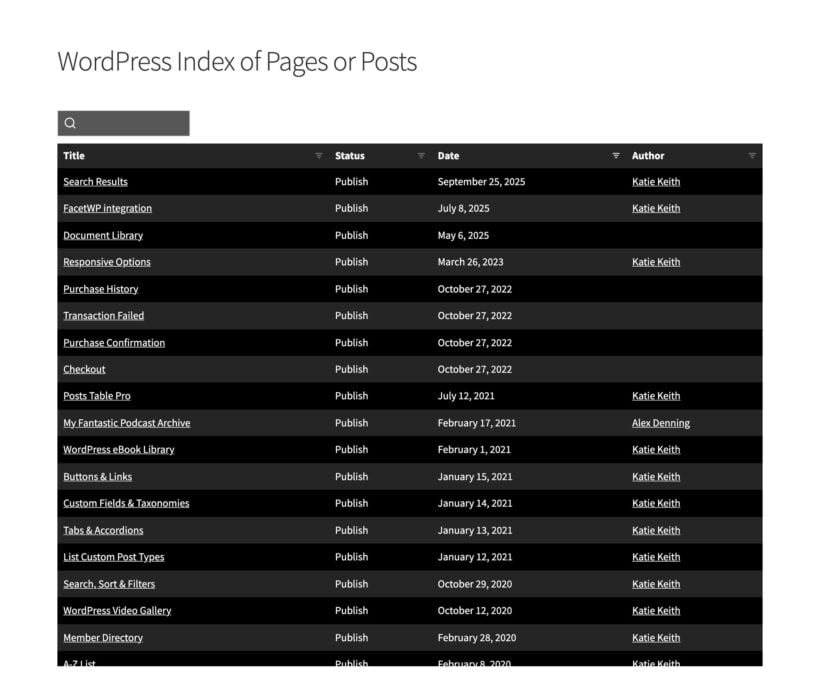
Improve your site's navigation with an index of pages or posts
FAQ
We're happy to help with any questions you have
How does the WordPress table plugin work?
Posts Table Pro is a WordPress table plugin. To create dynamic WordPress tables, use the user-friendly table builder to create a table and then embed it anywhere using the Posts Table block or shortcode.
Is it suitable for my use case?
Posts Table Pro is an incredibly flexible plugin and people use it in many different ways. This can make it difficult to work out if it's suitable for your specific use case. Don't worry, we're here to help!
Here are our suggestions in case you're wondering whether Posts Table Pro will work for your specific use case:
View the different types of content displayed on the demo site. There are lots of examples, including blog post indexes, member directories, audio and video galleries, directories, and more.
Browse the Posts Table Pro blog. We've published tutorials about how to use it for a wide range of use cases.
If you're still unsure, the best way forward is to test the plugin out on your own site. We offer a full 30-day money back guarantee so you can get a refund if it doesn't work in the way you are hoping.
We're also happy to provide personalized advice - just get in touch via the Support Center with details of what sort of information you'd like to display in a searchable table.
How can visitors search, sort and filter the table?
Every table can have an instant keyword search box, sortable columns and filter dropdowns.
Visitors can sort by more than one column at a time. Each filter dropdown allows multiple selections, has its own search box, and shows how many results each option has. You can put the filters above the table or inside the column headings, and an active filters area shows visitors what they've selected.
Switch on unique URLs and the address bar updates as visitors search, filter, sort and page through the table, so they can bookmark or share any view.
Does the WordPress table plugin create custom post types, pages, taxonomies etc.?
Content creation and content display are separate functions. Posts Table Pro displays content already stored in the WordPress database - it doesn't create the content for you. If you want to display content such as custom post types, custom fields or taxonomies, you will need to set them up beforehand and then display them using Posts Table Pro.
To make this simple for you, we've created a free plugin called Easy Post Types and Fields. This makes it really easy to create custom post types. You can also use the free plugin to add custom fields and taxonomies to any existing post type. Just create the post type and/or fields, add some posts to your website, and then display them using Posts Table Pro.
Does it work with ecommerce plugins?
Yes, you can use the WordPress table plugin to display products or other data from ecommerce plugins such as WooCommerce and Easy Digital Downloads. If you use WooCommerce then we recommend using our dedicated WooCommerce Product Table plugin instead, as it comes with extra features such as add to cart buttons.
Which columns can I include in my table?
Table columns are data fields that organize your content vertically. You can choose from any of the following: id, title, image, content, button, excerpt, published date, last modified date, author, tags, categories, status, custom taxonomies, and any custom field. Your columns can contain extra formatting and multimedia content such as embedded audio or video. If you like, then you can merge multiple columns into a single 'combined column' in the table.
Can I choose which posts are displayed in the table?
Yes, you can either list all your posts, pages or custom posts; or display items with a specific category, tag, custom taxonomy term, custom field value, date, author, and more.
Does it work with Users?
No, because Users are not a post type in WordPress. If you want to display people in your data tables (e.g. for a staff directory) then you can create a post type (e.g. 'Staff') and add the data there instead.
Can I customize the table column headings?
Yes! Our WordPress table plugin lets you change the heading for each column. It's also possible to make the table header row sticky, or hide it completely.
Can I try it for free?
There's a free version of our WordPress table plugin which you can download free from wordpress.org - Posts Table with Search & Sort. This displays standard WordPress posts in a HTML table. If you need to display other content such as custom posts, taxonomies or pages then you will need Posts Table Pro.
Will it work with my theme and other plugins?
Posts Table Pro works with any well-coded WordPress theme and a wide range of other plugins. The tables use your theme's fonts, font sizes and colors, so they fit into your site. You can style them without hiring a developer, writing code, or editing theme template files.
You can choose from the built-in design templates and use the customization options to personalize the tables. The theme compatibility guide for Barn2's plugins lists the themes we test with, and our support team will help with any styling or compatibility issues.
Which languages are supported?
Our WordPress table plugin comes with built-in translations for English, German, French, Spanish, Portuguese, Italian, Dutch, Polish, Swedish, and Norwegian. Please get in touch if you're interested in contributing a new translation.
You can also use Posts Table Pro with most multilingual plugins including WeGlot , TranslatePress and WPML. This makes it easy to translate your WordPress tables into multiple languages.
What are the minimum requirements for running the plugin?
The table plugin is fully tested with the latest version of WordPress. We always recommend running the most up-to-date version of WordPress, but we also support older installations:
WordPress 6.1 or greater (tested to 7.0.4)
PHP 7.4 or greater (tested to 8.5)
MySQL 5.7.8 or greater / MariaDB 10.3 or greater
What offers are available for Posts Table Pro?
Several offers are available if you are a nonprofit or wish to buy multiple plugins:
Charity discount - Registered nonprofits get 15% discount off.
2-plugin bundle - Get Posts Table Pro together with Password Protected Categories at a reduced fixed price. Select the bundle in the pricing table above.
Multi-buy discount - Add any two or more Barn2 plugins to your cart and get 40% off automatically at checkout. The most expensive plugin stays at full price, and every other plugin is reduced by 40%. No coupon needed.
All Access Pass - For the best possible value, get our All Access Pass which gives you VIP access to our entire plugin suite including Posts Table Pro.
We had a very positive experience with the Posts Table Pro team.
Throughout our communication, they were highly professional, patient, and attentive to every detail we raised. Rather than simply providing general answers, they took the time to carefully understand our questions, investigate the issues, and follow up on the specific details that mattered to us.
What impressed us most was their willingness to listen to feedback and continuously improve the product. The improvements they ultimately implemented addressed our concerns extremely well and delivered an excellent result.
We truly appreciate their professionalism, patience, attention to detail, and commitment to improving the product. It has been a very satisfying experience working with such a responsible and responsive team.
Highly recommended.
Keye Chen
Excellent Support!
Rated 5 stars
By Keye Chen on
Hello,
First of all, please accept my apologies for taking so long to get back to you.
I would also like to sincerely thank you and your team for all the support you have provided throughout this process. Your professionalism, patience, and careful attention to the details of our questions have left a very positive impression on us.
We especially appreciate the time you took to understand our concerns, investigate the details, and ultimately implement improvements that addressed our needs extremely well.
Your dedication and professionalism made it very easy for me to leave a genuine and highly positive review. The review reflects our real experience and our sincere appreciation for the support and improvements your team has provided.
Thank you again for your patience and excellent support. It has been a pleasure working with your team.
Best regards,
Keye Chen
Cory Lewis
Exactly what I need with Fantastic Support
Rated 5 stars
By Cory Lewis on
Using Posts Table Pro has made the Archives page of my Blog site so much cleaner and easier to read. Not to mention all the added functionality of my readers being able to sort, search, and filter the posts. I love that there are so many ways to customize it. I've barely scratched the surface. Carl from support was fantastic when I had one issue and he gave suggestions to try which helped point me to the root cause being a firewall issue on my hosting provider's side - which I was able to resolve with them.
Hartmut
Works perfectly, great Support
Rated 5 stars
By Hartmut on
Web pages can be easily sorted and filtered according to various criteria. Fast page loading. I was very impressed with the support!
Mike
Quick, Easy & To the Point!
Rated 5 stars
By Mike on
Posts Table Pro has been an effective way for me to get started quickly with adding parts, products or services to my website and be able to sort and filter how I want. Very customizable. Have used it on multiple websites and will continue where the need fits.
Heather
Easy to Use & Great Support
Rated 5 stars
By Heather on
Barn2 plugins are my go-to. Post Table Pro is easy to set up and use. Work great and best support there is. Highly recommend.
Harsh S
Great plugin
Rated 5 stars
By Harsh S on
I'm very happy with this plugin because I can build archive pages with it on all my sites quickly.
The support is fast and responsive. I am impressed.
David Haldeman
Works as advertised and great support
Rated 5 stars
By David Haldeman on
We have used Posts Table Pro for the last few years, and find it meets our needs to search and display posts. Recently we had an issue with moving the site, and the support group gave us immediate attention and solved the problem. Highly recommended.
Nicola Squaranti
Ottimi plugin e assistenza al TOP
Rated 5 stars
By Nicola Squaranti on
Plugin ottimi, documentazione accurata e assistenza al top. Complimenti.
Anonymous
Great plugin and amazing support
Rated 5 stars
By Anonymous on
I purchased this plugin for one of our latest projects. It is unquestionably the best plugin on the market for its intended purpose. It's flexible, user-friendly, and easy to set up and customize. Furthermore, their customer support is exceptionally fast and efficient. Highly recommended!
























Very positive experience with the Support team
By Shao Hung chen on
We had a very positive experience with the Posts Table Pro team.
Throughout our communication, they were highly professional, patient, and attentive to every detail we raised. Rather than simply providing general answers, they took the time to carefully understand our questions, investigate the issues, and follow up on the specific details that mattered to us.
What impressed us most was their willingness to listen to feedback and continuously improve the product. The improvements they ultimately implemented addressed our concerns extremely well and delivered an excellent result.
We truly appreciate their professionalism, patience, attention to detail, and commitment to improving the product. It has been a very satisfying experience working with such a responsible and responsive team.
Highly recommended.