








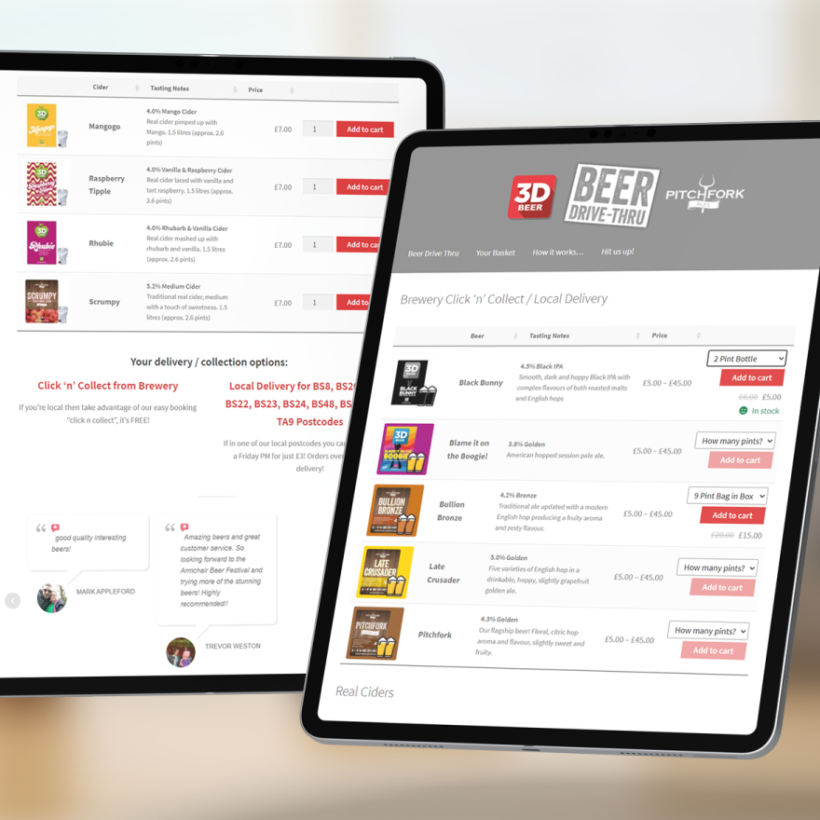
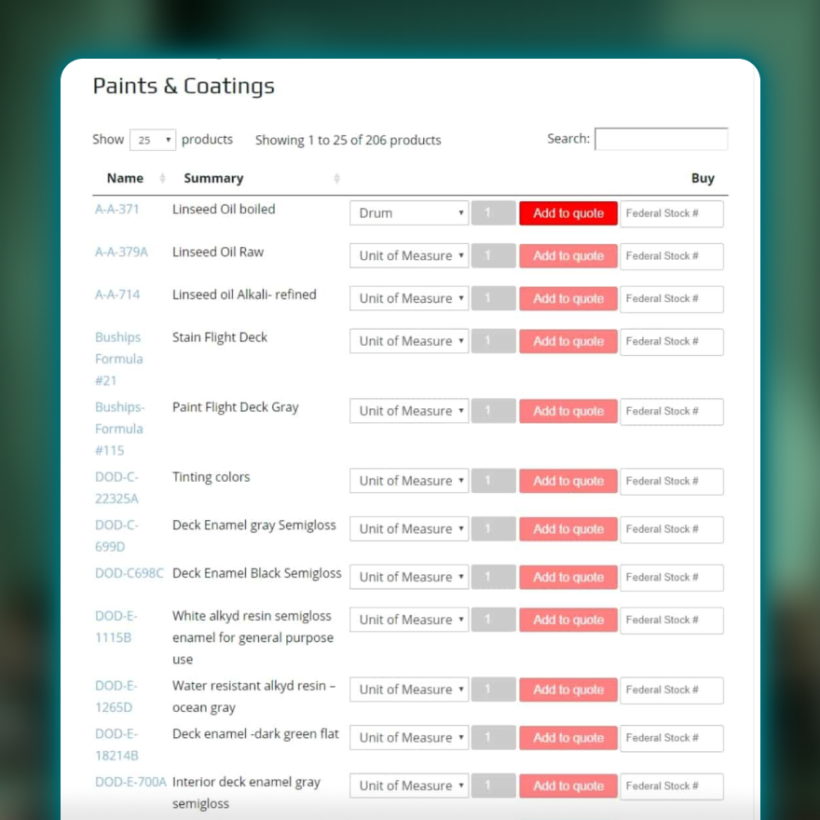
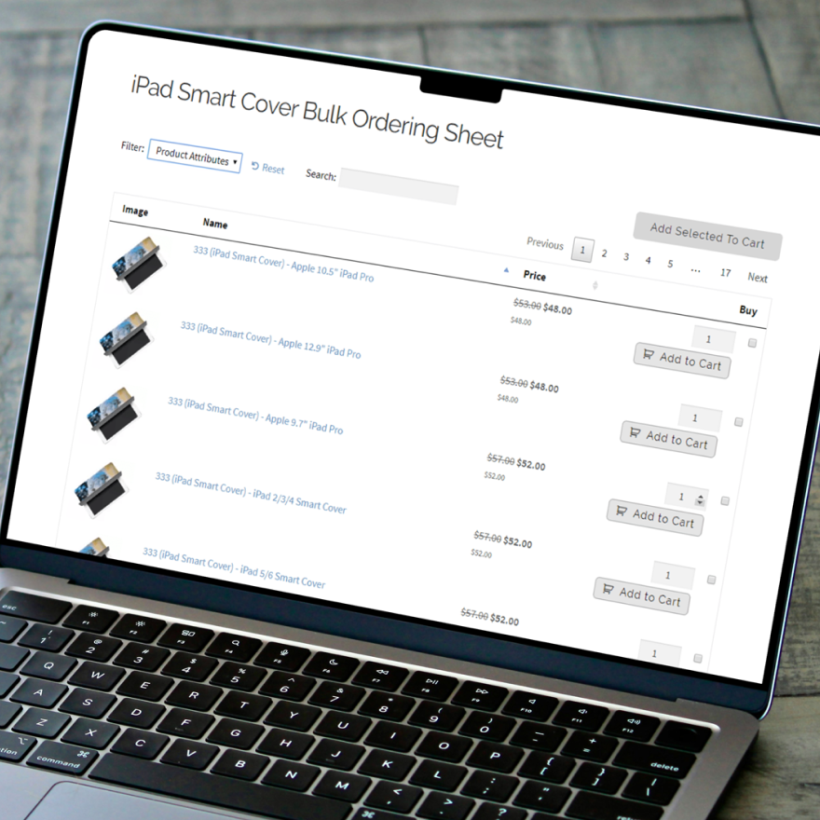
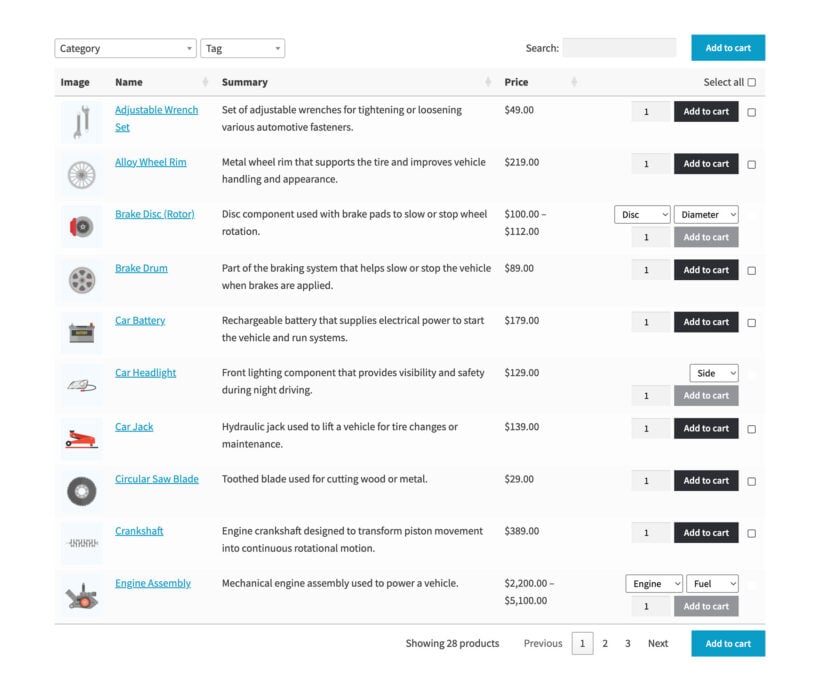




Create powerful WooCommerce product listings and flexible order forms with our bestselling Product Table plugin. Faster shopping = more sales. Trusted by 20,000+ site owners.
Create awesome WooCommerce product tables in seconds
Fast One-Page Ordering
Order multiple products and variations with one click
Quickly find products with instant search and sort
Ideal for WooCommerce wholesale, order forms and restaurants
Create Tables Your Way
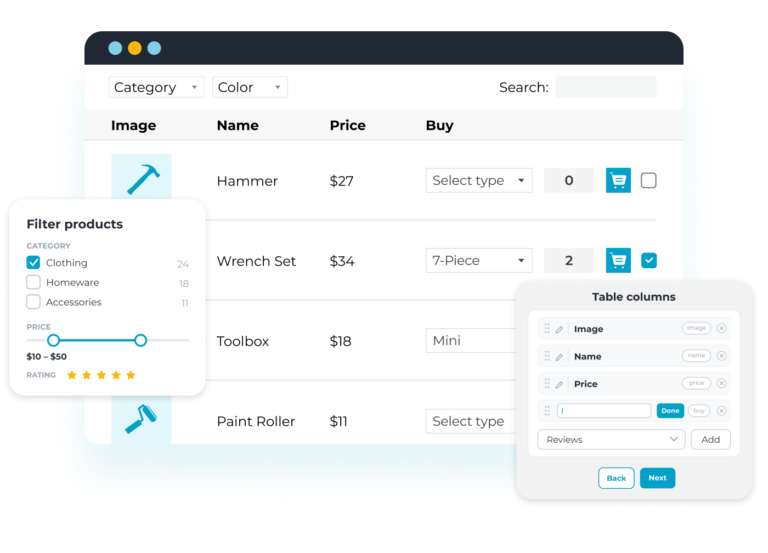
Create flexible tables with the easy table builder, then display them on shop pages or anywhere else on your site
List hundreds or even thousands of products!
Show any data you want: specific products, custom fields, attributes, taxonomies, SKU, videos & more
Easy to Set up & Customize
Simple and intuitive interface
Incredibly easy to customize
Pre-built templates and flexible design options
Perfect for developers or store owners with no coding skills
What is WooCommerce Product Table?
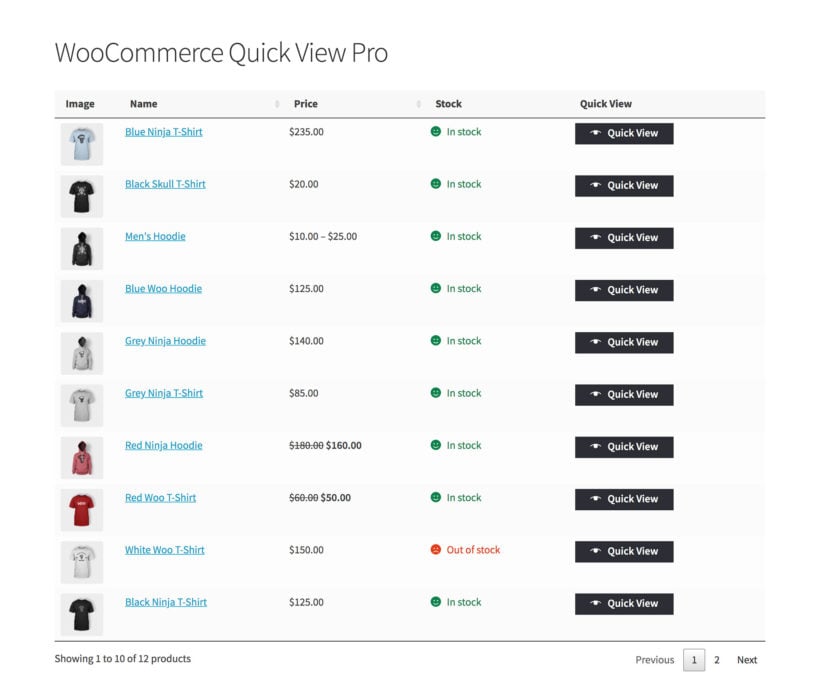
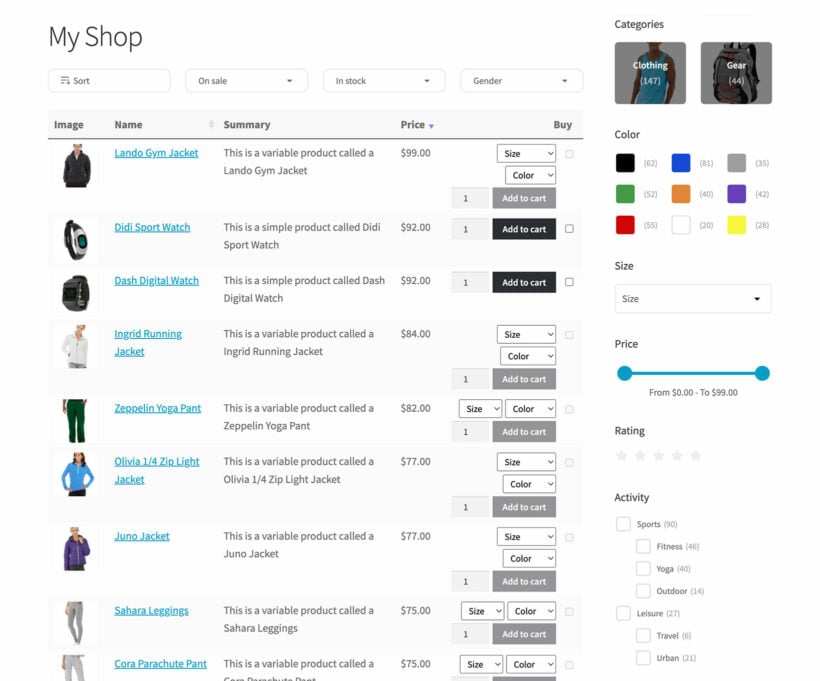
WooCommerce Product Table is a WordPress plugin by Barn2 that lists your store's products in a searchable, sortable table or one-page order form. Each table can show any product data, including images, prices, SKUs, variations, custom fields, and add to cart buttons, and customers can order multiple products without leaving the page. It handles thousands of products with lazy loading, and you can add tables to shop pages, category pages, or any other page using a block or shortcode.
THE #1 PRODUCT TABLE PLUGIN
Over two hundred 5 star reviews!
I have been using WooCommerce Product Table for a long time and must say that it is an amazing and easy to use plugin. The support is amazing, quick and caring.
Siman-tov - IsraelMasters Gate
I needed a fast order form for our wholesale chocolate shop. WooCommerce Product Table has so many options. Our customers like ordering with it.
The WooCommerce Product Table plugin comes with over 50 features, and we’re constantly adding new ones in response to our customers’ feedback. Combine them in 100’s of different ways to create unique tables listing your store’s products.
Click through our full list of features below!
Easy WooCommerce table builder
Our user-friendly table builder lets you create product tables with ease. Simply follow the step-by-step wizard to quickly create tables to your exact specifications 🪄
Add product tables anywhere on your site
Once you've created a WooCommerce table, either select which shop page templates it will appear on, or insert it manually using a Gutenberg block or shortcode.
Create multiple product tables
Build an unlimited number of product listing tables, each with different products and settings.
Add product tables to shop & category pages
Optionally enable the product table layout on the main shop page, category pages, or other WooCommerce template pages.
7 pre-built table templates
It's easy to tailor the design of your WooCommerce product tables to match your brand. To save time, choose from 7 eye-catching templates - default, minimal, dark, neutral, rounded, delicate and nature.
Infinitely customizable design
Once you've chosen a template, use the easy design options to tweak its look and feel until you're completely happy. You can change the product table's colors, sizes, borders, backgrounds, and more.
Customizable product table columns
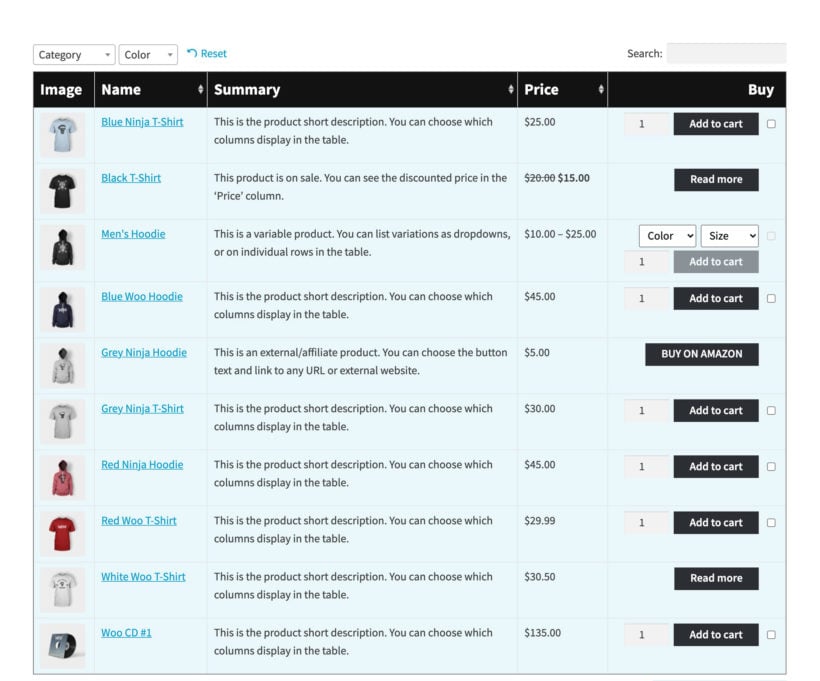
Display essential product data: SKU, name, price, stock, images, date, categories, tags, image, reviews, stock, weight, dimensions, author, price, add-to-cart, product page link. Add custom fields, attributes, or taxonomies for detailed product tables tailored to your needs.
Customizable column headings
Change the product table column headings to anything you like, or remove them completely. You can also change the column widths and how they behave on different screen sizes and mobile devices.
Merge table columns
WooCommerce Product Table also has a 'Combined columns' option which allows you to merge multiple columns into a single cell. For example, you might want to display the product description underneath the name.
Quantity selector
Show or hide the quantity picker so that customers can select quantities directly in the WooCommerce product table.
3 types of add to cart button
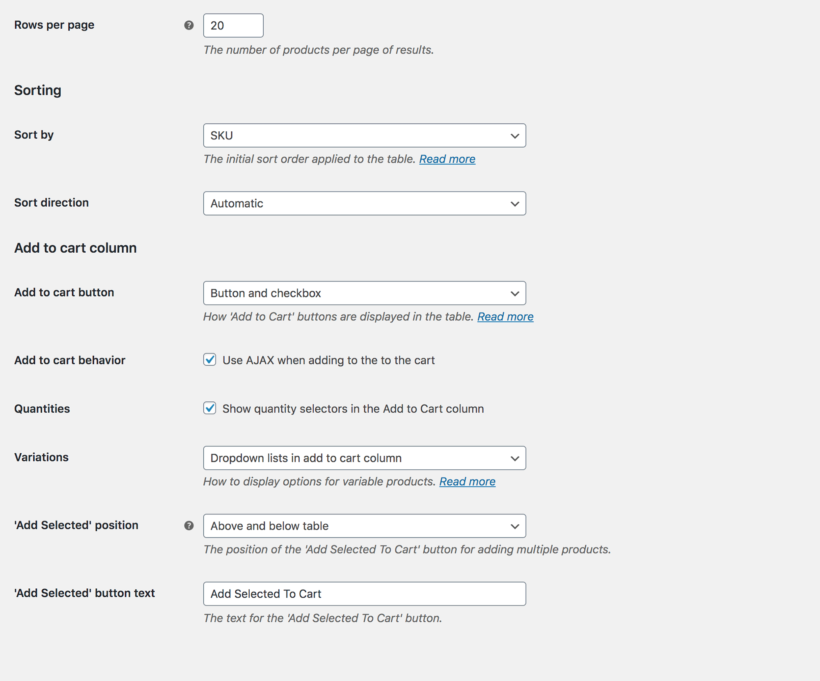
Choose whether the add to cart column includes a standard add to cart button, multi-select checkboxes, or both button and checkbox.
Change the ‘Add Selected to Cart’ button location
Position the button above or below the product table, or both.
Customizable add to cart button
Customize the wording of the add to cart buttons in table. For example, you might change this to 'Add to Basket' or 'Buy'.
Change the button wording
If you’ve included a button column linking to the single product page, then you can rename this to anything you like.
AJAX cart option
Control whether or not the page reloads when customers add WooCommerce products to the cart from the table.
3 ways to list variable products
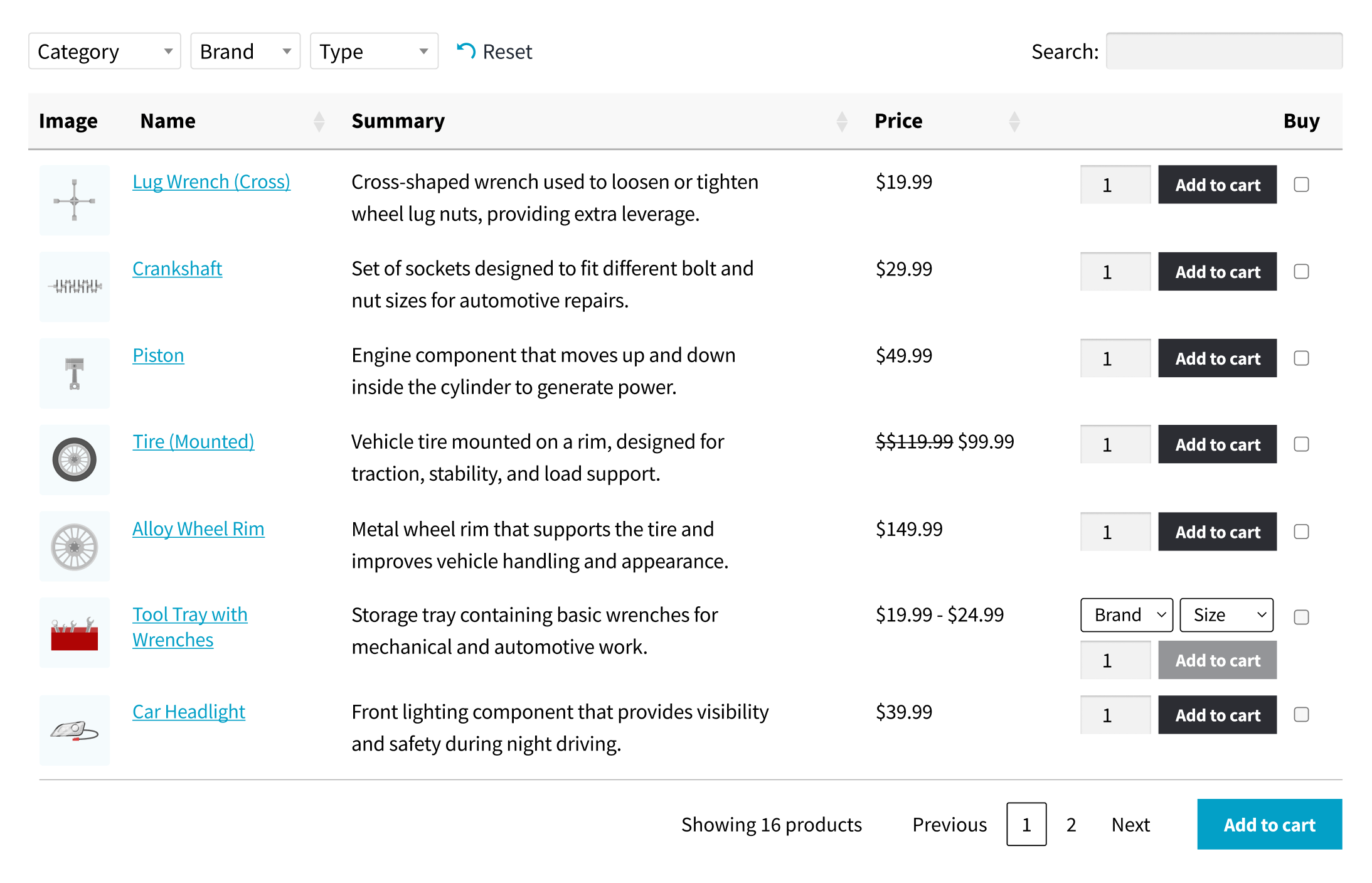
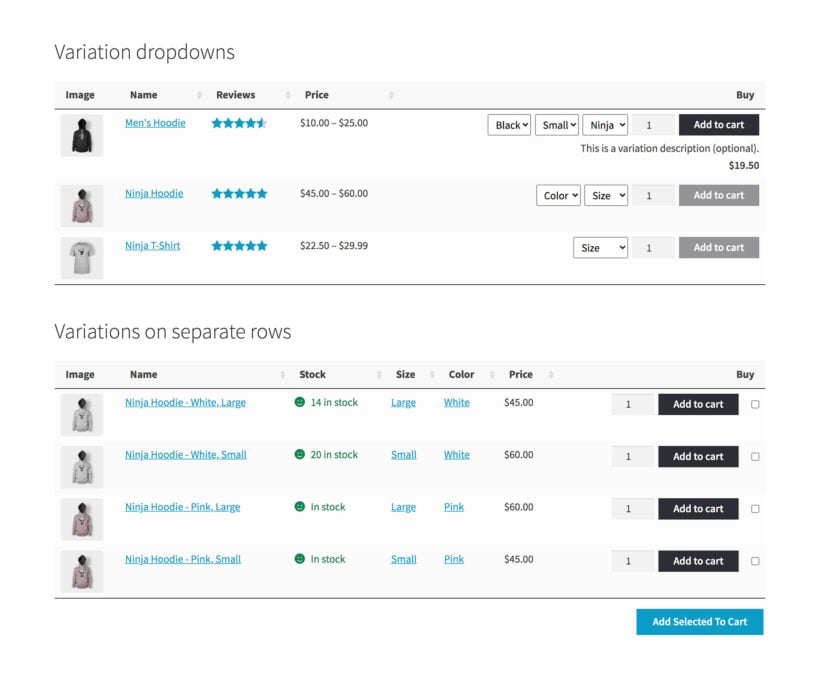
Choose whether to include variation dropdowns in the add to cart column; list each variation on its own row of the table; or add a ‘Read more’ button linking to the single product page where customers can choose their variations. (See them all in action here.)
Integrates with the official WooCommerce Add-Ons plugin
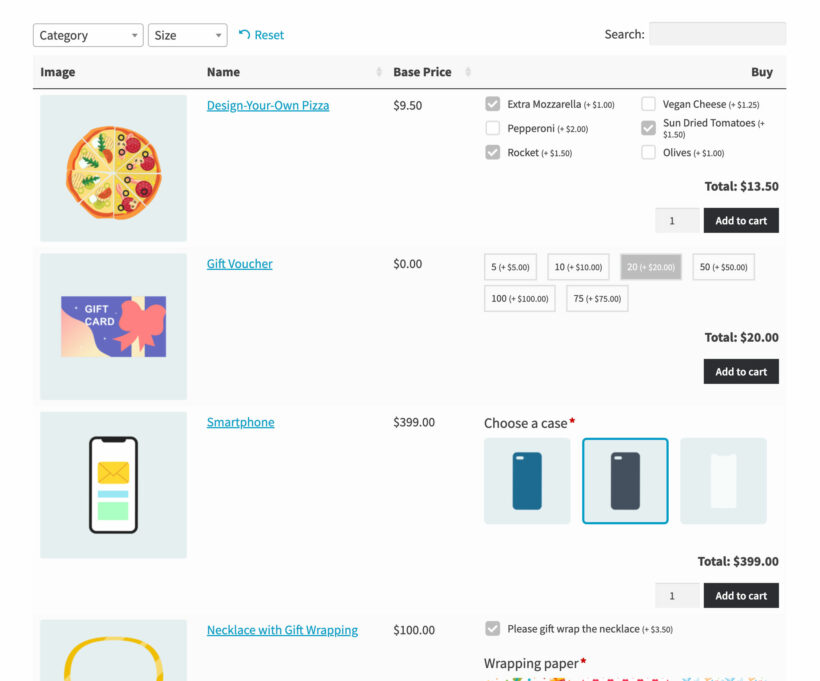
Use the Product Table plugin with WooCommerce Product Options to add other types of option to the table. This includes text entry fields, checkboxes, file upload fields, radio buttons, date pickers, and more.
List specific products in the table
Create WooCommerce product listings displaying specific products based on category, tag, status, date (based on day, week, and/or month), custom taxonomy term, or custom field value.
Include or exclude specific products
Include or exclude specific products from the table based on their ID.
Exclude entire categories
Exclude entire categories from the WooCommerce product table.
List previously ordered products
List products previously ordered by the current user, for example in a list of 'My Favorites' or on the WooCommerce Account page.
Column widths
Override the default sizing and control the width of each product table column.
Rows per page
Control the number of products shown on each page of the table.
Product limit
Set a maximum number of products that can appear in the WooCommerce table.
Set the date format
Choose the format for any date columns.
Specify date columns
If you’re using extra columns such as custom fields to display dates, use this option to ensure that it is sorted correctly in date order. Useful for displaying events in the WooCommerce product listing.
Multiple sort options
Control how products are ordered when the table first loads, and the sort direction.
Clickable column headings
Customers can click on column headings to sort the product table by any data they choose.
Flexible sorting
Either sort the WooCommerce table alphabetically, in date order, or numerically if you're displaying number data.
Keyword search
Display an instant AJAX-powered search box above the WooCommerce table, or as a standalone search box elsewhere on your WordPress site.
Pre-search the product table
Filter products based on a specific search term when the table first loads.
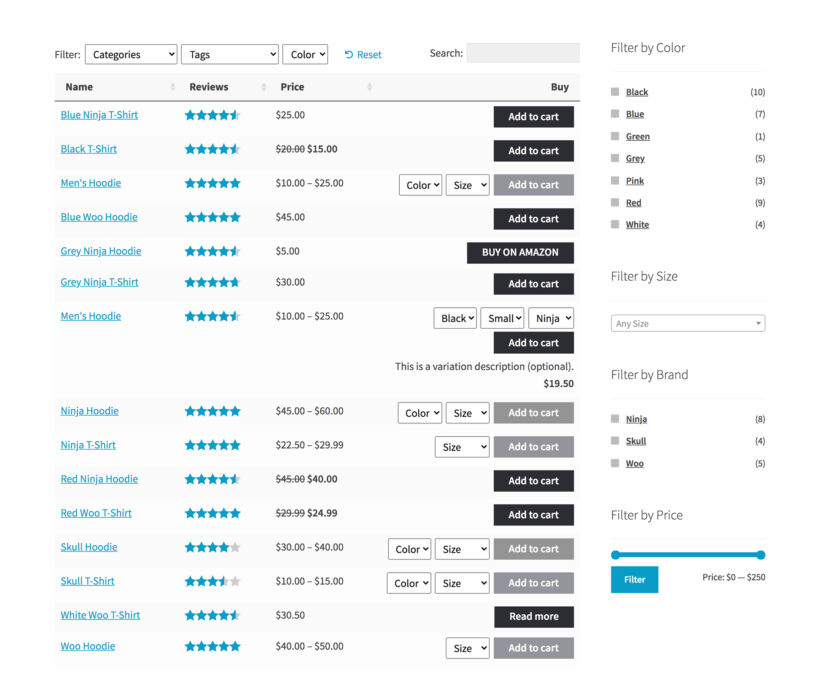
Product filter dropdowns
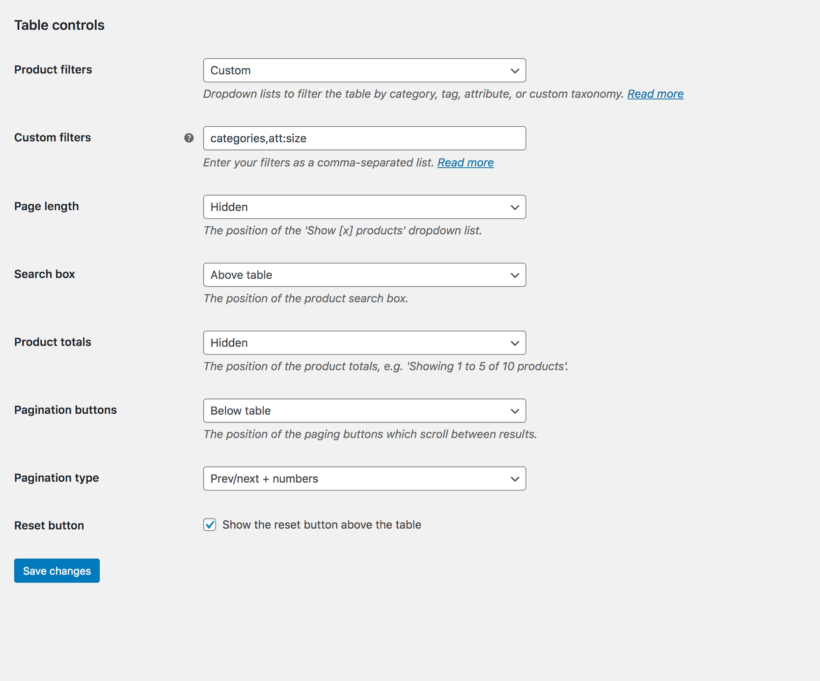
Add multiple filter dropdown lists above the table. Add filters for categories, tags, or any attribute or custom taxonomy.
Filter widgets
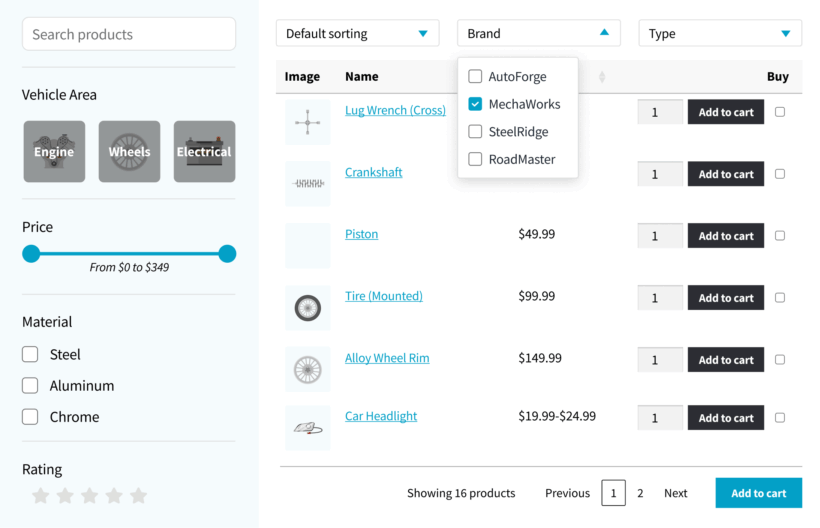
WooCommerce Product Table supports all the core WooCommerce filter widgets. This includes an active filters widget, attribute, price slider, and rating widgets.
Choose whether clicking on a category, tag or custom taxonomy in the table will perform a filter or load the relevant archive page.
Show, hide or position table elements
Control the position and visibility of the search box, reset button, page length dropdown, product totals, and pagination buttons.
4 types of pagination buttons
Choose from 4 different styles to let customers navigate between pages of the WooCommerce product table.
Customizable ‘no products’ messages
Change the text that appears when there are no products in the table. Add different text for when the table first loads and after the customer performs a filter of the product listing.
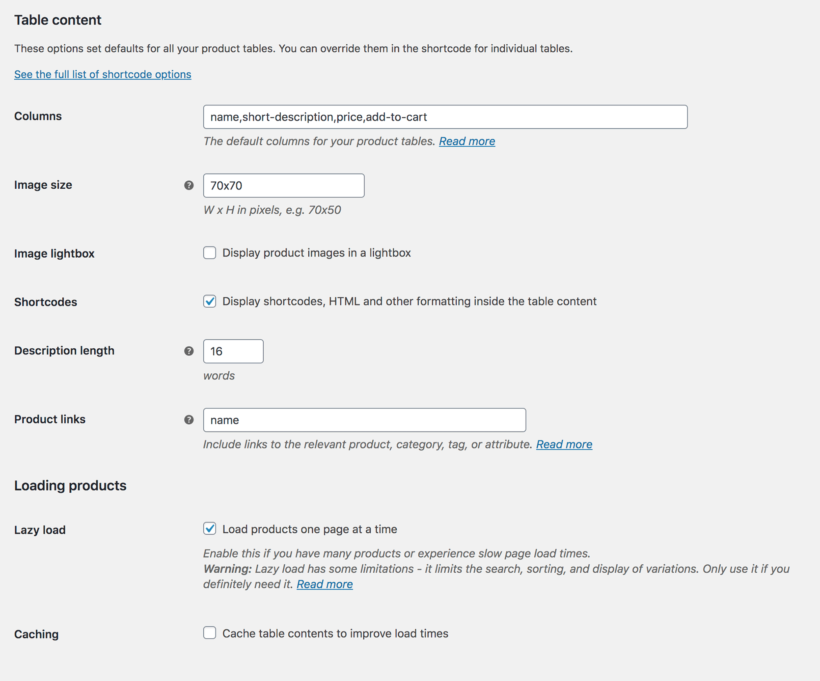
Image size
Control the size of the product images in the WooCommerce table.
Image lightbox
Choose whether customers can click on an image to view a bigger version in a lightbox. Alternatively, disable the link or link to the WooCommerce single product page.
Audio & video
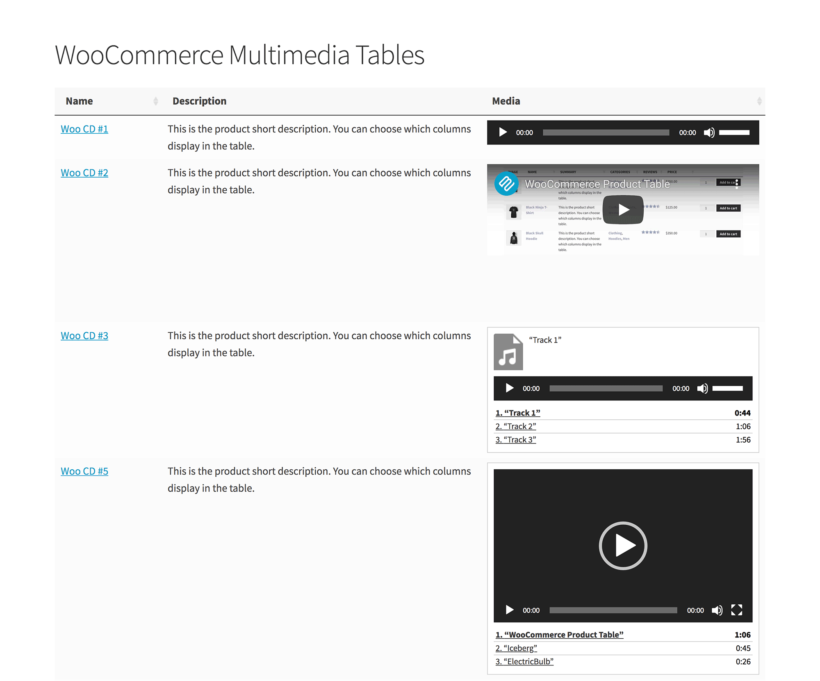
WooCommerce Product Table supports embedded audio files, video, and media playlists. Customers can watch or listen to multimedia content directly in the product table.
Description length
Set the length of the product description in the WooCommerce product listing.
Shortcodes & HTML formatting
Choose whether or not the product table will display content generated by other shortcodes, such as buttons, hyperlinks or embedded audio and video players.
Links in the WooCommerce product table
Specify which columns are clickable to the single product page, or disable all links.
100% responsive product tables
The WooCommerce product listing is fully responsive and will automatically adapt to fit different screen sizes.
Priorities option
Control which product table columns to hide when there are too many to fit on the page.
Responsive visibility
Use fine-grained control over which table columns to show or hide on different devices.
Responsive control
Control the + icon which customers click to view hidden columns of product data.
Responsive display
Choose whether to show or hide hidden columns by default, or whether to open them in a modal window.
WooCommerce Product Table is coded to load quickly and efficiency, minimizing the load on your server. It also comes with some extra performance features:
Lazy load
For particularly large tables, the lazy load option improves performance by loading the rest of the page before the product table, and loading one page of products at a time. With lazy load, there is no limit on the number of products you can list in the table. (We have customers who are using WooCommerce Product Table to list many thousands of products.)
Built-in caching
Enable the cache option to decrease the product listing load times even further.
Translations
The WooCommerce product listing plugin comes with dozens of translations built-in. It is also fully compatible with various multilingual plugins including Weglot, TranslatePress and WPML.
Sticky header
If your product tables contain lots of rows per page, then you can enable the sticky header so that customers can always see the column layouts as they scroll down.
Hide the table header
If the columns in your product tables are self-explanatory then you can keep the table clean by hiding the header row completely.
Wrap
Choose whether product table columns with multiple lines of text are truncated onto a single line, or wrapped onto multiple lines.
Footer visibility
Decide whether to include a footer row in the WooCommerce product table, repeating the column headings.
Scroll offset
If you have a sticky header, then you can change the height that the page scrolls back up to when customers navigate between pages in the WooCommerce table.
Numeric terms
This advanced option allows you to use numbers instead of words for your categories or taxonomies.
After trying multiple WooCommerce product table plugins, this one is the best. Totally worth it. Not only is the plugin great, it's well documented and the support is second to none. Such a pleasure to deal with an agency that knows what they're doing!
Philip La RosaCreative Canary - Australia
Choose Your Plan
You're covered by our no-quibble, 30 day money back guarantee
30% OFF
EVERYTHING
COUPON CODE: DONTMISS30
Black Friday Sale 2025
GO ALL ACCESS
Get the best offer on our full suite of WordPress and WooCommerce plugins.
Choose this option to add advanced filters above or alongside your product tables.
WooCommerce Product Table plugin with quick view
$158$158$
109
Save$49
WooCommerce Product Table List any or all of your products in a stylish table or order form layout
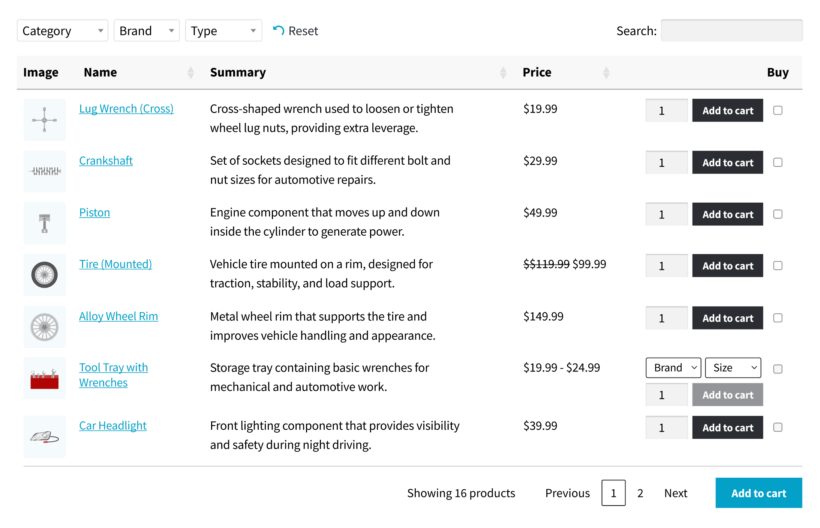
Search, sort and filter dropdowns Customers use the search box, sortable columns and filter dropdowns to find products
One-page ordering Select quantities, variations, and add to the cart directly from the product table
Advanced filters Help customers to find products more easily by displaying a wide range of visually interactive filters above your product tables or in the sidebar
One Plugin
WooCommerce Product Table Plugin
A fully featured product table plugin for WooCommerce, but without advanced filters.
WooCommerce Product Table plugin without quick view buttons
$
79
WooCommerce Product Table List any or all of your products in a stylish table or order form layout
Search, sort and filter dropdowns Customers use the search box, sortable columns and filter dropdowns to find products
One-page ordering Select quantities, variations, and add to the cart directly from the product table
Advanced filters Help customers to find products more easily by displaying a wide range of visually interactive filters above your product tables or in the sidebar
$1781$1781$
399
Save 77%
GO ALL ACCESS
Unlock all plugins for one price
19 current + future plugins
Up to 50 sites
Updates & priority support
60+ exclusive discounts
All plans include updates and support. You can upgrade at any time and just pay the difference. If your annual license expires, the plugin will continue working on your site but you must renew to change settings or receive updates, new features or support.
The WooCommerce product listing plugin lets you create as many tables as you like using the easy table builder. This takes you through all the most popular options step-by-step.
You can choose where to display each product table on your WordPress site:
Select which WooCommerce shop pages the table will appear on. (E.g. the main shop page, category archives, tag archives, product search results, and so on.)
Insert the WooCommerce product table to any other pages on your site using either a Gutenberg block or simple shortcode. With this option, you can either list all products in the table or select specific products based on ID, category, tags, date, status, type, and more.
There are over 50 options to customize your product tables. Get in touch for expert advice on getting the best out of WooCommerce Product Table.
Is WooCommerce Product Table suitable for my exact use case?
WooCommerce Product Table is an incredibly flexible plugin and people use it in many different ways. Here are our suggestions to help you figure out whether the product listings will work for your specific use case:
View the different types of content displayed on the demo site. There are lots of examples, including quick order forms, product directories, tables with embedded audio and video players, product variation tables, and more.
Create your own private WooCommerce Product Table admin demo and see how it works for your exact use case.
If you're still unsure, the best way forward is to test WooCommerce Product Table out on your own site. We offer a full 30-day money back guarantee so you can get a refund if it doesn't work in the way you are hoping.
We're also happy to provide personalized advice - just get in touch via the Support Center with details of what sort of information you'd like to display in a WooCommerce table.
Tip: WooCommerce Product Table is best at displaying multiple products and their variations at once. If you want to display a table of variations on the product page, then you might prefer our other plugin - WooCommerce Bulk Variations.
What can I display in the product table?
Your WooCommerce product listing can include any of the following columns: ID, SKU, product name, description, short description, date, last modified date, product image, reviews, stock level, product categories, product tags, product attributes, custom fields, custom taxonomies, weight, dimensions, author, price, sub-total, variations, and add to cart buttons and/or checkboxes (with or without quantity selector).
You can also choose which products to list in each WooCommerce table. There are lots of options to choose which products are included (or excluded) in the WooCommerce table. Select products by category, tag, custom field, taxonomy term, date, and more.
WooCommerce Product Table uses the product data already stored by WooCommerce itself. This means that you can add products to WooCommerce manually or import them using a CSV/XML import plugin, and they will display in the product table.
Can I customize the product table column headings?
Yes, you can change or remove the heading for any column in the WooCommerce product table.
Can I change the design of the table?
By default, the design of the product table will adapt to match your theme. For full control, you can select from a choice of 7 eye-catching pre-designed template tables. You can then use the built-in design settings to further customize your chosen template to match your exact brand.
For example, you can customize elements such as the product table colors, dividers, borders, background colors, and much more.
Will WooCommerce Product Table work if I have thousands of products?
Yes. If you have a large number of products then you can use the lazy load option. This loads the products one page of the table at a time, preventing any performance issues - regardless of how many products you have.
The WooCommerce Product Table plugin also has a built-in caching option. This speeds up the table even further.
Can I create a product table of variations?
There are 3 ways to create a WooCommerce variations product table:
List each product on its own row of the table with variation dropdowns in the 'Buy' column.
Display each variation on a separate row of the table with its own quantity picker and add to cart button.
Display a 'Select options' button so that customers must select variations on the single product page.
WooCommerce Product Table is designed to display multiple products (and their variations) at once. If you want to display the variations for one product at a time then you might prefer our other plugin - WooCommerce Bulk Variations. This adds a variations grid to the product page.
What are the options to search, sort and filter the product table?
WooCommerce Product Table is designed for listing large numbers of products in a table or order form. This makes it essential for customers to be able to find products quickly and easily. As a result, there are lots of ways to search, sort and filter the list of products:
Click on any column heading to sort the products in either direction. (You can set each column to sort alphabetically, by date, or numerically.)
Use the instant AJAX-powered search box above the table.
Display filter dropdowns above the table.
Add filter widgets to the page sidebar.
All of these elements are optional and you can disable them as required - for example, in smaller WooCommerce product tables.
For more advanced filtering, we have designed WooCommerce Product Table to work alongside our other plugin - WooCommerce Product Filters. This lets you add an even wider range of filter styles, such as clickable images, price sliders, tag clouds, and more. It also provides advanced filtering options, such as the ability to hide the filters on certain screen sizes and devices.
Can I create a product listing of items that the customer has previously ordered?
Most of people use WooCommerce Product Table to display the same products to all customers. However, it can do much more than that!
The product listing plugin also has a shortcode option which allows you to list products which have been previously ordered by the current user. Each logged in customer will see a product table containing only products that they have previously ordered. It's an excellent way to list their favorite items for quick re-ordering, either in their Account or elsewhere on your WordPress site.
Does WooCommerce Product Table work with wholesale plugins?
If you're building a wholesale area then we recommend using WooCommerce Product Table with WooCommerce Wholesale Pro, our purpose-built B2B solution. Product tables provide a quick order form layout which is perfect for wholesale buyers, who need a quick way to add products to the cart in bulk.
WooCommerce Product Table is available at a special bundled price when you buy it together with WooCommerce Wholesale Pro. To get the deal, choose the 2-plugin bundle on the WooCommerce Wholesale Pro page.
You can also use it with most other wholesale plugins, such as Wholesale Suite's pricing plugin.
Will the product tables work with my theme and other plugins?
By default, the product tables inherit styling from your theme such as the font size and color. There are built-in design templates for you to choose from, plus customization options which you can use to personalize the tables to your heart's content. If you notice any styling or compatibility issues, our support team will be happy to help.
Does WooCommerce Product Table work in my language?
The WooCommerce Product Table plugin currently comes with translations for English, French, Spanish, Portuguese, German, Italian, Dutch, Greek, Polish, Swedish, Norwegian, Finnish and Hebrew.
You can use it with most multilingual plugins including WeGlot, TranslatePress and WPML. They make it easy to translate your product tables into any language.
WooCommerce Product Table also supports right-to-left (RTL) languages.
What are the minimum requirements for running WooCommerce Product Table?
WooCommerce Product Table is fully tested with the latest versions of WordPress and WooCommerce. We always recommend running the most up-to-date version, but we also support older installations:
WooCommerce 7.2 or greater (tested to 10.8.1)
WordPress 6.1 or greater (tested to 7.0)
PHP 7.4 or greater (tested to 8.5)
MySQL 5.7.8 or greater / MariaDB 10.3 or greater
Can I have a discount?
We offer the following discounts to help with the cost of WooCommerce Product Table:
2-plugin bundle - Get WooCommerce Product Table together with WooCommerce Product Filters at a reduced fixed price. Select the bundle in the pricing table above.
Multi-buy discount - Add any two or more Barn2 plugins to your cart and get 40% off automatically at checkout. The most expensive plugin stays at full price, and every other plugin is reduced by 40%. No coupon needed.
All Access Pass - For the best possible value, get our All Access Pass which gives you VIP access to our entire plugin suite including WooCommerce Product Table.
Charity discount - Registered nonprofits get 15% discount off.
The Product Table plugin is easy to set up, works flawlessly, and is backed by an outstanding support team.
We faced several complex issues from using it alongside other plugins, and the Barn2 team not only responded quickly, but understood the problems right away and provided effective solutions. They even wrote custom code as a temporary fix until a future plugin update.
Having worked with dozens—if not hundreds—of software providers, I can confidently say these guys know their stuff, cut through the fluff, and genuinely go the extra mile. This isn’t just great support—it’s a reflection of strong work ethic, excellent management, and a culture of accountability.
Big Thank you!
Charlie
The Best Product Table - Above & Beyond Support
Rated 5 stars
By Charlie on
I've used this plugin for years on three different sites. Recently, the table was not working properly because it was conflicting with another plugin. Akramul Hasan identified the conflict and saved the day -- thank you!!
Cy Messenger
Fantastic Plugin, Fantastic Support
Rated 5 stars
By Cy Messenger on
The Barn2 team have done a great job with this plugin, it works great and is very flexible. We needed an updated Variables snippet and the team were only too pleased to help.
Kevin Peall
Fantastic service
Rated 5 stars
By Kevin Peall on
Had an issue and was sorted out promptly and painlessly. Nikki was prompt, kind and professional. Great product and service.
Nate Elsner
Amazing Plugin & Support
Rated 5 stars
By Nate Elsner on
Plugin works fantastically. On top of that, I received excellent customer support from Carl. He fixed my issues right away! Thanks Carl!
Attila Jáki
Best Woocommerce product table
Rated 5 stars
By Attila Jáki on
I have tried several other product tables but Barn2´s product table is the one I stucked with. Endless possibilities of customization not to mention the outstanding support.
Attila J.
Best Woocommerce product table
Rated 5 stars
By Attila J. on
Great plugin with endless possibilities of customization, not to mention the outstanding support.
Mark Lipari
Fully satisfied
Rated 5 stars
By Mark Lipari on
This plugin has done everything we've needed for a specialized site for our company's dealers. Support has been on point, as well.
Flawless Plugin, Exceptional Support
By Todor Saslekov on
The Product Table plugin is easy to set up, works flawlessly, and is backed by an outstanding support team.
We faced several complex issues from using it alongside other plugins, and the Barn2 team not only responded quickly, but understood the problems right away and provided effective solutions. They even wrote custom code as a temporary fix until a future plugin update.
Having worked with dozens—if not hundreds—of software providers, I can confidently say these guys know their stuff, cut through the fluff, and genuinely go the extra mile. This isn’t just great support—it’s a reflection of strong work ethic, excellent management, and a culture of accountability.
Big Thank you!