Search and filter indexing
Posts Table Pro uses a search index to make searching, filtering, and sorting faster, especially on sites with lots of posts.
When a table uses the new table library, Posts Table Pro does not need to run expensive WordPress queries every time a visitor searches or filters the table. Instead, it keeps a separate index of the post data that is useful for tables. The table can then look up matching posts from the index and return results more quickly.
The index is built in the background. Most site admins do not need to start it manually. You may notice an indexing message in the WordPress admin after installing or updating Posts Table Pro, or after a large content import.
How the index works
Posts Table Pro creates plugin-specific database tables and fills them with searchable information from the post types that Posts Table Pro is allowed to display.
The index is split into several parts:
- Search data stores searchable words from post titles, content, excerpts, authors, categories, and tags.
- Filter data stores the taxonomy terms and custom field values that are needed for table filters.
- Sort data stores normalized values for columns that are faster to sort from a prepared table.
- Status data records whether each post has been queued, indexed, skipped, or failed.
Search words are normalized before storage. For example, HTML and shortcodes are stripped, words are lowercased, very short words are ignored, and accented words are stored in a way that helps searches match both accented and non-accented text.
The index is separate from your posts. It does not replace or edit the original post content. If the index is rebuilt, Posts Table Pro clears and recreates the index records while leaving the posts themselves unchanged.
When the index is created or updated
The index is created automatically when Posts Table Pro prepares its search index database tables. This normally happens during plugin setup, update, or upgrade checks in the WordPress admin.
Posts Table Pro also keeps the index up to date after content changes. It watches common WordPress events such as:
- saving or updating a post;
- changing a post status;
- trashing or deleting a post;
- changing post terms;
- changing post meta, including Advanced Custom Fields data where relevant.
Small changes are queued shortly after the edit, rather than being processed immediately during the page load. This keeps the WordPress admin responsive while still keeping the index current.
During a full rebuild, Posts Table Pro processes posts in batches. The default batch size is 25 posts, and each batch respects time and memory limits so that large sites can index gradually.
What happens while indexing is running
Indexing runs in the background using Action Scheduler, the same background job system used by many WordPress and WooCommerce extensions. Visitors can continue using the site while indexing runs.
If a table is loaded while a full rebuild is still running, Posts Table Pro can fall back to regular WordPress queries until the index is ready. This avoids showing incomplete indexed results while the rebuild is in progress.

Where to find Action Scheduler
To view the background indexing jobs, go to Tools → Scheduled Actions in the WordPress admin.
Posts Table Pro indexing jobs are grouped under ptp_dv_indexer. If the Scheduled Actions screen is busy, search or filter for hooks beginning with ptp_dv_.
| Hook | What it does |
|---|---|
ptp_dv_run_batch |
Processes the next batch during a full index rebuild. |
ptp_dv_process_post |
Re-indexes one changed post. |
ptp_dv_process_posts |
Re-indexes a small group of changed posts, such as after bulk edits or imports. |
ptp_dv_index_cleanup |
Runs weekly cleanup for stale or orphaned index data. |
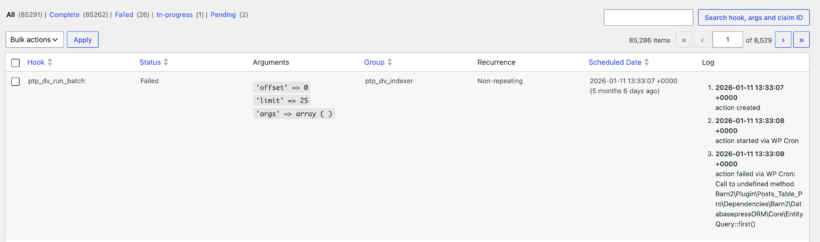
Completed actions are normal. Pending or running actions mean indexing is waiting to run or currently running. Failed actions can indicate a server error, a timeout, or a problem with a specific post.
Where to find Site Health information
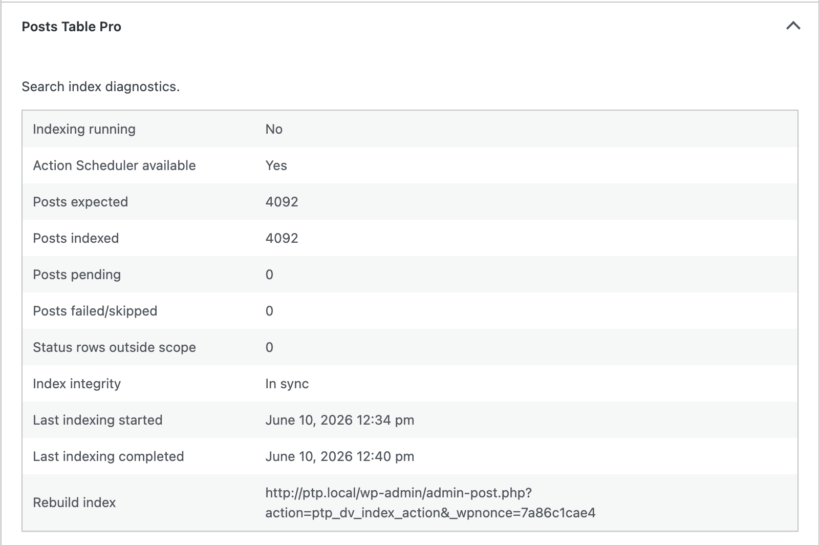
Posts Table Pro adds indexing diagnostics to WordPress Site Health. Go to Tools → Site Health → Info and look for the Posts Table Pro section.
This section can help support diagnose indexing problems. It includes values such as:
- whether indexing is currently running;
- whether Action Scheduler is available;
- how many posts are expected in the index;
- how many posts are indexed, pending, failed, or skipped;
- whether the index appears to be in sync;
- when indexing last started and completed;
- a rebuild URL that an administrator can use if a full rebuild is needed.
Admin notices you may see
Posts Table Pro only shows indexing notices to administrators. These notices are there to explain background work or highlight something that needs attention.
Indexing in progress...
This notice appears while a full rebuild is running. It shows how many posts have been indexed, the total number of posts, and the percentage complete. It also includes a Cancel button if you need to stop the current rebuild.
Search index needs attention.
This warning appears when the index appears incomplete, out of sync, or stalled. Use the Rebuild Index button to queue a fresh full rebuild. The Dismiss link hides that specific warning for your user account.
If the notice continually re-appears after rebuilding this means you have some posts which cannot be indexed. You can dismiss the notice in this case as the posts are not indexable.

Search indexing is unavailable.
This error appears if Action Scheduler is not available, which means Posts Table Pro cannot rebuild the index in the background. Check that the plugin installation is complete and that no required dependency has been removed or disabled.
No notice
If the index is healthy and no rebuild is running, Posts Table Pro does not show an indexing notice.
Troubleshooting
The progress notice stays visible for a long time
Large sites can take longer to index. Check Tools → Scheduled Actions for pending or failed actions in the ptp_dv_indexer group. If actions are pending but not running, make sure WP-Cron is working on the site.
The index warning says posts are pending but no jobs are queued
Click Rebuild Index in the warning. This cancels any stuck pending indexing jobs and queues a fresh rebuild.
Some posts failed or were skipped
Check the Posts Table Pro section under Tools → Site Health → Info. It can show failed or skipped post counts. Support may ask for this information if a specific post repeatedly fails to index.
Technical details
The admin progress notice polls the Posts Table Pro index status endpoint at posts-table-pro/v1/index/status.
The default database tables use the WordPress database prefix followed by the Posts Table Pro index table name. On a standard site using the wp_ prefix, the tables are:
wp_ptp_dv_tokenswp_ptp_dv_search_indexwp_ptp_dv_filter_indexwp_ptp_dv_sort_indexwp_ptp_dv_index_status
Indexing progress is stored in WordPress options such as ptp_dv_indexing_running, ptp_dv_indexing_progress, ptp_dv_indexing_started, and ptp_dv_indexing_completed. The database schema version is stored in ptp_dv_db_version.
Developers can customize parts of the indexing behavior with plugin hooks, including the index scope, batch size, search tokens, filter index meta keys, indexed search usage, and Site Health fields. These hooks should be used carefully because changing the index scope or indexed values can require a full rebuild.