Online ordering is here to stay, and recent events have made it even more important for restaurants and food outlets to take their business online
Fast. Food ordering
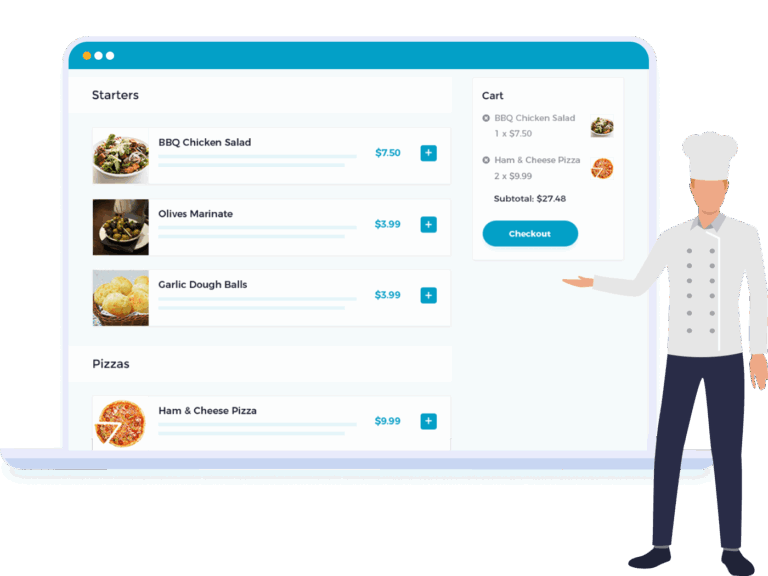
Quick and easy food ordering for WooCommerce
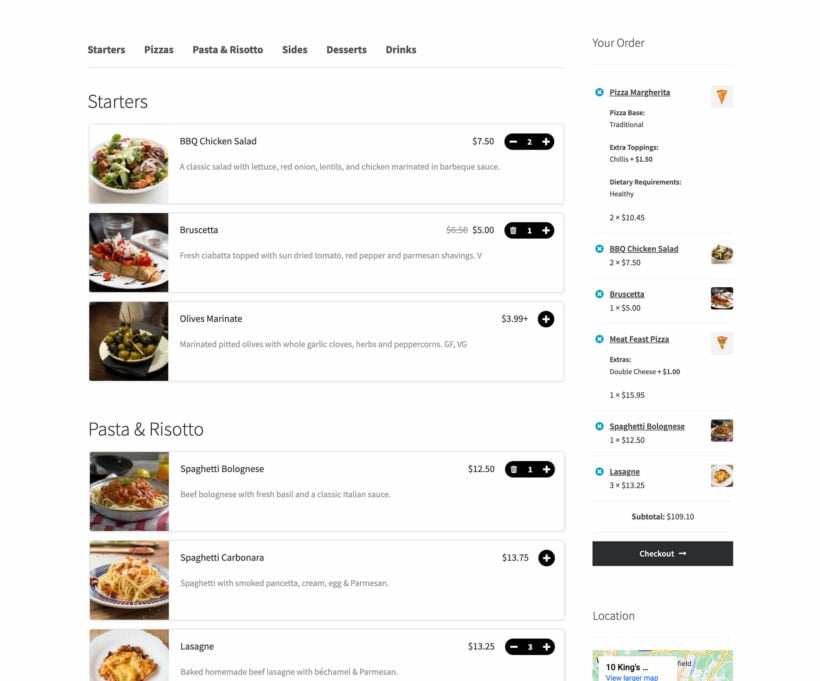
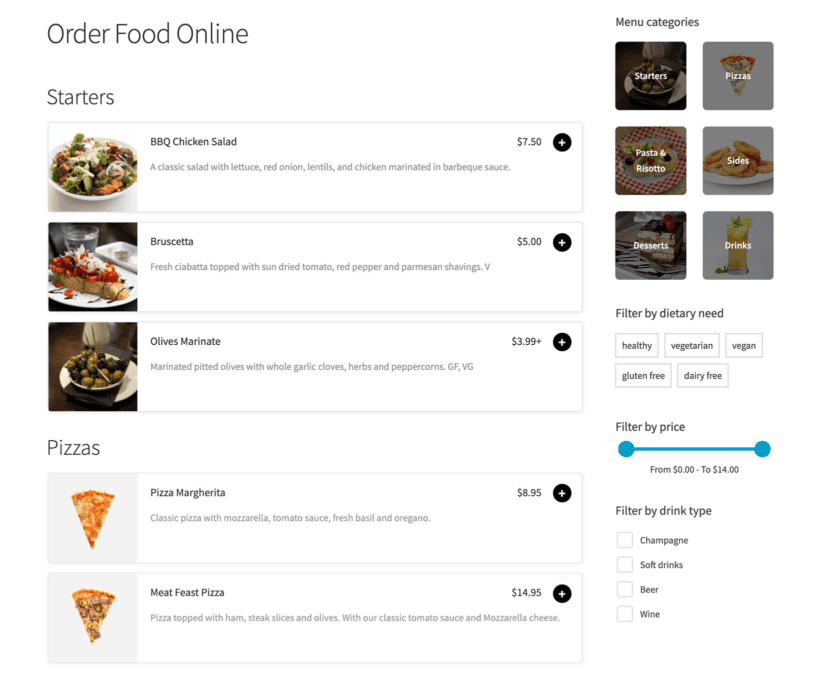
Familiar design inspired by major food order apps
Mobile-friendly design
Design your menu
Choose your layout
Select which food details to display
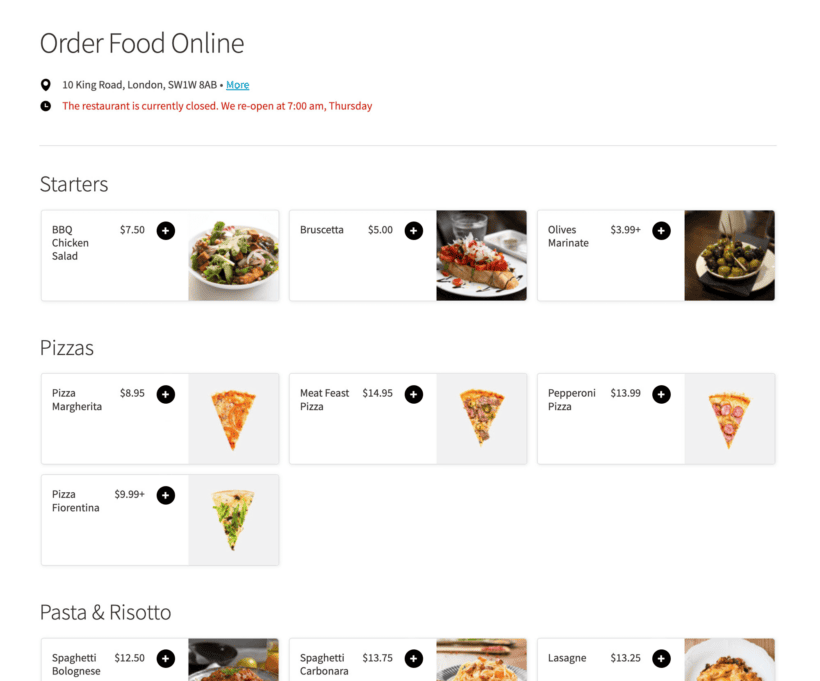
Set opening times and prevent ordering when the restaurant is closed
Add food options
Buy WooCommerce Restaurant Ordering with our Product Options plugin to create add-on options
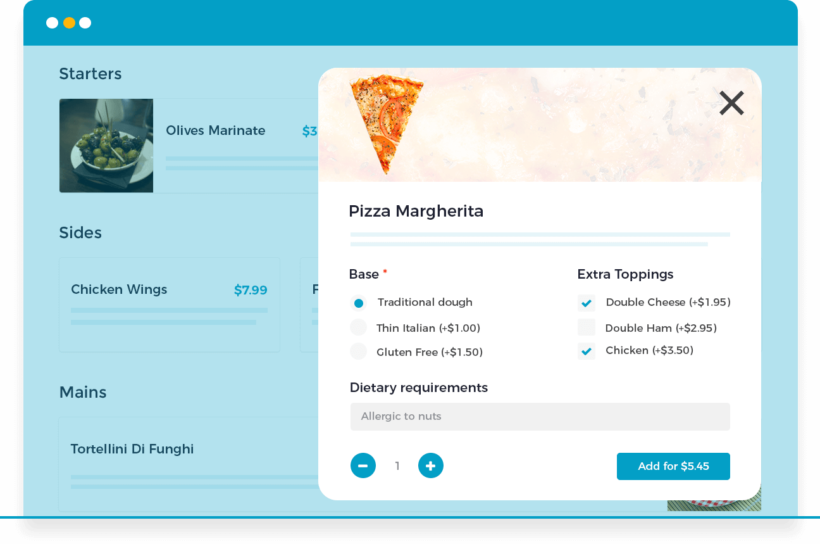
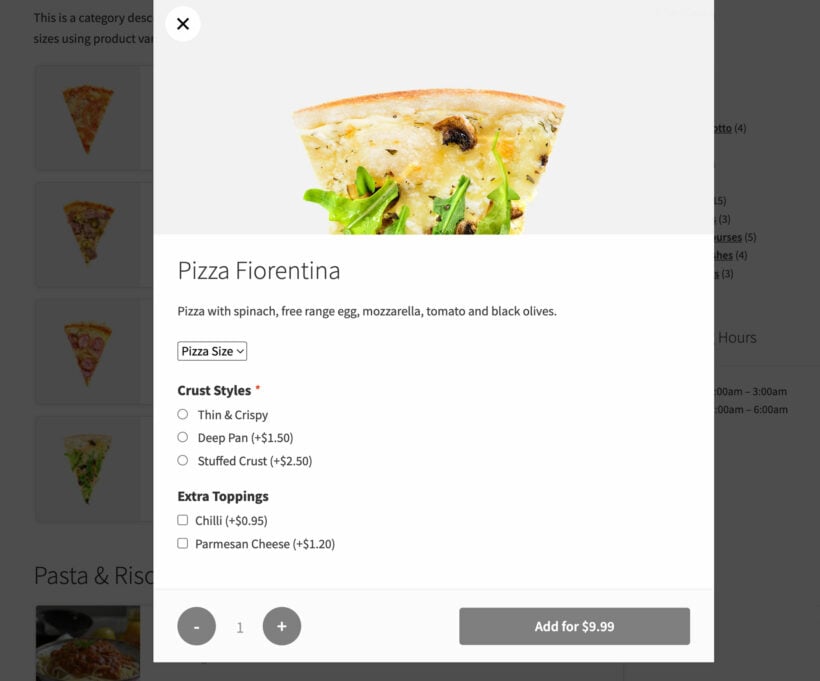
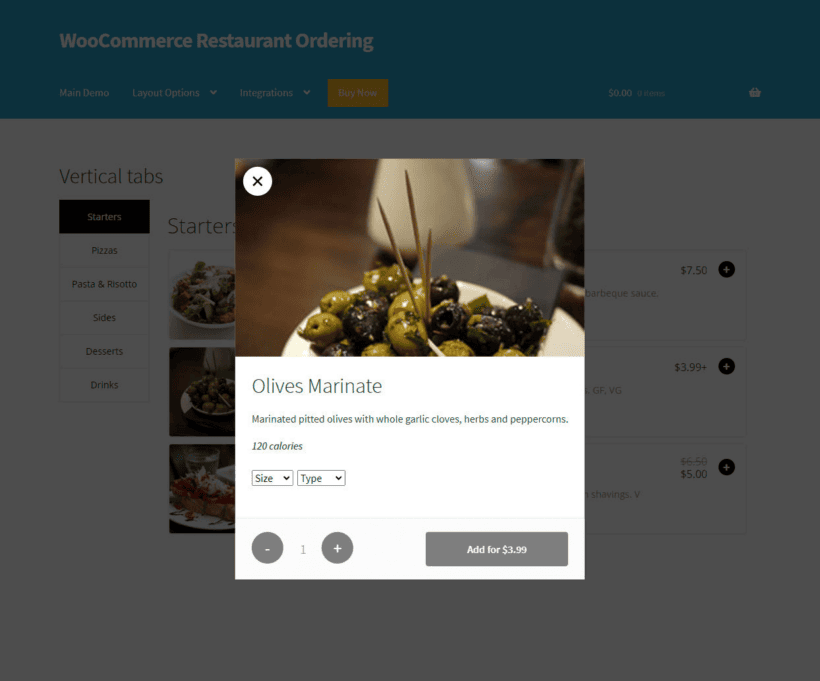
Choose options in a lightbox - extra toppings, size, quantity, dietary requirements
Full support for variable products
PACKED WITH FEATURES
Quite simply the best food ordering system for WordPress and WooCommerce 🚀
Instant food order forms
Restaurant opening times
Multiple menu layouts
Variations and add-ons
Quick order or lightbox
Delivery and collection
Works with other plugins
Translation ready
Instant order forms
List food products anywhere
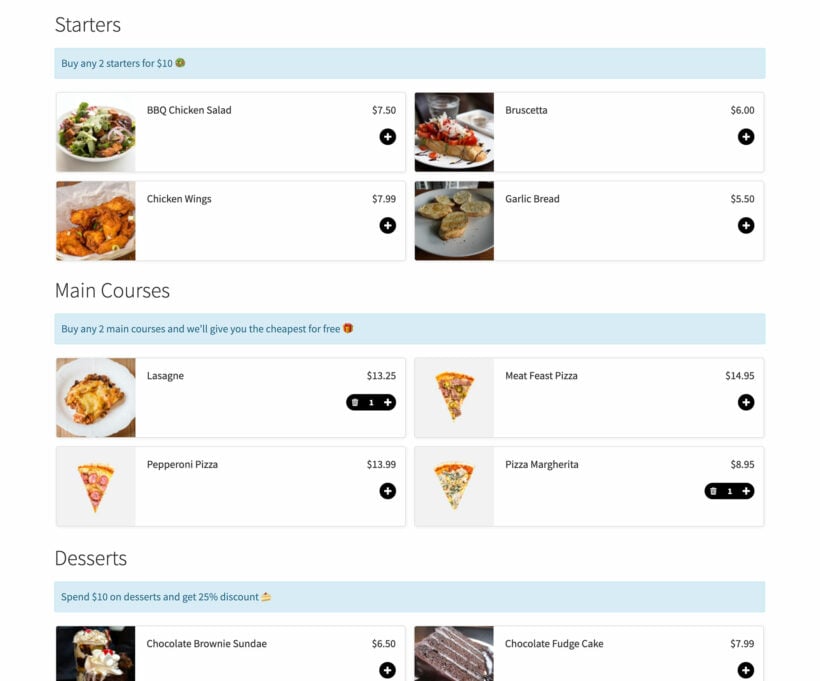
List food products on a Restaurant Ordering page, with a shortcode, or on WooCommerce shop and category pages.
Automatic order page
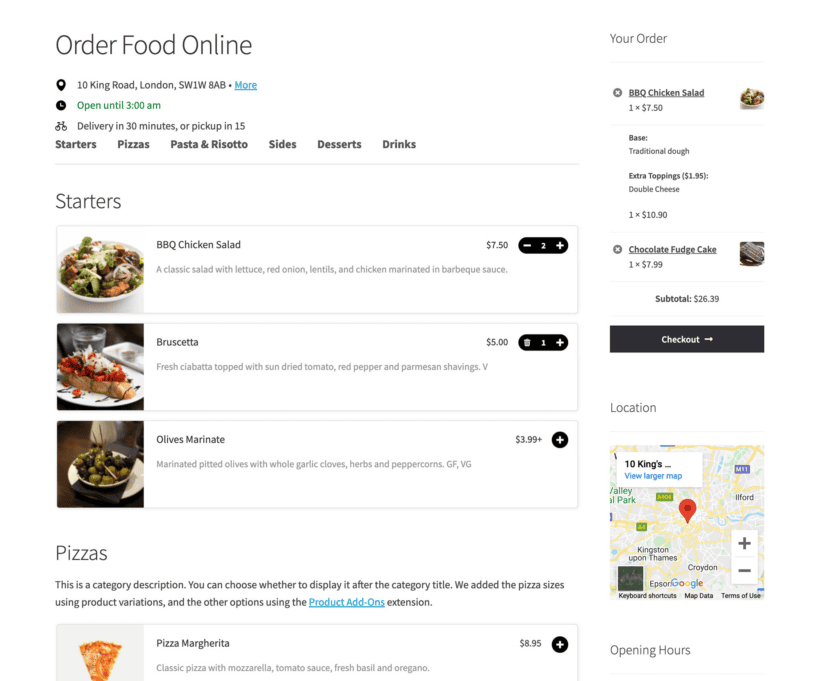
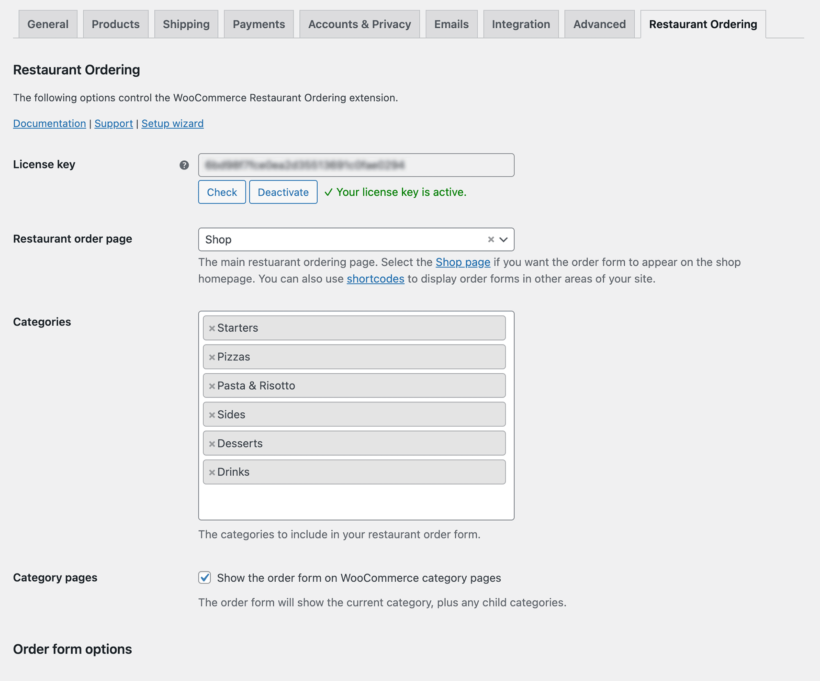
When you install the plugin it automatically creates a page listing all your products in a one-page order form, divided by category.
Shortcode order forms
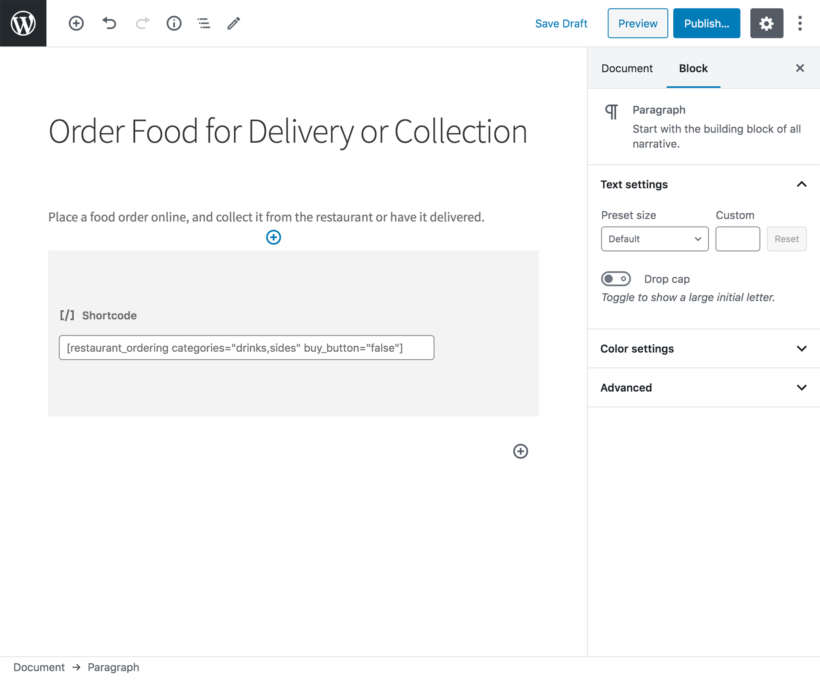
If you need more flexibility, you can use a shortcode to list items from specific categories in specific locations on your site. You can use shortcode options to customize each form individually. This allows you to add as many order forms as you like, each one different.
Category pages
You can also enable the food order form layout on the WooCommerce product category pages.
Set restaurant opening times
Disable ordering when closed
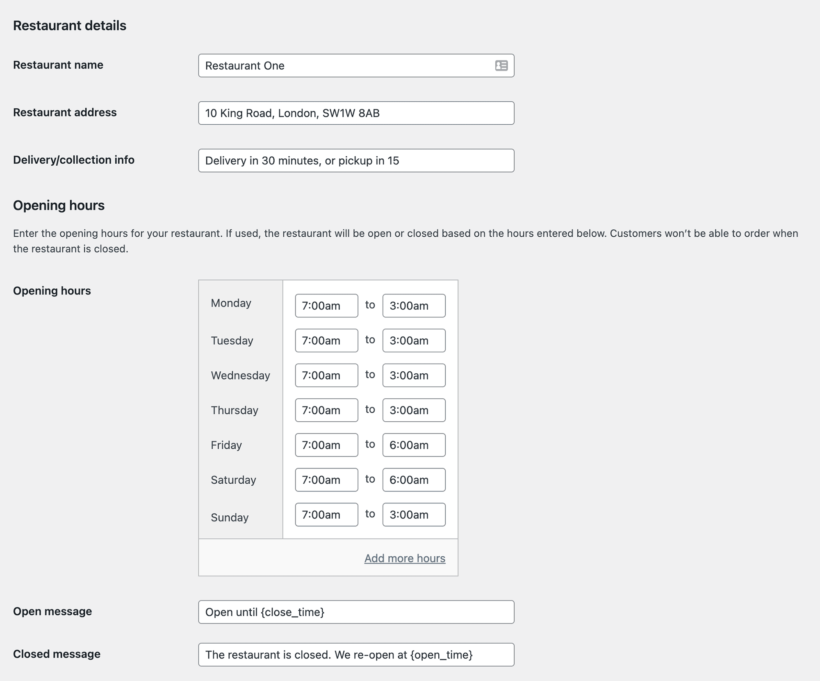
Set opening times and disable ordering when you're closed. Display different messages when you are open and closed.
Up to two sessions per day
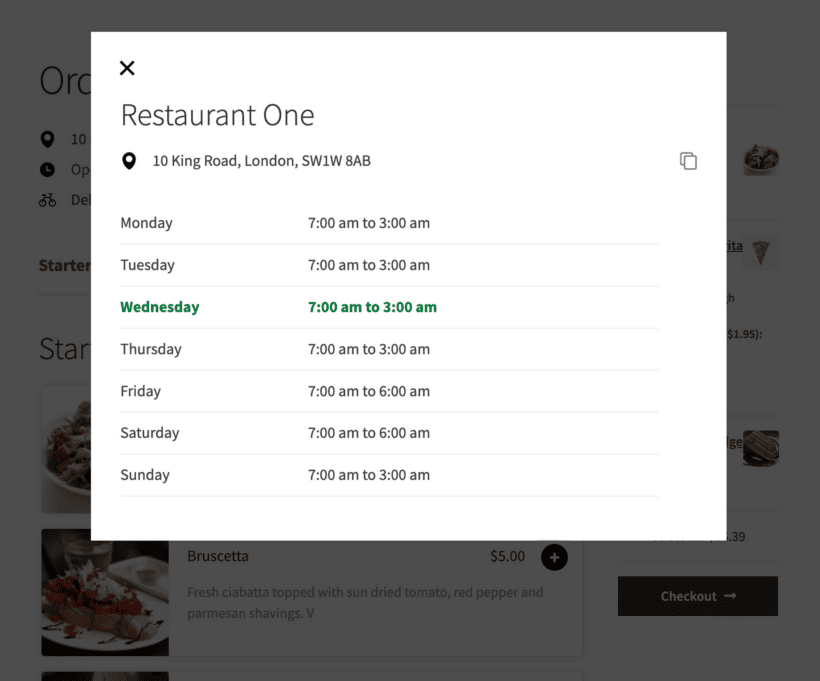
You can add up to two sessions per day (e.g. lunch and dinner), with different opening and closing times for each day of the week.
Open and closed messages
Customers are prevented from placing an order while the restaurant is closed. You can display specific wording on your site when the restaurant is open or closed, including details of when it will next open/close.
Multiple layout options
Choose your menu layout
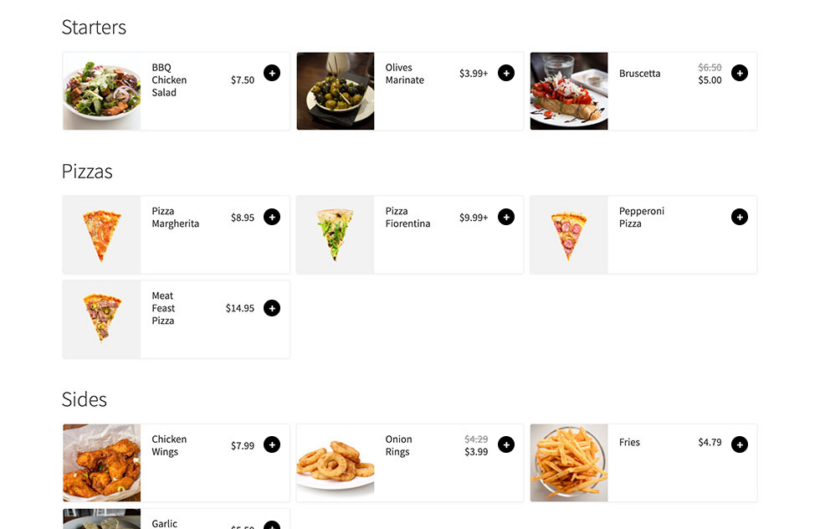
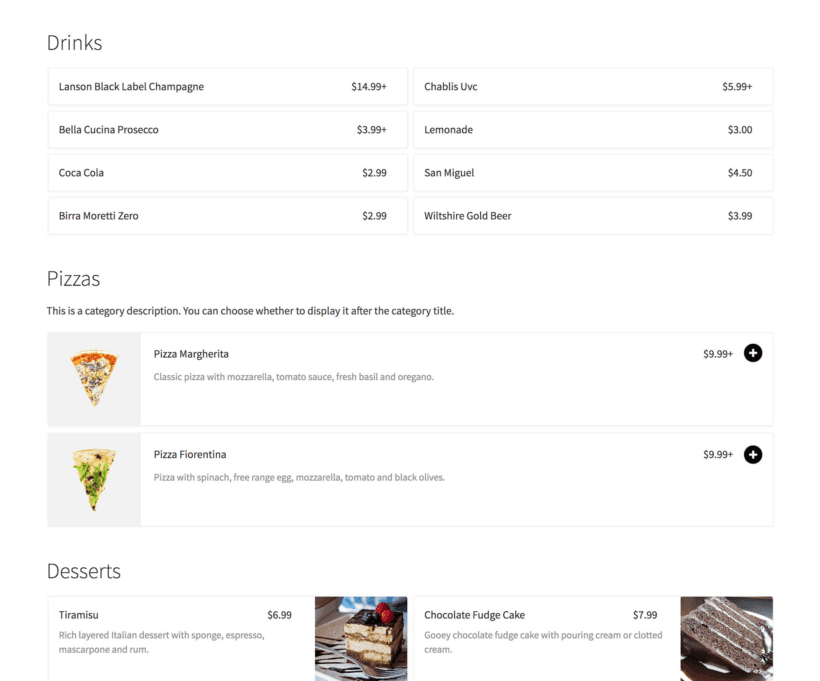
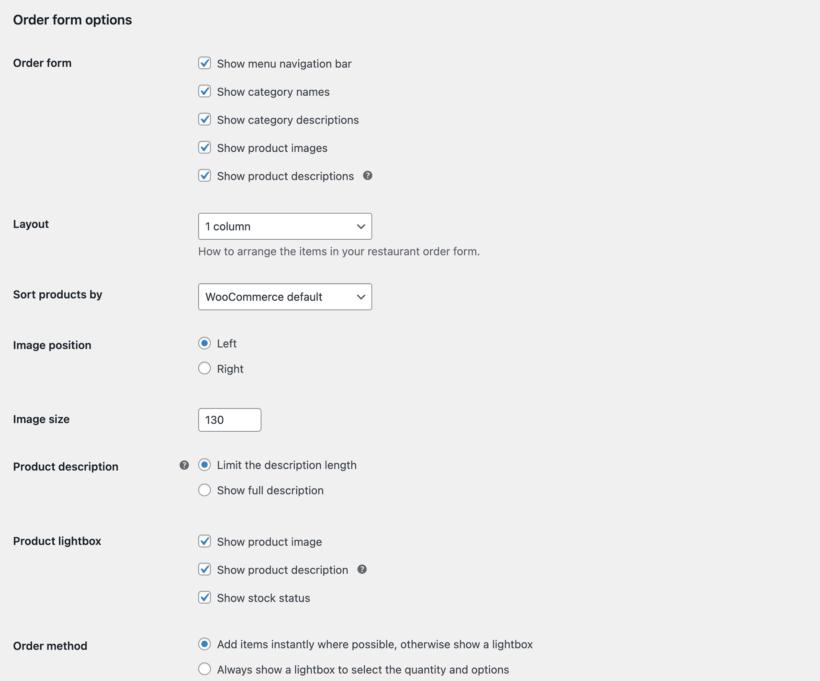
Display your restaurant menu as a single list or in 2 or 3 columns, and choose which product information to display.
Sell variations or add-ons
Product variations
Use product variations to sell food options, or add more more advanced choices with checkboxes, clickable images, and more. Variable products are perfect if you sell different versions of a meal or item (e.g. small, medium or large fries). Each variation appears as a dropdown list (e.g. a pizza with options for Size and Crust Type).
Product options
Most restaurants need more flexible order options, such as checkboxes for pizza toppings, or text fields for dietary requirements. To allow this, you can buy Restaurant Ordering together with our WooCommerce Product Options plugin for a discounted price. See the plugin demo for examples.
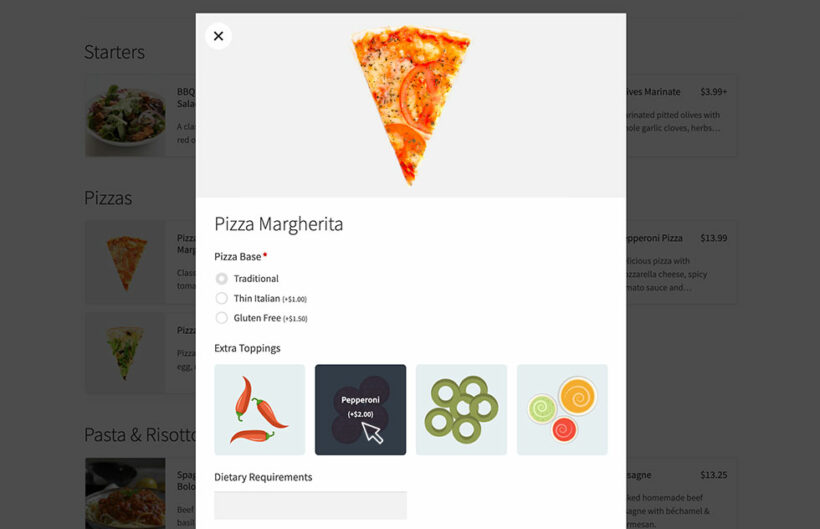
Choose options in a lightbox
The product options will appear in a lightbox when the customer clicks an item. They can easily select their options, change the quantity, see the updated price, and add the item to their order.
Quick order or lightbox
Your choice of ordering style
Choose between instant ordering where products are ordered with one click, or a lightbox to select quantity and options.
Add a mini cart
When customers order food online, they expect to be able to review and complete their order on the same page. To do this, we recommend using WooCommerce Restaurant Ordering with our other plugin - WooCommerce Fast Cart. This lets customers review their order, make changes, add related items and even check out and pay from an on-page popup cart.
Easy mobile ordering
Order from any device
Customers can order food from home or on the move. Your restaurant order system works on all devices.
Delivery and collection
Built-in WooCommerce shipping
The Restaurant Ordering plugin doesn't include these features directly. Instead it works with the delivery and collection options built into WooCommerce itself. You can use these to add multiple delivery options (e.g. 'Home delivery' and 'Collect in person'), charge delivery fees, and set shipping zones for delivery.
Delivery slots
If you want customers to choose an exact delivery slot then we recommend the WooCommerce Opening Hours & Chosen Times plugin. This works perfectly with Restaurant Ordering and lets customers choose a date and time slot for their food delivery and/or collection. It's also useful for managing your kitchen capacity as you can set a maximum number of orders per slot.
Setup guide
The Knowledge Base provides full documentation on how to set up your delivery options.
Meal deals and dietary information
Meal deals and fixed price menus
You can use WooCommerce Restaurant Ordering to create meal deals or fixed price menus, using our WooCommerce Quantity Manager and WooCommerce Discount Manager plugins to set limits and pricing rules.
Dietary information filters
Install the WooCommerce Product Filters plugin and use it to add a 'Dietary Information' filter to your restaurant ordering page, so customers can instantly narrow down the list of foods based on their dietary preferences.
Works with your theme
Works with your theme
WooCommerce Restaurant Ordering works with any well-coded WordPress theme. The order form has a clean, modern look that suits the vast majority of themes, and it inherits styles such as font size. You do not need a developer, custom code, or theme template edits. (See the themes we test with.)
Multilingual ready
Restaurant Ordering is designed to work with any WordPress translation plugin such as WPML, WeGlot and TranslatePress. The restaurant plugin also supports right-to-left (RTL) languages.
Easily the best WooCommerce restaurant ordering plugin
★★★★★
“We were able to launch on day one with the help of this plugin. If you are debating whether this is the solution for getting a restaurant going - look no further, this is the plugin you want.”
Adam Tracksler - USA
★★★★★
“The food order form works well and there are a lot of options to customise the menu. All-in-all a huge time saver - one of those good hassle-free plugins that do as they say and don't need a lot of tinkering with.”
Rishi Talreja - India
★★★★★
“Barn2's WooCommerce Restaurant Ordering plugin comes with a lot of options, but is still easy to comprehend as it was obviously set up in a very thoughtful way. It is stable, has no troubles like the vast majority of other plugins, and lets you present your products in the best way for your customers. Full marks! Wonderful support!”
Stefan ButzKreativlabor Butz - Germany
★★★★★
“I came across this plugin on YouTube and it appeared to do everything I wanted it to do in a sleek intuitive way. There are some learning curves since I'm new to WooCommerce but their support team have (and continue) to help where appropriate.”
If you want customers to be able to select extra options for their food choices, then get this option.
$178$178$
139
Save$39
Restaurant ordering Create food order forms and set opening times
Extra product options Allow customers to customize their food choices by selecting options such as pizza toppings or entering allergy information
One Plugin
WooCommerce Restaurant Ordering Plugin
If you just want restaurant ordering without the instant cart and checkout, then choose this option.
$
59
Restaurant ordering Create food order forms and set opening times
Extra product options Allow customers to customize their food choices by selecting options such as pizza toppings or entering allergy information
$1641$1641$
399
Save 75%
GO ALL ACCESS
Unlock all plugins for one price
19 current + future plugins
Free setup, priority support
80+ exclusive discounts
All plans include free setup, updates and support. You can upgrade at any time and just pay the difference. If your annual license expires, the plugin will continue working on your site but you must renew to change settings or receive updates, new features or support.
When you install the plugin it automatically creates a page listing all your products in a one-page order form, divided by category.
If you need more flexibility, you can use a shortcode to list items from specific categories in specific locations on your site. You can use shortcode options to customize each form individually. This allows you to add as many order forms as you like, each one different.
You can also enable the food order form layout on the WooCommerce product category pages.
Can I add extra options (e.g. toppings) to my products?
Yes - there are two ways to do this:
Product variations Variable products are a type of product in WooCommerce. They're perfect if you sell different versions of a meal or item (e.g. small, medium or large fries). You can add as many variations as you like to each product, and each one appears as a dropdown list (e.g. a pizza with options for Size and Crust Type).
Product options Most restaurants need more flexible order options, such as checkboxes for pizza toppings, or text fields for dietary requirements. To allow this, you can buy Restaurant Ordering together with our WooCommerce Product Options plugin for a discounted price. You can use the Product Options plugin to add a wide range of options to your food products - see the plugin demo for examples.
Whether you use variations or add-on fields (or both!), the product options will appear in a lightbox when the customer clicks an item. They can easily select their options, change the quantity, see the updated price, and add the item to their order.
How do delivery and collection work?
The Restaurant Ordering plugin doesn't include these features directly. Instead it works with the delivery and collection options built into WooCommerce itself. You can use these to add multiple delivery options (e.g. 'Home delivery' and 'Collect in person'), charge delivery fees, and set shipping zones for delivery.
The Knowledge Base provides full documentation on how to set up your delivery options.
Can I add a mini cart to the food ordering page?
When customers order food online, they expect to be able to review and complete their order on the same page. To do this, we recommend using WooCommerce Restaurant Ordering with our other plugin - WooCommerce Fast Cart. This lets customers review their order, make changes, add related items and even check out and pay from an on-page popup cart.
Can I add opening times and delivery slots?
The WooCommerce Restaurant Ordering plugin lets you set opening times. You can add up to two sessions per day (e.g. lunch and dinner), with different opening and closing times for each day of the week.
Customers are prevented from placing an order while the restaurant is closed. You can display specific wording on your site when the restaurant is open or closed, including details of when it will next open/close.
The WooCommerce restaurant plugin works with the standard shipping options that are built into WooCommerce. If you want customers to choose an exact delivery slot then we recommend the WooCommerce Opening Hours & Chosen Times plugin. This works perfectly with Restaurant Ordering and lets customers choose a date and time slot for their food delivery and/or collection. It's also useful for managing your kitchen capacity as you can set a maximum number of orders per slot.
Can I display nutritional information and allergens?
You may need to display nutritional information and allergens for food on your menu. To make things as easy as possible for hungry customers, we recommend adding this information to the following locations:
Install the WooCommerce Product Filters plugin and use it to add a 'Dietary Information' filter to your restaurant ordering page. The filter can appear either above or next to the food order form. Use product attributes to tag each food item with the relevant information, e.g. vegetarian, vegan, gluten free, dairy free, contains egg, etc. You can display the filters as a clickable tag cloud, checkboxes, images - whatever you like. Customers can then instantly narrow down the list of foods based on their dietary preferences.
You should also add the nutritional information to the product description and enable the 'Lightbox' option on the settings page. Customers can then open a popup for each product showing the nutritional information, as well as price and purchase options.
Most meal deal ordering systems need to set limits on how much customers can order from each category. You can do this by using the WooCommerce restaurant plugin with our WooCommerce Quantity Manager plugin. This lets you set minimum and/or maximum quantities on each of your meal deal categories. You can also use it to set minimum order values or maximum spend values for each category.
In addition, you may wish to set pricing rules and discounts which are not possible in WooCommerce on its own. To do this, you can use WooCommerce Restaurant Ordering alongside our WooCommerce Discount Manager plugin. This lets you create a wide range of rules including tiered discounts based on how much the customer spends, fixed price deals when the customer buys a certain combination of items, and so on.
Will it work with my theme and other plugins?
WooCommerce Restaurant Ordering works with any well-coded WordPress theme. The order form has a clean, modern look that suits the vast majority of themes, and it inherits styles such as font size. You do not need a developer, custom code, or theme template edits.
The theme compatibility page shows the themes we test with. If you do hit a styling issue, our support team will help.
Restaurant Ordering is designed to work with any WordPress translation plugin such as WPML, WeGlot and TranslatePress. This makes it easy for you to translate the plugin text into any language and use it on multilingual websites.
The restaurant plugin also supports right-to-left (RTL) languages.
What are the minimum requirements for running the plugin?
Restaurant Ordering is fully tested with the latest versions of WordPress and WooCommerce. We always recommend running the most up-to-date version, but we also support older installations:
What are the minimum requirements for running the plugin?
WooCommerce Restaurant Ordering is fully tested with the latest versions of WordPress and WooCommerce. We always recommend running the most up-to-date version, but we also support older installations:
WooCommerce 7.2 or greater (tested to 11.0.1)
WordPress 6.1 or greater (tested to 7.0.4)
PHP 7.4 or greater (tested to 8.5)
MySQL 5.7.8 or greater / MariaDB 10.3 or greater
What offers are available for WooCommerce Restaurant Ordering?
Several offers are available if you are a nonprofit or wish to buy multiple plugins:
2-plugin bundle - Get WooCommerce Restaurant Ordering together with WooCommerce Product Options at a reduced fixed price. Select the bundle in the pricing table above.
Multi-buy discount - Add any two or more Barn2 plugins to your cart and get 40% off automatically at checkout. The most expensive plugin stays at full price, and every other plugin is reduced by 40%. No coupon needed.
All Access Pass - For the best possible value, get our All Access Pass which gives you VIP access to our entire plugin suite including WooCommerce Restaurant Ordering.
Charity discount - Registered nonprofits get 15% discount off.
I'm using this plugin for multiple clients websites and they are very happy with it. Everytime I had an issue or a question, the support gave me a quick and complete answer! On top of that, it works well with other plugins and it has a good documentation.
Peggy
Perfect for food delivery / catering companu
Rated 5 stars
By Peggy on
Very happy with this plugin! We have different product categories set up for different kinds of products and even clients, and we can differentiate the view for all of them if needed. Works great with the product options plugin as well. Excellent support.
Armando J.
Perfect for meal ordering!
Rated 5 stars
By Armando J. on
This is an excellent plugin for sites that have any sort of food ordering setup. It includes the "quick view"-type popup where customers can choose further options, and seamlessly integrates with other Barn2 plugins like Fast Cart, and Product Options.
One of the things I really loved about it, is how well coded the front-end is. At first, I was discouraged when I saw the listing grid had such a small image. But when looking at the HTML, I was quickly able to add custom CSS styles to make the images more prominent, and even play around with the flex layout to have the images on the top and the data below them.
Highly recommended!
Karl O'Brien
Great plugin
Rated 5 stars
By Karl O'Brien on
Works great - have used it for multiple clients and they're very happy. Really comprehensive and the best experience for businesses to match the experience of the bigger players in the market.
Brian B
Great plugin and support
Rated 5 stars
By Brian B on
We were very impressed with the plugin and the support we received when we needed it. The look and feel was exactly what the customer wanted and we haven't had any issues with it since implementing it.
Kahlil Nagi
Very impressive
Rated 5 stars
By Kahlil Nagi on
It was initially hard to know if this plugin would suit my needs, so I took a punt on it. It's actually really easy, fast and clean, and has met my expectations. The best thing is the support I have been receiving for all my annoying questions! You are never left in the dark with Barn2 Plugins. Keep up the good work.
Regina
quick help and nice support
Rated 5 stars
By Regina on
I'm satisfied!
Maxime Lanneau
Great plugin and wonderful support !
Rated 5 stars
By Maxime Lanneau on
What's so good about this plugin? Stable and easy to use. Very reactive and comprehensive support. Synergize with various plugins. Good documentation.
Stefan Butz
Very useful and resourceful plugin
Rated 5 stars
By Stefan Butz on
Barn2's WooCommerce Restaurant Ordering plugin comes with a lot of options, but is still easy to comprehend as it was obviously set up in a very thoughtful way. It is stable, has no troubles with a vast majority of other plugins and lets you present your products in a way best for your customers. Full marks! Wonderful support!
Alex D
Great plugin
Rated 5 stars
By Alex D on
Great plugin, solid functionality and super fast support.

















Excellent Support!
By Lanneau Maxime on
I'm using this plugin for multiple clients websites and they are very happy with it. Everytime I had an issue or a question, the support gave me a quick and complete answer! On top of that, it works well with other plugins and it has a good documentation.