Stop losing customers with a long and complex order process. Increase conversions with Fast Cart - the instant WooCommerce popup cart and checkout plugin.
Replace multiple cart and checkout steps with a single on-page order form
A WooCommerce popup cart shows the cart and checkout in an overlay on the current page. Customers do not have to load a separate cart or checkout page. WooCommerce Fast Cart adds a popup cart, a slide-in side cart, and an optional skip-cart checkout. Customers can edit quantities and pay without a page reload. The popup integrates with any theme and any WooCommerce-compatible payment gateway.
Buy and Check out in one easy step
Reduce friction and abandoned carts
Let customers quickly order products on one page
Increase conversions by streamlining the WooCommerce checkout flow
INSTANT CART AND CHECKOUT, ANYWHERE
Instant access to the cart or checkout from any page
Replace the WooCommerce cart page, checkout page, or both
Integrates with your theme to match your design
FULLY CUSTOMIZABLE
Choose your button colors, design and layout
Upsell related products to increase revenue
Designed for beginners and developers
PACKED WITH FEATURES
Grow your sales by adding a flexible mini cart to WooCommerce. Customers can quickly make changes, add products and checkout - directly in the popup cart 🚀
Popup or floating cart
Instant on-page checkout
100% flexible
Promote upsells
Works with your theme
Any payment gateway
Replace cart and checkout pages
Translation ready
Popup or floating cart
No separate cart page
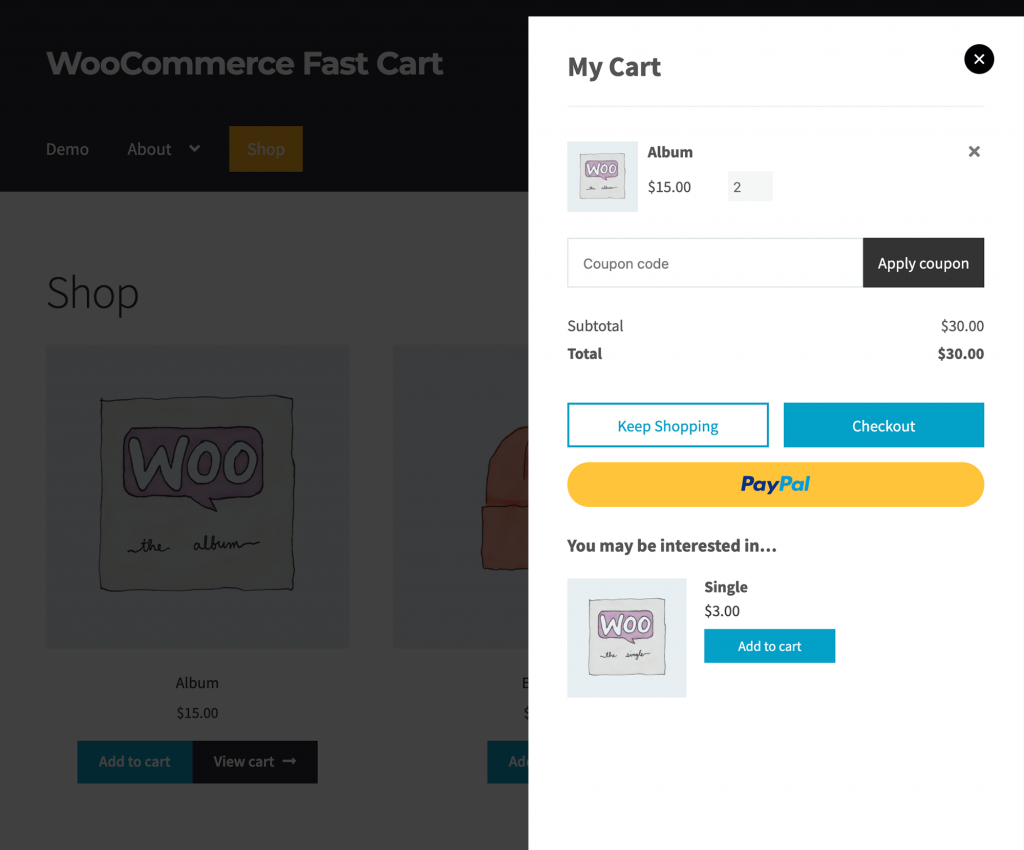
Enable auto-open or use the floating cart icon to launch the cart from anywhere. Customers don't need to visit a separate cart page.
Side cart or centered popup
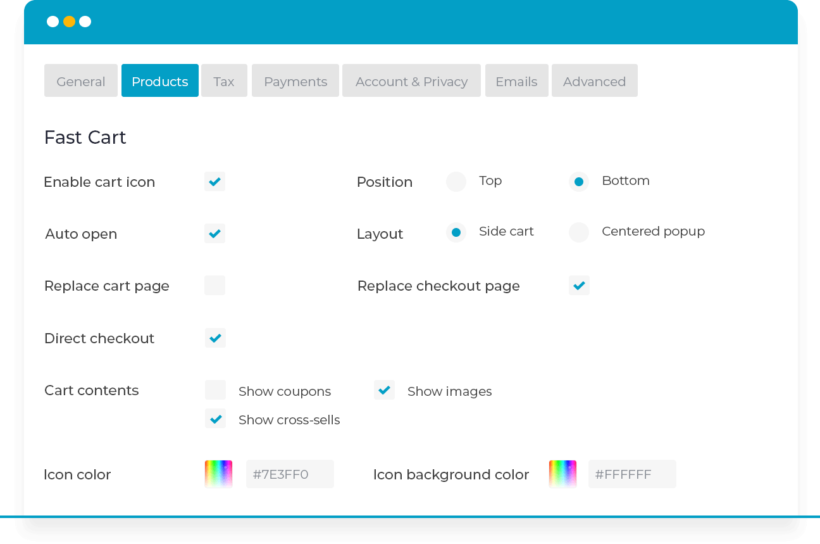
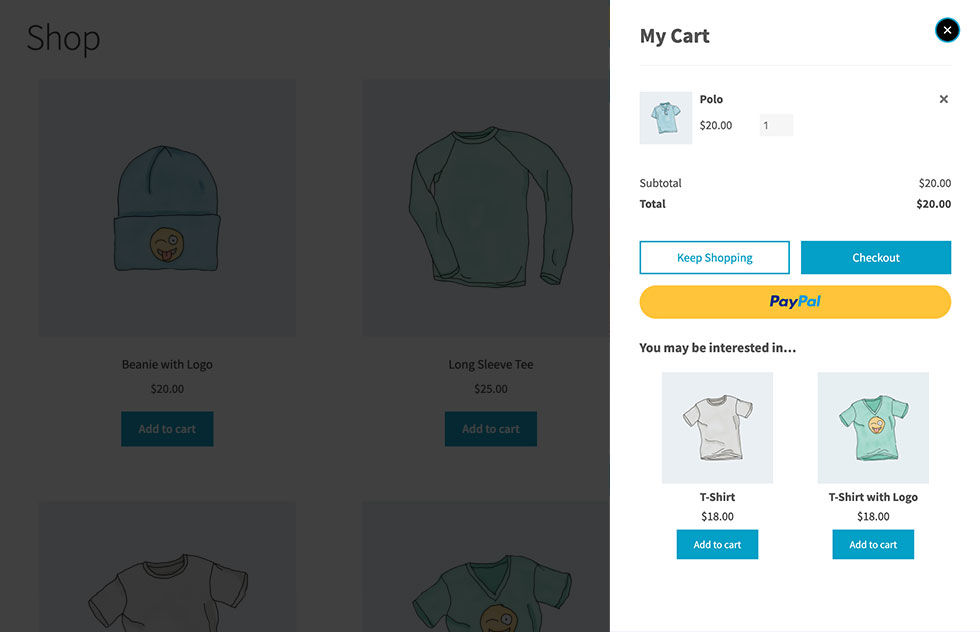
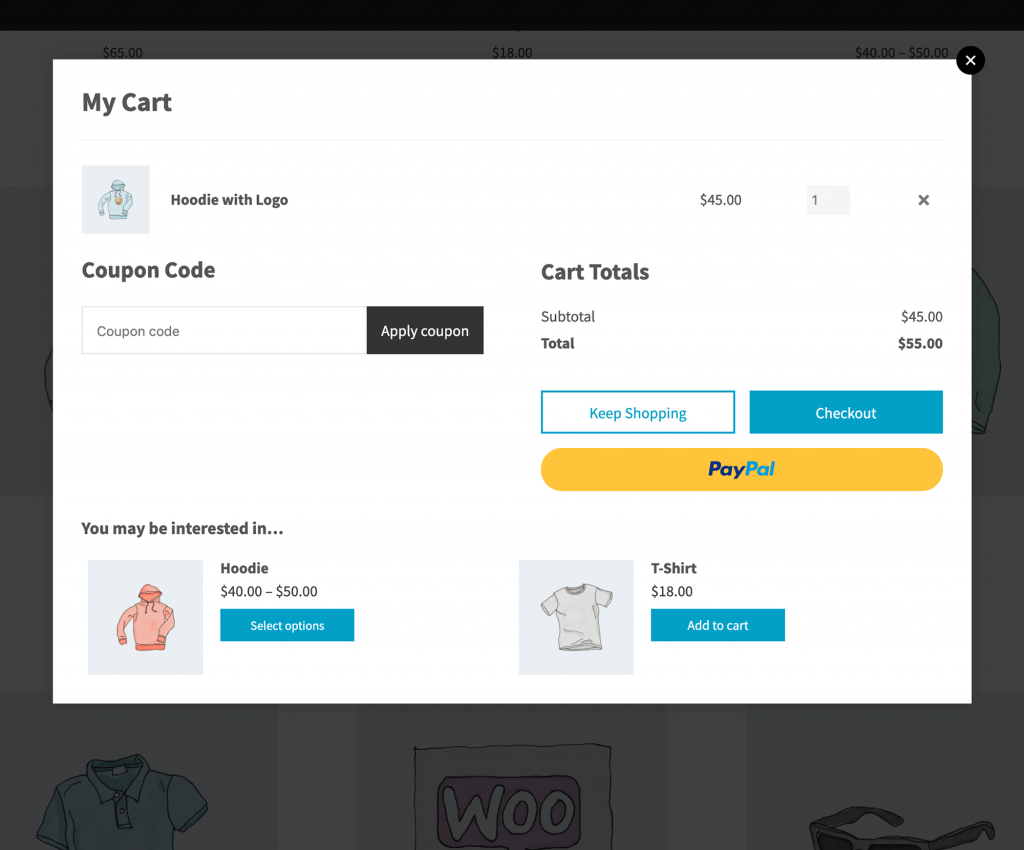
Choose between a side cart and a centered popup, and display it either automatically whenever a product is added or on click.
Floating cart icon
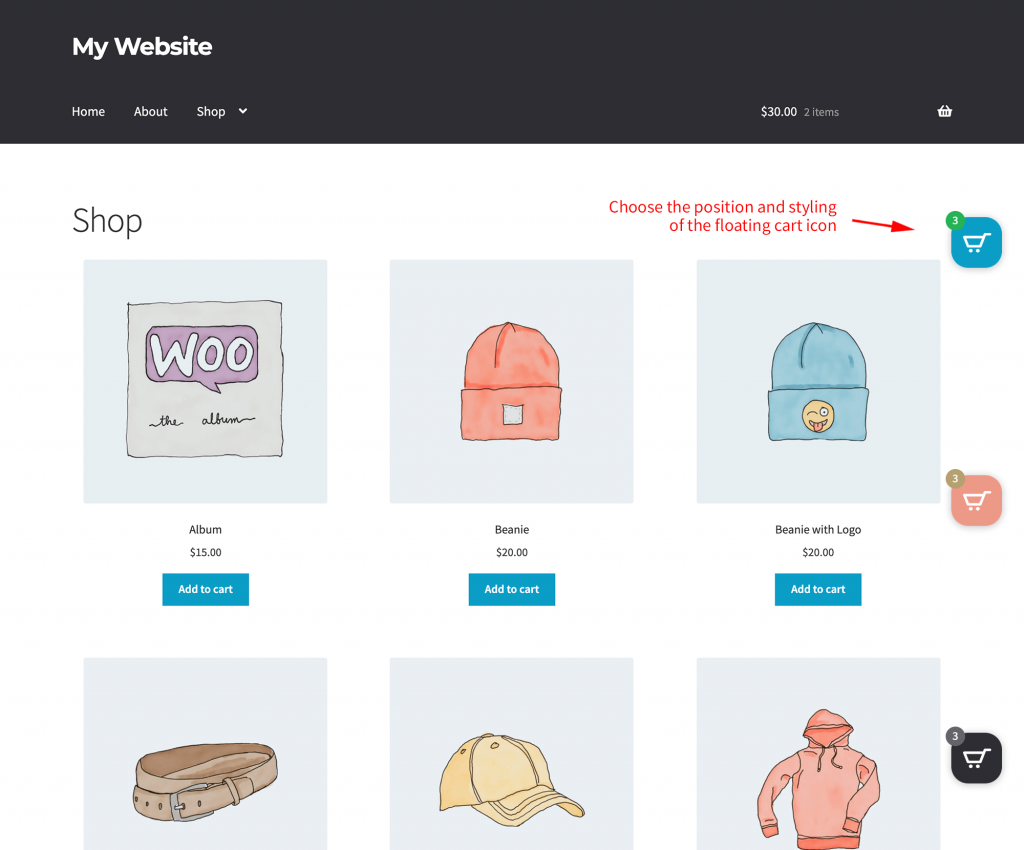
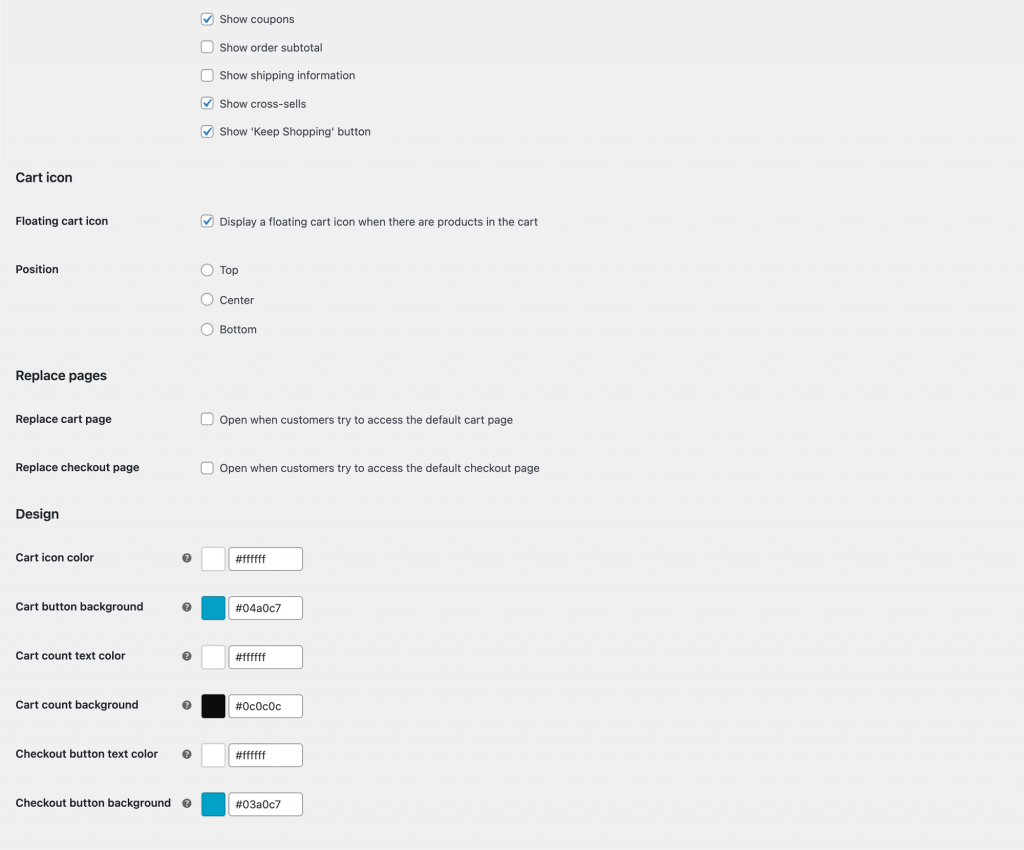
Position the icon at the top-right, bottom-right, or center-right of the screen. It appears only when products are in the cart. You can customize the color and background, and add text to appear alongside the icon.
Add the cart icon anywhere
Use the plugin's shortcode to insert the cart icon anywhere else on your site, such as your WordPress site's header.
Instant on-page checkout
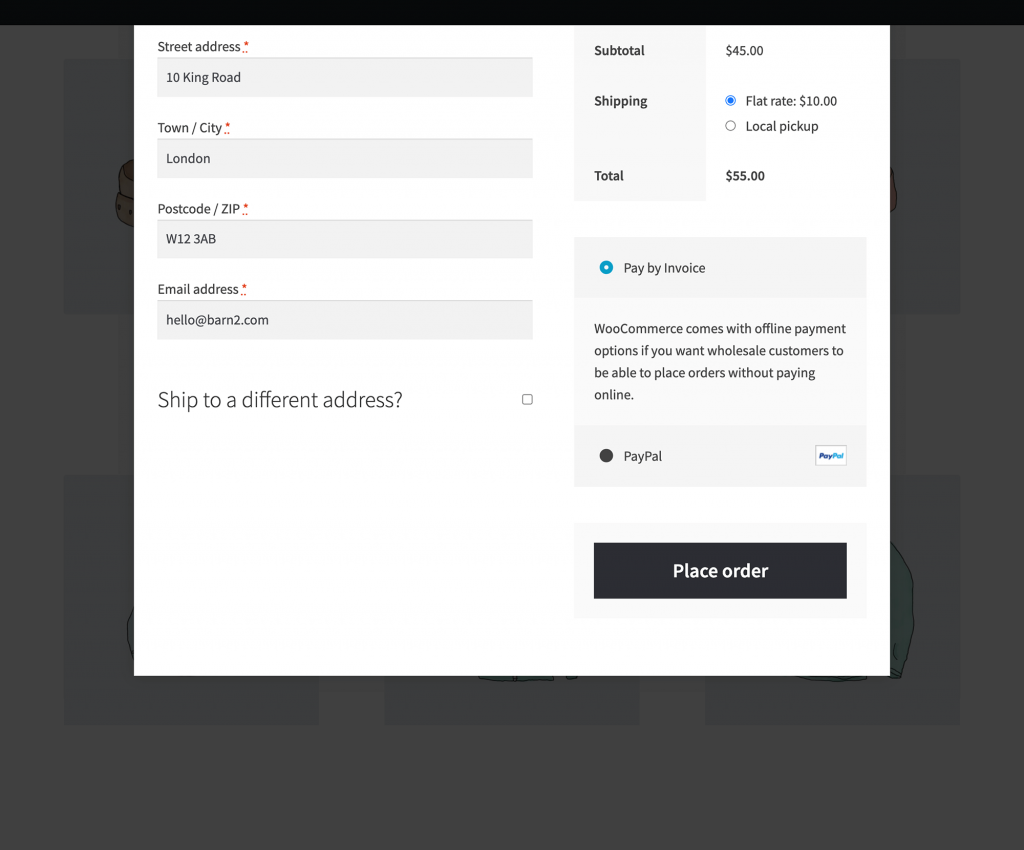
Check out without leaving the page
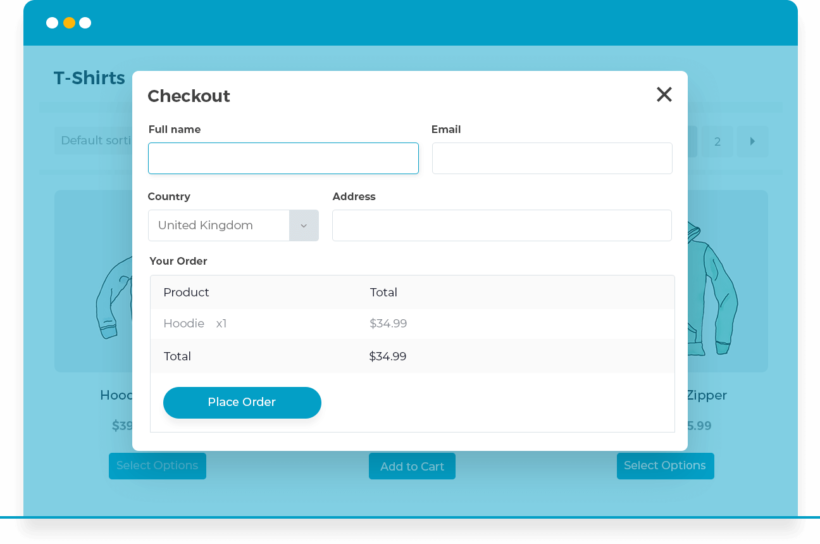
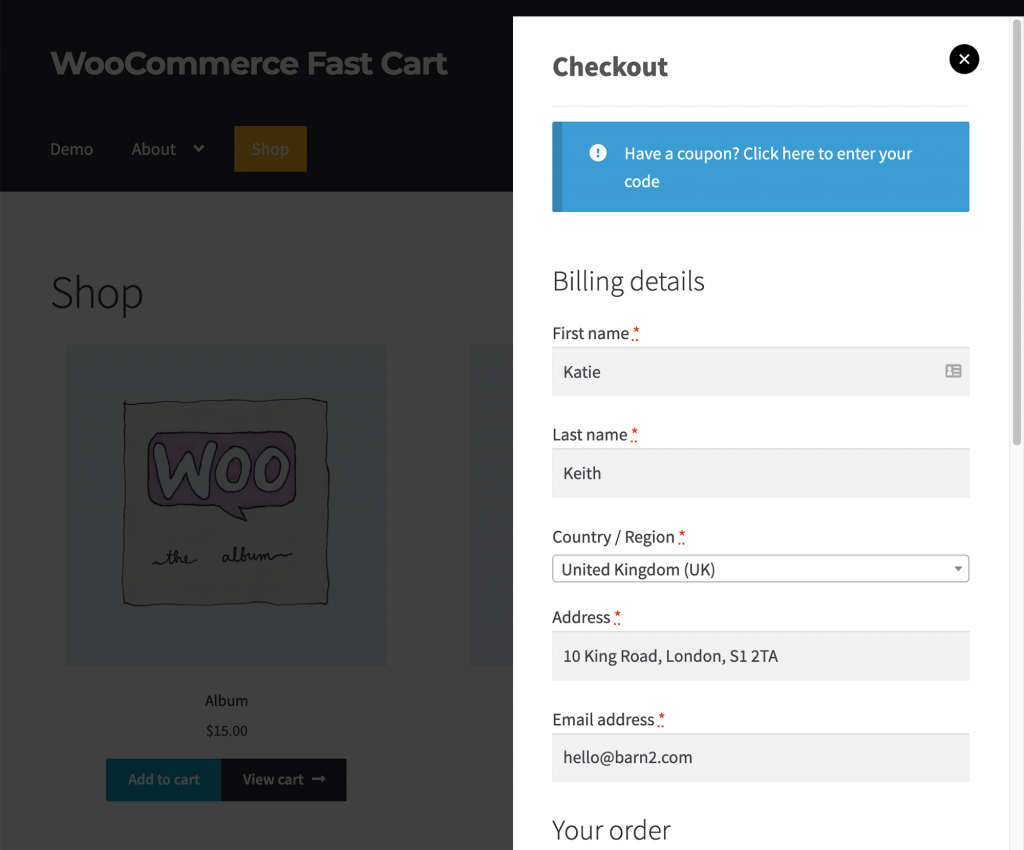
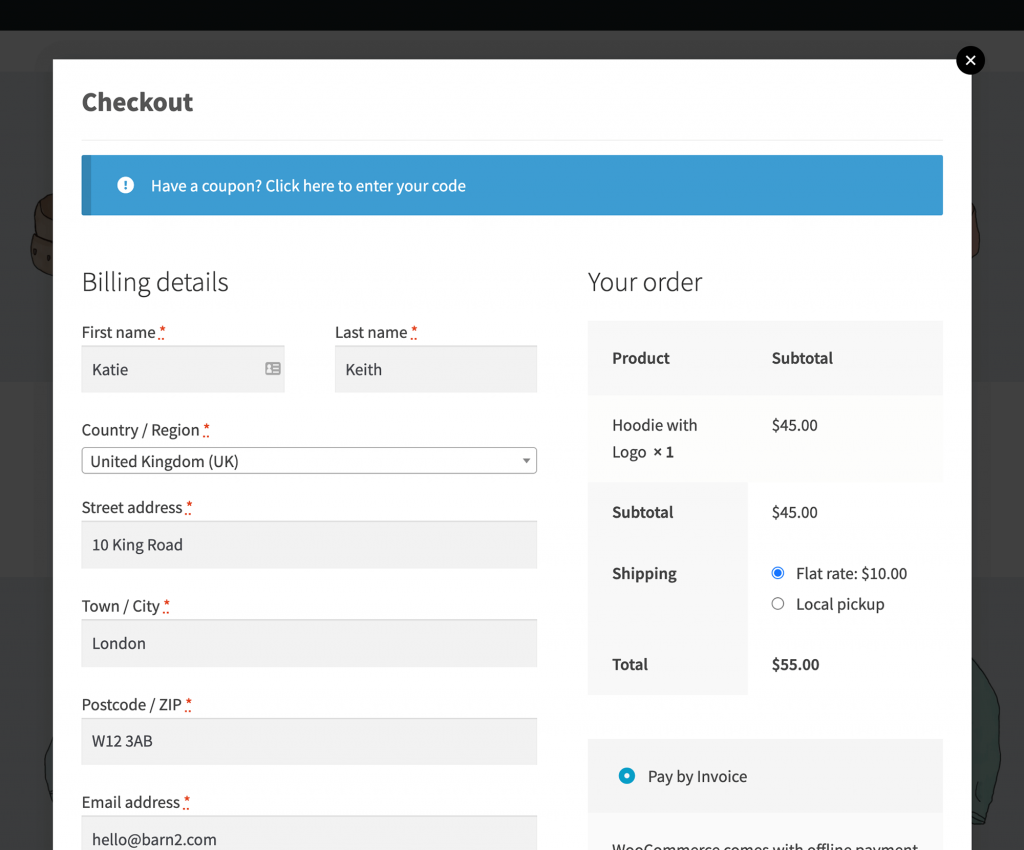
Customers complete their order directly in the popup. The Google address auto-complete saves them even more time!
Skip the cart with direct checkout
Skip the cart page entirely and display the checkout form immediately. The customer adds a product, the popup checkout opens (as a side panel or a centered popup), and they enter their details and pay without additional clicks.
Same fields as your main checkout
The popup checkout displays the same fields as your main checkout page. Customize them using any method that works with standard WooCommerce, including the Checkout Field Editor plugin, and the changes will automatically appear in Fast Cart.
Block-based cart and checkout
Fast Cart is fully compatible with the block-based cart and checkout introduced in WooCommerce 8.3.
100% flexible
You're in control
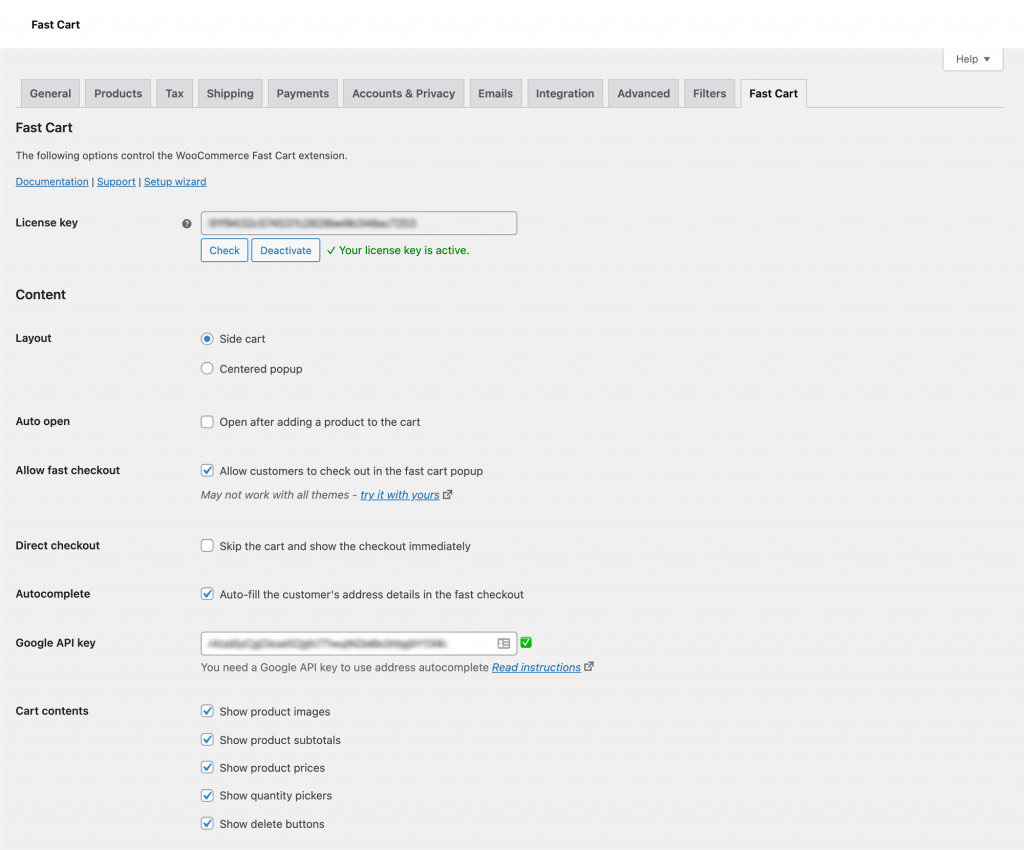
Choose a side or popup cart, button colors, design, layout and position.
Use it alongside, or instead of, the standard pages
Use Fast Cart as an additional option next to your regular checkout, giving customers the choice. Or replace your standard cart and checkout pages entirely, so that all cart and checkout links open the popup instead of separate pages.
Customize on the settings page
Everything is set up from the plugin settings page. It's designed for beginners and developers alike.
Promote upsells
Cross-sell in the popup cart
Increase average order value by cross-selling related products in the popup WooCommerce cart.
Easy to set up
Related products appear in the 'You may also be interested in' section of the popup cart. They are based on what's currently in the cart. You set up cross-sells in the product editor, and customers can add them directly from the popup without interrupting their checkout flow.
Add quick view to your upsells
Choose the Fast Cart + Quick View bundle to add quick view buttons to the upsells in the popup cart, so that customers can view and add them without exiting the popup.
Works with your theme
Compatible with any well-coded theme
The popup cart looks great in any theme. It uses your existing fonts, is fully responsive and complies with modern accessibility standards. There is no need to hire a developer, write code, or edit theme templates. (See the themes we test with.)
Fast performance
The mini cart loads after your main page content, so it doesn't affect your initial page load times. It's also fully compatible with performance optimization plugins like WP Rocket and Autoptimize.
Translation ready
Works with popular multilingual plugins like WPML, WeGlot and TranslatePress, so you can translate all plugin text. Right-to-left languages are supported too.
Fast Cart supports all major payment gateways including WooCommerce Payments, Stripe, PayPal Payments, and many more. The popup checkout is compatible with any payment method that works with standard WooCommerce checkout.
Your shipping options
The popup checkout displays all the shipping options you've configured in WooCommerce, whether flat rate, free shipping, local pickup, or custom methods added through plugins. They work exactly the same as in your regular checkout.
“This works so well. It is so clean looking with its option to appear as a slide in or popup. It looks professional and is FAST!! Outstanding, clean, looking cart with lots of options. Brilliant Support 😁🤩”
Daphne Stevenson - Australia
★★★★★
“WooCommerce Fast Cart is packed with every feature you need. But what I like most is the team behind it. I raised 2 WCAG issues, and they resolved both and baked in a few extra goodies.”
Joe Campbell - United States
★★★★★
“WooCommerce Fast Cart is one of the best plugins we’ve worked with. The checkout experience is incredibly smooth, fast, and user-friendly — exactly what our customers needed. It’s rare to find such a combination of excellent products and genuinely caring support. Highly recommended to anyone who wants to take their WooCommerce store to the next level!”
Kevin - Germany
★★★★★
“Barn2 is a rare company in this space - I have been building websites for many years and no other company has addressed issues as fast and diligently. They quickly move into action to add any features you suggest. Keep up the great work!”
Choose this option for a faster way for customers to view and add products before using the popup cart.
$138$138$
99
Save$39
On-page cart & checkout Customers can review their order, enter their details and pay directly in a conversion-optimized popup cart
Product quick view Preview products and add to the cart from a quick view lightbox
Preview related products Add quick view buttons to the upsells in the popup cart, so that customers can view and add them without exiting the popup
One Plugin
Fast Cart
If you just want a popup cart and checkout without product quick view, then choose this option.
$
79
On-page cart & checkout Customers can review their order, enter their details and pay directly in a conversion-optimized popup cart
Product quick view Preview products and add to the cart from a quick view lightbox
Preview related products Add quick view buttons to the upsells in the popup cart, so that customers can view and add them without exiting the popup
$1641$1641$
399
Save 75%
GO ALL ACCESS
Unlock all plugins for one price
19 current + future plugins
Free setup, priority support
80+ exclusive discounts
All plans include free setup, updates and support. You can upgrade at any time and just pay the difference. If your annual license expires, the plugin will continue working on your site but you must renew to change settings or receive updates, new features or support.
A popup cart is an overlay shopping cart that appears without page navigation. It displays as a slide-out panel or modal window. Popup carts show cart contents, totals, and checkout options. Customers can complete purchases without leaving their current page. This reduces friction and improves conversion rates.
Fast Cart reduces cart abandonment through instant checkout access. The plugin eliminates page loads between shopping and checkout. Customers see their cart immediately after adding products. The one-click checkout removes unnecessary steps from the purchase process.
How do customers access the mini cart?
A mini cart is a compact shopping cart interface that displays without page redirects. Customers access the WooCommerce mini cart by clicking the floating cart icon.
The icon position is customizable to top-right, bottom-right, or center-right. It appears only when products are in the cart. You can customize the color and background, and add text to appear alongside the icon.
To bring customers to the mini cart even faster, you can choose to show the fast cart automatically whenever a product is added. This encourages customers to complete their order straight away.
The plugin also has a [fast_cart] shortcode which you can use to insert the cart icon anywhere else on your site, such as your WordPress site's header.
Can I skip the cart and force customers to checkout immediately?
Yes! Direct checkout lets you skip the cart page entirely and display the checkout form immediately. This is an excellent idea if you need a quick way for customers to buy one product at a time. When enabled, WooCommerce direct checkout works in three steps:
The customer adds a product to their cart.
The popup checkout opens immediately, either on the right hand side of the page or as a centered popup.
The customer enters their details and completes payment without additional clicks.
Can customers still use the standard WooCommerce checkout?
Yes, WooCommerce Fast Cart gives you complete flexibility. You can use it as an additional option alongside your regular checkout, giving customers the choice. Alternatively, you can replace your standard cart and checkout pages entirely with the Fast Cart popup. When you choose the replacement option, all cart and checkout links will open the popup instead of separate pages.
What payment gateways are supported?
WooCommerce Fast Cart supports all major payment gateways including WooCommerce Payments, Stripe, PayPal Payments, and many more. The popup checkout is compatible with any payment method that works with standard WooCommerce checkout.
Which shipping options are available?
The popup checkout displays all the shipping options you've configured in WooCommerce. Whether you use flat rate, free shipping, local pickup, or custom shipping methods added through plugins, they'll all appear in the Fast Cart. Your shipping options work exactly the same as in your regular checkout.
Is it compatible with the block-based cart and checkout?
Yes, Fast Cart is fully compatible with the block-based cart and checkout introduced in WooCommerce 8.3. The block-based checkout uses WooCommerce's modern editor system for easier customization.
Can I edit the checkout fields in the mini cart?
The popup checkout displays the same fields as your main checkout page. You can customize these fields using any method that works with standard WooCommerce, including the Checkout Field Editor plugin. Any changes you make to your checkout fields will automatically appear in the Fast Cart.
How do related products work?
Related products appear in the 'You may also be interested in' section of the popup cart. These cross-sell products are based on what's currently in the cart and can significantly increase your average order value. You set up cross-sells in the product editor, and customers can add them directly from the popup without interrupting their checkout flow.
Will the Fast Cart plugin slow down my store?
No! Fast Cart is designed for performance. The mini cart loads after your main page content, which means it doesn't affect your initial page load times. This asynchronous loading keeps your site fast while adding powerful checkout functionality. The plugin is also fully compatible with performance optimization plugins like WP Rocket and Autoptimize.
Will it work with my theme and other plugins?
WooCommerce Fast Cart works with any well-coded WordPress theme. It uses your existing fonts and is styled to look good with most themes. There is no need to hire a developer, write code, or edit theme templates.
Our theme compatibility page shows the themes we test with. You can also change the color of the floating cart icon in the plugin options.
WooCommerce Fast Cart is fully compatible with all Barn2 plugins, plus plugins from other companies. The WooCommerce Fast Cart compatibility guide lists the plugins we have tested with it, and our support team will help with any styling or compatibility issues.
Does it work in my language?
Fast Cart is fully translation-ready and works with popular multilingual plugins like WPML, WeGlot, and TranslatePress. You can translate all plugin text to create a localized shopping experience for international customers. The plugin supports right-to-left languages too.
What are the minimum requirements for running the plugin?
WooCommerce Fast Cart is fully tested with the latest versions of WordPress and WooCommerce. We always recommend running the most up-to-date version, but we also support older installations:
WooCommerce 7.2 or greater (tested to 11.0.1)
WordPress 6.1 or greater (tested to 7.0.4)
PHP 7.4 or greater (tested to 8.5)
MySQL 5.7.8 or greater / MariaDB 10.3 or greater
What offers are available for WooCommerce Fast Cart?
Several offers are available if you are a nonprofit or wish to buy multiple plugins:
2-plugin bundle - Get WooCommerce Fast Cart together with WooCommerce Quick View Pro at a reduced fixed price. Select the bundle in the pricing table above.
Multi-buy discount - Add any two or more Barn2 plugins to your cart and get 40% off automatically at checkout. The most expensive plugin stays at full price, and every other plugin is reduced by 40%. No coupon needed.
All Access Pass - For the best possible value, get our All Access Pass which gives you VIP access to our entire plugin suite including WooCommerce Fast Cart.
Charity discount - Registered nonprofits get 15% discount off.
We’ve been using WooCommerce Fast Cart and I can honestly say it’s one of the best plugins we’ve worked with. The checkout experience is incredibly smooth, fast, and user-friendly — exactly what our customers needed.
On top of that, the Barn2 team is simply amazing. Their support is not only quick and professional, but also very kind and truly helpful. They took the time to answer my specific developer questions in detail and even provided guidance on how to ensure compatibility with additional payment gateways.
It’s rare to find such a combination of excellent products and genuinely caring support. Highly recommended to anyone who wants to take their WooCommerce store to the next level!
Greetings from Germany,
Kevin
M S
Good, but can be better
Rated 4 stars
By M S on
4/5 instead of 5/5 because there is no option to change quantity on check out - need a separate app from a third party for that
John Langlois
Clean moves the customer along
Rated 5 stars
By John Langlois on
Edge Padero did a great job in getting our Bulk Variations to appear in the Fast Cart in the way we wanted to see it.
It was like hiring a developer for the price of a plug-in.
Clare
Great plugin and brilliant support
Rated 5 stars
By Clare on
So grateful to Akramul for his support - he was so knowledgeable and helpful and really supported me. This is a great plugin and it's made a big difference to our site.
Anonymous
Great support
Rated 5 stars
By Anonymous on
Great plugin, and support team helped me solve a couple of issues (customizing and issues with other plugins).
Linda Lee
Good Solution
Rated 5 stars
By Linda Lee on
I'm happy with this solution as Woocommerce out-of-the-box cart was losing me sales because it was so slow.
Install was easy, in 20 minutes with testing.
The videos were very helpful in making the decision to go with Fast Cart. At first I didn't want to spend $89 annually for a solution but relative to other solutions, I'm hoping it produces ROI. It would be great if you offered a less expensive version for those of us who don't have that many transactions but still need a fast solution.
Daphne Stevenson
Excellent plugin!
Rated 5 stars
By Daphne Stevenson on
This works so well. It is so clean looking with its option to appear as a slide in or popup. It looks professional and is FAST!!
Love it!! The support team is unreal. Just be aware of the different international time zones! Highly recommend 😁🤩
Outstanding, clean, looking cart with lots of options. Looks great. Brilliant Support . 😁🤩
Valter lUCCHINI
Plugin well done
Rated 5 stars
By Valter lUCCHINI on
Good job for WooCommerce Fast Cart plugin. It's exactly what I was looking for. Thanks!
Javier Rodriguez
Great Support
Rated 5 stars
By Javier Rodriguez on
Building a custom b2b site and the Barn2 Team has been great in guiding with customizations. From a developer's point of view, their plugins are very intuitive and easy to implement. Fast Cart is supper easy to set up even if you are not a developer. Just plug and play.
Patrycja G.
Easy to Use and Support is Amazing!
Rated 5 stars
By Patrycja G. on
What a great plugin, I'm no expert but support was able to answer some of my questions. The plugin is very easy to use and has never failed. Highly recommend!


















Fantastic plugin and outstanding support!
By Kevin on
We’ve been using WooCommerce Fast Cart and I can honestly say it’s one of the best plugins we’ve worked with. The checkout experience is incredibly smooth, fast, and user-friendly — exactly what our customers needed.
On top of that, the Barn2 team is simply amazing. Their support is not only quick and professional, but also very kind and truly helpful. They took the time to answer my specific developer questions in detail and even provided guidance on how to ensure compatibility with additional payment gateways.
It’s rare to find such a combination of excellent products and genuinely caring support. Highly recommended to anyone who wants to take their WooCommerce store to the next level!
Greetings from Germany,
Kevin