Create shareable cart links with pre-configured product options
WooCommerce Product Options fully supports shareable cart links. These let you send customers a URL that recreates a fully configured cart. The link includes the product, selected options, variations, and quantities, and takes the customer straight to the cart page.
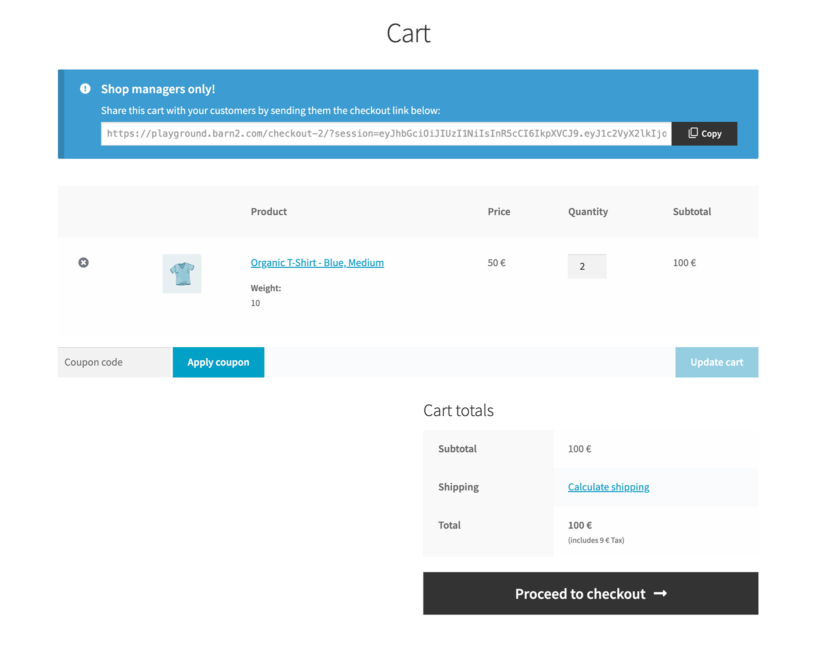
How it works
Create the cart exactly as you want the customer to see it, then copy the generated link from the cart page.
- Log into your WooCommerce store with an Administrator or Store Manager account.
- Open a product that uses WooCommerce Product Options.
- Choose the required options, variations, and quantities, then add the product to the cart.
- Open the WooCommerce cart page.
- At the top of the cart, copy the shareable cart link shown in the admin-only box.
- Share the link anywhere you need, for example in emails, quotes, blog posts, or support replies.
- When someone opens the link, their cart is automatically populated with the same product configuration you created.
Notes
- The link box is only visible to logged-in store managers and administrators.
- Customers never see the link generator itself.
- Any coupons applied to the cart are included in the link.
If searching the knowledge base hasn't answered your question, please contact support.