A WooCommerce wholesale plugin lets you sell to B2B buyers and resellers from the same store as your retail customers. WooCommerce Wholesale Pro adds a hidden B2B area with registration, user roles, role-based pricing and more. Mix and match the plugins in our wholesale bundle to add quick one-page order forms, bulk pricing and minimum quantities.
Flexible WooCommerce wholesale pricing
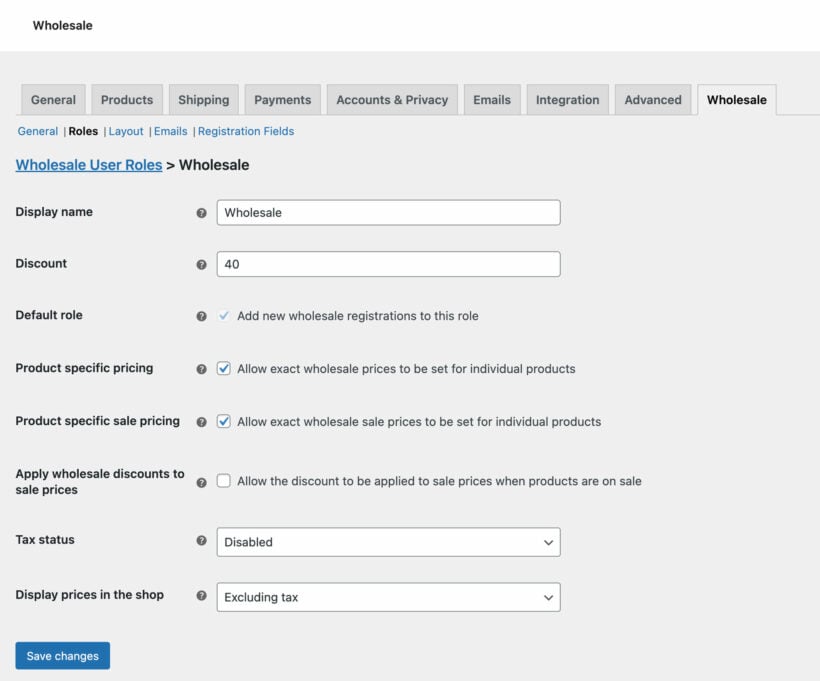
Create unlimited wholesale roles, each with their own pricing
Set global or category percentage discounts
Add wholesale prices for individual products
Streamlined wholesale user management
Allow wholesale buyers to register
Choose whether to hold new accounts for moderation or allow instant access
Add wholesale resellers manually or quickly convert existing customer accounts
Efficient B2B ordering for WooCommerce
Mix and match our suite of five B2B plugins to create a tailored WooCommerce wholesale store
Bulk buying interface designed for resellers
Maximizes your wholesale revenue
WooCommerce wholesale. Perfected.
We worked with thousands of stores to design the ultimate WooCommerce wholesale plugin
3 Pricing Options
Unlimited Wholesale Roles
Wholesale Registration
Wholesale Visibility
Wholesale Order Forms
Bulk Pricing and Quantities
Wholesale Registration
Customizable wholesale registration form
Build a custom B2B registration form with as many fields as you need, grouped into sections, with conditional logic to show fields only when needed. Choose from 7 field types: Single-line text, email, phone, dropdown, radio buttons, checkbox and file upload.
Where the registration form appears
Include the form on the WooCommerce wholesale login page, or create a dedicated reseller registration page with the [wholesale_registration] shortcode. You can also choose the page that wholesale users see after registering or logging in.
Flexible user moderation
Either let new wholesale users login immediately, or hold their registration for approval by an administrator.
Custom registration emails
The WooCommerce reseller plugin comes with 5 customizable emails for each stage of the registration process.
User profile field mapping
Map any registration field to the matching WooCommerce billing or shipping field, so the submitted data saves straight to the customer's account.
Wholesale User Roles
Unlimited wholesale user roles
Create as many roles for your WooCommerce resellers as you like. (The first one is created for you automatically.)
Role-based B2B discounts
Set separate wholesale prices and discounts for each user role - ideal for adding multiple discount tiers for different types of reseller.
Easily add wholesale users
Allow new wholesalers to self-register from the registration form, or add them manually.
Easy user management
Approve and manage your wholesale users in bulk from the WordPress dashboard.
Wholesale Pricing
3 types of wholesale discount
For each wholesale role, you can set global or category level percentage discounts, or set an exact wholesale price for each product and variation.
Wholesale price display
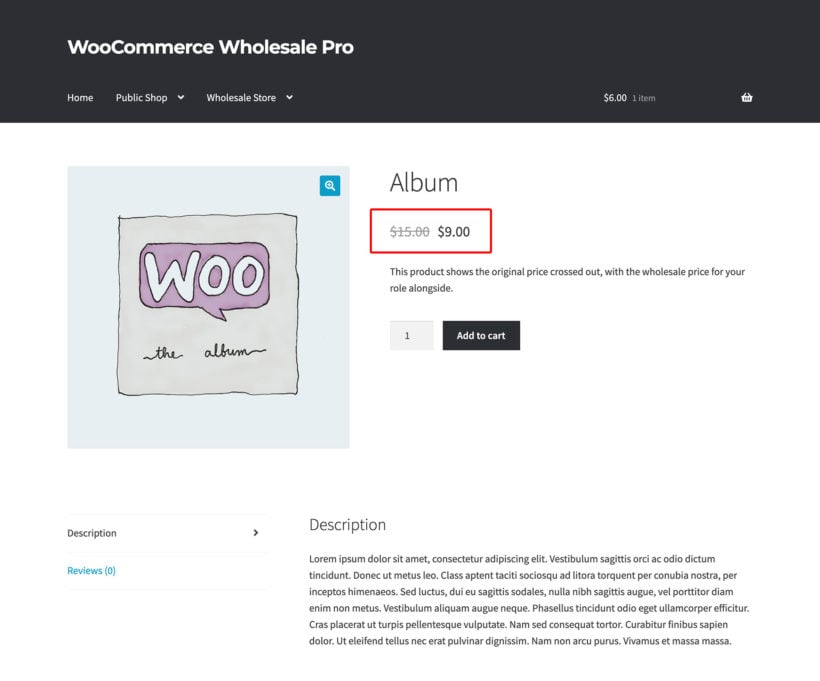
Choose whether to show the original price crossed out with the wholesale price alongside; or to hide the original price.
‘Hide Price Until Login’ option
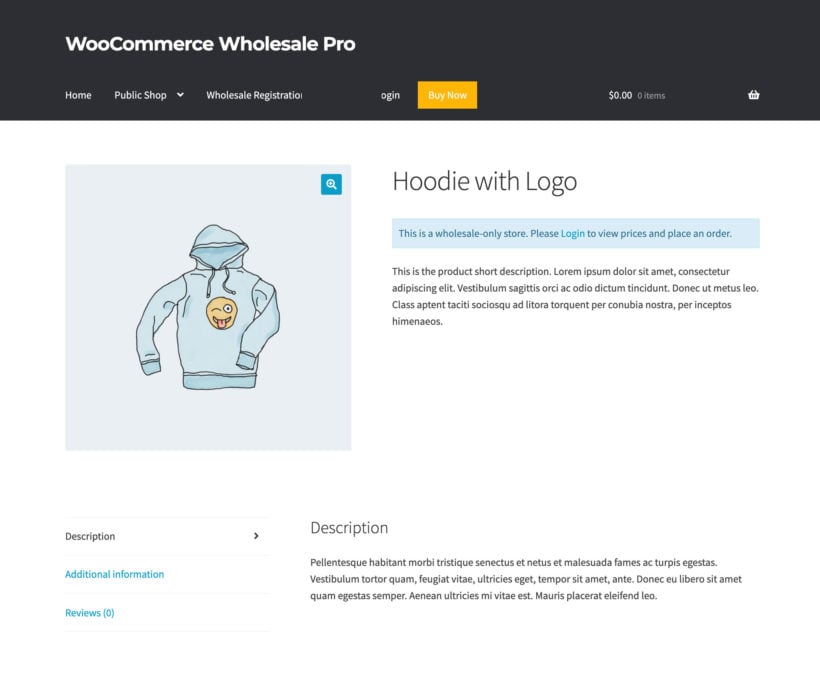
Decide whether to hide prices and add to cart buttons from logged out users - either globally or per category. Optionally add alternate content to appear when prices are hidden.
Sale prices
Optionally add sale prices for wholesale users, either manually or as a percentage of the sale price for retail customers.
Disable tax
Choose whether or not to charge tax for each wholesale reseller role.
Disable coupons
Optionally disable coupon codes for wholesale users.
Quick Order Forms
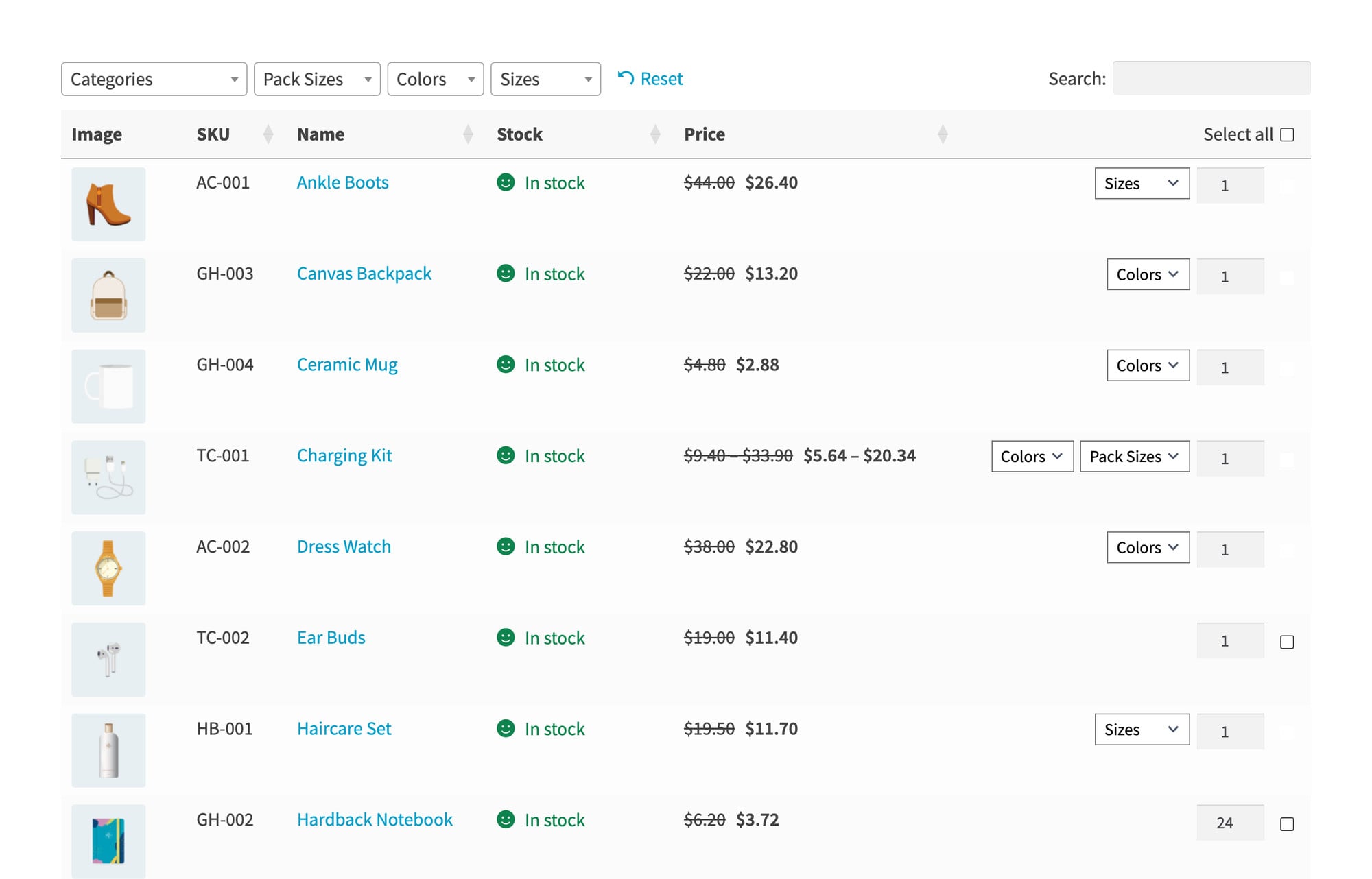
Includes WooCommerce Product Table
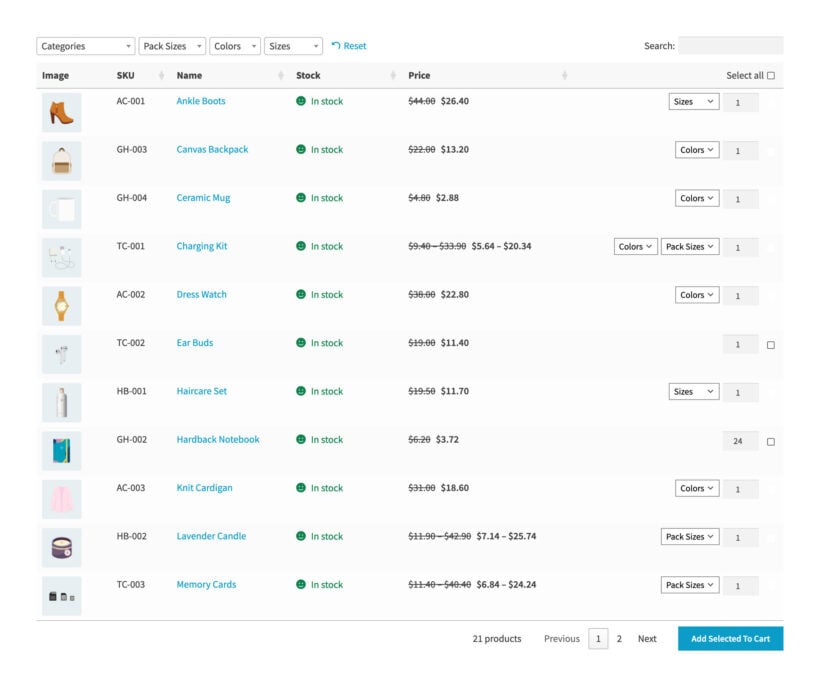
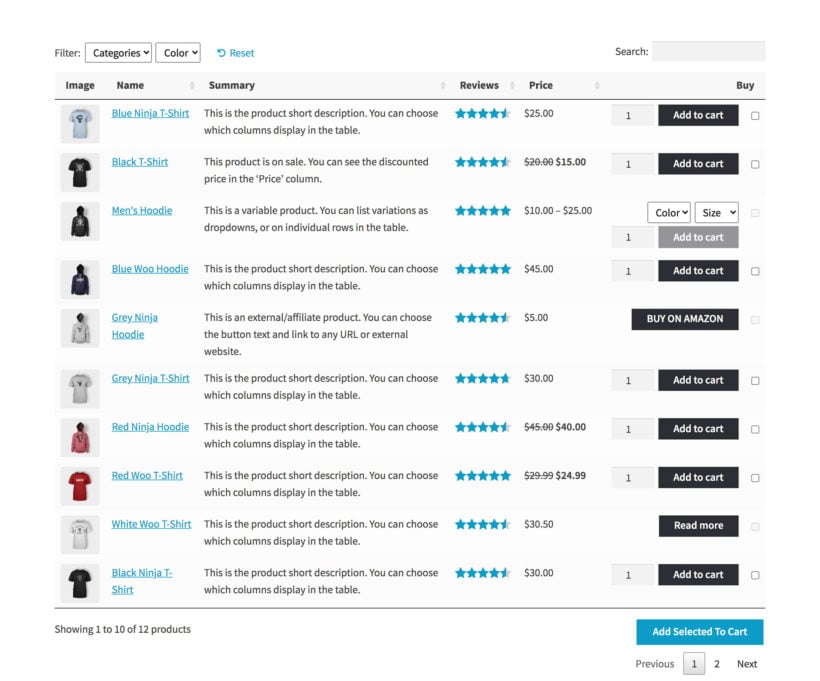
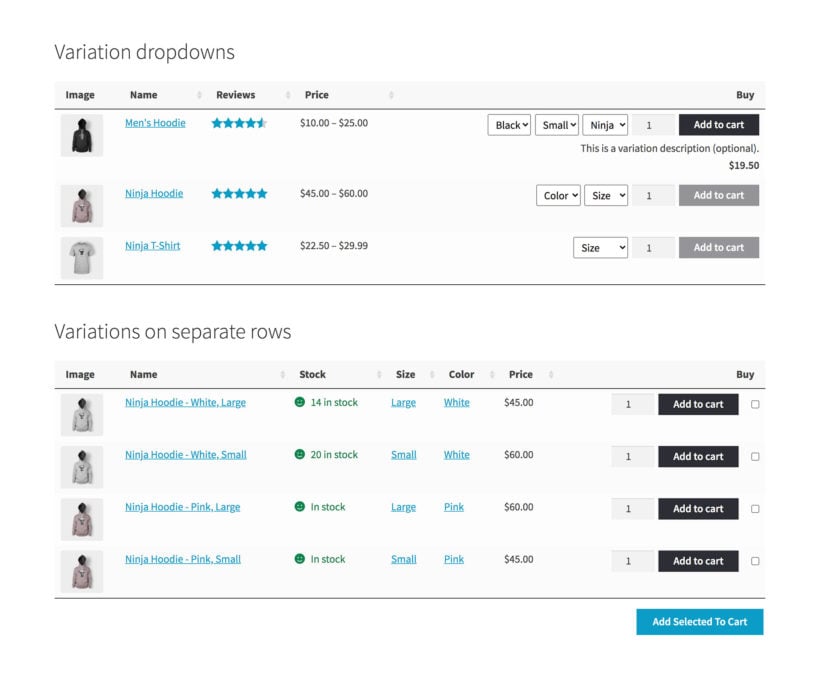
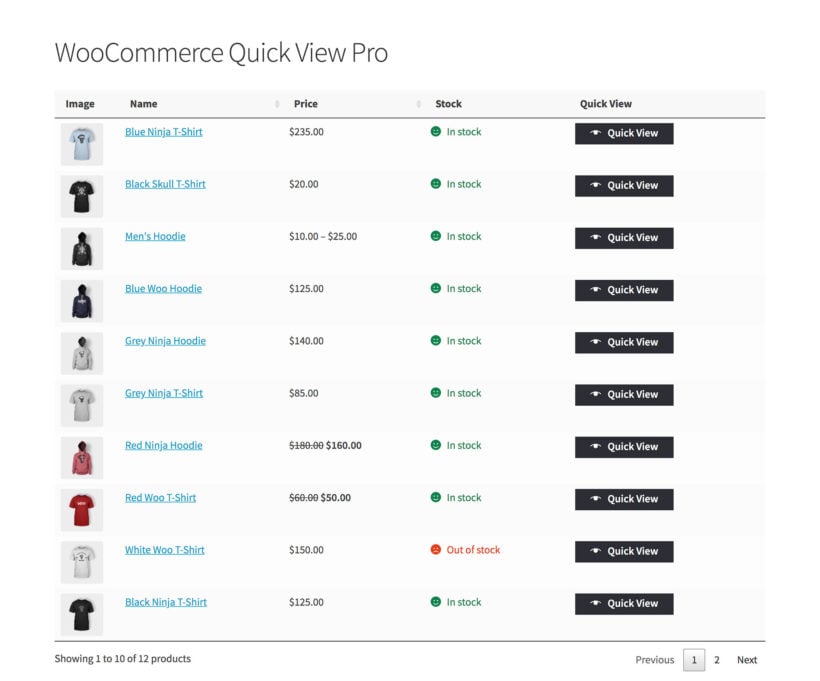
Our WooCommerce wholesale bundle includes the bestselling WooCommerce Product Table plugin, which adds quick order forms to your wholesale store.
Flexible display
Choose whether to use the wholesale order form layout in your public shop, B2B reseller area, or everywhere.
Product Table builder
As well as enabling the order form layout automatically, you can use the Product Table builder shortcode to insert order forms anywhere.
Over 50 options
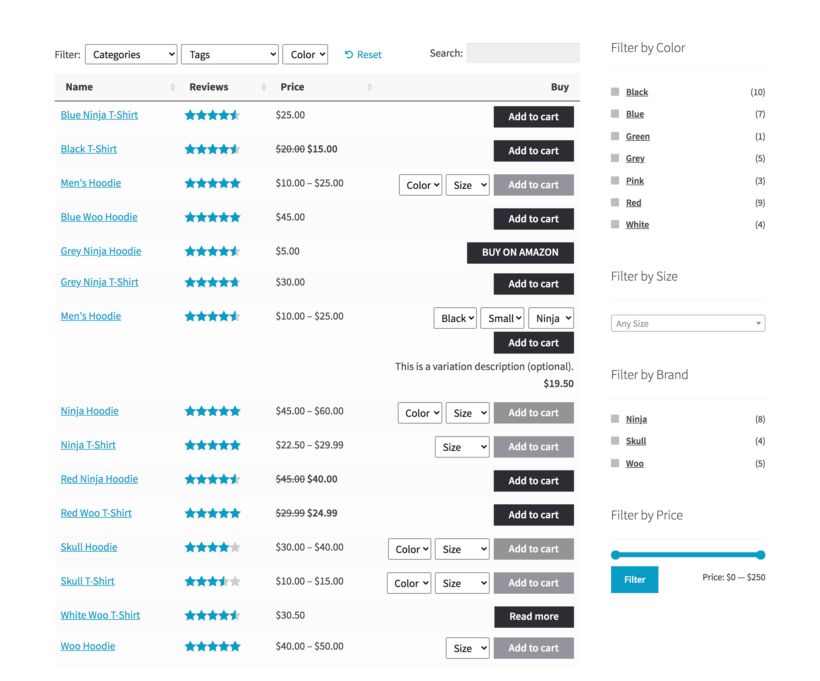
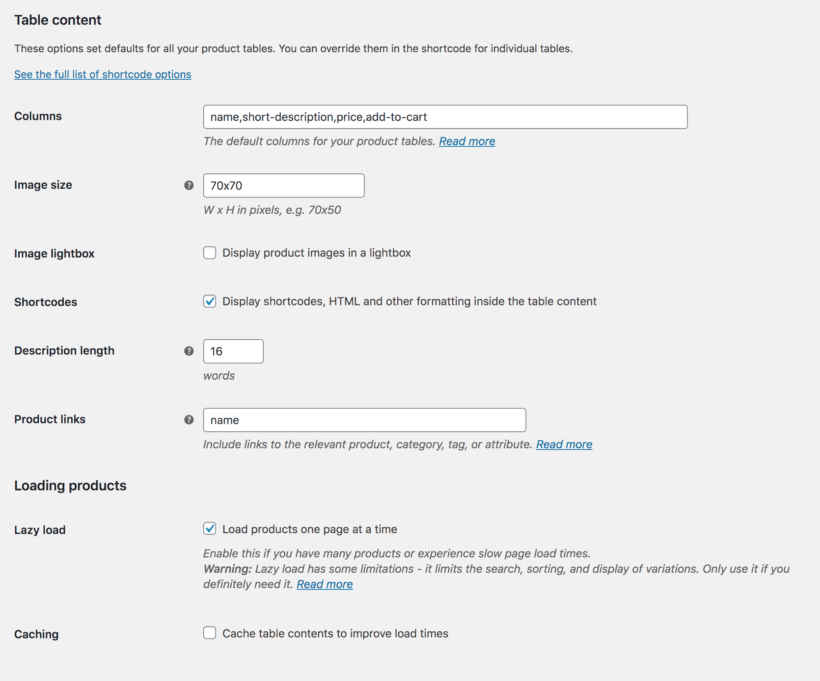
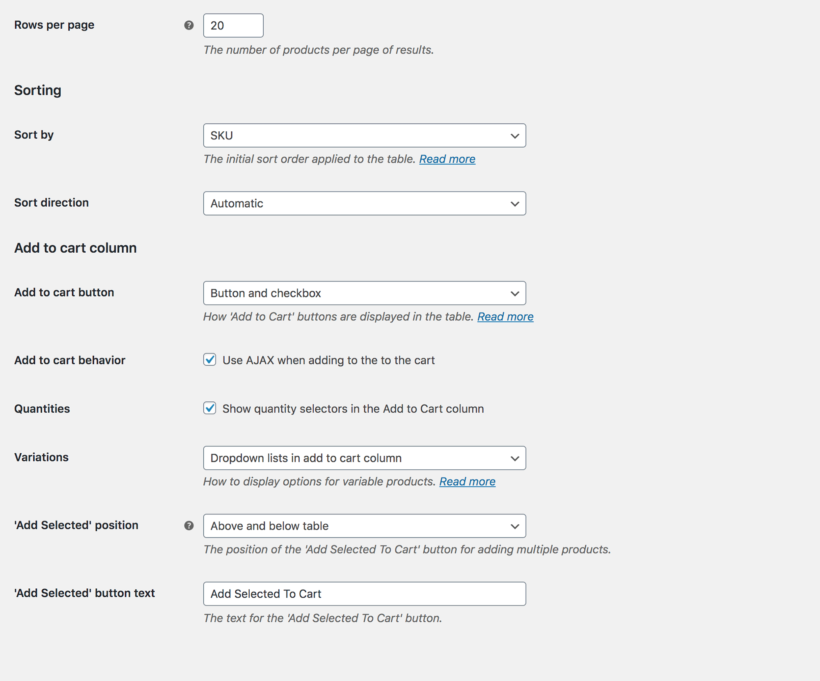
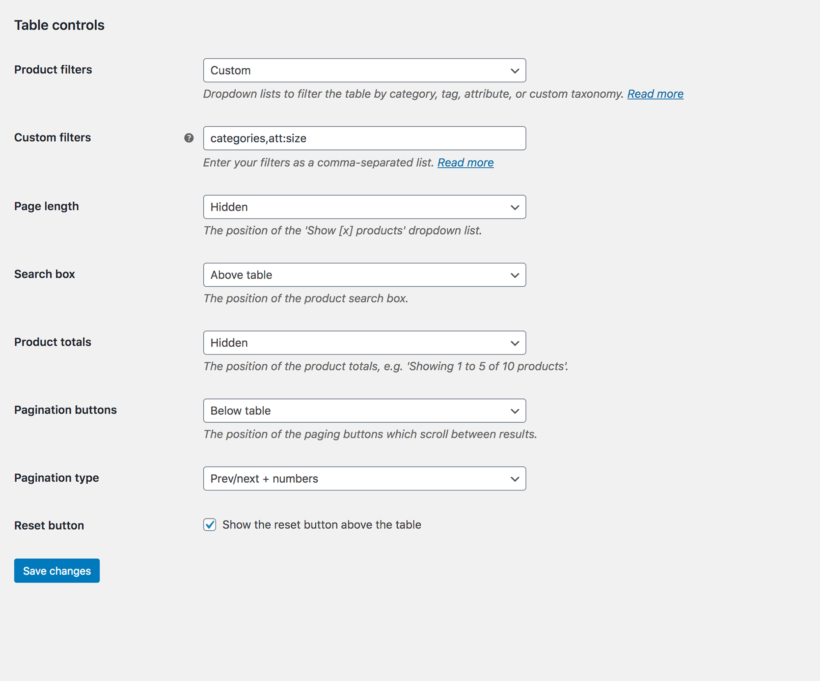
The WooCommerce product order form layout is incredibly flexible and has dozens of customizations. Choose your table columns, add to cart button type, add product filters, and more.
Easy wholesale order management
Filter orders in the WordPress admin based on user type (i.e. retail or wholesale) and manage them together or separately.
Manual wholesale order creation
Store owners can easily create orders on behalf of wholesale users (e.g. if you accept phone orders). They will be charged the correct price for their role.
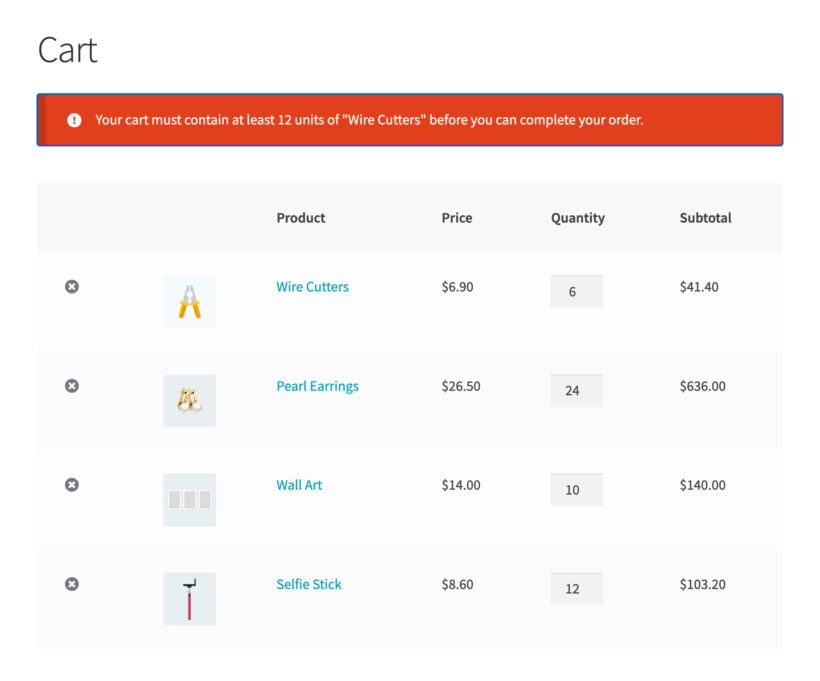
Min/Max Quantities
Includes WooCommerce Quantity Manager
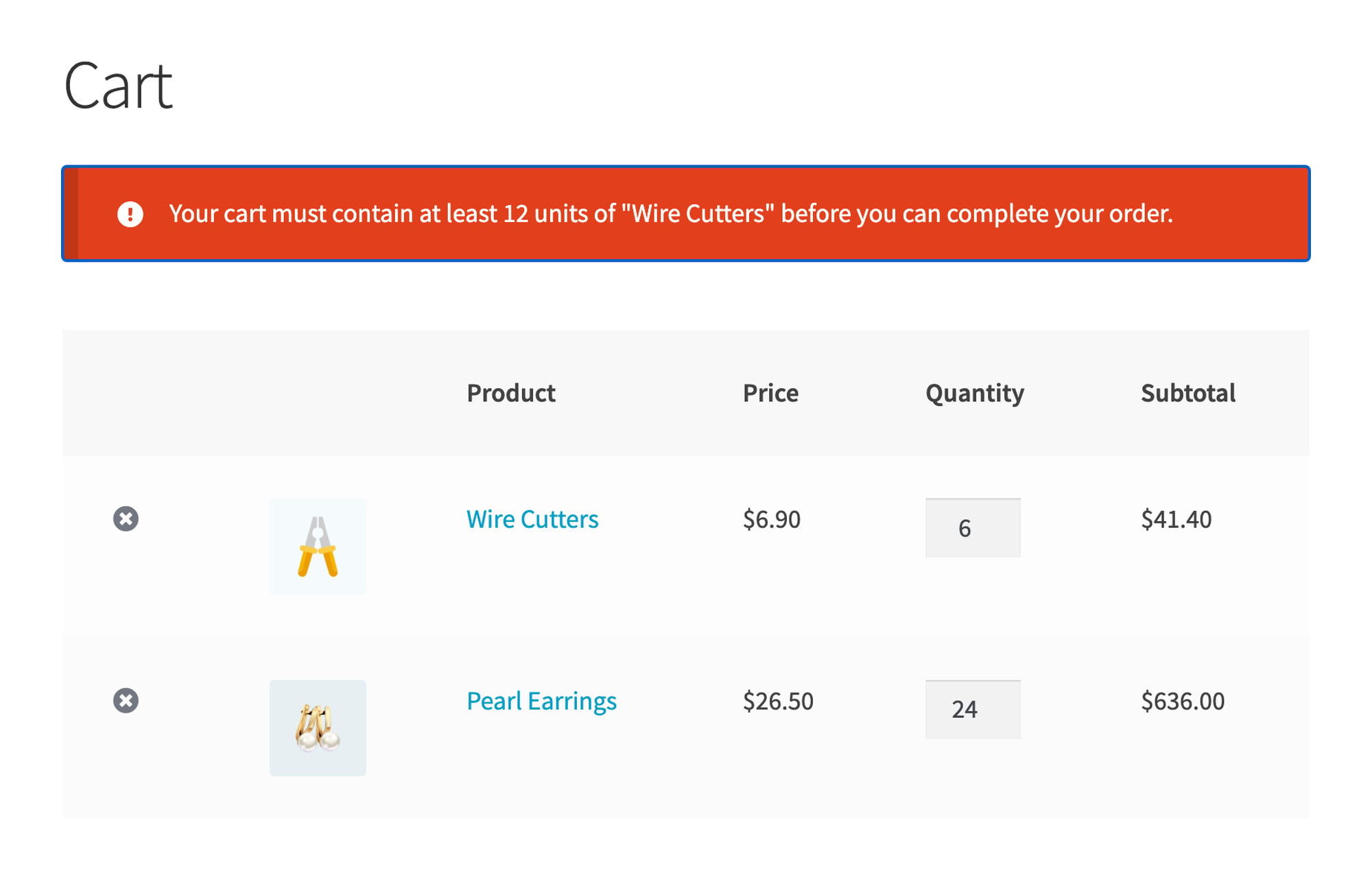
Our WooCommerce wholesale bundle includes the WooCommerce Quantity Manager plugin, which controls the quantities your trade customers can order.
Minimum and maximum order quantities
Set the smallest and largest quantity a wholesale customer can order, across the whole store, a category, a product or a single variation.
Packs, cases and step values
Sell in multiples of 6 or 12, so the quantity box only accepts the amounts you ship in.
Default quantity
Change the starting quantity from 1 to whatever a trade order usually looks like, or to zero so the buyer types their own.
Quantity rules on the product page
Show customers the rule before they reach the cart.
Bulk Discounts
Includes WooCommerce Discount Manager
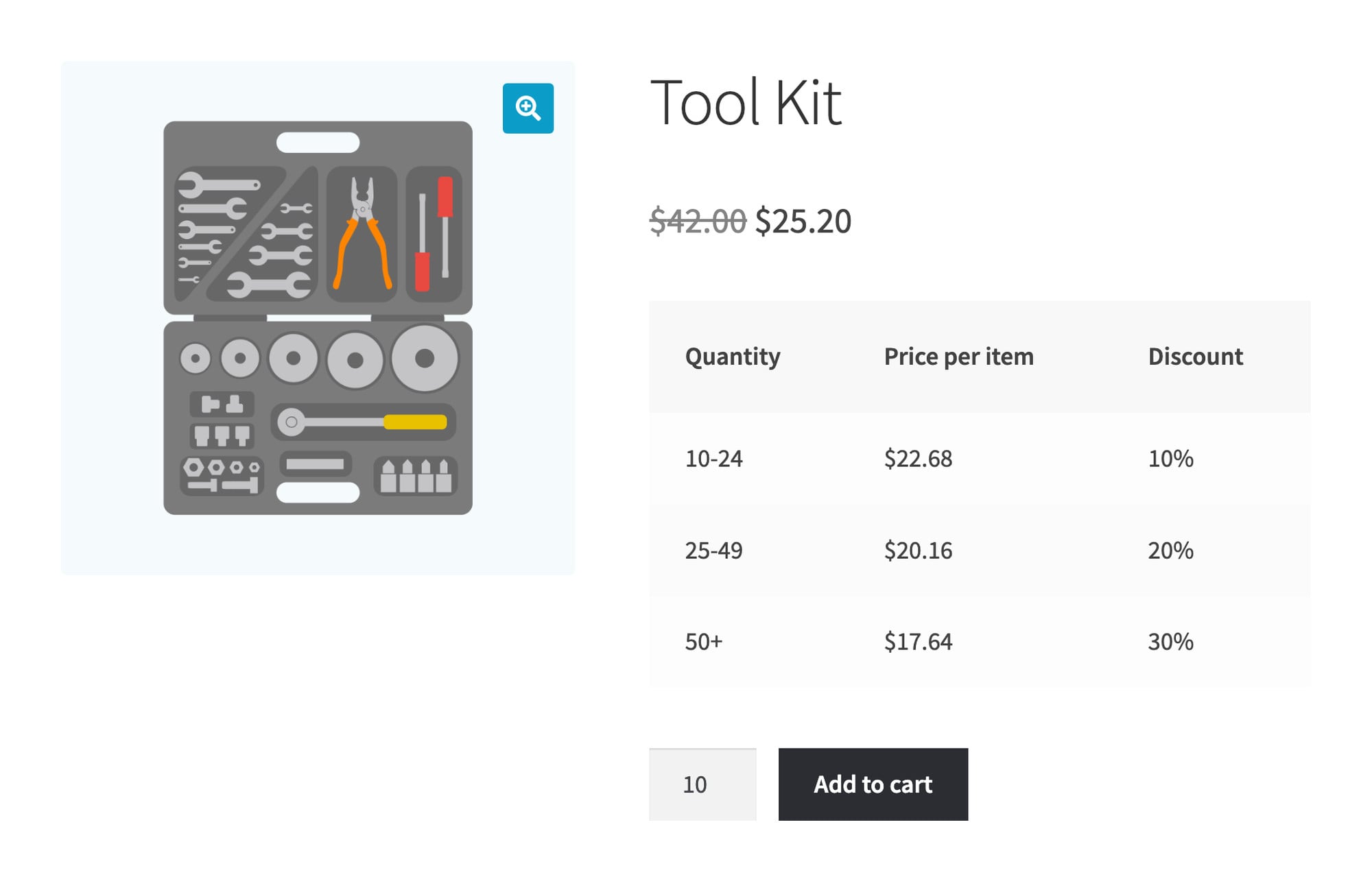
Our WooCommerce wholesale bundle includes the WooCommerce Discount Manager plugin, which prices by quantity on top of your wholesale prices.
Quantity-based discount tiers
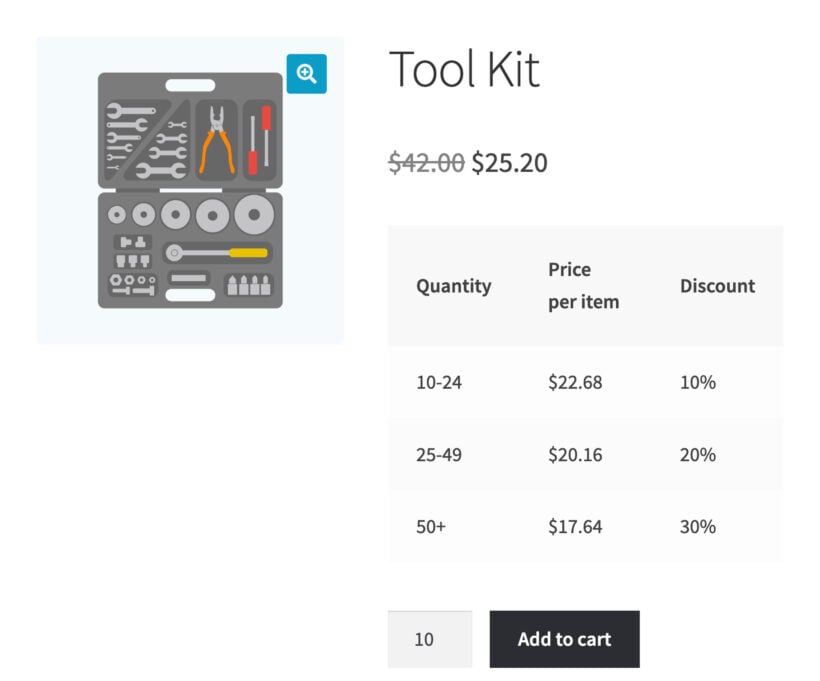
Give 10% off at 10 units, 20% at 25 and 30% at 50, on top of the wholesale price for that role.
Discounts per role, product or category
Choose exactly who gets each discount and what it applies to.
A pricing table on the product page
Show the tiers, so a buyer can see what ordering more is worth.
Scheduled wholesale sales
Start and end a promotion on dates you set.
Variation Grids
Includes WooCommerce Bulk Variations
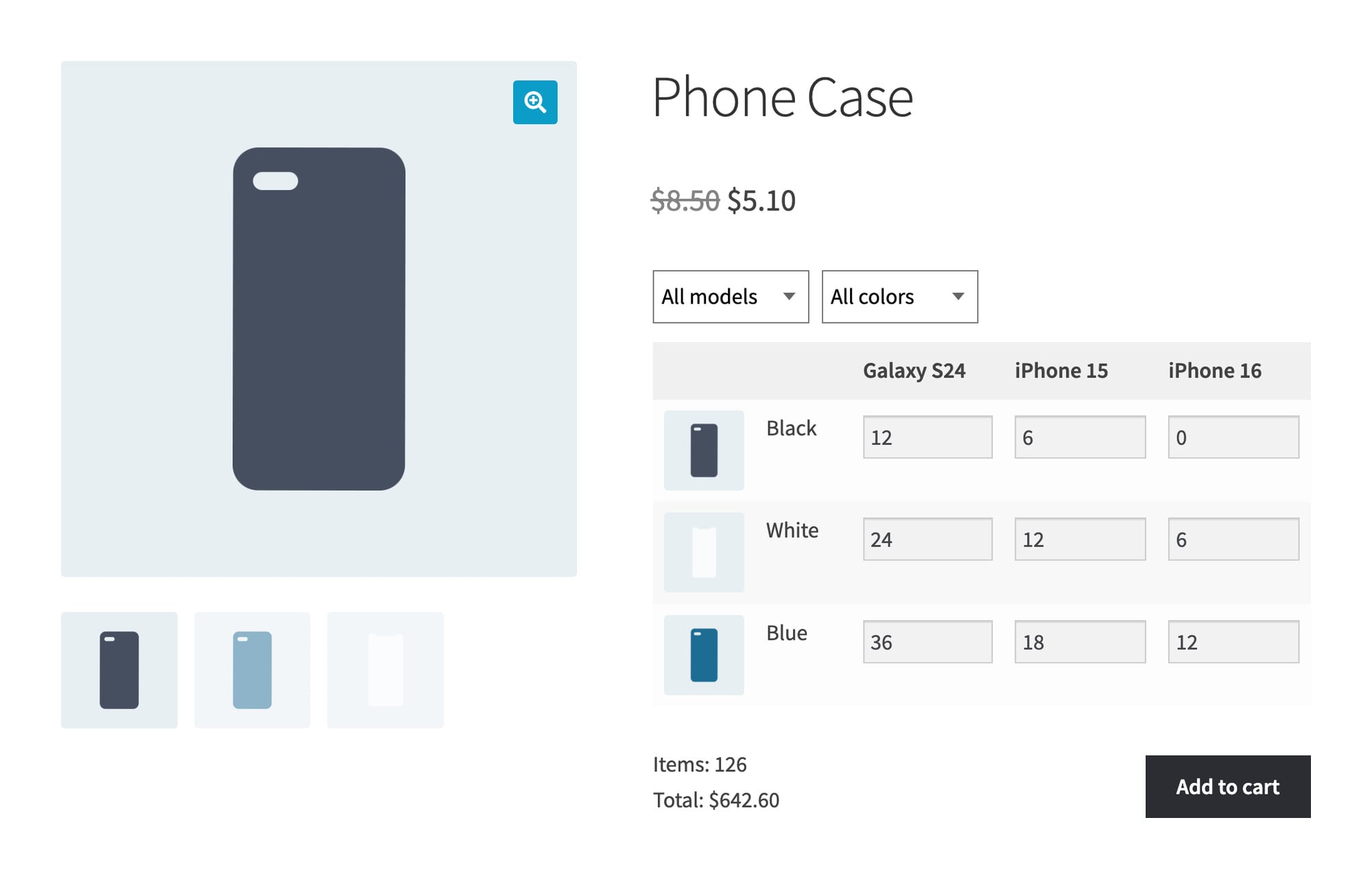
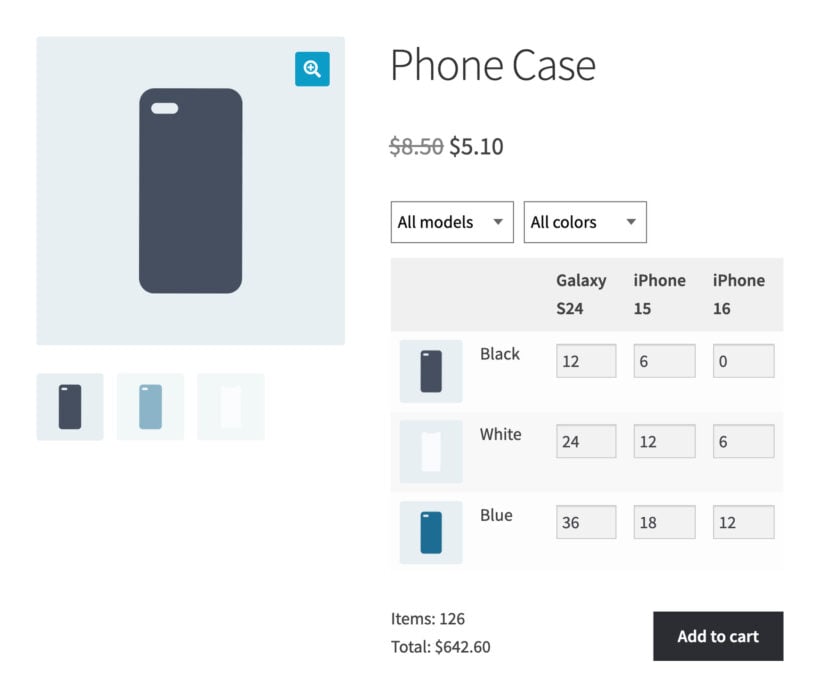
Our WooCommerce wholesale bundle includes the WooCommerce Bulk Variations plugin, which adds a variation ordering grid to your product pages.
Every variation in one grid
Show every size and color as a grid of quantity boxes instead of dropdown menus.
The whole size run in one click
A buyer types 12, 24 and 36 into three boxes and adds all of them to the cart together.
Stock and prices in the grid
Show the price and stock level for each variation beside its quantity box.
Filter dropdowns for large grids
Let buyers narrow a big grid down to the models or colors they order.
Product Visibility
Choose who can see your store
Choose who can see your products by setting each product category or individual product as either Public Only, Wholesale Only, or Both.
Widget visibility
Your WooCommerce widgets will only show products and categories that the current public or reseller user has access to.
Dynamic navigation menus
Your website menus will automatically show the correct links to each type of user.
Compatible with WooCommerce Protected Categories
For more fine-grained control, add our Protected Categories plugin to restrict categories to specific users or roles.
Payments & Shipping
Role-based payment gateways
Choose which user roles can see each payment method. This is ideal for offering different payment options to public and wholesale customers. For example, you can offer better invoice terms to certain WooCommerce reseller roles.
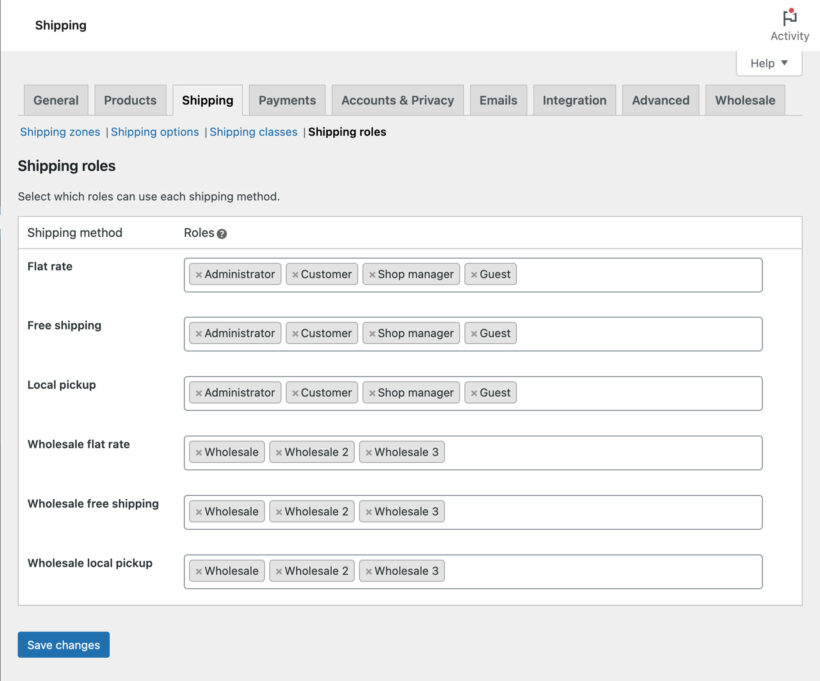
Role-based shipping options
Control which user roles can use each shipping method. This is perfect for offering different shipping options to public and wholesale customers. For example, you can offer free shipping to your most important resellers.
Other Integrations
Multi-currency plugins
Create an international multi-currency WooCommerce wholesale store by using the reseller plugin with WPML's WooCommerce Multilingual plugin or Aelia's WooCommerce Currency Switcher.
“Wholesale is now a reality for our retailers. Wholesale Pro is the solution for wholesale - no question. Looks great. Works great. So easy to use. Our retailers love it because it makes ordering so much easier for them. If I could give 10 stars, I would!”
John Garrett - United States
★★★★★
“Unlike 5 other plugins I tested, Barn2's wholesale plugin truly exceeded my expectations. It stood out for its seamless functionality, user-friendly interface, and unmatched speed. It effortlessly handled complex pricing structures and bulk orders.”
Tom Coady - UK
★★★★★
“With WooCommerce Wholesale Pro's flexibility and hands-on, prompt customer service, the site came out wonderfully. It matched my expectations of wholesale reseller functionality and surpassed my expectations of ease of use.”
Will BuchananBroadsheet Coffee - United States
★★★★★
“The plugin achieves what is stated on their website, but the thing that stands out is their quick responses to support requests. The support team helped us identify the meta data fields of the WooCommerce API needed for pushing the wholesale price.”
Create wholesale order forms with the WooCommerce Product Table plugin
Add variation grids to product pages with the WooCommerce Bulk Variations plugin
Set quantity minimums, maximums and increments with the WooCommerce Quantity Manager plugin
Set quantity-based wholesale discounts with the WooCommerce Discount Manager plugin
All plans include free setup, updates and support. You can upgrade at any time and just pay the difference. If your annual license expires, the plugin will continue working on your site but you must renew to change settings or receive updates, new features or support.
Our world-class support starts here: How can we help?
Which option should I choose?
Pick the option that matches how your trade customers order.
Wholesale Pro adds the wholesale roles, the wholesale prices, the registration form and the hidden B2B area. Choose this if you only need to show trade prices to approved customers.
Wholesale Pro + Product Table also lists your products as a one-page order form, so a buyer adds 20 lines to the cart without opening 20 product pages. You can use the order form in the wholesale area and keep the normal layout in the public shop.
The Wholesale Bundle adds three more plugins. Quantity Manager sets minimum, maximum and multiple order quantities. Discount Manager gives quantity-based discounts. Bulk Variations lets a buyer order every size and color from one grid.
All Access Pass gives you every plugin we make for $100 a year more than the Wholesale Bundle. It's worth it once you want a plugin that isn't in the Wholesale Bundle.
Will public and wholesale customers see the same products?
It's up to you! You can sell the same products to public and wholesale users (with different pricing for each role); or you can mark categories or products as 'Public Only' or 'Wholesale Only' so that only specific people can see them.
Can I hide the prices and 'Add to cart' buttons from non-wholesale users?
Some WooCommerce wholesale-only stores choose to display their full product range to everyone, but only show prices and buy buttons to logged in wholesale users. Our WooCommerce reseller plugin has a 'Hide Price Until Login' feature which lets you put the store into catalog-only mode for public visitors and guests. You can hide prices for all products, or for products in specific categories only.
That way, everyone can browse your products, but only logged in wholesalers can see the prices or make a purchase.
You can either just hide prices and buy buttons from guests, or you can display alternate content on the page. For example, you might add a message such as "Login to view prices and place an order".
If you prefer, you can use the plugin's visibility options to completely hide your products from public view.
Do the WooCommerce wholesale prices work with variable products?
If you set a percentage role-based wholesale discount for a particularly category or across your whole store, then this will apply to product variations as well as all other product types. If you choose to set exact wholesale prices for each product then you can set an exact price for each wholesale role per variation. If your wholesalers order several variations at once, WooCommerce Bulk Variations shows them all as a grid of quantity boxes. It's included in the Wholesale Bundle.
Does it support user-specific pricing?
When you use WooCommerce Wholesale Pro on its own, you can charge unique prices per user by creating a unique role for that user, setting up the pricing as needed, and assigning them to it.
To set prices for individual customer accounts, use Wholesale Pro with WooCommerce Discount Manager, which is included in the Wholesale Bundle. This lets you create additional discounts and select one or more individual user accounts that they will be used on.
Can I hide the public shop from wholesale resellers?
Yes - when a wholesale user logs into their account, any links to the main public Shop page will be hidden. Instead, the wholesale for WooCommerce plugin creates a 'Wholesale Store' page which lists your B2B products in the appropriate layout. You can add this to the navigation menu and only logged in resellers will be able to see it.
If you're using the order form layout then wholesale users will always see the products displayed in this way, for example if they visit a category page.
If you have products which are only available to public customers, then you can set specific categories or products to 'Public Only' so that they will be hidden from wholesale resellers.
How do I set bulk discounts for wholesale users?
Used alone, WooCommerce Wholesale Pro lets you set percentage discounts or product-specific pricing for each wholesale role. The same prices are charged regardless of the quantity ordered.
You can use it with our WooCommerce Discount Manager, which is included in the Wholesale Bundle, to add quantity-based tiered discounts for your wholesale roles. This lets you add as many bulk pricing levels as you like, and display them in a neat table on product pages to encourage WooCommerce resellers to buy more.
Can I set a minimum quantity or order value for wholesale buyers?
Some WooCommerce wholesale stores set minimum quantities or spend values for their B2B resellers. You can do this with WooCommerce Quantity Manager, which is included in the Wholesale Bundle.
This lets you set min/max quantity rules and spend values, either globally or for specific products, categories or variations. You can also use it to set quantity increments and step values - for example, for products that can only be bought in certain groupings.
You can set up these quantity rules for all your customers, or enable them for the wholesale roles only.
Can I sell customer-specific products?
Our WooCommerce reseller plugin lets you set each product category to Public Only, Wholesale Only, or Both. For more fine-grained control, you can use it with our other plugin - WooCommerce Protected Categories.
WooCommerce Protected Categories lets you restrict each product category to specific users or roles. For example, it's perfect if you need to:
Sell unique products (e.g. branded workwear) to each customer, which no other customers can see.
Sell different products to different groups of wholesale users.
Can I have different payment and shipping methods in the wholesale area?
Yes - our wholesale plugin for WooCommerce lets you select exactly which role(s) can access each payment and shipping method in your store. For example:
You might want to offer Stripe credit card payments to all users; PayPal to normal customers and guests only; and a pay later/invoice option to your most trusted wholesale resellers only.
You might want to offer flat rate shipping to everyone; a local pickup option for all wholesale roles; plus free shipping as an added bonus for your Gold or Elite wholesale role.
Tip: WooCommerce Wholesale Pro works with other shipping plugins such as Table Rate Shipping. We recommend using this if you want to offer weight-based shipping to wholesalers.
Can I disable taxes and coupons for wholesale resellers?
Yes - if taxes are enabled in your public store then you can disable them for any or all of your wholesale roles. You can also disable coupon codes and hide the coupon field for wholesale users.
Can I import wholesale prices to my store in bulk?
If you are importing products to your store - e.g. from CSV or XML - then you will probably want to import the wholesale prices at the same time. The easiest way to do this is to set the wholesale discounts globally or per category. That way, the correct discounts will be applied for the new products automatically.
It is also possible to import exact wholesale prices to individual products. This is a bit more complicated, so please read our knowledge base article for guidance.
How do I manage wholesale orders in WooCommerce?
Orders from wholesale resellers appear in the 'Orders' page of WooCommerce alongside your orders from regular customers. You can either manage all the orders together, or filter by retail or wholesale to view them separately.
It's also easy to create manual wholesale orders on behalf of your resellers, for example if you accept phone orders. When you create a manual order in WooCommerce and select a user with a wholesale role, the correct price for their role will be used automatically.
Will it work with my theme and other plugins?
WooCommerce Wholesale Pro works with any well-coded WordPress theme and a wide range of other plugins. The wholesale registration form and login page match WooCommerce's own default registration form and login page. You do not need a developer to write custom code or edit theme template files.
If you use WooCommerce Wholesale Pro with WooCommerce Product Table, the order form inherits your theme's styling by default. You can also override it from the plugin settings page.
Our wholesale plugins for WooCommerce are designed to work with any WordPress translation plugin such as WPML, WeGlot and TranslatePress . This makes it easy for you to translate the plugin text into any language and use it on multilingual websites. It also supports right-to-left (RTL) languages.
If your bundle includes Product Table, the wholesale order forms come with translations for English, French, Spanish, Portuguese, German, Italian, Dutch, Greek, Polish, Swedish, Norwegian, Finnish and Hebrew.
What are the minimum requirements for running the plugin?
WooCommerce Wholesale Pro is fully tested with the latest versions of WordPress and WooCommerce. We always recommend running the most up-to-date version, but we also support older installations:
WooCommerce 7.2 or greater (tested to 11.0.1)
WordPress 6.1 or greater (tested to 7.0.4)
PHP 7.4 or greater (tested to 8.5)
MySQL 5.7.8 or greater / MariaDB 10.3 or greater
What offers are available for WooCommerce Wholesale Pro?
Several offers are available if you are a nonprofit or wish to buy multiple plugins:
Bundles - Buy Wholesale Pro with Product Table, or buy the Wholesale Bundle and get all five wholesale plugins. Select either one in the pricing table above.
Multi-buy discount - Add any two or more Barn2 plugins to your cart and get 40% off automatically at checkout. This is ideal for adding plugins that aren't in the Wholesale Bundle, such as WooCommerce Protected Categories and WooCommerce Product Options. The most expensive plugin stays at full price, and every other plugin is reduced by 40%. No coupon needed.
All Access Pass - For the best possible value, get our All Access Pass which gives you VIP access to our entire plugin suite including WooCommerce Wholesale Pro.
Charity discount - Registered nonprofits get 15% discount off.
I needed a solultion that gives me all the opportunities to create a B2C and B2B-shop in one installation. The plugin gave me all the opportuninites to create different user roles and set the prices ond the product. So i am very happy with the solution! I actually did a lot of evaluation and testing on this so i can very recommend this soltution for people that create a Wholesale / B2B-Shop.
Also i have to give big thanks to the support that is very competent and quick!
Andrew
Great Plugin
Rated 5 stars
By Andrew on
Exactly the solution we were looking for our client's e-commerce website. Support from Barn2 is excellent too.
Brian Bass
Wholesale Pro is awesome!!!
Rated 5 stars
By Brian Bass on
I searched long and hard and finally found the perfect Wholesale plug-in for WooCommerce. Wholesale Pro is EXACTLY what I needed. Whats even better is their support staff. They have been very quick to reply and extremely helpful!!
Thank you!!
Brian Bass
Wholesale Pro is awesome!!!
Rated 5 stars
By Brian Bass on
I searched long and hard and finally found the perfect Wholesale plug-in for WooCommerce. Wholesale Pro is EXACTLY what I needed. Whats even better is their support staff. They have been very quick to reply and extremely helpful!!
Thank you!!
Matt
Great pliugin great service
Rated 5 stars
By Matt on
Great product and service - no job is to big or small would highly recommend
Robert Mackay
Fantastic support
Rated 5 stars
By Robert Mackay on
Really good plugin. Much better than anything else we found but the standout for us was the level of service and support. Excellent!
melissa hill
Happy Customer
Rated 5 stars
By melissa hill on
I am happy with the product as well as the kind support/service. They have been honest and reliable and I am happy that I found them.
Amy Wayth
Happy customer
Rated 5 stars
By Amy Wayth on
This plugin has been very easy to use to grow my wholesale business along side my retail business.
The support team are awesome!
Oli
Great Support
Rated 5 stars
By Oli on
Good plugin, and great support. Thanks!
Michael Aulia
Easy to use and powerful wholesaler plugin
Rated 5 stars
By Michael Aulia on
The ability to create different wholesaler roles (like business trades, etc.) with different pricing makes it a powerful plugin. Settings are easy to understand and overall experience is pretty flawless. Support is top notch too, very responsive and really understand the product they are supporting.

























Great Plugin & Support
By Pascal on
I needed a solultion that gives me all the opportunities to create a B2C and B2B-shop in one installation. The plugin gave me all the opportuninites to create different user roles and set the prices ond the product. So i am very happy with the solution! I actually did a lot of evaluation and testing on this so i can very recommend this soltution for people that create a Wholesale / B2B-Shop.
Also i have to give big thanks to the support that is very competent and quick!