Fed up with boring variation dropdowns? No problem! Use our WooCommerce Product Options plugin to replace them with eye-catching color, text and image swatches 🎨
Color swatches, image swatches, prices and rules, all on one product page
Color swatches
Image button swatches
Text label swatches
Swatches from your variations
Price formulas
Quantity per choice
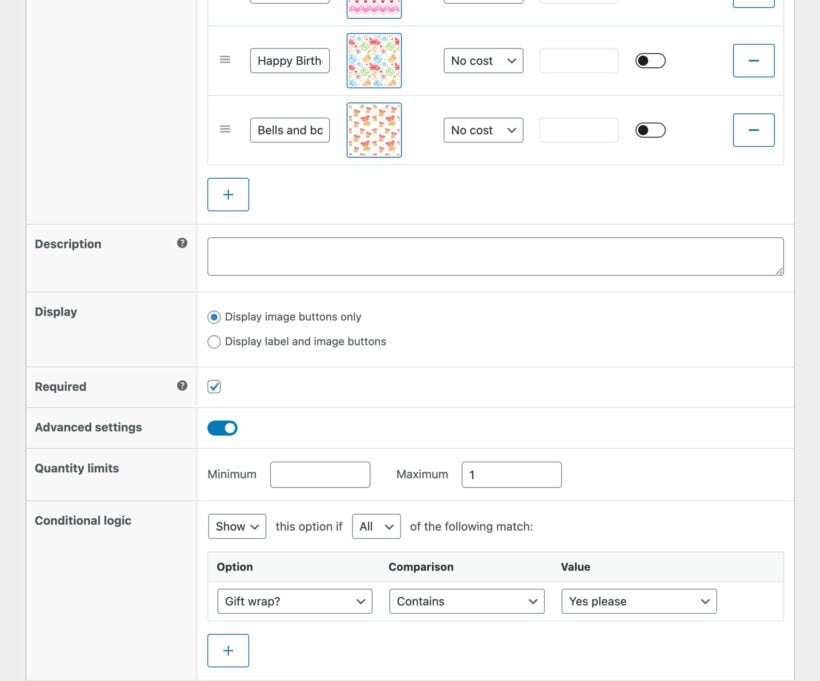
Conditional logic
Works with your theme
2 ways to create variation swatches
Show your existing variations as swatches
Already built your colors and sizes as WooCommerce variations? Pick the attribute and we display its terms as color swatches, image buttons or text labels. Your variation prices, stock and SKUs carry on working exactly as they do now.
Or create the swatches without variations
WooCommerce variations are slow to build and manage, so you can skip them altogether. Build the choices in our own interface instead: Five sizes in 10 colors is 15 choices rather than 50 variations.
Or use both on the same product
Show your variations as swatches, then add more options underneath for anything a variation can't hold, such as a name to engrave or a logo to upload.
3 eye-catching swatch styles
Color swatches
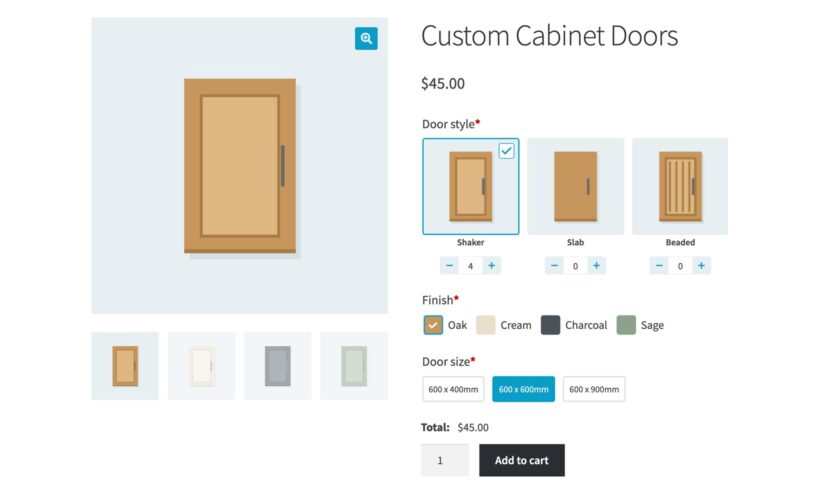
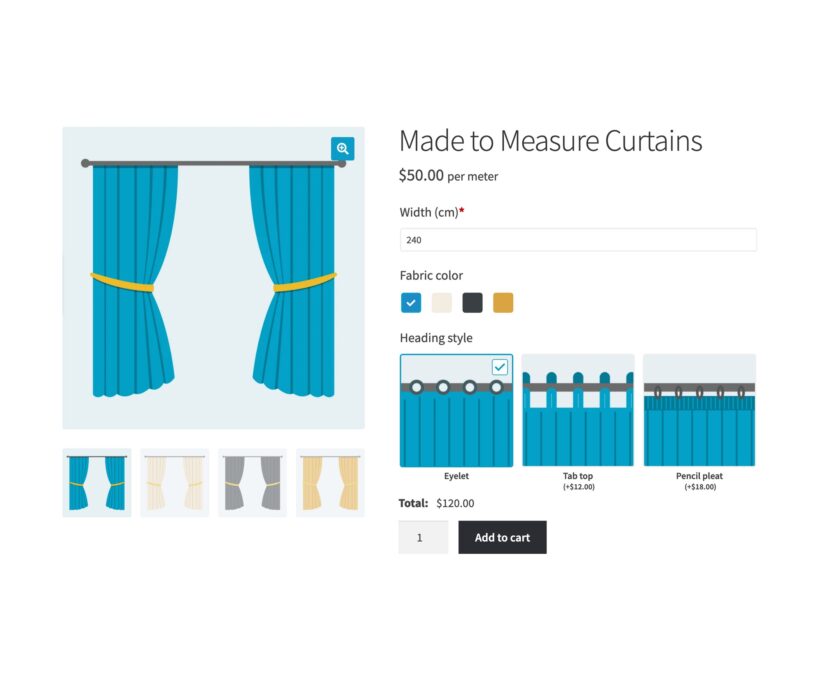
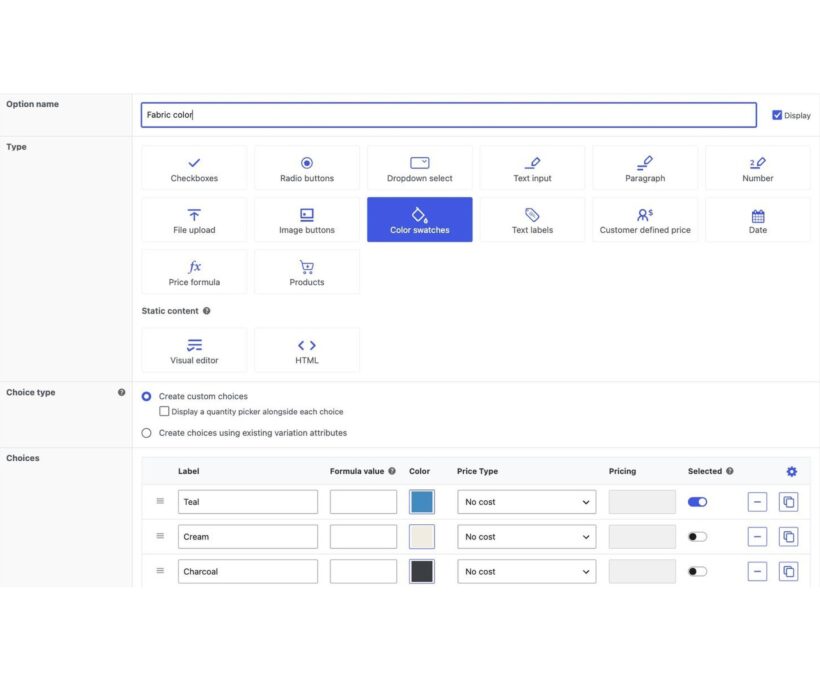
Each choice appears as a block of color, with the color name beside it or on its own. Add a quantity picker to any choice, and customers enter a quantity against each color.
Image buttons
Each choice appears as a photo instead of a flat color. A jewelry store we work with uses photos of each finish, because a photo shows the texture of the metal.
Text labels
Each choice appears as its name in a button, which suits sizes, finishes and materials. Customers read every option without opening a dropdown.
Flexible variation swatch pricing
A swatch built from a variation keeps the price you already set on that variation.
Put a price on the choices you create
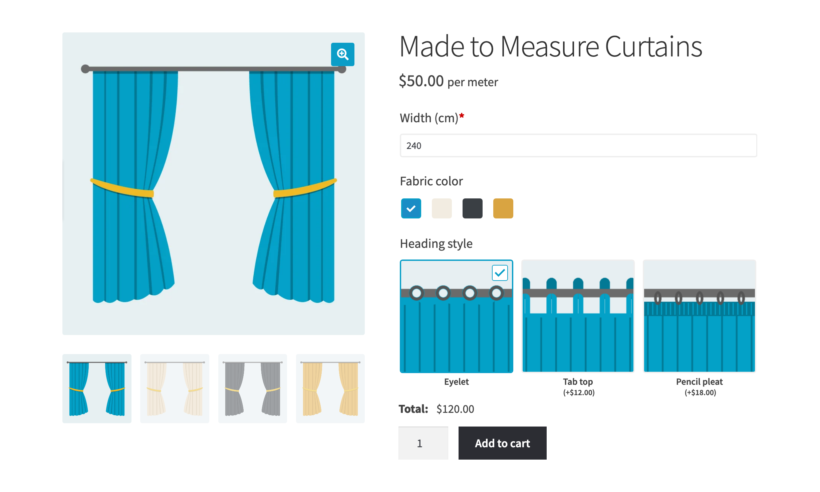
A choice you build in the plugin can add a fixed amount, a percentage, or a charge per unit. The total updates on the product page as the customer clicks.
Use any swatch in a price formula
Your variation attributes work as variables in a price formula, alongside the options you create, the quantity and the product's own dimensions. That lets you charge by area, by material or by quantity break. Describe the pricing in plain English and our AI bot writes the formula.
Add smart conditional logic
One choice narrows the next
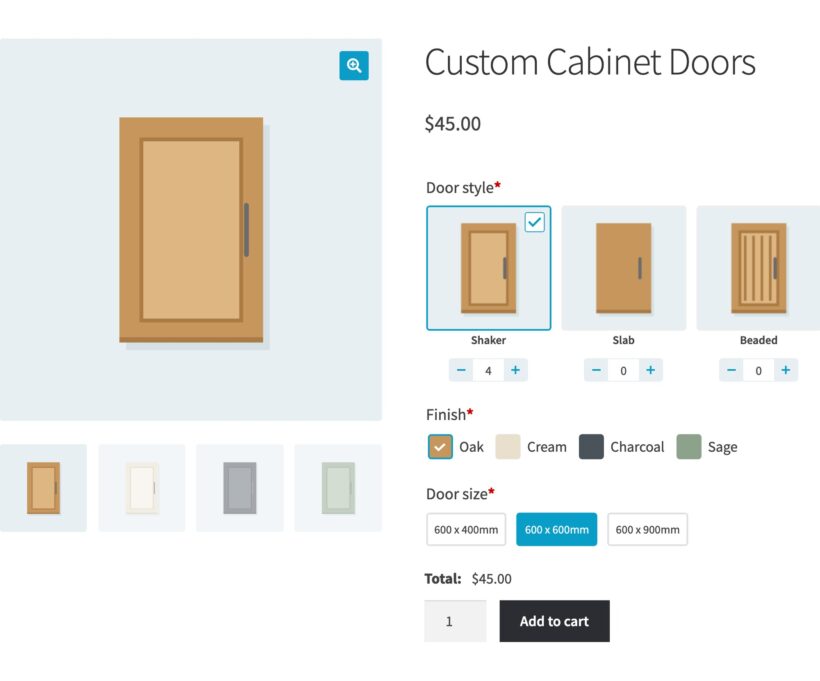
At The Cabinet Door Store, customers pick the finish first. They then see only the color swatches that finish comes in.
Keep the product page short
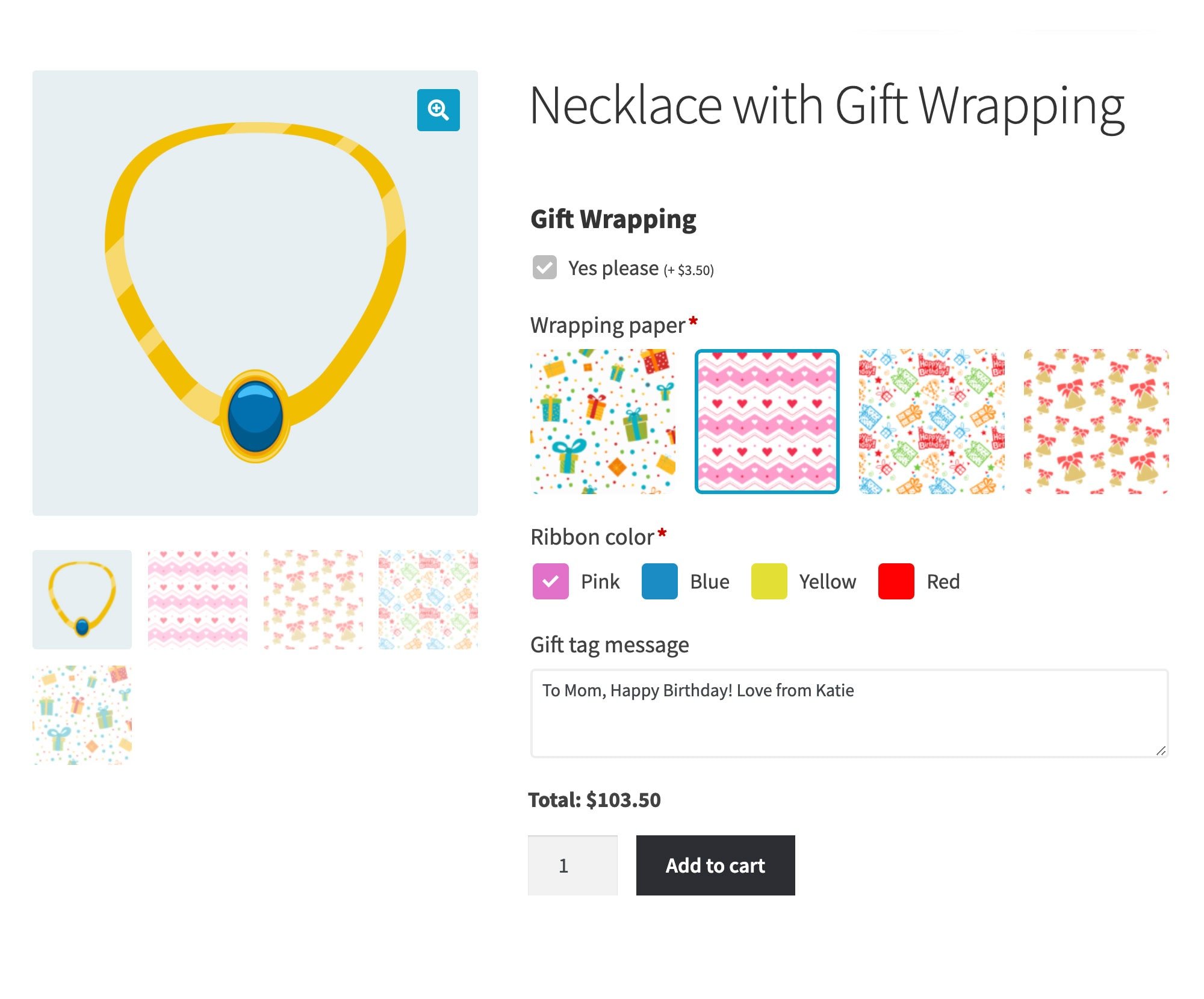
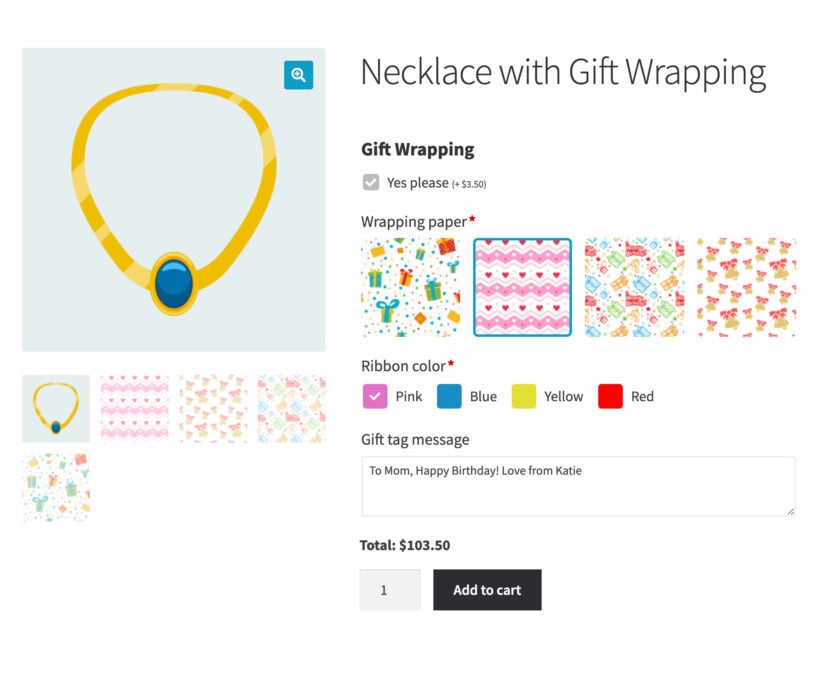
A small checkbox keeps the gift wrap swatches hidden until a customer ticks it.
Minimum and maximum quantities
Set how many choices a customer can pick, and how many of each. A sample pack can cap the total at six, however the customer mixes the colors.
Swatches everywhere your customers shop
Your swatches appear wherever your theme puts the add to cart button, on simple and variable products alike. They work in Divi, Elementor, Bricks, Breakdance and any well-coded theme.
The most flexible way to put color and image swatches on a WooCommerce product
★★★★★
“I was looking for a plugin that would allow my customers to build a product dynamically. The Barn2 plugin worked great for my project. Their customer service went above and beyond. Highly recommended!”
Kim Earp - USA
★★★★★
“The plugin gave us a solution to buy products in bulk, rather than individually - very useful for teams. It installed easily and works perfectly with WooCommerce variations, saving us a lot of time!”
Ian Curtis - UK
★★★★★
“It’s incredible how quickly things get complicated when you’re trying to price accurately. I haven't seen another plugin that lets you have formulas that you can use in Excel on a website.”
Richard Fewings - UK
★★★★★
“The team at Barn2 has done it again! We were able to add our options in no time. It works great with restaurant ordering, where you want customers to click on a thumbnail to add options (think Pizza).”
Armando J. Pérez-Carreño - USA
★★★★★
“The plugin was just what I needed to display a lot of add-ons to my products in a nice and easy way. At some point I needed some support and I got a comprehensive answer!”
Karin Van Genegen - Belgium
Getting started
Set up WooCommerce variation swatches
Install Product Options
Install the plugin on your store, then enter your license key in the setup wizard.
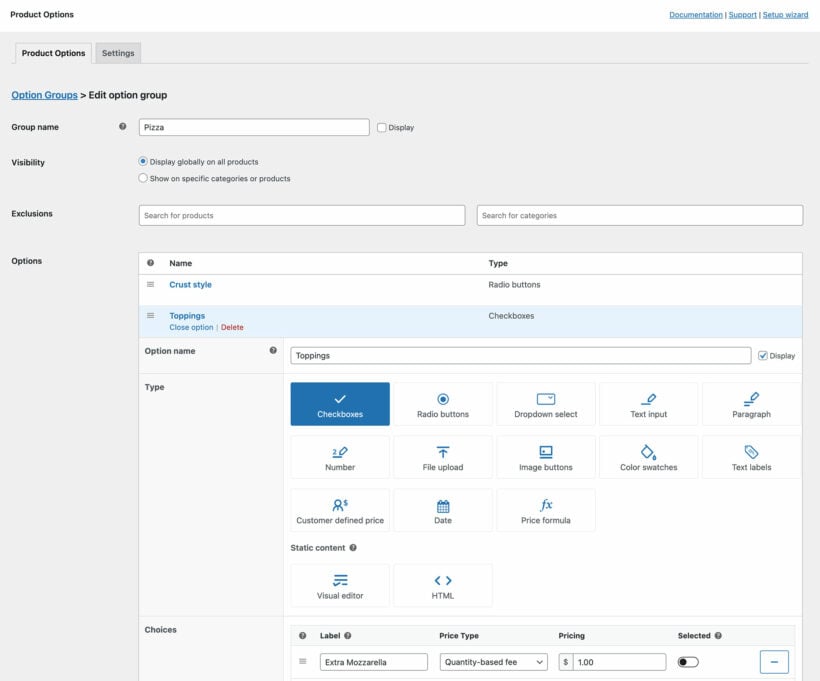
Add an option group
Create an option group, then choose the products or categories it applies to.
Add a swatch option
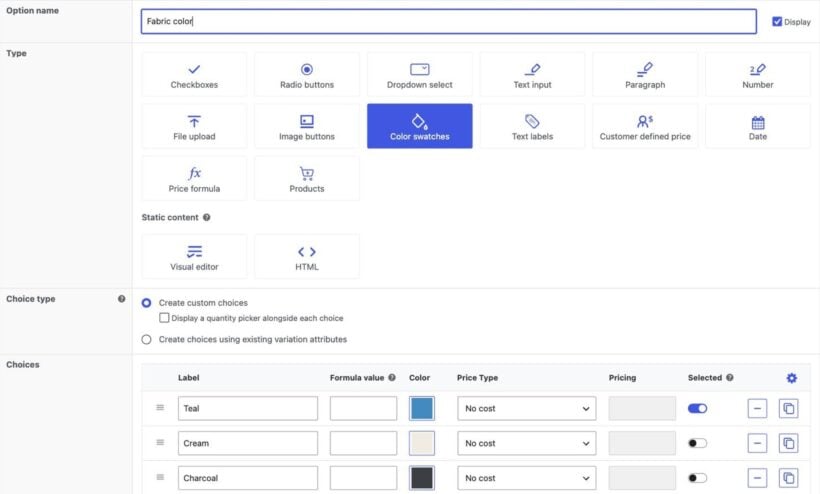
Choose 'Color swatches' or 'Image buttons', then create the choices or pick a variation attribute you already use.
Set up pricing and rules
Add conditional logic, quantity rules, or a price formula that reads the choices a customer makes.
Test and sell
Open the live product page, click through the swatches and place a test order.
Choosing a WooCommerce variation swatches plugin
Three ways to replace the dropdowns, and who each one suits
Store owners who just want the dropdowns to look better
Store owners already committed to a theme that includes swatches
Store owners who need pricing, conditional logic or extra fields alongside the swatches
What becomes a swatch
Your WooCommerce variation attributes
Your WooCommerce variation attributes
Your variation attributes, or choices with no variation behind them
Extra pricing
Not usually
Not usually
Price formulas, plus a price on any choice you create yourself
Conditional logic
Not usually
No
Show and hide swatches based on the customer's other choices
Other fields beside the swatches
None
None
Text, file upload, number, date, quantity per choice and more
Our verdict
A free plugin turns your dropdowns into swatches and stops there, which is all plenty of store owners need. Our comparison of 13 variation swatches plugins covers the best of them
Check your theme before you install anything, because several premium WooCommerce themes include swatches already. You're then tied to that theme, so changing it later means building the swatches again
Choose WooCommerce Product Options when the swatch is one part of a product the customer configures. You also get conditional logic, price formulas, quantity rules and extra fields alongside the swatches
★★★★★
“The best WooCommerce extra product options plugin ever made. Neatly written code, excellent support, and promises to develop and add functionality in the future. A real best buy. Thank you!”
Color, text and image swatches on your variations, plus conditional logic, price formulas and quantity rules.
$
149
Color and image swatches Replace the variation dropdowns with swatches customers can see
Advanced options Conditional logic, price formulas, and minimum and maximum quantities
Live image previews Let customers see their own text and uploads on the finished product
Two Plugin Bundle
Product Options + Live Preview
The same swatches, plus an add-on that previews a customer's own text and artwork.
$178$178$
199
Color and image swatches Replace the variation dropdowns with swatches customers can see
Advanced options Conditional logic, price formulas, and minimum and maximum quantities
Live image previews Let customers see their own text and uploads on the finished product
$1641$1641$
399
Save 75%
GO ALL ACCESS
Unlock all plugins for one price
19 current + future plugins
Free setup, priority support
80+ exclusive discounts
All plans include free setup, updates and support. You can upgrade at any time and just pay the difference. If your annual license expires, the plugin will continue working on your site but you must renew to change settings or receive updates, new features or support.
Our world-class support starts here: How can we help?
What are WooCommerce variation swatches?
Variation swatches replace the dropdown lists on a variable product with something a shopper can see. A color swatch shows a block of color for each choice, an image swatch shows a photo, and a text label shows the name in a button. WooCommerce has no swatches of its own, so you add them with a plugin or with a theme that includes them.
Can I turn my existing variation dropdowns into swatches?
Yes. Add an option in WooCommerce Product Options, set 'Choice type' to 'Create choices using existing variation attributes', then choose one of your attributes. The plugin reads its terms and displays them as color swatches, image buttons, radio buttons, checkboxes, a dropdown or text labels.
Do my variation prices, stock and SKUs still work?
Yes. When the swatches come from a variation attribute, the variations underneath are untouched. Variation SKUs, stock for each variation, imports and bulk edits all carry on working, and so does any other plugin that reads variations.
Can I add color swatches without creating variations?
Yes, and most of our customers do. You create the choices in the plugin instead, so five sizes in 10 colors is 15 choices rather than 50 variations. An option doesn't count stock of its own, so use real variations when you need a stock figure behind each color.
Can I charge a different price for each swatch?
A swatch that comes from a variation attribute keeps the price of its variation, exactly as WooCommerce prices it now. A choice you create in the plugin can add a fixed amount, a percentage or a per-unit charge of its own. Either way, a price formula can read the choice the customer made and work the price out from it.
Can I show variation swatches on my shop and category pages?
Product Options puts your swatches in the add to cart area of the product page, which keeps them off your shop and category pages. Add WooCommerce Product Table to list products with their swatches in a table, or WooCommerce Quick View Pro to open the options in a lightbox from the shop page. To let shoppers narrow the catalog by color, use WooCommerce Product Filters.
Can I show some swatches only when an earlier choice is made?
Yes, you do this with conditional logic. At The Cabinet Door Store, customers pick the finish first. They then see only the color swatches that finish comes in.
Can customers pick more than one swatch at a time?
It depends where the swatch comes from. Choices you create in the plugin can be checkboxes, so a customer picks several at once. Swatches built from a variation attribute follow WooCommerce's own rule of one of each attribute per cart line, so a shopper buying a blue one and a red one adds them separately.
Can I show a photo instead of a block of color?
Yes, you use the image buttons option type instead. A jewelry store we work with shows a photo of each color rather than a flat swatch, because the photo shows the texture of the metal.
Is there a free WooCommerce variation swatches plugin?
Yes, several, and a couple of them are good. If all you want is the dropdowns turned into swatches, start with a free one. Our comparison of 13 variation swatches plugins covers the free ones alongside the paid.
Will you set up my swatches for me?
Yes, free within 30 days of buying WooCommerce Product Options. Every license includes the service. It covers up to five options with 20 choices, which is plenty for a set of color and size swatches. After buying, you request it on our free setup page.
Will it work with my theme and other plugins?
WooCommerce Product Options works with any well-coded WordPress theme. We test it with a range of free and premium themes. You can add product options without bringing in a developer, adding code, or editing theme templates.
The theme compatibility page shows the themes we test with. If a theme conflict appears, our support team will help.
WooCommerce Product Options is designed to work with any WordPress translation plugin such as WPML, WeGlot and TranslatePress. This makes it easy for you to translate the extra product fields into any language and use it on multilingual websites.
What are the minimum requirements for running the plugin?
WooCommerce Product Options is fully tested with the latest versions of WordPress and WooCommerce. We always recommend running the most up-to-date version, but we also support older installations:
Plugin and Plugin support are great, I encountered a issue that support and developer fixed and updated very quickly. The mathematical equations and variables are easy to logically understand. Great plugin to solve complicated product options.
Little Nest Meadow
Best app for Woocommerce
Rated 5 stars
By Little Nest Meadow on
I am so pleased that I took a chance and got the Woocommerce Product Options. This app is the best app that I have for my website. It is so easy to use, and the results are exactly what I need for my products. Highly recommend this app to anyone with an ecommerce site.
Nikki LouiseRated stars
By Nikki Louise on
Thank you so much for the glowing 5-star review! We are absolutely thrilled to hear that WooCommerce Product Options has become the best app for your website. Our goal is always to make complex product customizations easy to manage, so it’s wonderful to know you found it easy to use and that the results are exactly what you needed for your products. Your recommendation means the world to our team! If you ever need any assistance or have ideas on how we can make the plugin even better, please don't hesitate to reach out. Wishing you and Little Nest Meadow continued success! -Nikki
Mitch Hollander
Love it!
Rated 5 stars
By Mitch Hollander on
Easy to use, but we have a relatively complex setup. Solution? Barn2's customer service has been incredible. Highly, highly recommend, it's a high quality product backed by helpful people.
PANAGIOTIS TOUVRAS
Very Helpful!
Rated 5 stars
By PANAGIOTIS TOUVRAS on
Τρομερή εξυπηρέτηση, άμεση και με βοήθησαν να σετάρω το Product Options έτσι όπως το ήθελα. Μπράβο τους!
Great service, prompt and they helped me set up Product Options the way I wanted. Well done to them!
TONY PHILIPSZ
Product page
Rated 5 stars
By TONY PHILIPSZ on
Adrian went out of his way to help me solve a configuaration set up and made the process seem simple.
Majd Issa
Fast and helpful
Rated 5 stars
By Majd Issa on
They’re doing great job!
Doris
Super Erweiterung
Rated 5 stars
By Doris on
Great range of functions, GDPR- and Händlerbund-compliant!
Andrew Ellis
Just what I was looking for
Rated 5 stars
By Andrew Ellis on
Having looked for ways to showcase our framing options we were disheartened to not find a visual option until we came across Barn2's plugin. It works perfectly offering a slick interface for creating the options as well as an easy to understand front end for our customers.
Maria Ward
Excellent Support
Rated 5 stars
By Maria Ward on
I had a problem with the functionality of the Barn2 plugin that I had purchased. Unfortunately, the product did not suit what I needed it for, however, I am super impressed at how excellent the customer support was at going the extra mile to try to find a solution that would work for my company. In the long run, they were able to refer out to another service provider who could possibly help us. This is how business should be done. They met the need of the customer, even though I didn't actually end up doing business with them. Although their product didn't suit my current, very specific need, I would definitely consider them again in the future as we continue to develop our site and business.
MC Global Fabrics SL
Great custom product tool
Rated 5 stars
By MC Global Fabrics SL on
The best option I´ve found to create custom products and calculations in WordPress. Best support and help.























Complicated Booking forms sorted
By Jeremy Opperman on
Plugin and Plugin support are great, I encountered a issue that support and developer fixed and updated very quickly. The mathematical equations and variables are easy to logically understand. Great plugin to solve complicated product options.