Supercharge your store with powerful, mobile-friendly filters. Help customers find products faster with instant filtering by category, attribute, price, color, stock, and more.
Don’t drive customers away because they can’t find the exact item they want. Give them a fast product filtering experience that keeps them coming back.
Filter By Anything
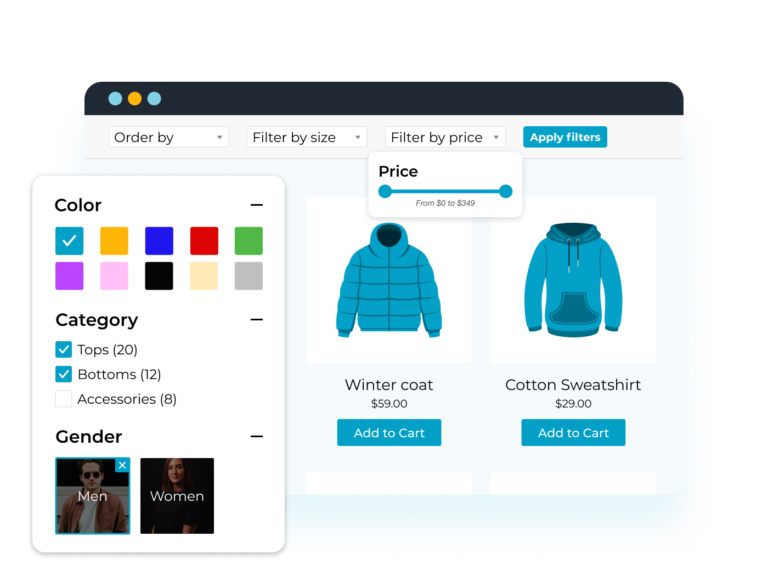
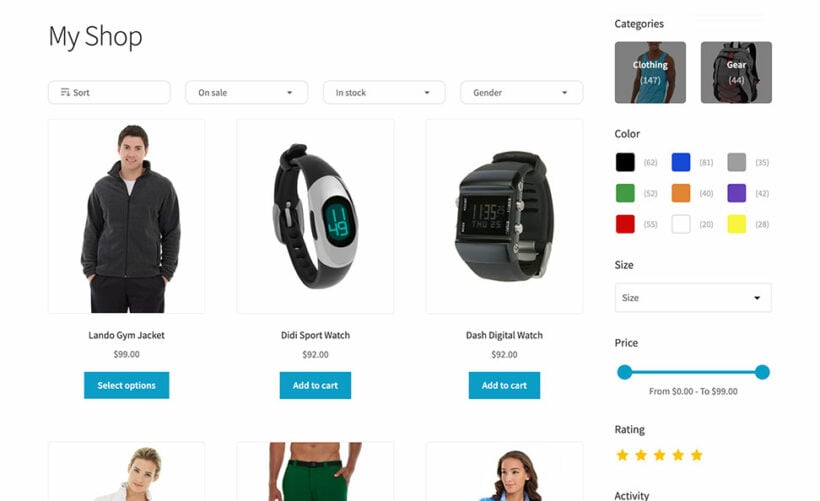
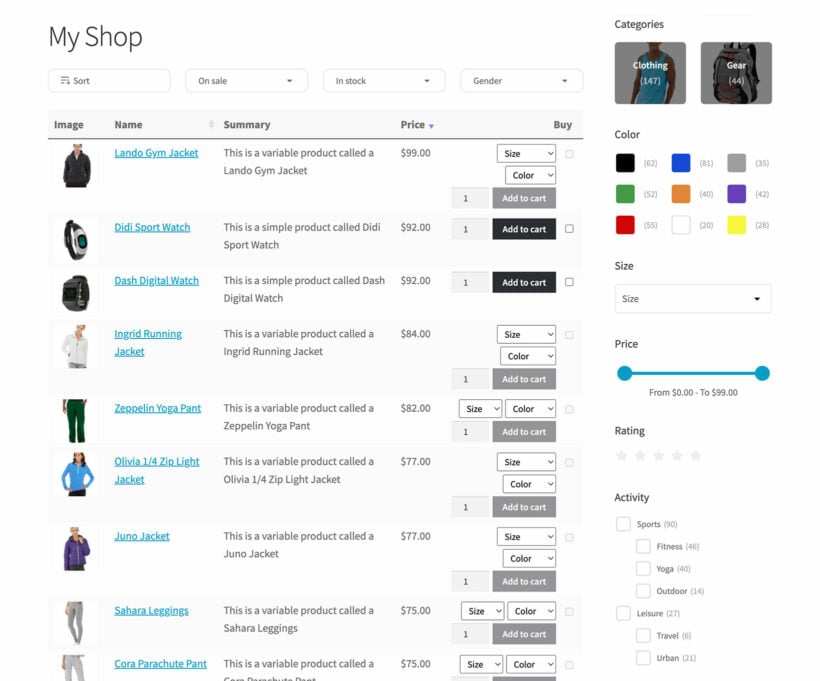
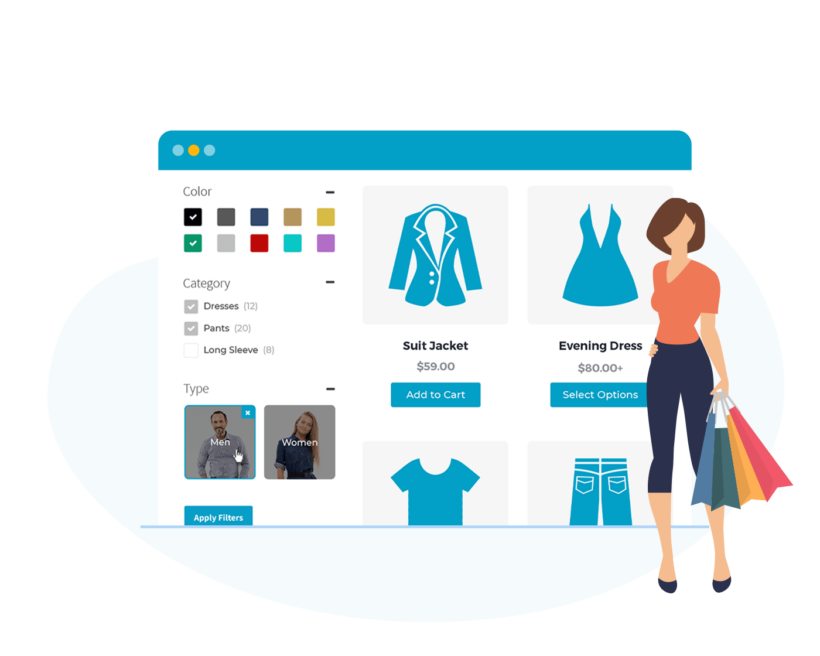
Filter by category, price, size, color, attributes, taxonomies, stock, on sale, rating, and more
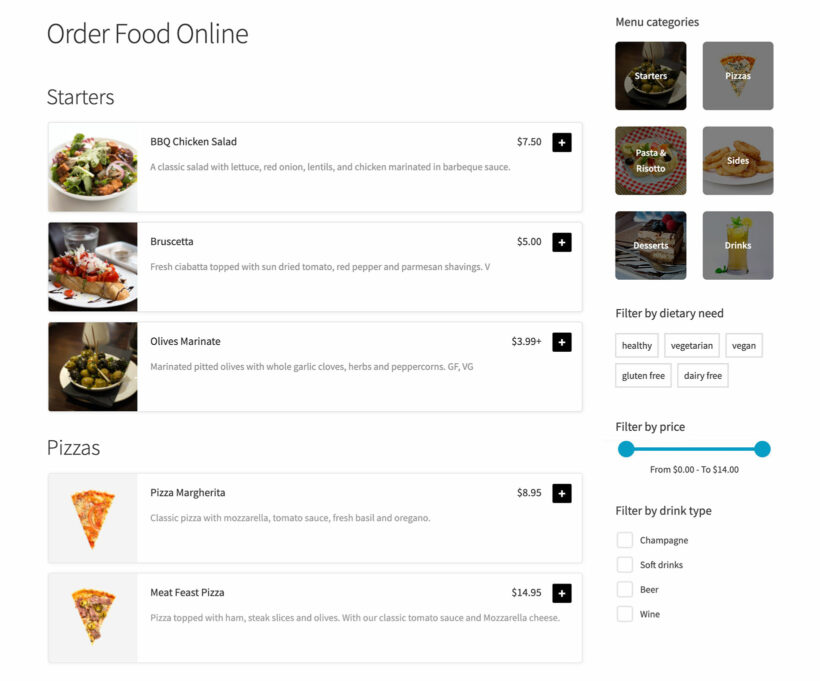
Add filter dropdowns, checkboxes, radio buttons, labels, color swatches, range sliders, or images
AJAX-based filtering for instant results
Fast Mobile Shopping
Supercharge mobile shopping for WooCommerce
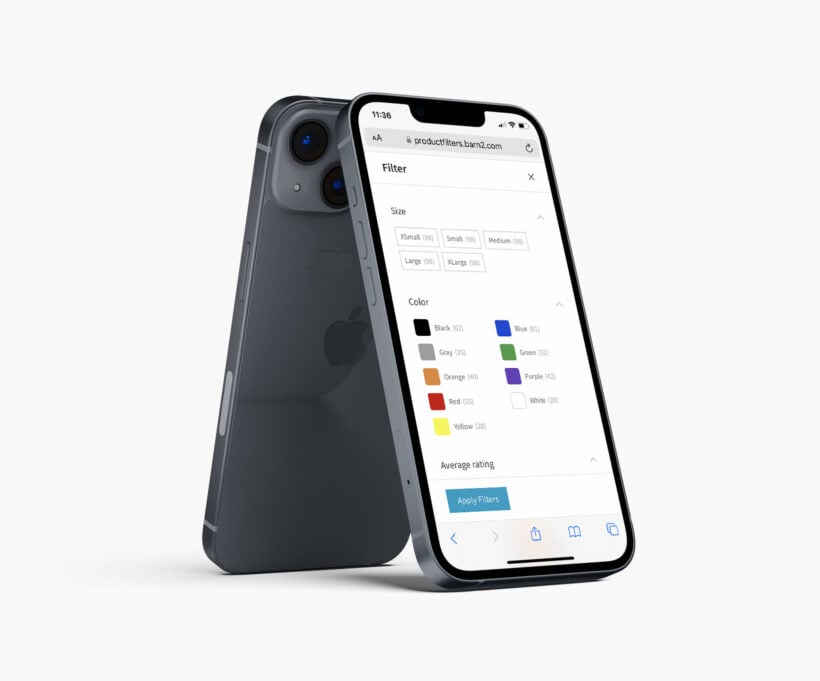
Choose different WooCommerce product filter options for desktop and mobile
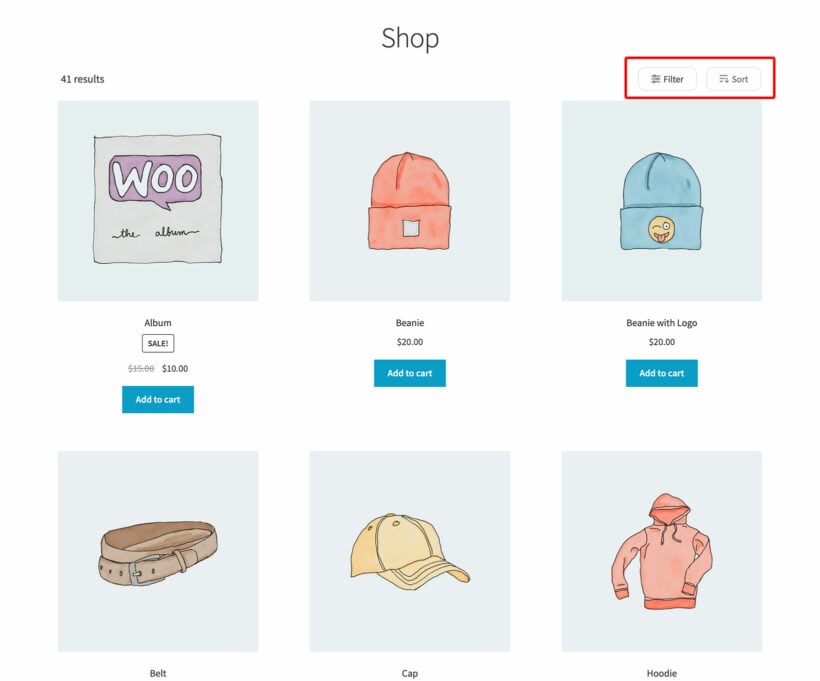
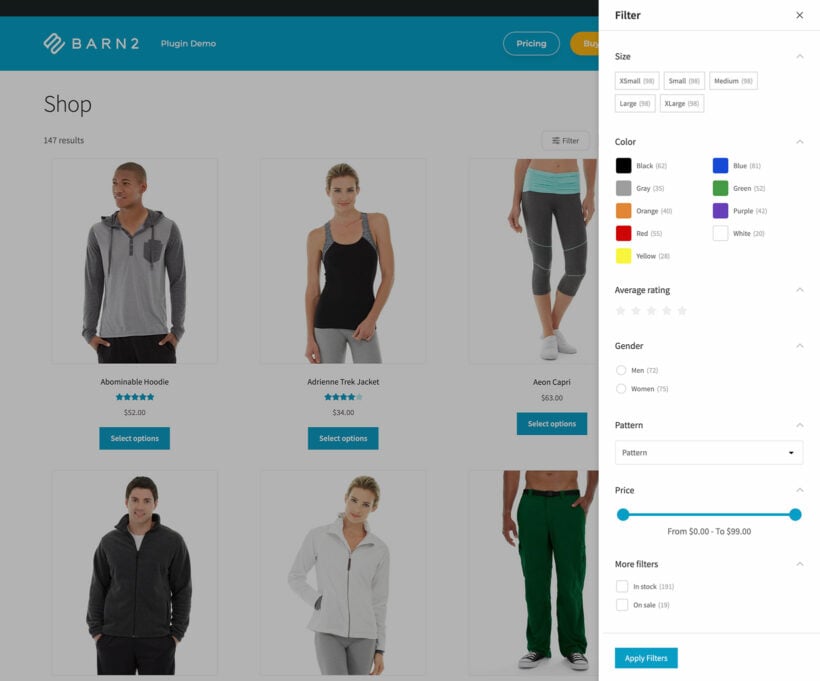
Display filters above your products, to the side, or in a mobile-friendly slide out panel
EASY PRODUCT FILTERS
Pre-installed with popular product filters
Clean minimal design - works perfectly with any WordPress or WooCommerce theme
The perfect WooCommerce products filter for both beginners and developers
Packed With Features
Everything you need in a WooCommerce product filter plugin
Filter huge catalogs
AJAX product filtering
Filter by anything
Color & image filters
Total flexibility
Unique filter URLs
Easy to use
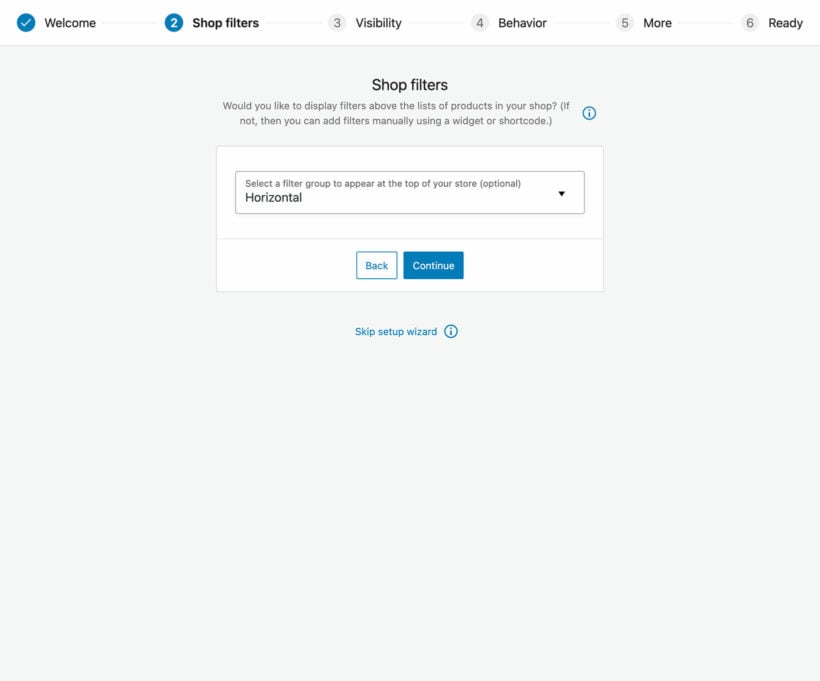
Simple filter setup wizard
Use the automatic setup wizard to quickly choose your main product filter settings.
Pre-installed product filters
We’ve added a set of ‘Recommended filters’ to help you get started. Either edit these or create new product filters.
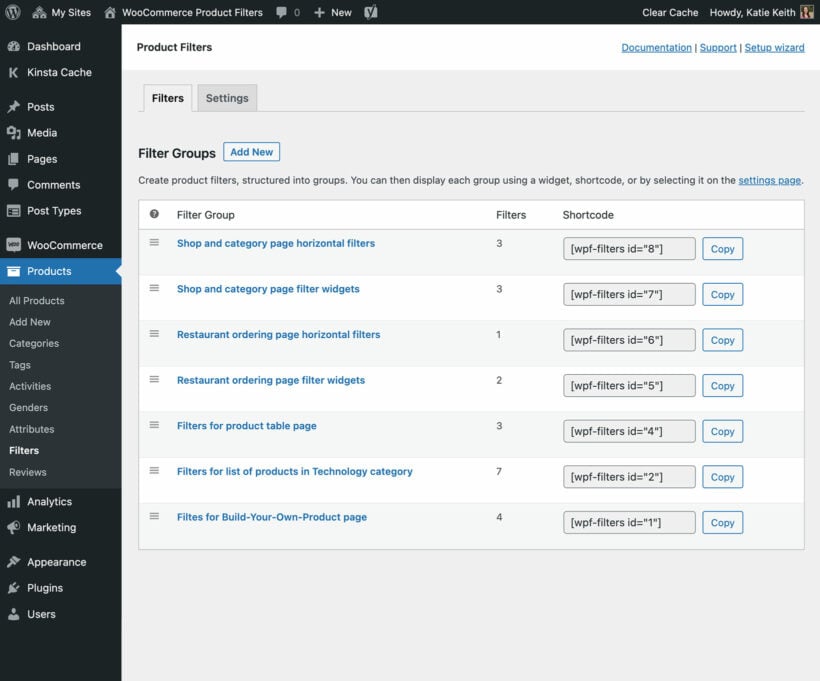
Structure filters into groups
Your WooCommerce product filters are structured into groups. You can easily display different sets of filters on different parts of your WordPress site.
Multiple filter types
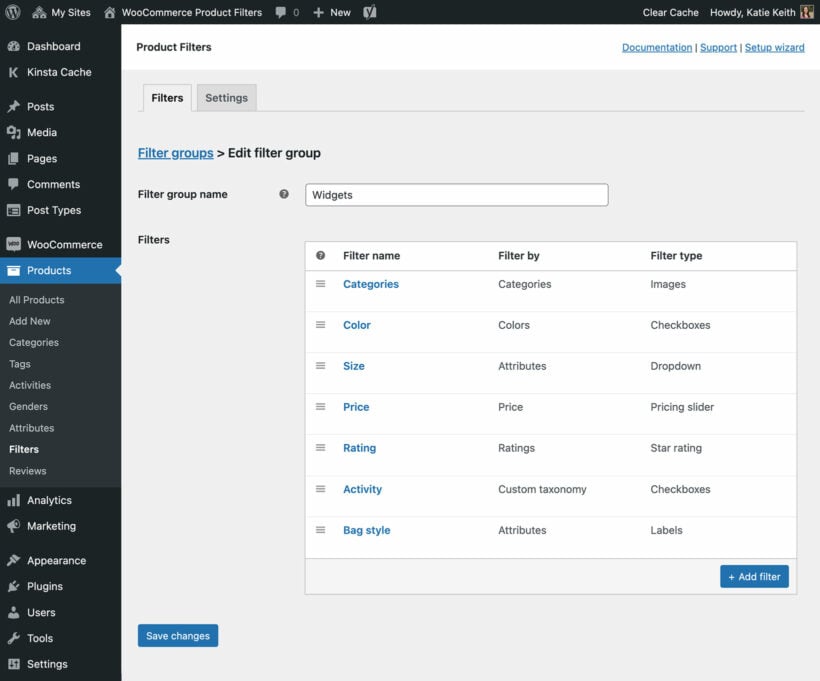
11 product filter types
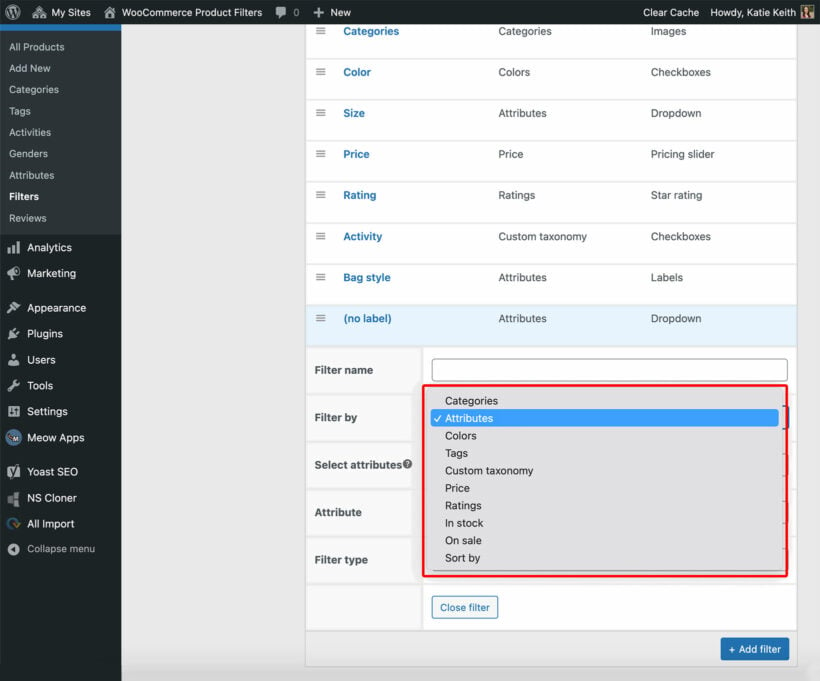
Filter by literally any type of WooCommerce product data, including categories, attributes, colors, tags, custom taxonomies, custom fields, price, ratings, in stock, and on sale. You can also add a keyword search box and product sort dropdown. It's even possible to display exactly which options appear in each filter.
Sort dropdown
Use the 'Sort' filter to allow customers to re-order the list of products. You can sort by popularity/total sales, average rating, recently added, or price in ascending or descending order.
Smart attribute filters
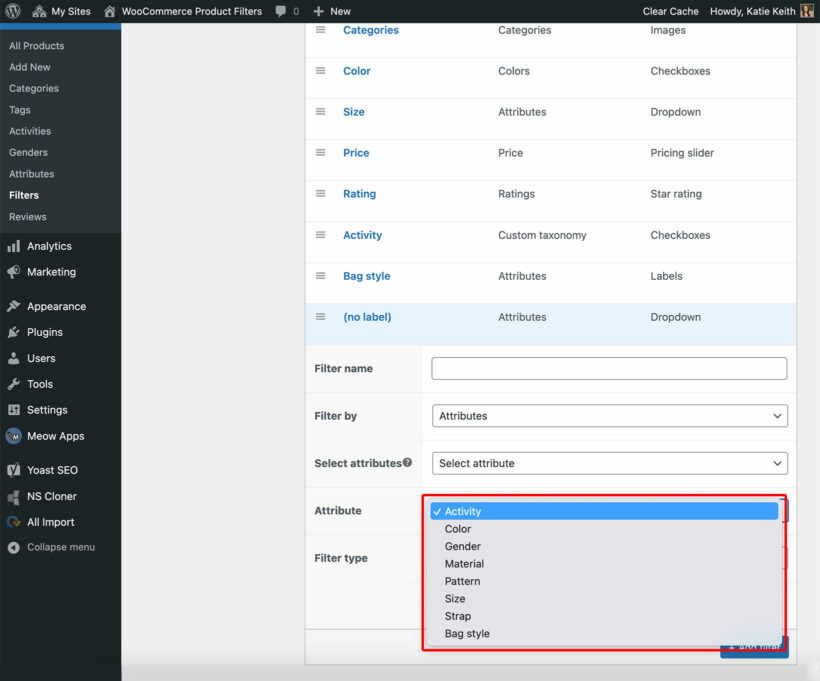
Either select a specific attribute, or automatically show filters for all the products on the current page (ideal if you use different attributes in different product categories).
Optional filter labels
For visual filters such as images and color swatches, choose whether to show a label alongside each filter option.
Choice of filter styles
7 WooCommerce filter styles
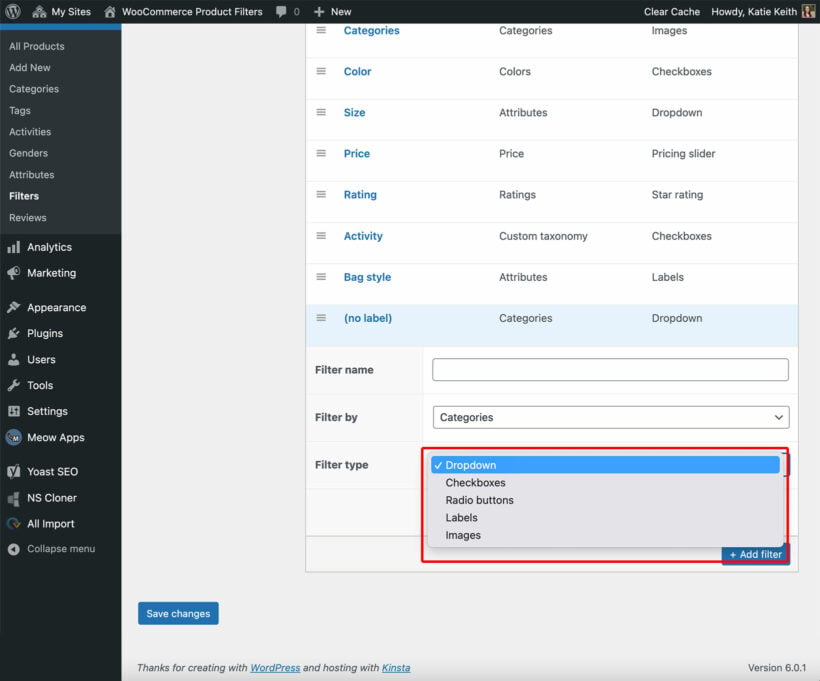
Present each type of product data in the most effective and user-friendly way possible. Choose from dropdowns, checkboxes, radio buttons, text labels, images, color swatches, and range sliders.
2 layout options
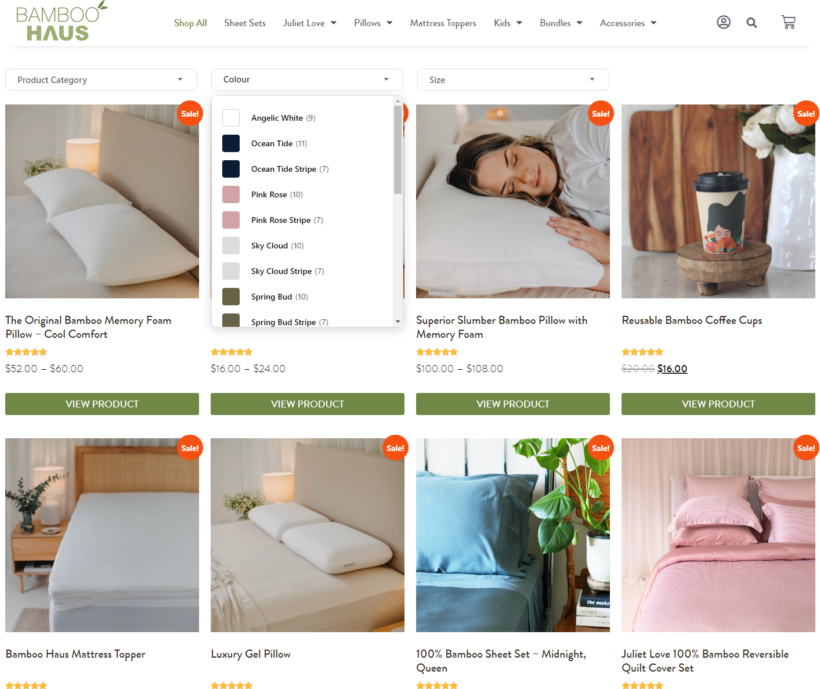
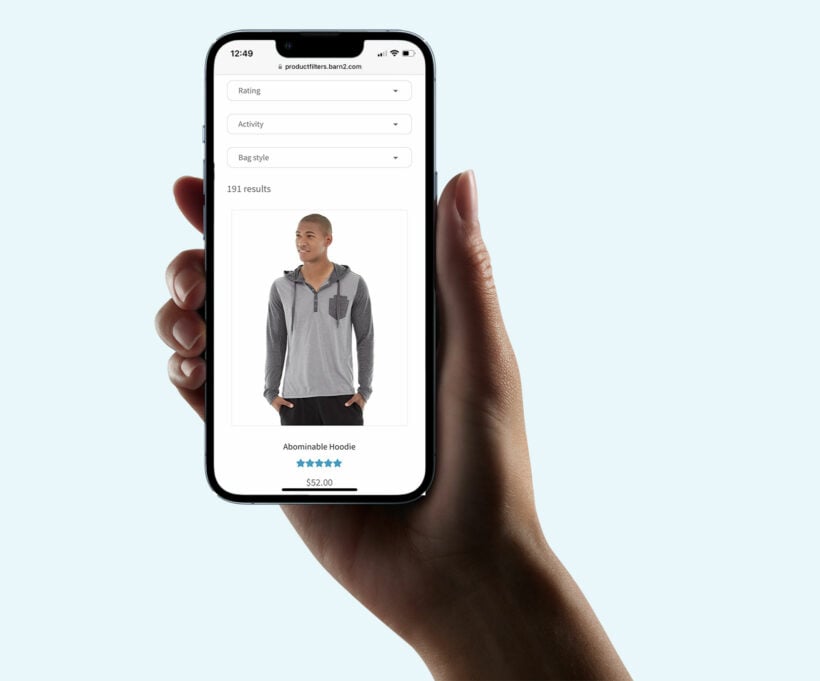
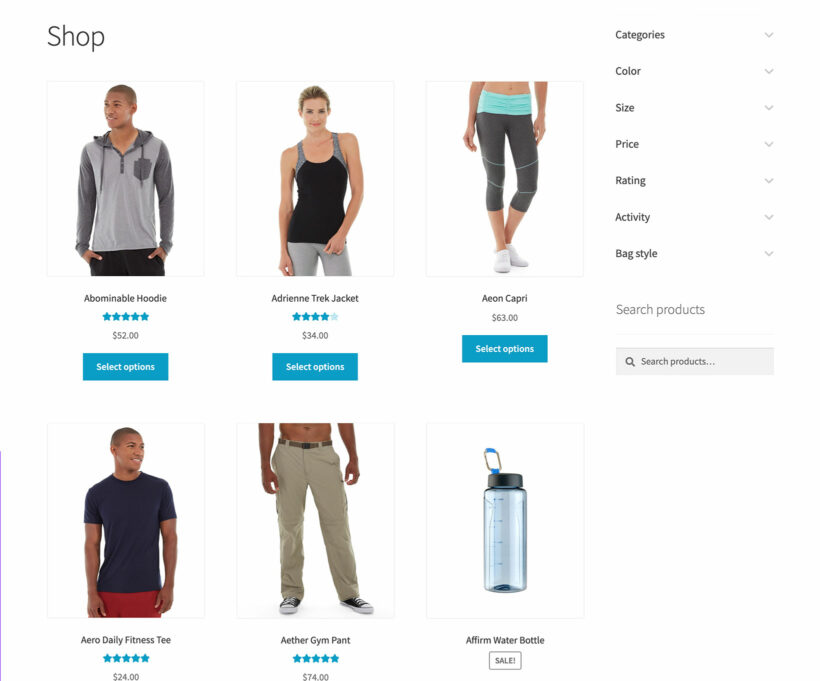
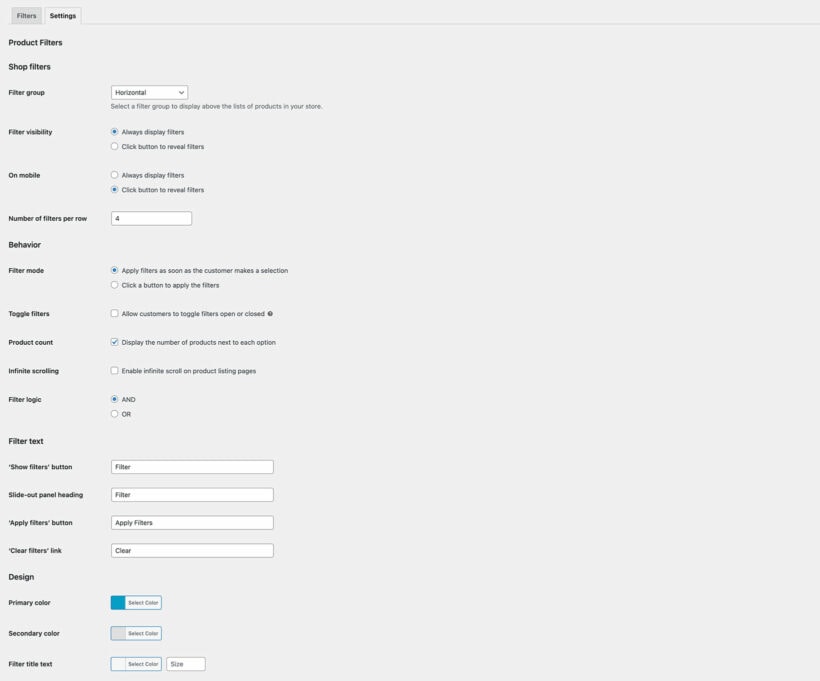
Choose a vertical or horizontal layout for each filter group. Vertical filters are perfect for sidebar widgets, and horizontal filters are hidden within dropdowns above the list of products.
Customizable product filter design
By the default, the filter colors will match your theme. There are settings allowing you to easily customize this.
3 ways to display filters
Display filters on the WooCommerce shop page
Automatically select a filter group to display at the top of all your main WooCommerce store pages (shop, categories, etc.).
Product filter widgets
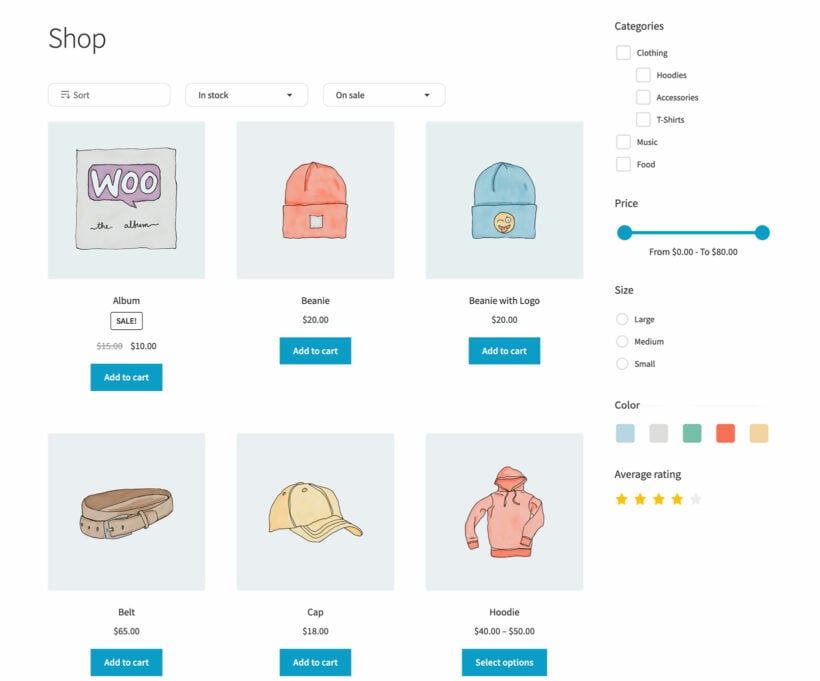
Select filter groups to appear in the left or right sidebar on your WooCommerce store pages.
Product filter shortcode
And for even more flexibility, use the built-in filtering shortcode to add and configure filters anywhere on your site.
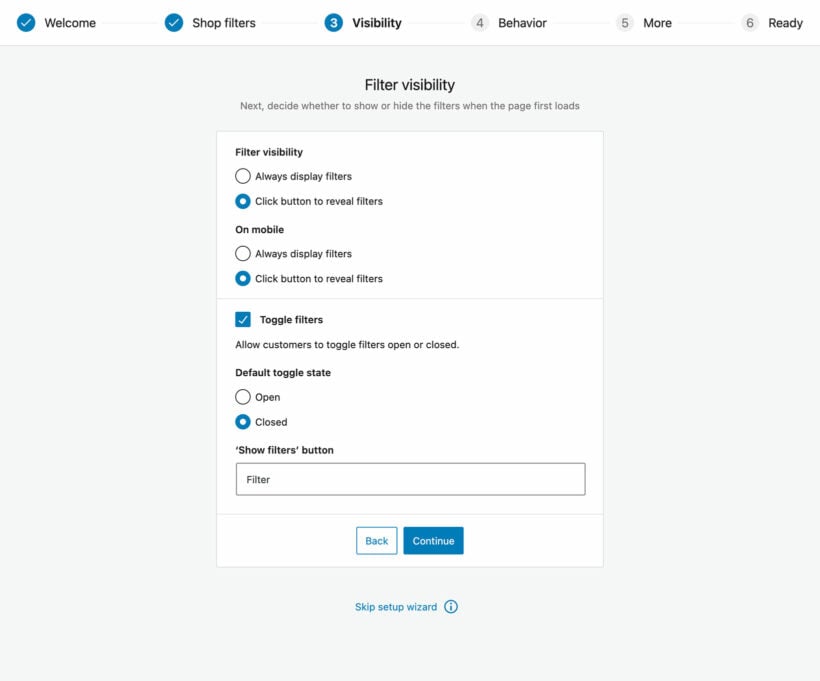
Visibility options
Show/hide filters by default
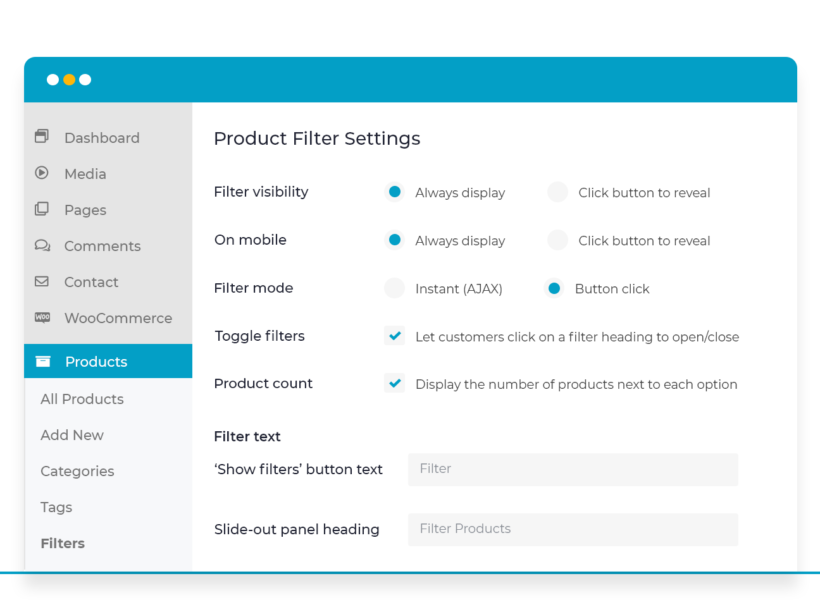
Optionally display filters in a slide-out panel on mobile and/or desktop instead of displaying them directly on the page. This is an excellent space-saving option for mobile users.
Toggle product filters open/closed
Allow users to click on a filter to show/hide the options inside. You can choose whether the toggles appear open/closed by default.
Customize the filtering behavior
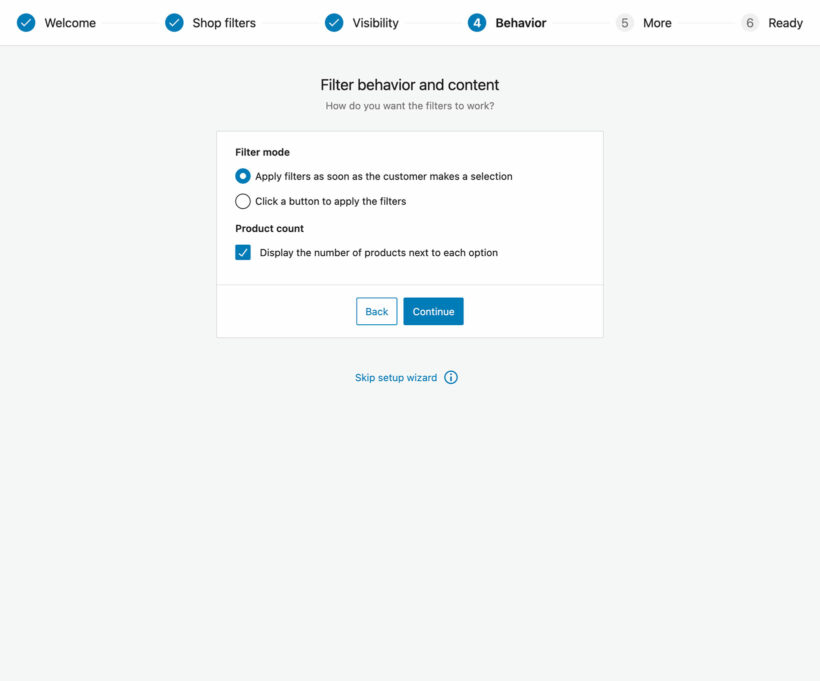
2 filter modes
Either apply filters as soon as the user makes a selection, or allow them to select multiple options and then click a button to view the results.
Show or hide the product count
Decide whether to show the number of WooCommerce products alongside each filter option.
Customizable filtering logic
Choose between 'and' and 'or' logic to control how to choose which products are displayed after applying a filter.
Mobile-friendly
100% responsive product filters
The WooCommerce product filters are fully responsive and will automatically adapt to fit different screen sizes.
Mobile-friendly slide-out panel
Your filter widgets will automatically be hidden within a mobile-optimized slight-out drawer for mobile users. Customers click on a button to reveal the filters.
Fast performance
Unlimited products
The AJAX filters are designed to work with unlimited numbers of products, with lightning fast load times.
Custom indexing
The WooCommerce filter plugin indexes your filter data behind the scenes, allowing instant results even for huge product catalogs.
Guaranteed compatibility
Works with your theme
WooCommerce Product Filters is designed to look awesome in any theme.
Use with other Barn2 plugins
Take your WooCommerce store to the next level by using it alongside our other plugins.
WooCommerce Product Table
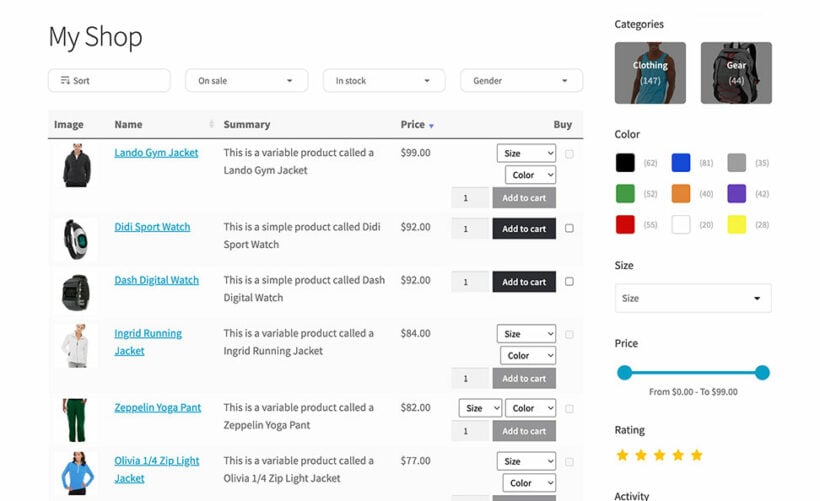
Use it with WooCommerce Product Table to create fast one-page WooCommerce order forms complete with advanced products.
Use WooCommerce Protected Categories to add hidden areas to your WooCommerce store. The filters will respect your products’ visibility settings.
WooCommerce Private Store
When you create a WooCommerce private store, the filters remain hidden from users without store access.
WooCommerce Wholesale Pro
Creating a wholesale/B2B store? Public and wholesale users will only see filters relating to the products that they have access to.
Page builder plugins
Your WooCommerce product filters will work with the main page builder plugins (Elementor, Divi Builder, Avada Fusion Builder, and Bricks), plus the Gutenberg block editor and the shortcodes which are built into WooCommerce.
And there's more...
Show active filters
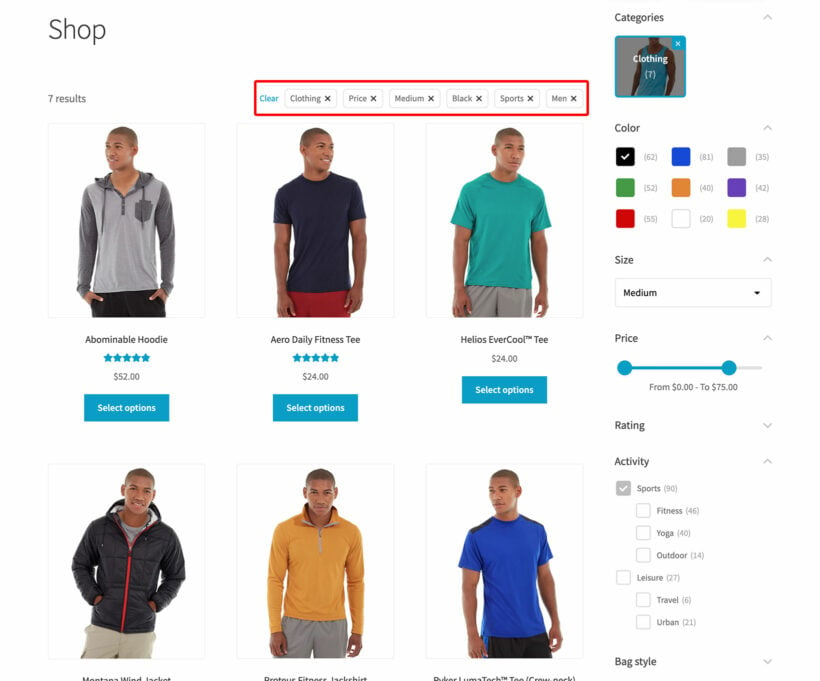
The active filters appear at the top of the page, so customers can easily remove individual filters - or use the ‘Clear’ button to start again.
Translations
Your WooCommerce product filters work with all the major WordPress translation plugins such as WeGlot, WPML and TranslatePress.
Advanced filtering logic
Your customers will only ever see valid filter options based on the products on the current page - no annoying empty filters.
“Just what we needed. I struggled to find a filter plugin to work with our product variations and this one works well for us. The support team has been very helpful and responsive. Would definitely recommend.”
Pete Miller - Australia
★★★★★
“I previously tried several different product filter plugins for my WooCommerce site and wasn't impressed - found them clunky and complicated. Then I stumbled on the one from Barn2, which is way better.”
Mark Sceats - New Zealand
★★★★★
“This is by far the best plugin for filtering products no matter how complex your website is. It's easy to setup, and Barn2's customer service are amazing.”
Wood Flooring KentUK
★★★★★
“I needed a product filter plugin that would hide other filters based on user selections (ie brand and categories) and this worked perfectly. Easy to set up and well styled.”
Choose this option to list products in a conversion-boosting order form with your product filters.
$158$158$
109
Save$49
Advanced product filters Add user-friendly product filters anywhere in your store
Filter by anything Create filters for any type of product data
Product tables List any or all of your products in a conversion-boosting order form
One Plugin
Product Filters Plugin
If you just want to add product filters to your usual store layout, then choose this option.
$
79
Advanced product filters Add user-friendly product filters anywhere in your store
Filter by anything Create filters for any type of product data
Product tables List any or all of your products in a conversion-boosting order form
$1641$1641$
399
Save 75%
GO ALL ACCESS
Unlock all plugins for one price
19 current + future plugins
Free setup, priority support
80+ exclusive discounts
All plans include free setup, updates and support. You can upgrade at any time and just pay the difference. If your annual license expires, the plugin will continue working on your site but you must renew to change settings or receive updates, new features or support.
EXPLORE SUCCESS STORIES
Explore real-world examples of how others are using this plugin to enhance their websites. Get inspired by innovative uses and discover new ways to make the most of its features.
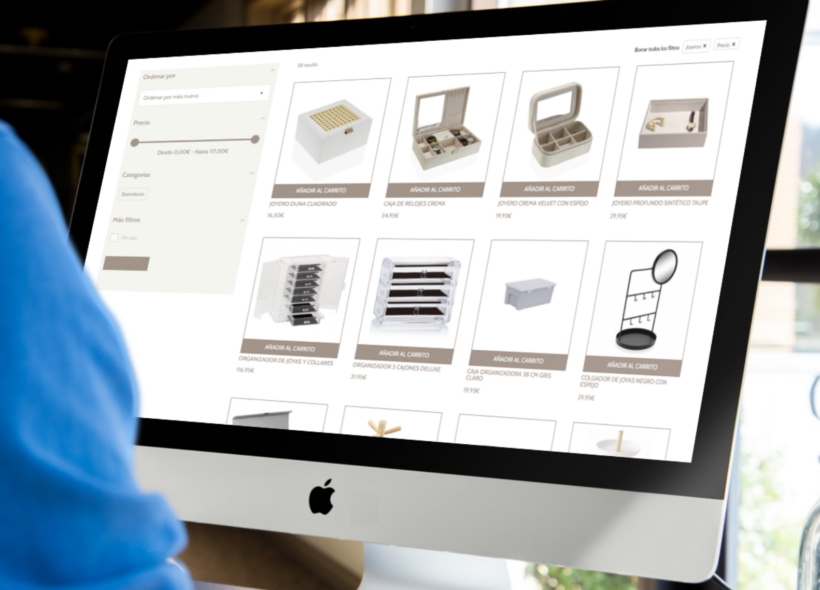
Orden en casa
Orden en casa is a Spain-based ecommerce store that sells a wide range of home organization products for the bedroom, kitchen, bathroom, lounge, and more.
Our world-class support starts here: How can we help?
How does WooCommerce Product Filters work?
WooCommerce Product Filters adds high quality filters to your ecommerce store. These replace the filters that come with WooCommerce itself and are significantly more flexible and user-friendly.
You set it up like this:
First, install the plugin and configure the options on the plugin settings page as needed (or skip this part and just use the default options). For example, you can choose whether to filter the products instantly using AJAX or via a button click. You can also choose whether to show/hide the filters by default, and how they work on mobiles.
Next, go to the 'Filters' page and create a filter group containing as many filters as you like. For example, you might create a group which contains filters for price, category and attributes.
Finally, display the filters in your store using any of the following methods:
Select the filter group on the plugin settings page. This will display the filters throughout your WooCommerce store, for example on the shop and category pages.
Add the filter group widget to any sidebar on your site - for example, the left or right sidebar on your WooCommerce store pages.
Use a simple shortcode to display the filters anywhere on your WordPress site.
When a customer visits a page containing filters, they can use them to narrow down the list of products. Depending on your settings, the list of products will either update as soon as they choose an option from a filter; or they can choose multiple filters and then use the 'Filter Products' button.
What can I filter by?
WooCommerce Product Filters lets you filter by just about anything! It is the most flexible product filter plugin on the market.
Here is a complete list of the available filters:
Category - Filter products by category. Display as dropdowns, checkboxes, radio buttons, labels, images (with or without the category name), or range sliders.
Attribute - Filter products by category. Display as dropdowns, checkboxes, radio buttons, labels, images (with or without the attribute name), or range sliders.
Color - Use color swatches to provide a visual way for customers to filter by color. Display as color swatches only, or with the attribute name.
Tag - Filter products by tag. Display as dropdowns, checkboxes, radio buttons, labels, or range sliders. The labels option effectively creates a filterable tag cloud.
Custom taxonomy - Filter products by a custom taxonomy which you have added to your WooCommerce products. Display as dropdowns, checkboxes, radio buttons, labels, images (with or without the taxonomy term name), or range sliders.
Custom field - Filter by the custom fields attached to your WooCommerce products. Display as dropdown lists, radio buttons, checkboxes, range sliders, or text input search fields. Supports Advanced Custom Fields (ACF).
Price - Display a price slider so that customers can select a low and high price to filter by.
Rating - Display star ratings so that customer can filter by average rating.
In stock - Display a checkbox which allows customers to view products which are in stock and exclude other stock statuses.
On sale - Display a checkbox which allows customers to view products which are on sale and exclude full priced products.
Sort by - Display a 'Sort products' dropdown which allows customers to change the order of the products in the list.
Will it work if I have hundreds or thousands of products?
The more products you have in your store, the more important it is for customers to be able to filter them. As a result, built our WooCommerce filter plugin with large product catalogs in mind.
WooCommerce Product Filter plugin has an indexing function which allows it to filter huge numbers of products without any performance issues. When you create or update a filter, the index updates in the background. This means that it can retrieve results instantly without having to trawl through your entire catalog.
Is it possible to filter for more than one attribute or category at a time?
Absolutely! The WooCommerce Product Filter plugin lets customers filter by multiple options at once. For example, they can use the filters to view products in a small or medium size which have a yellow or blue color attribute.
Customers can also use multiple filters at once, for example to filter by both price and category at the same time.
The filters use advanced logic behind the scenes and are dependent on one another. If you select items from one filter, the options in the other filters instantly update so that customers can only select combinations which are possible. This helps to prevent frustration and actively points customers towards options they can purchase.
Can I add the WooCommerce filters to a custom page?
Yes - as well as enabling filters automatically on your WooCommerce store pages, you can use a widget or shortcode to add filters to any other page on your site. For example, this is a good option if you have listed products using a page builder plugin like Elementor, Divi Builder, Avada Fusion Builder, or Bricks.
How do I create a dropdown filter?
WooCommerce Product Filters lets you choose from a wide range of filter styles, including dropdown filters, checkboxes, radio buttons, and more. These styles are used in the filter widgets that appear in the sidebar. When you create a filter in the WordPress admin, an option will appear letting you choose a style for the filter. You can add as many filters as you like, in as many different styles as you like.
The filter plugin also lets you display filters horizontally above the list of products - for example, at the top of the main Shop page. When you do this, all the filters are initially displayed as dropdowns. This helps to save space on the page. Customers click on a dropdown to open up the filter and see the options.
WooCommerce Product Filters also has a 'Dropdown' filter style, which is always displayed as a select list. You can choose between two ways to display dropdown filters:
A single dropdown list - If your data is hierarchical (e.g. categories) then the sub-categories are nested under their parent category.
Multiple step-by-step filters - For hierarchical categories and taxonomies, the customer selects a parent category from the first dropdown filter. The sub-categories then appear in a second dropdown filter alongside. This continues depending on the number of levels in your hierarchy. That way, customers can perform a step-by-step filter to drill down your products.
Can I create cascading step-by-step filters?
WooCommerce Product Filters provides two ways to create dependent filters which instantly update as the customer starts making selections:
The dropdown filters include an option to display categories and sub-categories (or taxonomies) as separate dropdowns. For example, if you're selling car parts then when the page first loads, only the top level 'Car Manufacturers' filter will appear. When the customer selects a manufacturer then an additional 'Car Models' dropdown listing the models for that manufacturer will appear. This continues depending on the depth of your category hierarchy.
When you add multiple filters of any type to a page, then they will be dependent on one another. For example, if you have added a category filter and a color filter then when the customer selects a category, the list of colors will update to only show colors of products in that category.
Can I use the plugin to filter by brand?
Yes, WooCommerce Product Filters works with all brand plugins such as WooCommerce Brands. The brand information in these plugins is stored as a custom taxonomy, so you can create a taxonomy filter to allow customers to filter by brand.
Alternatively, you can create your own 'Brands' custom taxonomy using our free Easy Post Types and Fields plugin. This saves buying a separate WooCommerce brands plugin. Just install the free plugin, go to Post Types → Other Post Types, choose the 'Products' post type and add a custom taxonomy called 'Brand' to this. You can then add a brand to each product and use WooCommerce Product Filters to create a filter by brand.
Will WooCommerce Product Filters work with my theme and other plugins?
WooCommerce Product Filters works with any well-coded WordPress theme. We test it with a range of free and premium themes, and conflicts are unlikely because it uses standard WooCommerce hooks and filters.
The theme compatibility page lists the themes we test with. You can set up the filters without a developer, custom code, or theme template changes. If a theme conflict appears, our support team will help.
WooCommerce Product Filters also works with the plugins we have tested with it. We have also tested these Barn2 plugin combinations:
WooCommerce Quick View Pro: Show quick view buttons in the filtered list, so customers can buy without leaving the page.
WooCommerce Fast Cart: Let customers filter, add to cart, then check out in a popup on the same page.
Does it work in my language?
WooCommerce Product Filters is designed to work with any WordPress translation plugin such as WeGlot and TranslatePress. This makes it easy for you to translate the filter text (e.g. the filter headings) into any language and use it on multilingual websites.
It is partially compatible with WPML. However, there are some limitations so we would recommend using one of the translation plugins listed above if possible.
What are the minimum requirements for running the plugin?
WooCommerce Product Filters is fully tested with the latest versions of WordPress and WooCommerce. We always recommend running the most up-to-date version, but we also support older installations:
WooCommerce 7.2 or greater (tested to 11.0.1)
WordPress 6.1 or greater (tested to 7.0.4)
PHP 7.4 or greater (tested to 8.5)
MySQL 5.7.8 or greater / MariaDB 10.3 or greater
What offers are available for WooCommerce Product Filters?
Several offers are available if you are a nonprofit or wish to buy multiple plugins:
2-plugin bundle - Get WooCommerce Product Filters together with WooCommerce Product Table at a reduced fixed price. Select the bundle in the pricing table above.
Multi-buy discount - Add any two or more Barn2 plugins to your cart and get 40% off automatically at checkout. The most expensive plugin stays at full price, and every other plugin is reduced by 40%. No coupon needed.
All Access Pass - For the best possible value, get our All Access Pass which gives you VIP access to our entire plugin suite including WooCommerce Product Filters.
Charity discount - Registered nonprofits get 15% discount off.
El plugin funciona correctamente, no hemos tenido ningún problema hasta ahora. Quizás a nivel estético ocupa demasiado en la interfaz, por lo demás contentos. Gracias
Hemiks
100% perfect service
Rated 5 stars
By Hemiks on
great product, great customer service (100% satisfied)
Bob
Excellent (it just works)
Rated 5 stars
By Bob on
Zero fuss. Easy install. Simple setup. Fast and flawless performance.
Janna
Works perfectly
Rated 5 stars
By Janna on
I needed a product filter plugin that would hide other filters based on user selections (ie brand and categories) and this worked perfectly. Easy to set up and well styled.
Marco
Very good support
Rated 5 stars
By Marco on
I am really happy that I decided to install the WooCommerce Product Filters from BARN2 to enhance my user experience in my e-commerce shop.
I had some customizing questions which one of the guys, Adrian Navaja really answered precisely and quickly, and in that way, that I can go ahead and customize everything with it. Happy client!
Wood Flooring Kent
The very best Woocommerce Product Filter
Rated 5 stars
By Wood Flooring Kent on
Having used Barn2's Wholesale Pro and Product Tables plugins, we were really excited to see that they had released a Product Filters plugin as the one we were using was clunky, ugly, and lacked alot of basic functionality.
We were not disappointed, this is by far the best plugin for filtering products no matter how complex or customised your website is. It's easy to setup, works from the word go, and Barn2's customer service are amazing for anything you need help with. We highly recommend this plugin.
Kai
Great product filter for WooCommerce + custom fields
Rated 5 stars
By Kai on
I tried out SO MANY woocommerce filters for a website build that relied heavily on custom fields for product details. Barn2's plugin worked perfectly. And their support was quick to reply with actionable advice when I ran into an integration question.
A+ plugin. Try it out. You'll most likely love it!
Mark Sceats
A great product filter
Rated 5 stars
By Mark Sceats on
Previously tried several different product filter plugins for my WooCommerce site and wasn't impressed. Found them clunky and complicated. Then stumbled on the one from Barn2, which is way better, and I recommend it. Support has been good too.
Joachim Roetger
A product filter that works
Rated 5 stars
By Joachim Roetger on
How to Select the Right Chair for You
At our online store, where we specialise in office chairs, one of the most common questions we receive is, “How do I choose the right chair for me?”
Thanks to Barn2’s product filter, we’ve streamlined the process, making it easy for users to browse chairs tailored to their specific needs. This feature allows customers to see a curated selection of chairs that best match their requirements.
Barn2’s support has been exceptional. They were highly responsive and helpful whenever we had questions during the implementation of the filters.
Our chair selector page is now one of the most visited areas on our site.
A big thank you to Barn2 for their fantastic support!
Seth
The best product filter solution out there
Rated 5 stars
By Seth on
My client has 16 different models of their simple flip phone with different feature sets. We needed a way for the user to choose which features they wanted or didn't want in their phone, and then the results display the models with those features. Barn2's product was by far the most user-friendly and came with a lot of support materials that made it easy to set up. I would definitely recommend this for your e-commerce shop!
















Buen funcionamiento
By Perth Espacio y Orden on
El plugin funciona correctamente, no hemos tenido ningún problema hasta ahora. Quizás a nivel estético ocupa demasiado en la interfaz, por lo demás contentos. Gracias