Set up dynamic pricing that changes what each customer pays: bulk discounts, quantity discounts, storewide sales, BOGO deals, role based pricing, and more 🚀
Easily create and display flexible WooCommerce discount rules
WooCommerce Discount Manager is a WordPress plugin that lets store owners create seven discount types from a single rules-based interface. It includes simple percentage and fixed-price discounts, total-spend discounts, free-product BOGO deals, buy-X-for-a-fixed-price bundles, buy-X-for-X-discount tiers, bulk quantity pricing, and volume bundles. Each rule can apply storewide or to specific products, variations, or categories. Rules can also be scoped to chosen WordPress user roles or scheduled to run between specified dates.
7 discount types
Set percentage or fixed price discounts, or dynamic discounts based on total cart value
Create tiered bulk pricing and ready-made quantity volume bundles
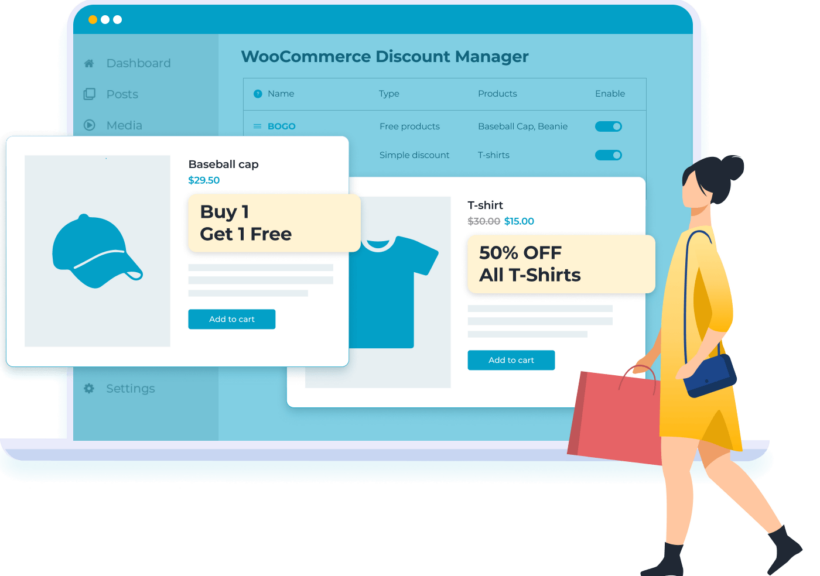
Give away free or gift products in WooCommerce, e.g. buy one get one free (BOGO)
Set pricing rules like "Buy 5 for $100"
WooCommerce Discount Mastery
Run storewide sales or create discounts for specific products, variations or categories
Schedule your WooCommerce sales by adding a start and end date
Create user and role based pricing rules
Display your discounts
Prominently display discounted prices
Tiered pricing tables for bulk pricing
Add custom messages to promote the discount on WooCommerce product and cart pages
FEATURE-PACKED DISCOUNT PLUGIN
Add any type of discount or dynamic pricing rule to WooCommerce 🚀
7 discount types
Free and BOGO products
Bulk and volume pricing
Role and customer pricing
Scheduled sales
Product and category rules
Promote your discounts
Translation ready
Easy to use
Simple discount creation
Use the automatic setup wizard to quickly choose your main settings for the WooCommerce discount plugin.
Visual drag and drop interface
Easily follow the onscreen prompts to set up as many discounts as you like.
7 discount types
Simple WooCommerce discounts
Create straightforward percentage discounts, or fixed price discounts such as $10 off.
Based on total spend
Give a percentage or fixed price discount off all carts that meet a minimum total spend value.
Free products
Buy a minimum number of products and get a fixed number of products for free, e.g. BOGOF. Either give away like-for-like products only, or any product in the cart (the lowest value products will always be the free ones).
Buy X products for a fixed price
Create fixed price deals where customers pay a discounted total amount when they buy a set number of products. Set this to work for like-for-like products only, or allow customers to mix and match to create a bundle.
Buy X products for X discount
Give a % or fixed price discount when customers buy a minimum number of products. You can choose whether the discount is applied to the entire cart, or products over the qualifying amount only. You can also choose how many products the discount is applied to.
Bulk discounts
Create tiered pricing structures where customers receive a different % or fixed price discount depending on the quantity ordered. For example, you might give 10% discount for quantities of 5-9, and 20% for 10+. You can choose whether to apply bulk pricing to the entire cart or to individual products only.
Volume bundles
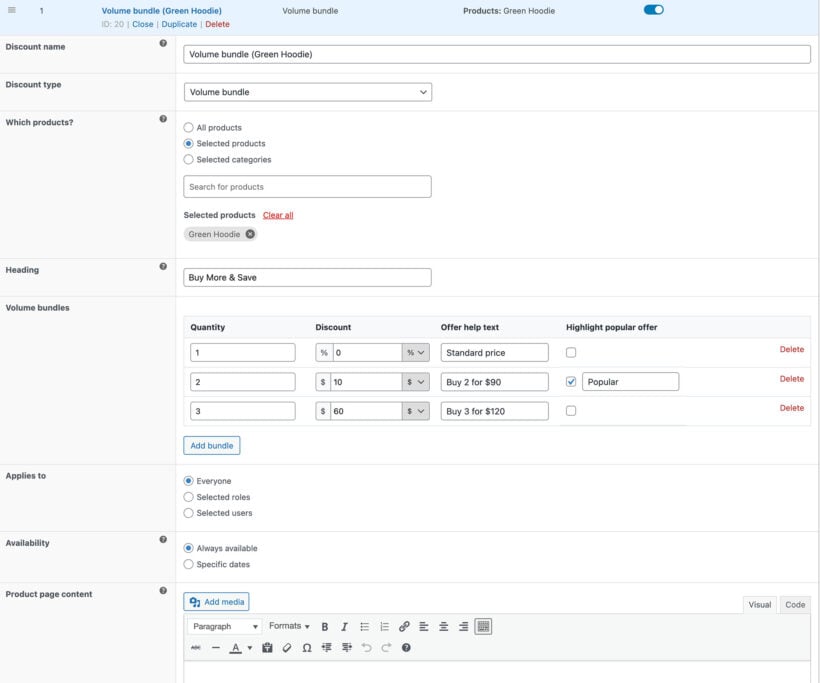
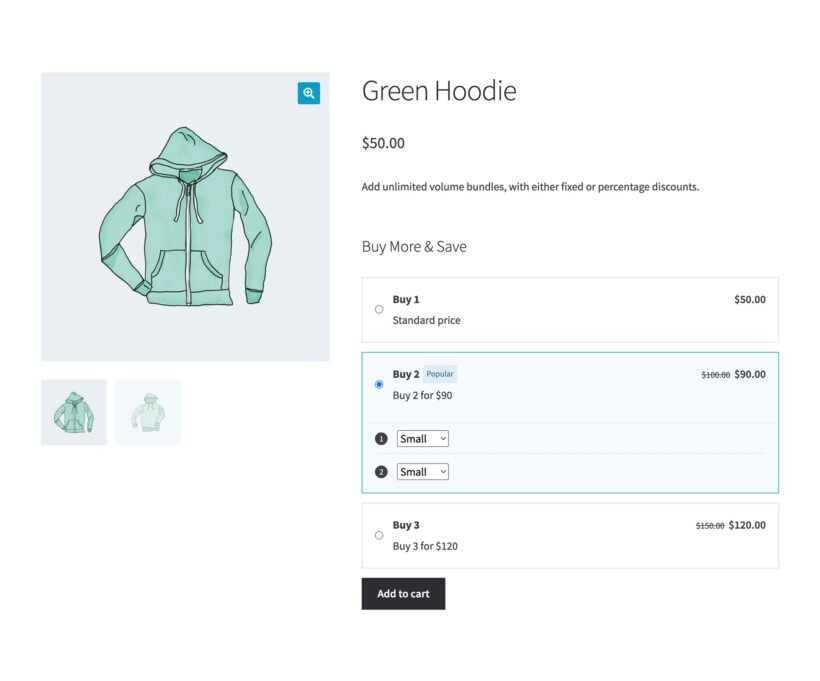
Create pre-built quantity-based bundles with fixed or percentage discounts, including mix-and-match variations of the same product. For example, buy 2 for 90, buy 3 for 120, or save 15 percent when purchasing 4. Ideal when you want to nudge customers to buy specific quantities.
Easy discount management
Central discounts page
Manage all your discounts centrally from a Marketing → Discounts page. View all the discounts in your store at a glance and see which products they are active on.
Easily enable and disable discounts
Use a toggle to instantly enable/disable each WooCommerce discount rule. For example, you can enable discounts in seconds at the start of the annual Black Friday sale.
Fine-grained control
Global discounts
Running a storewide sale in WooCommerce? Create sitewide discounts which apply to all of your products.
Role based pricing
Select which WordPress user roles each discount is used for, for example wholesale users only.
Exclude specific products
You can also exclude specific products and categories from your discounts.
Customer-specific pricing
You can even select individual users who will receive each discount, creating unique pricing rules for each user account.
Scheduled sales
Create scheduled sales by selecting the start and end date when each discount will be active in your WooCommerce store.
Displaying discounts
Show discounted pricing
The discounted prices automatically appear throughout your store. The original price appears crossed out to show how much money the customer is saving. The total amount saved also appears on the cart page.
Product page message
Add your own custom text to appear on the WooCommerce product page wherever the discount is active. You can add whatever you like here, including styled boxes and colored text to make the discount stand out.
Tiered pricing tables
Optionally add custom text to appear at the top of the cart page, clearly indicating that the discount has been applied.
Advanced discount logic
Error-free application
Where multiple discount rules apply to a particular product or cart, the plugin automatically determines which one to prioritize. This prevents accidentally applying multiple discounts at once, ensuring that every sale is profitable.
Guaranteed compatibility
Works with your theme
WooCommerce Discount Manager is designed to look awesome in any theme.
Use with other Barn2 plugins
Take your WooCommerce store to the next level by using it alongside our other plugins.
WooCommerce Product Table
Use it with WooCommerce Product Table to create fast one-page WooCommerce order forms complete with clearly displayed discounts.
WooCommerce Wholesale Pro
Creating a wholesale/B2B store? Create bulk discounts for your wholesale users only with our wholesale plugin.
Your WooCommerce product discounts will work with the main page builder plugins (Elementor, Divi Builder, Avada Fusion Builder, and Bricks), plus the Gutenberg block editor and the shortcodes which are built into WooCommerce.
Translation friendly
Your product discounts work with all the major WordPress translation plugins such as WeGlot, WPML and TranslatePress.
“Excellent discount management plugin that has allowed us to easily add quantity break discounts to our website. Simple to set up, great instructions and comprehensive discounting options.”
John Beardon - UK
★★★★★
“Barn2 not only make fantastic plugins that work easily and the customer service is second to none. The only thing better than dependable products is dependable customer service – they have that, too.”
Robert Pfeifer - USA
★★★★★
“The most easy and efficient plugin with a great support team. Really awesome, thank you so much!”
Maged MohamedEgypt
★★★★★
“I came across this plugin on YouTube and it appeared to do everything I wanted it to do in a sleek intuitive way. There are some learning curves since I'm new to WooCommerce but their support team have (and continue) to help where appropriate.”
All plans include free setup, updates and support. You can upgrade at any time and just pay the difference. If your annual license expires, the plugin will continue working on your site but you must renew to change settings or receive updates, new features or support.
Yes. WooCommerce Discount Manager sets prices dynamically, which means the price each customer sees depends on rules you control: how many items they buy, which products or categories are in the cart, how much they have spent, their user role, and the dates you choose. You can run bulk pricing tiers, BOGO deals, storewide sales and role based pricing from the same plugin.
What types of discount are available?
Our WooCommerce discount plugin lets you create 7 different types of discount:
Simple discount - Reduces the price by a straightforward percentage or fixed amount.
Based on total spend - Gives the customer a percentage or fixed amount discount when they spend a minimum amount.
Free products - When the customer buys a minimum number of products, you can mark some of the products in their cart as free. This is great for WooCommerce buy one get one free deals (e.g. "BOGO on t-shirts") and other types of giveaway (e.g. "Buy 2 make-up items and get a free lipstick").
Buy X products for a fixed price - Create fixed price deals, such as "Buy 5 t-shirts for $50".
Buy X products for X discount - Give customers a % or fixed price discount when they buy a minimum quantity of products. You can choose whether to apply the discount to the entire cart, or products over the qualifying amount only. You can also choose how many products to discount.
Bulk pricing - Create WooCommerce bulk discounts with as many quantity-based pricing tiers as you like. For example, you might give 10% discount for 5-9 products, or 20% for orders of more than 10 products. You can either apply the bulk pricing discounts across the entire cart, or to specific products only.
Volume bundle - Pre-set deals that apply a fixed or percentage discount when customers buy specific quantities of the same product or its variations, for example buy 2 for $90 or buy 3 for $120.
You can choose which products and categories to use each discount on, the start and end date, and which users and roles it applies to. Mix and match the options to create an incredibly flexible set of discount rules for your WooCommerce store.
Can I create sitewide sales in WooCommerce?
Absolutely! With WooCommerce Discount Manager, you can create discounts which apply globally across your entire ecommerce store.
If you like, then you can exclude specific products or categories from a sitewide sale. This gives you total control.
Can I add different discounts per product, variation or category?
Yes. When you create a discount, you can either apply it sitewide or select specific products, variations and/or categories that it will be used on.
Category-based discounts will automatically be used for the selected category and its sub-categories. If you don't want this then you can create unique discounts for each sub-category.
Can I offer discounts to specific users or roles?
Yes! You can use WooCommerce Discount Manager to create role-based pricing and even customer-specific pricing which is only used for selected user accounts. When you create a discount or deal, simply select which users and/or roles it will apply to.
Can I schedule discounts for a particular date?
The WooCommerce discount plugin has an option to choose a start and/or end date for each discount rule. This is a great way to pre-schedule sales instead of remembering to manually start and end them at the correct time. For example, you can set up Black Friday discounts in advance and choose a start and end date so that you don't need to do anything later.
Can I display the available discounts in the front end?
Unlike some WooCommerce dynamic pricing plugins, Discount Manager provides various ways for you to promote your discounts in the front end. That's essential to encouraging customers to add more items to their cart and take advantage of the available discounts.
Simple discounts (e.g. 10% off) are automatically displayed on shop pages, product pages, etc. The original price is crossed out with the discounted price displayed alongside.
For each discount type, you can add some custom content which appears on the product page. For example, you might add some text about the discount. Alternatively, you might add an eye-catching box containing the discount details.
For bulk discounts, you can display a tiered pricing table on your chosen location on the product page. This lists the quantity-based pricing tiers in a table so that customers can see how the price will reduce as they add more and more to their cart.
The cart page shows the discounted amounts as well as the total amount save.
You can optionally add a notice which appears at the top of the cart page, such as "Your 50% Black Friday discount has been applied".
Can customers see how much they have saved?
The cart page include a 'Total saved' row, showing the customer how much they have saved.
In addition, simple discounts are displayed throughout your store with the main price crossed out and the discounted price visible alongside. This makes it clear how much they are saving before adding products to the cart.
Can I create wholesale discounts with quantity-based pricing?
Most WooCommerce wholesale stores require a combination of the following types of discount:
Role-based discounts to charge different prices to different user groups (e.g. normal customers and wholesale buyers).
Quantity-based discounts to reward wholesale users for buying in bulk.
You can achieve this using the WooCommerce Discount Manager on its own, as it comes with role-based pricing as well as quantity-based pricing options.
However, for best results, we recommend using WooCommerce Discount Manager alongside our other plugin - WooCommerce Wholesale Pro. This comes complete with all the other features you need to build a successful wholesale store such as wholesale user registration and approval, unlimited wholesale user roles, wholesale-specific tax, payment and shipping options. You can use WooCommerce Wholesale Pro for the role-based pricing, and Discount Manager for the quantity-based discounts.
Can two discount rules be applied at once?
We've written our WooCommerce discount plugin in a way that ensures that multiple discounts can never be applied in a way that could be unprofitable for you. If more than one discount rule could potentially apply to a particular product, then the plugin uses a priority system to decide which discount to use - it will never apply multiple discounts to the same product at once.
You can easily set the priority order of your discounts through a simple drag-and-drop interface.
Will it work with my theme and other plugins?
WooCommerce Discount Manager works with any well-coded WordPress theme. Discount information on the front end uses your theme's styling options, so your discounts look good. You can create them without a developer, custom code, or theme file edits.
Our theme compatibility page shows the themes we test with. WooCommerce Discount Manager is fully compatible with all Barn2 plugins, and compatible with many plugins from other companies.
WooCommerce Discount Manager is designed to work with any WordPress translation plugin such as WPML , WeGlot and TranslatePress. This makes it easy for you to translate the discount information and labels into any language and use it on multilingual websites.
What are the minimum requirements for running the plugin?
WooCommerce Discount Manager is fully tested with the latest versions of WordPress and WooCommerce. We always recommend running the most up-to-date version, but we also support older installations:
WooCommerce 7.2 or greater (tested to 11.0.1)
WordPress 6.1 or greater (tested to 7.0.4)
PHP 7.4 or greater (tested to 8.5)
MySQL 5.7.8 or greater / MariaDB 10.3 or greater
What offers are available for WooCommerce Discount Manager?
Several offers are available if you are a nonprofit or wish to buy multiple plugins:
2-plugin bundle - Get WooCommerce Discount Manager together with WooCommerce Product Table at a reduced fixed price. Select the bundle in the pricing table above.
Multi-buy discount - Add any two or more Barn2 plugins to your cart and get 40% off automatically at checkout. The most expensive plugin stays at full price, and every other plugin is reduced by 40%. No coupon needed.
All Access Pass - For the best possible value, get our All Access Pass which gives you VIP access to our entire plugin suite including WooCommerce Discount Manager.
Charity discount - Registered nonprofits get 15% discount off.
Rated 5 out of 5 stars Based on 2 customer reviews.
Ted Goeltz
Flexible
Rated 5 stars
By Ted Goeltz on
I was looking for a plugin like this for several years. I have now been using it for over 6 months and love it. It has allowed me to discount an add-on without discounting the product. Support has been fantastic. I use several other Barn2 plugins and they all work great.
John Beardon
Perfect Functionality
Rated 5 stars
By John Beardon on
Excellent discount management plugin that has allowed us to easily add quantity break discounts to our website. Simple to set up, great instructions and comprehensive discounting options. Most importantly, it integrates perfectly with other Barn2 plugins, such as Woocommerce Product Options which, from experience, cannot be said for plugins from other developers.
























Flexible
By Ted Goeltz on
I was looking for a plugin like this for several years. I have now been using it for over 6 months and love it. It has allowed me to discount an add-on without discounting the product. Support has been fantastic. I use several other Barn2 plugins and they all work great.