Wholesale Essentials for WooCommerce Documentation
Wholesale Essentials for WooCommerce is a free plugin that adds a complete B2B wholesale system to your WooCommerce store.
The free plugin contains all the essentials to set up wholesale registration, create unlimited wholesale roles with automatic percentage discounts, and control what your wholesale customers see and pay. The premium version, WooCommerce Wholesale Pro, adds many more features including registration moderation, product-specific wholesale prices, category-level discounts, a custom registration form builder, payment and shipping method visibility per role, email customization, a guided setup wizard, and more.
How it compares to other free wholesale plugins
Most free wholesale plugins for WooCommerce give you a single wholesale role and a per-product pricing field. That works for very small stores, but quickly falls apart when you have more than one type of buyer or more than a handful of products.
Wholesale Essentials takes a different approach:
- Unlimited wholesale roles - create as many as you need (Retailer, Distributor, VIP, Trade), each with its own discount.
- Global percentage discounts - one discount per role, applied automatically across your whole catalog. No editing individual products, and new products get the discount automatically.
- Built-in wholesale registration - new customers can apply for a wholesale account directly from your site and receive an automatic welcome email when approved.
Installing the plugin
- Go to Plugins → Add New in the WordPress admin.
- Search for 'Wholesale Essentials for WooCommerce' and install the plugin by Barn2.
- Activate the plugin.
On activation, the plugin creates a default Wholesale user role and a Wholesale Login page containing the [wholesale_login] shortcode.
Plugin settings
You can find the plugin options at WooCommerce → Settings → Wholesale. The settings are organized into seven sub-tabs.
General
The General tab contains the main plugin options.
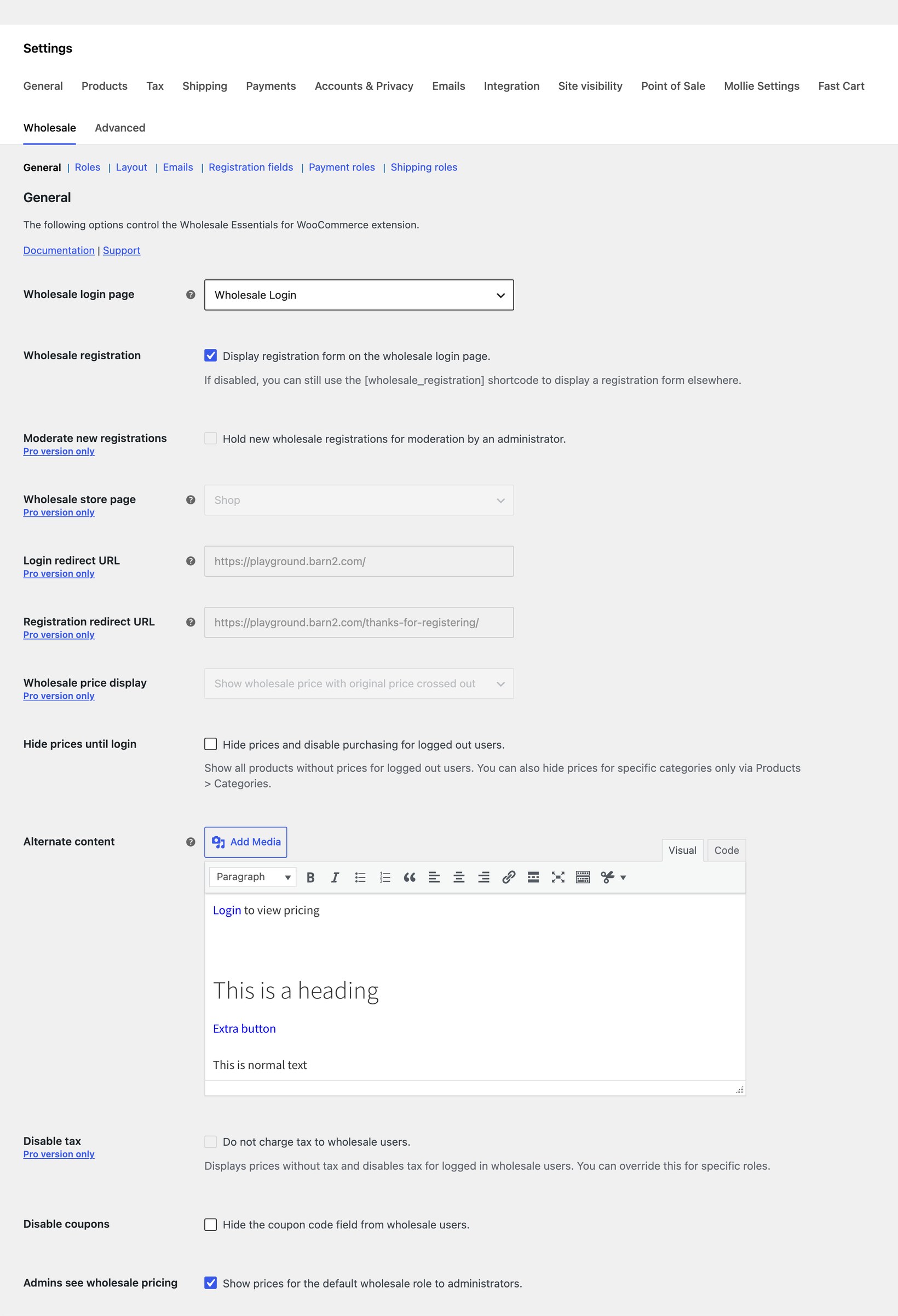
- Wholesale login page - Select the page that contains your wholesale login (and optional registration) form. The
[wholesale_login]shortcode is automatically added to the selected page. - Wholesale registration - Display the registration form on the wholesale login page. If disabled, you can still use the
[wholesale_registration]shortcode to display a registration form elsewhere. - Hide prices until login - Hide prices and disable purchasing for logged out users.
- Alternate content - When prices are hidden, users will see this text instead of the price.
- Disable coupons - Hide the coupon code field from wholesale users.
- Admins see wholesale pricing - Show prices for the default wholesale role to administrators (useful for previewing the wholesale experience).
The following options are part of WooCommerce Wholesale Pro and are visible as upgrade prompts in the free version: Moderate new registrations, Wholesale store page, Login redirect URL, Registration redirect URL, Wholesale price display, and Disable tax.
Roles
The Roles tab is where you create and manage your wholesale user roles. Each role has its own global percentage discount that's applied automatically to every product in your store.
You can create as many wholesale roles as you need - useful when you sell to different buyer types, such as Retailers at 20% off and Distributors at 35% off. The global percentage means you don't have to enter wholesale prices product by product; the discount is applied to your whole catalog and to any new products you add later.
On activation, the plugin creates a default Wholesale role with no discount. You can edit this role, add more roles, or delete additional roles at any time.
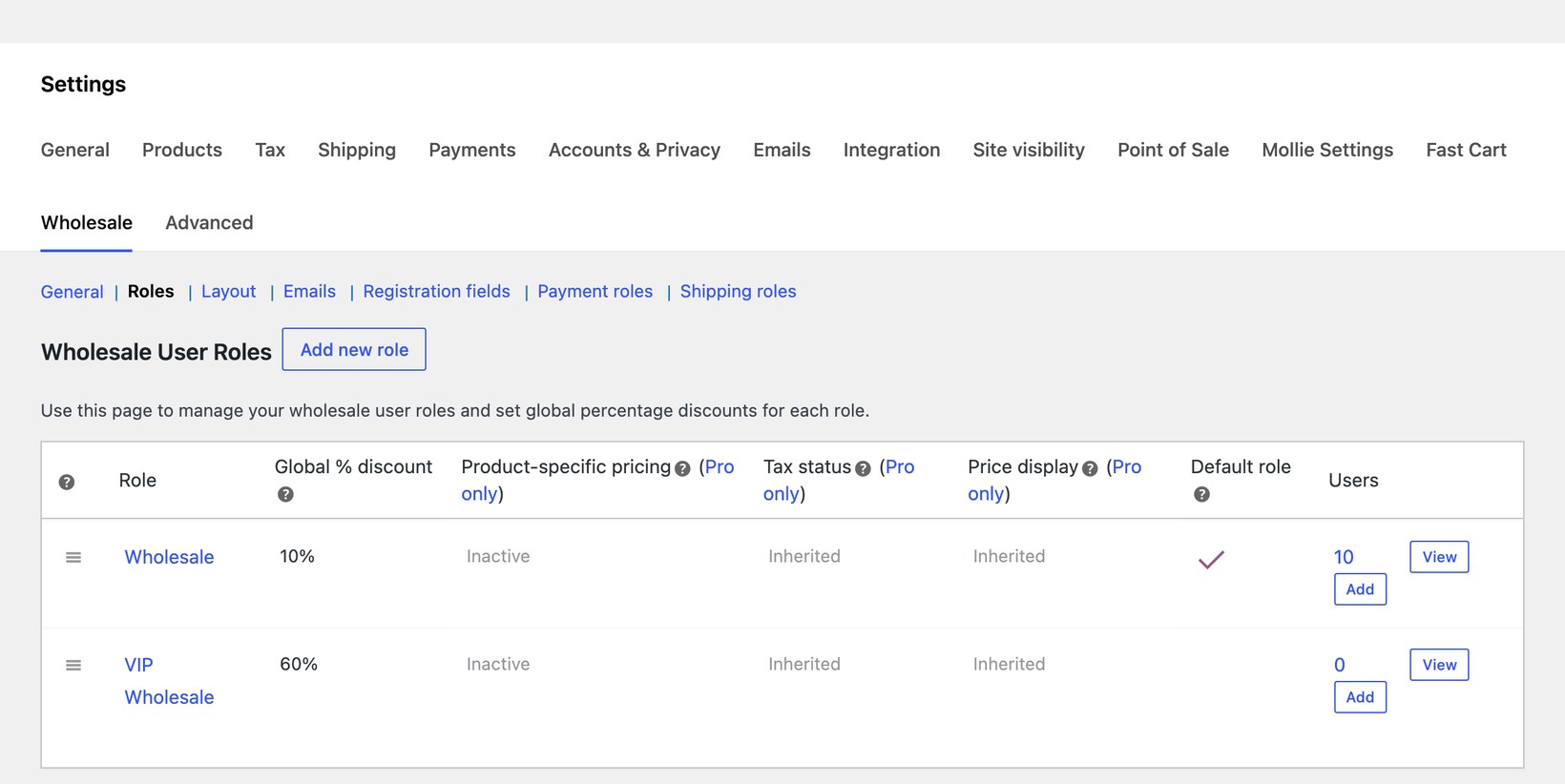
To add a new wholesale role:
- Go to WooCommerce → Settings → Wholesale → Roles.
- Click Add new role.
- Enter a Display name (for example, 'Retailer' or 'Distributor').
- Enter a Discount percentage. This is deducted from the regular price of every product for users with this role.
- Tick Default role if you want new wholesale registrations to be assigned to this role.
- Click Add role.
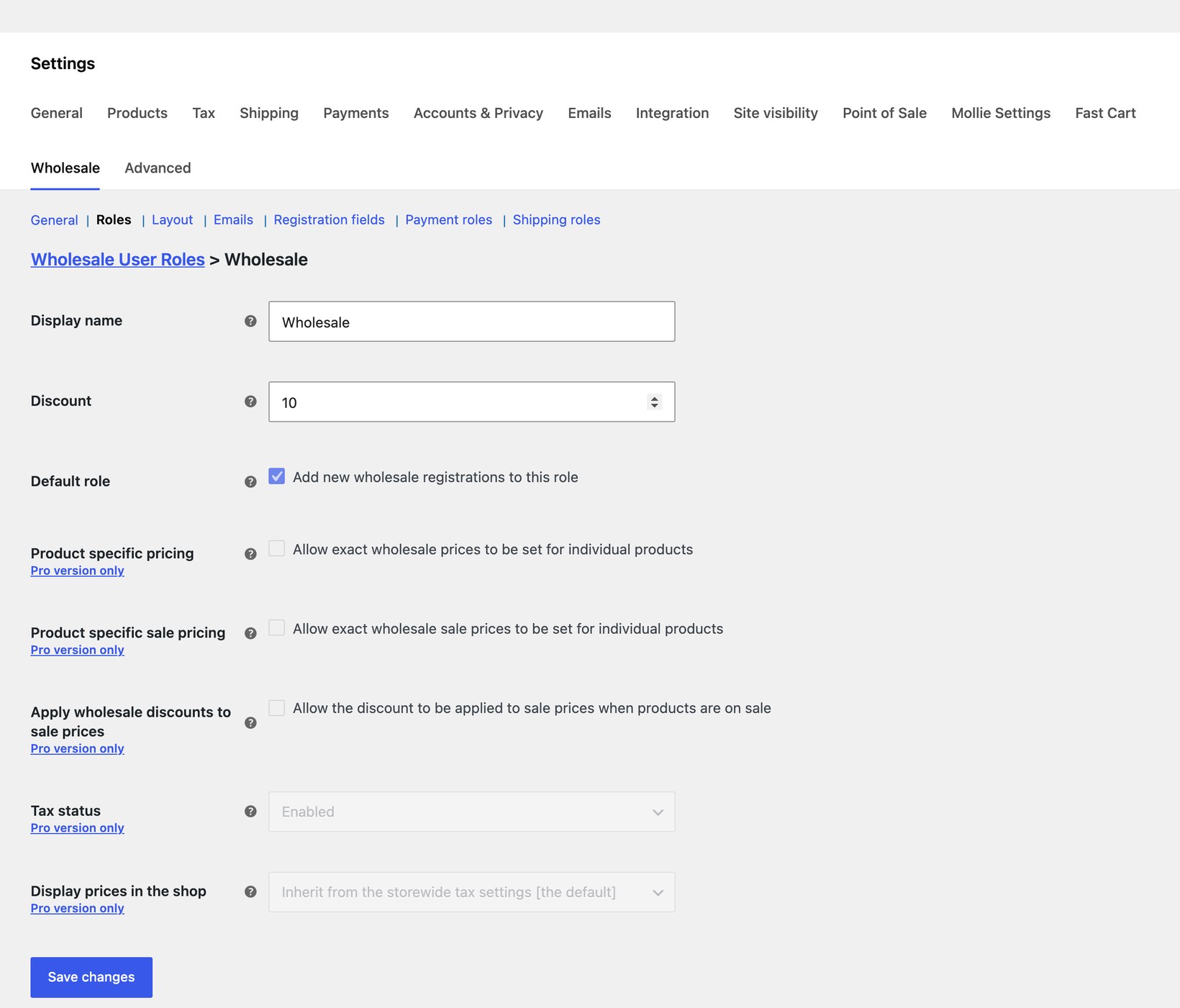
You can re-order your roles by dragging the handle on the left of each row. The default role is marked with a tick in the Default role column.
The roles list also shows columns for Product-specific pricing, Tax status, and Price display. These are part of WooCommerce Wholesale Pro and let you override the global discount with exact prices per product, control tax per role, and choose whether prices in the shop are shown with or without tax for each role.
Emails
The Emails tab lists the email notifications sent by Wholesale Essentials for WooCommerce. The free version includes a welcome email sent to new wholesale customers when they register and are auto-approved.
To customize the email, click on its name. This opens the standard WooCommerce email settings screen where you can edit the subject line, heading, content, and email type.
The Emails tab also lists the moderation emails (New wholesale user, Wholesale registration approved/declined/pending) that are sent when registration moderation is enabled. These are part of WooCommerce Wholesale Pro.
Layout, Registration fields, Payment roles, Shipping roles
The remaining four sub-tabs are previews of WooCommerce Wholesale Pro features:
- Layout - Display products to wholesale customers in a conversion-boosting order form layout, where buyers can quickly find products, select options, and add to the cart from a single page.
- Registration fields - Build a custom wholesale registration form with multiple field types, conditional logic and mapping to the WooCommerce user profile.
- Payment roles - Show different payment methods to different wholesale roles.
- Shipping roles - Show different shipping methods to different wholesale roles.
Adding wholesale users
Wholesale registration form
Built-in self-registration is one of the things that sets Wholesale Essentials apart from other free wholesale plugins, where you typically have to add wholesale users one by one in the WordPress admin.
The plugin creates a Wholesale Login page on activation that contains the [wholesale_login] shortcode. By default, this page displays both a login form and a registration form.
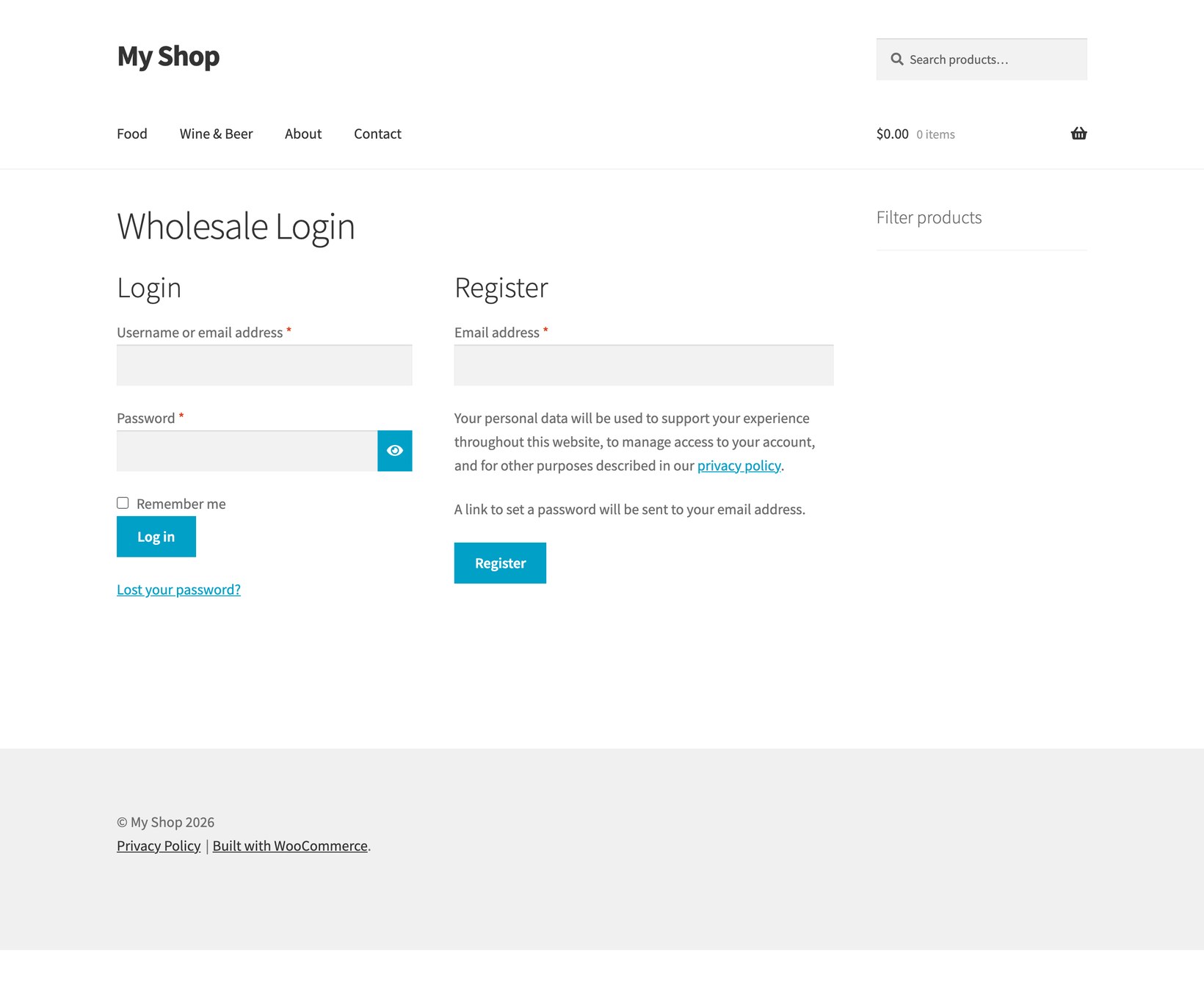
When a new customer registers, they're automatically approved and assigned to your default wholesale role. A welcome email containing their auto-generated password is sent to them, and they're redirected to your shop. Manual moderation of new registrations is available in WooCommerce Wholesale Pro.
Adding wholesale users manually
You can also add wholesale users yourself:
- Go to Users → Add New in the WordPress admin.
- Fill in the username, email, and password.
- Select your wholesale role from the Role dropdown.
- Click Add New User.
You can also bulk-change existing customers' roles to a wholesale role from the Users screen.
Shortcodes
The plugin includes two shortcodes:
[wholesale_login]- Displays the wholesale login form. If Wholesale registration is enabled in the General settings, a registration form is also displayed on the same page.[wholesale_registration]- Displays just the wholesale registration form. Use this if you want the registration form on a different page from the login form.
Both shortcodes are restricted to wholesale users - if a non-wholesale logged-in customer visits a page containing one of these shortcodes, they'll be prompted to log out before they can access it.
Hiding prices from non-wholesale users
If you tick Hide prices until login in the General settings, prices and add-to-cart buttons are hidden from all logged out visitors. Logged in customers (wholesale and standard) will continue to see prices as normal.
Use the Alternate content field to show a custom message in place of the price - for example, "Login to view trade prices" or a link to your wholesale registration page.
You can also hide prices for specific product categories only. Go to Products → Categories, edit a category, and tick the Hide prices option.
Disabling coupons for wholesale users
Wholesale customers usually get an automatic role-based discount, so allowing them to stack additional coupon codes on top can eat into your margins. To prevent this, tick Disable coupons in the General settings. The coupon field will be removed from the cart and checkout for any logged in wholesale user. Standard customers will still see and be able to use coupons as normal.
Pro plugin
WooCommerce Wholesale Pro extends the free plugin with everything you need for a more advanced B2B store.
Registration moderation
Hold new wholesale applications for admin approval, with a dedicated 'Pending' role and email notifications for new registrations, approval, pending, and decline.
Product-specific wholesale prices
Set exact wholesale prices on individual products and variations from the Edit Product screen, overriding the global role discount. Also adds wholesale sale prices.
Category-specific wholesale discounts
Set a percentage discount on individual product categories from the Edit Category screen, in addition to (or instead of) the global role discount.
Registration form fields
Build a custom wholesale registration form with a range of field types (including file uploads, dropdowns, radio buttons and checkboxes), group fields into sections, show or hide them with conditional logic, and map the data straight to the WooCommerce user profile.
Payment and shipping method visibility per role
Show different payment gateways and shipping methods to different wholesale roles - for example, offer bank transfer to trade customers and limit credit card payments to retail.
Dedicated wholesale store page
Create a separate area of your store visible only to wholesale customers, with login and registration redirect URLs to send customers exactly where you want them.
Product and category visibility
Set each product or category as Public Only, Wholesale Only, or Both. The setting controls what wholesale and non-wholesale customers see across your shop page, category archives, and navigation menus - useful for trade-exclusive lines or for hiding consumer-only ranges from your B2B catalog.
And much more...
- Setup wizard - Guided setup to get your wholesale store configured quickly.
- Email customization - Customize all wholesale email templates (welcome, approved, declined, pending).
- Tax control per role - Disable tax globally for wholesale users, or override per role.
- Price display control - Choose whether to show or hide the original price alongside the wholesale price, per role.
For a full feature breakdown, see the Free & Pro comparison.