8 Best WordPress shopping cart plugins, plus tutorial


Looking to set up a WordPress shopping cart to accept payments on your WordPress site? There are all kinds of reasons you might want to add an ecommerce shopping cart to your site, but WordPress doesn't offer this as a built-in feature.
WordPress has no built-in shopping cart, so you need a plugin or a hosted service to sell products and take payments on your site. There are plenty of good options, from full e-commerce platforms to simple add-a-cart plugins. In this post, I'll compare the eight best WordPress shopping cart plugins, then show you how to set one up with WooCommerce, the option I recommend for most stores.
If you already run WooCommerce, our Fast Cart plugin enhances and speeds up your shopping cart with a slide-out cart and one-page checkout.
Quick verdict: the best WordPress shopping cart plugins
Short on time? Here is where each option fits.
- Best overall and most flexible WooCommerce is the free, open-source plugin that powers most WordPress stores and does almost anything with the right extensions.
- Best for digital products Easy Digital Downloads is purpose-built for files, software and downloads.
- Best modern self-hosted option FluentCart is a fast, lightweight alternative to WooCommerce, geared to digital products.
- Best lightweight, modern option SureCart keeps your site fast by running the commerce backend in the cloud.
- Best fully hosted option Ecwid by Lightspeed handles everything for you, with no self-hosting.
- Simplest free option WordPress Simple PayPal Shopping Cart adds a basic PayPal cart for just a few products.
Evaluating these shopping cart plugins
Shopping cart options range from full plugins to hosted services. I compared them on what decides which one fits your store:
- Whether it is self-hosted (you own the data) or a hosted service.
- Whether it sells physical products, digital products, or both.
- Pricing, and whether there is a genuinely useful free version.
- The payment gateways it supports.
- How easy it is to set up if you are not a developer.
- The size of its ecosystem, and whether it is actively maintained.
I have left out options that are no longer safe to recommend, such as any that have been pulled from the WordPress.org plugin repository.
Comparing the best WordPress shopping cart plugins
Here is how the best WordPress shopping cart plugins compare at a glance.
| Plugin | Type | Free version | Starting price | Best for |
|---|---|---|---|---|
| WooCommerce | Self-hosted | Yes | Free core | Most stores |
| Easy Digital Downloads | Self-hosted | Yes | Free core | Digital products |
| SureCart | Hybrid (hosted backend) | Yes | Free plan | A fast, modern setup |
| FluentCart | Self-hosted | Yes | Free core | Digital-first stores |
| WP EasyCart | Self-hosted | Yes (2% fee) | Paid tiers | A simple all-in-one cart |
| Ecwid by Lightspeed | Hosted | No | From ~$5/mo | A no-maintenance hosted store |
| BigCommerce | Hosted | No | From ~$39/mo | Higher-volume stores |
| WordPress Simple PayPal Shopping Cart | Self-hosted | Yes | Free | A few products via PayPal |
Reasons to use a WordPress shopping cart plugin
While WordPress is the most popular way to make a website by a large margin, it doesn't come with any built-in shopping cart or payment processing features.
So while you can write about your products on a basic WordPress website or WordPress blog, you cannot sell them directly from your website. Your only options then are to use inconvenient workarounds, like having people send you money directly via PayPal.
A WordPress shopping cart plugin changes that, letting you sell products directly on your website. You'll be able to…
- List one or more products for sale.
- Let shoppers add one or more products to their "cart" and view those items on a dedicated shopping cart page.
- Process credit card payments at your website checkout via a variety of payment gateways, including PayPal and Stripe.
Some shopping cart plugins go even further, with integrations for popular shipping couriers, detailed order management features, and lots more.
By using such a WordPress plugin on your site, you're able to create a much more user-friendly, personalized shopping experience for your visitors. When you make it more convenient for people to buy your products or services, you naturally increase the chances that visitors will make a purchase.
8 best WordPress shopping cart plugins
Below are the eight best WordPress plugins that add shopping cart features to your site:
- WooCommerce
- Easy Digital Downloads
- SureCart
- FluentCart
- WP EasyCart
- Ecwid by Lightspeed
- BigCommerce
- WordPress Simple PayPal Shopping Cart
1. WooCommerce
In my opinion, WooCommerce is the best WordPress shopping cart plugin for most people.
It is the most popular WordPress ecommerce plugin, and the most popular way to build an online store on any platform, according to BuiltWith.
WooCommerce is a free, open-source plugin that helps you sell both physical and digital products on your website. You can accept credit card payments via a number of different payment gateways, including Stripe, PayPal, Amazon Pay, Authorize.net, and many other options.
You can also offer offline payment options, like cash on delivery or check. And once an order rolls in, you get a convenient dashboard area to manage the status of your orders.
If you're selling physical products, you can connect to a number of shipping options, including USPS and FedEx.
WooCommerce will work with any WordPress theme, but the developer offers its own free Storefront theme, which is a great place to get started if you need a WordPress theme for your shopping cart.
Another great thing is its extensibility and customization options. Because it's so popular, you can find thousands of add-ons to add more features to your WordPress shopping cart. If you’re already using WooCommerce, we also have a roundup of the best WooCommerce checkout plugins!
If needed, you can also make all or some of your store private, and you can also manage your store on the go, thanks to dedicated iOS and Android apps.
Pros and cons
Pros:
- Free, open-source core that you fully own and control.
- The biggest ecosystem in WordPress e-commerce, with thousands of extensions and themes.
- Sells physical and digital products, with dozens of payment gateways and shipping integrations.
- Backed by Automattic, so its future is not in doubt.
Cons:
- The “free” headline is misleading: a working store usually needs paid hosting, a theme and a few premium extensions, so real costs often run a few hundred dollars a year and up.
- It can slow a site down without caching and good hosting, and large catalogs need real server resources.
- You are responsible for updates, security and backups, and support is spread across forums and individual extension vendors.
2. Easy Digital Downloads
Easy Digital Downloads is a popular WordPress ecommerce solution for selling digital goods or services.
For example, it makes a good option for eBooks, photography and audio files. But it doesn't make a good option for physical products.
You can connect Easy Digital Downloads to a range of payment gateways, including PayPal and Stripe. Shoppers will then be able to choose their preferred payment method when they check out.
Easy Digital Downloads doesn't have as many extensions, but you can still find helpful tools. For example:
- Use Recurring Payments to take ongoing subscription renewals.
- The Posts Table Pro plugin can help you display your Easy Digital Downloads products in a table layout, much like the WooCommerce Product Table plugin does for WooCommerce.
- Use Password Protected Categories to create hidden areas of your EDD store.
- Use Easy Digital Downloads EU VAT to comply with EU tax rules, wherever you are in the world.
Pros and cons
Pros:
- Purpose-built for selling digital products, with clean file delivery and software license keys.
- A genuinely usable free core, with mature paid extensions when you need them.
- Lighter and simpler than WooCommerce if you only sell downloads.
Cons:
- Digital products only, so it is the wrong tool if you sell physical goods that need shipping.
- Advanced features (recurring payments, advanced reporting and frontend submissions) need paid extensions, so costs stack up.
- A smaller ecosystem and fewer compatible themes than WooCommerce.
3. SureCart

SureCart is one of the newer WordPress shopping cart plugins, and it takes a hybrid approach. It installs as a lightweight plugin, but the heavy lifting (orders, payments, subscriptions and taxes) runs on SureCart’s hosted infrastructure. That keeps your own site fast while you still manage everything from your WordPress dashboard.
It handles both one-off and recurring payments, has a drag-and-drop checkout builder, and connects to Stripe, PayPal, Mollie and Paddle. There is a genuinely useful free plan, with paid tiers as your store grows.
Pros and cons
Pros:
- Lightweight: the hosted backend keeps your own site fast.
- Handles one-off and recurring payments, with a drag-and-drop checkout builder.
- A useful free plan, and you manage everything from your WordPress dashboard.
Cons:
- Your core commerce data lives on SureCart’s servers, so you own less of it than with a self-hosted plugin.
- A newer plugin, so the ecosystem and third-party integrations are still smaller.
- The more advanced features sit behind paid tiers.
4. FluentCart
FluentCart is a self-hosted WordPress e-commerce plugin from the team behind FluentCRM and Fluent Forms. Like WooCommerce, it keeps all of your data on your own site, but it is built for speed, with a modern, streamlined admin and a lighter footprint.
It is designed around digital products, subscriptions and license keys, with built-in reporting and a fast checkout. As a newer plugin its extension ecosystem is smaller than WooCommerce’s, but it is developing quickly.
Pros and cons
Pros:
- Self-hosted, so all of your store data stays on your own site.
- Fast and modern, with a streamlined admin and a light footprint.
- Strong for digital products, subscriptions and license keys, from the well-regarded Fluent team.
Cons:
- Very new, so the extension ecosystem and pool of compatible themes are small.
- More geared to digital products; physical-product and shipping features are less mature.
- Fewer third-party developers familiar with it so far.
5. WP EasyCart

WP EasyCart is a simple WordPress shopping cart plugin. It is not as feature-rich as WooCommerce, but it is a solid choice if all you need is a simple shopping cart page.
Paid versions add support for more payment gateways, a Mailchimp integration and shipping integrations, though the free version takes a 2% transaction fee.
Pros and cons
Pros:
- A simple, all-in-one cart that is quick to set up.
- Sells both physical and digital products without extra plugins.
- A free version to try before you commit.
Cons:
- The free tier is thin and takes a 2% transaction fee, so it is really a trial-grade tier.
- A much smaller ecosystem and community than WooCommerce.
- Fewer integrations and extensions than the bigger platforms.
6. Ecwid by Lightspeed
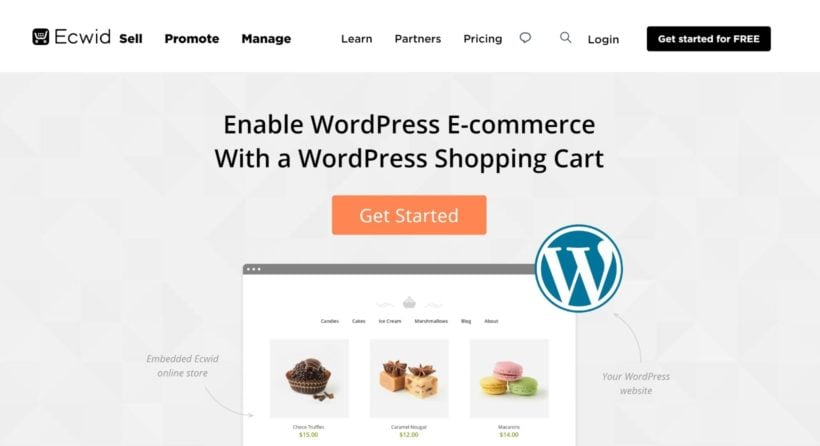
Ecwid is a cloud shopping cart service that you can integrate into your site via a dedicated WordPress plugin. The setup process is easy and, once you connect your site, you can manage all of your products from inside your WordPress dashboard.
Still, it's important to remember that this is not a self-hosted WordPress shopping cart - Ecwid's servers are responsible for the checkout and payment features, not your own.
While this makes it easy to set up and start accepting payments, you are giving up some control in exchange for that simplicity.
Pros and cons
Pros:
- Very easy hosted setup, with no self-hosting or maintenance to worry about.
- Sell across several sites and channels from one place.
- A good fit if you want someone else to handle the commerce backend.
Cons:
- There is no longer a free plan: paid tiers start at around $5 per month, and the cheapest tier caps your product count.
- Your store data lives on Ecwid/Lightspeed’s servers, so you give up some control.
- Less flexibility and customization than a self-hosted plugin.
7. BigCommerce
BigCommerce is a popular standalone ecommerce platform. While it does use a hosted approach, BigCommerce is unique in that it still locally stores any products that you add via your WordPress dashboard, which makes it great for a WordPress ecommerce website.
This means you can still create a product table layout using the Posts Table Pro plugin, despite BigCommerce using the hosted approach.
BigCommerce is also pricey, with plans starting at around $39 per month. Its WordPress connector plugin is also no longer actively maintained.
Pros and cons
Pros:
- A scalable hosted backend that handles checkout, payments and PCI compliance for you.
- Sells across multiple channels, which suits higher-volume stores.
- Keeps the heavy commerce engine off your own server.
Cons:
- Its WordPress connector plugin is no longer actively maintained (the last release was in late 2023), which is a real concern for a WordPress store.
- Pricey, starting around $39 per month, with plans that step up automatically as your sales grow.
- As a hosted platform, you are tied to BigCommerce and have less control than with a self-hosted plugin.
8. WordPress Simple PayPal Shopping Cart

As the name suggests, WordPress Simple PayPal Shopping Cart is a good choice if you just need a very simple WordPress shopping cart and you are happy to use PayPal for payments.
The plugin lets you add your own physical or digital products and give visitors the option to buy them directly or add them to their carts. They can then view the items on a separate cart page and pay via PayPal at checkout.
Again, a good simple option, but it lacks the flexibility of many of the other ecommerce shopping cart plugins.
Pros and cons
Pros:
- Completely free.
- Dead simple if you only need to sell a few products.
- No account or platform beyond a PayPal account to get paid.
Cons:
- PayPal only, so shoppers cannot pay any other way.
- Very basic, with no real catalog or order-management features.
- Some reviewers report reliability problems and patchy support.
Setting up a WordPress shopping cart with WooCommerce
WooCommerce is our recommended pick for most stores, so here is the short version of getting a shopping cart running with it:
- Install and activate the free WooCommerce plugin from WordPress.org.
- Run the setup wizard to create your cart and checkout pages, set your currency and connect a payment gateway such as Stripe or PayPal.
- Go to Products → Add New to add the products or services you want to sell.
WooCommerce’s own getting started guide walks through each step in detail.
Prefer to watch? This beginner tutorial walks you through setting up a WooCommerce store from scratch:
Improving your WooCommerce shopping cart
Once your shopping cart is live, a handful of plugins can make it convert better and feel more professional. The first few are our own plugins, and I will be clear about where each one fits.
Speed up the cart and checkout with Fast Cart
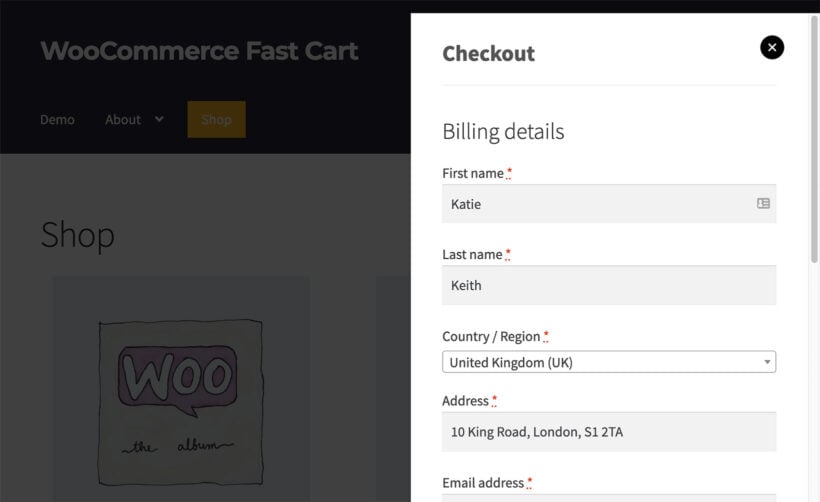
Our WooCommerce Fast Cart plugin adds a slide-out side cart and a quick one-page checkout, so shoppers can review their cart and pay without leaving the page they are on. Cutting out those extra page loads is one of the simplest ways to recover otherwise-lost sales.
Show products in a table with Product Table
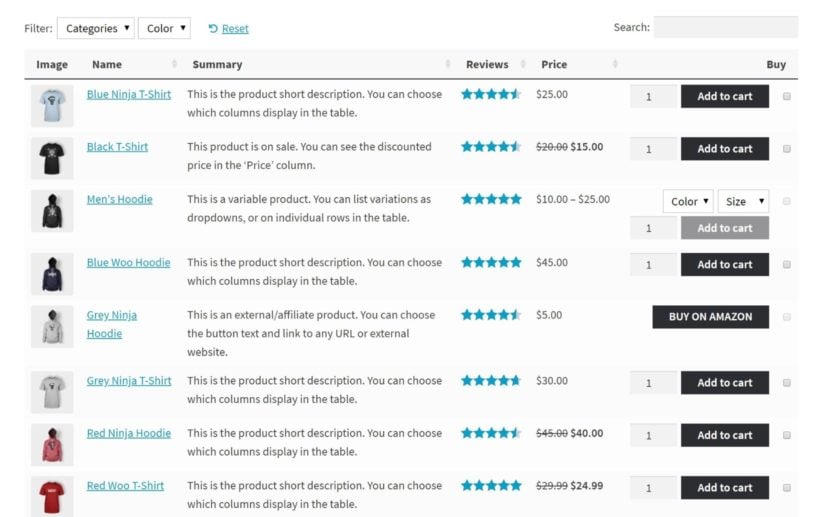
By default WooCommerce shows products in an image grid. Our WooCommerce Product Table plugin lists them in a searchable, sortable table with a bulk “add to cart”, which suits wholesale, large catalogs and order forms.
Help shoppers find products with Product Filters
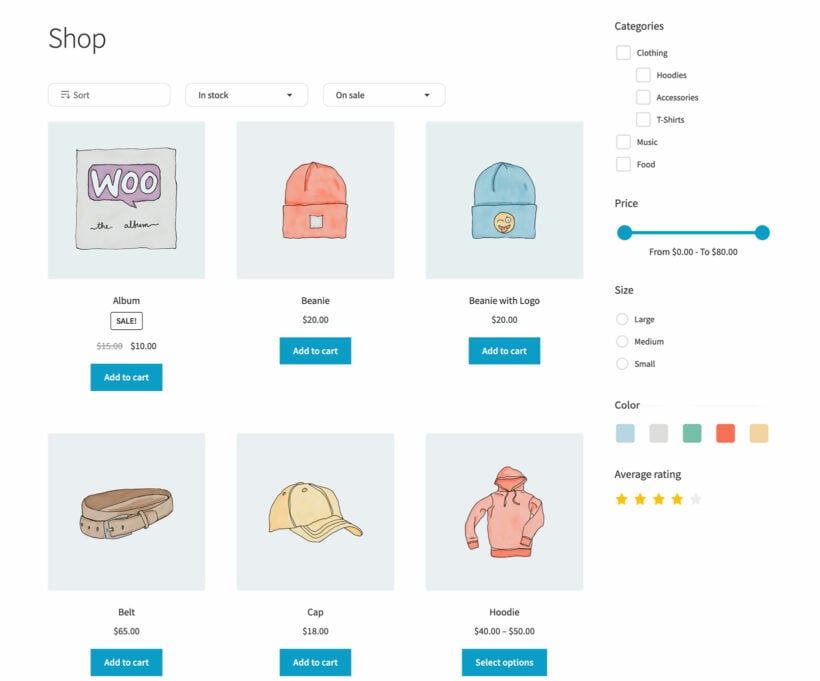
Our WooCommerce Product Filters plugin adds AJAX filters so customers can narrow products by category, price, attribute and more without reloading the page.
Offer product add-ons with Product Options
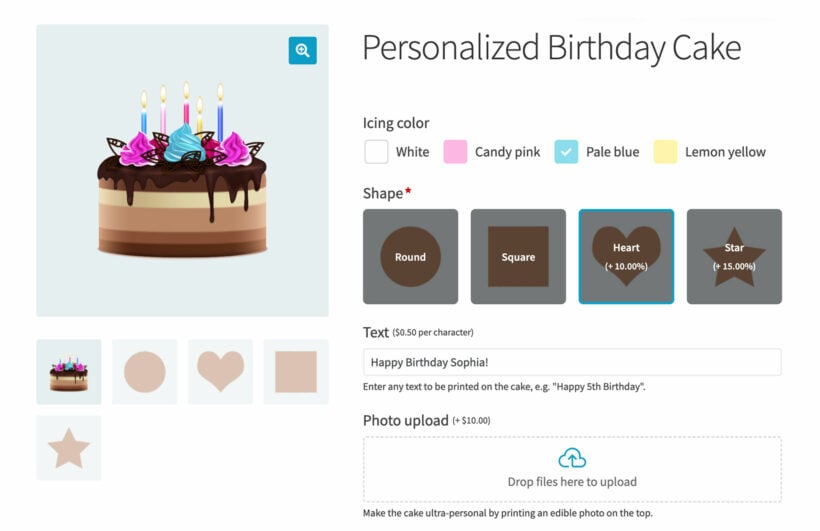
Our WooCommerce Product Options plugin adds custom fields and add-ons (such as engraving, gift wrap or file uploads) to the product page before the add-to-cart button.
A free third-party alternative: ThemeHunk side cart
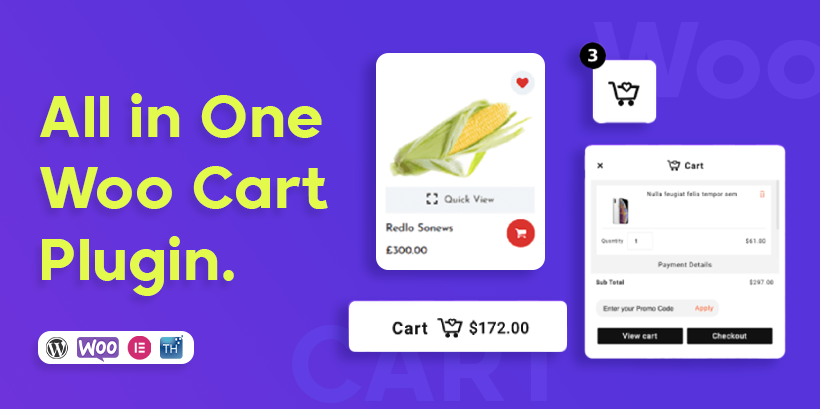
If you only want a floating side cart and you are not using our plugins, ThemeHunk’s Advance Side Cart for WooCommerce (formerly the All in One Woo Cart plugin) is a free option. A paid version adds extra styling and abandoned-cart recovery.
Best Practices: How to generate more sales from your WordPress shopping cart
Once you have a functioning WordPress shopping cart in place, you can turn your attention to getting more sales via your new shopping cart system and optimizing your conversion rates. Here’s what I recommend:
- Create a well-designed layout: Make sure that your product design and layout of the shopping cart offers all the details a customer might want to know while being precise and relevant. Use clear product images and make sure your page is optimized for mobile devices for the best customer experience.
- Offer assistance: Show customers you care and help them make decisions easily by offering support. This could be something as simple as offering product tutorials (like a size guide), email or chat assistance for any queries, access to testimonials and social media etc.
- Use product upsells and cross-sells: A quick and effective way to increase your online store sales is to show site visitors products related to their purchase. For example, a customer buying a guitar can be shown a guitar case, strings etc.
- Have a fast, streamlined checkout process: Ensure that your checkout process isn’t tedious and supports all popular payment methods like PayPal and Stripe. Offering coupons and discounts at checkout can give customers that final push to purchase!
- Increase the default product quantity: Another way to subtly encourage larger orders is to increase the default quantity using a plugin like Quantity Manager. Customers can still purchase a single product if they want, but by increasing the "anchor" in their mind, you can boost the chances that they purchase multiple products.
- Simplify navigation with product filters: To improve your customers' shopping experience, you can add product filters to your store. You can do this with a plugin like Product Filters, allowing your customers to find their desired product quickly and easily. If you have a large store with products in multiple categories, adding product filters can be a great addition to your store.
Finally, if you're using the product table approach we outlined above, there are also a number of techniques you can implement to increase the conversion rates for your product tables.
Get started with a WordPress shopping cart plugin today
If you want to sell products directly from your WordPress site, you need a WordPress shopping cart plugin.
While I've shared eight quality shopping cart WordPress plugins in this post, my overall recommendation for most people is WooCommerce. Again, I'm not the only one who likes it - it's the most popular way to build an online store and powers a large share of the ecommerce stores in the top one million websites.
Which option is right depends on what you are selling and how much you want to manage yourself:
- For most stores, start with WooCommerce. It is free, flexible and the most widely supported.
- If you only sell digital products, Easy Digital Downloads or FluentCart are a better fit.
- For a lighter, more modern setup, look at SureCart.
- If you would rather not self-host at all, Ecwid by Lightspeed handles everything for you.
- If you only need to sell a handful of products, WordPress Simple PayPal Shopping Cart is the simplest free option.
Whichever platform you choose, our own plugins can make the shopping experience better, as covered above: Fast Cart for a quicker cart and checkout, plus Product Table, Product Filters and Product Options.
4 Comments
This is not easy, I tried to change my theme to Jewelry,but only some of my site changed. Can you fix this?
Hi Mary! We'd love to help you out. Can you please send a support request with more information regarding the issue you are having via our Support Center so we can look into this for you? Thanks.
WP EASYCART IS NOT FREE
Pricing Page: EasyCart is 2% per transaction on Free Edition
Hi, Clinton. Thanks for pointing this out. I see what you mean. WP EasyCart may have changed their pricing or terms since our article was first published over a year ago. We have now updated it. Thanks.