9 best product designer plugins for WooCommerce: Compared


The best WooCommerce product designer plugin for most stores is WooCommerce Product Options, with Fancy Product Designer and Zakeke the top picks for blank-canvas design and 3D previews. I've compared all the leading options, with real pros, cons and pricing for each.
Allowing customers to customize products when they order can lift both order value and demand. McKinsey's research on personalization found that 71% of consumers expect personalized interactions, and 76% get frustrated when they do not find them.
WooCommerce is a great foundation for a product designer website, but on its own it does not let customers place custom orders. A good product designer plugin such as WooCommerce Product Options fixes that, letting shoppers customize their products and order something bespoke.
The WooCommerce product designer plugins below all work in different ways, so it's worth reading about each one to find the type of customization features you need.
Quick verdict: the best WooCommerce product designer plugins
Short on time? Here are my picks by use case.
- Best overallWooCommerce Product Options covers the widest range of customization, from simple monograms to full made-to-order configurators.
- Best blank-canvas designerFancy Product Designer gives customers a full design studio with clipart, shapes and live preview.
- Best for 3D and ARZakeke adds 2D and 3D customization, augmented reality and automatic print-ready files.
- Best for print-on-demandCustomily generates production-ready files and sends them straight to fulfillment.
- Best free optionPickPlugins Product Designer offers a basic free design canvas on WordPress.org.
Evaluating these product designer plugins
I compared these plugins on what matters when you let customers design their own products. That means the range of customization on offer, how easy the designer is for shoppers to use, whether it produces print-ready files for manufacturing, the pricing model, and how well it works with WooCommerce.
I also checked that each plugin is still actively maintained and weighed the genuine complaints in its reviews. A couple of well-known tools have closed down recently, so anything no longer available has been left off the list.
Best WooCommerce product designer plugins
I've ordered these from the most flexible all-rounder to specialist canvas designers, enterprise web-to-print tools and a free option. Look for the customization style that fits your products.
| Plugin | Type | Best for |
|---|---|---|
| WooCommerce Product Options | Options + live preview | Most stores |
| Fancy Product Designer | Design canvas | Designing from scratch |
| Zakeke | 2D/3D + AR (SaaS) | 3D and AR |
| Lumise | Design canvas | Value canvas designer |
| Customily | Personalizer (SaaS) | Print-on-demand |
| PrintXpand | Web-to-print | Print businesses |
| WooCommerce Online Designer Tool | Web-to-print | Enterprise print |
| Extendons Product Designer | Design canvas | Budget canvas |
| PickPlugins Product Designer | Design canvas | Free option |
1. WooCommerce Product Options
Our WooCommerce Product Options plugin transforms the single product page into a fully featured product configurator. It does this by adding a wide range of extra fields and options for customers to configure.
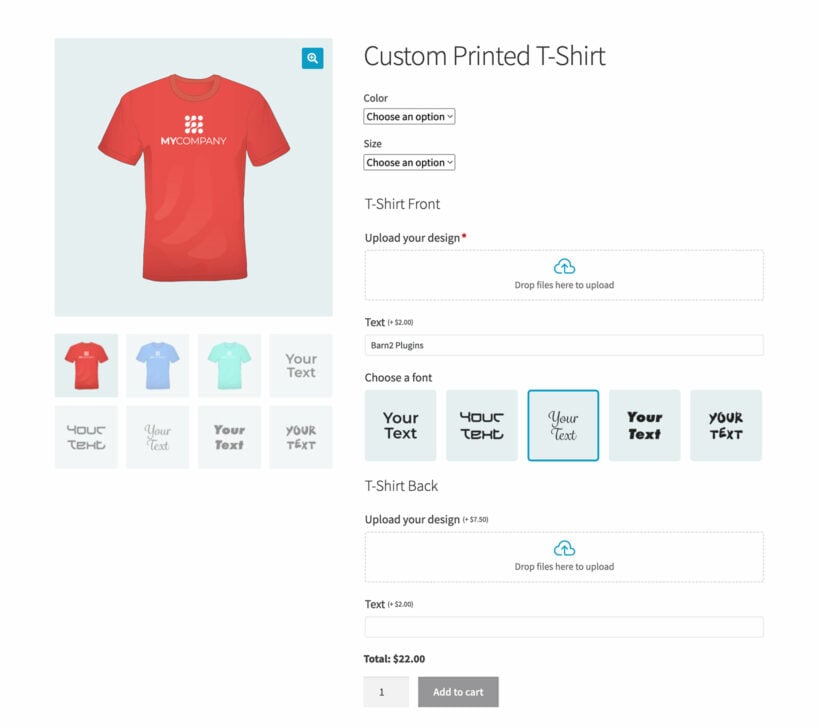
Customers can mix and match the options to create a bespoke custom product that meets their exact specification.
Product option types you can add
- File upload: Allow customers to upload a logo, image, or design to appear on the product. Optionally allow customers to preview their uploaded images so that they can see what the final customized product will look like.
- Checkbox and radio button: Allow customers to configure different aspects of the product by making selections.
- Text fields: Allow customers to add custom text that needs to be printed on the product. This is also perfect for entering custom instructions for the manufacturer to implement.
- Dropdowns: Let customers choose from multiple options. For example, you can use this to allow users to choose a font in which the text will be printed on a product.
- Color swatches: These color swatches are perfect for letting customers pick the product color in a more visual way.
- Image options: Clickable images provide a visually appealing way to choose options.
- Text area: This is ideal for products where detailed instructions related to the custom product orders are required to process them.
- Display other products in the WooCommerce designer: As well as adding options directly to a product, you can display other products from your store as options. For example, a "Design your own cosmetics box" product designer might display make-up products from elsewhere in your store.
- Other niche use-case product options: You also add HTML, Visual Editor, and customer-defined price fields.
Depending on the field type, you can either create the options directly in the plugin or select existing variations to add to the product builder using the above styles.
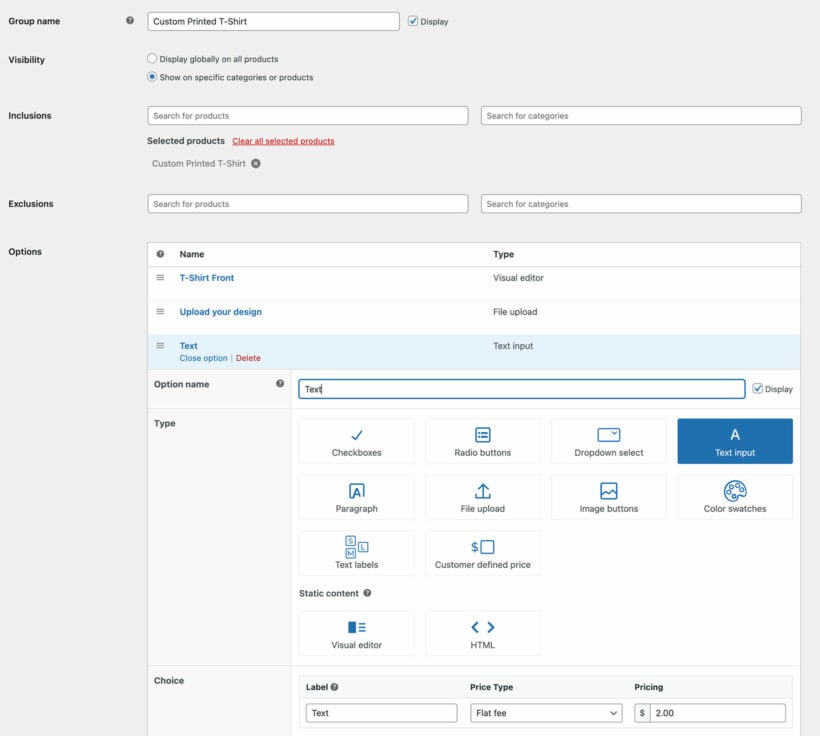
Advanced product designer options
Importantly, WooCommerce Product Options lets you charge extra for customizations. This is a great way to upsell products and increase your average order value. For example, you can charge extra for customers who choose to add a custom engraving to a jewelry product.
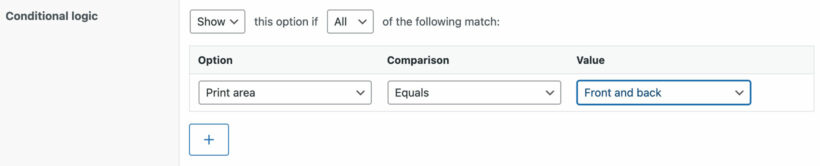
There's also a conditional logic feature, where you can show and hide options in the product designer based on user selection. For example, if you're creating a WooCommerce t-shirt designer then you can hide the options for the t-shirt back until the user chooses the '2 sided' option.
Of course, you only want customers to be able to design products within the limits of what's possible. That's why WooCommerce Product Options comes with the ability to set minimum and maximum quantities. For example, you can control how many checkbox options the customer can tick. You can also set a maximum character count on text fields, for example if an engraved product can only fit a certain number of characters.
As you can see, WooCommerce Product Options has everything you need in a custom product designer. That's why it's our no. 1 pick.
Provide live previews of the customer-designed product
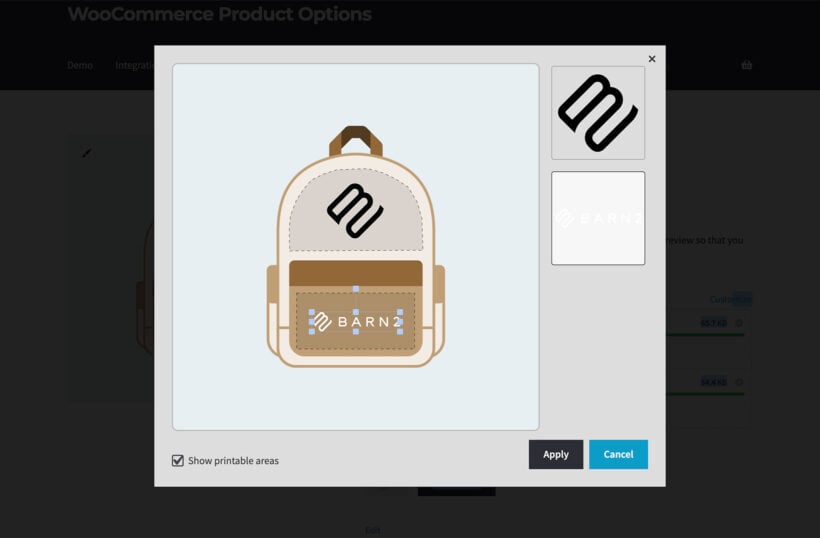
WooCommerce Product Options also comes with an optional 'Live Preview' add-on. This enables live previews for file upload fields. Customers can design their own product by uploading images and then resizing and adjusting them within the live preview.
Live preview is a must for any WooCommerce product designer which supports custom printed products. It's important for customers to be able to visualize the finished printed product. WooCommerce Product Options with Live Preview makes this easy.
As the store owner, you can set printable areas to control which parts of the product can be designed:
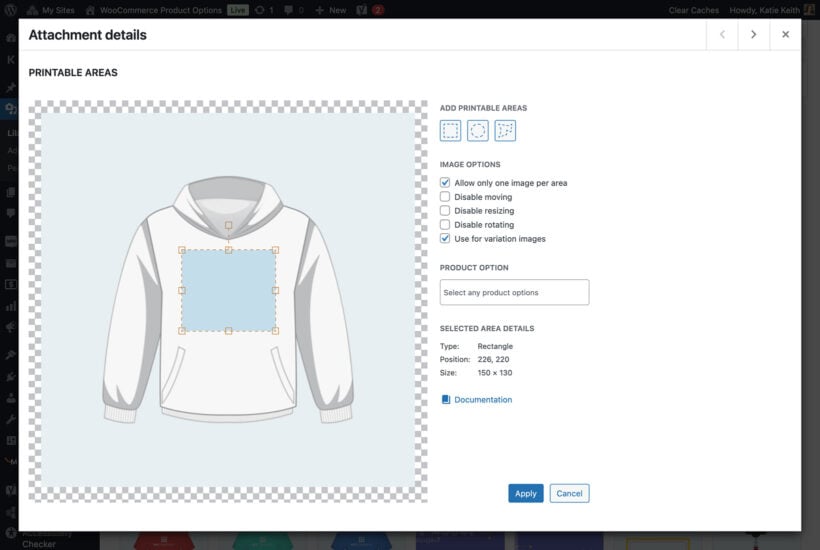
That way, you stay in control as the store owner - while the customer can design their product within the parameters you have set.
We've ranked WooCommerce Product Options first because it covers the widest range of customization use cases of anything on this list. Customers can mix and match options, upload their own text and images, and adjust, resize and reposition them in the live preview.
"Product designer" can mean different things to different stores. Some shoppers want a blank canvas to add their own content; others want a configurator, where they 'design' a product by selecting from set options. WooCommerce Product Options covers the configurator approach, and with the Live Preview add-on customers can see their choices on the product as they build it. A layered-images option is coming too, letting customers build a custom design from preset image layers.
If you specifically want a blank-canvas design studio with a clipart library and freehand shapes, a dedicated tool like Fancy Product Designer may suit you better. For most stores, though, Product Options does everything you need without a monthly fee.
- It offers a huge range of option types, including text fields, file uploads, dropdowns, checkboxes, color swatches, image buttons and customer-defined pricing.
- Conditional logic, per-option pricing and minimum and maximum limits give you full control over what customers can design.
- The Live Preview add-on lets customers position, resize and rotate their text and uploaded images on printable areas you set.
- Self-hosted with flat annual pricing, so there are no per-order fees or design limits like the SaaS tools charge.
- It's an options and personalization plugin, not a blank-canvas studio. There's no clipart library, freehand shapes or layered vector editing.
- The visual designer lives in the separate Live Preview add-on, so you need the bundle for live image previews.
- Previews are image-based, so it won't generate print-ready vector or PDF artwork from a canvas.
- Uploaded images can't be cropped, rotated or have their backgrounds removed in the browser, so customers need to prep their artwork first. Some SaaS tools here include AI background removal.
2. Fancy Product Designer
With more than 23,000 sales on CodeCanyon, Fancy Product Designer is a popular option for creating highly customized products on your WooCommerce site.

- A genuine blank-canvas studio: customers add and position text, upload artwork, pick clipart, and preview live, including in 3D.
- The category leader, with 23,000+ sales and years of active development.
- A one-time CodeCanyon purchase rather than a monthly SaaS fee.
- CodeCanyon support only covers six months unless you renew, and reviews flag slow replies.
- It's a heavy, complex plugin that takes real time to set up and can clash with some themes.
- There's no automated print-ready file workflow tied to fulfillment like Zakeke or Customily.
3. Zakeke
Zakeke is a market-leading visual customizer that adds a 2D and 3D design canvas to WooCommerce, along with augmented reality and automatic print-ready files.
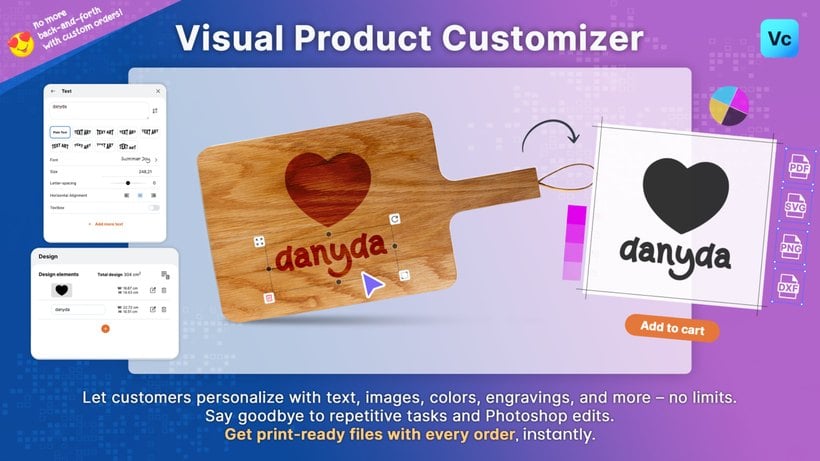
- True 2D and 3D customization, plus AR and virtual try-on, in one platform.
- Automatically generates print-ready files (PDF, PNG, SVG and DXF), which removes the manual artwork prep for print-on-demand.
- A polished, app-like experience on mobile, and it's actively maintained as an official WooCommerce extension.
- It's a SaaS with a dual cost: a monthly fee from $29.90 plus a per-order transaction fee of around 1.5 to 1.9% on the higher plans.
- Each plan caps how many products you can make customizable (5, 25 or 50), so large catalogs reach custom pricing quickly.
- Support can be slow on the lower tiers, with no weekend cover.
4. Lumise Product Designer
Lumise is a full design-canvas plugin that comes bundled with its own theme for styling your product pages.

- A genuine visual design canvas, with templates for t-shirts, mugs, caps and more.
- Strong value: a one-time CodeCanyon purchase with 13,000+ sales and a 4.8-star average.
- Comes with the Lumise theme for a polished storefront, and it's actively updated.
- CodeCanyon support is limited to six months unless you renew.
- The bundled theme and broad feature set add a learning curve.
- Like other canvas tools, it can be heavy on the product page.
5. Customily
Customily is a print-on-demand personalizer that pairs a live design preview with automatic print-ready file generation, wired directly into fulfillment services.
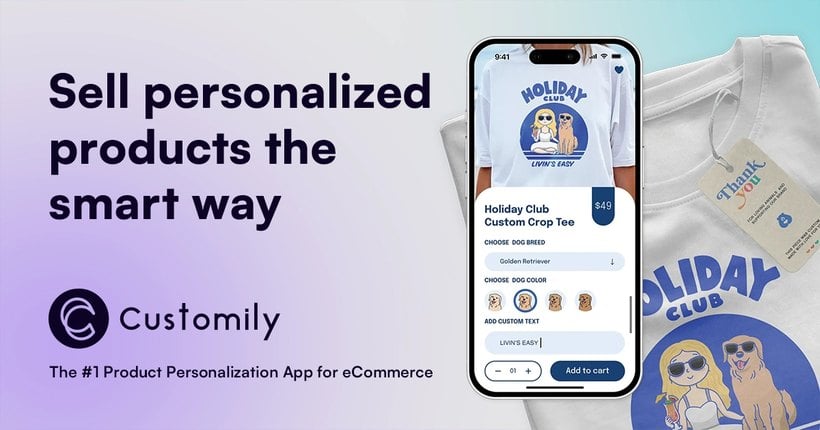
- Automatically creates production-ready files and sends them to print-on-demand partners like Printful, Printify and Gelato.
- A deep toolkit: text, image upload, clipart, maps, and AI effects like background removal.
- Works across WooCommerce, Shopify, Etsy and Amazon on one subscription.
- It's a SaaS at $49 a month plus per-item fees, so costs climb with volume.
- Templates take real time to set up, and reviewers note a steep learning curve.
- Rendering can be slow at high order volumes, and its ratings come from Shopify rather than a WooCommerce review base.
6. PrintXpand
PrintXpand (formerly Brush Your Ideas) is an enterprise web-to-print platform with a deep WooCommerce design tool built for print businesses.
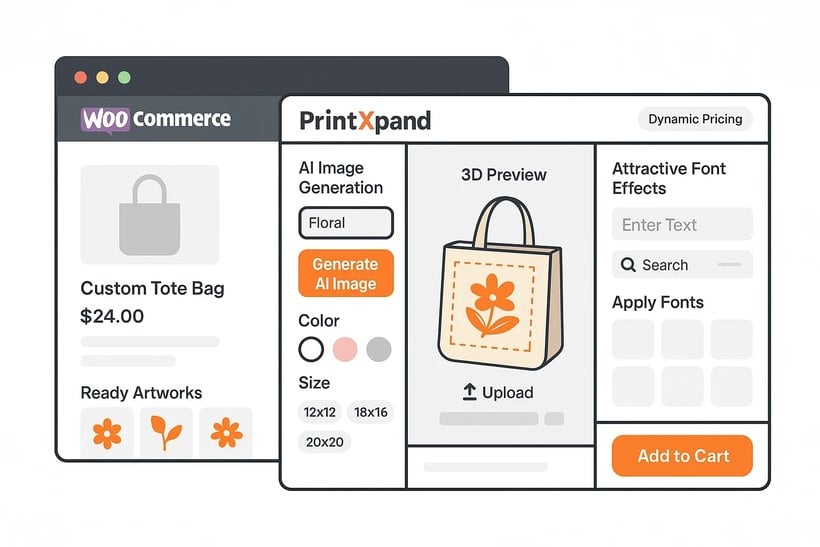
- A full web-to-print designer, with multi-side design, real-time print-method pricing and print-ready CMYK output.
- Built for commercial print shops, with cloud or on-premise deployment and no per-order fees.
- Actively developed, with AI image generation and broad product coverage from apparel to packaging.
- Pricing is quote-based with no public figures, and reviewers report custom-work charges that add up.
- It's an implemented, configured solution rather than a self-serve plugin, so expect setup effort.
- The independent review base is thin, at around 18 all-positive reviews, and support runs on India time zones.
7. WooCommerce Online Designer Tool
WooCommerce Online Designer Tool from DesignNBuy is a full web-to-print studio aimed at serious print operations.

- A Canva-like web-to-print studio with live preview, suited to high-volume print work.
- Handles complex print products and large catalogs, with enterprise deployment options.
- Backed by an established web-to-print vendor.
- It's enterprise software with quote-based pricing, so it's overkill and pricey for a small store.
- The WordPress connector has a tiny install base and a modest 3.6-star rating.
- Setup is involved compared with a simple plugin.
8. Extendons Custom Product Designer
Custom Product Designer by Extendons is a budget canvas designer on the WooCommerce marketplace that lets customers add text, images, clipart and shapes with a live preview.
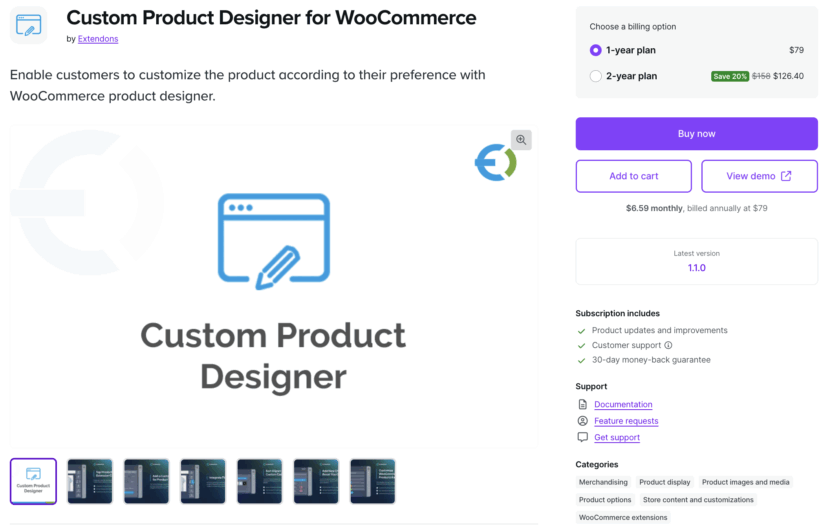
- A real visual canvas (text, images, clipart and shapes) with live front and back previews.
- Conditional logic, per-customization pricing and preset templates.
- Affordable on the WooCommerce marketplace at around €69 a year.
- It has no published reviews yet, so its quality and longevity are unproven.
- It's smaller and less established than Fancy Product Designer or Zakeke.
- Documentation and support are lighter than the market leaders.
9. PickPlugins Product Designer
Product Designer by PickPlugins is the main free product designer on WordPress.org, with a basic canvas for adding text, clipart and images.

- Genuinely free on WordPress.org, with a basic design canvas for text, clipart and images.
- A reasonable starting point for simple custom products on a tight budget.
- Self-hosted, with no monthly fees.
- It's lightly maintained, with a small user base and a modest 3.2-star rating.
- The Pro version is currently listed as unavailable, which limits the upgrade path.
- It lacks the polish, support and print-ready output of the paid tools.
Which product designer plugin should you choose?
The right plugin depends on what you sell and how much design freedom your customers need.
- For most stores, WooCommerce Product Options is the most flexible and best-value choice, covering everything from simple personalization to full configurators.
- For a true design-from-scratch canvas, go with Fancy Product Designer or Lumise.
- For 3D, augmented reality and automatic print files, choose Zakeke.
- For print-on-demand with fulfillment built in, use Customily, or PrintXpand for a larger print business.
- On a tight budget, start with the free PickPlugins Product Designer.
Our own WooCommerce Product Options remains my top pick for the widest range of stores. You can use it to build sophisticated product configurators where customers select eye-catching options to design their ideal product:
- Huge range of option types and styles.
- Add various types of pricing to each field.
- Set minimum and maximum values that customers can select from.
- Use conditional logic to dynamically show fields based on the customer's other selections.
- Full 30-day money back guarantee so you can try it on your site risk-free.
Whichever you choose, start with a plugin that fits how your customers want to design. For most stores, that is WooCommerce Product Options.
FAQ
What are the benefits of using product designer plugins?
There are several good reasons to use a WooCommerce designer plugin.
Some key benefits of using WooCommerce product designer plugins include:
- Enhances shopping experienceCreating customizable products and giving customers an easy way to choose product options or view product details when shopping from your online store is a great way to offer a unique shopping experience. Customers will be easily able to select product options and view additional information about a product before they add it to their shopping carts. This helps enhance the shopping experience and cater to all types of users, even non-tech-savvy ones.
- Gives an interactive experience to potential customersYou can create a more interactive experience on your single product pages by displaying additional product fields or displaying products differently. This enhances the shopping experience while also making it easier for customers to shop from your online store.
- Allows you to target new markets, which isn’t possible with WooCommerce as it comes You can create and sell custom products on your online store. For instance, you can create a customizable product such as a hoodie or t-shirt and let customers design their own hoodie or t-shirt using extra product options before they add the product to their shopping cart.
WooCommerce product designer plugins transform your single product pages and give your online store a more professional look. Without them, you’ll be stuck with default-looking WooCommerce products that customers can find on most online stores elsewhere.
What can you sell with a WooCommerce product designer?
There are many different types of product which you might want to let the customer design themselves. Here are some common use cases:
- Personalized gifts - Personalizable products like engraved jewelry, personalized mugs, and custom t-shirts make for unique and thoughtful gifts. Customers can add names, dates, or special messages, making these items perfect for birthdays, anniversaries, and other special occasions.
- Brand promotion - Businesses can design their own customizable products for promotional purposes. Custom t-shirts, hats, and bags with company logos or slogans are excellent for giveaways or selling as merchandise, helping to increase brand visibility and loyalty.
- Event memorabilia - If you sell items for events such as weddings, corporate events, and sports tournaments, then you might need a WooCommerce product designer to allow customers to order items like engraved glassware or personalized keychains.
- Fashion and self-expression - "Design your own" clothing and accessories allow customers to express their personal style. Brands like Nike and Ralph Lauren offer options to design custom shoes and polo shirts, giving customers the freedom to create unique fashion statements.
- Home decor - Customizable home decor items, such as personalized wall art, custom cushions, and engraved photo frames, allow customers to add a personal touch to their living spaces. These products can be tailored to match specific themes or preferences.
- Pet accessories - Pet owners love to spoil their pets with personalized items. They can have great fun using a WooCommerce custom designer website to order bespoke pet collars, engraved tags, and personalized pet beds.
- Tech accessories - Custom tech accessories, such as phone cases, laptop sleeves, and smartwatch bands, are in high demand. Customers can design custom products with colors, designs and even add personalized text or images.
These are just some of the use cases where a WooCommerce product designer adds value.
Is WooCommerce Product Options a Fancy Product Designer alternative?
Yes, for stores that need option-driven customization rather than a full visual canvas. WooCommerce Product Options handles file uploads, conditional logic, color swatches, image options, dropdowns, and per-option pricing on the standard product page. It does not include a free-form vector design canvas the way Fancy Product Designer does. It is the right pick for personalized text, file-upload-and-print, and configurable-options use cases.
Is there a free WooCommerce product designer plugin?
Yes. PickPlugins Product Designer is free on the WordPress.org repository and provides a basic clip-art-and-text designer for simple products. For production use with conditional logic, dynamic pricing, and live previews, a paid plugin is usually required.
What is the difference between a WooCommerce product designer and a product configurator?
A product designer is typically a tool where the customer makes the product their own – uploading a logo, picking colors, adding text, or arranging components on a canvas. A product configurator is the broader category covering any plugin that lets a shopper customize a base product before adding it to the cart, including bundle and kit assemblies. Several plugins on this list are both, including WooCommerce Product Options.
10 Comments
I do custom laser engraving and sublimation. I am looking for a plug-in that will allow for designing: jewelry-necklace, bracelet, cutting boards, plaques, tumblers, glass ware, business cards, keychains, canvas, mirrors etc. for engraving and then sublimation for tumblers, puzzles, canvas, business cards, wind spinners etc. So far Zakeke covered half of the options but I was just seeing if you knew of one that covered all the ones I mentioned. Thank you so much
Hi Shari. Thanks for your comment. WooCommerce Product Options seems to be the plugin that you're looking for. However, we will still need more info about the specifics of what you're trying to achieve so we can give you a better insight. Can you please reach us directly via our Support Center about this? Thanks!
Hi, is there a simple plugin that customers can choose their colour of t-shirt and have it show, then their choice of design and have it shown directly on the t-shirt or upload their own design and have that show on the t-shirt? My current plugin, they would have to drag the design over and the t-shirt colours doesn't show the colour that it as I can have up to 3 or 4 different shade variants of blue.
Hi Claire. Among all the plugins on this list, I think the WooCommerce Product Configurator is the best choice for what you're trying to achieve as it will visually display all the customer's chosen design in real time. Cheers!
Hello, I would like to know if there is a live demonstration to test and see better how it works live?
Hi, Juan.
Thanks for your interest in WooCommerce Product Options. You can sign up for a free admin demo of the plugin, where you can test drive the plugin for up to 4 hours. You can also check the plugin in action at https://productoptions.barn2.com/. Cheers!
Hi,
I want a product designer plugin that customers can design their own coin, the design is used for laser machines, How it should work is after the customer designs their coin then pays for it then they would be able to download the design.
No download before payment.
Is there a plugin that can be setup like this?
thank you tom.
Hi, Tom. I'd like to recommend WooCommerce Product Options. This plugin enables you to create an unlimited number of product options, including checkboxes, text areas, radio buttons, and more. If your coins require additional options in your WooCommerce product, our plugin is well-suited for this purpose. However, if your main priority is on allowing users to design their own coin and download it, then Product Designer for WooCommerce might be the better fit for your needs.
If you have any other questions, please don't hesitate to reach out to our Support Center. Have a great day!
The 5 is no longer working
Hi, Valérie. Thanks for letting us know. I see that the WooCommerce Custom Product Designer plugin was last updated in July 2019. I'm relaying this to our team for review. In the meantime, please let me know if there's anything else that we may help you with.