Send WooCommerce emails to multiple addresses. Add extra recipients for customer notifications and route admin emails to suppliers, dropshippers, and team members.
Add unlimited email recipients to any WooCommerce notification email
Route Admin Emails to Your Team
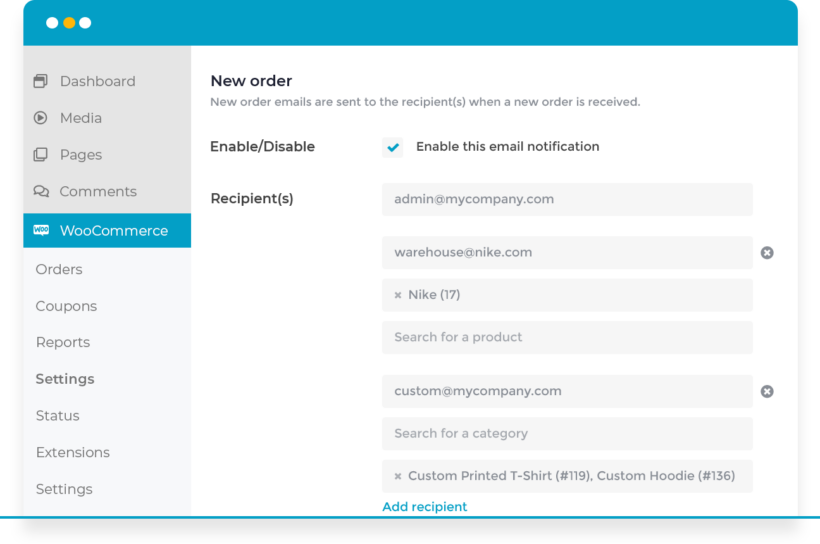
Route admin notifications to specific email addresses based on products ordered
Send new order emails automatically to the correct store, supplier, or warehouse
Include fulfillment centers and dropshippers for automatic order processing
Multiple Recipients for Customer Emails
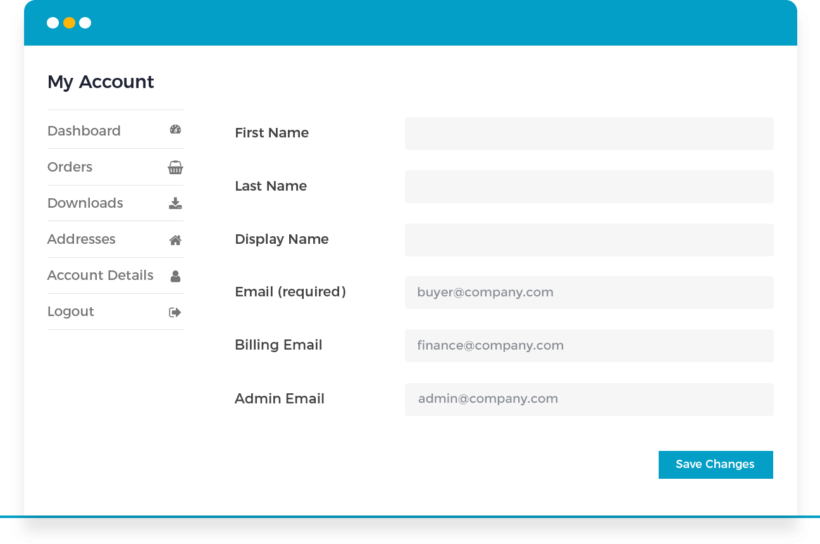
Store multiple email addresses for each WooCommerce customer account
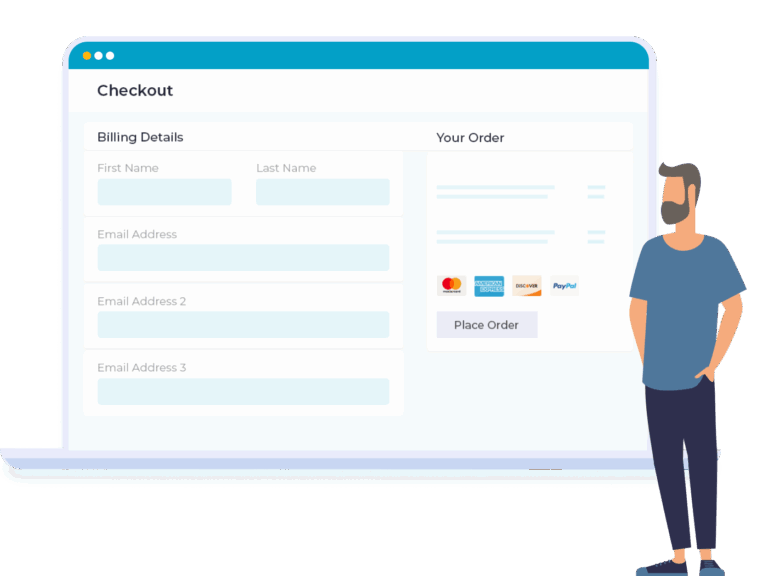
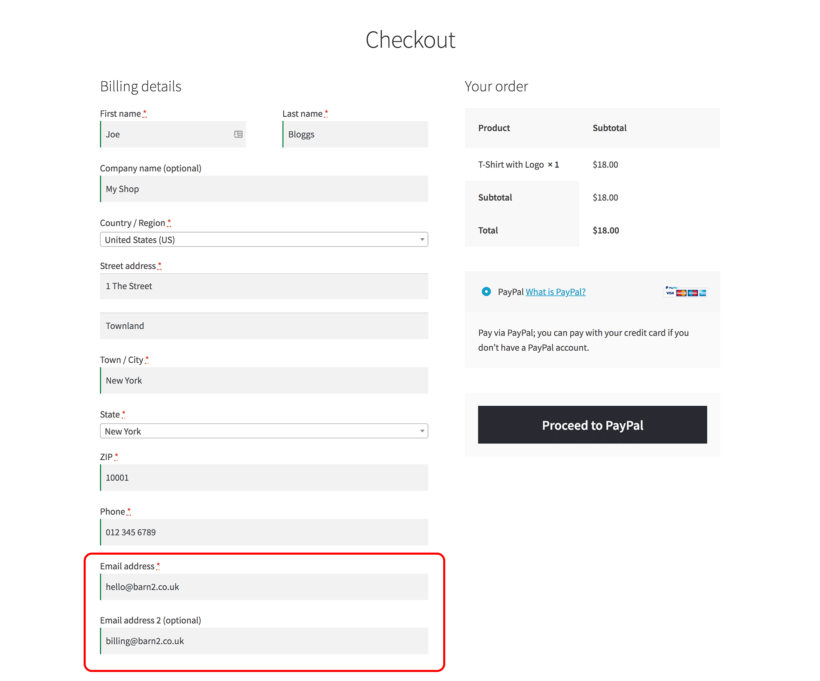
Display additional email fields on checkout page, account page, or both
Send customer emails to extra recipients, including third-party plugin notifications
Super-Fast 5-minute Setup
Install WooCommerce Multiple Email Recipients
Choose your plugin settings
Start adding extra email addresses to WooCommerce!
PACKED WITH FEATURES
With everything you need for advanced notifications, look no further than WooCommerce Multiple Email Recipients! 🚀
Unlimited email addresses
Orders sent to suppliers
Recipients per product or category
Extra customer recipients
Checkout and account fields
Choose which emails to send
Works with other plugins
Translation ready
Unlimited email addresses
Unlimited email addresses per customer
Add unlimited email addresses per customer. Choose exactly how many email fields to display.
Choose where the fields appear
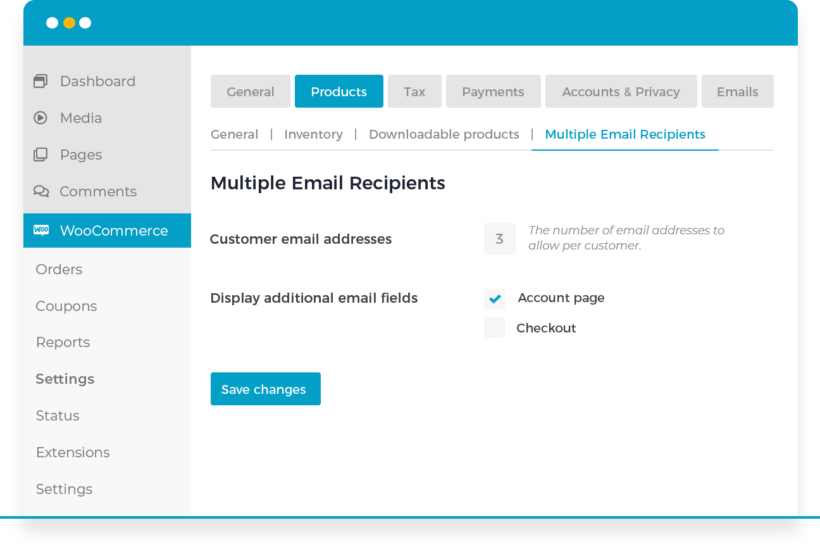
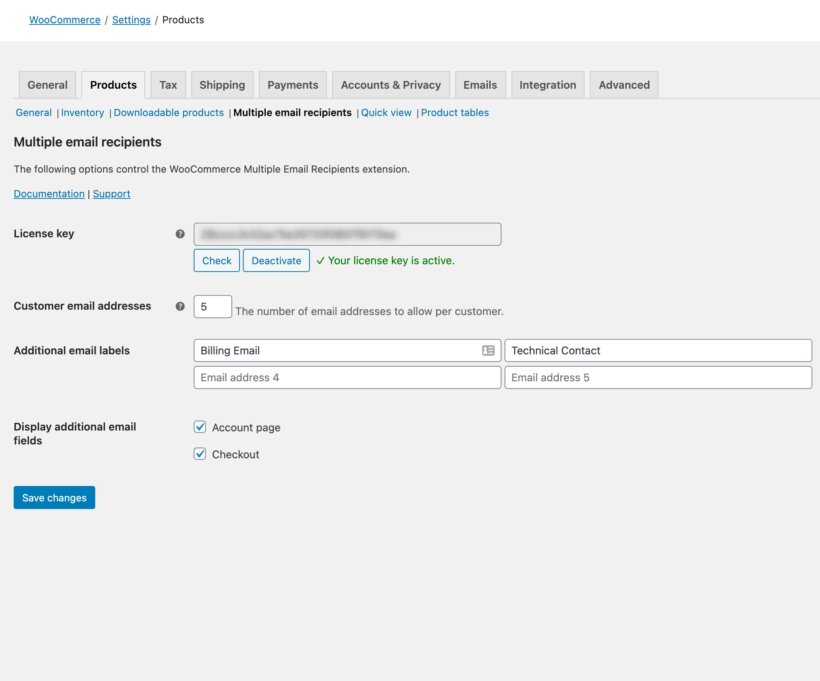
Simply choose how many email address fields you require on the plugin settings page, and whether or not to display them in the WordPress admin only, or also on the 'My Account' and 'Checkout' pages.
Add addresses manually
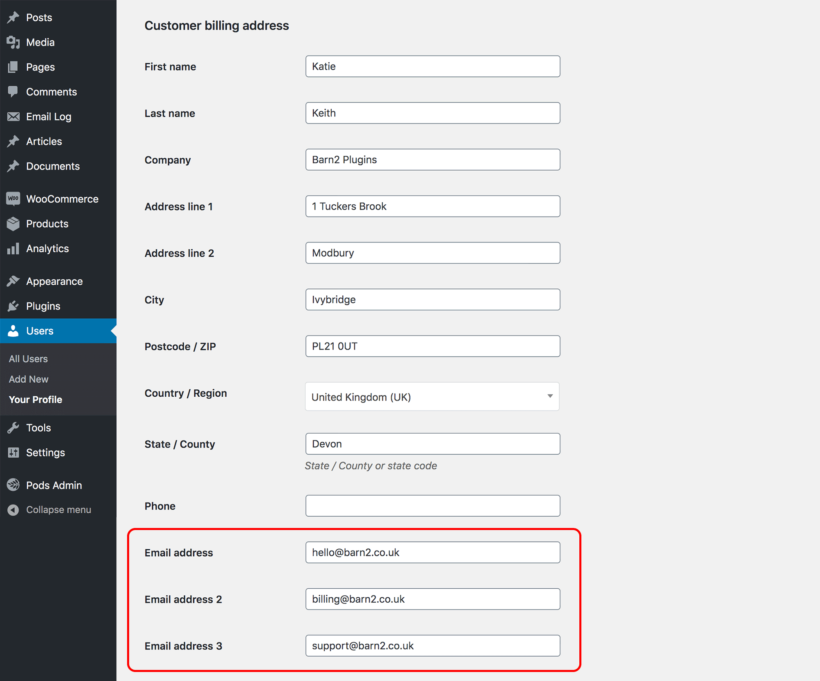
The additional email address fields always appear on the 'Edit User' page in the WordPress admin, regardless of whether you've chosen to display them on the Account and Checkout pages. This means that you can add extra email addresses manually on behalf of your customers.
Send orders to suppliers
Notify suppliers automatically
Route admin order notifications to suppliers, dropshippers, warehouses, and team members automatically.
Product-based email routing
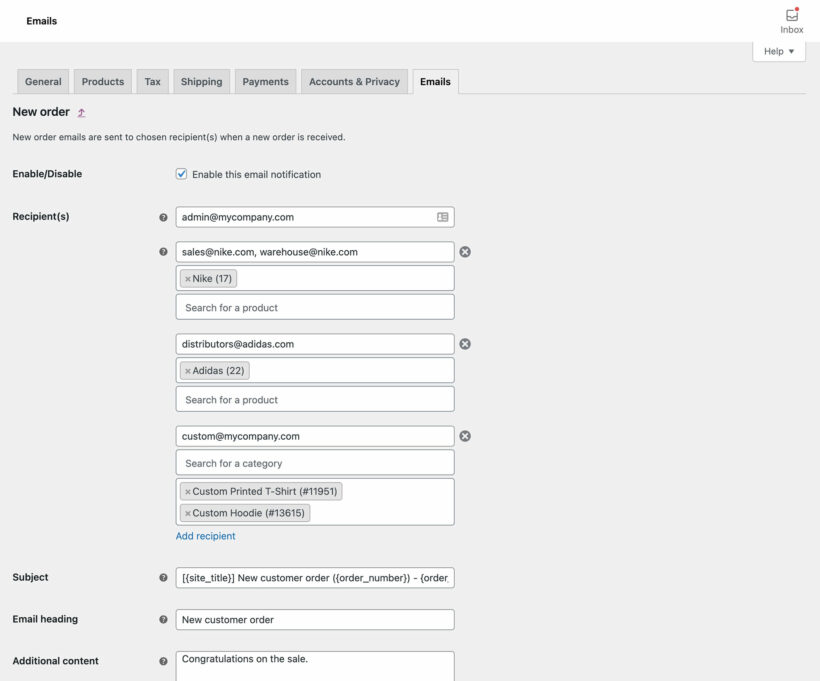
When an order contains products from different suppliers or categories, the plugin automatically routes notifications to the correct recipients. Each supplier receives admin emails only for their specific products, streamlining order fulfillment.
Different emails per product
Choose recipients by product or category
Send admin notifications to different recipients based on the specific products or categories ordered.
Global or product-specific
Either add email addresses which will receive notification of all orders, or enable them for specific products or categories only.
Customer and admin emails
Customer email recipients receive order confirmations, shipping notifications, and customer-facing emails. Admin email recipients receive new order notifications, cancellation alerts, and failed payment notices. Both types can be configured independently.
Flexible front-end display
Checkout, account page, or both
Display customer email fields on the WooCommerce checkout page, account page, or both locations.
Keep the checkout short
Some stores like to show multiple email fields on the WooCommerce Account page, while keeping the checkout as short and simple as possible.
Enable for specific emails
Choose which emails to send
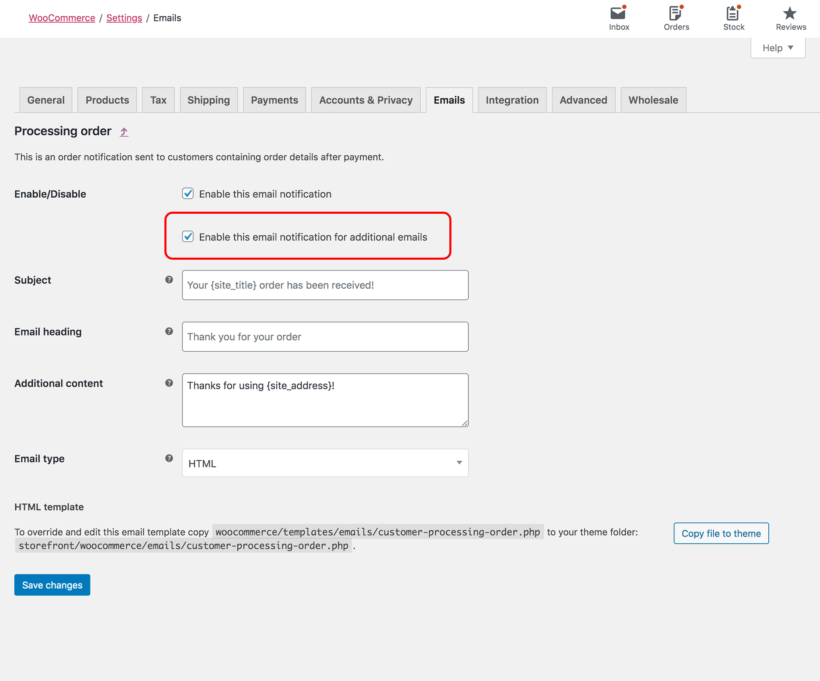
Choose which WooCommerce emails go to additional recipients. Works with customer and admin emails. For each email, you can choose whether or not to include the additional recipients.
The extra addresses are included in emails triggered by manual orders that you create in the WordPress admin for your store.
Works with your theme and plugins
Works with your theme
The extra fields match WooCommerce's own default email address field. You can add them without a developer, custom code, or theme template changes.
Works with your plugins
WooCommerce Multiple Email Recipients works directly with WooCommerce and does not interact with your other plugins, so you can run it alongside anything, including every SMTP and email deliverability plugin.
Multilingual ready
Designed to work with any WordPress translation plugin such as WPML, WeGlot and TranslatePress.
Love it or your money back
30-day guarantee
With our 30-day guarantee, you can try the plugin risk-free and get a refund if you’re not delighted.
The only way to add multiple email recipients to WooCommerce
★★★★★
“If you need more emails for your customers, and a plugin that does that job? Look no more, this plugin is really good, and super easy to use :)”
Christer Hansson - Norway
★★★★★
“Perfect if you have stock from multiple vendors and want to streamline the fulfilment process.”
Tarnier Hopper - Australia
★★★★★
“I came across this plugin on YouTube and it appeared to do everything I wanted it to do in a sleek intuitive way. There are some learning curves since I'm new to WooCommerce but their support team have (and continue) to help where appropriate.”
Cade Pellett - New Zealand
★★★★★
“Barn2 is a rare company in this space - I have been building websites for many years and no other company has addressed issues as fast and diligently. They quickly move into action to add any features you suggest. Keep up the great work!”
All plans include free setup, updates and support. You can upgrade at any time and just pay the difference. If your annual license expires, the plugin will continue working on your site but you must renew to change settings or receive updates, new features or support.
WooCommerce Multiple Email Recipients Screenshots
See the plugin in action.
Control the number and display of the additional email addresses on the plugin settings page
Fine-grained control over which customer emails to send to the additional recipients
Add recipients to Woo order emails based on products and categories
Store owners can manually add extra customer email addresses in the WordPress admin
Choose whether to show additional email address fields on the Woo checkout page
Got a question? We're here to help
Get fast, friendly support by email or chat, or find answers in our knowledge base.
WooCommerce Multiple Email Recipients is a WordPress plugin that adds multiple email functionality to WooCommerce stores. The plugin provides two main features: adding extra email addresses to customer accounts for receiving order notifications, and routing admin emails to different recipients based on products ordered.
What type of additional email addresses can I add to WooCommerce?
The WooCommerce Multiple Email Recipients plugin lets you add extra email addresses for:
Customer emails - You can add extra email address fields to appear on the checkout and/or account page. These addresses can receive any or all of the customer order emails.
Admin email notifications - You can also add extra recipients for any or all of the emails that WooCommerce normally sends to the administrator. Either add email addresses which will receive notification of all orders, or enable them for specific products or categories only. For example, this is the perfect way to automatically notify suppliers of new orders of their products.
What's the difference between customer and admin email recipients?
Customer email recipients are additional addresses linked to customer accounts that receive order confirmations, shipping notifications, and customer-facing emails. Admin email recipients are business-side addresses that receive new order notifications, cancellation alerts, and failed payment notices. Both types can be configured independently.
How does product-based email routing to suppliers work?
Product-based email routing sends admin notifications to specific email addresses based on order contents. When an order contains products from different suppliers or categories, the plugin automatically routes notifications to the correct recipients. Each supplier receives admin emails only for their specific products, streamlining order fulfillment.
How many additional WooCommerce email addresses can I have?
WooCommerce Multiple Email Recipients lets you add an unlimited number of email addresses per customer. Simply choose how many email address fields you require on the plugin settings page, and whether or not to display them in the WordPress admin only, or also on the 'My Account' and 'Checkout' pages.
Can I disable the additional email addresses on the checkout?
Yes, the WooCommerce Multiple Email Recipients plugin gives you full control over where to display the additional email address fields on the front end. Some stores like to show multiple email fields on the WooCommerce Account page, while keeping the checkout as short and simple as possible.
Can I add extra email addresses for my customers manually?
Yes, WooCommerce Multiple Email Recipients displays the additional email address fields on the 'Edit User' page in the WordPress admin, regardless of whether you've chosen to display them on the Account and Checkout pages. This means that you can add extra email addresses manually on behalf of your customers.
Which WooCommerce emails can I send to the extra recipients?
WooCommerce Multiple Email Recipients can include the additional addresses in any of the emails to the customer or administrator which can be automatically sent to the customer by WooCommerce itself.
For each email, you can choose whether or not to include the additional recipients.
How to add multiple email recipients in WooCommerce?
Install WooCommerce Multiple Email Recipients plugin and navigate to the WooCommerce settings.
For customer emails: Set the number of additional fields and choose display locations. Email addresses can be added manually in WordPress admin or by customers during checkout.
For admin emails: Add global recipients or configure product-specific routing.
Are the extra recipients notified of manual orders?
Yes, WooCommerce Multiple Email Recipients works with manual orders that you create in the WordPress admin for your store. The additional email addresses are attached to whichever emails WooCommerce or your other plugins send. If these are triggered by a manual order, then the extra addresses added by WooCommerce Multiple Email Recipients will be included in the email.
Will it work with my theme and other plugins?
WooCommerce Multiple Email Recipients works with any well-coded WordPress theme and can run alongside your other plugins. The extra email address fields appear in a logical place on the Account and Checkout pages.
The extra fields match WooCommerce's own default email address field. You can add them without a developer, custom code, or theme template changes. The theme compatibility guide shows which themes work with WooCommerce Multiple Email Recipients.
If another plugin adds its own WooCommerce emails, you can add extra recipients to those emails too. WooCommerce Multiple Email Recipients works directly with WooCommerce and does not interact with your other plugins, so you can run it alongside anything, including every SMTP and email deliverability plugin.
Does it work in my language?
WooCommerce Multiple Email Recipients is designed to work with any WordPress translation plugin such as WPML, WeGlot and TranslatePress. This makes it easy for you to translate the labels for the additional email address fields into any language and use it on multilingual websites.
What are the minimum requirements for running the plugin?
WooCommerce Multiple Email Recipients is fully tested with the latest versions of WordPress and WooCommerce. We always recommend running the most up-to-date version, but we also support older installations:
WooCommerce 7.2 or greater (tested to 11.0.1)
WordPress 6.1 or greater (tested to 7.0.4)
PHP 7.4 or greater (tested to 8.5)
MySQL 5.7.8 or greater / MariaDB 10.3 or greater
What offers are available for WooCommerce Multiple Email Recipients?
Several offers are available if you are a nonprofit or wish to buy multiple plugins:
Multi-buy discount - Add any two or more Barn2 plugins to your cart and get 40% off automatically at checkout. The most expensive plugin stays at full price, and every other plugin is reduced by 40%. No coupon needed.
All Access Pass - For the best possible value, get our All Access Pass which gives you VIP access to our entire plugin suite including WooCommerce Multiple Email Recipients.
Charity discount - Registered nonprofits get 15% discount off.
We use this plugin to send orders for specific items to another vendor for fulfillment. It was super easy to set up. Works great, automates our system, and saves us so much time!
Mike Panessa
Excellent!
Rated 5 stars
By Mike Panessa on
Plugin has performed flawlessly from initial configuration to present.
Danny
Excellent Plugin
Rated 5 stars
By Danny on
Easy to use and does the job.
Ryan
Very Good
Rated 5 stars
By Ryan on
Nothing but great stuff to say about this plugin. It works great and solved my problem right away. The support team is great. I recommend this plugin 100%.
Ralph
Does the job
Rated 5 stars
By Ralph on
Thanks for this plugin. This would seem to be basic functionality that should be part of WooCommerce but it's not. Your plugin does the job for this badly needed feature.
Ard
Simple and effective
Rated 5 stars
By Ard on
Very happy. Had no problems after using it for a few years!
Alan
Superb support
Rated 5 stars
By Alan on
Multiple email recipients is a cracking plugin which is very reliable and super-easy to use and setup. It's surprising that this feature isn't built into woocommerce so thank you Barn2 for this plugin!
Darren Roberts
Does the job well!
Rated 5 stars
By Darren Roberts on
Great plugin and excellent support. Does exactly what it says on the tin!
Christer Hansson
Super plugin! Does the job!
Rated 5 stars
By Christer Hansson on
If you need more e-mails for your customers, and a plugin that does that job? Look no more, this plugin is really good, and super easy to use. Good code, and super support! Recommended :)
Morten Torlei
Great plugin
Rated 5 stars
By Morten Torlei on
WooCommerce Multiple Email Recipients solved our problem with B2B customers. Support is quick and friendly, making the process even better. Highly recommended.















Just what we needed
By Allie on
We use this plugin to send orders for specific items to another vendor for fulfillment. It was super easy to set up. Works great, automates our system, and saves us so much time!