Mix and match our Product Options, Bulk Variations and Live Preview plugins to sell personalized t-shirts, clothing and workwear with custom printing and embroidery pricing.
The most flexible t-shirt designer and clothing configurator for WooCommerce
★★★★★
“I was looking for a plugin that would allow my customers to build a product dynamically. The Barn2 plugin worked great for my project. Their customer service went above and beyond. Highly recommended!”
Kim Earp - USA
★★★★★
“The best WooCommerce extra product options plugin ever made. Neatly written code, excellent support, and promises to develop and add functionality in the future. A real best buy. Thank you!”
Built for printers, embroiderers and uniform suppliers
Flexible clothing configurators for screen printing, embroidery, DTF and vinyl
Names and numbers
Your customer types a name, a squad number or a slogan. You set the character limit and the price.
Thread and print colors
Shoppers choose the shirt color, the thread color and the print color from swatches or image buttons.
Logo and artwork uploads
Customers attach print-ready artwork. You choose the file types you accept and the maximum size.
Live design preview
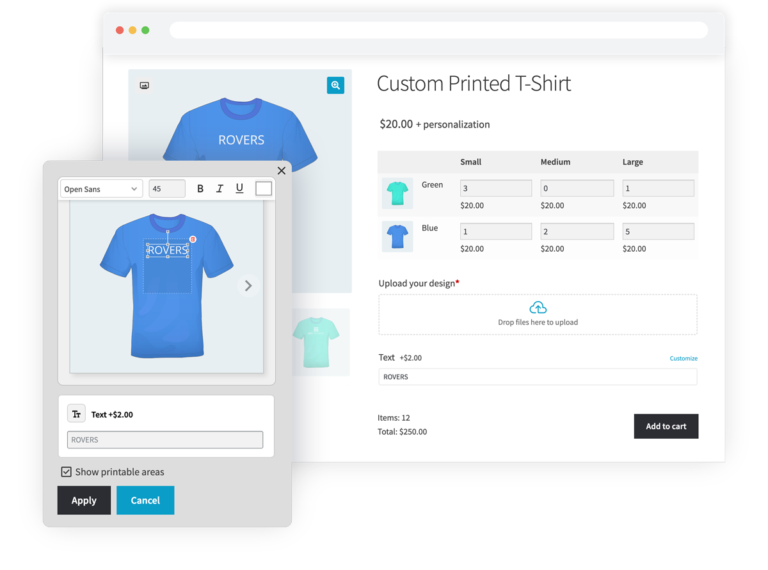
Live Preview shows the logo and text on the shirt, inside the area you mark as printable.
Order for the entire team
Selling to teams, clubs and workspaces? Add bulk variation grids for fast multi-item ordering.
Setup fees and bulk rates
Charge a screen setup fee plus a per-unit rate, and use formulas to give discounts for bigger orders.
EVERYTHING YOU NEED TO SELL PERSONALIZED CLOTHING IN WOOCOMMERCE
Design fields, pricing rules and whole size runs - all on one product page
16+ field types
Per-option pricing
Custom price formulas
Customizable live previews
Set printable areas
Bulk size variation grids
Conditional logic
Works with your theme
Sell the same shirt a hundred different ways
Create clothing configurators with unlimited fields
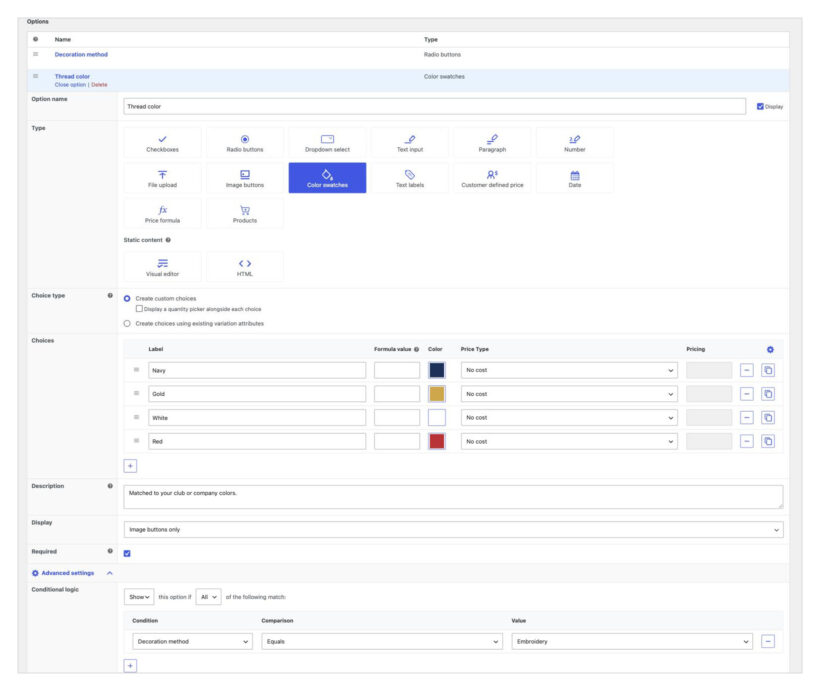
Add extra fields so that customers can configure their t-shirts, workwear and custom clothing. Use our intuitive interface, or simply describe the configurator to our AI. Let customers type a name, a squad number or a slogan, pick a font, a thread color, a print position, a decoration method, and more. You set the character limits and the prices.
Customers see the design before they buy
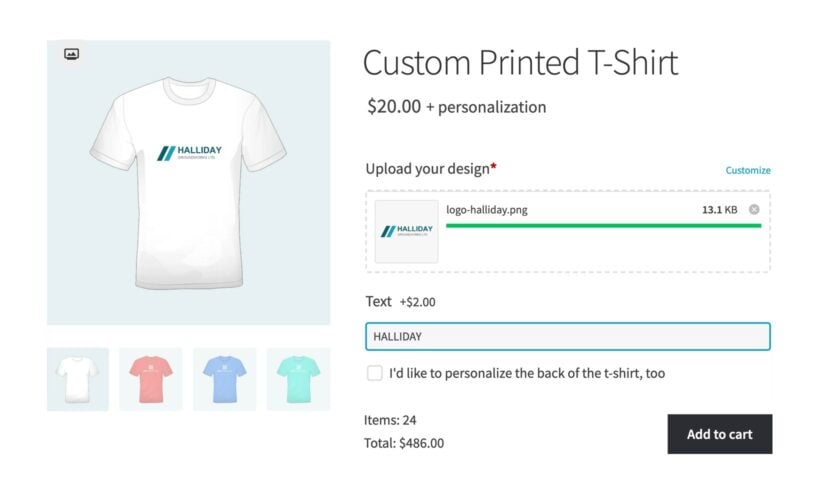
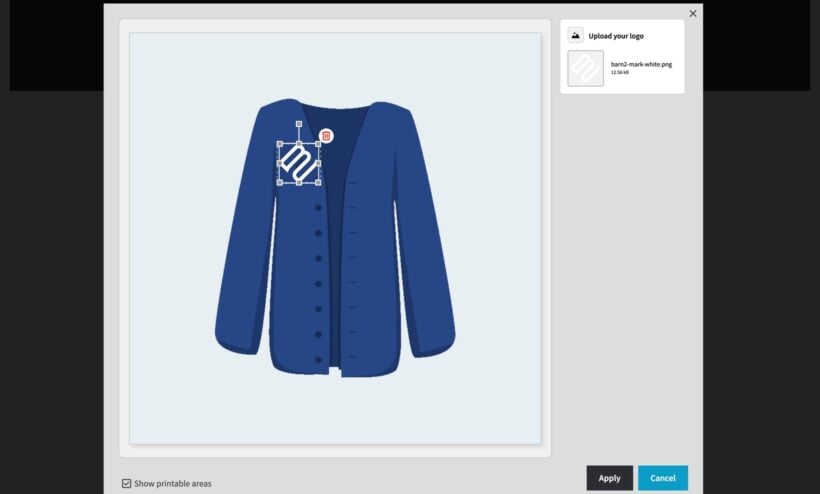
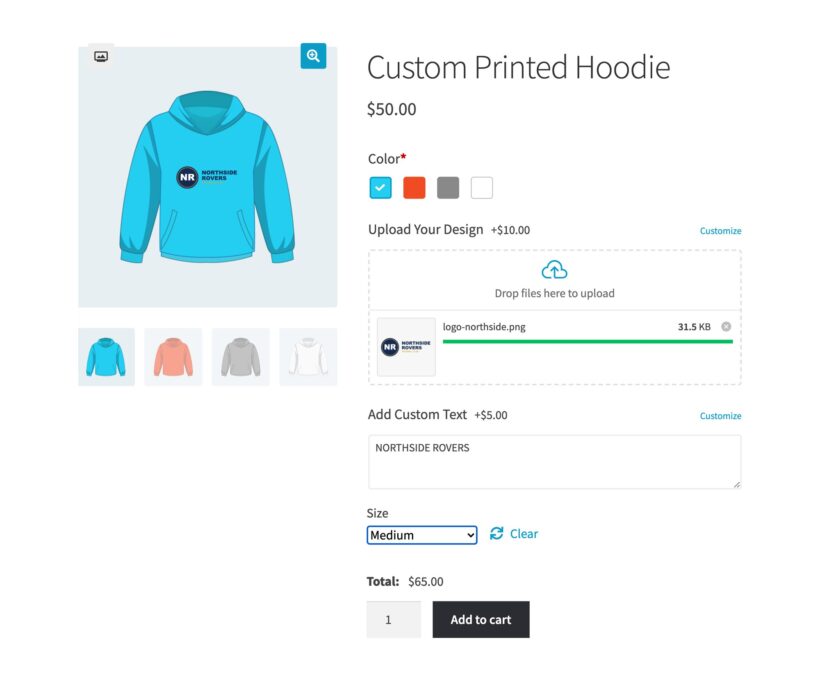
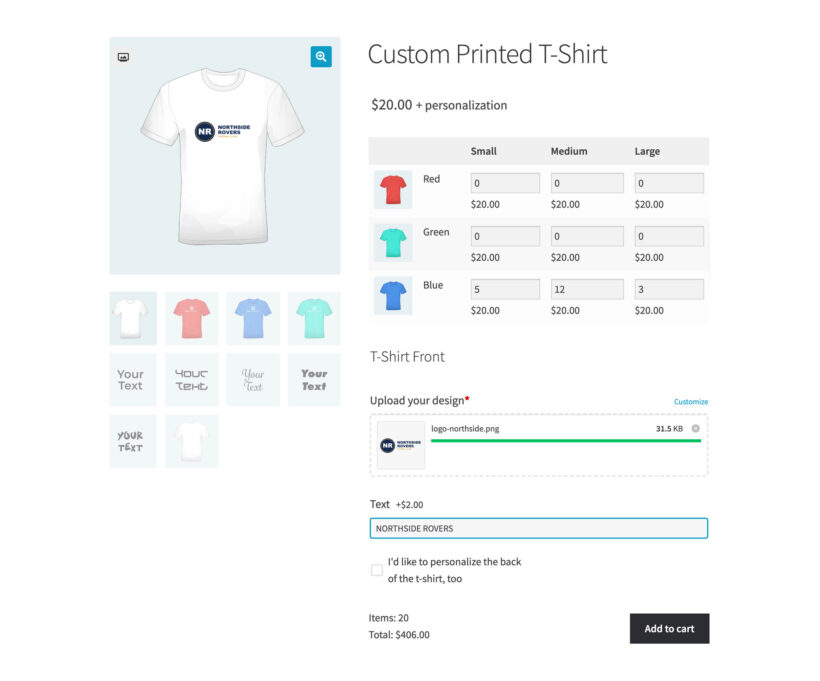
The Live Preview plugin shows the logo or the text on the product, inside the area you mark as printable, and the shopper drags it into position.
Smart conditional logic
Use conditional logic to only show each customer the options they need. For example, only ask for a thread color on an embroidery order, or for a print-ready file on a screen printing order.
Let clubs select multiple sizes at once
One grid instead of one order per size
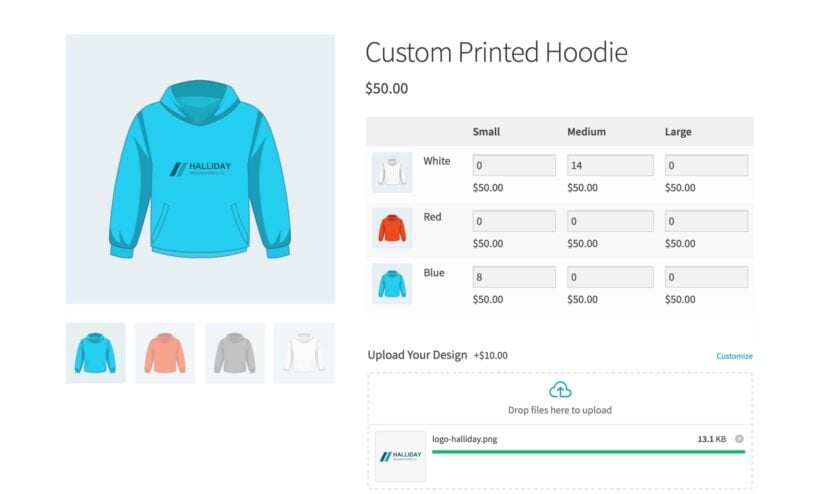
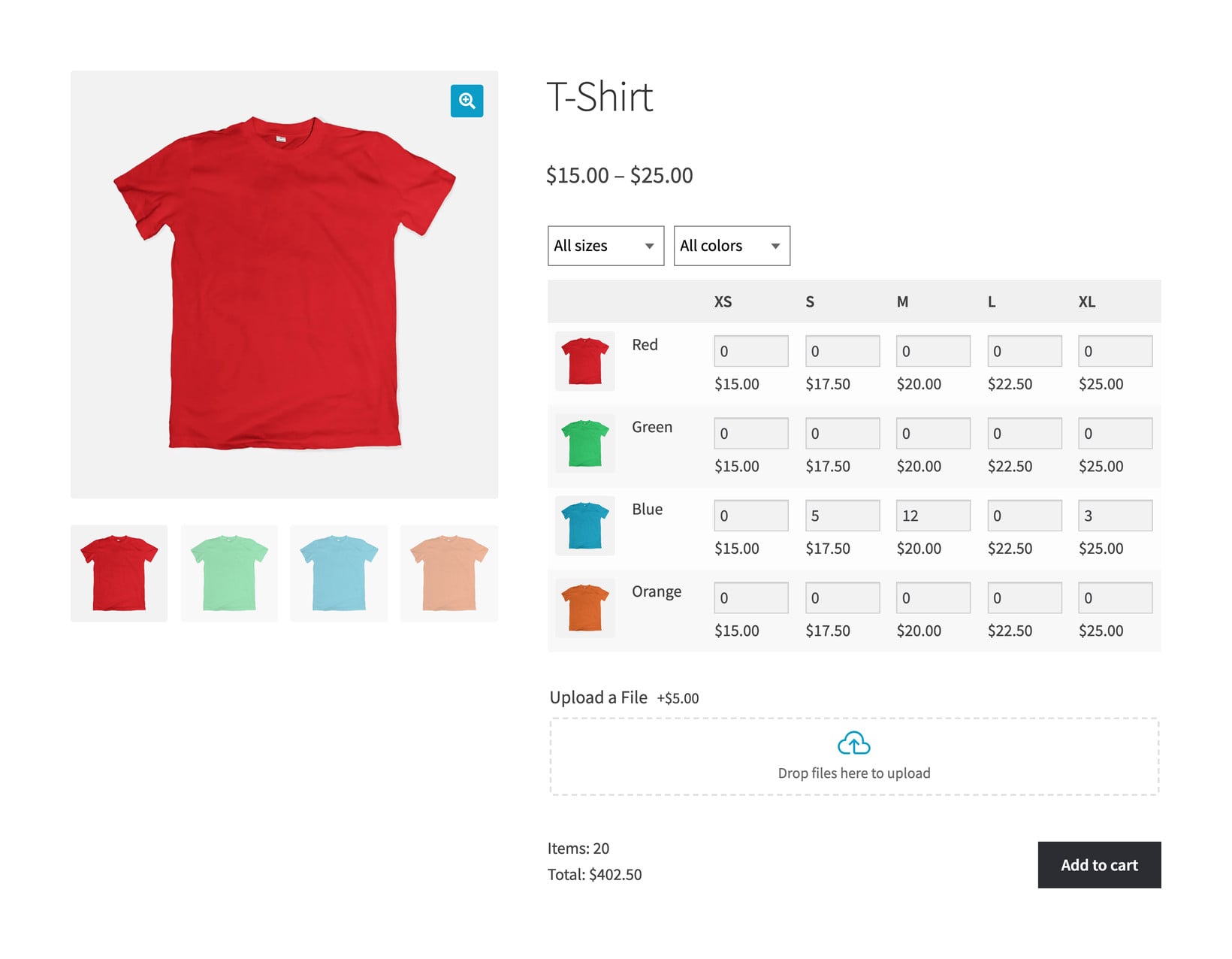
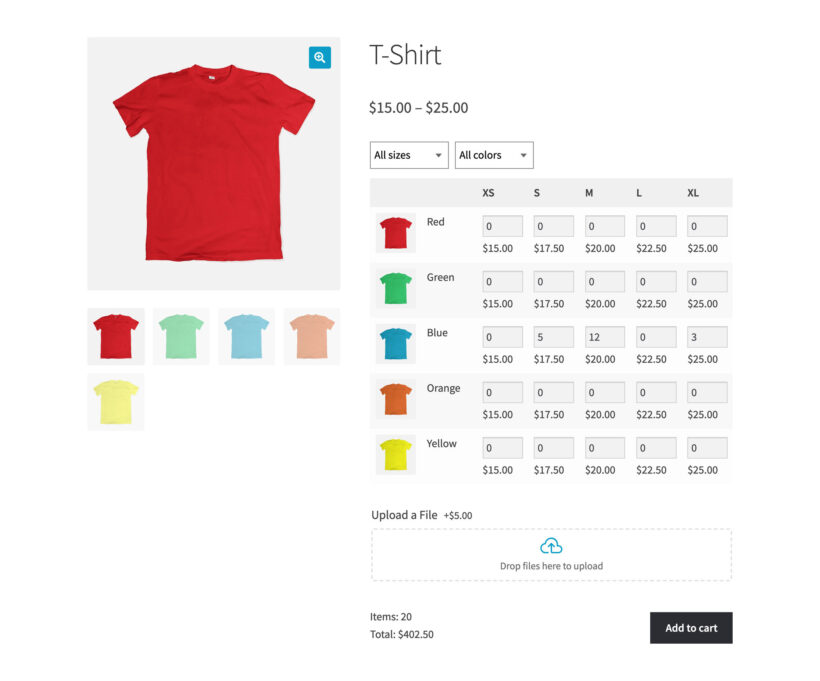
Replace the basic WooCommerce variation dropdowns with a quick ordering grid, with a row per color and a column per size. That way, clubs and workplaces can order 6 small, 14 medium and 4 large from one page, and see the total price update as they type.
Use the same custom design for to all sizes
Your design fields appear under the variations grid, so the club types the club name, uploads the crest and picks the print position once. One click adds all 20 personalized t-shirts to the cart.
What you see in the order
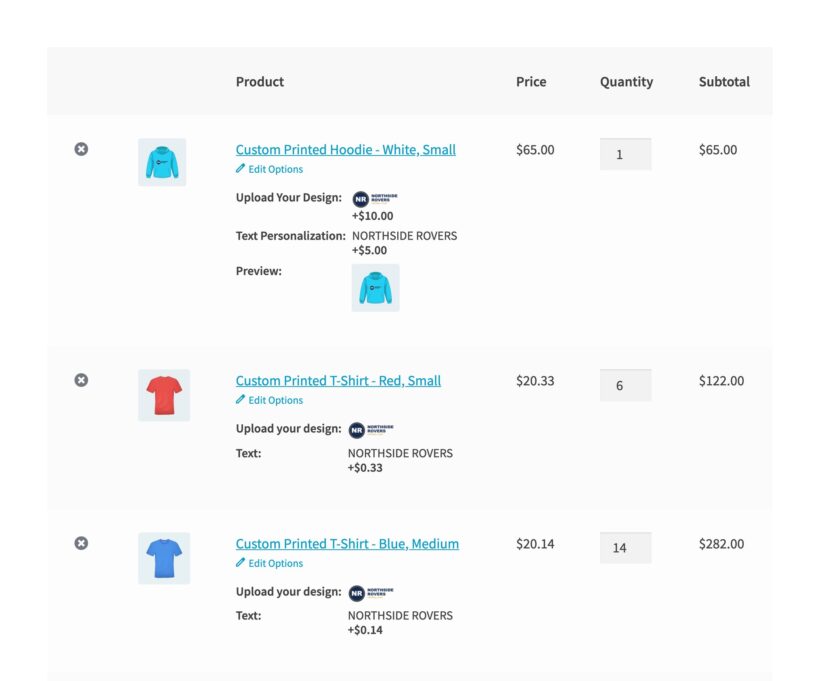
You receive the order with one line per size variation with the quantity alongside each one, so you can read the pick list straight off the order. The name, the number, the colors, the print position and the uploaded artwork come through with it.
Let customers preview their design before paying
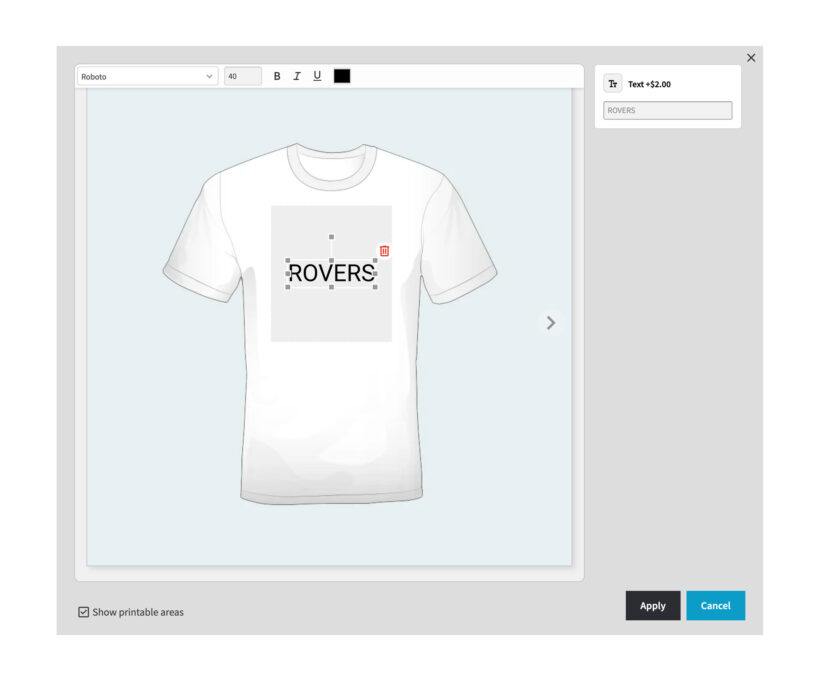
Your customer uploads their logo or types a name and sees it on the shirt straight away. Dashed printable areas mark where the print can go, so nothing goes off the edge of the fabric.
Set custom printable areas
Use the "Printable areas" screen to add one or more printable areas to each image and control whether customers can edit details such as the print size, position and font.
Receive the mockup with the order
The customer's approved preview appears in the cart and on the order, ensuring that expectations are clear before you print the personalized clothing order.
Charge properly for setup, names and artwork
A setup fee plus a per-unit rate
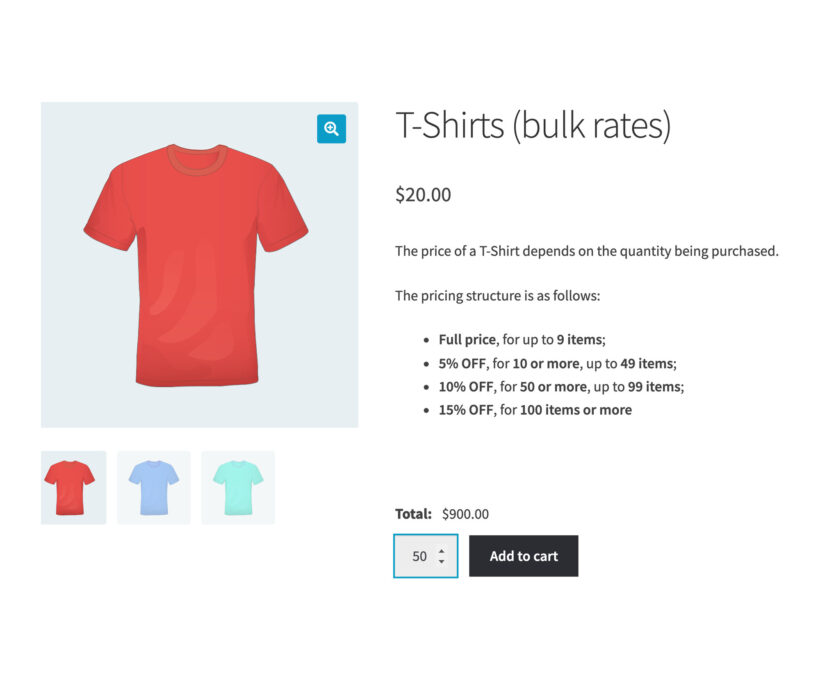
Put a price on each option, or write a custom price formula. The formula supports all mathematical and logical operators and include functions such as bulk pricing discounts and quantity breaks.
Save time with AI price formulas
Not a spreadsheet expert? No problem! Our price formula AI lets you describe your formula in plain English and then generates it for you.
Display live totals to the customer
Customers watch the price change as they configure the clothing product or t-shirt, so nobody has to ask you for a quote before they can order.
Get print-ready artwork with every order
The uploaded logo arrives on the order screen at full resolution, next to the name, the number, the thread color and the print position the customer chose.
Nothing to chase by email
Every detail you need to decorate the garment is captured at checkout, so you can send the order straight to the press or embroidery machine.
Customers who want to build artwork from scratch with clipart and layout tools
Printers and embroiderers who decorate their own stock
Who makes the shirt
Your print supplier
You
You
What the customer does
Picks a design or uploads their own artwork
Lays out their own artwork on a canvas
Fills in the fields you set up: Name, number, font, thread color and print position, then places their logo
Ordering a run of sizes
WooCommerce's standard size dropdown
WooCommerce's standard size dropdown
A quick order form with a quantity field per variation
How you price it
The supplier price plus your margin
Usually one flat price per product
Add prices to each element of the configurator or create price formulas with bulk discounts and more
Our verdict
Choose a print-on-demand supplier if you have no production of your own, because they print and ship every order. You sell their stock at their prices, and they take a cut of each sale
Choose a full design studio if your customers want to design custom artwork for their t-shirts directly on your store, instead of just uploading artwork they've already prepared
Combine the plugins listed below to create a flexible t-shirt designer or clothing configurator with the exact fields you require. It's ideal for any shop that prints or embroiders its own stock
★★★★★
“The plugin gave us a solution to buy products in bulk, rather than individually - very useful for teams. It installed easily and works perfectly with WooCommerce variations, saving us a lot of time!”
Ian Curtis - UK
Choose Your Plan
Every license includes free setup service and a 30 day money back guarantee
30% OFF
EVERYTHING
COUPON CODE: DONTMISS30
Black Friday Sale 2025
GO ALL ACCESS
Get the best offer on our full suite of WordPress and WooCommerce plugins.
All plans include free setup, updates and support. You can upgrade at any time and just pay the difference. If your annual license expires, the plugin will continue working on your site but you must renew to change settings or receive updates, new features or support.
Customers place their logo and see it before they buy
Clubs order a full kit on one product page
Customers type quantities instead of adding each size
Your rate per shirt falls as the order grows
Every order reaches you ready to print
You build the options once in the plugin
You decide where the printing goes on every garment
Custom clothing FAQs
Our world-class support starts here: How can we help?
Is this a separate WooCommerce t‑shirt designer plugin?
The t‑shirt designer is built from three of our plugins, and you can start with one. WooCommerce Product Options adds the design fields: The name, the number, the font, the thread color, the print position and the artwork upload. Live Preview puts the design on the product so the customer sees it before they buy. Bulk Variations lets a club order every size in one go. The pricing table on this page sells them singly, as a pair, or all three together.
How do customers design their own clothing?
They fill in the fields you set up on the product page. You choose what those are: A name, a squad number, a font, a thread color, a print position or an artwork upload. Live Preview then shows their design on the product. It works the same way on a variable product, so the customer picks a size and color first, then designs.
What clothing can I sell this way?
Any clothing you decorate to order. Printers and embroiderers use this setup for t‑shirts, hoodies, polo shirts, sweatshirts, caps, workwear, hi-vis vests, aprons, club kit, team jerseys, school uniforms and tote bags. You choose the decoration methods the customer picks from, whether that’s screen printing, embroidery, DTG, DTF or vinyl transfer. Conditional logic then asks for a thread color on an embroidery order and a print-ready file on a printed one.
Can customers add a name, a number and their own artwork?
Yes to all three. You create a text field for the name and another for the squad number, then set a character limit and a price on each. For artwork you add a file upload field and choose the file types you accept and the maximum size. Every value and every file arrives with the order, so you know exactly what to print.
Can each shirt in a run carry a different name?
Not within a single cart line. The fields a customer fills in apply to the whole line, not to each shirt inside it. Clubs normally send the name and number list as an uploaded file or in a text area, which arrives with the order. If you want a separate name against each shirt, the customer adds each one to the cart on its own.
Can customers see their design before they buy?
Yes. Our Live Preview add-on shows the logo or the text on the shirt, inside the area you mark as printable, and the shopper drags it into position. The preview follows them into the cart, so you and your customer both have the same picture of the finished order before anyone pays.
How does a club order team shirts in several sizes at once?
WooCommerce Bulk Variations replaces the size and color dropdowns with a grid of quantity boxes. A club types five against Small, 12 against Medium and three against extra large, then adds all 20 shirts to the cart in one click. The design fields appear under the grid, so the club fills them in once for the whole run. You get one order line per size, with the quantity against it and every design detail attached. Each line carries its own copy of a fixed option price, so a $2 name charge across three sizes comes to $6.
How do I charge a setup fee plus a per-unit rate?
You write it as a price formula. The bulkRate function drops the rate as the order grows, and the bulkPrice function swaps in a different price at each quantity break. For example, you can charge a $25 screen setup fee plus $8 a shirt, with the rate falling on bigger orders. Our bulk calculation examples show the formulas, and our AI bot writes them for you from a plain English description.
Can I give a discount on bigger clothing orders?
Yes, in two ways:
A price formula in WooCommerce Product Options changes the price as the shopper types a quantity, so a shirt can drop to $9 each at 25 units. The new price appears on the product page before anything goes in the cart.
Our WooCommerce Discount Manager plugin works differently: You set one quantity rule and apply it to a product, a category or your whole store, then the discount comes off in the cart.
Use a formula when the price depends on the design options the customer picks. Discount Manager is better when you want the same bulk discount across your whole clothing range.
Will you set up my design options?
Yes, free within 30 days of buying WooCommerce Product Options. Every license includes this service, and it covers up to five options with 20 choices, which is enough for a working t-shirt designer or workwear order form. After buying, you request it on our free setup page.
Will it work with my theme and other plugins?
WooCommerce Product Options works with any well-coded WordPress theme. We test it with a range of free and premium themes. You can add product options without bringing in a developer, adding code, or editing theme templates.
The theme compatibility page shows the themes we test with. If a theme conflict appears, our support team will help.
WooCommerce Product Options is designed to work with any WordPress translation plugin such as WPML, WeGlot and TranslatePress. This makes it easy for you to translate the extra product fields into any language and use it on multilingual websites.
What are the minimum requirements for running the plugin?
WooCommerce Product Options is fully tested with the latest versions of WordPress and WooCommerce. We always recommend running the most up-to-date version, but we also support older installations:
Plugin and Plugin support are great, I encountered a issue that support and developer fixed and updated very quickly. The mathematical equations and variables are easy to logically understand. Great plugin to solve complicated product options.
Little Nest Meadow
Best app for Woocommerce
Rated 5 stars
By Little Nest Meadow on
I am so pleased that I took a chance and got the Woocommerce Product Options. This app is the best app that I have for my website. It is so easy to use, and the results are exactly what I need for my products. Highly recommend this app to anyone with an ecommerce site.
Nikki LouiseRated stars
By Nikki Louise on
Thank you so much for the glowing 5-star review! We are absolutely thrilled to hear that WooCommerce Product Options has become the best app for your website. Our goal is always to make complex product customizations easy to manage, so it’s wonderful to know you found it easy to use and that the results are exactly what you needed for your products. Your recommendation means the world to our team! If you ever need any assistance or have ideas on how we can make the plugin even better, please don't hesitate to reach out. Wishing you and Little Nest Meadow continued success! -Nikki
Mitch Hollander
Love it!
Rated 5 stars
By Mitch Hollander on
Easy to use, but we have a relatively complex setup. Solution? Barn2's customer service has been incredible. Highly, highly recommend, it's a high quality product backed by helpful people.
PANAGIOTIS TOUVRAS
Very Helpful!
Rated 5 stars
By PANAGIOTIS TOUVRAS on
Τρομερή εξυπηρέτηση, άμεση και με βοήθησαν να σετάρω το Product Options έτσι όπως το ήθελα. Μπράβο τους!
Great service, prompt and they helped me set up Product Options the way I wanted. Well done to them!
TONY PHILIPSZ
Product page
Rated 5 stars
By TONY PHILIPSZ on
Adrian went out of his way to help me solve a configuaration set up and made the process seem simple.
Majd Issa
Fast and helpful
Rated 5 stars
By Majd Issa on
They’re doing great job!
Doris
Super Erweiterung
Rated 5 stars
By Doris on
Great range of functions, GDPR- and Händlerbund-compliant!
Andrew Ellis
Just what I was looking for
Rated 5 stars
By Andrew Ellis on
Having looked for ways to showcase our framing options we were disheartened to not find a visual option until we came across Barn2's plugin. It works perfectly offering a slick interface for creating the options as well as an easy to understand front end for our customers.
Maria Ward
Excellent Support
Rated 5 stars
By Maria Ward on
I had a problem with the functionality of the Barn2 plugin that I had purchased. Unfortunately, the product did not suit what I needed it for, however, I am super impressed at how excellent the customer support was at going the extra mile to try to find a solution that would work for my company. In the long run, they were able to refer out to another service provider who could possibly help us. This is how business should be done. They met the need of the customer, even though I didn't actually end up doing business with them. Although their product didn't suit my current, very specific need, I would definitely consider them again in the future as we continue to develop our site and business.
MC Global Fabrics SL
Great custom product tool
Rated 5 stars
By MC Global Fabrics SL on
The best option I´ve found to create custom products and calculations in WordPress. Best support and help.



















Complicated Booking forms sorted
By Jeremy Opperman on
Plugin and Plugin support are great, I encountered a issue that support and developer fixed and updated very quickly. The mathematical equations and variables are easy to logically understand. Great plugin to solve complicated product options.