The best WordPress audio plugins compared


WordPress comes with a basic audio player, but the moment you want a polished design, a playlist, or a searchable library of tracks, you need a dedicated audio plugin to do the job properly.
I've compared the best WordPress audio plugins below, with the strengths and trade-offs of each. The list covers everything from a single embedded track to a full searchable audio library with metadata columns. It also includes a use case where table-based plugins do the job better than a pure audio player.
Quick verdict
- Best overallWavePlayer is a polished, customizable audio player that works alongside most plugins, including our own table plugins.
- Best for audio libraries with text columnsDocument Library Pro and WooCommerce Product Table turn audio into a searchable, filterable table with title, album, length, and other metadata columns.
- Best for mp3 with waveformMP3 Audio Player by Sonaar adds a waveform bar under the player and supports Elementor, Gutenberg, shortcode, and JavaScript API output.
- Best for playlistsAudioIgniter handles unlimited playlists and integrates with services like Amazon S3, Anchor, and Shoutcast.
- Best simple optionAudio Album is a plain, lightweight player for sites that just need a few tracks displayed cleanly.
How we evaluated these audio plugins
I looked at each plugin against the things that decide whether an audio plugin really serves your site. That means the quality of the on-page player, how much metadata you can show alongside each track, and how cleanly it works with the block editor. I also weighed playlist support and ecommerce integration for sites selling audio.
When you're comparing options yourself, here's the checklist:
- Player design: does it look polished, or does it default to the basic browser audio bar?
- Metadata display: can you show track titles, albums, lengths, and other columns next to each player?
- Playlists: does it support multi-track playlists, albums, or a sequenced player?
- Ecommerce: can you sell audio with WooCommerce or Easy Digital Downloads?
- Block editor: does the plugin offer a native block, or do you rely on shortcodes?
- Distribution: if you're running a podcast, does it generate the feed for Apple Podcasts and Spotify? (If feed generation is your priority, see our WordPress podcast plugins roundup. That's a different category.)
At-a-glance comparison
| Plugin | Free version | Standout strength | Best for |
|---|---|---|---|
| WavePlayer | No | Polished player with deep customization | Sites that want a quality audio player on every page |
| Document Library Pro and WooCommerce Product Table | No | Searchable, filterable tables of tracks with text columns | Audio libraries, music catalogs, and WooCommerce audio stores |
| MP3 Audio Player by Sonaar | Yes | Waveform bar plus Elementor, Gutenberg, and shortcode output | Music creators and podcasters |
| AudioIgniter | Yes | Unlimited playlists with streaming-service integrations | Sites with multiple albums or playlists |
| Audio Album | Yes | Plain, lightweight player with album support | Simple audio pages |
| Compact WP Audio Player | Yes | Minimal HTML5 player that drops into any page | Embedding a single track in a post |
The best WordPress audio plugins
Below are the six audio plugins I'd consider, ordered by how well they suit most sites. The list starts with the strongest dedicated player, then our own table-based plugins for audio libraries with text columns, then more specialist tools.
1. WavePlayer

WavePlayer is a robust audio player that goes well beyond the default WordPress audio bar. It works alongside most other plugins, including Elementor, WooCommerce, and our own Document Library Pro, so you can drop a quality player into almost any layout.
The plugin gives you deep customization. You can change the color palette, switch to a dark theme, pick from multiple skins, and tailor the playback controls. Documentation is detailed, so you can get a player up and running quickly.
Pros:
- Polished, customizable player design.
- Compatible with Elementor, WooCommerce, and table-based plugins.
- Multiple skins and a dark mode out of the box.
Cons:
- Premium plugin with no free version.
- Focused on the player itself, not on managing a large catalog.
Best for: sites that want a polished audio player wherever audio appears.
2. Document Library Pro and WooCommerce Product Table
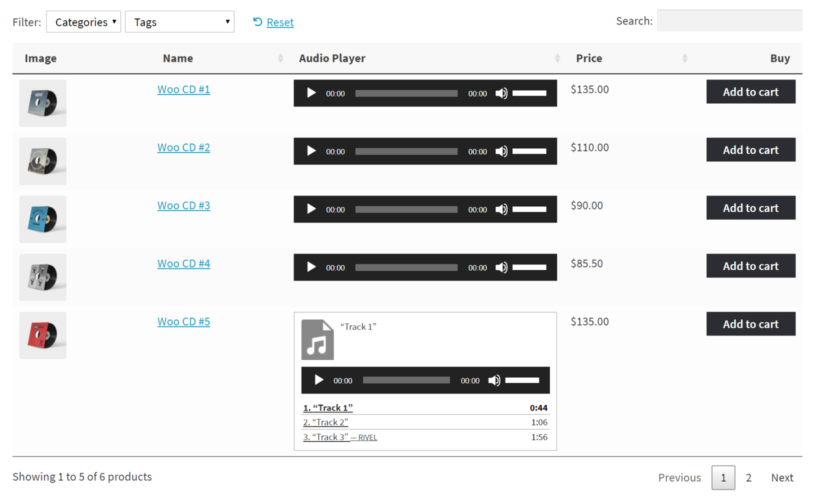
Our own Document Library Pro and WooCommerce Product Table plugins are the right choice when your audio collection needs more than a player. They turn your tracks into a searchable, sortable, filterable table with columns of metadata visitors can use to find what they want, whether that's by album, artist, length, genre, or any custom field.
Use Document Library Pro for a general WordPress audio library of tracks, albums, or podcast episodes. Use WooCommerce Product Table when you're selling audio files and want a WooCommerce audio store with add-to-cart buttons in the table itself. If your site runs on another platform, there is a cloud version of Document Library Pro you can build once and embed anywhere.
Both plugins work alongside any of the dedicated players above. You can embed the standard WordPress audio player in each row, or use WavePlayer or another player inside the table for a more polished look.
Build an audio library with Document Library Pro
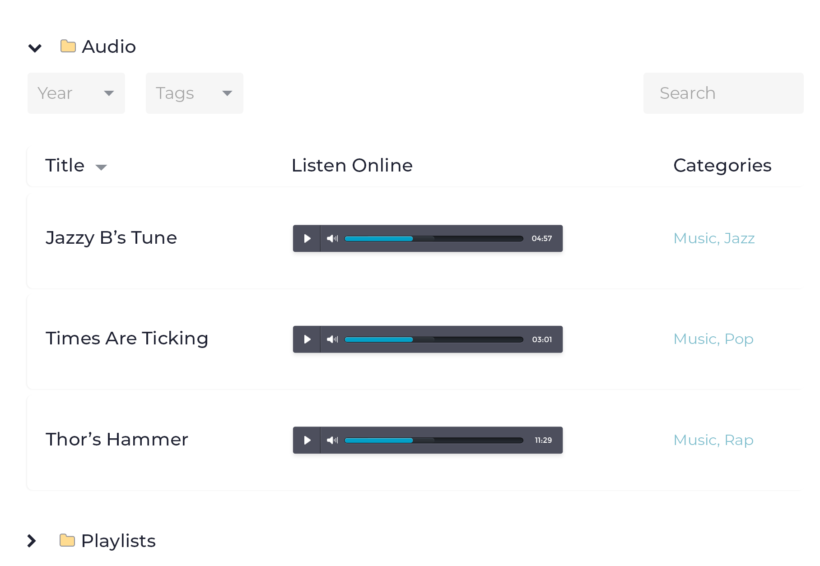
The step-by-step audio library guide walks through the setup. Add each track as a document, fill in the metadata columns (title, album, artist, and duration), and the plugin renders a table with an embedded player on every row.
The audio playlist guide shows the same approach for sites that want sequential playback through a list of tracks.
Sell audio with WooCommerce Product Table
For a WooCommerce audio store, WooCommerce Product Table displays your audio products in a table with previews, prices, and an add-to-cart column on every row. Customers can browse, listen, and buy without leaving the page.
The WooCommerce audio store guide covers the setup.
Pros:
- Searchable, sortable, filterable tables of any number of tracks.
- You add columns for metadata like album, artist, length, genre, and custom fields.
- Compatible with any dedicated audio player, including WavePlayer.
- WooCommerce Product Table adds ecommerce on top of the same table model.
Cons:
- Document Library Pro has a free edition, Document Library Lite, though audio playback needs a paid plan, and WooCommerce Product Table is sold as premium only.
- Not audio players themselves, so pair them with a player for the best look.
Best for: building audio libraries and music catalogs, archiving podcast episodes, or running a WooCommerce audio store.
3. MP3 Audio Player by Sonaar

MP3 Audio Player by Sonaar is an enhanced version of the default WordPress audio shortcode player. The interface is more intuitive, and you can show multiple audio files in playlists, albums, or podcast formats.
The standout feature is the waveform bar under the player, powered by WaveSurfer.js. You can display the player using Elementor, Gutenberg, a shortcode, or the JavaScript API, which gives you flexibility across page builders. Bulk import lets you upload audio files and create multiple posts in one go.
Pros:
- Waveform bar adds visual feedback to the player.
- You can output the player via Elementor, Gutenberg, shortcode, or the JavaScript API.
- The free version covers core features, with a Pro upgrade for advanced needs.
Cons:
- Less compatibility-focused than WavePlayer for embedding in table plugins.
- Best features sit behind the Pro version.
Best for: music creators and podcasters who want a waveform-style player with flexible output.
4. AudioIgniter Music Player

AudioIgniter is a popular audio player plugin focused on playlist support. You can create unlimited playlists and display them in a clean, responsive layout.
It supports more than a dozen streaming services, including Amazon S3, Radiojar, Anchor, and Shoutcast. You can let listeners download or buy tracks straight from the audio page. The Pro version adds bulk upload and more advanced playlist management.
Pros:
- Strong playlist support with album and track organization.
- Integrates with streaming services like Amazon S3 and Anchor.
- The free version is available on wordpress.org.
Cons:
- Player design is functional rather than eye-catching.
- Bulk upload needs the Pro version.
Best for: sites running multiple albums, playlists, or radio-style audio streams.
5. Audio Album

Audio Album is a simple, lightweight player. It won't impress on design, but it fits cleanly into any theme and supports albums, mp3, and wav out of the box.
You can add a title and song information that displays as the track plays. Links can open lyrics or other content in a popup, so a single album page can hold extra context for each track. Player colors are customizable, so the look matches your site.
Pros:
- Free and lightweight.
- Album support, including titles and per-track info.
- Customizable player colors.
Cons:
- Plain design.
- Limited features beyond basic playback.
Best for: simple audio pages where a plain player is fine.
6. Compact WP Audio Player

Compact WP Audio Player is an HTML5 player for embedding mp3 and other audio files on your site. It's compact by design, so it fits into a post or a sidebar without taking over the page.
It's easy to manage and suits sites that need to host occasional audio like a single episode or interview. It doesn't really do playlists, so it's not the right tool for albums or full catalogs. You can pair it with Document Library Pro to show several tracks side by side, each with its own compact player.
Pros:
- Minimal, compact UI that suits embedded audio.
- HTML5-based with broad browser support.
- Free.
Cons:
- No playlist support.
- Bare design with limited customization.
Best for: embedding a single track or short clip in a post or sidebar.
Which WordPress audio plugin should you choose?
The right audio plugin depends on whether you mostly need a polished player, a searchable library of tracks, or something simple for the occasional embed.
- If you want the best on-page audio player, choose WavePlayer.
- If your audio collection needs sortable text columns (title, album, length, and genre), choose Document Library Pro for a library or WooCommerce Product Table for a store.
- If you want a waveform bar and flexible output methods, choose MP3 Audio Player by Sonaar.
- If you need playlists, albums, or streaming-service integrations, choose AudioIgniter.
- If you just need a simple album player, choose Audio Album.
- If you only want to embed a single track in a post, choose Compact WP Audio Player.
- If your audio is a podcast and you need an RSS feed for Apple Podcasts and Spotify, see our WordPress podcast plugins roundup instead.
If you're stuck choosing, start with the use case. For one or two embedded tracks, pick a polished player. For a searchable library, pick a table-based plugin. For multi-album sites, pick a dedicated playlist player. Drop in the free version of your top pick on a staging site, add a few real tracks, and check how it looks on mobile.
8 Comments
There's also a new plugin called "Audio Comparison" for synced A/B listening, useful for studio, mixing, mastering websites. Look here https://audiocomparison.kaedinger.de
There's also a free lite version in the WP plugin directory, "Audio Comparison Lite".
Hi, Florian. Thanks for your suggestion. Although Audio Comparison is yet to be tested with our plugin, we'll be happy to discuss this in more detail should you get in touch with us via our Support Center.
Hi ! Since I wasn't able to find an audio plugin fitting my needs, I created a new (free) one, WP SoundSystem.
Would you have a look at it ? It has, I think, a lot of unique features, and it would be awesome if you could add it to your post.
Thanks a lot ! https://wordpress.org/plugins/wp-soundsystem/
Gordo
Hi, Gordo. Thanks for the info.
We haven't tested with your plugin yet, but you are welcome to do so using our Posts Table Pro plugin on your site, completely risk-free - thanks to our 30-day money back guarantee. If the two plugins don't work together in the way you had hoped, you can get a full refund within 30 days of your purchase.
Additionally, when you test them out together, I suggest trying them with the Lazy Load option either enabled or disabled as some audio plugins work with one mode and not the other.
Should there be more users who ask about your plugin, we'll look at testing it ourselves to add it to this article.
Many thanks.
I would like to know more about how you're product interacts with wp soundsystem
Hi, Dan. Thanks for your comment. As mentioned, I'm afraid we haven't tested with the WP SoundSystem audio plugin by G.Breant. I imagine that you can use its WordPress shortcode to embed/display its audio player as described for the other audio plugins here in our article. If you already have a license for Posts Table Pro, we can discuss this further and in more detail via our dedicated Support Center.
Thanks for sharing great list of player but Responsive HTML5 Audio Player PRO is best ever bcoz i have purchased and used on my site, very simple easy to operate, you can download and share song with social media friends, u also can create list etc...
I got to know about this need thing. I am using WordPress for many days but didn't know about this feature. This audio feature will be helping me a lot now. I will use this plugin to listen to music while writing a blog. You can manage the link of the songs from the Wp-admin panel.