7 best WooCommerce cart plugins compared (2026)


Looking for a WooCommerce cart plugin to lift your conversions and average order value? I've compared the seven best options for 2026, with genuine pros and cons for each.
The default WooCommerce cart sends shoppers to a separate cart page, then on to another page to pay. Every extra click is a chance for them to leave, and the Baymard Institute puts the average cart abandonment rate at around 70%. A good cart plugin keeps customers moving toward checkout instead of bouncing.
The seven plugins below tackle that friction in different ways, from slide-out side carts to popup checkouts. My top pick is WooCommerce Fast Cart, which shows the cart and checkout in a popup so customers never lose their place.
Quick verdict: the best WooCommerce cart plugins
Short on time? Here are my picks by use case.
- Best overallWooCommerce Fast Cart combines a popup cart, a side cart and a fast checkout in one plugin, and it works on any store.
- Best for upsellsFunnelKit Cart adds in-cart cross-sells and free-shipping reward bars to raise average order value.
- Best free side cartSide Cart WooCommerce by XootiX is the most popular free slide-out cart on WordPress.org.
- Best for skipping the cartDirect Checkout sends shoppers straight from the product page to checkout.
Evaluating these cart plugins
I compared these plugins on the things that decide whether a cart plugin earns its place. That means how much friction it removes between adding a product and paying, which shapes your checkout conversion rate. I also look at the conversion features each one offers (upsells, coupons and free-shipping bars), how well it works with any theme and payment gateway, and the price.
On top of that, I checked that each one is actively maintained and weighed the real complaints in its reviews, not just its star rating. Where a tool is really a checkout or abandoned-cart plugin rather than a cart plugin, I've left it out and pointed you to the right guide instead.
Essential WooCommerce cart plugin features
There are numerous WordPress cart plugins available, but not all deliver the features you need to increase conversions. Look for these essential features when evaluating cart plugins:
- Minimal, clean design that doesn't overwhelm customers.
- Quick access to the cart page through AJAX-powered functionality and popup options.
- Quick checkout process with side cart drawer and real-time updates.
- Promotes upsells through intelligent product recommendations.
- Customization options for matching your brand.
- Integration with payment gateways like PayPal & Stripe.
- Optimized for speed with mobile responsiveness and floating layouts.
- Compatible with your theme and multi-step checkout optimization.
These features are the foundation of a good cart plugin.
Best WooCommerce cart plugins
Before the detailed reviews, here's a quick comparison to help you choose.
| Plugin | Type | Standout feature | Best for |
|---|---|---|---|
| WooCommerce Fast Cart | Popup + side cart | Popup checkout | Most stores |
| FunnelKit Cart | Side cart | In-cart upsells and rewards | Raising order value |
| Side Cart WooCommerce | Side cart | Popular and free | Budget stores |
| Modern Cart | Side cart | Clean modern drawer | Mobile-first stores |
| Caddy | Side cart | Built on the Interactivity API | Block themes |
| Mini Ajax Cart | Mini cart | Animated layouts | Design-led stores |
| Direct Checkout | Skip cart | Straight to checkout | Single-product stores |
Now let's look at each one in detail.
1. WooCommerce Fast Cart

I've ranked WooCommerce Fast Cart first for one clear reason. It's the only plugin here that shows both the WooCommerce cart and the checkout in an on-page popup.
Most side cart plugins give you a cart, but customers still have to visit a separate page to pay, which adds friction and slows the buying process. Fast Cart removes that step. It's our own plugin here at Barn2, and we firmly believe the on-page checkout genuinely makes it the best cart plugin for most stores.
We built Fast Cart to fix a specific problem: the default WooCommerce checkout is long, and every extra page it takes the shopper through is another chance for them to abandon.
The plugin makes it easier for customers to view products in the cart, review their order, change quantities, remove items and redeem discount codes. It helps you promote related products using WooCommerce's powerful product recommendation engine, and speed up the checkout process.
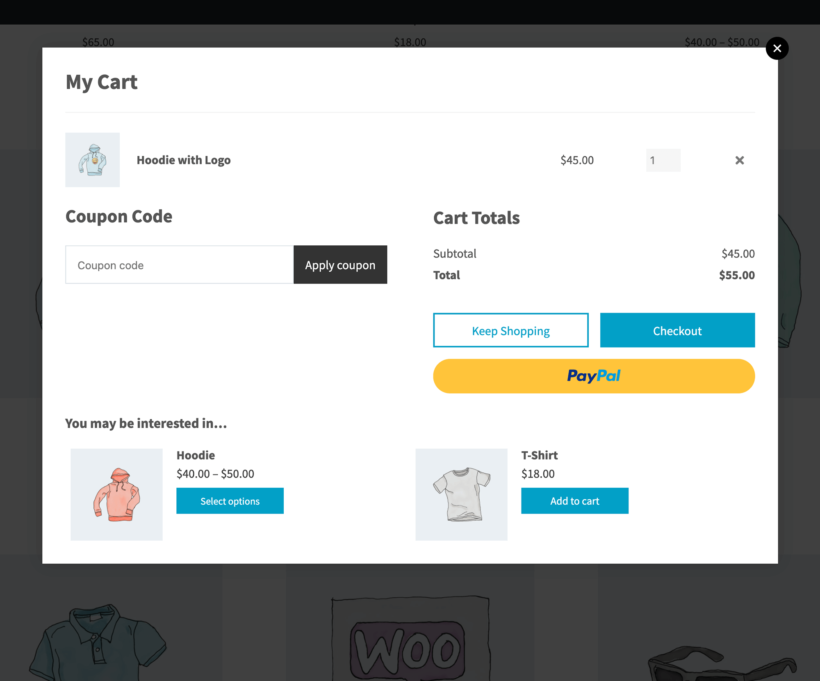
As soon as a customer adds a product to the cart, a popup appears either as a side cart on the right of the screen, or a larger lightbox in the middle. Customers can review the product without leaving the page, maintaining their shopping momentum.
The unique fast checkout displays the WooCommerce checkout as a popup, making purchases much quicker and easier. You can even make the purchasing process ultra-fast by skipping the cart and opening the popup checkout as soon as customers add a product to the cart.
Great plugin. The install and configuration is very easy and has a good concise set of options. Barn2 are very helpful and clearly work hard to maintain a high standard of work and client support.
Darrel MARTINCustomer
Fast Cart's biggest strengths are its flexibility and the way it shortens the path to payment.
- Works with any WooCommerce theme and all the major payment gateways, including PayPal, Stripe and Amazon Pay.
- Shows the cart and checkout in a popup, with an option to skip the cart page for one-click buying.
- Recommends related products inside the popup, so you can upsell without sending customers away.
- Backed by responsive support and built with accessibility in mind.
There are a couple of things to weigh up.
- The review count is still small, so there's less public feedback than some older plugins.
- You need an active license to change settings or get updates, though the plugin keeps working if your license lapses.
- It focuses on cart and checkout rather than full sales funnels, so stores wanting multi-step funnels with A/B testing will need a dedicated tool.
- There's no built-in free-shipping progress bar, so you'd add one with a snippet or a companion plugin (several rivals here include one natively).
2. FunnelKit Cart
FunnelKit Cart is a slide-out cart drawer built to raise average order value with in-cart upsells and reward bars.
★★★★★ 5/5 | Developed by FunnelKit
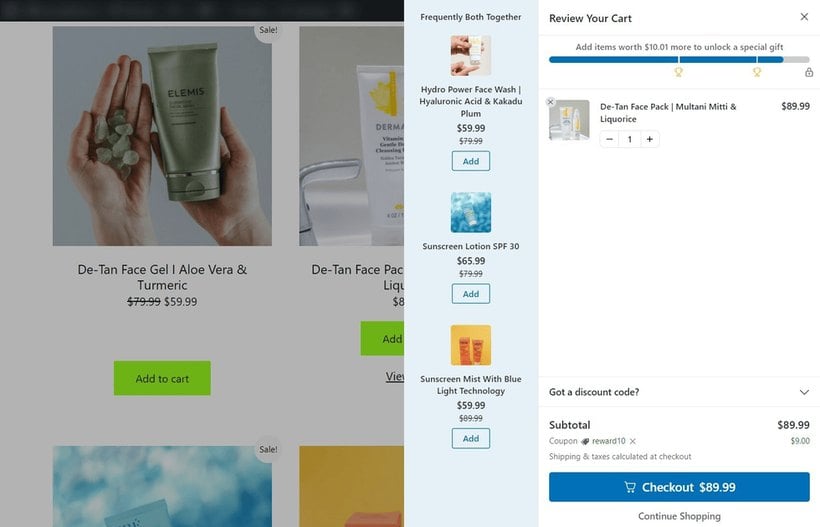
FunnelKit Cart, once part of WooFunnels, comes from the team behind the FunnelKit funnel-building suite. The free version gives you a clean slide-in cart with a floating cart icon, AJAX add-to-cart, a coupon field and express checkout buttons for Stripe, PayPal and Google Pay.
What sets it apart is on the paid plan. You get in-cart cross-sells and upsells, plus reward bars that nudge shoppers to spend more to unlock a free gift, a discount or free shipping. If you already run FunnelKit Checkout or its one-click upsells, the cart drops straight into that setup. These in-cart offers pair well with other WooCommerce upsell and cross-sell plugins.
It's a strong choice if raising order value is your priority.
- The free version is genuinely usable on its own, with express checkout and an AJAX cart included.
- In-cart upsells and free-shipping reward bars are built to lift average order value.
- Updated roughly every month and kept compatible with the latest WooCommerce, with deep developer hooks for customization.
- Support is the most praised part of its reviews.
It does come with a few trade-offs around pricing and reliability.
- The upsell and reward features aren't sold as a cheap add-on. They need a FunnelKit Plus plan from $299 a year, which covers the whole funnel suite.
- The support forum shows a steady stream of cart-count and AJAX refresh issues, often tied to caching.
- It can clash with checkout-field, multicurrency and discount-rule plugins, so expect some testing on a customized store.
- Its near-perfect rating comes from a small, support-solicited review base.
3. Side Cart WooCommerce by XootiX
Side Cart WooCommerce by XootiX is the most popular free side cart on WordPress.org, with a slide-out drawer that updates without a page reload.
★★★★★ 4.9/5 | Developed by XootiX
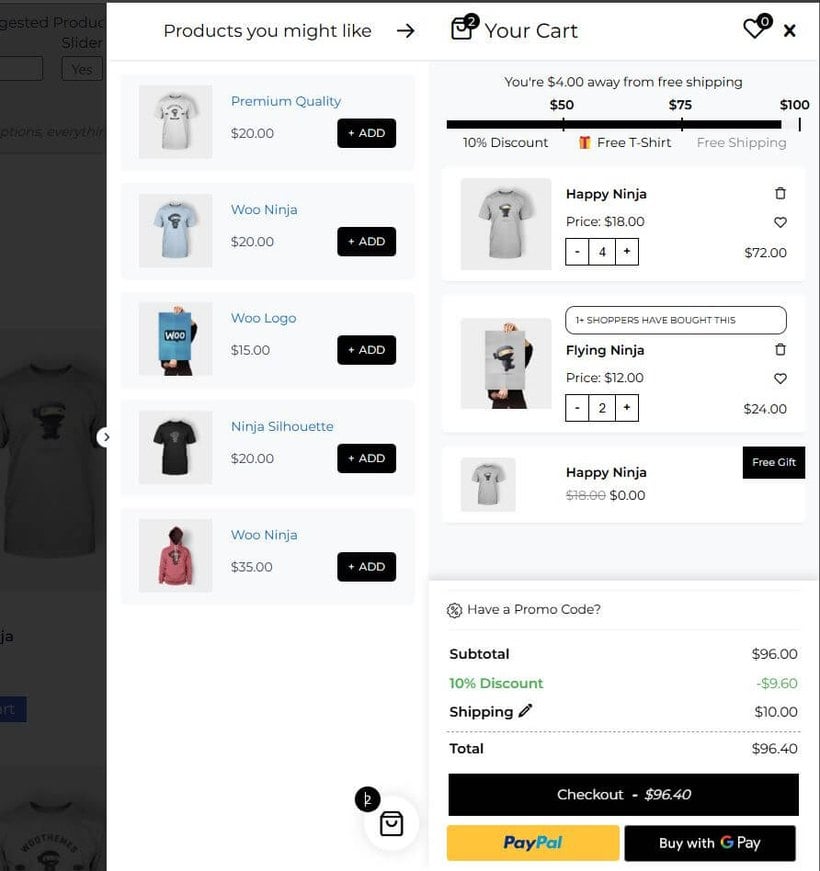
With more than 80,000 active installs and a 4.9-star average across 451 reviews, Side Cart WooCommerce is the default free choice for a lot of stores. It adds AJAX add, update and remove from anywhere on the site, a floating basket icon and a slide-out cart you can drop into a menu or place with a shortcode.
The free version covers the basics well. The conversion features, though, sit behind the Pro upgrade. Quantity controls in the cart, a coupon field, a shipping calculator, cross-sells and express checkout buttons all need a paid license, which starts at around $29 a year for one site.
It earns its popularity for a few reasons.
- High satisfaction at real scale, with 80,000+ installs and 451 reviews averaging 4.9 stars.
- Lightweight and frequently updated, with recent fixes for block themes, Elementor and caching plugins.
- A capable free AJAX side cart for stores that just want a working drawer.
The free tier has clear limits.
- Most conversion features, including quantity editing, coupons and cross-sells, are Pro-only.
- Support on the free forum is patchy, with several recent threads left without a reply.
- Some buyers have reported a dispute over a 'lifetime' license later treated as annual, so read the Pro terms carefully.
- An on-load fragment-refresh request and the odd caching conflict can affect heavily cached sites.
4. Modern Cart
Modern Cart is a slide-in cart drawer from the CartFlows team that keeps shoppers on the page while they review and edit their order.
★★★★☆ 4.6/5 | Developed by CartFlows
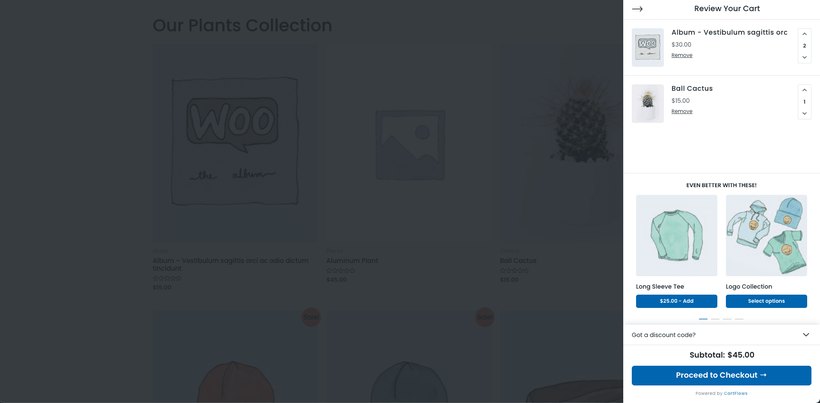
Modern Cart is a sleek, performance-focused WooCommerce cart plugin that enhances the default cart experience with a fast, slide-in drawer. Instead of redirecting to a separate cart page, shoppers can instantly review, edit, and proceed to checkout, creating a smoother user flow and reducing abandoned carts. It's perfect for stores that want a modern feel without bloating the site or complicating setup.
Modern Cart works particularly well for mobile-heavy stores, where the slide-in drawer suits touch screens. The real-time updates mean customers see immediate feedback when they adjust quantities or apply coupons, which builds trust and reduces confusion during checkout.
It's a clean, modern option that's quick to set up.
- A polished slide-in drawer with real-time updates, smart recommendations and a free-shipping progress bar.
- Performance-focused and well suited to mobile-heavy stores.
- Comes from CartFlows and Brainstorm Force, an established and financially stable team.
There are a couple of caveats.
- It only offers the slide-in drawer layout, with no popup or skip-cart option.
- It's still a young plugin with a small review base, so it's less battle-tested than older carts.
- Some of the more advanced controls need the Pro version, at around $69 a year.
5. Caddy
Caddy is a smart side cart rebuilt on the modern WordPress Interactivity API, which makes it fast and a natural fit for block-based stores.
★★★★☆ 4.0/5 | Developed by Tribe Interactive
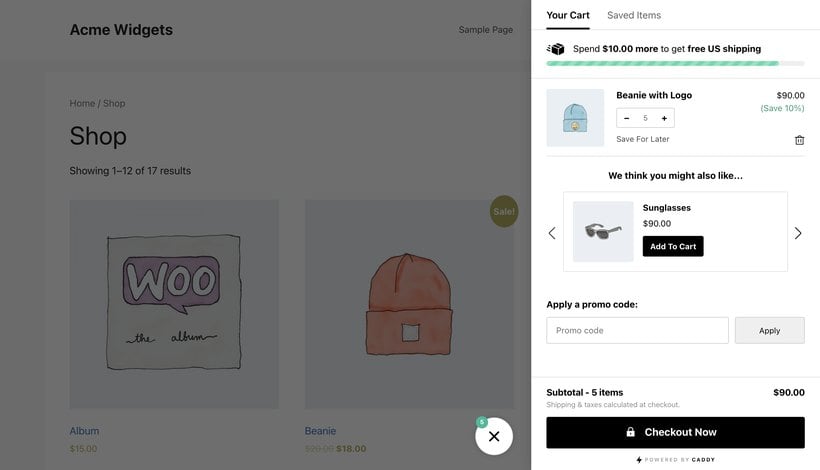
Caddy's standout is its architecture. Version 3 was rewritten on the WordPress Interactivity API and the WooCommerce Store API, with no jQuery. Cart updates are instant and run through the same foundation as WooCommerce's own cart and checkout blocks. If you use a block theme and worry that a side cart will fight with the block checkout, Caddy is built to avoid exactly that.
The free version includes a free-shipping meter, in-cart recommendations, save-for-later, a coupon field and quantity controls. It's made by Tribe Interactive, a small California agency that also builds RetentionKit.
It's the most modern pick in this list.
- Built on the WordPress Interactivity API and Store API, with no jQuery, for fast and reliable cart updates.
- A strong fit for block themes and the WooCommerce block checkout.
- A capable free tier with a free-shipping meter, recommendations and save-for-later.
A few things hold it back.
- The free version pushes an upgrade notice across the admin that some users find hard to ignore.
- Auto-opening the cart after each add-to-cart can only be turned off in the Pro version, from $99 a year.
- Updates have occasionally broken sites, and at around 4,000 installs it's less tested than the big names.
6. Mini Ajax Cart for WooCommerce
Mini Ajax Cart for WooCommerce adds a sticky, animated slide-in cart, with a free version and a more advanced premium one.
★★★★★ 5/5 | Developed by HashThemes
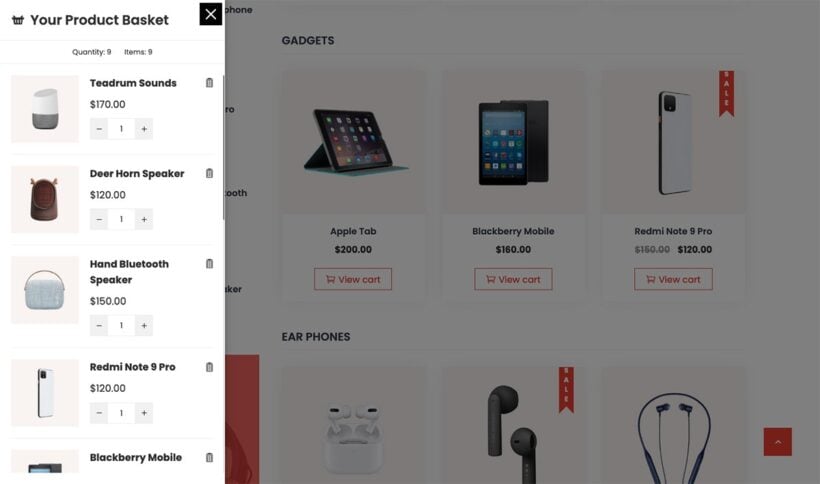
If you're looking for a WooCommerce plugin with flexible features to add a mini cart to your ecommerce store, Mini Ajax Cart for WooCommerce delivers the solution. It's a freemium plugin that offers both free and pro versions.
The lite version includes simple options to place a sticky shopping cart on your online store and display cart items in a beautiful slide-in form. You can customize the typography and color of texts in the cart items. The plugin includes different animation effects to display cart items in an engaging fashion.
The premium version unlocks advanced features like different layouts to display cart items and position options for the mini AJAX shopping cart. You can display additional items such as currently active discount offers with promo codes, a carousel displaying related products, and much more. There's also a Glassmorphism layout option to display the cart and cart items in a transparent frost glass effect.
It's a good fit if design and animation matter to you.
- A free sticky slide-in cart with typography and color controls.
- Animation effects and layout options, including a frosted-glass style in the premium version.
- Actively maintained, with a low-cost premium upgrade.
It's a smaller plugin, with the usual trade-offs.
- The install base and review count are small, so there's limited public feedback.
- The more useful layouts and features need the premium version, from around $19.
7. Direct Checkout for WooCommerce
Direct Checkout for WooCommerce by QuadLayers takes a different approach: it skips the cart page and sends shoppers straight to checkout.
★★★★☆ 4.8/5 | Developed by QuadLayers

The free Direct Checkout plugin is straightforward in its approach. It shortens the checkout process by skipping the shopping cart page. When a customer clicks on the 'Add to cart' button, they're redirected straight to the checkout page.
The free version includes options like Ajax add to cart which prevents the website from reloading whenever customers add a product to the cart. The plugin also enables you to remove checkout fields like the shipping address, which is unnecessary if you're selling digital products.
With the premium version, you can enable one-page checkout and a quick purchase button on single product pages.
Use this if you've decided to stick with the default WooCommerce checkout page and simply want to skip the cart. If you want customers to check out without leaving the page, then use WooCommerce Fast Cart instead. That plugin has its own direct checkout feature which skips the cart page and opens the popup checkout, which is better for conversions.
It's a popular, well-reviewed free plugin.
- Free, with 80,000+ installs and a 4.8-star average across 400+ reviews.
- Skips the cart page and adds AJAX add-to-cart and a quick-purchase button.
- Useful for single-product stores and digital downloads where the cart adds nothing.
It suits some stores far better than others.
- Skipping the cart means customers can't review or adjust their order before paying, which hurts multi-item stores.
- Useful extras like one-page checkout need the Pro version, which starts at $49 a year.
Checkout and abandoned-cart tools I left out
A few tools often show up in cart roundups but do a different job, so I've kept them out of the list above and pointed you to the right guide instead.
- Checkout field editorsTo add, remove or reorder fields on the checkout form, see my guide to the best WooCommerce checkout plugins.
- Abandoned-cart recoveryTo win back shoppers who leave, the best WooCommerce abandoned cart plugins cover email tools like Retainful.
- A Shopify-style checkoutFor a full multi-step checkout redesign, see how to create a Shopify-style checkout in WooCommerce.
- Choosing a cart systemIf you haven't set up WooCommerce yet, compare the broader options in my roundup of WordPress shopping cart plugins.
Choosing the right cart plugin
The right WooCommerce cart plugin depends on your store and how your customers shop. Here's a quick steer by store type.
- Most stores - WooCommerce Fast Cart, for a popup cart and checkout that works anywhere.
- Raising average order value - FunnelKit Cart, for in-cart upsells and reward bars.
- On a budget - Side Cart WooCommerce, for a solid free drawer.
- Block themes - Caddy, for a modern cart built on the block stack.
- Single-product or digital stores - Direct Checkout, to skip the cart entirely.
Whichever direction you lean, weigh these factors before you commit.
- FeaturesThe cart style you need, plus checkout optimization and mobile support.
- IntegrationCompatibility with your theme, payment gateways and other plugins.
- Ease of useHow quickly you can set it up and how simple it is for customers.
- PricingThe annual cost against the lift you expect in sales.
- SupportThe quality of the documentation and how responsive the team is.
Start with one or two plugins that fix your most pressing problem, then add to your setup as you spot new ways to improve the cart.
So, which is the best WooCommerce cart plugin?
With cart abandonment so common, a cart plugin that recovers even a small share of those lost sales tends to pay for itself quickly. A faster, smoother path to checkout is one of the most direct ways to lift your conversion rate without spending more on traffic.
WooCommerce Fast Cart is my top pick because it combines a popup cart, a side cart and a fast checkout in one plugin, and works on any store.
If your main goal is a higher average order value, FunnelKit Cart and its in-cart upsells are worth a look. On a tight budget, Side Cart WooCommerce gives you a solid free drawer, and Direct Checkout is the simplest way to skip the cart on single-product stores. If you run a block theme, Caddy is the most modern fit.
2 Comments
You guys forgot the best one!
Caddy - https://usecaddy.com/
Hi, Mike! Thanks for mentioning your own Caddy – Side Cart for WooCommerce plugin by Tribe Interactive. I'm relaying this to our marketing team for review. We'll get in touch should we require more info. Cheers!