Encourage bigger orders by showing live variation discounts in real time

The latest WooCommerce Bulk Variations and WooCommerce Discount Manager releases now show live bulk discounts in WooCommerce variation grids. Prices update as customers add larger quantities.
For years, our customers have asked for the same thing on the variation grid. Show the discount before checkout, not after.
I get why. Imagine a customer filling in a grid of sizes and colors. They don't realize a bulk discount kicks in at 25 units, so they stop at 10 and check out. The discount was there, but they couldn't see it.
We've just shipped WooCommerce Bulk Variations 2.5 and WooCommerce Discount Manager 1.5. The two plugins now talk to each other fully. As your customer types bigger quantities into the grid, the total price below updates live. It reflects any matching bulk pricing rule instantly.
What's actually new in this release
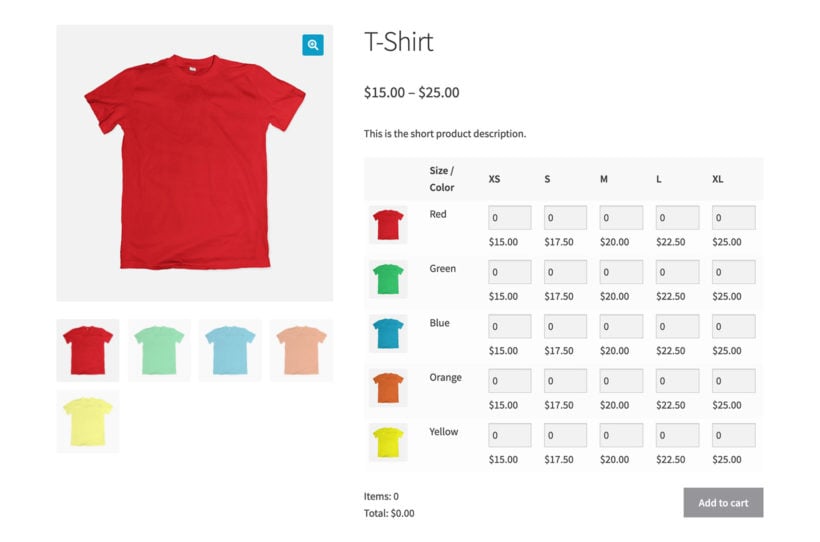
The two plugins already worked together - you could combine them before. The problem was that bulk pricing only kicked in at the cart level. So the price shown under the variation grid was always the full price.
That's now fixed. As customers select bigger quantities, the total price below the grid updates instantly. They see exactly how much they save by adding two more units. Or by hitting the next pricing tier.
This works automatically once both plugins are updated and a matching bulk pricing rule exists. There's no extra setup on the Bulk Variations side.
The two discount types you can use with Bulk Variations
WooCommerce Discount Manager supports many discount types. Two of them are particularly relevant for the variation grid.
Simple discounts (already supported)
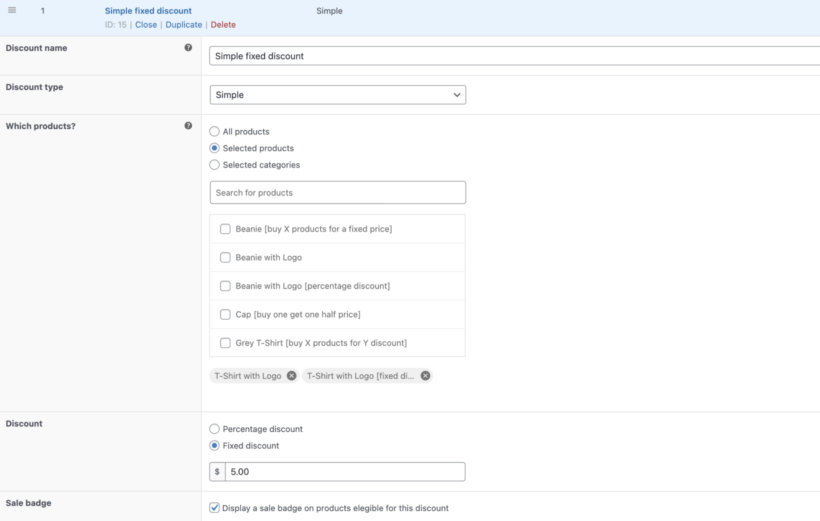
Each variation shows its original price crossed out, with the discounted price next to it. This works well for percentage-off promotions or fixed reductions on specific variations. A weekend sale of 20% off all blue variants is a typical example.
This already worked in earlier versions, and nothing has changed for these.
Bulk pricing discounts (new in this release)
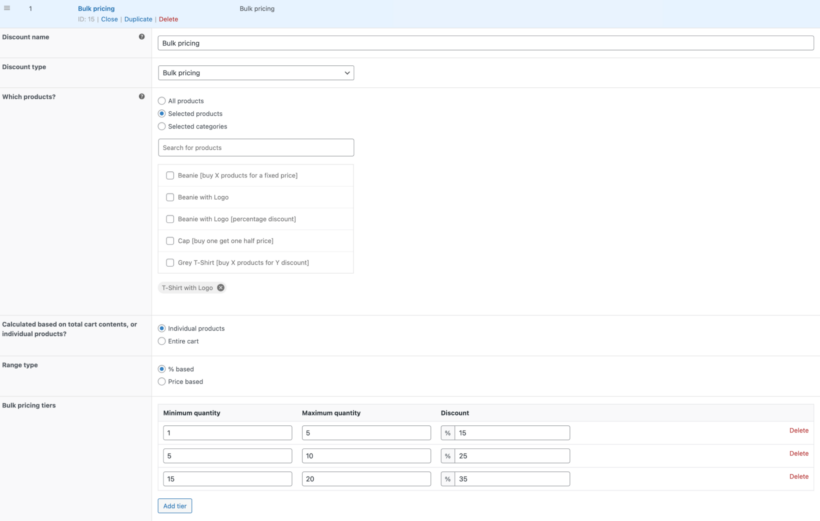
Customers see prices update as they increase quantities across variations in the grid. This works well for wholesale-style pricing and "buy more, save more" tiers. It also suits products customers naturally buy in multiples.
A simple example: buy 10+ get 10% off, buy 25+ get 15% off. The customer sees that discount apply live as they hit each tier.
Which bulk pricing rules work best in the grid
Any bulk pricing rule from WooCommerce Discount Manager will trigger in the variation grid. But some rule types create a stronger pull than others.
Quantity-based percentage discounts work especially well. Customers can clearly see how each extra unit reduces the unit price. Tiered rules are also strong. Hitting the next tier gives the customer a visible reward for adding a few more items.
Fixed-amount discounts (e.g. $5 off when buying 10+) work, but the saving feels less dramatic in a grid context. Percentage-based rules tend to read more clearly when prices are updating live.
If you're setting up bulk pricing for variations for the first time, start with two or three tiers. Avoid going to five or more. Too many tiers can confuse customers and dilute the urgency to hit the next one.
Why this matters for conversions
The shift from "discount at checkout" to "discount in the grid" is small mechanically. But it's meaningful commercially.
Visible discounts give customers a reason to add more before they leave the product page. They reduce cart abandonment from people who didn't realize a discount was available. They also remove the awkward moment of arriving at the cart and seeing an unexpected price drop.
Here's a quick scenario: A customer is buying branded t-shirts for an event. They've selected 8 shirts across three sizes in your variation grid. Without live pricing, they don't know that ordering 12 would unlock a 15% discount. They check out at 8.
With the new live pricing, the price below the grid drops the moment they add a few more units. They see the saving. They round up. The order goes from 8 shirts to 12. That's more revenue for you and a better deal for them.
How to set it up
Setup takes a few minutes if you already have both plugins:
- Update WooCommerce Bulk Variations to version 2.5 or later.
- Update WooCommerce Discount Manager to version 1.5 or later.
- In WooCommerce Discount Manager, create a bulk pricing rule via WooCommerce → Discount Manager → Add Discount.
- Apply the rule to the parent product or to specific variations within it.
- Save the rule and visit the product page to see the live pricing in action.
Here's WooCommerce Bulk Variations in action:
That's it.
What existing customers need to do
If you already use both plugins, you only need to do two things:
- First, update both plugins to the latest versions.
- Second, make sure at least one bulk pricing rule applies to the product or its variations.
The new live pricing display works automatically from there. Existing simple discount setups continue to work exactly as before.
Use cases worth knowing about
This combination opens up some selling models that were awkward to run before:
- Print shopsSelling shirts, mugs, or stationery in multiple sizes and colors with quantity discounts.
- B2B suppliersSelling components, fasteners, or building materials where customers mix configurations in one order.
- Promotional product companiesWhere buyers regularly mix variations across an order and expect tiered pricing.
- Specialty retailersCosmetics, supplements, or snacks running "buy more, save more" offers across variant ranges.
In each case, the customer was previously guessing at their savings until checkout. Now they see them while still building the order.
Try it for yourself
If you already use both plugins, update them and your customers will see the new live pricing straight away. If you only use one of them, this update is a strong reason to consider adding the other.