Limited time offer: 10 examples + how to run one in WooCommerce

A limited time offer is one of the simplest ways to lift conversions on an ecommerce store. Done right, it shortens the buyer's decision time from "maybe later" to "I need this now". Done badly, it trains customers to never pay full price. This guide covers what works, what doesn't and how to run one in WooCommerce.
Most stores already run limited time offers without thinking of them that way. The Black Friday sale, the post-Christmas clearance, the "free shipping today only" banner that goes up when conversions dip. Each one is a limited time offer in disguise, and each one converts better than the equivalent evergreen promotion.
What separates the good ones from the bad ones isn't the size of the discount. It's how clear the deadline is, how believable the scarcity feels, and whether the offer fires automatically without you babysitting it.
I'll cover the definition first, then look at the psychology of why these offers work, walk through 10 example types you can use today, and finish with how to set one up in WooCommerce using either the native sale-price feature or WooCommerce Discount Manager for anything more complex.
What is a limited time offer?
A limited time offer is a promotion with a fixed start and end date, after which the discount or perk disappears. The deadline is the whole point: it compresses the buyer's decision and pushes the sale forward.
Common formats include flash sales, holiday discounts, free-shipping windows, first-purchase incentives and BOGO promotions tied to a specific date range. Each one trades a slice of margin for a faster purchase decision and a shorter consideration period.
Why limited time offers work
Limited time offers tap into two well-studied psychological levers:
- Scarcity. When something feels available only for a short window, people assign more value to it. The same product at the same price feels different when there's a clock attached.
- Loss aversion (FOMO). The fear of missing out on a deal is a stronger motivator than the prospect of an equivalent gain. "Save 20% today" outperforms "20% off all the time".
There's a third reason that doesn't get talked about enough: deadlines force the buyer to act. Without a deadline, a "maybe later" customer drifts away and forgets. With a deadline, the same customer has to decide one way or the other, and a meaningful share will tip toward "yes".
The trade-off is that limited time offers only stay effective if they're actually limited. Run a permanent "ends midnight" sale and customers wise up. The legal risk also grows: regulators in the US, UK and EU have all started fining stores for fake countdown timers and perpetual sales.
10 limited time offer examples you can use
The patterns below cover the most common limited time offer types in ecommerce. Pick the one that matches your goal, not the one that's easiest to set up.
1. Flash sale
A short, deep discount across all products or a category, typically 24 to 72 hours. The classic flash sale is "30% off everything this weekend". It works because the time window is short enough that customers have to act, and because the discount is steep enough to feel like a real event rather than an everyday promotion.
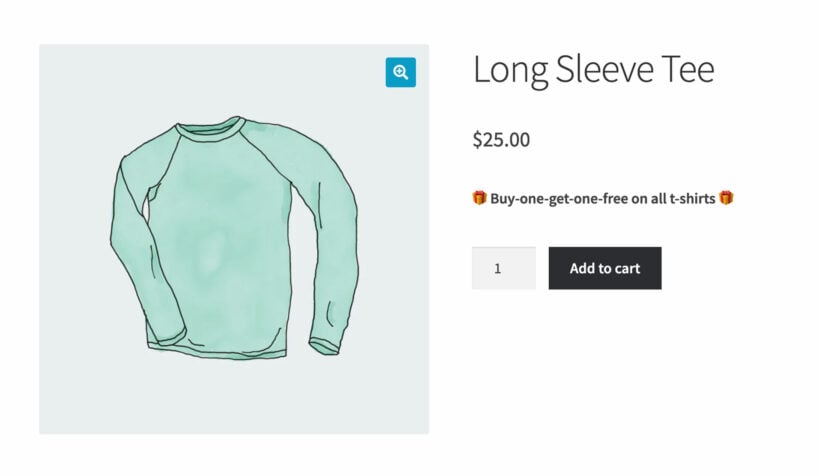
2. Buy one get one free (BOGO)
BOGO works particularly well for consumables and apparel. The customer pays for one item and gets a second free, or at a heavy discount (BOGO 50%). The headline "free" carries more psychological weight than the equivalent percentage off the basket total, even though the maths often works out to a similar discount.
3. Free shipping threshold
"Free shipping on orders over $50, today only." This one nudges average order value up without giving away product margin. Particularly effective for stores where most baskets are just below the threshold.
4. First-purchase discount
Auto-applied to new customer accounts, usually 10-15% off. The deadline is implicit (it expires the moment the customer buys), but you can also pair it with a 7-day window after signup. New-customer offers tend to lift conversion most when they appear at exit-intent rather than on the homepage.
5. Seasonal or holiday sale
Black Friday, Boxing Day, Memorial Day, back-to-school, anniversary sale, end-of-summer clearance. Holiday sales work because the deadline is baked in by the calendar, so the urgency feels natural rather than manufactured.
6. Abandoned-cart recovery offer
A 10% off code sent 24 hours after a customer abandons their cart, expiring in 48 hours. This pattern recovers a meaningful share of lost baskets and the deadline is what makes it work. Without the expiry, the customer files it for "later" and never returns.
7. Pre-order or launch discount
Early-bird pricing for the first 48 hours of a product launch. Customers get a small saving for buying before the public release, and you get a sales surge that signals momentum to the algorithm on Google, Meta and Amazon.
8. Bundle promotion
"Buy these three products together at 15% off, this week only." Bundle promotions lift average order value while feeling like a deal rather than a markup. Pairs well with your bestsellers as the anchor product and slower movers as the add-ons.
9. Loyalty or member-exclusive offer
A flash sale only visible to logged-in customers or a specific role (wholesale, gold members, repeat buyers). Two benefits: it rewards your best customers and it creates a reason to sign up. Pair with role-based pricing for the implementation.
10. Milestone or anniversary celebration
"10 years in business, 10% off this week." The reason for the sale is baked into the headline, which makes it feel less like a discount grab and more like an event. Works particularly well for established brands that don't want to look discount-driven.
How to set up a limited time offer in WooCommerce
There are two main ways to do this. Start with the native sale-price field if you only need one discount on one product (or a handful). Move to a plugin once you need BOGO, cart-based rules, free shipping triggers or multiple overlapping promotions.
Method 1: Native WooCommerce sale price + sale dates
WooCommerce ships with a built-in sale price feature. Each product has a Sale price field and an optional Sale price dates field that activates the sale price between two dates and reverts to the regular price after the end date.
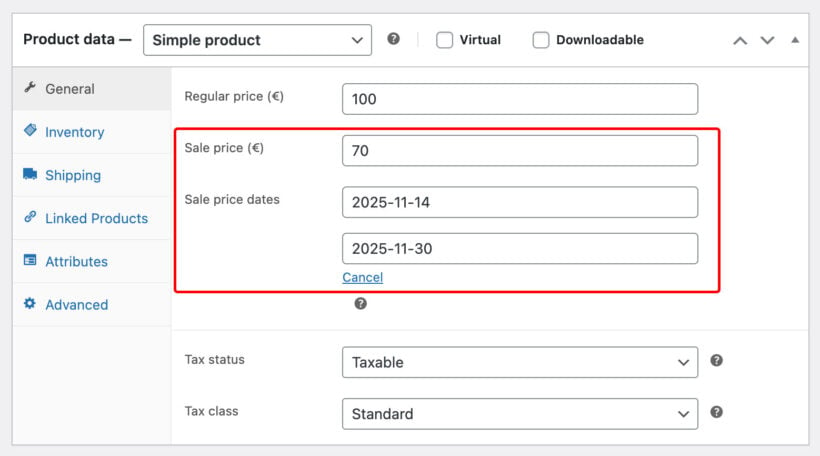
The setup is simple:
- Open the product in Products → All Products.
- In the Product data box, on the General tab, fill in the Sale price.
- Click the Schedule link next to the sale price.
- Set the From and To dates for when the sale price should apply.
- Update the product.
WooCommerce will automatically switch the price on the start date and back on the end date. Sale badges appear on the product image while the offer is running. The downside: this only handles a single discount per product. If you want "20% off all t-shirts" or "BOGO on accessories", you need to edit every product individually, which gets unmanageable past a handful of items.
Method 2: WooCommerce Discount Manager for everything else
For anything more complex than a single product sale, WooCommerce Discount Manager handles the patterns WooCommerce doesn't include natively.

When you create a new discount, you pick from a set of templates that map to the common limited time offer types:
- Simple percentage or fixed. 20% off a category, $5 off a product. The basic flash sale.
- Based on total spend. Free shipping over $50, or $10 off when the cart total hits $100.
- Free products (BOGO). Buy two t-shirts, get the third free.
- Buy X for a fixed price. Three for $20 pricing.
- Buy X for Y discount. The classic 3-for-2 deal.
- Bulk pricing. Volume-tiered discounts that kick in at certain quantities.
Each rule has a schedule that sets when the discount activates and when it expires:
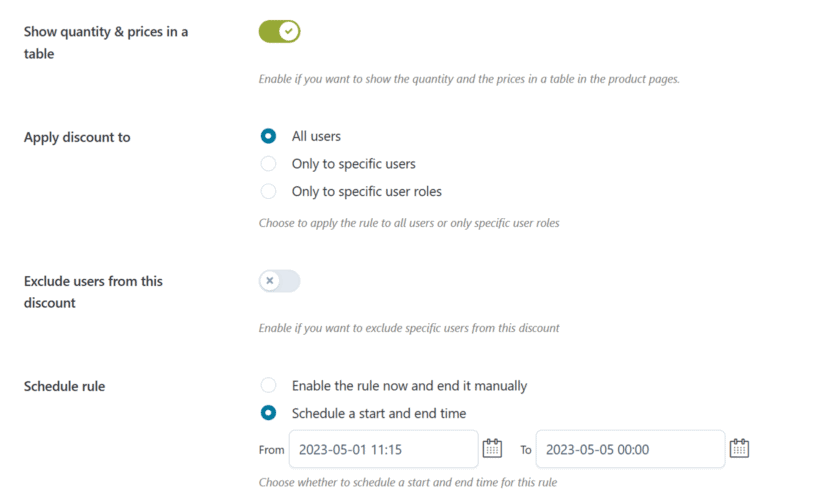
The rule fires automatically on the start date and stops on the end date. There's no manual cleanup, no risk of the sale running past midnight by accident and no need to edit individual products. For a full walkthrough of the patterns, our discount pricing strategy guide covers what tends to work for different store types, and our WooCommerce pricing guide covers how this fits into a broader pricing model.
For stores running on Shopify rather than WooCommerce, our guide to building a limited time offer in Shopify covers the equivalent setup on that platform.
Best practices for limited time offers
A few patterns separate the offers that lift revenue from the ones that train customers to wait for the next sale.
Make the deadline real
The single most important rule. If the offer ends at midnight Sunday, end it at midnight Sunday. Don't extend "by popular demand". Don't run a permanent "ends today" countdown. Customers notice within two or three cycles and the urgency stops working.
Set a believable deadline length
24-72 hours for flash sales. 7-14 days for seasonal promotions. Pre-order discounts can stretch to 30 days. Anything longer feels evergreen and loses the urgency that makes the offer work in the first place.
Communicate the deadline everywhere
Homepage banner, product page badge, cart page reminder, email subject line and abandoned-cart sequence. The customer should see the deadline at every touchpoint, not buried in the small print of a promo email.
Be honest about the discount
The "was $200, now $99" pattern only works if the product genuinely sold at $200 recently. Inflating the original price to make the discount look bigger is a fast route to a chargeback dispute or a regulator's letter. UK and EU rules in particular now require the lowest price the product sold at in the previous 30 days.
Don't run them too often
If every week has a limited time offer, none of them are limited. Pick 4-8 windows a year (Black Friday, summer sale, anniversary, end-of-quarter clearance, plus a couple of flash sales) and resist the urge to fill the gaps. Customers learn the cadence and time their purchases around your "real" sales rather than buying at full price.
Pair the offer with a clear reason
"10 years in business, 10% off this week" works better than "20% off everything". The reason gives the offer a story, makes it feel less like a discount grab and gives the customer something to share. "End of season clearance" tells the customer why the price has dropped, which makes the promotion feel like an event rather than a markdown.
Frequently asked questions about limited time offers
How long should a limited time offer last?
Flash sales work best in the 24-72 hour range. Seasonal promotions fit 7-14 days. Anything longer than two weeks stops feeling time-limited and the urgency drops away. Pre-orders and product-launch windows are the exception: 30 days is reasonable if the discount is small.
Do countdown timers actually work?
Yes, when the countdown is real. A genuine deadline with a visible clock typically lifts conversion by 5-15% over the same offer without a timer. The trap is the fake countdown that resets every time the page loads. Customers spot these quickly and the trust hit costs more than the timer earns.
What's the best discount percentage for a flash sale?
15-30% off works for most stores. Anything under 10% rarely produces a noticeable conversion lift. More than 40% risks margin damage and trains customers to wait for the next sale. The exception is heavy clearance, where the goal is to shift stock rather than maximize revenue.
Can I run multiple limited time offers at once?
Yes, but be careful about how they stack. A 20% off code plus an automatic free-shipping threshold plus a BOGO rule can quickly compound into a 50% discount you didn't intend. Discount Manager lets you control whether rules combine or override each other, which is the main reason it's worth using over native WooCommerce coupons.
Are limited time offers legal everywhere?
Mostly yes, but the rules around how you display the original price are tightening. The EU's Omnibus Directive and the UK's CMA enforcement now require the lowest price the product sold at in the previous 30 days to be shown alongside the sale price. The US doesn't have a federal equivalent, but state-level rules (particularly California) and the FTC's deceptive pricing guidance apply. Document your "before" prices and avoid inflating them ahead of a sale.
How do I create urgency without dishonest tactics?
Real deadlines, real low-stock signals, and reasons the customer can verify. "Sale ends Friday" with a clock that doesn't reset. "Only 3 left in size M" when there really are 3 left. "Launch week pricing" for the actual launch week. Anything fabricated will be spotted, and the long-term cost of a damaged trust signal outweighs the short-term lift.
Final thoughts
Limited time offers are one of the highest-leverage tools in ecommerce when the deadline is real and the offer is honest. They compress the buyer's decision, lift conversion and create natural moments to re-engage lapsed customers. The trap is using them so often that the word "limited" stops meaning anything.
Start with the patterns that match your goal: flash sales for stock clearance, BOGO for apparel and consumables, free-shipping thresholds to lift average order value, seasonal windows for the calendar dates that already drive demand. Set up the first one in WooCommerce Discount Manager using a clear schedule, communicate the deadline everywhere, and resist the urge to extend.