5 donor gift ideas for sustainable donor relationships

Donor gifts thank supporters in a way that strengthens the relationship and lifts repeat giving. Here's what kinds of donor gifts work, plus how to automate them through your existing WordPress and WooCommerce setup.
Most donors aren't motivated by getting something back. They give because they care. But a small, well-chosen donor gift sends a signal that the nonprofit notices and values their contribution, and that signal materially lifts the chance of a second donation.
The challenge with donor gifts is the cost. Physical gifts shipped to every donor eat into the donation itself, and the admin overhead of fulfilment usually falls on a volunteer who has better things to do. A good donor gift programme uses donor surveys to balance the emotional payoff against the time and budget required to run it.
This guide covers five donor gift formats that work well, plus the WordPress and WooCommerce setup that makes any of them runnable by a small team.
Why donor gifts matter for nonprofit retention
Donor retention rates in the nonprofit sector average around 45%, which means more than half of first-time donors don't give a second time. That makes existing donors, not new ones, the most reliable source of fundraising revenue year over year.
A thoughtful donor gift multiplies up that number. It doesn't have to be expensive: research consistently shows that acknowledgement and personalization matter more than the dollar value of what's sent. A donor who feels noticed gives again. A donor who gets a generic auto-receipt usually doesn't. (For lower-cost ways to drive that retention without a dedicated gift programme, see the cheap fundraising ideas guide.)
The bar for "thoughtful" is low. A personalised thank-you note, a small token tied to the cause, or exclusive access to something supporters can't buy elsewhere all qualify. The two ways to get this wrong are sending nothing at all, or sending something so generic it could have come from any nonprofit.
Types of donor gifts that work
Five formats cover most of what small nonprofits run successfully.
1. Digital downloads
Digital downloads are the lowest-cost option and the easiest to scale. You could create any number of things, including an eBook tied to your cause, a print-quality poster, a recipe collection from beneficiaries, a 30-day mindfulness journal, or an exclusive report. The cost to deliver the 1,000th copy is the same as the cost to deliver the first: zero 😀
Setup is straightforward. Upload the file to your WordPress site, configure your donation plugin to send a download link in the receipt email, and you're done. Most modern WordPress donation plugins support file attachments in receipts natively, and a dedicated resource library plugin handles larger libraries of supporter-only downloads.
Digital downloads only work well when the content is genuinely valuable. A 4-page PDF assembled in an afternoon won't impress anyone, but a real piece of content the donor would have happily paid for elsewhere often will.
2. Physical thank-you gifts
Physical gifts include things like stickers, postcards, branded enamel pins, tote bags and calendars. These are the classic donor gifts, and they still work when run well. The trick is to make the gift feel cause-connected rather than generic merch, ideally drawn from the same nonprofit brand identity assets that live in your nonprofit social media toolkit. Think of a sticker that quotes a beneficiary, a postcard featuring an actual photo from the field, or a calendar where each month features a different programme.
Fulfilment is the friction with this approach. Hand-mailing 500 stickers eats a weekend of volunteer time, so most small nonprofits use print-on-demand services like Printful, Sticker Mule's storage option or Vistaprint. at Barn2, we use Spring for our merch store. It has a feature to provide coupon codes so that we can send free gifts.
All of these services handle warehousing and shipping for you, which makes the format viable for nonprofits without a fulfilment team.
3. Free products tied to a donation amount
If your nonprofit already sells merchandise or memberships through WooCommerce, you can use the same store to give supporters a free branded item once they donate above a threshold. For example, "Donate £50 or more this month and choose a free Mission T-shirt." The mechanic is simple, the value to the donor is clear, and the store handles fulfilment automatically.
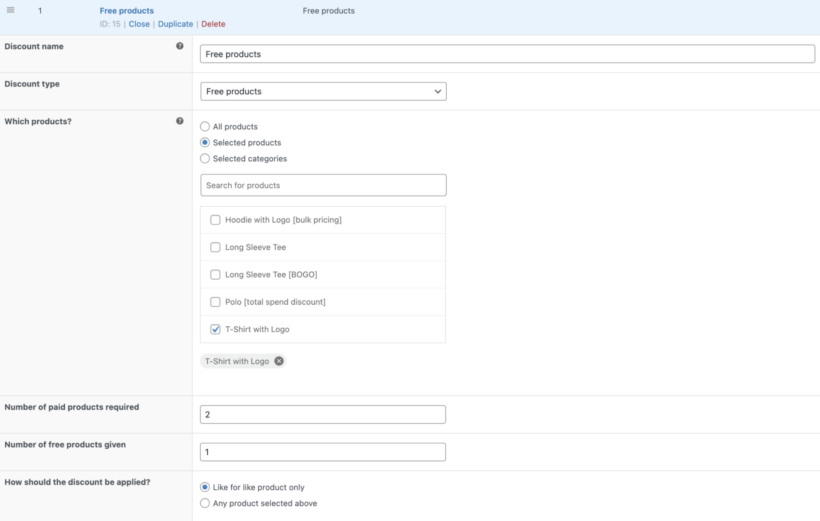
The WooCommerce side is handled by WooCommerce Discount Manager's "Free products" discount type. You can configure a rule that says "if cart contains a £50+ donation, add one free T-shirt to the order", and the plugin will handle the conditional logic, the inventory check and the cart-level fulfilment automatically.
4. Exclusive access
Exclusive access can mean a private webinar, a behind-the-scenes video tour of a programme, an invitation-only Q&A with the executive director, or a monthly impact email that doesn't go to the general list. These cost almost nothing to produce because they're either things you already do internally or things you do once and broadcast.
The value to donors is the implied status of being insiders rather than just givers. Tie the access to a donation tier (monthly recurring at £25+, or an annual gift over £500) and the gift becomes a soft membership perk that drives upgrades.
On the technical side, you can use gated content rules on your WordPress site. Donor records map to a user role, and the role unlocks access to specific posts, pages or downloads.
5. Public recognition
Public recognition can take the form of a donor wall page on your website, a campaign named after a major donor, or a social media shout-out on a recurring day. The cost is essentially zero, the time investment is minimal, and the donor gets something they can share with their own network.
The risk to manage is generic recognition. A donor wall with 200 names that nobody reads is less effective than a regular "donor of the month" feature that tells one supporter's story properly. Concentrated, specific recognition outperforms blanket lists, especially for membership associations where each donor is also a long-term member.
How to set up free product donor gifts with WooCommerce
The free-products mechanic deserves a closer look because it's the most operationally efficient way to run a physical donor gift at scale. The WooCommerce store handles fulfilment, the donation plugin handles payment, and the discount plugin handles the conditional rule that ties them together.
The setup with WooCommerce Discount Manager is:
- Add the donation product to your WooCommerce store as a normal product (typically a "name your price" variant or fixed-amount variations: £25, £50, £100, etc.).
- Add the donor gift products to the store too, at their normal retail price (£15 T-shirt, £8 mug, £5 sticker pack).
- Create a Discount Manager rule with discount type "Free products". Choose the donation tier as the trigger product and the donor gift as the free product.
- Set "Number of paid products required" to 1 (the donation) and "Number of free products given" to 1 (the gift).
- Optionally limit the rule by date (campaign window), customer role, or cart contents.
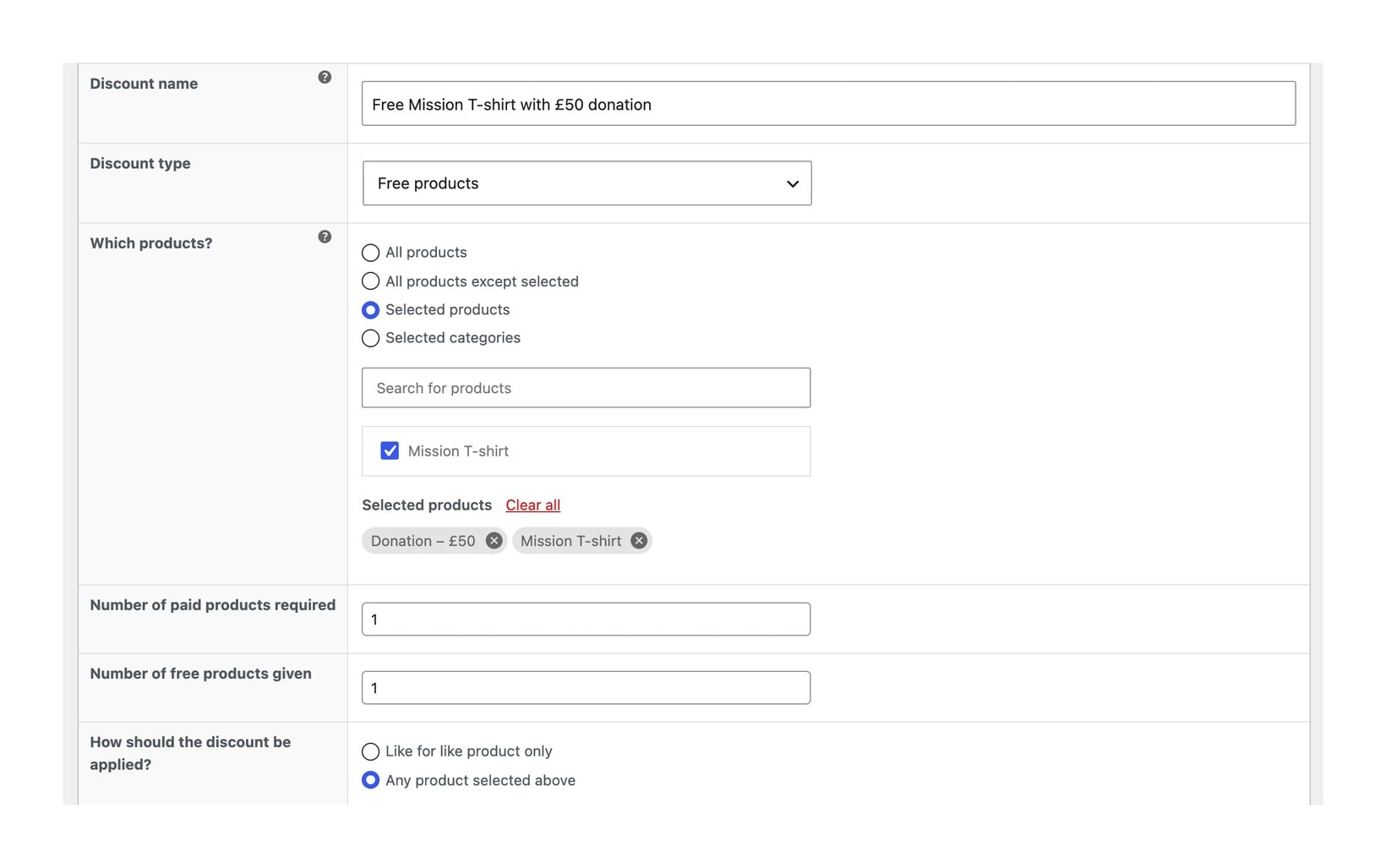
The result is that a supporter who donates £50 sees the free T-shirt added to their cart automatically. They pay only for the donation, and the T-shirt fulfills like a normal WooCommerce order.
For nonprofits with tax-exempt status, you can configure role-based tax exemption alongside the discount rule so donor gifts don't generate accidental tax obligations.
How to manage donor gift assets at scale
Once a donor gift programme is running, the operational pain shifts to keeping track of the assets behind it. Last year's eBook, this campaign's poster files, the donor wall photo for each major sponsor, and the thank-you note template the team agreed on three months ago all need to live somewhere findable.
A searchable document library on your nonprofit's WordPress site handles this. Document Library Pro turns a section of the site into a filterable archive that volunteers, board members and the comms team can self-serve from. Public-facing donor gifts (downloadable eBooks, donor wall images, thank-you cards) sit in the open library, while donor-only resources (annual reports, sponsor packs, named-gift letters) sit behind gated content rules tied to donor user roles. Not on WordPress? The same library is available as a cloud version for any website, with a Shopify app if your nonprofit sells its gifts through a Shopify store.
Five real organizations show how they built donor-facing libraries in the WordPress nonprofit resource library examples roundup. The pattern that scales best is one library with multiple campaign-specific sections, rather than a separate site or microsite for each campaign.
Frequently asked questions about donor gifts
What is the most cost-effective donor gift?
A digital download. Once you've produced the content, every additional copy is free. An eBook, a downloadable poster, or an exclusive report all qualify. The one caveat is that the content has to be genuinely valuable, because a thin freebie does more harm than no gift at all.
How much should a donor gift cost relative to the donation?
The conventional benchmark is under 10% of the donation amount, ideally under 5%. A £5 sticker pack for a £100 donation is fine; a £30 hardback book for the same donation is not. The exception is major-donor gifts at the £1,000+ tier, where bespoke or experience-led gifts can run higher.
Do donor gifts affect tax-deductibility?
In most jurisdictions, the value of the gift is subtracted from the tax-deductible portion of the donation. So a £100 donation with a £15 gift means £85 is tax-deductible. Check with your local tax authority for the exact rules. WooCommerce's tax-exempt customer roles can help manage the accounting side if you sell donor gifts through the store.
Can I send different donor gifts based on donation amount?
Yes. Set up multiple Discount Manager rules tied to different donation tiers. A £25 donation triggers a sticker pack; a £50 donation triggers a sticker pack plus a thank-you postcard; a £100 donation triggers a T-shirt. Each rule runs independently, and donors who hit higher tiers can stack the gifts or pick one.
What about donors who don't want a gift?
Always offer an opt-out: a tickbox on the donation form labelled "I don't want a gift; please apply the full donation to the cause." A surprising share of supporters tick this. The opt-out makes the gift programme feel respectful rather than transactional.
Final thoughts
A donor gift programme is one of the higher-leverage things a small nonprofit can run, but only if the operational side is automated. Hand-fulfilling every gift order through a volunteer eats time the team doesn't have, and the inconsistency hurts the donor experience.
The right setup is one library for digital gifts, one WooCommerce store for physical gifts, one Discount Manager rule per donation tier, and a clear gated-content path for exclusive access. Once that runs, the recurring effort drops to refreshing the gifts each campaign cycle.