Best WooCommerce measurement price calculator plugins 2026


Need to charge for WooCommerce products by length, area, volume or weight? I have compared the ten best WooCommerce measurement price calculator plugins, with real pros and cons for each, so you can pick the right one for your store.
Pricing is an essential feature of any online store. On its own, WooCommerce does a great job of handling payments for regular fixed price products. However, what if you sell customizable products and need to offer dynamic measurement-based pricing? In this case, WooCommerce's default pricing options won't be enough.
That's where you need one of the best WooCommerce measurement price calculator plugins, a type of product add-ons plugin. They automate the process of calculating product prices based on measurement units. That way, you can charge for WooCommerce products by length, width, area, volume, weight, and other dynamic factors.
Quick verdict: Best measurement price calculator plugins
If you just want the short answer, here it is. Keep reading for the full comparison and step-by-step setup.
- Best overall WooCommerce Product Options combines a measurement price calculator with dozens of other option types, so you're not stuck with pricing fields alone.
- Best free option Flexible Quantity for WooCommerce has a free WordPress.org plugin covering the basics, with a pro upgrade if you need more.
- Best for formula-based pricing Calculated Fields Form handles complex calculations beyond simple measurements, including date-based and financial formulas.
- Best for simple dimension fields Measurement Price Calculator is the official WooCommerce extension, and a solid choice if you only need basic measurement pricing.
What are the best WooCommerce measurement price calculator plugins?
In this article, I'll reveal the 10 best WooCommerce measurement price calculator plugins which I've compared and ranked below.
I compared these plugins on price, ease of setup, and the field types available for collecting measurements. I also looked at how flexible each plugin's measurement price formula is, whether a free version exists, and the support behind it.
I'll also provide a brief tutorial showing how to use our #1 pick - WooCommerce Product Options - to add a measurement price calculator to your products.
What is a WooCommerce measurement price calculator plugin?

A WooCommerce measurement price calculator plugin is a tool that allows shoppers to specify the unit measurement of a product when placing an order. It works like this:
- A user inputs the required measurements into a cost calculator form on the product page. Alternatively, they can select from a set of pre-defined measurements.
- The plugin then uses a formula to automatically calculate the product price based on these dimensions or measurements. (You can create your own custom price formulas with the best price calculator plugins for WooCommerce.)
- The calculated total price appears on the product page. This shows users exactly what they will pay.
- Customers are charged the total price when they add the item to their cart, and when they check out.
- As store owner, you will receive the measurement information in the order notification email. You'll have everything you need to go ahead and create the product, whether it's made-to-measure, cut-to-size, or something else.
Measurement price calculator plugins are very useful for stores that sell custom-made products with dimension, weight or volume-based pricing. For example, you'll probably need one if you own a fabric, floor tile, or coffee store.
It makes sense to sell these products in yards, inches, square feet, and pounds. Or if you use metric product measurements, you can sell in meters, centimeters, kilograms, liters, and so on.
Your users would prefer to input custom product measurements and see the total price automatically. This makes for a great shopping experience. A measurement price calculator plugin makes this possible in WooCommerce.
Benefits of using a measurement cost calculator plugin
Here are some of the major ways your store can benefit from a WooCommerce measurement price calculator plugin:
- Your customers get instant and accurate price quotes for customizable products. Buyers can customize their orders based on size, dimensions, and other units of measurement. Examples of such products include fabric, carpeting, wallpaper, or custom-sized windows and doors.
- Easily manage and update product prices based on changes in the cost of materials or other factors.
- Integrate the plugin with other WooCommerce plugins to further customize product pricing and give customers more flexibility.
- Save time by eliminating the need for customers to contact sales or visit your physical store to make custom orders manually.
- It boosts your store's shopping experience, encourages more sales, and keeps your customers coming back.
This is dynamic pricing at work: The user inputs the product measurements, and the price updates based on a formula.
Sell by size, weight, area or volume
The great thing about the best measurement price calculator plugins for WooCommerce is their flexibility.
Charge by product size
Add dimension fields to the cost calculator and include these in your price formula. That way, you can charge by any combination of length, width, height, depth, and so on.
You can collect the size data in any unit of measurement. This might be meters, cm, inches, yards, or whatever you use for your products. If you'd rather price by variation choices instead of exact measurements, see our guide to attribute-based pricing.
Product weight-based pricing
Alternatively, you can sell by weight in WooCommerce. This time, create a cost calculator form for WooCommerce with a product weight field. Users can input the required weight in kilograms/kg, pounds and ounces, and so on.
Price products by area
You can also combine two number fields in order to price products by area. This might be by the cubic yard, square footage/sq ft, square meter, square cm, or other unit of area.
For example, you might create a WooCommerce measurement price calculator with fields for length and width. These multiply together, and then multiple by the price per meter/yard to calculate the price.
Volume-based pricing
Finally, you can add three fields to the cost calculator form in order to price by volume. For example, this could be width, length, and depth to calculate the number of cubed meters.
Whatever type of measurement-based pricing you need, you can set it up with the best WooCommerce measurement price calculator plugin. It's a flexible way to create dynamic pricing based on user-defined measurement data.
Which stores need a price calculator plugin?
As you can see, a WooCommerce price calculator is essential for virtually all stores that sell products priced based on quantity-based and user-defined values. Some common use cases include:
- Made-to-measure clothing and apparel retailers.
- Furniture and interior decor stores.
- Products sold by area, such as a box of tiles.
- Home improvement and construction companies.
- Woodwork and metalwork artisans.
- Shipping and logistics companies that offer size-based shipping.
With that out of the way, here's a full comparison, starting with our top recommendation.
Comparison table: WooCommerce measurement price calculator plugins
| Plugin | Price | Free version | Measurement types | Formula support | Best for |
|---|---|---|---|---|---|
| WooCommerce Product Options | Paid, single license fee | No | Length, area, weight, volume and more | Advanced, with custom variables and an AI formula bot | Stores that need measurement pricing plus other options |
| Measurement Price Calculator | Paid | No | Length, area, weight, volume | Two calculator modes | Simple measurement pricing only |
| Flexible Quantity for WooCommerce | Free, with paid pro version | Yes | Weight, dimension, area, volume | Price per unit | Budget-conscious, basic pricing |
| WooCommerce Price Calculator | Paid | No | Multiple units, including derived units | Formula using stock data | Variable-sized products |
| Price Calculator for WooCommerce | Paid | No | Multiple units | Global pricing rules | Store-wide pricing rules |
| Calculated Fields Form | Free, with paid pro version | Yes | Any calculation, not just measurements | Advanced, including dates and currency | Non-WooCommerce-specific calculations |
| Stylish Cost Calculator | Paid | No | Custom quote fields | Basic | Quote and estimate forms |
| SUMO WooCommerce Measurement Price Calculator | Paid | No | Multiple types and units | Multiple calculator modes | Simple and variable products |
| Zigaform | Paid | No | Custom estimation fields | Conditional logic | Multi-step estimation forms |
| Stylemix Cost Calculator | Paid | No | Custom quote fields | Basic | Quotation and project estimation forms |
1. WooCommerce Product Options - best overall

WooCommerce Product Options provides everything you need to create a price calculator, and more. It's a fully featured product add-ons plugin which comes with a wide range of field types in addition to a measurement price calculator. That way, you get a lot more for your money compared to buying a single-feature cost calculator plugin.
We built WooCommerce Product Options to include everything the official WooCommerce extension was missing, from an advanced price formula to visual field types like image buttons and color swatches. We added measurement pricing to the plugin after customers told us the official WooCommerce Measurement Price Calculator felt too basic.
It lacked custom variables, advanced logical operators, and the visual field types many made-to-measure stores wanted. Product Options already had a wide range of option types. As a result, adding a price formula field meant measurement fields could work alongside things like conditional logic, minimum and maximum quantities, and image or color swatches for extras such as fabric choice.
Measurement price calculator features
The measurement price calculator in this plugin is simple to use, and incredibly sophisticated at the same time:
- Unlimited measurement fields - Add as many user input fields as you like for collecting product measurements. These can be number fields where the customer enters an exact measurement, or pre-defined choices such as radio buttons or dropdown lists.
- Custom price formula - Create a custom price formula to calculate the price.
- Advanced logic and operators - You can keep the price formula as simple or as complex as you like. It supports all the standard mathematical operators such as adding, subtracting, multiplication and division, plus more advanced mathematical and logical operators. You can also use brackets to add stages to the calculation and ensure a correct result.
- Supports all product data - Build the formula from whatever the customer enters, plus other product data like weight, dimensions or price.
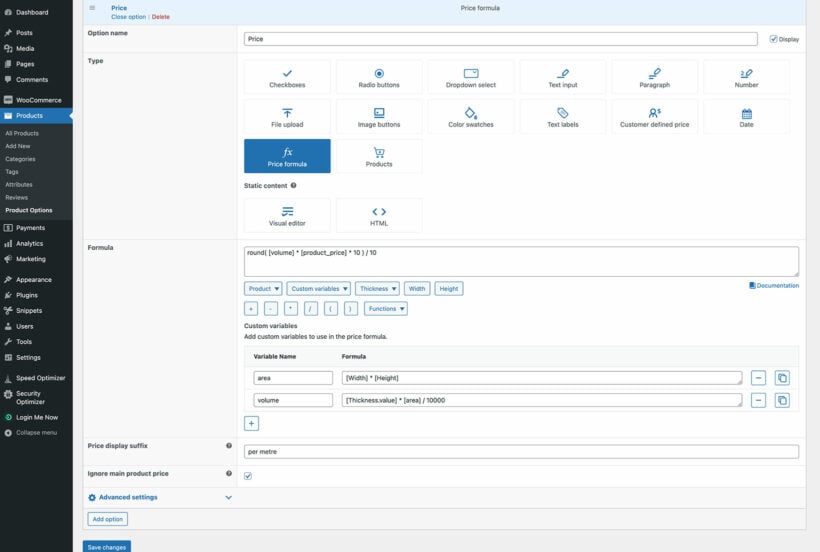
- Display product prices by size/weight/etc. - Normally, WooCommerce just displays a basic price at the top of the product page, for example "$50". That's no use for selling products by dimension, size or weight. WooCommerce Product Options lets you add a pricing label after the product price, such as "$50 per meter", which is far clearer for shoppers.
- Include or exclude the main product page in the formula - WooCommerce Product Options lets you choose whether to add the base product price to the results of the calculation. For example, if you display the main price as "$25 per liter", you don't want to add $50 to the calculated total.
- Simplify the measurement price calculator with custom variables - To simplify a complicated formula, you can create your own custom variables. For example, you might use
[width] × [length]to create an[area]variable to use in the formula.
WooCommerce Product Options pros and cons
Pros: Unlimited measurement fields, an advanced price formula with custom variables, and dozens of other option types like image buttons, color swatches and conditional logic, all in one plugin.
Cons: Options don't track stock for each individual measurement choice. If you need stock control per choice, use real WooCommerce variations or the Products option type alongside your measurement fields.
Add other types of option to your products
As I mentioned above, Product Options is amazing value for money because it's not just a WooCommerce measurement price calculator plugin.
Most stores that use measurement-based pricing offer other customizations too. For example, the best curtain stores let the user input dimensions and click on images to choose other features, such as the color and the type of curtain heading. That's why it's best to buy a proper product options plugin with this extra flexibility.

How to add a measurement price calculator to a WooCommerce product
Watch the video above for a full walkthrough, or follow this summary.
Setting up a measurement price calculator with WooCommerce Product Options takes four steps. First, install and activate the plugin, then activate your license key in the setup wizard.
Next, create (or edit) the WooCommerce product that needs measurement-based pricing, and add a price. This is the price your formula will use, whether that's a base price or a price per unit.
Then go to Products → Product Options and add a new option group. Add a number field for each measurement you need, such as width, length or weight, and choose whether customers enter an exact number or pick from pre-defined choices like radio buttons.

Finally, add a 'Price formula' field and build your formula from the measurement fields, using standard mathematical operators or the AI formula bot if you'd rather describe the pricing in plain English. Add a price display suffix such as "per square meter" so shoppers understand the unit. Then tick 'Ignore main product price' if you don't want the base price added on top.
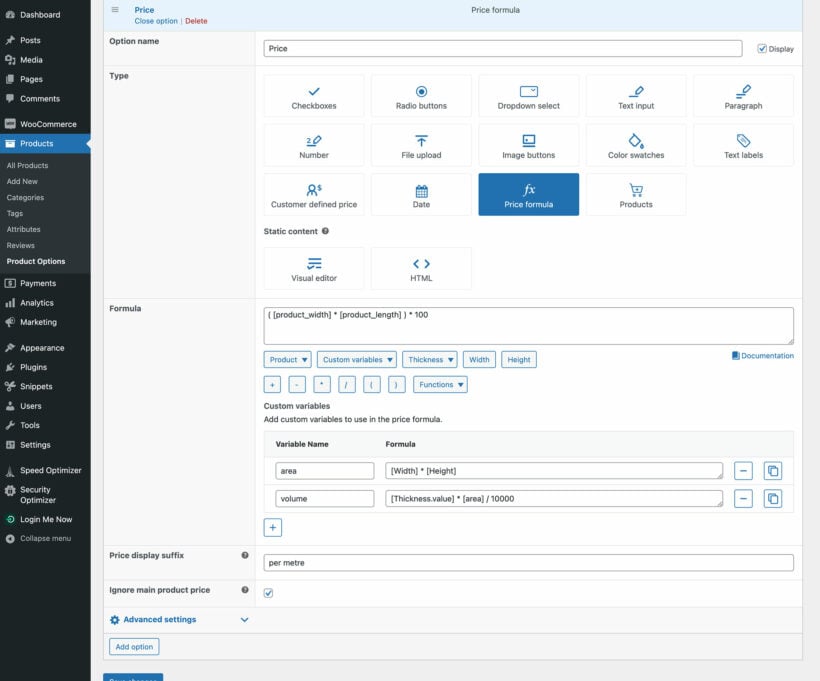
Once it's set up, view the product page and test different measurements to make sure the formula calculates the price the way you intended. For the full click-by-click steps, see our knowledge base guide to price formulas.
Other WooCommerce price calculator plugins
As you can see, there are plenty of reasons why WooCommerce Product Options is the best WooCommerce measurement price calculator plugin. However, there are other options if it isn't the right fit, and I'll cover those next.
2. Measurement Price Calculator
Looking for the second best WooCommerce measurement price calculator plugin for your store? We also recommend Measurement Price Calculator. This is the official extension from WooCommerce.com, and it offers all the customization options your buyers need to order custom product measurements.
The main drawback is that the ratings aren't quite so high, and it doesn't come with other option types. For example, it wouldn't meet the needs of our curtain example above because you can add the cost calculator fields, but not other fields to choose the curtain heading style, pole, etc.

Measurement Price Calculator is a single feature extension that helps you to create sets of measurement price calculator fields in WooCommerce.
A shopper first enters specific values into these WooCommerce measurement price calculator fields. The plugin will determine the product price based on a formula you've set in the back end. It then automatically updates the main product price.
Plugin features

Measurement Price Calculator packs lots of product pricing features. But here are a few that stand out:
- Add price calculator fields above the 'Add to cart' button - Create WooCommerce measurement price calculator fields. Then add them as extra product options to the product page. These user-defined fields appear above the Add to cart button, integrated into the order process. You can choose to either make the fields required or not. You also get to add a description telling buyers what to do and change the pricing labels next to the fields.
- Set advanced product pricing formulas with two cost calculator modes - Add simple or advanced formulas that determine the final product price based on user-defined measurement values. The calculation can either be quantity-based or user-defined. The user-defined calculator mode is ideal for products that are sold in custom sizes.
- Update the product price everywhere - Once the buyer enters their preferred product measurements, the total price changes everywhere. These changes are visible not only on the product page. The customer will also see price updates in their cart, confirmation emails, and during checkout.
- Introduce pricing tables - Use a pricing table to offer pricing rules consisting of a measurement range in which specific prices apply to specific unit measurement ranges.
If you're not sure about how well these features work in reality, Measurement Price Calculator offers a 30-day money-back guarantee. The plugin is completely incompatible with some popular WooCommerce extensions, including Product Bundles, so check compatibility before you buy.
Pros: Official WooCommerce integration, two calculator modes (quantity-based and user-defined), and pricing tables for measurement ranges.
Cons: Ratings are lower than WooCommerce Product Options, there's no way to add other option types like text fields or image choices, and it's completely incompatible with WooCommerce Product Bundles.
3. Flexible Quantity for WooCommerce

Flexible Quantity for WooCommerce is a plugin that delivers the basic WooCommerce measurement price calculator feature efficiently. You generally get to sell products based on their weight, dimension, area, or volume.
Like our #1 pick, the plugin helps you set the product price per measurement unit and the increment value of the unit. And then you can assign a minimum and maximum product quantity. But that's just about all you get in the free version.
Pro version features
If you need even more functionality, you can upgrade to the pro version to get features like:
- Pricing labels to indicate the unit of measurement
- User-defined measurement units
- Product pricing based on the dimension and dynamic unit measurement calculations
- Pricing table for measurement ranges
- Shipping class based on the product quantity
The plugin is available in English and Polish. You can see it live in action on the demo site.
Pros: A free WordPress.org plugin that covers basic measurement pricing, available in English and Polish, with a live demo you can try before you buy.
Cons: The free version is limited to price per unit and minimum/maximum quantity. Pricing labels, custom units and pricing tables all need the pro upgrade.
4. WooCommerce Price Calculator

The next plugin on our list is a premium WooCommerce measurement price calculator plugin perfect for variable-sized products. WooCommerce Price Calculator takes variable unit inputs from the customer and displays the product price instantly.
Features
- Multiple types of measurement units like meter, foot, yard, mile, and derived units.
- Use your stock management values as a factor in price calculation.
- Display pricing tables (for displaying measurement ranges).
- Quantity-based discounts to boost sales.
Pros: Supports multiple measurement units including derived units, factors your stock management values into the price, and includes quantity-based discounts.
Cons: It's a CodeCanyon plugin with no free trial, and its formula-based pricing in WooCommerce is more basic than a dedicated product options plugin.
5. Price Calculator for WooCommerce

Price Calculator for WooCommerce from Addify is a measurement price calculator plugin with very similar features to the plugins we've mentioned above. It allows customers to enter the exact dimensions they need to buy measurement-based products.
Features
- Multiple measurement units, pricing tables, stock management capabilities, and pricing unit labels.
- Supports different input and output units.
- You're not limited to product-level pricing, and can set global pricing rules as well.
- 30-day money-back guarantee for those not impressed by the feature offer.
Pros: Global pricing rules you can apply across products rather than one at a time, multiple measurement units, and a 30-day money-back guarantee.
Cons: The feature set closely mirrors other measurement calculator plugins, so it doesn't stand out beyond price and support.
6. Calculated Fields Form

What about serving your store visitors WooCommerce measurement price calculator fields in web forms? Calculated Fields Form can help you make that happen.
Features
- A multipurpose cost calculator plugin for WooCommerce that's not limited to product pricing only. You can also use it to complete other types of financial and even date operations, e.g. for reservation forms.
- Supports numeric fields, currency fields, slider controls, email fields, radio buttons, and checkboxes.
Pros: Not limited to product pricing, so you can also use it for other calculations such as reservation forms, and it supports currency fields, sliders and radio buttons.
Cons: It's a general-purpose form calculator rather than a WooCommerce-native tool, so connecting it to product pricing takes more manual setup than a dedicated plugin.
7. Stylish Cost Calculator

Stylish Cost Calculator provides a user-friendly way to build elegantly designed WooCommerce measurement price calculator fields. This plugin specializes in visualizing your products and calculating their prices in the most attractive way possible. It offers a great way to offer your buyers an excellent user experience while helping them to enjoy measurement-based pricing too.
Features
- Multiple invoice-style layouts.
- Visually appealing cost calculator interface.
- Can double as a lead generation form builder - all you need to do is remove the 'Add to cart' or 'Buy now' buttons.
Pros: An attractive interface with multiple invoice-style layouts, and it can double as a lead-generation form once you remove the 'Add to cart' button.
Cons: It leans toward quotes and estimates rather than instant checkout pricing, so it suits stores gathering enquiries as much as stores selling directly.
8. SUMO WooCommerce Measurement Price Calculator

SUMO WooCommerce Measurement Price Calculator is another fully-featured WooCommerce measurement price calculator plugin that's worthy of mention.
Features
- Supports multiple measurement types, units, and cost calculator modes.
- Supports both simple and variable products.
- Keep stock of your inventory in form of the measurement units.
- Pricing tables and customizable pricing unit labels.
Pros: Supports both simple and variable products, multiple calculator modes, and keeps stock in measurement units rather than whole products.
Cons: It's sold on CodeCanyon with no listed free version, and updates follow the marketplace's release schedule rather than a dedicated WordPress.org changelog.
9. Zigaform

Zigaform is an advanced drag-and-drop form builder. It comes with all the best WooCommerce measurement price calculator plugin features you need and more.
Features
- Build flexible multi-step cost estimation forms, which your buyers can use for measurement-based pricing.
- Supports conditional logic in order to dynamically specify which calculation fields to show or hide.
Pros: A flexible drag-and-drop builder for multi-step forms, with conditional logic to show or hide fields.
Cons: It's built as a general estimation form tool rather than a WooCommerce measurement calculator specifically, so simple measurement pricing takes more setup than it needs to.
10. Stylemix Cost Calculator

The Stylemix Cost Calculator plugin lets you create a range of pricing-related forms.
Features
- Create many types of measurement price calculator forms including quotations, price, and project estimation forms.
- Provides a drag-and-drop editor to create your cost calculator forms in the WooCommerce back end.
- Comes with some other field types such as a date picker.
Pros: A drag-and-drop editor for quotation, price and project estimation forms, plus a built-in date picker field.
Cons: It's geared toward quotes and estimates rather than direct WooCommerce checkout pricing, so it takes extra configuration to use as a straightforward measurement calculator.
Which measurement price calculator plugin should you choose?
If you sell by length, area, weight or volume and want the flexibility to add other options too, such as color swatches or file uploads, WooCommerce Product Options is the best overall choice.
When you're on a tight budget and only need the basics, Flexible Quantity for WooCommerce has a free WordPress.org version to start with.
For pricing that goes beyond simple measurements, into date-based or financial calculations for example, Calculated Fields Form is built for that, though you'll need to connect it to WooCommerce yourself. If your formula only needs product measurements, formula-based pricing through Product Options covers this natively.
If you only need simple dimension fields with no other extras, the official Measurement Price Calculator is a straightforward choice.
Frequently asked questions about WooCommerce measurement price calculators
What is a WooCommerce measurement price calculator?
A WooCommerce measurement price calculator is a plugin that lets customers enter measurements, such as width, length, weight or volume, and calculates the product price automatically from a formula you set up.
Is there a free WooCommerce measurement price calculator plugin?
Yes. Flexible Quantity for WooCommerce has a free WordPress.org plugin that covers basic measurement pricing, though pricing tables, custom units and pricing labels need the paid upgrade.
What is the best cost calculator plugin for WordPress?
For most stores, WooCommerce Product Options is the best WooCommerce measurement price calculator plugin. It combines an advanced price formula with dozens of other option types, from image buttons to conditional logic, in one plugin.
How do I charge by area or volume in WooCommerce?
Add two number fields, such as width and length, for area, or three, width, length and depth, for volume. Then multiply them together in a price formula and multiply the result by your price per unit.
What's the difference between the official WooCommerce Measurement Price Calculator and third-party plugins like WooCommerce Product Options?
The official extension only handles measurement pricing. Third-party plugins like WooCommerce Product Options add the same measurement calculator alongside dozens of other option types, such as color swatches, file uploads and conditional logic. They also add a more advanced price formula with custom variables.
Get the best WooCommerce measurement price calculator for your store
A WordPress measurement price calculator plugin is a great tool for expanding your store and letting you price by unit of measure.
We believe that our WooCommerce Product Options plugin is the best because:
- It's perfect for creating a measurement price calculator in WooCommerce.
- You get more for your money because you can also add other field types such as checkboxes, text fields, radio buttons, clickable images, and more.
- It comes with a full 30-day money back guarantee, so you can try it risk-free.
- Expert support is available from Barn2's team, for example if you need any help perfecting your WooCommerce measurement price calculator.
Ready to set up your own measurement price calculator? Get started with WooCommerce Product Options below.
2 Comments
Hey James, great article. I'm wondering if it's possible to use one of the these plugins to achieve the following:
User selects a piece of steel (say 3m length). They then want it cut 3 times at $7 per cut so 1200mm, 800mm & 1000mm. Each time they choose a cut, it calculates the remaining length for them so they how much left to cut.
Thanks again!
Hi, Matt. Thanks for asking! Our plugin doesn't support the feature you've mentioned. For this particular use case, you'll need a different plugin or most likely a custom code to achieve it. I hope this helps! If you have more questions regarding our plugin, please reach us at our Support Center.