10 best WooCommerce print on demand plugins


WooCommerce Print on Demand (POD) is the perfect way to allow customers to order products online, which are then printed and sent to them. It's ideal for custom items like photo products, personalized or branded goods and even 3D printing, including printed items you don't want to hold in stock.
It's now easy to start a print on demand business with WordPress and WooCommerce, where products are only printed after a customer orders, so you hold no stock. The model has clear benefits - low startup costs, no inventory management and flexible product testing - though the trade-offs are lower profit margins and longer shipping times than bulk printing.
With the digital printing industry expected to grow by 27 billion dollars to 2034, it's a strong business model with low overheads and no stock to hold.
Keep reading to learn everything you need to know about building a WooCommerce print on demand business. You'll learn:
- The best print on demand design and customization plugins for WooCommerce.
- The best print fulfillment and dropshipping services.
- How to decide between printing in-house and using a dropshipping service.
- How to market your print on demand store.
- Companion plugins to run your store smoothly.
Short on time? Here's the quick verdict on the best print on demand WooCommerce plugins and fulfillment services:
- Best for personalizing productsWooCommerce Product Options is the easiest way to let customers add text and upload images, with a live preview.
- Best full design canvasLumise lets customers design a product from scratch with templates and clipart.
- Best free fulfillment with the biggest catalogPrintify prints and ships on demand with no monthly fee.
- Best for fast global deliveryGelato produces locally in over 30 countries to cut shipping times and costs.
- Best for brand controlPrintful handles white-label fulfillment with consistent in-house quality.
Evaluating these print on demand plugins
Print on demand covers two different jobs, so I weighed each tool against the one it's built for. For the design plugins, I looked at how much creative control customers get, whether there's a live preview, and how simple the setup is. For the fulfillment services, I compared product range, base costs, shipping speed and reach, and the quality of the WooCommerce integration.
I also checked recent reviews and how actively each tool is maintained, and I've listed clear pros and cons for every print on demand WooCommerce plugin and service below.
What is print on demand for WooCommerce?
Printing on demand is a method for product production (printing) only after a client has made a purchase.
Typically, two categories of products are ideally suited for a print on demand service:
- Custom products which are personalized to the customer. Since the design is entirely dependent on the customer, print on demand is the only way to produce these products.
- Non-personalized printed products which you don't want to hold in stock. The print on demand business model is also perfect for reducing your inventory costs on any other type of printed item. For example, you might sell a low volume of a particular t-shirt design. Instead of printing t-shirts which you may never sell, it's more profitable to print on demand. That way, you're not investing in stock that you may never sell. You also save on warehousing and storage capacity.
As with any type of company, a print on demand business will be more profitable if customers can place orders automatically. That's why you need a website powered by WordPress and WooCommerce.
About WordPress and WooCommerce
WordPress is the foundation of your website and makes it easy for you to build and edit your own site. WooCommerce adds the ecommerce functionality, such as the ability to add products and take orders online.
Used alone, WordPress and WooCommerce will get you most of the way to offering a print on demand service online. However, they are missing some crucial features. You can easily fix this by installing a WooCommerce print on demand plugin. This tailors WooCommerce to the print on demand industry, creating a professional result for a surprisingly low cost.
Both WordPress and WooCommerce are 100% free and open source. Even if you buy some paid add-ons (which will have a low annual cost), it's much cheaper than a hosted website with platforms like Shopify.
Later in this article, I'll reveal the best print on demand plugins WooCommerce has available. But first, it's worth deciding whether to print your products in-house or use a dropshipping service.
Printing products in-house vs. dropshipping
When you start a print on demand business with WooCommerce, you can choose between two business models:
- Dropshipping, or;
- Holding inventory and digital printing your own products.
I'll explain what each option means, and then help you choose what's best for your print on demand service.
Dropshipping
WooCommerce dropshipping is a process of supply chain management where the retailer does not keep a physical product inventory. Instead, a third party manufacturer or wholesaler fulfills the order and ships the product to the customer.
With dropshipping, you don't own any inventory. There's no need to buy digital printing equipment because you're using external print providers. You only fulfill orders with the help of a manufacturer or wholesaler. As a result, your setup costs are incredibly low.
Although you have to pay a reasonable fee to the dropshipper, it's still possible to achieve high profit margins.
Creating a dropshipping store is simple. You don't have to worry about managing inventory because this is outsourced to experts who specialize in this. Instead, your role focuses on building a conversion-generating website and acquiring customers.
Dropshipping and WooCommerce print on demand
You can use WooCommerce to create a dropshipping website as follows:
- Install one of the print on demand WooCommerce plugins in this article.
- Use the WooCommerce Multiple Email Recipients plugin to automatically pass your order notification emails to the dropshipper. If you use multiple dropshippers then you can route the emails to different addresses depending on the products ordered.
Further reading: The complete guide to WooCommerce dropshipping.
Inventory with in-house printing
Inventory involves pre-purchasing and holding stock of the goods which you plan to sell. Some, such as produce and perishable goods, can be quickly sold and gone. Others, like office supplies, need to be stored for longer before they can be shipped out to customers. Either way, you need to consider warehousing costs which can be significant.
Inventory can fluctuate widely depending on which items are in high demand at the moment. As a result, inventory control is essential and the foundation of your entire inventory management system.
Inventory and WooCommerce print on demand
You can build a WooCommerce website with full inventory management. WooCommerce has various stock control features which you can use to manage the number of each item that can be sold. Use it with one of the print on demand plugins featured later in this article.
Hold the inventory in stock, and print the items on demand when orders are received. For example:
- If you sell t-shirts with WooCommerce then you might have a choice of 50 designs. Buy blank t-shirts in each size and color, but only print them when orders are received.
- Photography printing services might order large quantities of photo paper in each size. They would then wait to receive an order before producing the digital prints on demand.
This maximizes your profit margins because there's no risk of printing designs that won't sell.
Further reading: Complete guide to WooCommerce photography plugins.
Benefits of having your own inventory
Compared to dropshipping, inventory brings several benefits. Here are some of them:
- Better customer service. Cut out any intermediaries and own the entire order fulfillment process. That way, you can provide better services to your customers. You can control how quickly the custom products are sent. Returns are easier. You can also keep a tighter rein on quality control, product lead times, resulting in fewer customer complaints.
- Bulk discounts. Your manufacturer or suppliers will offer better discounts if you order the products in bulk. It's often wise to order more than you think you'll need so you can take advantage of these lower prices. After all, if you end up with excess stock then you can always find a creative way to get rid of it while maintaining your profit margins.
- Consistent branding. Some dropshippers offer white label or branding options, but this is limited. In contrast, you can brand every aspect of the customer journey when you hold your own inventory. When you prepare orders for your customers, you can pack them exactly how you want by handling inventory and orders yourself. With branded packaging, you can provide a 360-degree brand experience, including customized packing slips and tracking pages. Additionally, you can put special discounts, treats, or offers into your package to build a better relationship with your customers and encourage them to buy from you again.
However, the setup costs are much higher than with dropshipping. With a print on demand business, there are other implications of choosing to produce your own custom products. You must invest in professional-grade digital printing equipment. This is in addition to universal expenses such as warehousing and storage.
Choosing between inventory and dropshipping
Each method of selling online has advantages and disadvantages. The decision comes down to your business's unique needs. Here's a quick guide to help you decide if dropshipping or inventory management is right for you.
- Are you capital-rich? Stocking inventory means having enough cash to pre-purchase products for your store. If you don't have this ready, then drop shipping will be easier to start with. Of course, you can always switch to inventory when your store is more established in future.
- Do you have enough time and resources? Managing stock and printing in-house require a lot of time and resources. If you can hire separate staff for this, then it might be worth doing. However, if you're running the business alone then this can distract you from the essential tasks of marketing and building the business. Dropshipping is a much more efficient way to sell custom products online as you can focus on other things.
- How important is branding and quality control to you? With dropshipping, you have to trust that your suppliers will provide good products and deal with your orders correctly. If you want full control then it's better to manage the fulfillment process in-house.
Marketing your print-on-demand store
Running a print-on-demand WooCommerce store takes more than great products. You also need to know how to market them. Start by understanding your target market, researching the competition, and factoring in desired profit margins when setting prices. This ensures you stay competitive while still making a profit.
Next, think about the best ways to reach your audience. Social media advertising is a powerful tool to showcase your unique designs and attract potential customers.
Influencer partnerships can also help by tapping into an engaged audience that trusts the influencer’s recommendations. Don’t overlook email marketing either - it’s an excellent way to build a loyal customer base, promote new designs, and offer discounts to encourage repeat purchases.
The best print-on-demand WooCommerce plugins
As we saw earlier, you'll need a print on demand plugin to add the features WooCommerce is missing on its own. Print on demand really involves two jobs, so I've split the plugins into two groups:
- Design and customization plugins that let customers personalize or design their own products.
- Print fulfillment and dropshipping services that print and ship your products for you.
I've also included three companion plugins that handle the practical side of running a print on demand store. The numbers are just for reference: I've grouped the tools by the job they do rather than ranking them one to nine, so pick the one that fits your products and business model.
Print on demand design and customization plugins
These plugins let your customers personalize or design their own products before they buy, whether that's adding text and uploading images or using a full design canvas. They handle the customer-facing design step, not the printing itself, so you pair them with in-house printing or one of the fulfillment services later in this article.
When using a dropshipping provider with any of these plugins, you should check whether they can handle the types of option which you create using these plugins. Some dropshippers are more flexible than others.
1. WooCommerce Product Options
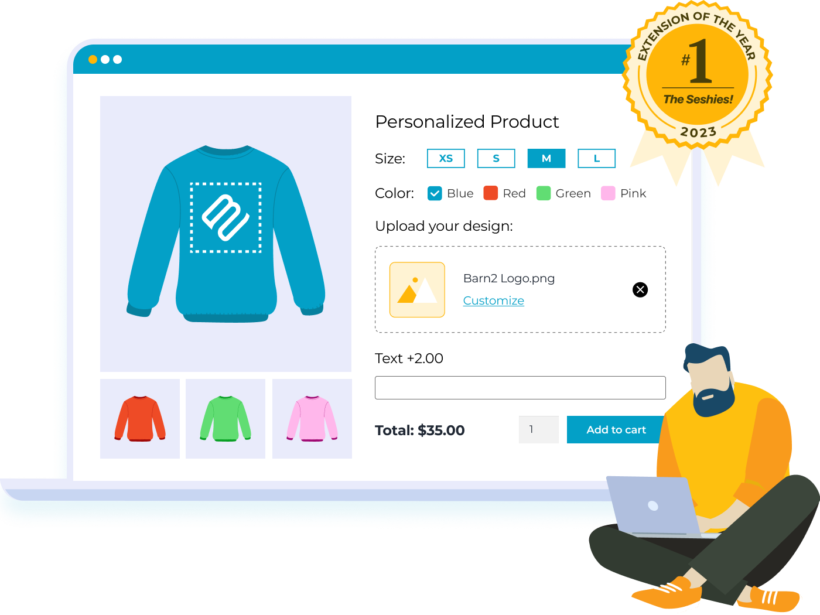
The WooCommerce Product Options plugin is ideal for print-on-demand products where the customer needs to add information to customize a product. This includes:
- Adding text to be printed on a personalized product.
- Uploading images to be printed on the product, e.g. customer images, graphics or logos. This can include multiple image uploads such as the front and back of a t-shirt.
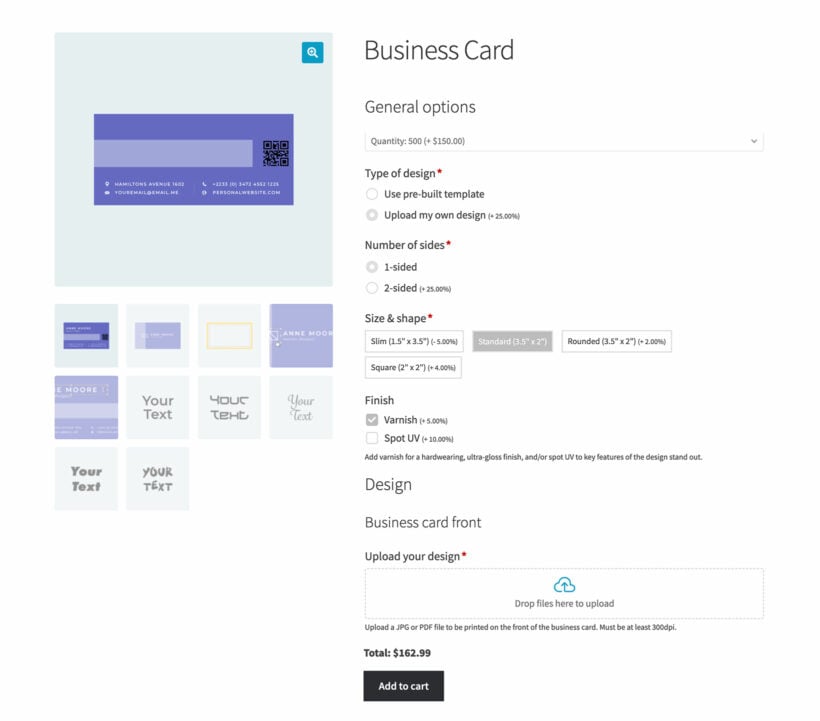
- Uploading documents to be printed, such as business cards or the design for a 3D printed object.
- Specifying details for the printed product, such as choosing a font, paper weight, and so on.
- Allowing customers to view a live preview of their uploaded images on the product.
WooCommerce Product Options is one of our own plugins here at Barn2, and it's the easiest of these to set up and use. Customers add text or upload images into print areas you define, and the Live Preview add-on shows the result on the product in real time.
It does less than a full design canvas like Fancy Product Designer or Lumise, with no freeform dragging or clipart library. For most personalized and made-to-order products that simplicity is the whole point. Monogrammed gifts, printed business cards and custom signage all keep their uploads print-ready, with far less for you to configure.
- Pros Text, file and image upload fields with conditional logic and per-option pricing, plus a live preview that carries through to the cart.
- Cons It's not a freeform design canvas, so customers upload into a fixed print area with no built-in clipart, and the full preview needs the separate Live Preview add-on.
Key features
WooCommerce Product Options comes with everything you need to sell print on demand products:
- Add extra options to your print on demand products, including:
- Text fields.
- File upload fields (with support for any file type).
- Image options, so customers can click on an image to choose a particular design.
- Other field types such as dropdowns, radio buttons, and checkboxes.
- Either create options directly in the plugin, or display existing product variations as checkboxes, color swatches etc. The latter is ideal if you're using a WooCommerce dropshipping plugin and will be sending orders direct to the fulfillment center, as they will expect you to use product variations (e.g. for size and color).
- Use conditional logic to show and hide printing options depending on the user's selections. For example, only display the file upload field for the back of a business card if the customer selects '2 sided'.
- Add rules such as the maximum number of characters for text fields, and a maximum file size.
- Try it risk-free with the 30-day money back guarantee.
2. Fancy Product Designer
Fancy Product Designer is a full canvas designer for WooCommerce that lets customers create their own product from scratch. It goes a step further than uploading text and images to a pre-defined layout, giving them more control, more creativity and interactive previews.
I've used Fancy Product Designer myself and found it incredibly difficult. The options are scattered all over the place and the interface is poor. It has more features than WooCommerce Product Options, but more features don't make it better.
The one reason I'd reach for it over Product Options is if you genuinely need its advanced image-editing tools. Otherwise I'd stick with an easier plugin.
- Pros A genuinely powerful design canvas with advanced image-editing tools, multiple product views and a one-time price.
- Cons I found it incredibly difficult to set up, with options scattered everywhere and a poor interface. Only worth it if you specifically need its advanced editing features.
3. Lumise Product Designer
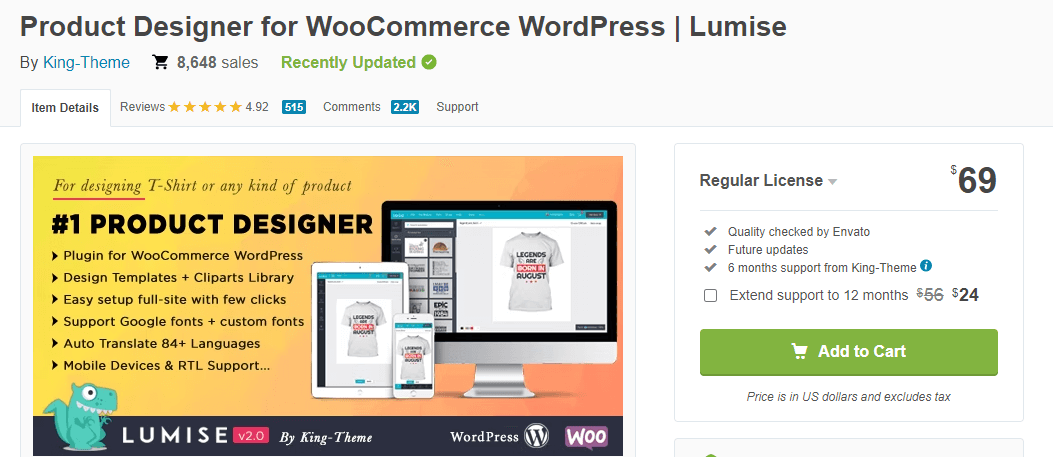
Lumise is a full product designer for WooCommerce, sold on CodeCanyon. Like Fancy Product Designer, it gives customers a canvas to add text, cliparts and their own images, then exports a print-ready file. What sets it apart is a large library of ready-made templates, so customers can start from a finished design and tweak it rather than face a blank product.
It's the best-selling designer of its kind, with a one-time price and no subscription.
- Pros A large template and clipart library, a one-time CodeCanyon price, and a strong track record with over 12,000 sales.
- Cons Support is the standard CodeCanyon model rather than a dedicated team, and like any canvas designer it adds weight to your product pages.
4. Zakeke Interactive Product Designer for WooCommerce
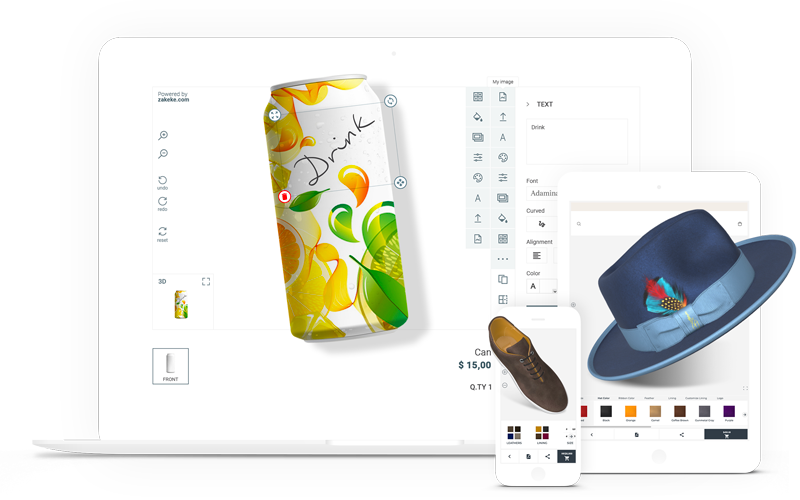
Zakeke lets customers design and preview highly customized products. It also has extra features such as customized 3D renders, percentage or a fixed prices per customization.
As with Fancy Product Designer, I'd recommend this plugin when you offer a high degree of customizability. Customers might be frustrated to see such advanced functionality if you're only letting them make a few tweaks or upload images to a fixed location. It's essentially a complete custom product generator.
- Pros A visual customizer plus 3D, AR and virtual try-on in one tool, with print-ready files generated automatically and rendering handled on Zakeke's servers.
- Cons It's a monthly subscription with no permanent free tier, the cost climbs as you scale, and the 3D setup takes some work.
5. Podbase
Podbase is a print-on-demand dropshipping provider focused on tech accessories, and it offers a WooCommerce integration so you can connect your store, create custom products, and have Podbase handle printing, packing, and shipping without holding inventory.
Their WooCommerce integration page describes a straightforward setup flow: connect your store, pick products, start selling, and notes that access may be via waitlist or early access. Podbase highlights phone, laptop, tablet, and earbud cases as core products, and says orders are printed, packed, and shipped from the EU, with turnaround often within 24 hours. They also promote “no fulfilment fees,” a free-to-use model, and claims about lower average costs versus competitors, plus early access to unreleased device models for sellers who want to stay ahead of new launches.
6. Customily Product Personalizer
Customily is a personalization platform built specifically for print on demand. Customers personalize products with a live preview, and Customily generates the print-ready file automatically, so there's no manual proofing between you and your printer. It connects to WooCommerce alongside other sales channels, and added a Canva integration in 2026.
- Pros Automatic print-ready files, a real-time preview, and a workflow designed around print on demand rather than generic product options.
- Cons Subscription pricing with no free tier, and it's aimed at sellers who need automated production files rather than simple personalization.
Print fulfillment and dropshipping services
These are different from the design plugins above. Rather than handling the customer-facing design step, they print and ship your products for you. You upload your designs, connect your WooCommerce store, and the service produces, packs and dispatches each order, so you hold no stock yourself.
7. Printful

Printful is a hosted print on demand service which integrates with WooCommerce. You create the Printful products in Printful, and have them displayed on your WooCommerce store. When a customer places an order, it is automatically sent to Printful for digital printing and dispatch.
Printful offers a wide range of white label products for print on demand. Their product catalog includes clothing, accessories, mugs, art prints, water bottles, and stationery.
With Printful, you only pay when a customer places an order for a print on demand product. Printful charges you for the shipping, fulfillment, and product. There are no setup or ongoing subscription costs.
To guarantee your profit margin, you add a price for the Printful product which includes your required profit. You then pay a lower amount to Printful, and keep the difference.
- Pros Free to start with pay-per-order pricing, a large catalog with a free mockup generator, and white-label branded shipping from global facilities.
- Cons Base costs run higher than some rivals, and the official WooCommerce plugin is poorly rated, with recurring reports of dropped connections and sync issues, so check its current reviews before relying on it.
8. Printify
Printify is similar to Printful, in that it is a third party print on demand dropshipping tool which integrates with WooCommerce.
Choose from a huge product catalog (over 1,300 products). The entire catalog can be printed with your or your customers' designs. These are similar to the selection at Printful and include clothing, home and living, and accessories.
There are lots of random products like mouse pads, bags, socks, face masks, backpacks and phone cases. Even the clothing range is very extensive, with everything from sweatshirts to baby clothes.
If you go this route, our guide to building a WooCommerce Printify store walks through the full setup.
- Pros The largest catalog of any major network, a genuine free plan with no monthly fee, and a global network of providers so you can print close to your customers.
- Cons Because you pick the print provider and Printify doesn't own the facilities, quality and turnaround vary between them, so it's worth ordering samples first.
9. Gelato
Gelato is a global print on demand service with an official WooCommerce integration. Its standout feature is local production: Gelato prints in over 30 countries and routes each order to the nearest facility, which cuts shipping times and costs for international customers. You build products from its catalog, and orders are produced and shipped automatically as they come in.
- Pros Local production around the world for faster, cheaper delivery, a free plan to start, and a strong fit for stores selling internationally.
- Cons The catalog is smaller than Printify's, and some products and discounts sit behind the paid Gelato+ plan.
10. CustomCat
CustomCat are another third party dropshipper for print on demand. They offer WooCommerce integration. The dashboard looks dated next to Printful and Printify, but the low base costs make it a solid choice for startups watching their margins.
- Pros Among the lowest base costs in print on demand, fast US production, and no subscription needed to connect.
- Cons Fulfillment is US-centric, orders are sent across in batches rather than instantly, and the design work happens in CustomCat's own tool rather than on your store.
Companion plugins for your print on demand store
These plugins handle the practical side of running a print on demand store. None of them design or print products themselves, but each one works alongside any of the tools above.
WooCommerce Bulk Variations
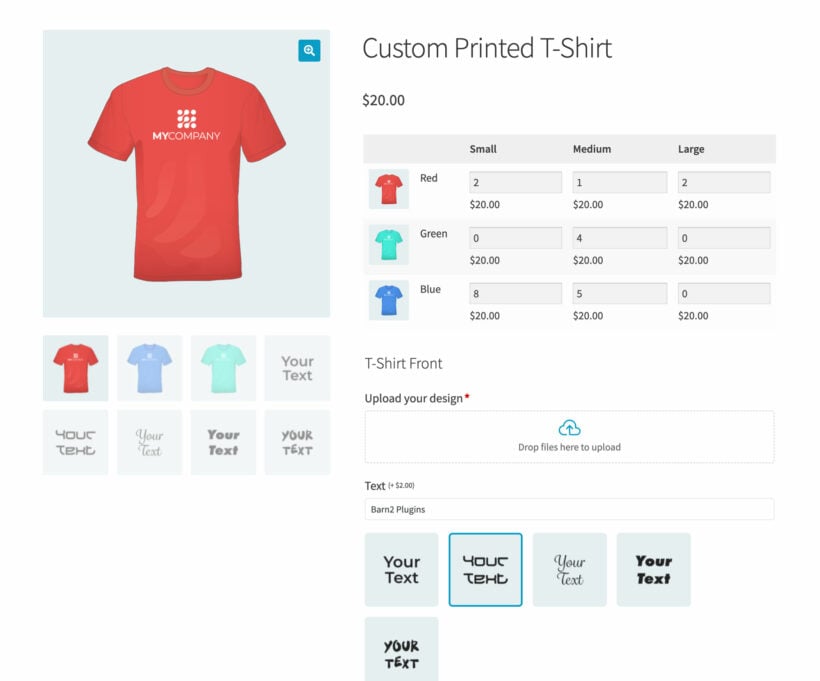
If you're selling print on demand clothing in WooCommerce then our Bulk Variations plugin is a useful companion. Use it to display the size and color variants in a user-friendly order form. When you use it alongside the WooCommerce Product Options plugin recommended above, the extra print on demand options will appear underneath the grid of variations.
- Pros Turns size and color variations into a single grid order form, and pairs neatly with WooCommerce Product Options for the customization fields.
- Cons It only displays variations, so it doesn't design or print anything itself, which makes it a companion rather than a standalone print on demand tool.
WooCommerce Lead Time

Since print-on-demand orders take a bit longer to manufacture and deliver, your customers need to know how long they'll be waiting.
Our WooCommerce Lead Time plugin offers the best way to do this. It lets you add a handling or processing time to your store, or to specific products or categories. The turnaround time appears on your store pages, so customers know when their printed product will be delivered.
WooCommerce Lead Time works with other plugins featured in this article such as WooCommerce Product Options.
- Pros Shows handling and turnaround times on the shop, product pages, cart, checkout and order emails, set globally or per product.
- Cons It's display-only, so you set the times manually rather than pulling them live from a print supplier.
WooCommerce Multiple Email Recipients

By default, WooCommerce sends order notification emails to the website administrator. That's generally not sufficient for a print on demand service.
If you print products in-house then you need an automation to route the new order emails to the printing department. On the other hand, if you use dropshipping then the new order emails must be sent to the dropshipper. You don't want to waste time doing this manually!
Our WooCommerce Multiple Email Recipients plugin solves this. Use it to send the order emails to the correct person for on demand printing and dispatch.
You can either add the same email address(es) who will receive notification of all new print on demand orders. Alternatively, you can specify different recipients for each product or category. This is useful if you use different dropshipping companies to print different types of product.
- Pros Routes new-order emails to the right printer or dropshipper automatically, by product or category, and adds extra recipients to any WooCommerce email.
- Cons It handles email routing only, not the fulfillment itself, so it works alongside a print partner rather than replacing one.
Which print on demand plugin should you choose?
The right choice comes down to whether you're focused on how customers design products, or on who prints and ships them. Here's how I'd decide:
- For personalizing products WooCommerce Product Options is the easiest way to let customers add text and upload images, and it's where I'd start for most stores.
- For a full design-from-scratch canvas use Lumise, or Fancy Product Designer only if you specifically need its advanced image editing and can put up with a fiddly setup.
- For hands-off fulfillment start with Printify for the widest catalog and a free plan, or Gelato if you ship internationally.
- For brand control and low costs Printful gives the most consistent quality, while CustomCat keeps base prices down.
For most stores I'd pair a customization plugin with a fulfillment service: one to capture what the customer wants, and the other to print and ship it.
There's no single best print on demand setup. Start with the pick that matches your main products, then add the companion plugins as your store grows.
6 Comments
Hallo, ich finde, du triffst immer den Nagel auf den Kopf. Bitte mehr Artikel dieser Art. VG
Hallo Carl,
vielen Dank für das nette Feedback! Es freut mich sehr, dass dir die Artikel gefallen. 😊
Viele Grüße!
Is there any product that allows you as the shop owner to add photos to the customer so that the customer can select pod products with the photos you have connected to the customer? A scenario is if you take your book photos and you would like to provide each student the option to buy products with the photos you have taken. Is there, or do you know, a setup that would provide this?
Hello Mike, thank you for your comment! From your description, it seems that achieving your desired outcome would require custom code customization. As of now, I'm not aware of any existing plugins that fulfill those specific requirements.
It could be beneficial for you to explore code customizations through platforms like Codeable, where experts can assist you in achieving your customization.
I hope this information is helpful. Should you have any other questions, please don't hesitate to contact us through our Support Center. We would be more than happy to provide further assistance. Many thanks!
I have a Printful account where I upload my high quality images for my wall art. when it is added to the shop of my Woocommerce store, the six or 8 images are also added at the same size on Printful. This is causing massive problems with loading problems. Can you tell me if there is a way to combat this problem. The store is new and I am still uploading products, it isn't indexed yet as I still have a way to go, but the loading speed is about 15 second to load which is totally unacceptable. Is there a plugin that you have that can reduce the size of the images?
Hi, Glenda. Sorry to hear you're having this difficulty with the large file size of the product images on your site increasing the page load time. I agree that this definitely needs to be improved on. I suggest you use a WordPress image optimizer such as the free EWWW Image Optimizer plugin to address the issue. I hope this helps. Cheers!