The best WooCommerce abandoned cart plugins for 2026


Looking for a way to recover lost potential sales? This guide will review the top WooCommerce abandoned cart plugins to help you convert your store visitors into customers. Even better, you'll find here some unusual tips and little-known ways to prevent customers from abandoning their carts in the first place.
The average cart abandonment rate is around 70%, which means most stores lose roughly 7 out of every 10 carts. The good news is that a lot of that lost revenue is recoverable - and some of it is preventable in the first place.
Below, I'll cover both: plugins that recover carts after they've been abandoned, plus two ways to stop abandonment happening at all - by speeding up the checkout and showing shipping costs upfront.
Short on time? Here's the short version:
- Prevent abandonment firstOur own WooCommerce Fast Cart speeds up checkout so fewer carts are abandoned in the first place.
- Best free recovery pluginCart Abandonment Recovery by CartFlows - the most popular free option (300,000+ installs).
- Best multichannel recoveryOmnisend - email, SMS and push, with a generous free tier.
- Best for SMSCartBoss - pay-as-you-go text-message recovery.
- Best if you already use itMailchimp - build a cart automation from your existing email platform.
How I picked these plugins
There are dozens of abandoned cart plugins, so I've focused on ones that are genuinely effective and still actively maintained, grouped by what they're best at - prevention versus recovery, free versus paid, email versus SMS. For each, I looked at how it works, its pricing, its install base and reviews, and where it falls short. Where a plugin is one of ours, I say so.
Why do customers abandon carts?
Every ecommerce business is different. However, the following are some typical flaws that lead to cart abandonment:
- Complexity - Online buyers have a limited attention span. If the checkout process is too complicated or time-consuming, they will quit it. Make the transaction process as simple and effortless as possible to avoid this.
- High shipping fees - Customers frequently abandon shopping carts after learning how much their product would cost with shipping. You can offer free delivery to avoid this.
- Lack of trust - Some web users are hesitant to provide credit card information online. Increase conversions by using social proof. Think about developing a solid brand to increase confidence on the checkout page and throughout the site. A liberal return policy might also assist in relieving client fears.
- No purchase intent - Many people add things to their basket but do not finish their purchase. It might be simply because they are browsing with little purchasing intent. Help encourage these users to buy right away by giving limited-time promotions and instilling a sense of urgency.
- Payment methods - Customers frequently have strong preferences for how they would want to pay. That means they will only finish a transaction if their chosen method is available. You can reduce this issue by accepting the most common payment options, such as Visa and PayPal.
- Item is too expensive - Online consumers frequently compare prices to get the best rates. You may prevent clients from abandoning their cart by providing special discounts and coupon codes. This keeps them from getting scared off by excessive pricing and seeking better offers elsewhere.
- Technical problems - All technology is prone to faults and errors. Check your statistics and the checkout process frequently to verify there are no blocking problems. Also, make sure the code on your checkout page is lightweight to avoid high load times.
As you can see, there are many reasons why people leave shopping carts. Below, I'll walk through the best WooCommerce abandoned cart plugins - covering both how to prevent abandonment and how to recover the carts you can't.
How about preventing people from cart abandonment in the first place?

What if you could prevent WooCommerce cart abandonment in the first place? As we mentioned in the previous paragraph, one of the most common reasons customers quit payment is a lengthy, complicated checkout procedure. Every additional step and form field hinders and complicates the user's ability to complete payment. Customers want a straightforward, convenient process. Thus any extra steps detract from the user experience.
Here's why it's worth starting with prevention: recovery plugins only ever win back a fraction of lost carts, and usually only by giving away a discount to do it. Preventing the abandonment in the first place keeps the whole sale, at full price, so it's the most cost-effective place to start. There's also a timing argument: a shopper is most likely to buy in that first session, while they're in the mood to decide. Once they've left and you're relying on a recovery email to win them back, they've usually moved on, and that buying intent has faded. Next, I'll cover two tools that reduce abandonment before it happens, then the recovery plugins for the carts you can't save.
Prevent abandoned carts with a fast on-page cart and checkout
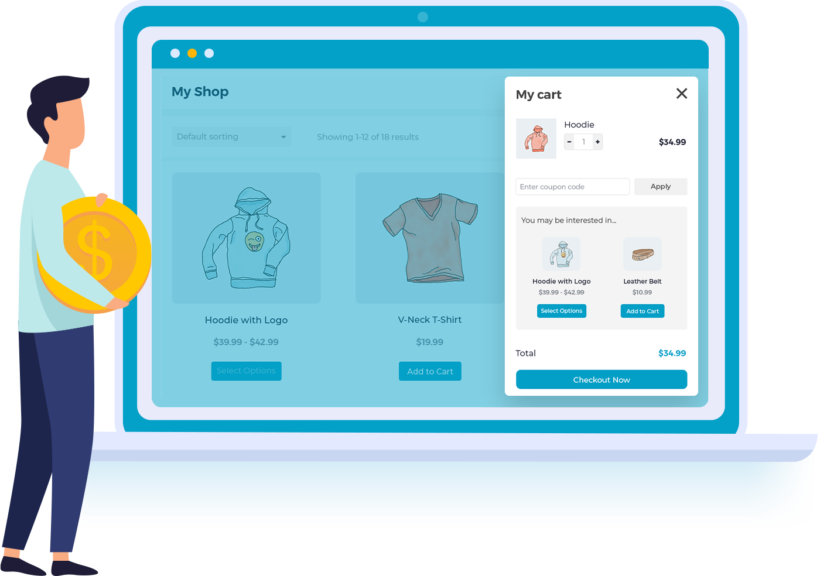
Our own WooCommerce Fast Cart is designed to reduce abandoned carts - it's one of ours here at Barn2. It does this by making it much quicker and easier for customers to complete their order, so they're less likely to abandon their cart.
Fast Cart works by displaying the cart and/or checkout in an on-page popup. Customers can review and complete their order without ever leaving the current page. They will never leave your store or product pages with WooCommerce Fast Cart since their cart is always with them.
Customers can use WooCommerce Fast Cart to view products in their cart, evaluate their purchases, alter quantities, delete items, and activate coupon codes. Related products appear in the mini cart, helping to increase your average order value.
What makes it truly stand out is a one-of-a-kind quick checkout that pops up. This makes purchasing things much faster and easier.
The popup cart might appear as a little lightbox on the right side of the screen or as a larger lightbox in the centre. Customers can review their selections without leaving the page, and also complete their purchase directly within the popup.
You may further speed up the checkout process by bypassing the cart and displaying the popup checkout as soon as a consumer adds an item to the cart.
So, why does Fast Cart reduce abandoned carts?
Now, let's compare this to a standard checkout process in WooCommerce. This is how you normally place an order in WooCommerce:
- First, customers add products to the cart.
- Next, they need to check the items and quantities inside the cart to review the order. To do this, they need to abandon the shop pages and visit a separate cart page.
- Once they are ready to pay, they need to click on the "Purchase" button that will lead them to another page.
- They fill out their name and email address on the checkout page, choose a delivery method, and input their address and payment information (plus an optional billing address) before completing the transaction that will lead them to yet another page.
That is way more hassle for the customer.
You quickly increase your chances of a successful purchase by shortening the checkout process and reducing the number of pages needed to load before completing the transaction. To speed up the process and reduce abandoned carts even more, you can enable the 'Direct checkout' option which skips the cart part of the process completely, and displays the checkout as soon as the customer opens the popup cart. This is even faster.
WooCommerce Fast Cart - our WooCommerce side cart plugin - is available as a standalone WooCommerce side cart plugin or as part of the All Access Pass.
Like all our other plugins, WooCommerce Fast Cart comes with:
- In-depth documentation and tutorials.
- Export support from our friendly team.
- Full 30-day money-back guarantee.
Cons:
Fast Cart prevents abandonment but can't recover a cart that's already been left behind, so pair it with one of the recovery plugins below. It's also a premium plugin, with no free version.
Stop customers abandoning their cart due to unexpected shipping costs
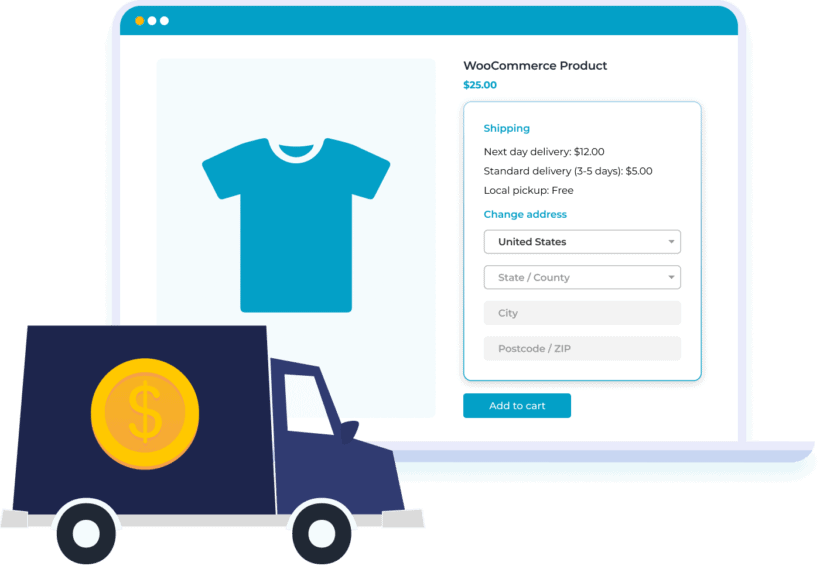
Have you ever been shopping online and added products to the cart just to check the shipping cost? And then abandoned your cart when you weren't happy with the shipping options? If so, then you'll understand how you can reduce abandoned carts by providing upfront shipping costs to your customers.
Normally, WooCommerce only shows shipping costs on the cart and/or checkout page. Stop and think about that for a moment, as it's absolutely ridiculous! Customers are expected to decide whether to purchase a product before they know what it will cost to send to them - or even if you ship to their location!
The solution is to install the WooCommerce Shipping Calculator plugin. This handy plugin takes less than 5 minutes to set up, and adds a shipping calculator to your chosen position on the WooCommerce product page. Customers enter their address and instantly see the shipping costs so that they can make a fully informed decision of whether to add the product to their cart. As a result, unexpected shipping costs are no longer a reason for them to abandon their cart.
How to recover abandoned carts
We've talked a lot about preventing cart abandonment. Now it's time to look at WooCommerce cart abandonment plugins that will help you gain back your potential lost revenue.
It's crucial to remember that your ecommerce cart abandonment rate will never be zero. You can't stop everyone from abandoning their shopping carts. That's why it is very important to additionally to preventing cart abandonment, you also use plugins that help you recapture lost clients.
The Fast Cart and Shipping Calculator plugins compatible with all the WooCommerce abandoned cart plugins listed below. Use them with any of these plugins for best results.
Cart Abandonment Recovery (CartFlows)
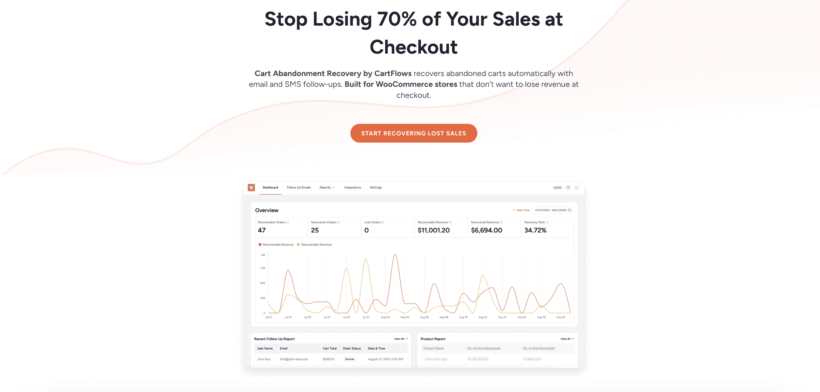
Cart Abandonment Recovery by CartFlows is the most popular free abandoned cart plugin on WordPress.org, with over 300,000 active installs and a 4.8-star rating. It helps store owners track abandoned carts in real time and automatically re-engage customers with targeted recovery emails and smart incentives, encouraging them to complete their purchases.
By combining detailed analytics with advanced automation, Cart Abandonment Recovery Pro makes it easier to understand customer behavior and optimize recovery campaigns, ultimately increasing conversions and revenue.
Features
Cart Abandonment Recovery Pro allows you to monitor abandoned carts with detailed product-level insights, so you can see exactly which items customers leave behind. This helps you spot trends and refine your recovery approach more effectively.
With advanced email automation, you can create customized recovery workflows and send multiple follow-up emails at specific intervals. You can also personalize messages based on customer data, making your recovery campaigns more relevant and engaging.
The plugin also supports smart coupon generation, allowing you to offer dynamic discounts to incentivize customers to return and complete their purchases. You can control coupon rules, expiration times, and usage limits directly from the dashboard.
Cons:
The big watch-out is that it relies on WordPress's built-in cron to send recovery emails - if your site's WP-Cron is unreliable, carts can silently go uncaptured. Its block-based checkout support has also lagged behind classic checkout, and the admin 'review us' prompts annoy some users.
Omnisend
Omnisend is one of the most popular all-in-one marketing platforms for ecommerce, used by over 100,000 stores, and it's a strong pick for cart recovery because its free plan already includes multichannel automation. You can recover carts by email, SMS and web push from a single pre-built workflow, where many rivals lock SMS and automation behind paid tiers.
Key features:
- Ready-made abandoned cart workflows across email, SMS and push.
- Generous free tier, with paid plans scaling by contacts and sends.
- Deep WooCommerce data for segmentation and product recommendations.
- Pre-built templates so you can launch quickly.
Cons:
It's a full marketing platform, so it's more than you need if you only want a simple cart email, and costs rise as your contact list and send volume grow.
FunnelKit Automations
FunnelKit Automations is a powerful, all-in-one marketing automation engine built specifically for WordPress. With a clean visual automation builder and zero-code setup, you can create highly targeted abandoned cart campaigns that go beyond simple reminder emails.
Many WooCommerce stores lose revenue not because customers aren’t interested, but because follow-ups aren’t timely or relevant. FunnelKit Automations tracks abandoned carts in real time and lets you trigger automated emails, SMS (via Twilio), and push notifications (via PushEngage connector). These messages can be based on customer behavior, cart value, products added, and purchase history, ensuring every follow-up is context-aware.
Inside the dashboard, you can view abandoned carts, recovered orders, revenue generated from automations, and the performance of each recovery sequence. This helps you clearly understand what’s working and optimize your follow-ups for better conversion rates.
Features
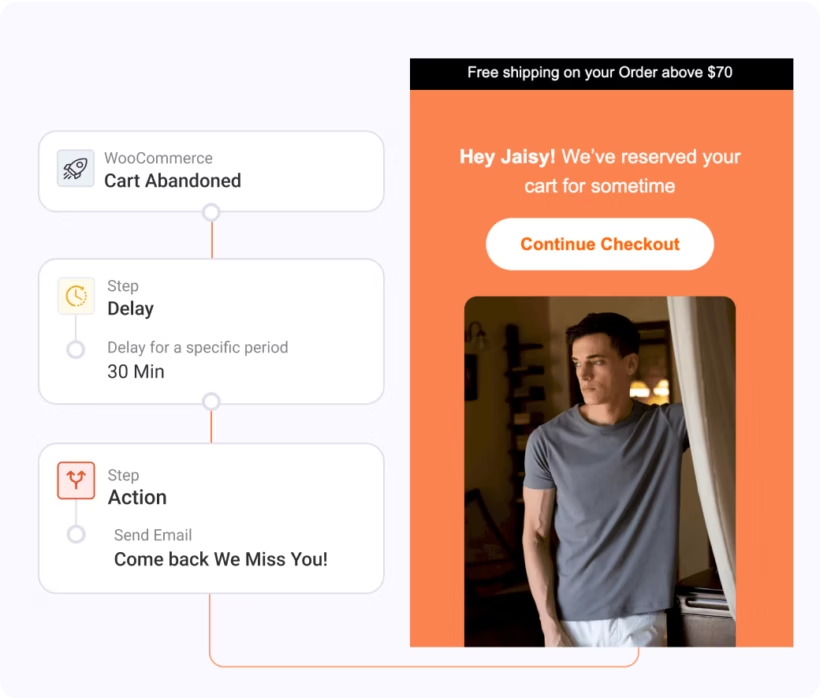
FunnelKit Automations lets you automatically send personalized abandoned cart messages using dynamic merge tags for customer name, cart items, product images, pricing, and unique recovery links. Each message restores the customer’s cart exactly as they left it, making it easy to complete the purchase with a single click.
A major advantage of FunnelKit Automations is segmentation and conditional logic. You can create different recovery sequences for first-time buyers, returning customers, or high-value carts. Emails can be triggered by conditions such as cart total, specific products, applied coupons, or customer roles, enabling highly relevant messaging.
You can control exactly when each recovery email is sent, whether it’s minutes, hours, or days after a cart is abandoned. FunnelKit Automations supports multi-step sequences, so you can automatically gently remind customers, offer personalized coupons, or add urgency over time.
Beyond abandoned carts, FunnelKit Automations can be used for post-purchase follow-ups, cross-sells, win-back campaigns, and more. Its built-in visual drag-and-drop builder lets you design beautiful transactional and marketing emails, making it a long-term automation solution rather than a single-purpose plugin.
If you’re looking for a scalable abandoned cart recovery tool that grows with your WooCommerce store, FunnelKit Automations is a strong choice, especially for businesses that want deeper personalization without writing code. Plus, it also has a free version available with Pro starting at $99.50 per year.
Cons:
Cart-recovery automations sit in FunnelKit's higher-priced tiers rather than the cheapest plan, so the real cost is more than the headline price. It's also a full marketing-automation suite, which is more than you need if you only want simple recovery emails.
Recapture
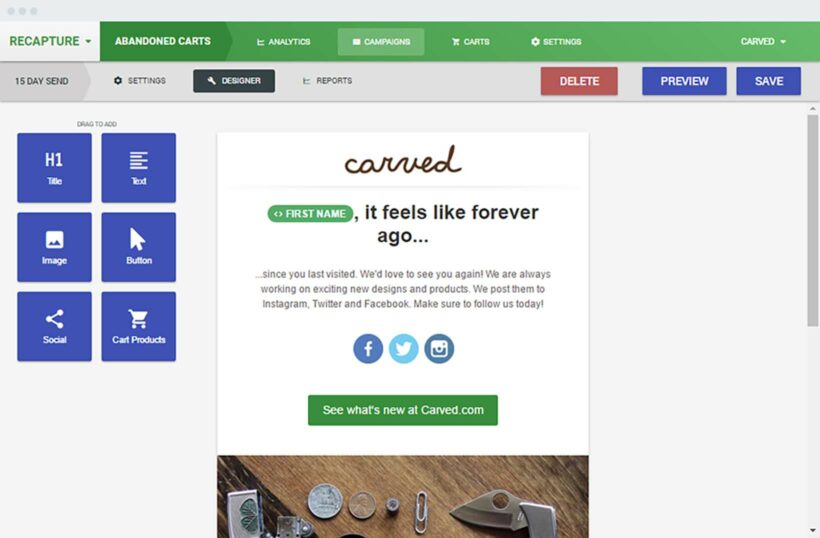
Recapture.io is a straightforward email marketing and abandoned cart recovery solution. With the simple 5-minute setup, you can begin swiftly and easily recover lost income from your clients. There is no coding necessary.
Most ecommerce business owners have no idea how many customers add items to their carts and then leave without purchasing. At Barn2, we use Recapture to collect data on our WooCommerce abandoned carts. Inside Recapture, you can set up your campaigns and send an email with a discount or special offer to customers who abandon a cart. Customers may reclaim their abandoned cart and finish checkout with a single click making the whole process quick.
Using the integrated dashboard, you can keep track of restored orders and carts.
Features
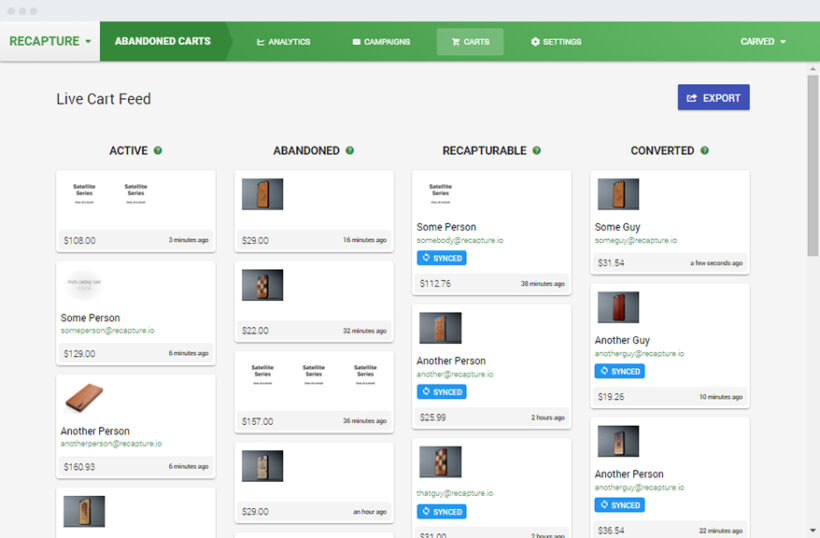
Customers who abandon their shopping cart should receive tailored response emails automatically. Every email contains links that recreate the customer's identical session on your store regardless of the device used.
A huge benefit of Recapture is personalization. Each customer can receive an image of the items they abandoned to be able to remind them of what they left in the cart. You can create segments for each campaign to ensure that each consumer receives highly relevant and targeted emails. Creating segments will take little time and will result in higher open rates and conversion rates!
Recapture allows you to specify when to send the automatic email to recover the cart. You can create as many emails as you want and set them to be sent automatically.
You can sign up to Recapture here. If you receive at least five orders a day, you definitely need this tool!
Cons:
Recapture is a hosted service with a recurring monthly cost (from around $39/month) rather than a one-off plugin, and because pricing is revenue-based, the bill grows as it recovers more. Your cart data also lives on Recapture's servers rather than your own site.
CartBoss - SMS Abandoned Cart Plugin
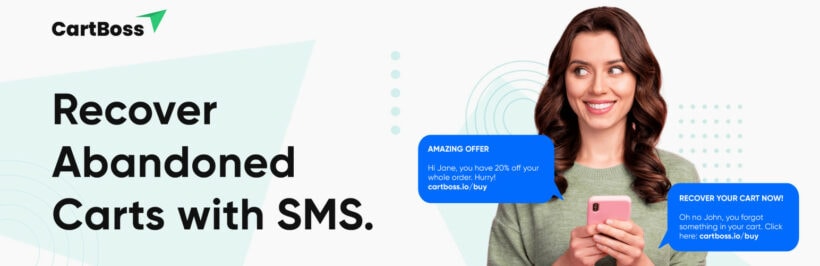
CartBoss is a WooCommerce abandoned cart plugin that sends SMS text messages to customers who have abandoned their shopping carts. It is designed to help WooCommerce store owners recover lost revenue by re-engaging with customers who have shown interest in their products but did not complete their purchase.
Unlike the other abandoned cart plugins on this list, CartBoss uses SMS text messages which makes it very unique. This grab's customers' attention directly on their mobile device, and you can use it alone or with other abandoned cart plugins for WooCommerce.
Features
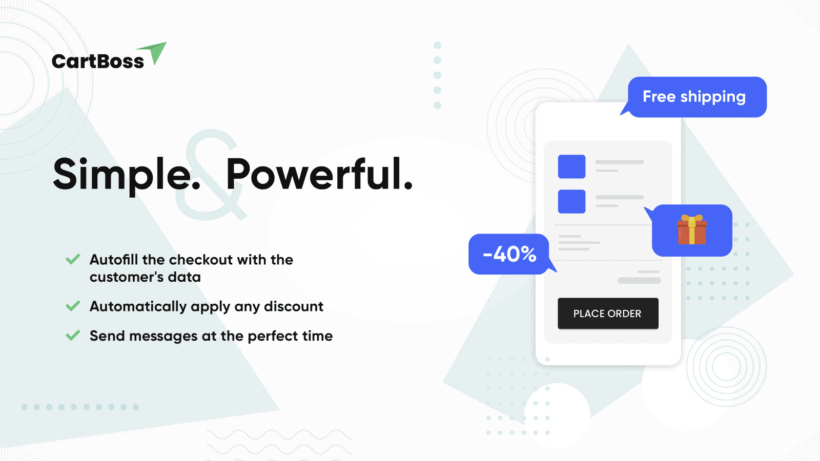
CartBoss allows store owners to customize their recovery SMS messages, including personalized offers and incentives to encourage customers to complete their purchase. The plugin also offers an easy-to-use dashboard that displays key metrics such as recovery rate, revenue recovered, and other important data.
One of the main benefits of CartBoss is its ability to reach customers directly on their mobile devices. SMS text messages have a high open rate, making them an effective way to engage with customers who may have missed or ignored recovery emails. By sending personalized SMS messages, CartBoss helps to create a sense of urgency and incentivizes customers to take action and complete their purchase.
CartBoss also offers advanced automation features, allowing store owners to set up automatic recovery messages based on specific triggers or customer behavior. For example, you could send a recovery message automatically after a certain amount of time has passed since the cart was abandoned, or after a customer has visited a certain number of pages on your WordPress site.
The core CartBoss plugin is free, and you just pay per text message with no subscription fees.
Cons:
Because you pay per SMS, costs can climb quickly for high volumes or expensive destinations, and SMS marketing puts the consent and GDPR burden on you - you need explicit opt-in to text customers. It's also one-directional, so customers can't reply to the message.
Klaviyo
Klaviyo is the marketing platform of choice for many larger, data-driven stores, with powerful segmentation, abandoned-checkout and browse-abandonment flows, and dynamic coupons built on deep WooCommerce event data. If you're already scaling and want serious automation, it's hard to beat on capability.
Key features:
- Advanced segmentation and behavioural triggers for cart and browse abandonment.
- Omnichannel email and SMS flows with detailed reporting.
- Free tier to start, with usage-based pricing as you grow.
Cons:
It's powerful but not the easiest to set up, and the official WooCommerce connector plugin is poorly rated (around 2.8 stars on WordPress.org), with recurring complaints about form bugs and integration friction - so check the current reviews and test carefully before committing.
Retainful - Free WooCommerce Abandoned Cart Recovery Plugin
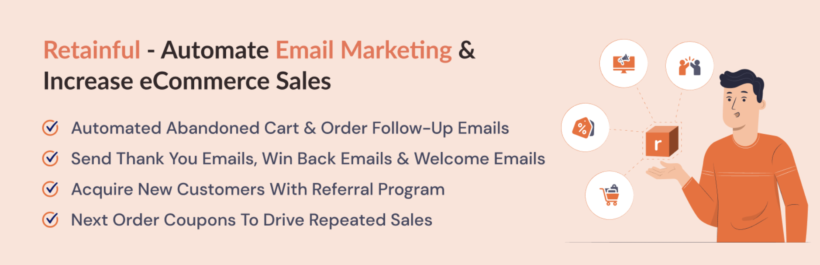
Retainful is a free WooCommerce cart abandoned plugin that can help you automate your email marketing, increase sales, and expand your business. You can easily create and deploy email campaigns with pre-built email process templates.
Features
In Retainful, you can create your campaigns with the simple drag-and-drop editor and use the Retainful dashboard to track every abandoned or recovered cart and income in real-time.
This plugin is helpful for more than simply cart abandonment. You can use features like a countdown timer, exit-intent popups, or add-to-cart popups to encourage your clients to buy while they are on your website.
Retainful works with popular ecommerce systems like WooCommerce and Shopify and marketing solutions like HubSpot, ActiveCampaign, and Mailchimp.
Retainful comes with detailed reporting – you can see abandoned carts, recovered carts, and active carts. This means you can view real-time carts or carts of clients shopping on your site right now.
You can as well compare the values of abandoned orders versus recovered orders.
The free version It's intended to give you a sense of everything Retainful has to offer and only supports up to 300 contacts. So, you'll most likely be upgrading to a premium subscription very soon.
You can get the Retainful WooCommerce plugin here.
Cons:
Retainful runs through a connected Retainful cloud account rather than entirely on your own site, and the free tier is capped (around 300 contacts), so a busy store will reach the paid plans fairly quickly.
Abandoned Cart Lite for WooCommerce
Abandoned Cart Lite for WooCommerce by Tyche Softwares is a long-established free plugin (20,000+ active installs) that runs entirely on your own site, with no external marketing account required. It captures abandoned carts from both guests and logged-in customers and sends automated recovery emails on a schedule you set.
Key features:
- Fully self-hosted - recovery emails run from your own WordPress site.
- Captures guest and logged-in carts, with an abandonment dashboard.
- Free core plugin; a Pro version adds templates, SMS and more reports.
Cons:
Some reviewers report it logging large numbers of "fake" abandoned carts from bot add-to-cart hits, which can inflate your stats, and the more useful templates and channels sit in the paid Pro version.
ShopMagic Abandoned Carts
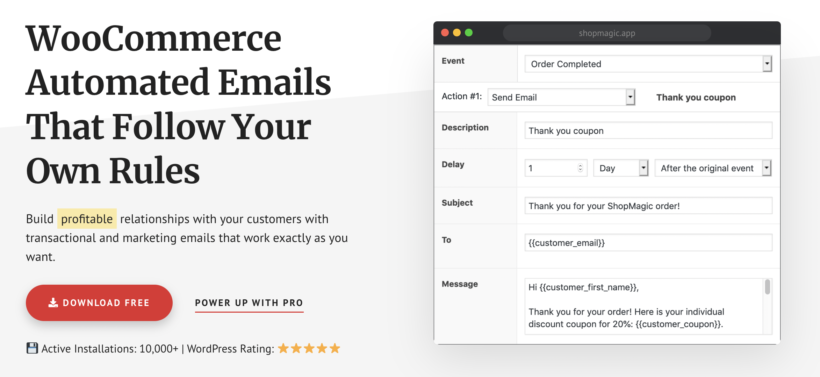
ShopMagic Abandoned Carts is another great WooCommerce abandon cart option. This plugin allows you to tailor the email message you send to your customers while also streamlining processes. You can easily add specific triggers and criteria to your automation.
Furthermore, you can utilize the site's built-in no-code editor to rapidly and easily update and test the emails.
Features
ShopMagic Abandoned Carts is a free ShopMagic plugin (which is also free). You'll need both ShopMagic and the ShopMagic Abandoned Carts extension to retrieve abandoned carts. You must download it separately from the main plugin. However, the procedure is effortless.
Email collecting is incredibly beneficial for organizations trying to broaden their marketing reach. ShopMagic's Abandon Cart extension captures consumer emails before checkout, allowing you to generate future lead generation possibilities. This plugin integrated everything into MailChimp flawlessly so you can keep building your email lists without skipping a beat.
ShopMagic Abandoned Carts also provides some excellent extensions to enhance and modify your processes. Customers may be targeted with automated email campaigns depending on their status, purchasing frequency and budget, and specific items viewed or purchased.
The Delayed Emails extension allows you to send time-delayed emails to consumers to thank them for their purchases and promote future transactions. The Request a Review plugin, when combined with all of the other fantastic features, automates targeted review outreach so you can collect valuable data that benefits both you and your consumers.
Cons:
ShopMagic Abandoned Carts only works if you also install the separate ShopMagic core plugin, so it's a two-plugin setup. It's email-only and has a fairly small user base compared with the big players here.
YITH WooCommerce Recover Abandoned Cart
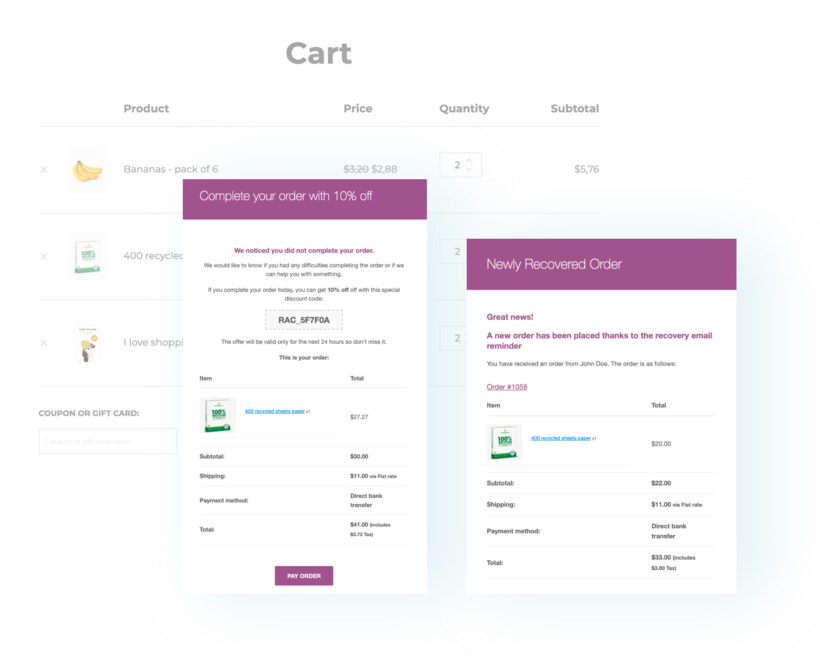
Another interesting plugin for abandoned cart recovery is YITH WooCommerce Recover Abandoned Cart. By delivering coupons with a special discount on abandoned items, YITH WooCommerce Recover Abandoned Cart may remind your consumers what they left behind and urge them to finish their purchase process.
Features
YITH WooCommerce Recover Abandoned Cart, lets you choose whether to retrieve all users' orders and carts or just those with a specific user role. In this way, you can send automated emails to only those with a specified user role, such as administrator, customer, and subscriber.
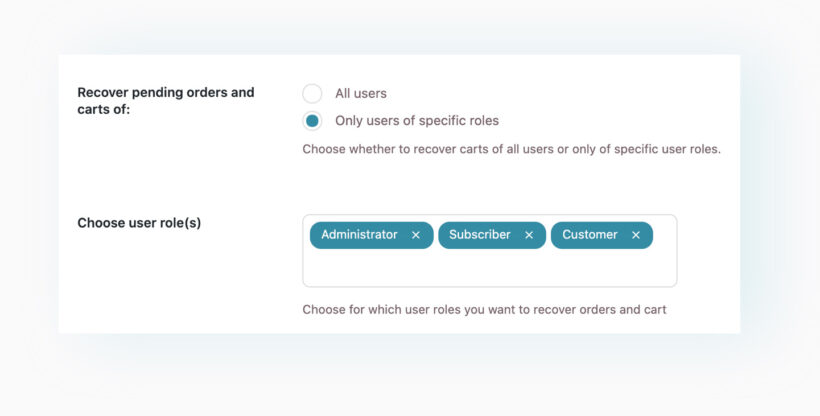
When the option "Recover carts of guest users" is enabled, the contact information entered will be retained and used to send an automated email to recover the purchase if the user fills out the checkout forms but does not finish the order. You may also provide a checkbox to ask for the user's approval to use personal data to send promotional emails.
Like other WooCommerce abandoned cart plugins, YITH WooCommerce Recover Abandoned Cart lets you choose the number of minutes after a cart is deemed abandoned. As well as the timeframe after which the automated email to reclaim the cart is sent.
You can use one of the available templates to send the initial emails to recover purchases and carts with a single click. As well as, you can create an unlimited amount of automated emails within the plugin.
Suppose your online store has an international consumer base. In that case, you may also encourage customers to choose a language in which they feel most comfortable, as YITH comes with numerous language options.
You can sign up to YITH WooCommerce Recover Abandoned Cart here and start recovering your abandoned carts immediately.
Cons:
There's no free version any more - the old free plugin on WordPress.org was closed back in 2020 - so you'll need the premium plugin (around €79.99/year). It's also email-only, with no SMS option.
Mailchimp

Mailchimp is not a WooCommerce plugin but an email marketing platform. However, if your checkout page integrates directly with Mailchimp, you can set your cart abandoned email sequence without needing a WooCommerce cart abandoned plugin. You probably are using Mailchimp already for your email marketing, so the setup will be fast and easy.
Features
Mailchimp also offers the option of individualized product recommendations. It personalizes each email for each consumer, and you don't have to do anything. All you need to do is copy and paste the text block into the email, and everyone has a unique email.
You can also encourage clients to fill their shopping carts with more items by providing individualized product recommendations. You can utilize the purchase data from your store to give recommendations for items you believe your customers will enjoy.
Mailchimp also comes with in-depth conversion reports in which you can check how many checkouts were converted. If your business requires you to be mobile, you may use Mailchimp mobile app to enable an automatic abandoned cart email.
Cons:
Because Mailchimp sits outside WooCommerce, you build the recovery automation inside Mailchimp itself rather than your WordPress dashboard. The official integration plugin also has a patchier reputation than the others here, so it's worth checking its current WordPress.org reviews before you rely on it - over the years it has had integration bugs (for example, around how customers are opted in or unsubscribed at checkout). It really only makes sense if you're already committed to Mailchimp for your email marketing.
Which is the best WooCommerce abandoned cart plugin?
The best results come from a two-step approach: cut down on abandonment first, then recover the carts you couldn't save.
Step 1: Reduce abandonment
Start by removing the friction that makes people leave. Our own WooCommerce Fast Cart speeds up checkout - one of the biggest causes of abandonment - and the WooCommerce Shipping Calculator shows delivery costs upfront so there are no surprises at checkout. As the saying goes, prevention is better than cure.
Step 2: Recover the carts you lose
You can't stop everyone leaving, so add a recovery plugin to win back the rest. My picks depend on what you need:
- Best freeCart Abandonment Recovery by CartFlows.
- Best multichannelOmnisend - email, SMS and push on a free tier.
- Best for SMSCartBoss.
- Already use email marketing?Recapture for image-personalized emails, or Mailchimp if you're already on it.