The best WooCommerce B2B plugins (free + premium)

Looking for the best WooCommerce B2B plugins to add wholesale pricing, hidden products, quote requests, and user-role gating to your store? The right combination turns a standard WooCommerce shop into a proper wholesale operation.
A WooCommerce B2B plugin adds wholesale features to your store. The four core capabilities are trade pricing, hidden products, quote requests, and user-role gating. Each one solves a different problem, and most stores need at least two working together.
Quick verdict: the best WooCommerce B2B plugins
Short on time? Here are my picks by use case.
- Best overall (our own suite)WooCommerce Wholesale Pro handles wholesale pricing and visibility, and anchors a mix-and-match suite for everything else.
- Best free suite to startB2BKing has the most capable free version, with a deep Pro upgrade.
- Most established alternativeWholesale Suite is the long-running market leader on WordPress.org.
- Best for B2B order formsWooCommerce Product Table turns your catalog into a one-page bulk order form.
Comparing these B2B plugins
I looked at how much of the B2B workflow each plugin covers: registration, roles, wholesale pricing, tax, quotes and order forms. I also weighed its WordPress.org or marketplace rating and install count, its free version and pricing, and how actively it's maintained.
I ran each one on a fresh WordPress and WooCommerce install hosted on Kinsta, so no plugin was inheriting settings or conflicts from another.
Several of the plugins below are our own. We build a family of WooCommerce plugins at Barn2, including Wholesale Pro, so I've flagged that clearly and listed genuine cons alongside the pros.
Last updated for 2026: added B2BKing, WholesaleX and Addify's B2B suite, refreshed the ratings and install counts, and added our free Wholesale Essentials plugin as a starting point.
What does a WooCommerce B2B plugin do?
A WooCommerce B2B plugin extends your store with features built for trade customers. It controls who sees what, how prices are calculated for different buyer groups, and how orders are placed. The free WooCommerce plugin doesn't include any of this out of the box.
Here's what the four core capabilities cover:
- Trade pricingSet discounted prices for approved wholesale customers, either as a percentage off or fixed prices per product.
- Hidden products and catalog gatingShow certain products or categories only to logged-in B2B users, or hide prices until customers register.
- Quote requestsReplace the add to cart button with a 'request a quote' option for trade buyers who need custom pricing.
- User-role gatingOffer different shipping methods, payment gateways (like pay by invoice), and tax rules to wholesale users only.
Jump to the comparison to see which plugin handles which capabilities.
The Barn2 B2B plugin suite
These are all our own plugins, so I will be straight with you about them. Rather than one bloated tool, we build a family of focused B2B plugins at Barn2, so you add only the pieces you need. WooCommerce Wholesale Pro is the core, and you can mix and match Product Table, Quantity Manager, Bulk Variations and Discount Manager below to match your store. Add any two or more to the same cart and you get 40% off, so you can build a discounted suite tailored to your requirements. I've kept the cons below balanced despite these being ours.
WooCommerce Wholesale Pro (the core)
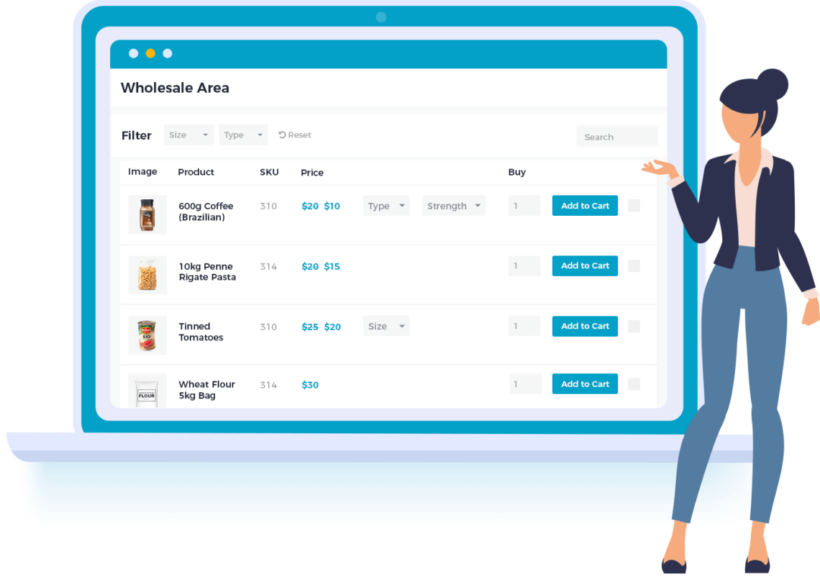
WooCommerce Wholesale Pro is the heart of the suite and the only plugin you need for the wholesale essentials: registration, role-based pricing, hidden categories, and role-based payment and shipping. You can add a wholesale section to an existing public store or build a B2B-only site from scratch, then bring in the companion plugins below for anything extra.
Premium · by Barn2 (that's us)
Pros
- Covers the full workflow: unlimited wholesale roles, percentage or per-product pricing, hidden categories, and a custom registration form with approval.
- Deactivate tax for trade customers, remove the coupon box for wholesale users, and offer pay-by-invoice at checkout.
- Bulk-approve or self-register wholesale users, with hidden categories replacing the need for a separate gating plugin.
- Backed by a dedicated support team and a 30-day money-back guarantee.
- A free Wholesale Essentials plugin covers the basics if you want to try wholesale pricing before upgrading.
Cons
- No built-in request-a-quote workflow; you'd add a quote plugin or use a suite like B2BKing for that.
- Accounts are per individual user, with no shared company account for multiple buyers under one business.
- A complete B2B store may need one or two companion plugins on top, though the 40% multi-buy discount offsets the cost.
Wholesale Pro covers wholesale pricing and product visibility. For additional B2B features, add any combination of the plugins below. Because they're built to work together, Wholesale Pro plus one or more of these covers the whole wholesale workflow. You also get 40% off when you buy two or more together.
Add WooCommerce Product Table for order forms
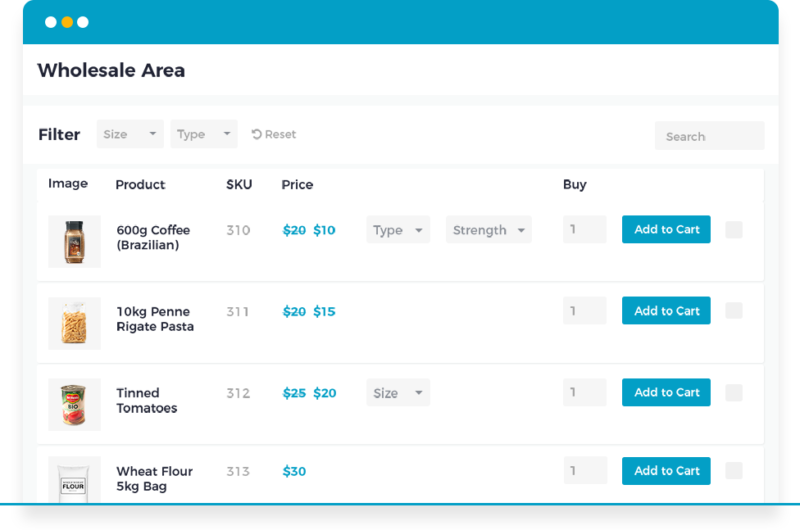
Trade buyers do not want to click through individual product pages. WooCommerce Product Table turns your catalog into a one-page order form, where buyers search, filter and add multiple items to the cart from a single table. Combined with Wholesale Pro, they see wholesale prices in that order form.
Premium · by Barn2 (that's us)
Pros
- A one-page B2B order form with search, sort and filtering, listing all products or split by category.
- Add-to-cart buttons or checkboxes for bulk ordering, with variation and quantity pickers in the table.
- Shows wholesale prices in the order form when paired with Wholesale Pro.
Cons
- It's an order-form layout, not a pricing or roles plugin on its own.
- Premium only, with no free version.
Add WooCommerce Quantity Manager for bulk quantity rules
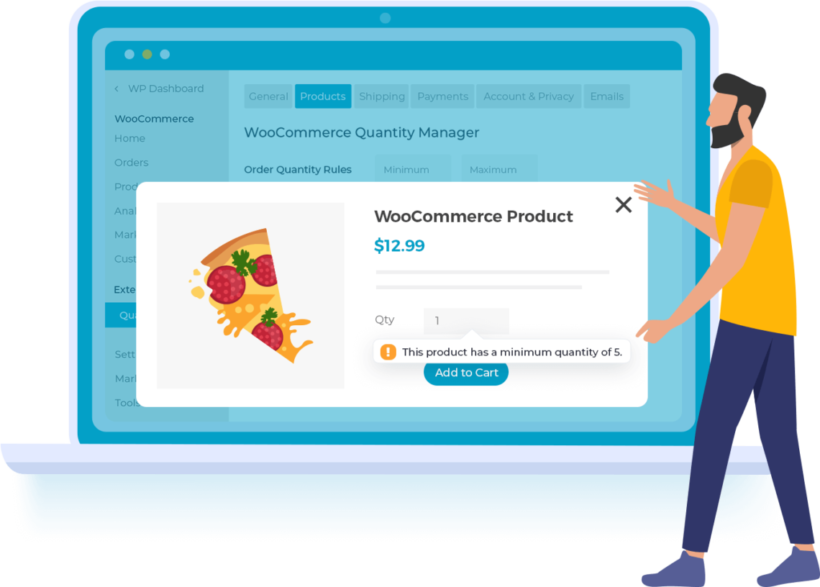
By default, WooCommerce sets every product to a quantity of one, which nudges buyers toward single units. WooCommerce Quantity Manager adds advanced quantity rules, so you can set sensible bulk defaults and stop unprofitable small orders.
Premium · by Barn2 (that's us)
Pros
- Set minimum and maximum quantities per order, category, product or variation.
- Set minimum and maximum order values, plus per-category or per-product spending limits.
- Quantity step values and per-role rules, so trade and retail behave differently.
Cons
- A single-feature plugin: it manages quantities, not pricing or roles.
- Premium only, with no free version.
Add WooCommerce Bulk Variations for variable products
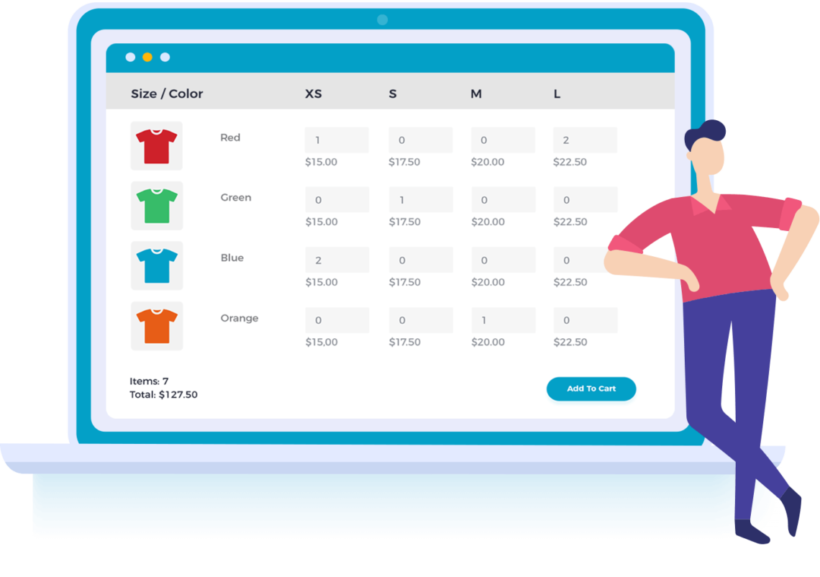
If you sell products with lots of variations, WooCommerce Bulk Variations speeds up both managing them and letting B2B buyers order them. It displays every variation in a single grid or pricing matrix that doubles as an order form, instead of a slow dropdown.
Premium · by Barn2 (that's us)
Pros
- Show every variation, with stock and prices, in a single table or pricing matrix.
- Let buyers order multiple variations at once, ideal for sizes and colors in bulk.
- Manage all your variable products from one place in the admin.
Cons
- Only relevant if you sell variable products.
- Premium only, with no free version.
Add WooCommerce Discount Manager for dynamic pricing
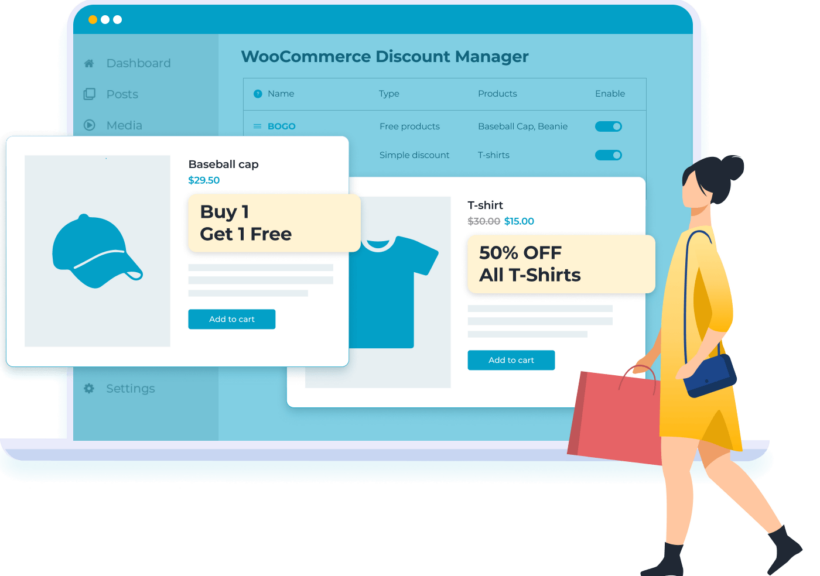
Sometimes wholesale pricing gets more complex than flat role discounts. WooCommerce Discount Manager adds dynamic and quantity-based pricing on top of your wholesale roles, and, unusually, displays those deals clearly on the front end.
Premium · by Barn2 (that's us)
Pros
- Bulk and tiered pricing, role-based pricing and scheduled sales, shown on the product page rather than only at the cart.
- Layer dynamic discounts on top of Wholesale Pro roles for advanced wholesale pricing.
- Create storewide, category and product discounts from one place.
Cons
- Bulk and tiered discounts calculate at the cart, so the product page can show the base price until checkout.
- Premium only, with no free version.
Other all-in-one WooCommerce B2B suites
If you'd rather have everything in a single plugin from another vendor, these suites each cover the full B2B workflow. Here's how they compare.
Wholesale Suite

Wholesale Suite by Rymera is the long-running market leader, built around the free WooCommerce Wholesale Prices plugin (20,000+ installs) with premium add-ons for order forms, lead capture, payments and quotes. It's mature and well-supported, but the full workflow is split across several plugins you license separately.
★★★★★ 4.8 · 20,000+ installs · by Rymera
Pros
- The best free B2B starter on WordPress.org: creates a wholesale role and lets you set trade pricing for it.
- Premium add-ons cover bulk order forms, registration and lead capture, NET 30/60/90 payment terms, and request-a-quote.
- Mature, actively maintained, and backed by a large independent review base.
- A good fit if you want to add only the pieces you need over time.
Cons
- The full workflow is sold as several separate plugins you install and license individually, which gets expensive fast.
- Setup has a learning curve once you start combining pricing rules, registration and order forms.
- Payment terms require a Stripe account through the Wholesale Payments add-on.
- No single all-in-one install; you assemble the suite yourself.
Search for 'WooCommerce Wholesale Prices' by Wholesale Suite under Plugins → Add New to install the free version.
B2BKing
B2BKing by WebWizards is the most-installed dedicated B2B suite on WordPress.org and the strongest free starting point. It packs an enormous feature set, from company accounts and subaccounts to request-a-quote and an invoice payment gateway, though that breadth is also its learning curve.
★★★★★ 4.9 · 10,000+ installs · by WebWizards
Pros
- A genuinely capable free version covering wholesale pricing, customer groups and per-group payment and shipping.
- Pro adds registration approval, tiered pricing, tax exemptions, request-a-quote, a bulk order form and subaccounts.
- A built-in CRM dashboard for managing B2B accounts, plus an invoice payment gateway.
- Actively maintained, with a long release history and a 4.9-star average.
Cons
- A steep learning curve; the 130+ features take real time to configure correctly.
- Most true B2B features are locked to the paid Pro tiers; the free version is pricing-focused.
- Pro is an annual per-site subscription, so ongoing cost adds up.
- Beginners usually need the documentation or support to get set up.
WholesaleX
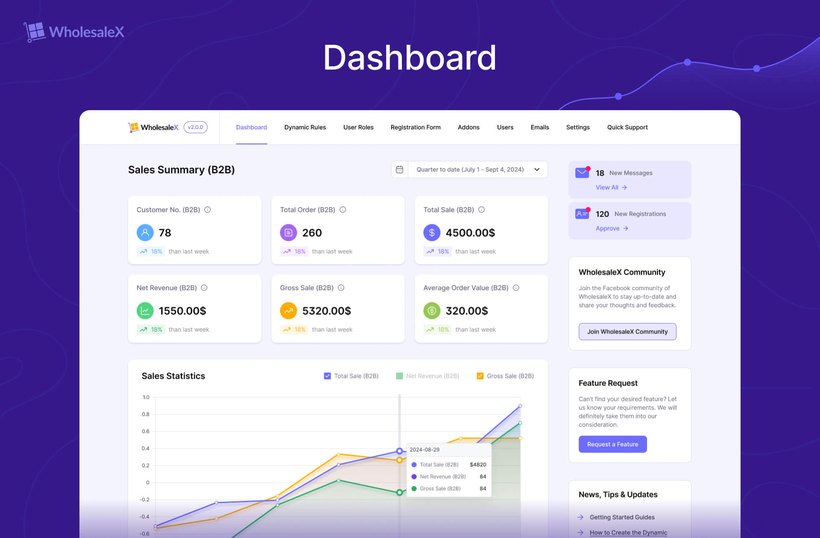
WholesaleX by WPXPO is a modern all-in-one suite with a clean interface and, unusually, a lifetime license option instead of annual renewals. It consolidates roles, dynamic pricing, quotes and bulk ordering into one plugin with a usable free tier.
★★★★★ 5.0 · 2,000+ installs · by WPXPO
Pros
- An all-in-one suite: wholesale roles, a registration form builder, and a dynamic pricing engine in one plugin.
- Request-a-quote with built-in buyer-seller messaging for price negotiation.
- Bulk order form, catalog mode, a store-credit wallet and subaccounts for team buyers.
- Lifetime license option, which avoids the annual renewals most rivals charge.
Cons
- Net-terms and invoicing aren't as deep as some rivals; store credit relies on the Wallet add-on.
- Quote and order-form settings are buried in a broad settings menu, so configuration can feel layered.
- The support forum shows recurring bugs (double-shown prices, variations showing $0.00, and tax-exemption misfires).
- Some integration conflicts reported, including with Stripe.
Wholesale for WooCommerce

Wholesale for WooCommerce by WPExperts is a full suite that bundles the core B2B workflow into one plugin, with a free version on WordPress.org and a Pro tier. It suits hybrid B2B and B2C stores that want one mid-priced tool rather than several add-ons.
★★★★☆ 4.4 · WooCommerce marketplace · by WPExperts
Pros
- One plugin for wholesale registration with approval, multiple roles, and role, category and product-level pricing.
- Tiered quantity pricing, tax exemption for verified wholesalers, and minimum order rules.
- Role-based payment and shipping restrictions, private store visibility, and a wholesale dashboard.
- Freemium, so you can trial the core before upgrading.
Cons
- A feature-dense admin that reviewers find unintuitive, with a real learning curve.
- Its quote / request-a-quote capability is weaker than B2BKing or Wholesale Suite.
- Carelessly configured pricing rules can add database load.
- A smaller independent review base than the category leaders.
B2B for WooCommerce by Addify
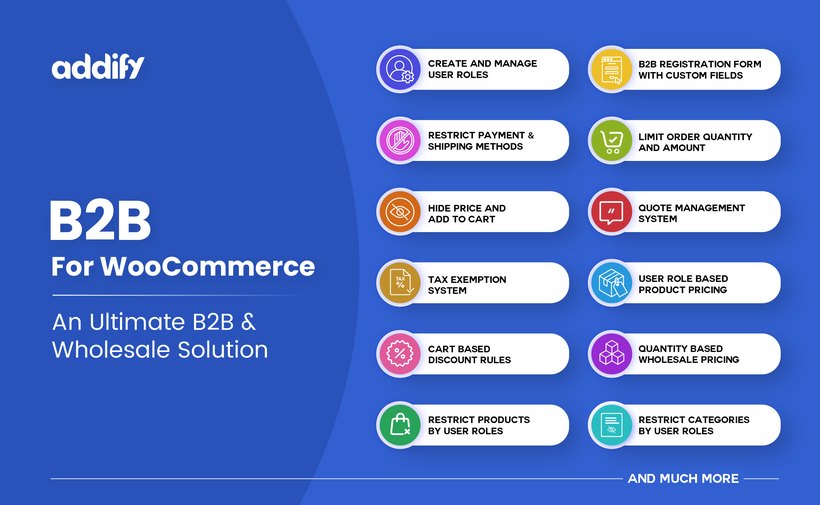
B2B for WooCommerce by Addify is an all-in-one suite sold on the official WooCommerce.com marketplace, which bundles around five Addify modules into one B2B package. The marketplace listing means single-vendor billing and official support, at the cost of a higher price and no free trial.
★★★★☆ 4.7 · WooCommerce marketplace · by Addify
Pros
- Custom B2B roles and extended registration forms with around 18 field types and admin approval.
- Role-based and quantity-tiered pricing with CSV price import.
- A request-a-quote system with PDF generation and quote-to-order conversion.
- Product and category visibility controls, tax exemption with document uploads, and per-role payment and shipping rules.
Cons
- It's a bundle of five-plus separate modules, so setup spans many screens and can feel fragmented.
- No free version to trial, and it's an annual license rather than a one-time price.
- Resolving theme or plugin conflicts often needs an Addify support ticket.
- The rating on Addify's own store is higher than the independent marketplace figure, so treat vendor reviews with care.
ELEX Catalog Mode, Wholesale & Role-Based Pricing (budget option)

ELEX Catalog Mode, Wholesale & Role-Based Pricing by ELEXtensions is the budget pick. At around $79 it packs in catalog mode, role-based and customer-specific pricing and a basic quote button, though build quality and depth aren't quite at the level of the dedicated suites.
★★★★★ 4.7 · 10,000+ installs · by ELEXtensions
Pros
- Role-based, customer-specific and category-based pricing, plus catalog mode, in one affordable plugin.
- A free version on WordPress.org for simple-product catalog mode and role pricing.
- Includes a basic request-a-quote button.
- Around $79 for premium, cheaper than the full suites.
Cons
- No native B2B registration or account-approval workflow, and no minimum-order rules.
- The quote feature is a basic button, not a full quote-management system.
- The free version is limited to simple products and is reported not to work on some setups.
- It doesn't change the store layout; pair it with an order-form plugin for B2B ordering.
Choosing the right WooCommerce B2B plugin
The right plugin depends on what kind of B2B store you're running. Here are the four questions I'd ask before choosing:
- Trade-only or mixed retail?If you sell to both trade and public customers from the same store, you need role-based pricing and category visibility. WooCommerce Wholesale Pro handles both in one install.
- Do you need quote requests?Some B2B buyers won't check out without negotiating first. If quotes are part of your sales process, look for a plugin with a 'request a quote' option.
- How big is your catalog?Stores with 100+ products need a fast way for B2B buyers to order in bulk. Pair WooCommerce Wholesale Pro with our wholesale order form setup so buyers can add multiple items from one page.
- What integrations matter?If you need invoice payment, role-based shipping, or custom tax rules, check those are covered before you commit. Most B2B stores need at least one of these.
FAQ
Is there a free WooCommerce B2B plugin?
Yes. Our own Wholesale Essentials for WooCommerce is a free plugin for wholesale pricing and roles, and Wholesale Suite's WooCommerce Wholesale Prices is another solid free option. Both are good starting points, but most stores outgrow them once they need quote requests, hidden products, or role-based shipping.
What is the best WooCommerce B2B plugin?
For most stores, WooCommerce Wholesale Pro is the strongest all-round option. It handles wholesale pricing, hidden categories, role-based payment and shipping, and bulk registration in one install. Pair it with WooCommerce Product Table if you also need a one-page order form for trade buyers.
Can I hide wholesale prices from retail customers?
Yes. Most B2B plugins include a 'hide price until login' feature, which means only approved wholesale users see the trade price. WooCommerce Wholesale Pro and WooCommerce Wholesale Prices both support this. It's the standard setup when you sell to both trade and retail from the same store.
Does WooCommerce support B2B natively?
No. The free WooCommerce plugin doesn't include wholesale pricing, hidden categories, quote requests, or role-based shipping. You'll need a B2B plugin to add these features. WooCommerce on its own only supports a single price per product. It also has one set of payment and shipping rules for all customers.
Our top WooCommerce B2B plugin recommendations
There's no single best WooCommerce B2B plugin; the right choice depends on what your store needs. Here's where I'd start.
- For a complete, flexible wholesale setup, build a suite around our own WooCommerce Wholesale Pro. Add Product Table, Quantity Manager, Bulk Variations or Discount Manager as you need them, with 40% off two or more.
- To start for free, try our own Wholesale Essentials plugin or B2BKing's free version.
- For everything in one single plugin, B2BKing is the most-installed all-in-one suite, or WholesaleX for a modern option with a one-time license.
- For a long-established suite you build up from separate plugins, Wholesale Suite is the market leader.
- On a tight budget, ELEX covers the basics cheaply.
2 Comments
WooCommerce B2B is the best plugin for B2B, B2C/B2B hybryd solutions... All features I need in a single plugin!
Hi, Wayne. Thanks for the kind words for our WooCommerce B2B order forms solution! I'm glad to hear it has the features that you need. Should you have any questions, you can let us know via our dedicated Support Center. Cheers.