What associations should know before building on WordPress


WordPress is a strong platform for associations, offering full data ownership and flexible plugins, but it requires more setup than turnkey alternatives. This guide covers membership tools, document management, payments, and the key trade-offs to consider before you build.
Many associations reach a fork in the road when planning their website. Should you choose a dedicated Association Management System, or build on WordPress and assemble the tools you need?
WordPress gives associations real control. You own your data, you choose your tools, and you are never subject to a vendor's pricing changes or forced migrations. The trade-off is clear, though: you handle hosting, security, plugin updates, and user roles yourself.
This guide walks through every major decision area, from membership plugins and payments to document management and community tools. By the end, you will have a clear picture of whether WordPress fits your association and which plugins to consider.
Is WordPress right for associations?
WordPress is a self-hosted, open-source platform that powers over 40% of all websites. Associations use it because it offers complete control over data and platform decisions.
What WordPress handles well for associations:
- Membership management with tiered access levels.
- Document management for governance and policies.
- Content gating for members-only resources.
- Event registration and calendars.
- Fundraising and donation collection.
Total cost of ownership at a glance:
A DIY WordPress build typically costs around $200 to $600 per year for hosting and plugins. A professionally built site starts around $5,000. Dedicated AMS platforms like WildApricot or MemberClicks often cost $2,000 to $10,000 or more per year, and almost always use per-member pricing.
That distinction matters. Think of an AMS like a utility bill - it grows every time you add a new member. WordPress is more like buying a building - here is a higher upfront cost, but your annual "keep the lights on" spend stays low and predictable even as your community grows.
WordPress also gives you full data ownership. You can export your member database at any time. There is no vendor lock-in and no risk of a forced platform migration.
WordPress DIY vs AMS Platform Annual Costs by Membership Size
| Membership Size | WordPress DIY | AMS Platform |
|---|---|---|
| Small 0–500 members |
$500–$3,000/year | $10,000–$20,000+/year |
| Growing 500–2,000 members |
$1,500–$6,000/year | $15,000–$30,000+/year |
| Mid-size 2,000–10,000 members |
$3,000–$10,000/year | $25,000–$50,000+/year |
| Large 10,000+ members |
$5,000–$15,000+/year | $50,000–$100,000+/year |
Should you choose WordPress for your association?
Here is a straightforward way to think about it.
Benefits of WordPress for associations:
- Platform control with no vendor lock-in or forced migrations.
- Budget flexibility, from DIY under $500 per year to scaled professional builds.
- Custom member portals and content restrictions that rigid AMS platforms cannot match.
Drawbacks to plan for:
- Requires ongoing maintenance: hosting, security patches, plugin updates, and role configuration.
- Someone on your team needs to be comfortable with WordPress basics.
- More configuration effort than a turnkey AMS solution.
WordPress works best for associations that want full ownership of their data and the freedom to build a site that looks and feels exactly like their community.
Document management for governance and policies
Most AMS platforms treat document storage as an afterthought. Bylaws, board minutes, policies, and compliance documents need something more serious than a folder of PDFs attached to emails.
WordPress's default Media Library is also a poor fit. Files uploaded there are indexed by Google by default. A link shared carelessly can expose sensitive draft documents to the public. Associations need searchable, secure document management with proper access control and an audit trail.
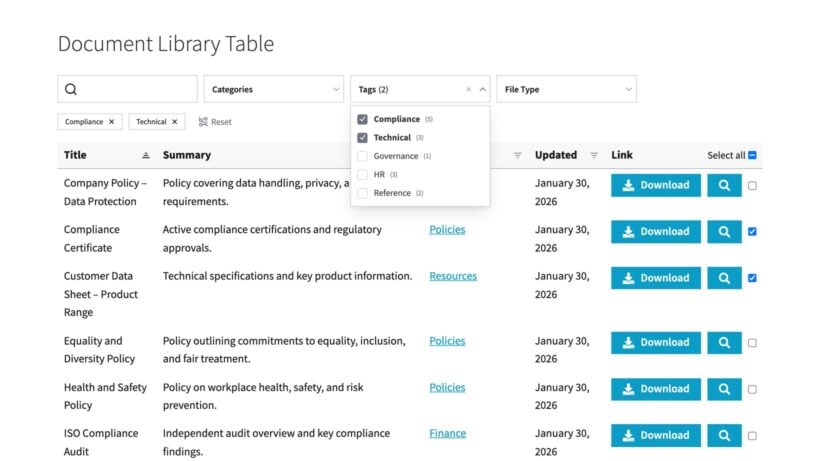
Document Library Pro fills this gap directly. It provides searchable tables and grids, hierarchical folders, filters, lightbox previews, and CSV import and bulk upload. It also has various additional governance-specific features that are important for associations:
- Protection by user role or specific users, so only Board members see board materials (for example).
- Version history with rollback, so you always have a record of policy changes.
- Expiry dates that auto-draft outdated documents before they mislead anyone.
- Download tracking for compliance and audit purposes.
For associations selling downloadable resources or publications, see how to add downloadable PDF files. For content gating, read more at set up gated content in WordPress step by step.
Not every association ends up on WordPress. Some run on a dedicated AMS, and others sit on Squarespace, Wix or a platform a supplier chose for them. A governance library shouldn't be the thing that forces that decision. Document Library Pro also comes in a cloud version that gives you the same searchable, access-controlled archive on any website. You build the library once and add it to your existing site with an embed code, or have it published as a standalone members' area, with the hosting handled for you. Bylaws, minutes and policies stay behind the same role-based access whether or not your site runs on WordPress. If your association qualifies as a nonprofit, you can claim 15% off Document Library Pro, whether you use the WordPress plugin or the cloud version.
Collaborative editing
When you add the association's documents to the library, you can either store them in the WordPress media library or host them on any external file management system. For example, you can keep them on platforms like Google Drive, Microsoft OneDrive, or Dropbox.
Use Google Drive if you'd like employees of the association to be able to edit documents collaboratively. That way, they can click on a link to view the document on Google Drive and - depending on their permissions - make edits and comments.
Membership management and payments
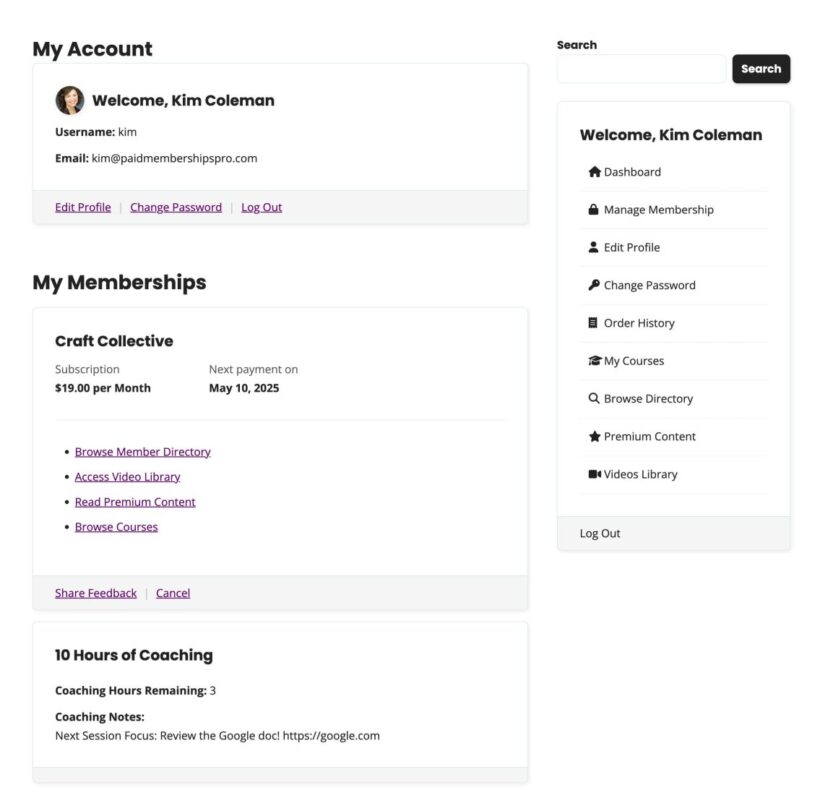
WordPress supports several capable membership plugins. Before comparing them, it helps to know what they have in common. Most membership plugins provide member levels, recurring dues collection, renewal reminders, content restriction by tier, and searchable member directories.
The real decision comes down to your specific situation:
- Paid Memberships ProBest for budget-conscious associations starting from zero. A free tier is available for testing. Paid plans start at $174 per year.
- MemberPressBest if you are already using WooCommerce for events or publications. The integration is tight and plugin conflicts are less likely. Plans start at $199.50 per year.
- MembershipWorksBest when events and membership management are equally critical. Both live in one plugin, including event management, registration, and a calendar. A free version is available for up to 50 accounts, with paid tiers starting at $35 per month.
All three plugins cost significantly less on annual licensing than dedicated AMS platforms.
Payment integration:
All three membership plugins integrate with Stripe, PayPal, and Apple Pay. If your association qualifies as a nonprofit then request Stripe's nonprofit rates, which are 2.2% plus $0.30 per transaction versus the standard 2.9% plus $0.30.
For non-dues revenue like donations or campaigns inspired by cheap fundraising ideas, add GiveWP or Charitable alongside your membership plugin.
Forms, events, and learning tools
Forms and registration
Most associations need more than a basic contact form. Officer elections with voting logic, volunteer applications with conditional fields, and committee nominations all require something more capable.
- Gravity FormsBuilt for complex processes. Handles conditional fields, multi-page forms, payment collection, and integrations with membership plugins for access restriction by level. Plans start at $59 per year.
- WPFormsA simpler alternative for basic contact forms, registration, and feedback. A free version is available. Paid plans start at $49 per year.
Both integrate with membership plugins so you can restrict form access by membership level.
Events and learning management
- The Events CalendarGood for committee meetings, member events, and chapter gatherings. The Pro version at $99 per year adds registration, recurring events, and subscription feeds.
- Events ManagerFree core plugin with a booking system, multiple locations, and recurring events. The Pro version starting at $99 per year adds payment gateways, custom booking forms, and member pricing.
Choose based on feature needs. If event registration and membership dues are equally critical to your operation, MembershipWorks (covered above) may handle both in one plugin and reduce complexity.
Learning management systems
If your association generates revenue through certification programs or continuing education, an LMS is worth adding. LearnDash or LifterLMS both integrate with membership plugins. Free members can access introductory content, while paid members unlock full certification tracks. Content dripping also keeps members engaged over time by releasing materials gradually.
Community and engagement tools
Community platforms
Not every association needs a community platform. For some, paywalled content and a member directory are enough. But for trade associations where networking drives renewal, or professional groups with active committees, a richer engagement layer makes a real difference.
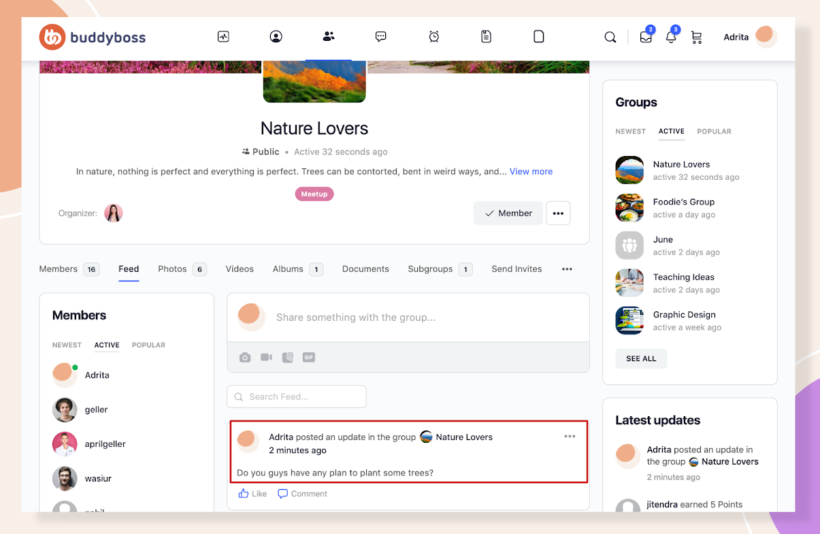
- BuddyBossTransforms WordPress into a community platform with member profiles, social groups by committee or interest area, activity feeds, direct messaging, and member connections. Premium plans start at $228 per year.
- BuddyPressFree and capable but requires more configuration than BuddyBoss. Good starting point for associations with limited budgets.
- bbPressTraditional WordPress forum plugin with topics, replies, and moderation. Integrates well with BuddyBoss and BuddyPress. Free to use.
Email automation
Member data staying inside WordPress, rather than syncing to an external service, is a genuine advantage. Both MailPoet and FluentCRM run directly from your WordPress dashboard.
Key capabilities include welcome sequences, renewal reminders, event announcements, and newsletter campaigns. Sequences can trigger automatically based on membership status changes, which reduces manual admin work considerably.
MailPoet starts from $10 per month for up to 500 subscribers and offers a free version. FluentCRM starts at $103 per year. Factor these into your total cost of ownership when comparing to an AMS.
What to plan for before you build
Several technical and operational realities catch associations off-guard during a WordPress build. Here are the most important ones to plan for:
WordPress roles do not map neatly to association structures. Out of the box, WordPress has roles like Administrator, Editor, and Subscriber. Your association needs Board, Committee, Member, and Staff. Use a role editor plugin like Members or User Role Editor to create these. Test access configurations carefully. Misconfigurations can expose sensitive content to the wrong people.
There is no native AMS sync. If you are running a separate system like Wild Apricot, Novi, or MemberClicks alongside WordPress, the two systems need to stay aligned. That either means manual reconciliation or custom integration. Single sign-on between WordPress and a separate membership database requires custom development or Zapier workflows. Neither is plug-and-play.
Signs you have reached the "sanity check" limit:
- The manual headacheYou are spending hours every week doing manual admin or acting as the bridge between tools.
- The frictionIt feels like you are managing a collection of separate parts rather than one cohesive system.
- The decision ruleYou have not outgrown WordPress's capability; you have outgrown the administrative effort required to maintain it. If the staff time spent managing separate plugins costs more than an AMS subscription, it is time to reconsider.
At that scale, associations typically go one of two directions. Some use WordPress as the public-facing layer with a dedicated AMS backend handling membership data. Others move entirely to an AMS platform. WordPress remains viable in both cases, either with custom development or AMS integration.
The associations which I see struggling most with WordPress are ones that tried to replicate AMS features using five separate plugins, without a plan for how those plugins communicate. Start with a clear plugin architecture before you start setting things up.
Katie KeithFounder and CEO
Your plan: WordPress for associations
WordPress is a flexible and cost-effective platform for managing associations. The decision to build on it is really a decision to prioritize control and flexibility over hands-off convenience.
It works best when someone on your team is comfortable with WordPress basics, and when your budget calculation genuinely accounts for hosting, plugins, and ongoing maintenance.
If that fits your situation, here is a sensible decision sequence:
- Confirm your budget and technical comfort level.
- Choose your membership engine based on your primary use case.
- Set up payment processing and request nonprofit rates from Stripe.
- Organize governance documents with Document Library Pro so members can find what they need in seconds.
- Layer in community, event, and email tools as your needs clarify.