How to add a multistep checkout to WooCommerce

Adding a multi-step checkout to your WooCommerce store can have a massive impact on your conversions and sales. You can't create a multistep checkout with a standard WooCommerce install, so let's solve that.
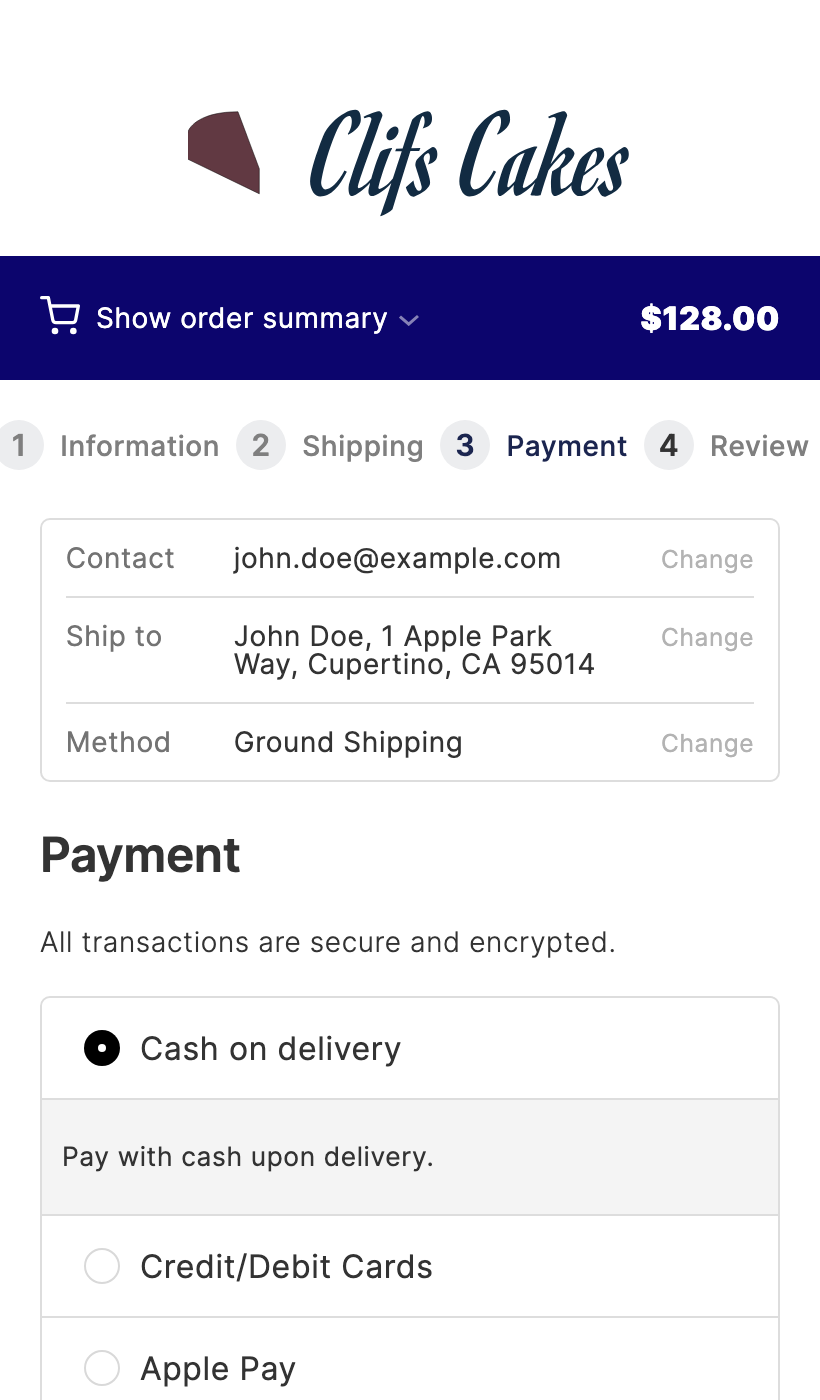
In this article, you'll learn why a multistep checkout works and how to add one to your store. I'll use CheckoutWC, a popular WooCommerce multistep checkout plugin.
If your store has the standard one-page checkout, it can feel overwhelming and distracting.
A multistep checkout breaks the process into clean stages. You reduce cart abandonment and lift your conversion rate.
So, before we jump into the how, let's address the why.
Why add a multistep checkout to WooCommerce?
As a store owner, you work hard to make every part of your business run smoothly. The goal is to add value through your products.
The last thing you want is for someone to give up on your store because of friction at the final step.
That's why the checkout experience matters. With a multistep checkout plugin like CheckoutWC, you deliver a clean, focused process.
Let's break down the main benefits of a multistep checkout.
A multistep checkout reduces checkout abandonment
A long, complicated checkout makes people leave.
According to Baymard Institute data, 18% of users abandon carts due to long or complicated checkouts. A multistep checkout helps because it:
- Removes unnecessary fields and keeps each step focused.
- Auto-completes addresses so customers don't have to type every line.
- Adjusts sizing and layout for mobile devices.
A multistep checkout removes distractions
CheckoutWC creates an app-like experience. It strips the site navigation so customers can fully focus on buying.
Imagine your store being so easy to buy from and clutter-free that customers don't think twice about completing the purchase. Their focus stays on the screen at hand.
CheckoutWC removes your site's standard navigation, sidebars, banners, and more. Customers see only the simplified steps they need to complete.
A straightforward checkout is key to higher sales.
A multistep checkout guides the customer to purchase
A multistep checkout plugin walks customers through the checkout in clear, manageable stages.
CheckoutWC templates usually break the flow into three logical steps: Details, Shipping, and Payment.
Sectioning each step keeps the customer focused and removes the bulk of the default checkout.
The last stage of the customer journey is the most fragile. Each step in a multistep checkout is designed to keep them moving forward.
A multistep checkout is mobile friendly
Customers want simplicity. Most online shopping happens on smartphones.
Overcomplicating the checkout costs you sales. A multistep checkout like CheckoutWC gives mobile customers a polished, focused experience.
So now we've covered the benefits. Let's look at why CheckoutWC is a strong way to add a multistep checkout.
Add a multistep checkout with CheckoutWC
Here's why CheckoutWC is a strong choice for adding a multistep checkout to WooCommerce.
What is CheckoutWC?
CheckoutWC is a WooCommerce checkout plugin that replaces the standard checkout with a polished, conversion-focused design.
The plugin offers Shopify-inspired templates and supports both multistep and single-page layouts. You pick the template that works for your store.
When the checkout feels modern and simple, cart abandonment drops and sales go up.
Here's a brief overview of the key features that CheckoutWC offers:
- Customers fill out fewer fields, making the checkout quicker.
- Address autocomplete saves customers from typing every line.
- Sizing and layout adjust automatically for mobile devices.
- The plugin is compatible with WooCommerce themes and most third-party plugins.
- Setup is straightforward - install, pick a template, and customize.
Not only is CheckoutWC easy to set up, you can fully customize it to fit your brand.
Customizations available include:
- Personalize the checkout header text.
- Change font, button, and accent colors to fit your theme.
- Enable or disable the upgraded checkout on desktop or mobile.
- Add a side cart to let customers adjust quantities mid-checkout.
How to add a multistep checkout to WooCommerce
Below are the steps to add a multistep checkout to your store. The process has two parts:
- Install the multistep WooCommerce checkout plugin (CheckoutWC).
- Customize it to fit your store.
Let's get it up and customized.
Step 1: Install CheckoutWC
Purchase CheckoutWC from checkoutwc.com. You'll get a download link and a license key.
Once you've purchased CheckoutWC, take the following steps:
- Go to Plugins → Add New → Upload Plugin.
- Choose the zip file you downloaded, upload, and click 'Activate'.
- Enter your license key when prompted.
With CheckoutWC installed, we can move on to customizing your multistep checkout.
Step 2: Customize CheckoutWC for your store
CheckoutWC is now active. Adjust the settings so customers get the most from your new checkout.
To customize the plugin, do the following:
- Go to WooCommerce → CheckoutWC in your WordPress dashboard.
- Open the 'General' tab.
- Pick a template that matches the look you want. Each template comes with the multistep flow built in.
- Open the 'Branding' tab. Upload your logo and adjust colors, fonts, and button styles to match your theme.
- Open the 'Side Cart' tab if you want a slide-in cart on every page.
- Click 'Save Changes' when you're happy with the settings.
That's it. Your multistep checkout is now live.
Display the multistep checkout in a quick popup cart
There are lots of reasons to add multistep checkout to WooCommerce. It breaks the process into logical chunks.
However, sending customers across multiple pages still slows them down. The fix is to display the multistep checkout inside a popup modal.
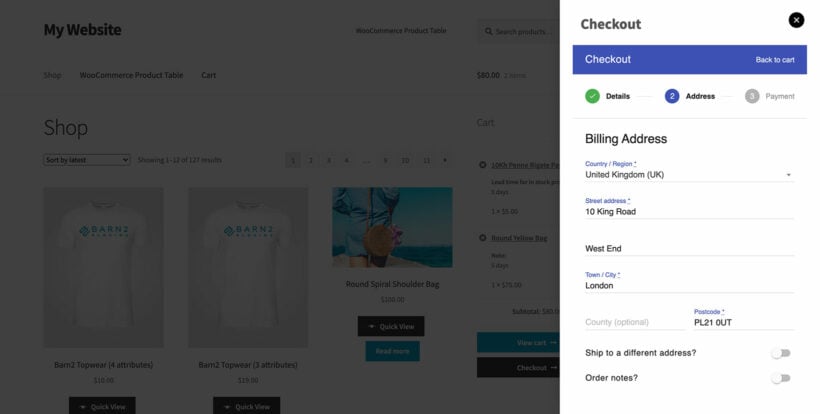
In this screenshot, the multistep checkout is shown inside the WooCommerce Fast Cart popup. Fast Cart turns the cart and checkout into a true one-page shopping experience.
Fast Cart is compatible with multistep checkouts. The customer moves through each step inside the popup. They get the benefits of a structured checkout without leaving the page.
Further reading: How to use WooCommerce Fast Cart with multi-step checkout.
Add a multistep checkout for WooCommerce today
With these steps complete, your multistep checkout is live.
Customers can now move through your checkout faster and with less friction. You'll see fewer abandoned carts and stronger conversion rates.
The sooner you install CheckoutWC, the sooner you'll see the results.