Flux Checkout vs CheckoutWC vs WooCommerce Fast Cart

Choosing between Flux Checkout vs CheckoutWC for your WooCommerce store? Here's how the two plugins compare against each other, plus some additional checkout plugins worth considering.
Replacing or upgrading the default WooCommerce checkout can lift your conversion rate substantially. Three plugins dominate this space: Flux Checkout, CheckoutWC, and WooCommerce Fast Cart.
Each one takes a different approach to the same problem. This guide walks through what each plugin does, where they differ, and which combination works best for most stores.
I'm writing this following some recent changes to Flux Checkout. Originally an Iconic WP plugin, the Iconic brand has now been discontinued, and Flux Checkout has been merged into something called Kadence Store Kit. Its future is unclear, so lots of people are seeking a reliable Flux Checkout alternative. The aim of this article is to help you compare the options and plan the next steps for your WooCommerce checkout.
The three plugins at a glance
All three plugins improve the WooCommerce checkout, but they solve different parts of the problem.
- Flux Checkout replaces the standard checkout page with a multi-step layout.
- CheckoutWC also replaces the standard checkout, with a polished design and a long list of features.
- WooCommerce Fast Cart skips the separate cart and checkout pages entirely. Customers complete the purchase inside an on-page popup. Use it alone or combine it with Flux Checkout or CheckoutWC.
The first two are direct competitors. WooCommerce Fast Cart sits in a different category and pairs well with either of the other two.
How the three checkout plugins compare
Here's how Flux Checkout, CheckoutWC and WooCommerce Fast Cart stack up against each other on the features that matter most.
| Feature | Flux Checkout | CheckoutWC | WooCommerce Fast Cart |
|---|---|---|---|
| Replaces the WooCommerce checkout page | Yes (multi-step) | Yes (one-page or multi-step) | No |
| Removes the separate cart and checkout pages | No | No | Yes (replaces them with an on-page popup) |
| Customizable design templates | Yes | Yes | Inherits from your existing checkout (or Flux/CheckoutWC if used together) |
| Order bumps at checkout | Yes | Yes | Works with whichever checkout runs inside the popup |
| Customizable thank you page | Yes | Yes | Not applicable |
| Actively developed as a standalone plugin | No (bundled into Kadence Store Kit) | Yes | Yes |
| Pairs with the others | Can run inside Fast Cart | Can run inside Fast Cart | Wraps either checkout in a popup |
As you can see, CheckoutWC and WooCommerce Fast Cart cover different ground and complement each other, which is why I recommend running them together.
Flux Checkout is now part of Kadence Store Kit
As I mentioned in the introduction, Flux Checkout was originally built by Iconic. It replaced the default WooCommerce checkout with a clean multi-step layout.

The plugin has now been merged into Kadence's Store Kit. As a result, it is no longer a standalone solution for upgrading the WooCommerce checkout. You can read more on the Kadence Store Kit page.
This change has implications for Flux Checkout's future. Flux is no longer being actively developed as a standalone product. I would expect feature work to slow down as the team focuses on the wider Store Kit bundle. You also risk adding bloat to your site because Store Kit inevitably contains features you don't need.
If you already use Flux Checkout, it will keep working and you will continue receiving updates. However, if you're choosing a checkout plugin for a new store then I'd recommend looking elsewhere.
CheckoutWC is the strongest standalone replacement
CheckoutWC is the closest direct alternative to Flux Checkout. It replaces the default checkout with a polished, optimized layout.
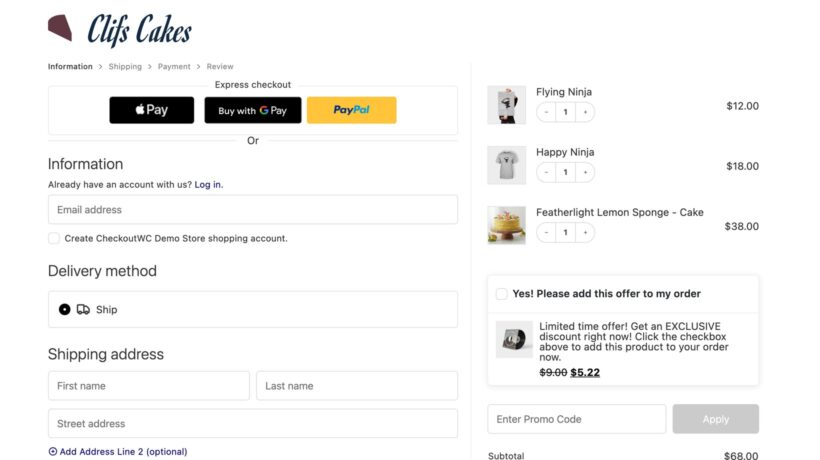
You get a one-page or multi-step checkout, with multiple design templates to pick from. The plugin handles trust seals, order bumps, address autocomplete, and a customizable thank you page.
CheckoutWC has been actively developed for years. The Kestrel team ships regular updates and the plugin has a clear roadmap.
I believe this is the strongest checkout replacement for most stores and highly recommend it. It works well out of the box and you can customize the design without writing code.
The plugin also supports popular page builders if you want deeper control over the layout. Either way, the checkout looks and feels noticeably better than the default WooCommerce one.
WooCommerce Fast Cart takes a different angle
WooCommerce Fast Cart isn't a direct replacement for Flux or CheckoutWC - it can work alongside them. It removes the cart and checkout pages from the customer journey entirely.
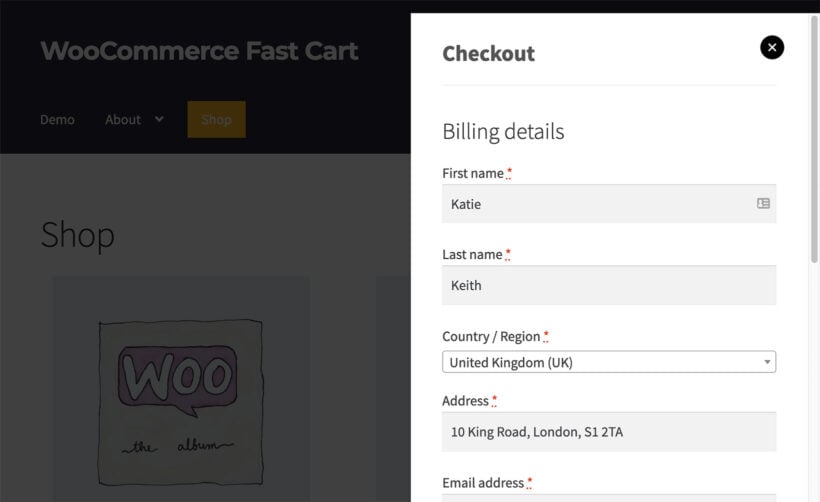
When a customer adds an item to the cart, Fast Cart opens an on-page popup. The popup shows the cart contents and the full checkout form together. Customers can edit quantities, enter their details, and pay without leaving the product page.
This removes a major source of friction. Customers no longer click through to a separate cart page and then a separate checkout page. The whole transaction happens in one place.
Fast Cart works on its own, with the default WooCommerce checkout running inside the popup. But it really shines when you combine it with one of the other plugins below.
Combine CheckoutWC with WooCommerce Fast Cart
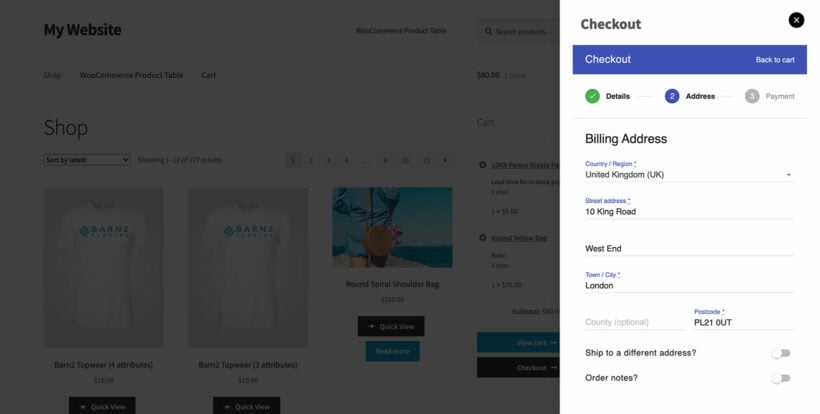
For the best of both worlds, run CheckoutWC and WooCommerce Fast Cart together.
CheckoutWC styles and optimizes the checkout. Fast Cart wraps that checkout in an on-page popup. The result is an optimized, multi-step checkout that opens instantly without a page change.
I recommend this combination for stores that take conversions seriously. CheckoutWC handles the design and feature depth. Fast Cart handles the speed and removes the cart-to-checkout page hop.
You can also pair Flux Checkout with Fast Cart. With Flux now moving into Kadence Store Kit though, using Fast Cart with CheckoutWC is the safer long-term pick.
Which checkout plugin should you choose?
The right plugin depends on your store and what you already use.
- Pick CheckoutWC if you want a polished, actively developed replacement for the WooCommerce checkout.
- Choose WooCommerce Fast Cart if you want to skip the cart and checkout pages and complete sales in a popup.
- Combine both for the strongest result, with the optimized checkout running inside a fast on-page popup.
- Consider Flux Checkout only if you're already using Kadence Store Kit and want the full bundle.
For most WooCommerce stores, the CheckoutWC plus WooCommerce Fast Cart combination delivers the best conversion lift. Each plugin solves a separate problem, and they complement each other instead of overlapping.
Final thoughts
Improving your checkout is one of the highest-impact changes you can make to a WooCommerce store. A faster, cleaner checkout converts more visitors into customers.
If you're still unsure which combination fits your store, see our wider guide to WooCommerce checkout plugins. It compares more options across the full checkout journey.