Posts Table Pro 4: Faster tables, happier visitors


Posts Table Pro 4 is here, with a redesigned table, a faster engine, and a long list of new features for filtering, sorting, and sharing your tables.
More than 10,000 WordPress sites worldwide use Posts Table Pro to display their content in searchable, sortable tables. People use it for blog archives, staff directories, course catalogs, A-Z indexes, real estate listings, and pretty much any other type of data you can think of.
Today I'm pleased to announce that Posts Table Pro 4 is now available. It's the biggest update we've ever shipped for this plugin. We rebuilt it from the ground up with three goals in mind. We wanted a more modern look, much faster performance on large tables, and a simpler setup experience for our users.
We've been using the new version on the Barn2 sites for a few weeks now, and the speed difference on bigger tables is the part you'll keep noticing - as well as the modernized look and feel.
What's new in Posts Table Pro 4
Posts Table Pro 4 is a major rebuild of our WordPress table plugin. It introduces a redesigned table layout, a new indexing engine for faster performance, and a set of new features for filtering, sorting, pagination, and sharing.
The headline changes are multi-column sorting, multi-select filters, infinite scroll, shareable table URLs, and inline column filters. All your existing template choices and design controls are still there too, so you can keep tailoring the look exactly how you want it.
New to Posts Table Pro? Here's how to set up a table from scratch:
A modernized table design
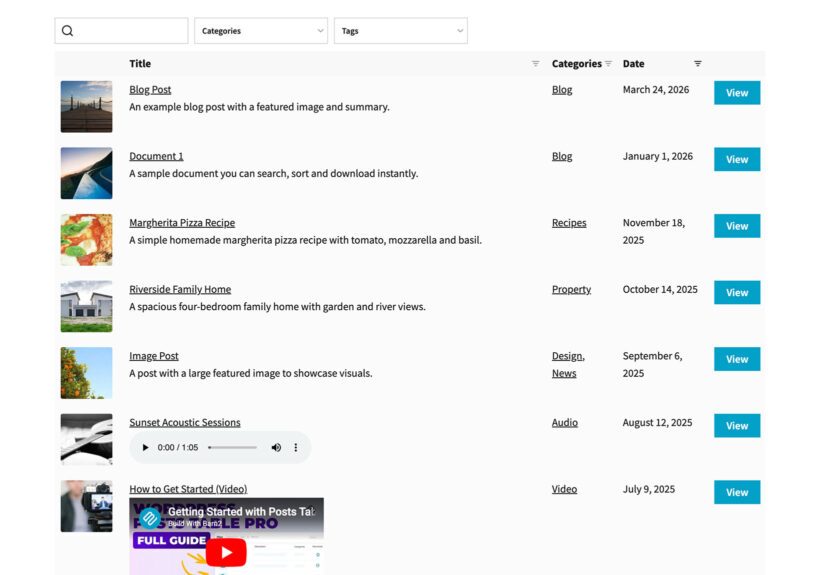
The first thing you'll notice is that the table itself looks more modern out of the box. The default styling has been refreshed to feel cleaner and more current.
You don't need to change a single setting to get the new look. Once you update, the new styles take effect automatically.
All your existing template choices and customization options have been carried over. So if you've spent time tailoring colors, spacing, or typography on your current table, none of that work goes to waste. You can keep what you have, or use the new design as a starting point.
The flexibility is the same as before. You can build image-led tables for product catalogs, data-dense tables for technical specs, compact tables for directories, or spacious tables for document libraries. Whatever your use case, the design bends to fit it.
A faster engine under the hood
The biggest change in version 4 is one you can't see directly. We've rebuilt the back-end with a new indexing system that pre-computes the data your tables need. This makes a real speed difference on larger tables.
The result is faster load times, faster search, and faster filtering. The bigger your table, the more noticeable the improvement. Sites with thousands of rows are where this really pays off.
Tables also lazy-load by default in version 4. The previous limitations that came with lazy loading - around filtering, sorting, and pagination - no longer apply. You get the speed benefit without losing any features 🚀
New filtering and sorting features
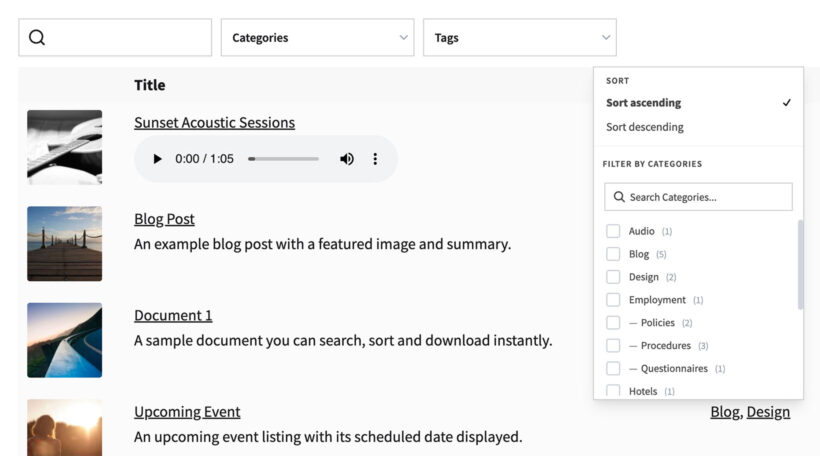
A big chunk of the version 4 work went into giving people more control over how visitors find what they need. Here's what's new:
- Multi-column sortingVisitors can sort by more than one column at a time. This is useful when two fields matter together, like price and rating, or date and category.
- Filters in two locationsPlace filters above the table as drop-downs, or inside each column header as inline filters. Pick whichever fits your layout.
- Multi-select filtersEach filter now accepts multiple values at once. Visitors are no longer limited to one choice per filter.
- Active filters displayA clear summary of the currently applied filters appears above the table. Visitors always know exactly what they're looking at.
- Filter countsEach filter option shows the number of matching posts beside it. Visitors can see what's worth selecting before they click.
Together, these changes make the table much more usable for visitors who need to drill down through a lot of content.
Infinite scroll, shareable URLs, and container height
Three additional new features round out the new release.
Infinite scroll
There's a new pagination mode that loads more rows as the visitor scrolls down the page. It's an alternative to the traditional numbered pages, and it works particularly well for browsing-style tables where visitors are scanning rather than searching for something specific.
Shareable table URLs
Each table now generates a unique URL that reflects its current state. The URL captures the active search, filters, sorting, and pagination.
This is genuinely useful in a lot of scenarios. Someone can bookmark a specific filtered view to come back to later. A support agent can send a customer a link to "this exact list of options". A team can share an internal directory pre-filtered to the right department. I find myself using it more than I expected.
Container height control
A new setting lets you fix the height of the table container. The default is 70vh, but you can use any CSS length unit, and calc() expressions are supported too. It's handy when you need the table to fit a specific space in your page layout.
How to update to Posts Table Pro 4
If you're an existing customer, update as follows:
- Update to version 4 from your WordPress dashboard.
- Due to the size of the update, you will remain on the legacy tables until you choose to activate the new ones. I recommend doing this on a staging site before going live. To enable the new tables, go to Posts Table Pro → Settings and uncheck the 'Legacy DataTables' option.
- Still on the settings page, look through the other new features which you wish to use and pick the ones you want to enable (inline filters, infinite scroll, etc.).
- Test thoroughly on the front end to ensure everything still works as expected.
In general, any customizations you've made to the legacy tables will continue working with the new ones. The exception is specific JavaScript customisations you might have made to the jQuery Datatables library, so please test these carefully.
Coming soon to WooCommerce Product Table and Document Library Pro
The same engine and feature set are coming to WooCommerce Product Table and Document Library Pro in the next few weeks.
If you use either of those plugins, you can look forward to the same modernized design, the same performance gains, and the same new filtering, sorting, and sharing features. We'll announce each one separately when it's ready.
Final thoughts
Posts Table Pro has been one of our most-loved plugins for years, and version 4 is the rebuild it deserved. Update from your dashboard, take a look through the settings page, and pick the features that fit your site.
Thanks to everyone on the Barn2 team who worked on this release, and to the customers who shared feedback along the way. I think you're going to love it!