WooCommerce pricing: What it costs to run a store and how to price your products

Two questions hide behind "WooCommerce pricing". How much does it cost to run a WooCommerce store? And how do you price the products you sell on it? This guide covers both, plus the plugins that handle each part.
WooCommerce itself is free. That's the answer to one half of the question, and it's the reason WooCommerce now powers a huge share of small and mid-size online stores.
The rest of the cost (hosting, payment processing, themes, plugins) depends on the choices you make. Most of the cost comparisons online either gloss over the trade-offs or pad the numbers to make a competitor look better.
The second half of the question is more interesting. Once the store is live, how do you decide what to charge for the products? WooCommerce supports fixed prices, variations, tiered discounts, dynamic rules, role-based pricing and customer-specific quotes. Each one suits a different kind of store, and most stores end up using two or three at once.
I'll cover the cost side first, then move on to pricing strategies, and finish with discounts and price-display options.
How much does it cost to run a WooCommerce store?
WooCommerce itself is free to download and use. There's no license fee, no transaction fee or monthly subscription. The plugin earns its keep on the WooCommerce.com marketplace where Automattic sells the official extensions.
What you do pay for is everything around it: hosting, the domain, payment processing, any premium plugins or themes you choose, and developer time if you're not building the store yourself. For smaller ecommerce businesses, small business credit cards can provide additional flexibility when covering these recurring operating expenses.
Rough annual totals:
- Small store with a free theme and one or two paid plugins: $200-$800/year.
- Mid-size store with managed hosting, a premium theme and several paid plugins: $1,500-$3,000/year.
- Custom builds and enterprise setups: higher again, mostly driven by developer time and infrastructure.
For a fuller comparison with the main alternative, our 5 real reasons to use WooCommerce over Shopify guide breaks down the trade-offs.
The line items below cover where the spend usually goes.
Domain name
Expect $10-$20/year through any major registrar. Namecheap, Cloudflare Registrar and Google Domains are all reliable choices.
Buy your country's TLD (.co.uk, .ca, .com.au) as well as the .com if both are available, and point them at the same site. The cost difference is a few dollars a year and you'll catch visitors who guess wrong.
Hosting
Hosting is the biggest variable cost. Three tiers cover most stores:
- Shared hosting ($5-$15/month). SiteGround, Bluehost, GreenGeeks. Fine for stores under 1,000 products or low traffic. Limits start to bite as traffic grows.
- Managed WordPress hosting ($25-$100/month). Kinsta, WP Engine, Pressable. Better performance, automated backups, less maintenance. Most serious stores end up here within their first year.
- Custom or enterprise hosting ($200+/month). Self-managed VPS, dedicated servers, multi-region deployments. Needed for very high-traffic stores or specific compliance requirements.
SSL certificate
SSL is free if your host provides Let's Encrypt, which almost all of them now do. Paid certificates with extended validation run $50-$200/year, but unless you specifically need EV for compliance reasons, the free option is fine.
WooCommerce and core plugins
Free. WooCommerce itself, plus WordPress core and the free versions of most essential plugins (Yoast SEO, UpdraftPlus and Wordfence) cost nothing.
The costs creep in once you start adding paid features, which I'll cover in the next section.
Premium plugins and extensions
$0-$1,000+/year depending on the features you need. Common categories and approximate annual costs:
- Page builder ($49-$99/year if you go premium): Elementor Pro, Bricks. Free alternatives exist (the WordPress block editor handles most layouts).
- SEO plugin ($0-$99/year): Yoast SEO free works for most stores; Yoast Premium and Rank Math Pro add advanced features.
- Security and backups ($0-$200/year): Wordfence free + UpdraftPlus free handle the basics. Premium tiers add scanning, two-factor and offsite backups.
- Product pricing and option plugins ($69-$199/year): WooCommerce Product Options for variable add-on pricing, WooCommerce Discount Manager for tiered discounts, plus any specific plugins for the pricing strategy you pick (see the next section).
- Email marketing integration ($0-$200/year): Mailchimp free tier, MailerLite, ConvertKit. Most have nonprofit or small-business tiers.
Premium theme
Anywhere from free to $199, either as a one-off license or an annual subscription depending on the theme.
The free options handle most stores well. Astra, Kadence and the default Twenty Twenty-Five are all solid starting points.
If you need more design control, premium tiers like GeneratePress Premium or Blocksy Pro add the flexibility for a single license fee.
Payment processing fees
The industry standard is 2.9% + $0.30 per credit-card transaction. Stripe, PayPal, Square and WooPayments all charge close to this rate.
That works out to $290/month for a store doing $10,000 in revenue, or roughly $35,000/year on a $1M store. For most growing stores, this is the single biggest ongoing cost.
Worth knowing: many gateways offer reduced rates for nonprofits, high-volume merchants or specific industries. Ask before signing up rather than after. Our roundup of WooCommerce payment gateways compares the current options.
Other operational costs to plan for
- Transactional email service ($0-$30/month): SendGrid, Postmark, Mailgun. Improves receipt and order-update deliverability over your host's default mail.
- Tax calculation ($0-$100/month): TaxJar, Avalara. Optional but worth it once you sell to multiple jurisdictions.
- Image CDN ($0-$50/month): Cloudflare free tier handles most stores; Bunny.net or BunnyCDN scale beyond that.
- Developer time: variable. Plan for 5-20 hours of paid development if you're not building the store yourself.
Pricing strategies for WooCommerce products
Once the store is live and you've implemented all your new product ideas, the question shifts from "what does it cost?" to "how should I price what I'm selling?".
WooCommerce supports several pricing models out of the box, and many more with plugins. Most stores end up combining two or three (a base price, plus tiered discounts for bulk orders, plus role-based pricing for wholesale customers, for example).
The sections below cover each model with a short explainer and a link to the deep-dive guide.
Fixed pricing (default)
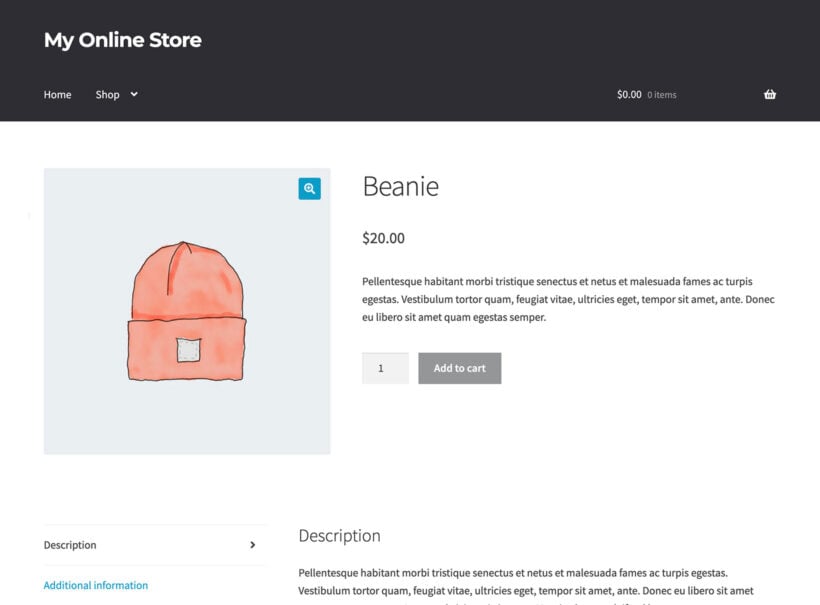
Fixed pricing is the simplest model. Each product has one price; customers pay that price. Set it on the General tab of the Product data box in Products → Add New. No plugin needed. This is the right starting point for most stores.
Variable pricing for product variations
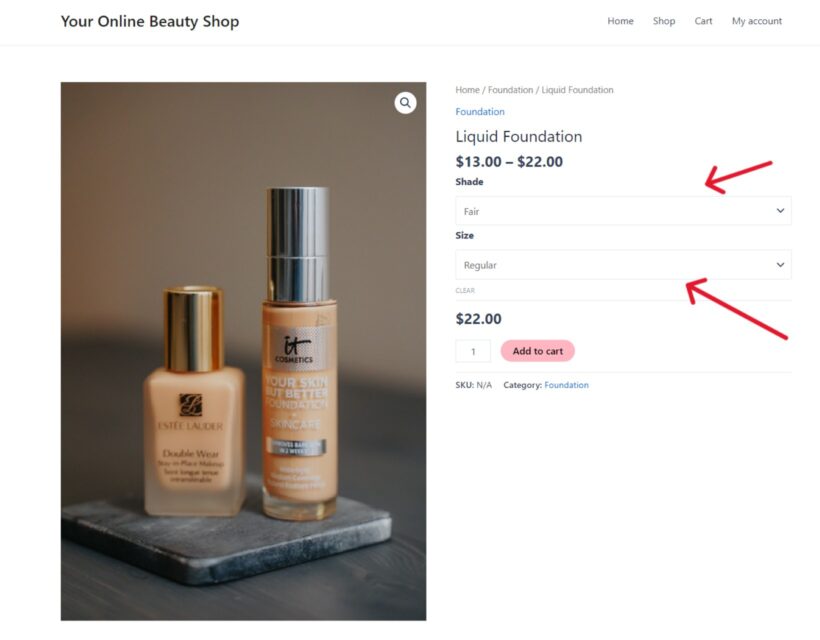
WooCommerce supports variable products natively. For example, a foundation at $13-$22 with different shades and sizes, or a T-shirt at $19.99 for sizes S-XL and $24.99 for XXL. Configure each variation under the Variations tab of the Product data box. WooCommerce displays the price range on shop archives ("$13.00 - $22.00") and the specific price after the customer picks a variation.
Tiered or volume pricing
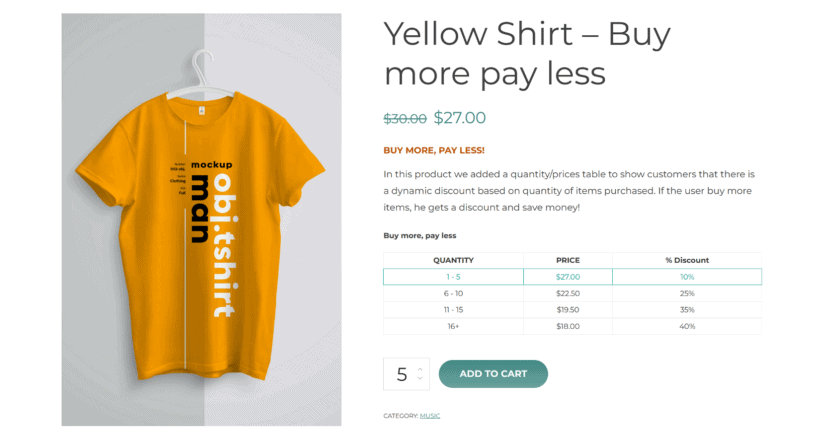
The unit price drops as the customer buys more. For example, 1-9 at $20 each, 10-49 at $18 each, 50+ at $15 each. The pattern is common in B2B and wholesale. Our comprehensive guide to WooCommerce tiered pricing covers the setup with WooCommerce Discount Manager.
Role-based pricing
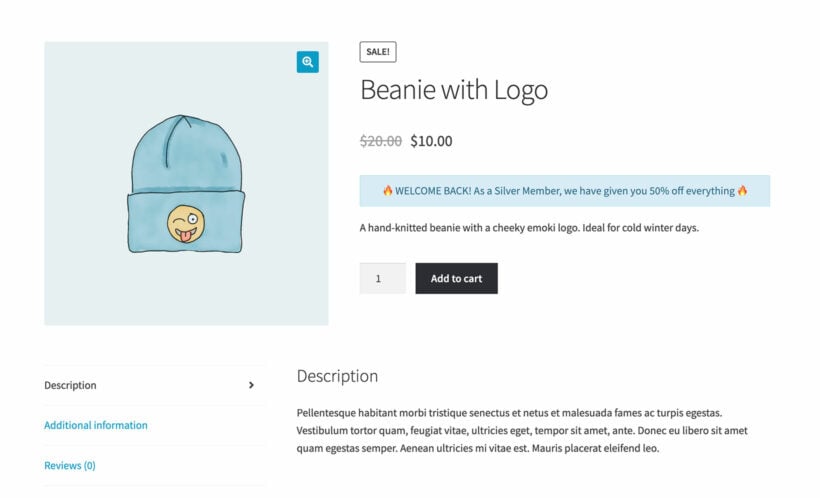
Different customer groups see different prices. Wholesale customers see wholesale rates, retail customers see retail rates, and members see member-only discounts. Our WooCommerce role-based pricing guide covers the setup.
Customer-specific pricing
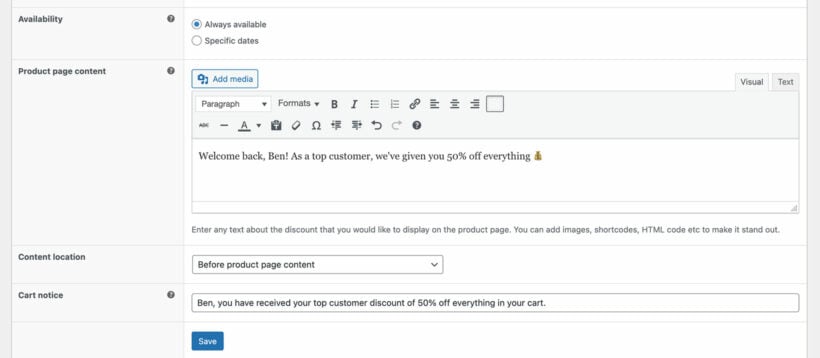
This is pricing tailored to an individual customer rather than a customer group. It's typically used for high-value B2B customers who negotiate their own rates. Our customer-specific pricing guide walks through the configuration.
Dynamic pricing rules
With dynamic pricing, the price changes based on cart contents, time of day, total spend or customer history. For example, "10% off when you buy three or more", "free shipping over $50" or "20% off this category for the next 24 hours". Our roundup of the best dynamic pricing plugins for WooCommerce compares the current options.
Add-on and option-based pricing
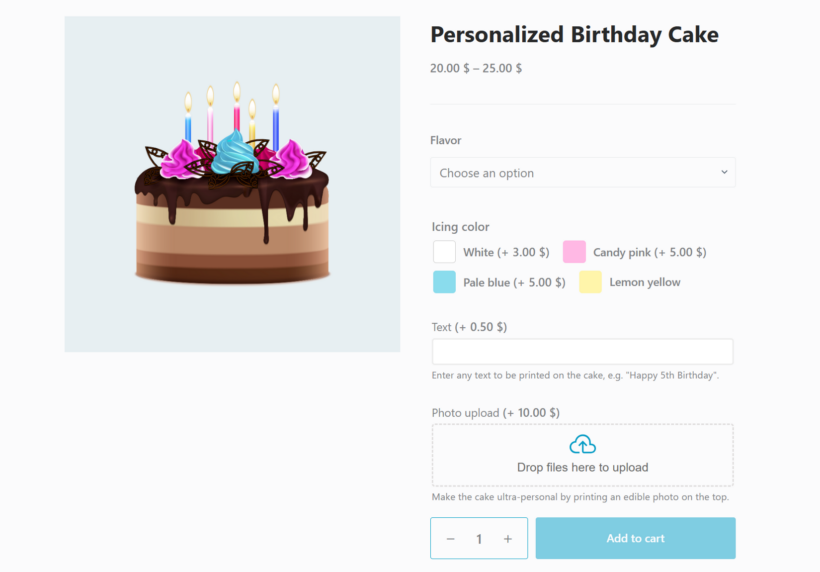
The product has a base price plus per-option adjustments. For example, a personalized birthday cake at $30 base, plus $5 for a custom message piped on top, plus $3 per extra flavor layer, plus $8 for premium icing. WooCommerce Product Options handles this with checkboxes, radio buttons, text fields and dropdowns that each carry a price adjustment.
Attribute-based pricing

In stock WooCommerce, it isn't possible to price by attribute directly. If you want a size or finish to add to the price, you have to create a separate variation for every combination of attributes, which gets unwieldy fast (a product with 4 sizes, 5 colors and 3 finishes needs 60 variations).
The simpler alternative is to skip WooCommerce attributes for the priced choices and build them as options instead. WooCommerce Product Options lets you add radio buttons, checkboxes or dropdowns for each attribute, with a flat fee or percentage adjustment attached to each one. The base price stays clean and you don't have to maintain dozens of variations.
Our attribute-based pricing guide covers both approaches.
Formula-based pricing
The price is calculated from a formula rather than picked from a list. For example, a custom-cut rug priced as length × width × material cost, or a printed banner priced as size × quantity. Our formula-based pricing guide covers the patterns.
Measurement-based pricing
Measurement pricing is closely related to formula pricing: the price is set by length, area, volume or weight. Stores selling fabric by the meter, cable by the foot or paint by the liter all use this model. The WooCommerce measurement price calculator guide walks through the setup.
"Name your price" or pay-what-you-want
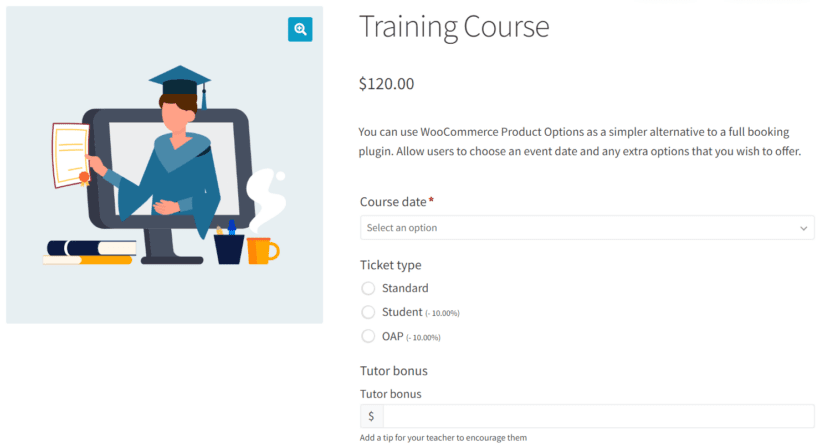
The customer decides the price. This is often used for donations, tips, pay-as-you-can content and other cheap fundraising ideas. Our "Name Your Price" plugins guide compares the options.
How to apply discounts in WooCommerce
WooCommerce ships with a coupon system out of the box. Go to Marketing → Coupons to create fixed-amount or percentage discounts, free-shipping codes, minimum-spend requirements and usage limits.
For occasional promotions, that's all you need. For anything more complex (cart-content rules, automatic discounts without a code, free-product rewards or customer-history triggers), you need a proper rules engine. WooCommerce Discount Manager adds the patterns WooCommerce doesn't include natively.
For the strategy side of discounting (when to discount, how deep, which segments), our discount pricing strategy guide covers what tends to work for different store types.

A few discount patterns worth knowing:
- Buy one get one free (BOGO). The classic. Discount Manager handles this with a "free products" rule type.
- Spend $X, save $Y. Automatic threshold discount, no coupon code required.
- Category-wide flash sale. Time-limited percentage discount on a whole category.
- First-time customer discount. Auto-applied for new accounts.
- Bundled discount. "Buy these three products together at 15% off". Cart-contents rule.
For fees that work the opposite direction (surcharges, handling fees, payment-method fees), our WooCommerce fees guide covers the setup.
How to display prices clearly on your WooCommerce store
The same price renders differently depending on how WooCommerce is configured to show it. Three settings make a meaningful difference to how customers perceive the price.
Variation price ranges
By default, a variable product shows the lowest-to-highest range on shop pages ("$19.99 - $24.99"). Some stores prefer "From $19.99" or want to hide the range entirely until the customer picks a variation. WooCommerce Variation Prices handles the formatting options. You can even list variation prices individually as a price list.
Sale prices and badges
WooCommerce shows sale prices with a strike-through on the original. Sale badges appear on the product image automatically. Both can be customized through theme settings or filters. The bigger win is making sure the regular-price-vs-sale-price contrast is visible enough to register.
Currency and tax display
Configure under WooCommerce → Settings → General and WooCommerce → Settings → Tax. Decide whether prices include or exclude tax, how to display the tax notice, and which currency symbol the store uses. For multi-currency stores, a plugin like CurrencySwitcher or Multi-Currency for WooCommerce handles the conversion.
Frequently asked questions about WooCommerce pricing
Is WooCommerce really free?
Yes. The WooCommerce plugin and WordPress core both cost nothing to download or use. You pay for hosting, the domain, payment processing fees and any optional premium plugins or themes. A small WooCommerce store can run on $200-$300/year all-in.
How much does WooCommerce cost compared to Shopify?
For a small store under $10,000/month in revenue, WooCommerce typically costs less than Shopify because there's no platform fee. For larger stores, the comparison gets closer because WooCommerce's flexibility costs in developer time and plugin licenses. Our 5 real reasons to use WooCommerce over Shopify guide covers the trade-offs in more depth.
What's the cheapest way to start a WooCommerce store?
The cheapest start is free WordPress on shared hosting ($60-$100/year), free WooCommerce, a free theme (Astra or Kadence) and a Stripe or PayPal account for payments (no setup cost, only per-transaction fees). All-in first-year cost can be under $150 if you're building the store yourself.
Can I have different prices for different customers in WooCommerce?
Yes. Use role-based pricing for customer groups (wholesale vs retail), or customer-specific pricing for individuals. Both setups are covered in their respective guides.
How do I hide prices for guests or logged-out users?
Hiding prices (see our guide on how to hide prices in WooCommerce) is common in B2B stores where pricing is members-only. Plugins like WooCommerce Catalog Visibility Options or B2BKing handle the WooCommerce hide price until login pattern. Our customer-specific pricing guide covers the workflow.
What's the best plugin for WooCommerce discounts?
For most stores, WooCommerce Discount Manager covers the patterns you'll need: tiered discounts, BOGO, cart-based rules, percentage and fixed discounts, and category sales. The full comparison is in our dynamic pricing plugins roundup.
Final thoughts
WooCommerce gives you control over both the cost of running the store and the pricing of what you sell. The free baseline is genuinely free; the optional layers (premium hosting, paid plugins and advanced pricing models) only kick in when you need them.
Start with fixed pricing and the default coupon system. Add a pricing plugin only when a specific business need pushes you to: tiered wholesale rates, dynamic promotions, formula-based pricing for custom products, or role-based pricing for member-only access. Each plugin should pay for itself in lifted average order value or reduced manual work, not just because it exists.