Create a Buy X Get Y Offer in Shopify (Step by Step)

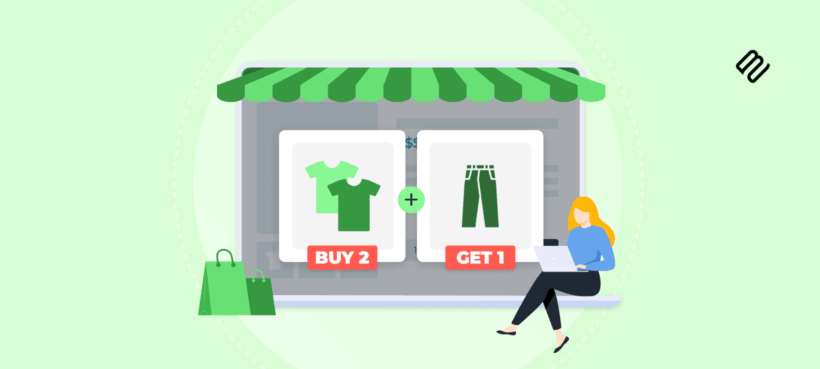
Shopify supports Buy X Get Y promotions natively for basic cross-product offers, and through third-party apps for more complex scenarios. This guide covers both methods step by step, plus alternatives for quantity-based pricing using Barn2 Bundles & Bulk Discounts.
Whether you need a classic cross-product deal or tiered volume pricing, the right approach depends on your specific promotion type. Native Shopify discounts handle straightforward Buy X Get Y offers, while apps fill the gaps when native features fall short. If you actually need same-product volume pricing, that's a different tool entirely.
Keep reading to discover the best methods and tools for creating Buy X Get Y deals in Shopify, ensuring you find the perfect fit for your store's strategy.
What are Buy X Get Y promotions?
A Buy X Get Y promotion rewards a customer who purchases product X with a discount or free item on product Y.
Is Buy X Get Y the same as BOGO?
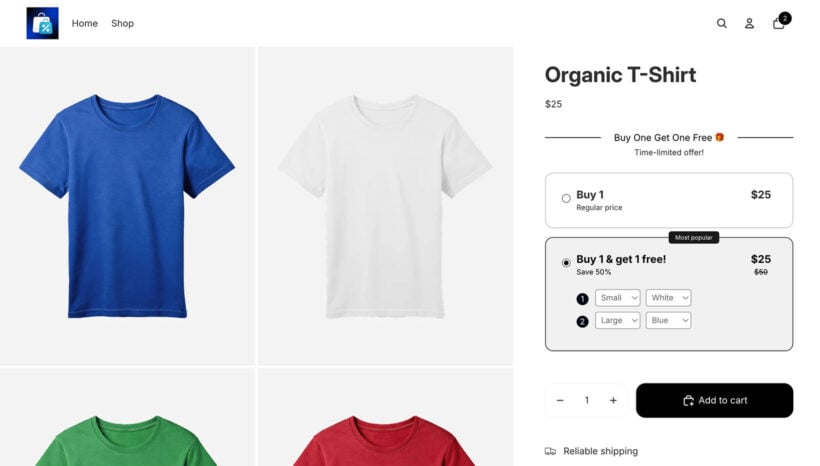
BOGO typically means the same product twice. Buy one shirt, get one shirt free. Buy X Get Y is more flexible. You can pair different products together, so buying a shirt might unlock a hat at 50% off instead.
That flexibility makes Buy X Get Y useful for cross-selling, clearing slow-moving inventory, and building more strategic promotions. Common use cases include Black Friday campaigns, pairing a best-seller with a slower product, and rewarding customers who spend above a threshold.
Common types of Buy X Get Y promotions
Before choosing a setup method, it helps to identify which promotion type you actually need.
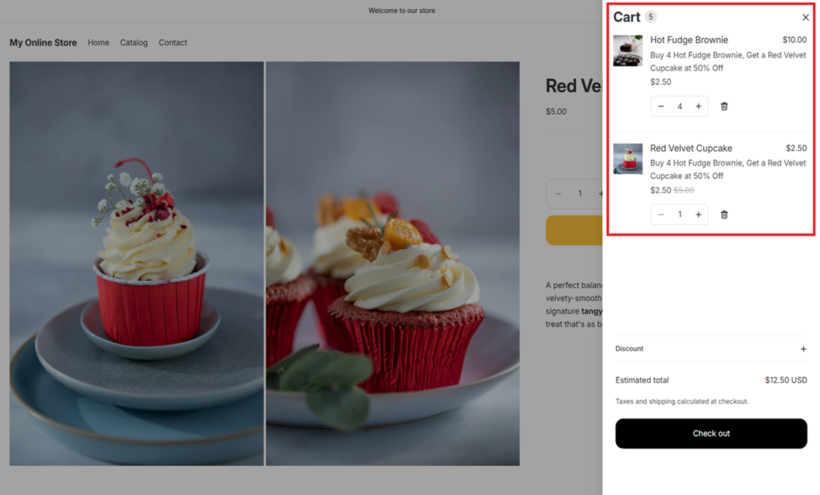
- Buy X Get Y DiscountedBuy a coffee machine, get pods at 50% off.
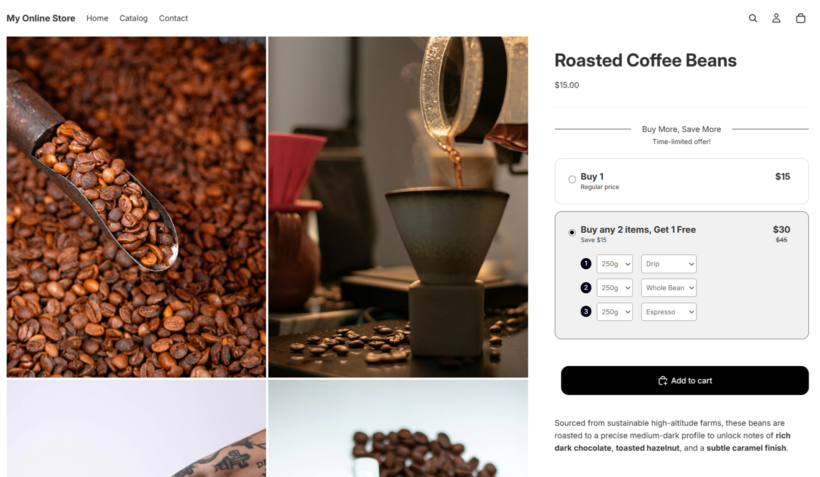
- Buy X Get Y FreeBuy two candles, get one candle free. This is essentially a volume deal.
- Tiered Buy X Get YBuy two, get 10% off; buy three, get 20% off. This usually requires an app.
- Buy X & Y Get ZBuy a burger and fries, get a drink free. This always requires an app.
Which promotion type do you actually need?
If you want a cross-product deal (buy shirt X, get hat Y free), use Method 1 or Method 2 below.
If you want same-product volume pricing (buy more, save more), skip straight to the Alternative section on Bundles & Bulk Discounts.
Method 1: Set up Buy X Get Y using Shopify's native discounts
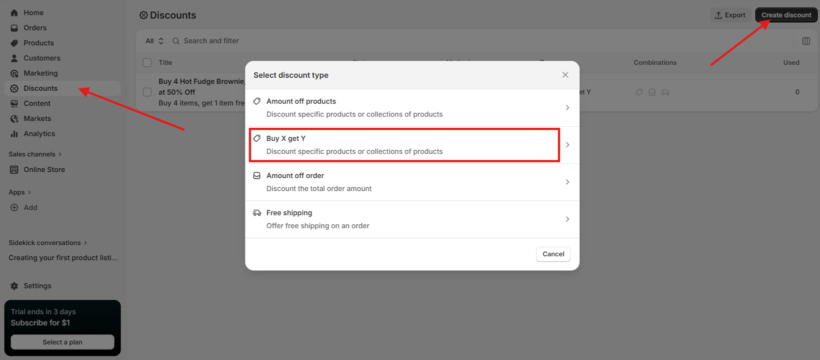
Shopify includes two native approaches for Buy X Get Y offers. The first is a discount code that customers enter at checkout. The second is an automatic discount that applies when conditions are met, with no code required.
Here is how to create a Buy X Get Y discount in Shopify admin.
Step 1: Go to Discounts in your Shopify admin. Click 'Create discount' and select 'Buy X Get Y'.
Step 2: Choose 'Discount code' as the discount type.
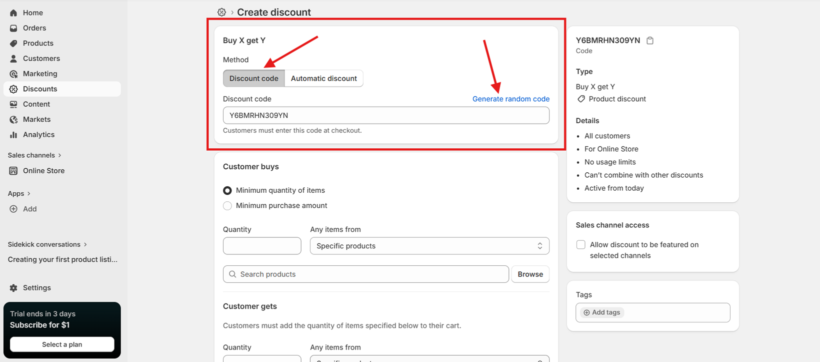
Step 3: Configure the 'Customer buys' section. Set a minimum quantity of items or a minimum purchase amount. Then select the products or collections that qualify as X.
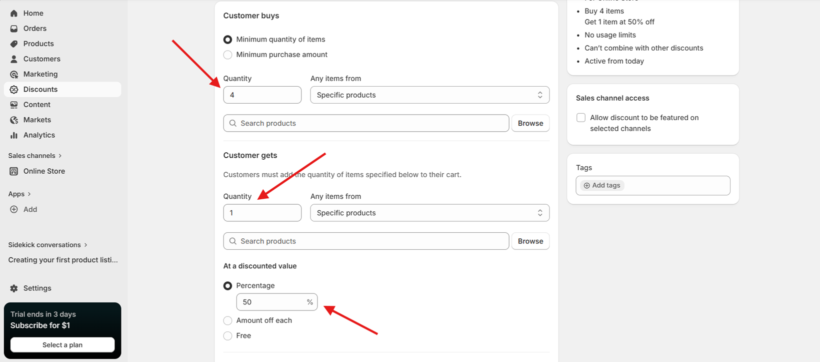
Step 4: Configure the 'Customer gets' section. Set the quantity of items the customer receives. Select the products or collections for Y. Choose the discount value: percentage off, amount off each item, or free.
Step 5: Set customer eligibility. You can apply the discount to everyone, specific segments, or individual customers.
Step 6: Set maximum usage limits. You can cap total uses or restrict to one use per customer.
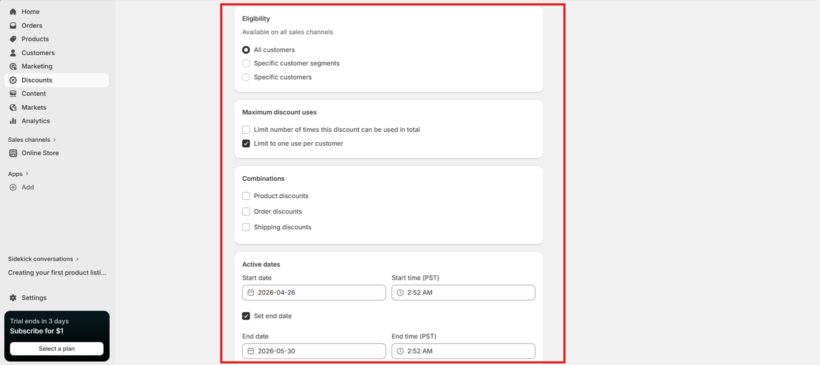
Step 7: Enable or disable combinations with other active discounts.
Step 8: Set active dates and save the discount.
Automatic Buy X Get Y discounts
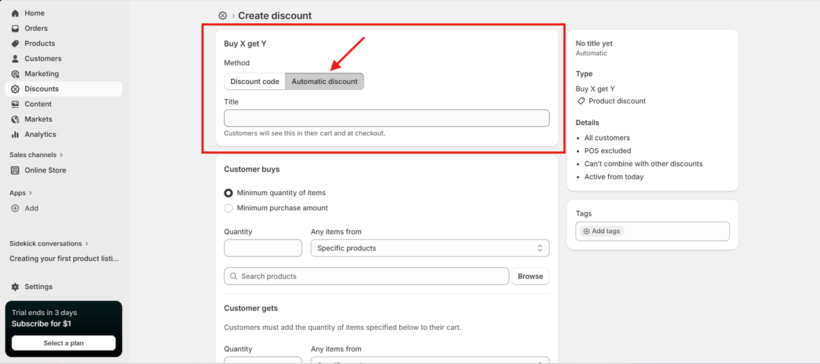
Automatic discounts follow the same steps but apply without a code. The key difference is selecting 'Automatic' discount type after choosing Buy X Get Y, rather than 'Discount code'.
A few things to keep in mind: Y items must be in stock. An out-of-stock Y product will break the offer completely. If you have discount combinations disabled, Shopify applies the highest-value active discount rather than stacking them. I always recommend testing the discount in a browser before launching, so you can confirm it applies as expected.
Why the free item doesn't appear automatically
Why isn't my free gift appearing in the cart?
This is the most common frustration with native Shopify Buy X Get Y discounts. Shopify's native offers are pricing rules. They do not auto-add the Y item to the cart.
Customers must manually add both X and Y items to their cart. The discount then applies at checkout when both items are present. If the customer forgets to add Y, they miss the reward entirely.
Practical workarounds for native setups include:
- Adding clear messaging on product pages that explains what the customer needs to add.
- Using cart or checkout reminders to prompt customers to add the free item.
- Displaying sitewide banners or pop-ups that communicate the promotion clearly.
If auto-adding the free item is important to your customer experience, a third-party app is a better starting point than trying to work around native limitations. Apps like CartBot handle this automatically.
Method 2: Third-party apps for Buy X Get Y needs
Third-party apps solve specific limitations that native Shopify cannot address. I find the easiest approach is to start with the problem you're trying to solve, then match an app to it.
If your main issue is Y items not auto-adding to cart:
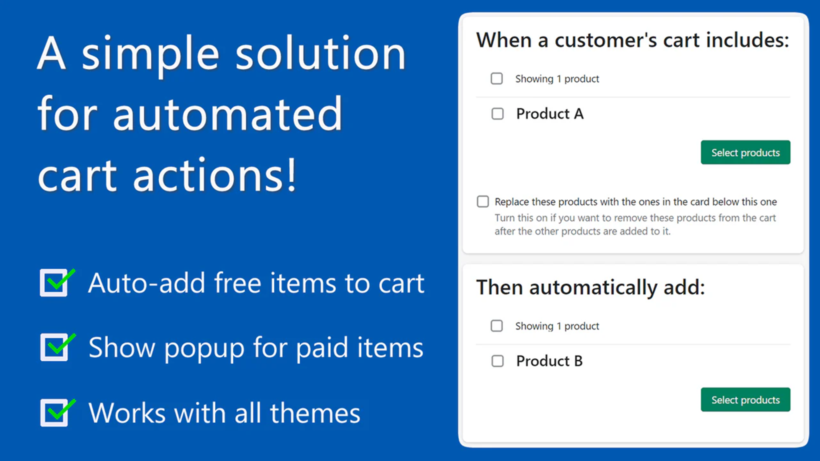
CartBot: Gift with Purchase is purpose-built for this. It's a lightweight app focused specifically on auto-adding gifts when purchase conditions are met. Choose CartBot if your native Shopify setup works well for everything else and you just need to solve the auto-add problem.
If you need upsell widgets, promotion badges, or advanced rules:
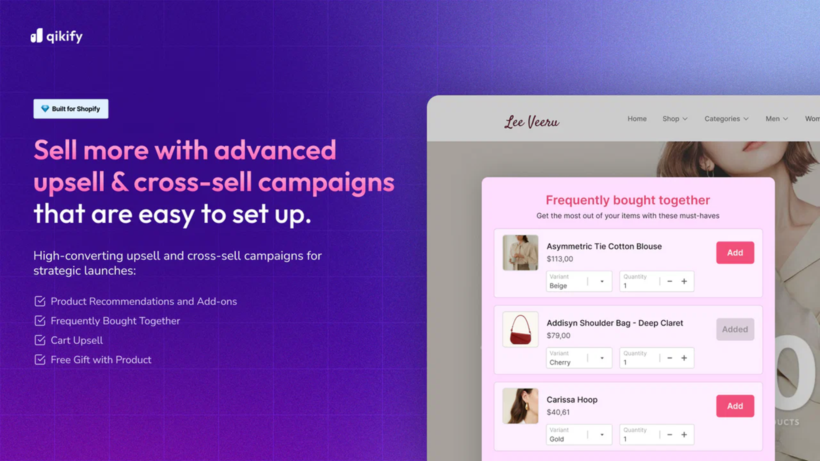
Qikify BOGO & Free Gift offers a free plan with promotion badges and advanced rule support that goes beyond native Shopify. Choose Qikify if you're on a budget and want visible upsell widgets alongside your Buy X Get Y offer.
If you need complex conditional logic or sophisticated cross-sell campaigns:
Some stores run promotions that involve multiple product conditions, customer segment targeting, or progress bars showing how close a customer is to unlocking a reward. Apps in this tier typically carry a monthly subscription fee. Evaluate them based on the specific capability you need, not the total feature count.
Apps vary in pricing, analytics depth, and support quality. I'd suggest installing one app to solve one problem rather than layering multiple discount apps, since conflicts between apps and native discounts are a common source of issues.
Alternative: Need same-product volume pricing instead of Buy X Get Y?
Some readers searching for Shopify Buy X Get Y actually need quantity-based pricing for the same product. This is especially common for DTC brands and B2B wholesale stores.
Examples of this type of pricing include "1 for $10, 2 for $18, 3 for $25" or "Buy five or more, get 15% off." These are quantity discounts, not traditional Buy X Get Y offers.
The difference matters. Buy X Get Y rewards purchasing product X with a discount on a different product Y. Quantity discounts reward bulk purchases of the same product, collection, market segment, or date range.
Barn2 Bundles & Bulk Discounts is built specifically for this use case.
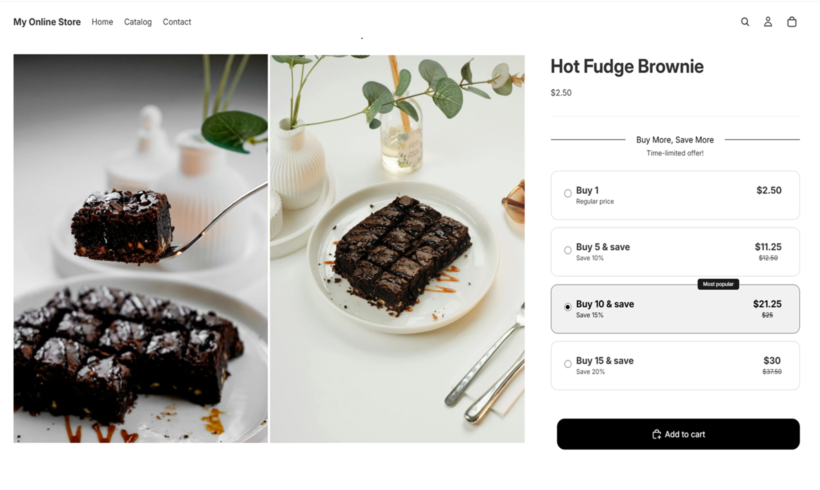
- Unlimited discountsBypasses Shopify's native 25-discount limit and supports unlimited product bundles, mix-and-match bundles, BOGO offers, and bulk discount rules.
- Tiered pricing displayShows volume pricing directly on product pages so customers can see their savings before adding to cart.
- Discount prioritizationA drag-and-drop system prevents stacking conflicts when you run multiple promotions at the same time.
- SchedulingAutomate campaign start and end dates without manual intervention.
- Flexible calculationConfigure whether discounts apply per variant, per product, or across a selection of products.
To get started, install Bundles & Bulk Discounts from the Shopify App Store. In the app dashboard, create a new discount rule and select your discount type (bulk, bundle, or BOGO). Set your qualifying products and the pricing tiers you want to display. The app handles the rest, including showing the pricing table on your product pages automatically.
Troubleshooting Buy X Get Y discounts
Why is my Buy X Get Y discount not applying?
Work through this checklist to isolate the issue.
- Product selectionVerify that X and Y products or collections are configured correctly. Variant mismatches are a frequent cause of discounts failing to apply.
- InventoryY items must be in stock and must not be hidden or archived.
- Cart contentsCustomers must add both X and Y items before the discount applies at checkout.
- Active datesScheduled promotions run on the store's time zone as configured in Shopify admin. Check this if a promotion isn't activating when expected.
- Discount combinationsIf stacking is disabled, another active discount may be overriding your Buy X Get Y offer.
- App conflictsSome cart apps or discount apps interfere with native Shopify discounts. Temporarily disabling other apps can help isolate the cause.
Testing in an incognito browser or using Shopify's discount preview tool is the fastest way to confirm whether conditions are being met correctly.
Set up effective Shopify promotions today
To recap, there are three approaches covered in this guide.
Native Shopify discounts work well for basic cross-product Buy X Get Y offers. Third-party apps like CartBot and Qikify add auto-add features and advanced rules when native discounts fall short. And Bundles & Bulk Discounts handles same-product volume pricing with tiered displays and unlimited discount rules.
The right choice depends on what you're actually trying to build. If you've identified that quantity-based pricing is what you need, Bundles & Bulk Discounts is worth a look.