8 best WordPress food delivery plugins in 2026


Most food-delivery roundups give you a list of competing plugins and ask you to pick one. This article works differently. The eight plugins below cover eight different jobs in a food-ordering workflow: two essential for most businesses, and six optional extras to further supercharge your food delivery system.
Food delivery is one of the fastest-growing parts of WordPress ecommerce. Whether you're running a small local cafe, a big restaurant chain, or just looking for a way to schedule delivery slots in WooCommerce, the right plugin can make a real difference. In this article, I'll cover the 8 best WordPress food delivery plugins of 2026.
Quick verdict
- Essential for restaurant orderingWooCommerce Restaurant Ordering turns your menu into a searchable one-page order form, with no per-order commissions and a $349 lifetime license option.
- Essential for delivery slot schedulingDelivery and Pickup Date Time by CodeRockz covers per-product processing time, per-zone cut-offs, and multiple pickup locations, with a genuinely capable free tier.
- Best optional extra for menu customizationWooCommerce Product Options adds extras, modifiers, and allergen flags to menu items, which is where most default WooCommerce setups fall short for food.
What is a food delivery plugin?
A food delivery plugin is a software tool designed to provide an online ordering system for food delivery. It allows food businesses to integrate online ordering into their WordPress website without the need for complex coding or technical skills.
With a food delivery plugin, your customers can browse menu items and select their desired food and drinks. They can also customize their orders, arrange delivery, and make payments online. That makes online food ordering and delivery easier for customers and less work for your business.
There are some different use cases for food delivery plugins, including:
- Restaurants - integrates with your restaurant's online menu for a food delivery system and select delivery or pickup options.
- Food gifts - sell gift boxes and baskets through the plugin integration.
- Grocery stores - customers can shop for groceries via the plugin on the ecommerce store.
- Meal delivery services - customers can order ingredients and recipes for home-cooked meals.
Looking for restaurant reservations or table reservations? Check out the best WooCommerce booking plugins.
How we evaluated these food delivery plugins
I looked at each plugin against the factors that decide whether it really works for a food business. The main ones are menu and order-form usability, delivery scheduling, payment gateway flexibility, customer-facing notifications, and how cleanly it handles edge cases like holidays, minimum orders, and per-zone rules. Vendor health also matters: release frequency, support responsiveness, and recent direction.
One note on what we considered and didn't include. Orderable, a dedicated all-in-one food-ordering plugin, looked like a strong contender, but it's owned by Liquid Web, which has spent the past year consolidating brands and retiring product sites. The Orderable website is still online at the time of writing, but the trajectory isn't reassuring. We also dropped the Simba Hosting "WooCommerce Opening Hours and Delivery Times" plugin (previously recommended here), because it hasn't shipped a feature since June 2022.
At-a-glance comparison
| Plugin | Job | Free version | Best for |
|---|---|---|---|
| WooCommerce Restaurant Ordering | Menu and ordering | No | Restaurants and takeaways with long menus (essential) |
| Delivery and Pickup Date Time | Slot scheduling | Yes | Local delivery and pickup with time slot needs (essential) |
| WooCommerce Product Options | Menu customization | No | Menus with extras, modifiers, allergens, or special instructions |
| WooCommerce Fast Cart | Faster checkout | No | Mobile-heavy food sites losing carts at the redirect |
| WooCommerce Table Rate Shipping | Zone-based shipping rates | No | Multi-postcode pricing tiers and minimum-order surcharges |
| YITH WooCommerce SMS Notifications | Customer SMS updates | No | Stores wanting per-status SMS (received, preparing, out for delivery, and delivered) |
| WooCommerce Conditional Shipping and Payments | Conditional checkout rules | No | Restricting gateways or methods by zone, role, or cart total |
| YITH WooCommerce Multi Vendor | Multi-vendor marketplace | No | Multi-restaurant food marketplaces |
The two essentials
1. WooCommerce Restaurant Ordering
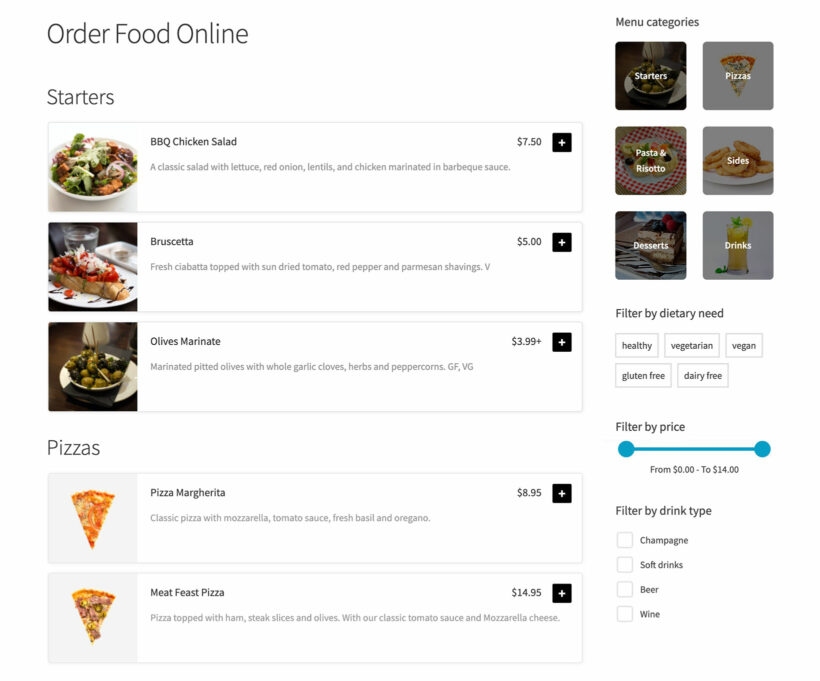
Our WooCommerce Restaurant Ordering plugin is the essential menu and ordering plugin for most food businesses. It extends WooCommerce to provide a complete solution for restaurants, takeaways, and any food business with a real menu.
The plugin makes ordering quick and easy by displaying all menu items on a single one-page order form. You can create detailed menu items, including item descriptions, prices, and images. That makes it easy for customers to see what's available and make informed choices.
The one-page order form is user-friendly on the front end. Customers easily add items to their cart and specify any customizations or special requests. It's equally easy for you to set up in the backend of your WordPress food delivery website.
Read one of our most popular tutorials: Complete guide to building a WooCommerce restaurant ordering system.
Pros:
- Single-page menu that scales to long menus without slowing down on mobile.
- Inline quantities, variations, and dietary tags, so customers don't click into individual product pages.
- The menu layout is intentionally modeled on world-leading systems like Uber Eats and Just Eat, with several layout options and full control over what information to display per item.
- Works with all the standard WooCommerce gateways and integrates cleanly with the other plugins in this list.
- A $349 lifetime license is available, which is rare in the food-ordering space.
Cons:
- Premium-only with no free tier.
- Doesn't include delivery slot scheduling, so you'll want to pair it with the CodeRockz plugin below.
Best for: restaurants, takeaways, and food businesses with menus where customers benefit from scanning and filtering quickly.
2. Delivery and Pickup Date Time by CodeRockz

Delivery and Pickup Date Time for WooCommerce by CodeRockz is the slot scheduling side of the stack. It pairs naturally with WooCommerce Restaurant Ordering above to cover the full menu plus slot workflow.
The plugin handles the rules food delivery stores really need. Per-product processing time, per-shipping-zone cut-off times, and multiple pickup locations each with their own capacity. It also covers advanced time slots with capacity caps and per-slot fees, special open days for holidays that fall on weekends, and a backend delivery calendar view. It's block-checkout and HPOS compatible.
It rates 4.9 / 5 from 280 reviews on WordPress.org with 5,000+ active installs. Recent 2026 reviews come specifically from flower delivery, garden centre, and farm shop operators. Releases ship roughly every two weeks. The free tier covers date-based slot scheduling, basic time slots, and the backend calendar. Pro (from $79/year) adds per-product processing time, per-zone cut-offs, advanced capacity rules, multiple pickup locations, and Google Calendar sync.
Pros:
- Per-product processing time and per-shipping-zone cut-off rules, which most other slot plugins don't handle natively.
- 4.9 / 5 from 280 reviews on WP.org with active 2026 reviews from food-specific operators.
- Releases roughly every two weeks; the most recent landed in the last fortnight.
- Block-checkout and HPOS compatible, so it works on modern WooCommerce setups.
- Genuinely capable free tier covering date-based scheduling and a backend calendar view.
Cons:
- Smaller install base than older alternatives, which means fewer third-party tutorials and theme integrations.
- The admin UI is functional rather than polished; it gets the job done without winning design awards.
Best for: any food business that needs to control when orders can be placed, when they're delivered, and how many slots are open per service.
Optional extras to supercharge your delivery system
The six plugins below solve specific problems that not every food business hits. Add them when you need them; ignore them otherwise.
3. WooCommerce Product Options
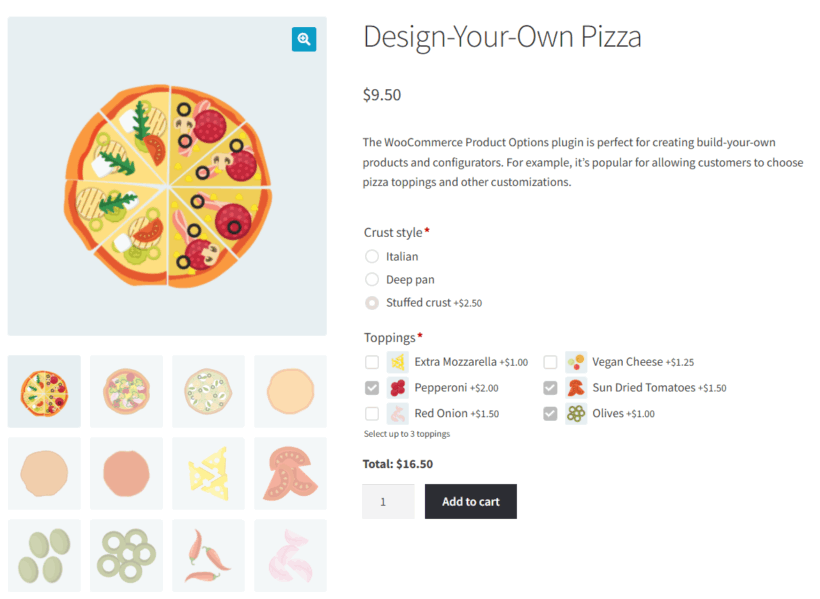
Our WooCommerce Product Options plugin is the menu customization layer. Most default WooCommerce setups fall short for food because they treat each menu item as a single product with limited variation options. WooCommerce Product Options lets you add the kind of choices food menus really need: extras, modifiers, allergen flags, cooking preferences, drink modifications, portion sizes, and free-text special instructions.
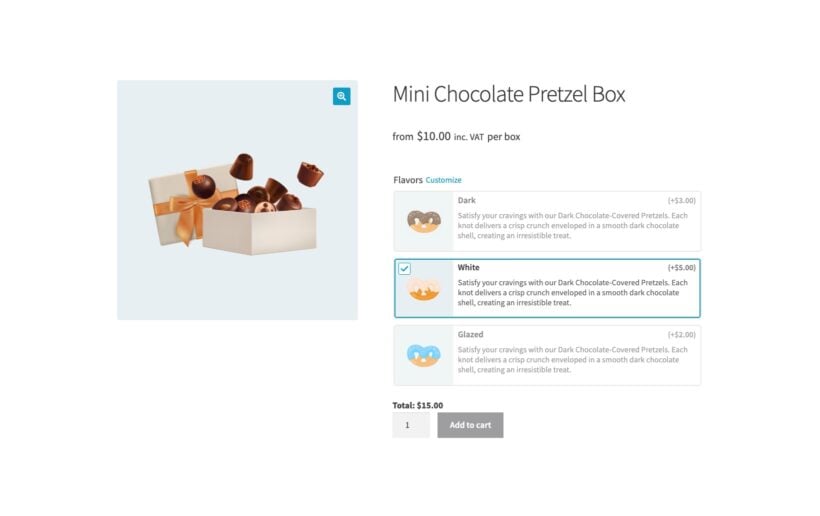
The plugin adds option fields to any product. Options can be checkboxes, radio buttons, dropdowns, image button cards (great for visual menu choices like topping selections), text inputs, file uploads, and date or time pickers. Each option can adjust the price, and you can show or hide options based on other selections.
For a working example, a pizza item might have a base price plus a checkbox group for toppings, a radio group for crust type, and a dropdown for size that affects the base price. A text field handles special instructions. The customer builds their order and sees the total update in real time, and the kitchen receives a clean ticket with every choice.
Pricing is $99/year for one site or $349 lifetime.
Pros:
- Handles the menu customization use cases food businesses really need: extras, modifiers, allergen flags, and special instructions.
- Image button cards layout works particularly well for visual food menus.
- Conditional logic lets options appear or disappear based on other choices.
- Real-time price calculation as customers build their order.
- A $349 lifetime license is available.
Cons:
- Premium-only with no free tier.
- Adds setup complexity for menus with many customization rules.
Best for: food menus with real customization needs: pizzerias, sandwich shops, build-your-own-bowl restaurants, and anywhere customers expect to pick toppings, sides, or modifications.
4. WooCommerce Fast Cart
If you're looking for add-ons with a faster order process for your customers, this plugin is your best bet.
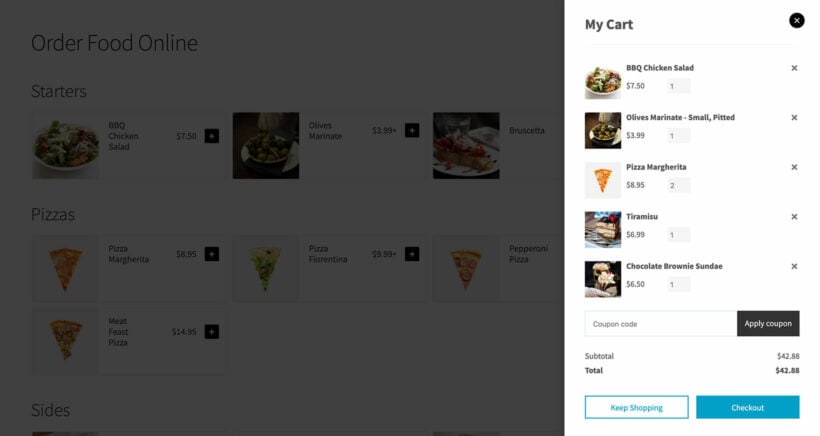
Our WooCommerce Fast Cart plugin makes the food delivery process easier by displaying the cart and/or checkout in an on-page popup, rather than directing customers to a separate page.
When a customer adds an item to their cart, the plugin displays a popup showing the contents. They can use the mini cart to view, edit, or proceed to checkout. During the checkout process, only the necessary fields are shown directly in the mini cart, which makes it quick and easy for customers to complete their orders.
With a faster checkout, conversion rates are likely to improve and the risk of abandoned carts is reduced.
The fast cart works with the other WordPress restaurant plugins featured in this article. Use them together for the best results.
Pros:
- Keeps customers on the menu page through cart and checkout, which reduces mobile abandonment.
- Mini cart and checkout open in the same popup, with no full-page reloads.
- Pairs cleanly with WooCommerce Restaurant Ordering for a single-screen ordering journey.
- A $279 lifetime license is available.
Cons:
- Premium-only with no free tier.
- Some third-party checkout customizations (custom fields, multi-step flows) need configuration to play nicely.
Best for: mobile-heavy food sites where the default WooCommerce checkout flow is losing carts to redirects and page reloads.
5. WooCommerce Table Rate Shipping
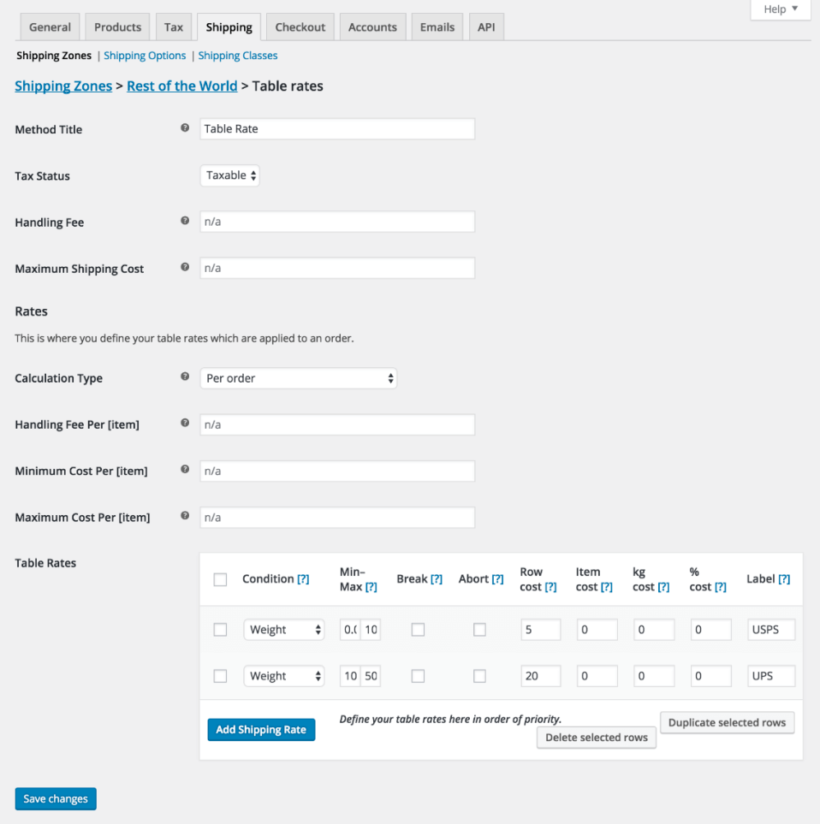
WooCommerce Table Rate Shipping is essential for stores that need to charge for food deliveries in more complex ways.
This food delivery plugin provides you with a lot of flexibility and control over your shipping rates. You can set up multiple shipping methods with different rates or offer different shipping methods for different products. This can be based on the total order value, weight, or anything else.
That's useful for food delivery businesses because they can offer different shipping rates based on the type of food items, the weight, and the delivery location. It gives you much more flexibility with your food delivery fees and delivery options.
Table Rate Shipping is also user-friendly and easy to set up. You can create and manage your shipping rates directly from the WooCommerce dashboard. There are some free plugins with similar functionality, but they're less well supported. The credible free alternative for single-restaurant operations is Flexible Shipping by Octolize; for anything more involved, we recommend the official Automattic extension.
Pros:
- First-party Automattic extension with native compatibility for shipping zones, cart and checkout blocks, and HPOS.
- Four calculation modes (per order, per item, per line, and per shipping class) cover the realistic food-delivery rate rules.
- Reliable Automattic support channel if your store already runs other paid WooCommerce extensions.
Cons:
- Premium-only; the credible free alternative is Flexible Shipping by Octolize for simpler stores.
- No native distance-based or radius-based rates; if you need driving-distance pricing, you'll need a separate plugin.
Best for: stores that already run other paid WooCommerce extensions and want one support relationship for the whole stack.
6. YITH WooCommerce SMS Notifications
YITH WooCommerce SMS Notifications handles the customer-facing notification layer. It sends SMS messages at every stage of the order status lifecycle: received, preparing, out for delivery, and delivered. Staff can also receive an admin SMS the moment a new order lands, which is useful when the kitchen isn't always at a screen.
The standout is that it works with 40+ SMS gateways including Twilio, Vonage, MessageBird, and ClickSend. You pick the gateway per-status from a dropdown, and you're not locked into one provider. The plugin license is around $69/year, and the SMS itself is pay-as-you-go via your chosen gateway. For a small food delivery store sending 200 SMS per month, realistic monthly cost is roughly $11 to $12 all-in.
If the budget is tight, the credible free alternative is WSMS (formerly WP SMS) by VeronaLabs, with 7,000+ active installs on WP.org and the most recent release in May 2026.
Pros:
- 40+ SMS gateway support, including Twilio, Vonage, MessageBird, and ClickSend, chosen per-status.
- Per-status triggers (received, preparing, out for delivery, and delivered) plus admin SMS for new orders.
- Around $11 to $12/month all-in for a small store sending 200 SMS per month.
Cons:
- No native WhatsApp channel; markets where WhatsApp is the default customer channel need a separate plugin.
- SMS provider costs (Twilio account, A2P 10DLC registration for US carriers) sit on top of the plugin license.
- No free version of the YITH plugin itself, although the WSMS alternative covers the basics.
Best for: food delivery stores in the US, UK, and EU that want SMS-first per-status customer updates.
7. WooCommerce Conditional Shipping and Payments

Previously, we assumed that you should offer the same food delivery options to every customer. However, that may not be the case.
Conditional Shipping and Payments is a WooCommerce plugin that allows for customization. You can control which shipping and payment methods are displayed to customers based on various conditions.
It's a way to control which shipping methods and payment options are shown to customers when they order online. As a result, this makes the process easier and less confusing.
For example, you can offer free shipping to customers who have bought a lot from you, or only show payment options that work in a certain place.
Conditional Shipping and Payments is user-friendly and easy to set up. You can create and manage your conditions directly from the WooCommerce dashboard, and you can also import and export conditions in bulk.
Pros:
- First-party Automattic extension with native WooCommerce shipping zone and gateway awareness.
- Import and export conditions in bulk, which speeds up multi-store rollouts.
- Combines cleanly with the Table Rate Shipping plugin above.
Cons:
- Not a food-delivery plugin in its own right; only useful in the stack alongside a real ordering and scheduling tool.
- No debug tooling, and stacking rules across states, product types, and roles hits a usability ceiling quickly.
Best for: food businesses that already have a working menu and slot plugin and need a supporting restriction layer for postcode-specific gateway rules or minimum-order conditions.
8. YITH WooCommerce Multi Vendor
If you're running a multi-restaurant marketplace (think Just Eat or Uber Eats), you'll need a multi-vendor plugin on top of WooCommerce Restaurant Ordering. Each restaurant manages its own menu, orders, and inventory through their own login.
YITH WooCommerce Multi Vendor is the option we recommend. It pairs cleanly with WooCommerce Restaurant Ordering using the category-based setup described in our full guide to building a multi-vendor restaurant ordering system. Each vendor gets their own admin login, manages their own products and orders, and you can set commission rates from the central admin.
The guide covers three setup options: a WordPress multisite (one sub-site per restaurant), a single site with a separate ordering page per restaurant (no plugin needed), or the full multi-vendor plugin path. For most marketplace operators the multi-vendor plugin path is the right one, and YITH WooCommerce Multi Vendor is the cleanest fit with our restaurant ordering plugin.
YITH WooCommerce Multi Vendor pricing starts at around $129/year. Alternative WCRO-compatible multi-vendor plugins are also listed in the guide if YITH doesn't suit, including WooCommerce Product Vendors (the official Automattic extension) and MultiVendorX.
Pros:
- Works cleanly with WooCommerce Restaurant Ordering using the category-based setup in our existing guide.
- Vendor admin logins, frontend product management, and commission control out of the box.
- Established YITH support and update channel.
Cons:
- Significant setup complexity compared to the single-restaurant path.
- Premium-only; budget for the plugin license plus ongoing maintenance time.
- For most use cases, a WordPress multisite or single-site category setup (covered in the guide) is simpler than running a full multi-vendor plugin.
Best for: marketplace operators launching a multi-restaurant food delivery platform with separate vendor logins. Skip this if you're running a single restaurant.
Which WordPress food delivery plugins should you use?
Most food businesses start with the two essentials and then layer on optional extras as specific needs come up. Here's where I'd start, and what to add when:
- WooCommerce Restaurant Ordering: essential. The menu and order form for almost any food business.
- Delivery and Pickup Date Time by CodeRockz: essential. Add this if customers need to choose a delivery or pickup slot.
- WooCommerce Product Options: add if your menu has customizations like toppings, sides, modifications, dietary tags, or special instructions. Most restaurants will want this.
- WooCommerce Fast Cart: add if your customers order mainly on mobile and you're seeing carts abandoned at the redirect to the cart page.
- WooCommerce Table Rate Shipping: add if you need zone-based delivery rates. Flexible Shipping by Octolize is the credible free alternative for single-restaurant operations.
- YITH WooCommerce SMS Notifications: add if customers expect text updates on order status. WSMS by VeronaLabs is the free WP.org alternative.
- WooCommerce Conditional Shipping and Payments: add only if you need to gate gateways or methods by postcode, role, or cart total.
- YITH WooCommerce Multi Vendor: add only if you're running a multi-restaurant marketplace. See our full multi-vendor food ordering guide for setup options.