The best 'Name Your Price' plugins for WooCommerce in 2026


Looking to add a Name Your Price WooCommerce field to your website? I've compared the best WordPress plugins for the job, with real pros and cons for each.
Most WooCommerce stores sell physical and digital products that have fixed prices. In these stores, the customers pay a pre-defined sum that the store owner decides. But not all websites are the same.
What if you want to let the customer choose what they want to pay, either for the whole product, or to add an extra amount to the price? Common cases include charity donations, price surveys for an unreleased product, and tips or gratuities a buyer can add to the main product price. The "Tutor Bonus" field on the WooCommerce product below is one example:

All of these examples require the site user to enter an amount they choose. Both WordPress and WooCommerce don't allow them to do this by default, but a 'Name Your Price' WooCommerce plugin makes it easy. Below I'll cover the seven I'd consider in 2026, plus a step-by-step tutorial for setting one up with our highly-recommended plugin, WooCommerce Product Options.
Quick verdict
- Best overall (most flexible)WooCommerce Product Options gives you a Name Your Price field plus dozens of other product option types, with conditional logic to show or hide fields based on selections.
- Best dedicated pluginWooCommerce Name Your Price is the official Automattic extension purpose-built for this one job, with minimum-price control and clean WooCommerce integration.
- Best free optionBooster for WooCommerce is actively maintained (533 reviews and a 92% rating, last updated May 2026), but enable only the modules you need to avoid site bloat.
What is a Name Your Price field in WooCommerce?
A Name Your Price field is a feature that allows customers to enter their own price for a product or service. The feature adds a numerical field to one or more WooCommerce products, where customers enter a specific amount they're willing to pay (or add to the base price).
This feature is helpful for purposes like:
- Charitable donationsCharity or non-profit organizations can allow customers to make donations using a Name Your Price field. Most NGOs don't have products or services with fixed prices anyway.
- Making an offerIf your prices are negotiable, you can use a Name Your Price field to create a WooCommerce Make an Offer system.
- Customized products or servicesIt's also great for customized products or services. For example, if you sell custom-made clothing, you could use a Name Your Price field to allow customers to specify their budget and then adjust the product accordingly.
- Pricing strategy testingBy allowing customers to name their prices, you can gather data on how much people are willing to pay for your products. This information can be used to refine your pricing strategy.
To use a Name Your Price field in WooCommerce, you need to install and activate one of the plugins below.
How we evaluated these Name Your Price plugins
I compared each plugin against the factors that really decide whether it works for the Name Your Price use case. The main ones are how the field looks and behaves on the product page, and whether you can set a minimum or suggested price. I also weighed how cleanly each plugin integrates with the rest of your WooCommerce checkout, and how much flexibility you get for adjacent product options.
I also weighed vendor health: active install count, release frequency, support responsiveness, and recent direction. A plugin that hasn't shipped a release in a year gets flagged for that, even if the core product still works.
At-a-glance comparison
| Plugin | Free version | Standout strength | Best for |
|---|---|---|---|
| WooCommerce Product Options | No | Full product-options system with Name Your Price as one of many field types | Stores wanting flexibility beyond Name Your Price |
| WooCommerce Name Your Price | No | Official Automattic extension purpose-built for the Name Your Price use case | Stores that want a clean dedicated plugin |
| Product Add-Ons | No | Official Automattic extension with personalized product options | Stores wanting product add-ons plus customer-defined pricing |
| YITH WooCommerce Name Your Price | No | YITH-supported dedicated Name Your Price plugin | Sites already running other YITH plugins |
| Booster for WooCommerce | Yes | Free WP.org plugin with Name Your Price and dozens of other modules | Budget-conscious stores willing to enable modules selectively |
| Product Open Pricing | Yes (1 product only) | Free WP.org plugin specifically for open pricing | Single-product pilot use cases |
| ELEX WooCommerce Name Your Price | Yes | Free WP.org plugin with minimum-price control | Side-project use only (small install base) |
The best Name Your Price WooCommerce plugins
There are several Name Your Price WooCommerce plugins out there. When choosing one, it's worth looking for a plugin that works cleanly with WooCommerce, places the price field in a sensible location on the product page, and packs other handy features. Below is each of the seven plugins I'd consider in 2026, with real pros and cons for each.
1. WooCommerce Product Options
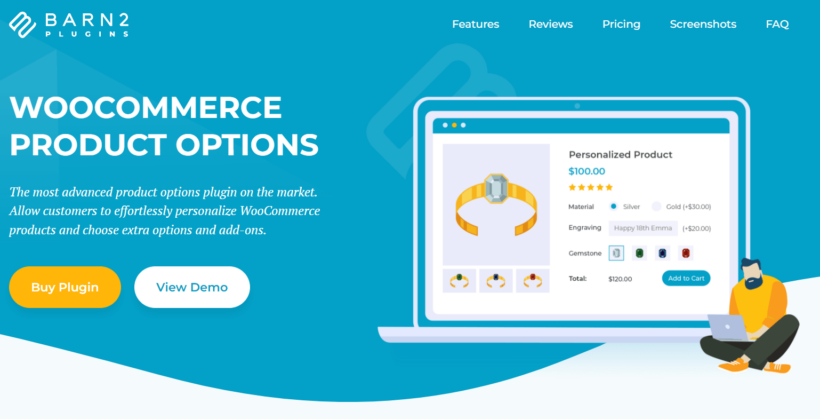
Our top recommended Name Your Price WooCommerce plugin is WooCommerce Product Options. It's a feature-rich plugin that allows you to add more options to your products, including a customer-defined price field.
The field is displayed above the Add to Cart button so that customers can choose to add an extra amount to a product's base price. The main product price at the top of the page updates when they add an extra amount, and the change is marked out in the cart, checkout, and order emails.
WooCommerce Product Options is packed with other powerful features you can use alongside the Name Your Price field, including:
- Choose whether to make the Name Your Price field required.
- Change the label which appears next to the field.
- Add a helpful description that appears underneath the field to instruct customers.
- Conditional logic to show or hide other fields depending on whether the Name Your Price field has been filled in. You can also show or hide fields based on the other options the customer has selected.
- Compatibility with other Barn2 plugins for adjacent use cases.
Pros:
- Name Your Price plus dozens of other field types (checkboxes, radios, dropdowns, image button cards, text inputs, and more) in a single plugin.
- Conditional logic for showing or hiding fields based on selections.
- Real-time price updates as customers fill in the field.
Cons:
- Premium-only with no free tier.
- Overkill if Name Your Price is the only thing you need; a dedicated single-purpose plugin (covered next) is simpler in that case.
Best for: stores that want Name Your Price as part of a broader product-options system with conditional logic and multiple field types.
2. WooCommerce Name Your Price
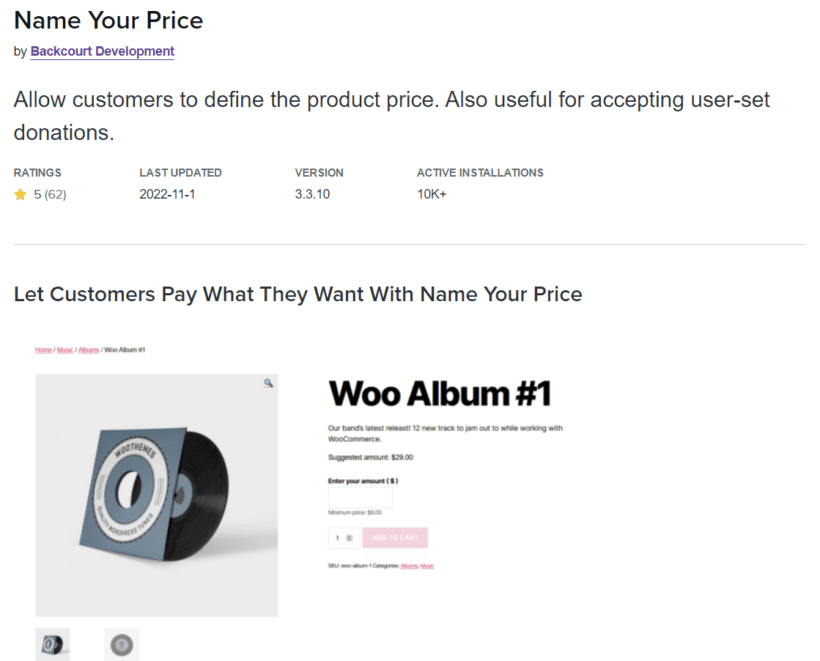
WooCommerce Name Your Price is the official Automattic extension for this one job. It allows customers to set the price they wish to pay for products, or the amount to donate for fundraisers. You can determine the minimum price they can pay, or leave them to decide how much they want to pay, for instance when making donations.
The plugin does the job with its core features:
- Easy setup that doesn't require any coding skills.
- Compatibility with several other plugins, including WooCommerce Product Add-Ons.
- Integration with a variety of product types.
- Facilitation of online bill payments and tip jars.
Pros:
- Purpose-built for the Name Your Price use case; nothing extra to configure or pay for.
- Official Automattic extension with native WooCommerce checkout integration.
- Minimum-price control is built in.
Cons:
- Single-purpose only; no other product option types beyond Name Your Price.
- Premium-only with no free tier.
- If you want a wider variety of product options, WooCommerce Product Options above is your best bet.
Best for: stores that only need Name Your Price and want a clean dedicated plugin from the official WooCommerce marketplace.
3. Product Add-Ons

WooCommerce Product Add-Ons is another official Automattic extension. It gives your customers a personalized shopping experience, including choosing the price to pay for products. The plugin allows customer-defined pricing that works well for gratuity, customized products, donations, and tips.
Some other helpful features include:
- Image-based selections for customers to see what a product looks like before buying.
- Three different pricing options: flat fee, quantity-based, and percentage-based.
- Compatibility with other plugins like WooCommerce Subscriptions.
- Textboxes, dropdowns, and checkboxes to add more product options.
Pros:
- Three pricing models (flat fee, quantity-based, and percentage-based) cover most pricing rules.
- Official Automattic extension with reliable support.
- Includes image-based selection fields for visual product options.
- Includes a 30-day money-back guarantee.
Cons:
- Fewer field types than WooCommerce Product Options (no conditional logic, fewer layouts).
- Premium-only; the same $99/year ballpark as WooCommerce Name Your Price for less specialised functionality.
Best for: stores that want product add-ons alongside customer-defined pricing, and prefer Automattic's official support channel.
4. YITH WooCommerce Name Your Price
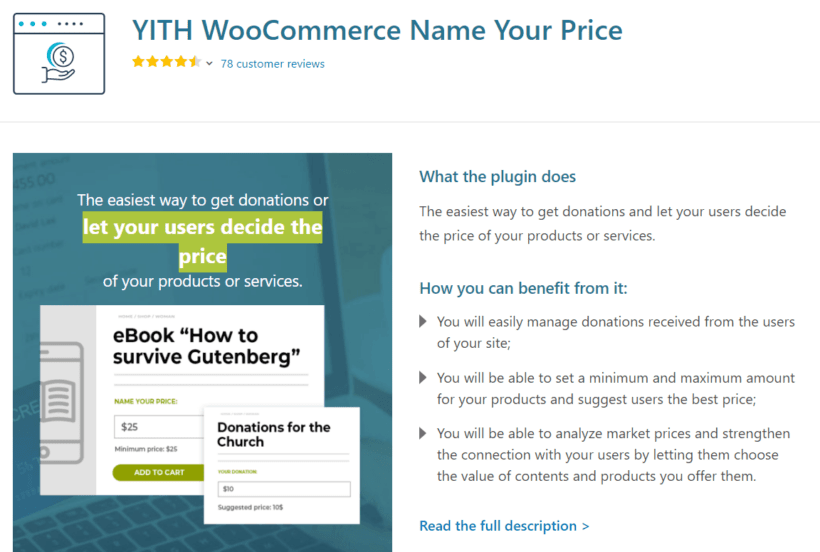
YITH WooCommerce Name Your Price is another credible dedicated option. You can use it to receive donations and let customers pay what they can afford. Some of its features include:
- Open prices for single products, variations, and grouped products.
- Price suggestions appear on the details page.
- Minimum and maximum pricing options for customers.
- Compatibility with several other YITH plugins.
Pros:
- Works with simple, variable, and grouped product types.
- Both minimum and maximum price controls.
- Easy integration if you already run other YITH plugins.
Cons:
- Single-purpose plugin; no broader product-options functionality.
- Premium-only; you get less value per dollar than WooCommerce Product Options if you need more than just Name Your Price.
Best for: sites already running other YITH plugins that want a dedicated Name Your Price option from the same vendor.
5. Booster for WooCommerce

Booster for WooCommerce is the strongest free option in this list. It's a modular plugin with flexible customization options that lets you add a Name Your Price field along with dozens of other features, including:
- Global discounts and variable pricing.
- Customized emails and administrative tools.
- Custom WooCommerce payment gateways.
- Personalized shopping and checkout experience for customers.
Booster is actively maintained, with a release in May 2026 and a 92% rating across 533 WP.org reviews. That's a meaningfully larger user base than the other free options in this list.
Pros:
- Genuinely active free option with regular releases and a 92% rating from 533 reviews on WP.org.
- Modular design lets you enable only the features you need.
- Covers Name Your Price plus dozens of other WooCommerce customizations.
Cons:
- The breadth of modules creates real bloat risk if you enable too many; performance can suffer on larger stores.
- Some advanced modules sit behind the paid Booster Plus upgrade.
Best for: budget-conscious stores comfortable enabling Booster modules selectively to avoid bloat.
6. Product Open Pricing for WooCommerce
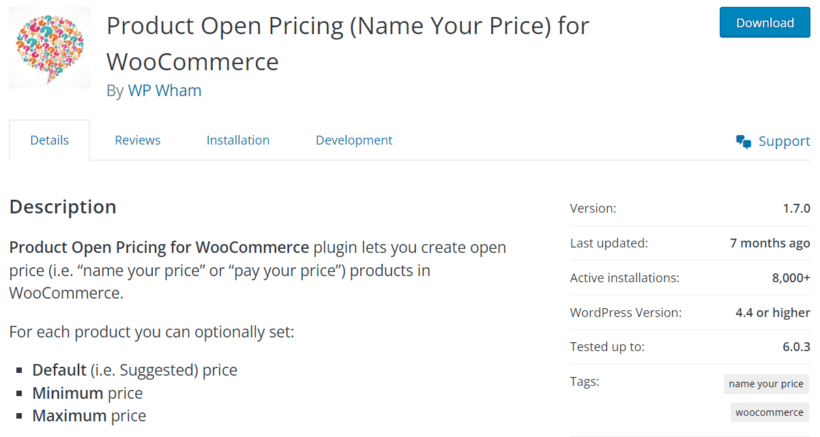
Product Open Pricing for WooCommerce is another free Name Your Price plugin with a premium alternative for more features. It allows store owners to set up products with open pricing, meaning customers can enter their preferred product prices. You can set minimum, maximum, or suggested prices, with other features like:
- Open pricing field customizations, including the label, placeholder text, and so on.
- Integrations with WooCommerce core.
- Compatibility with WooCommerce plugins like Subscriptions and Memberships.
The plugin was last updated in March 2026, so it's still being maintained. The install base is small, and some reviewers have flagged that customers can set a negative value in the pricing field unless you configure the minimum carefully.
Pros:
- Free WP.org plugin with minimum, maximum, and suggested price controls.
- Still being maintained (last update March 2026).
- Subscriptions and Memberships compatibility in the free version.
Cons:
- Free version only allows you to enable open pricing for a single product at a time; multiple products require the premium upgrade.
- Reviewers have flagged a negative-value pricing field if the minimum isn't configured carefully.
- Small install base and review count limit the social-proof signal.
Best for: single-product pilot use cases on a tight budget.
7. ELEX WooCommerce Name Your Price
ELEX WooCommerce Name Your Price is another free alternative you can consider. With ELEX, you can set the minimum price at which the consumer can proceed with payment. Once the consumer has specified a custom price, they can go ahead to checkout. ELEX also:
- Allows you to adjust the prices globally and for individual products.
- Supports simple and variable WooCommerce products.
The caveat with this plugin is that it has only a handful of installs and 8 reviews on WP.org. For a plugin handling pricing, that's a thin validation signal compared with Booster for WooCommerce or the official extensions.
Pros:
- Free WP.org plugin with minimum-price control.
- Last update February 2026; still being maintained.
- Supports both simple and variable WooCommerce product types.
Cons:
- Very small install base and only 8 reviews on WP.org; limited validation signal.
- Fewer features than Booster for WooCommerce or the paid options.
Best for: side-project use only; for anything production-facing, Booster for WooCommerce is the stronger free pick.
How to add a Name Your Price field to a WooCommerce product
Adding a Name Your Price field to a WooCommerce product with the Product Options plugin is easy. All you need to do is follow these steps.
First:
Get your copy of WooCommerce Product Options here. Once you're done, you'll receive an email with a downloadable ZIP file and license key.
Next:
- Log into your WordPress admin area and go to Plugins → Add New → Upload Plugin.
- Choose the plugin ZIP file, then click Install Now followed by Activate Plugin.
- Use the setup wizard to apply the basic settings and activate your license key.
At this point, WooCommerce Product Options should be fully functional. It's time to add your first Name Your Price WooCommerce field to your store.
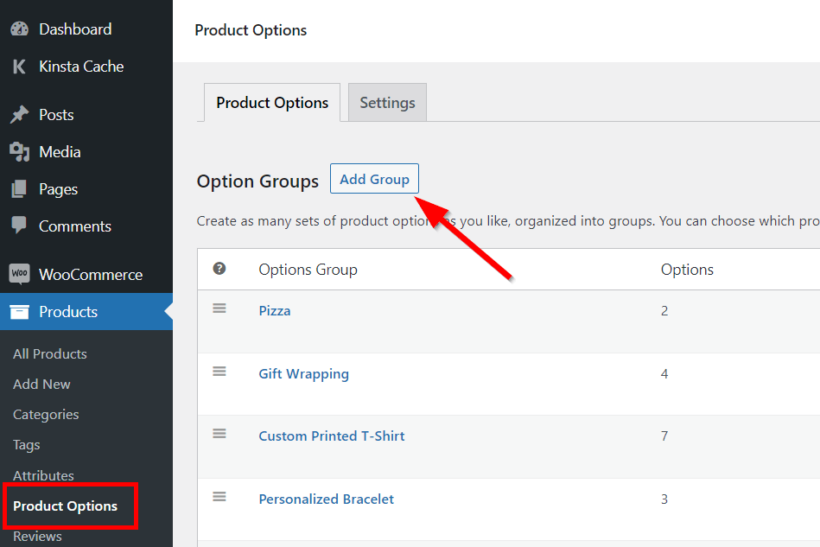
To do this, go to Products → Product Options → Add Group.
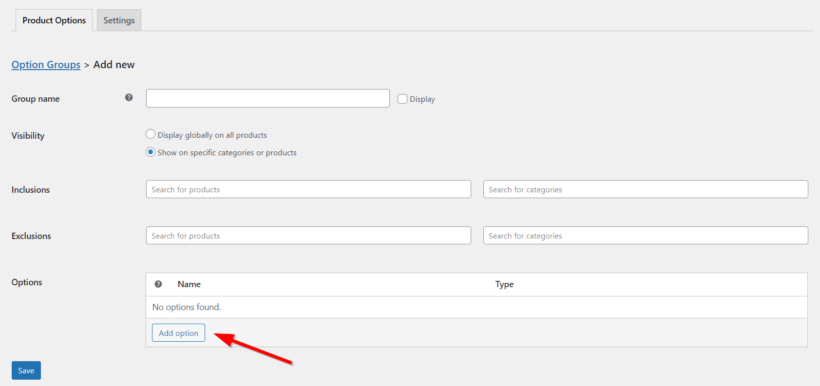
On the next page, set the group name and select the products or product categories where you want to display the Name Your Price field. Then click Add option.
Add an option name and select Customer defined price under the Type section.
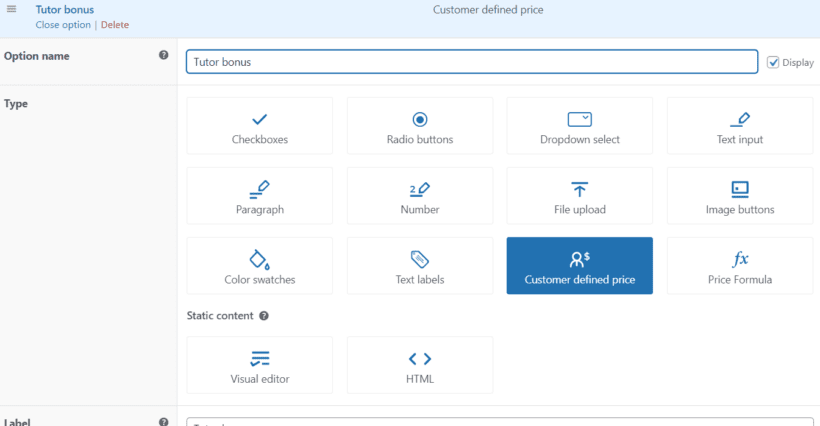
Enter the label and check the Required option if you want to. You can also enable conditional logic if there are conditions for which you'd like the field to be displayed or hidden.

Once you're done, click Save changes at the bottom left of the page, and the group will be successfully created. The Name Your Price WooCommerce field will now appear on all the product(s) you've added the options group to.
The main product price is updated immediately after the user enters a value in the new 'Name Your Price' field. Perfect.
Which Name Your Price plugin should you choose?
Here's where I'd start, and what to add when:
- WooCommerce Product Options: the top pick if you want Name Your Price plus a wider range of product options, with conditional logic and multiple field types.
- WooCommerce Name Your Price: pick this if you only need Name Your Price and want a clean dedicated plugin from the official WooCommerce marketplace.
- Product Add-Ons: add this if you want product add-ons alongside customer-defined pricing, and prefer Automattic's support channel.
- YITH WooCommerce Name Your Price: consider this if you already run other YITH plugins.
- Booster for WooCommerce: the strongest free option, with a 92% rating from 533 reviews on WP.org. Enable only the modules you need to avoid bloat.
- Product Open Pricing for WooCommerce: consider for single-product pilot use cases; configure the minimum carefully to avoid the negative-value field bug some reviewers have flagged.
- ELEX WooCommerce Name Your Price: side-project use only; Booster for WooCommerce is the stronger free pick.
If you have any questions or comments, leave them in the comments section below.