WooCommerce payment gateways compared


Choosing the right WooCommerce payment gateway shapes your conversion rate, your fees, and your customers' trust. Here's a comparison of the best options, plus how to set them up.
A WooCommerce payment gateway is the technology that processes payments between your store, your customer's bank, and your merchant account. Pick the wrong one and you'll lose margin on fees. You'll also see more abandoned carts at checkout and run into currency or wallet limits.
In this guide, I'll cover the most popular WooCommerce payment gateways. I'll walk through how to set them up. I'll also finish with two bonus angles for stores with more advanced needs.
What is a WooCommerce payment gateway?
A WooCommerce payment gateway is a service that securely processes payments at checkout. It connects your store to the customer's payment method and your bank account, then settles the funds. Without one, you can't accept paid orders.
In practice, your gateway choice affects four things:
- Fees. Some gateways charge higher per-transaction fees than others. Over thousands of orders, the difference adds up.
- Customer experience. A fast, familiar checkout reduces cart abandonment. An unfamiliar one increases it.
- Currency and country support. Not every gateway covers every region. International stores need wider support.
- Security and compliance. PCI-DSS compliance, fraud detection and tokenization should be table stakes.
What to look for in a WooCommerce payment gateway
Before picking a gateway, run through this list. Each criterion will narrow the field for your store specifically.
- Per-transaction fees and any monthly costs. Stripe, PayPal and WooPayments all sit around 2.9% + a fixed fee. Some enterprise gateways add a monthly platform fee on top.
- Currency and country support. Stripe and PayPal cover most markets. Square is strongest in the US, UK, Canada and Australia. Mollie is strongest in Europe.
- Digital wallets included. Apple Pay and Google Pay don't run on their own. They install via Stripe, WooPayments or Braintree. Check that your gateway includes them.
- Recurring billing and subscriptions. If you sell subscriptions, the gateway must support recurring payments through WooCommerce Subscriptions or a similar plugin.
- Fraud tools. Look for built-in fraud detection and chargeback protection rather than relying on third-party add-ons.
- Setup and maintenance effort. Some gateways install in minutes. Others need manual API keys, certificates and ongoing configuration.
How I evaluated these payment gateways
I researched each gateway using the vendor's own marketing pages and pricing. I also read user reviews on the WordPress.org repository and the WooCommerce.com marketplace. The reviews matter most for the cons. They surface the rough edges that don't show up on the sales page.
I've ordered the gateways by ease of setup, starting with the simplest WordPress-native option.
I haven't installed every gateway personally, so I've grounded each writeup in real published information rather than first-hand testing.
Disclosure: Barn2 doesn't make a WooCommerce payment gateway. That means I have no horse in this race and have ranked these on merit. This article also contains no affiliate links.
WooCommerce payment gateways at a glance
| Gateway | Best for | Typical fee (online) | Digital wallets | Subscriptions |
|---|---|---|---|---|
| WooPayments | Stores that want an all-in-one option managed inside WordPress | 2.9% + 30¢ (US cards) | Yes | Yes |
| Stripe | Stores that want flexibility and a strong developer ecosystem | 2.9% + 30¢ (US) | Yes | Yes (with subscriptions plugin) |
| PayPal | Stores selling to customers who already trust the PayPal brand | 2.9% + 30¢ (US) | Partial | Yes |
| Square | Brick-and-mortar stores expanding online | 2.9% + 30¢ (online); 2.6% + 10¢ (in-person) | Yes | Partial |
| Mollie | European stores with multiple local payment methods | Varies by method (e.g. iDEAL ~€0.29 flat) | Yes | Yes |
| Authorize.net | Established US businesses with higher-volume operations | 2.9% + 30¢ plus ~$25/month | Limited | Yes |
| Amazon Pay | Stores selling to customers with existing Amazon accounts | 2.9% + 30¢ (US) | Not applicable | Yes |
WooPayments
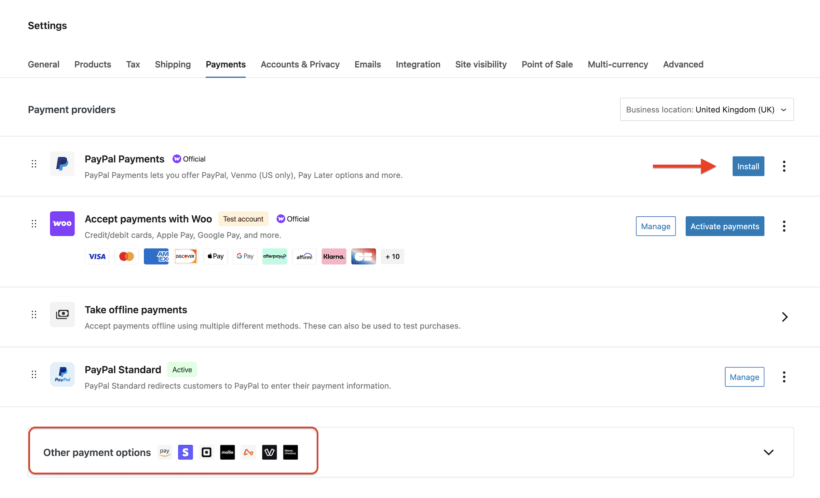
WooPayments is WooCommerce's official payment gateway, built and maintained by the team behind WordPress. It's powered by Stripe under the hood, but managed entirely from your WordPress dashboard. That makes it the easiest gateway in this list to set up.
What stood out in research: the all-in-one experience is the big selling point. There's no separate merchant account to register and no API keys to copy across. You manage payouts, refunds and disputes inside WooCommerce instead of switching tabs to a Stripe dashboard. Reviews highlight that the trade-off is less flexibility than running Stripe directly.
Key features
- Accepts cards, Apple Pay, Google Pay and several local payment methods.
- Manage transactions, payouts and disputes from inside WooCommerce.
- Multi-currency support for international stores.
- Subscriptions support via WooCommerce Subscriptions.
Pros
- Fastest setup of any gateway in this list. No third-party signup, no API keys.
- Native WooCommerce experience with no extra dashboard to manage.
- Tight integration with WooCommerce Analytics and order reporting.
- Free to install. You pay only the transaction fees.
Cons
- Less flexible than Stripe direct. If you outgrow it, migrating to standalone Stripe is the usual next step.
- Country availability is narrower than Stripe.
Best for
Stores that want an official, all-in-one gateway and prefer to manage everything inside WordPress.
Stripe
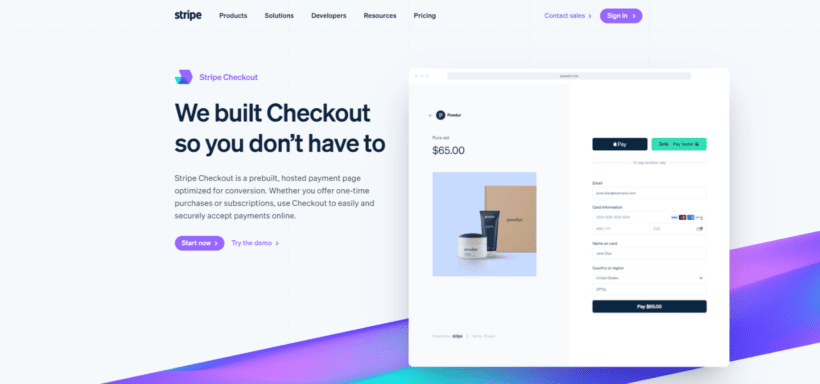
Stripe is the gateway that powers WooPayments behind the scenes. Installing it directly gives you more control over your Stripe account, plus access in countries where WooPayments isn't available yet.
What stood out in research: Stripe's API and developer ecosystem are unusually deep. Almost every WooCommerce plugin you might add later has first-class Stripe support. That's not the case for every gateway here.
Key features
- Accepts major cards, Apple Pay, Google Pay and local methods like Klarna and Afterpay.
- Recurring payments work natively with WooCommerce Subscriptions.
- Built-in fraud prevention via Stripe Radar.
- One of the simplest test-mode flows for development and staging.
Pros
- Wide country and currency support.
- Best-in-class developer documentation and ecosystem support.
- Generous test mode for trying changes safely.
Cons
- Standard pricing isn't the cheapest. High-volume stores can negotiate, but small stores pay the rack rate.
- Account holds and reserves can hit new stores that grow quickly. Reviews flag this regularly.
Best for
Stores that want a flexible, well-supported gateway with global reach. Pick Stripe over WooPayments if you need more control or if your country isn't supported by WooPayments.
PayPal

PayPal is the most recognized payment brand in this list. Customers who don't want to type card details often pick PayPal at checkout. That's why most stores offer it alongside a card gateway.
What stood out in research: PayPal is rarely a store's only gateway. It usually runs alongside Stripe or WooPayments, picking up the customers who specifically prefer the PayPal wallet. The official PayPal Payments for WooCommerce plugin from WooCommerce is the canonical way to install it.
Key features
- Accepts PayPal balance, linked cards, and bank transfers through the PayPal wallet.
- Pay Later and Venmo support in the US.
- Buyer and seller protection are built in.
Pros
- Trusted brand that lifts conversion for some customer segments.
- Quick setup with no underwriting hurdles for most stores.
- Wide international reach.
Cons
- Reviews flag occasional account holds and dispute decisions that don't go the merchant's way.
- Customer journey jumps off-site for some payment flows, which can feel less polished than a hosted card field.
Best for
Stores that want to offer a familiar wallet option alongside their main card gateway.
Square
Square is best known for its point-of-sale system. If you already run a retail or hospitality business in person, the Square for WooCommerce plugin reuses the same account. Your online store and your physical store sit on top of one Square setup.
What stood out in research: Square's inventory sync is the practical reason most stores pick it. Stock counts update across your physical store and your WooCommerce site automatically. That's hard to replicate with a card-only gateway. Reviews caution that the sync occasionally lags and needs manual reconciliation.
Key features
- Unified online and in-person payments.
- Inventory sync between Square and WooCommerce.
- Sales reporting that combines both channels.
Pros
- Single account for in-person and online sales.
- No monthly fee.
- Strong receipt and customer record handling.
Cons
- Country availability is limited (US, UK, Canada, Australia, Japan, France, Ireland, Spain).
- Subscription support is partial. Stripe or WooPayments handle recurring billing more cleanly.
Best for
Brick-and-mortar businesses expanding online. If you don't already use Square in person, Stripe is the better default.
Mollie
Mollie is the strongest gateway for European stores. It's particularly strong for those that need iDEAL (Netherlands), Bancontact (Belgium), Sofort, or other local payment methods. The US-centric gateways don't cover these well.
What stood out in research: the official Mollie Payments for WooCommerce plugin is well-rated on WordPress.org. Reviews highlight clean Dutch and Belgian integrations specifically. Mollie's pricing is per-method rather than a flat percentage, which works out cheaper for high-value or local-method orders.
Key features
- iDEAL, Bancontact, SEPA Direct Debit, Klarna, plus cards and digital wallets.
- Per-method pricing rather than a single percentage.
- Easy onboarding for European businesses.
Pros
- Best local-method coverage in Europe.
- Often cheaper than Stripe for iDEAL and SEPA-heavy stores.
- Highly rated WooCommerce plugin.
Cons
- Best fit for European stores. North American businesses get little benefit.
- Method-level pricing takes a moment to wrap your head around.
Best for
European stores, especially those selling into the Netherlands, Belgium, Germany and France.
Authorize.net
Authorize.net is a long-established gateway owned by Visa. It has a strong reputation with US-based businesses that have processed card payments for years. The fraud and reporting tools are aimed at higher-volume operations.
What stood out in research: Authorize.net's appeal is in the longevity of its merchant relationships rather than novelty. Reviews note that the admin UI feels dated. The underlying processing is reliable and the fraud rules are detailed.
Key features
- Accepts major cards, eChecks and recurring billing.
- Advanced fraud detection suite with configurable filters.
- Mature merchant account integrations for established businesses.
Pros
- Trusted name with US merchant banks.
- Excellent fraud tooling out of the box.
- Reliable for higher-volume stores.
Cons
- Adds a monthly platform fee on top of transaction fees.
- Setup is more involved than Stripe or WooPayments.
- Admin UI feels dated.
Best for
Established US businesses with higher volume that need detailed fraud controls.
Amazon Pay
Amazon Pay lets customers check out using the addresses and payment methods saved in their Amazon account. For stores selling to existing Amazon shoppers, that one-tap familiarity can lift conversion.
What stood out in research: Amazon Pay's strongest use case is shoppers who don't have their card to hand. The auto-filled checkout shortens a long form into a couple of clicks. Reviews note that the integration depends on your customers having Amazon accounts. It works best as a complement to a primary gateway, not a replacement.
Key features
- One-click checkout for Amazon account holders.
- Auto-fills shipping and billing details from the customer's Amazon account.
- Backed by Amazon's fraud and security infrastructure.
Pros
- Frictionless checkout for the right audience.
- Wide trust thanks to the Amazon brand.
- No monthly fees.
Cons
- Only useful if a meaningful share of your customers have Amazon accounts.
- You still need a primary gateway alongside it.
Best for
Stores selling to consumer audiences who already shop on Amazon.
How to set up a payment gateway in WooCommerce
WooCommerce handles all payment gateways through a single settings screen. The exact steps vary by gateway, but the general workflow is the same.
- Install the gateway plugin. Most gateways have an official WooCommerce plugin either on WooCommerce.com or in the WordPress.org repository.
- Go to WooCommerce → Settings → Payments. You'll see the gateway listed alongside any others you have installed.
- Click 'Manage' or 'Set up' for the gateway you want to enable.
- Connect the gateway to your merchant account. Stripe, WooPayments and PayPal walk you through this in a guided onboarding. Older gateways like Authorize.net ask for API keys you copy from your merchant dashboard.
- Configure the customer-facing details: the title shown at checkout, any instructions, and whether to enable test mode.
- Save changes and run a test transaction in your store. Use the gateway's sandbox mode to confirm orders and refunds work before you flip the switch to live.
You can run multiple gateways at the same time. WooCommerce shows them all to the customer at checkout and remembers which one they pick.
Going beyond the basics with Barn2 plugins
While Barn2 doesn't make a payment gateway, two Barn2 plugins make payment gateways noticeably more useful in specific situations.
Show different payment methods to different user roles with WooCommerce Wholesale Pro

By default, every customer sees the same set of payment methods at checkout. WooCommerce Wholesale Pro changes that. You can restrict each payment method to specific user roles.
Disclosure: we make this plugin. We've included Wholesale Pro in this article because it provides a unique way to offer different payment gateways to different types of customers.
Common setups include:
- Offer card and PayPal payments to retail customers, but show invoice or direct bank transfer only to wholesale roles.
- Show a special wholesale-only gateway (like a B2B payment processor) to trade roles only.
- Hide offline methods like 'Check payment' from retail customers and reserve them for verified wholesalers.
The settings live at WooCommerce → Settings → Wholesale → Payment roles. Add as many payment options as you need and de-select any roles that shouldn't be able to use each one. On the front end, each customer only sees the payment methods their role is allowed to use.
Run checkout from a popup cart with any payment gateway via WooCommerce Fast Cart
Disclosure: we make this plugin too. WooCommerce Fast Cart replaces the standard cart and checkout pages with an on-page popup. The full checkout, including whichever payment gateway you've configured, runs inside the popup.
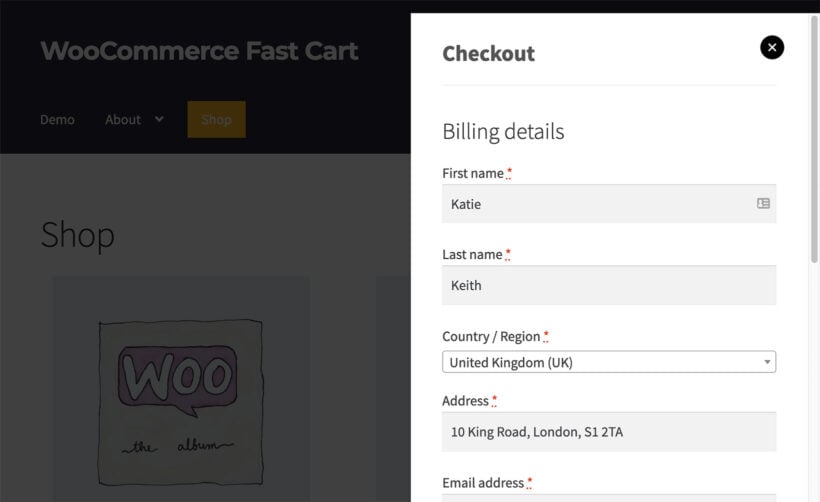
Whatever gateway you pick from this article will work inside Fast Cart. Customers can review their cart, enter payment details and place the order without leaving the product page. That removes one of the slowest steps in the customer journey. The effect is strongest when paired with a fast gateway like Stripe or WooPayments.
Which WooCommerce payment gateway should you choose?
There's no single right answer. The best gateway depends on your customers, your geography and the rest of your stack.
- Most stores: WooPayments. It's the fastest gateway to set up and is managed entirely inside WordPress.
- Stores wanting more flexibility or international reach: Stripe directly, with PayPal alongside it for the customers who prefer that wallet.
- Brick-and-mortar going online: Square, to keep your in-person and online sales in one account.
- European stores: Mollie, for the strongest local-method coverage (iDEAL, Bancontact, SEPA).
- Established US businesses with detailed fraud needs: Authorize.net.
- Consumer stores selling to Amazon shoppers: Amazon Pay alongside your primary gateway.
- Wholesale stores: any of the above, paired with WooCommerce Wholesale Pro to separate retail and wholesale payment methods by role.
Final thoughts
The right WooCommerce payment gateway is the one that fits your customers and your business model. Test it in sandbox mode before going live. Monitor your dispute rates and reconsider after your first few hundred orders. If checkout feels like the slow part of the customer journey, pair your gateway with WooCommerce Fast Cart. The whole checkout then runs on the same page.