Document management software: how to choose 2026


There are several types of document management software, and which one to use depends on your organization's specific needs. I'll walk through the main types, the self-hosted vs cloud question, and which fits your size and use case.
A solo accountant, a 200-person regulated business and a council publishing records for the public all need something called "document management" - but surprisingly, they all need different software. The best document management software for one would be overkill or a dead end for another, so it can be hard to find the right type.
I'll break the choice down so you can rule out whole categories quickly. We'll look at:
- The main types of document management software, from cloud platforms to a simple website library.
- Where your files should live: self-hosted, cloud or on-premise.
- What fits your size, from a small business to a regulated enterprise.
- Which type of software suits your use case, by department and sector.
- The options for publishing documents as well as managing them internally.
What is document management software?
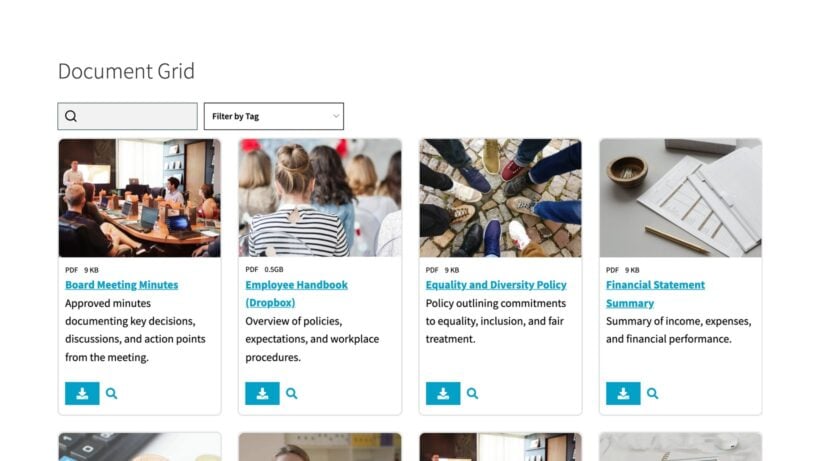
Document management software is a system for storing, organizing, tracking and controlling access to your files in one place. It replaces scattered folders and email attachments with a single source of truth, where each file has a known location, a history and a set of permissions.
True document management software goes further than storage. It tracks versions so you always know which copy is current, keeps an audit trail of who changed what and when, and searches inside files rather than just their names. It also sets rules for how long documents are kept. In addition, the software might provide a way to allow people to find and access documents - either from an internal system or on your public-facing website.
It's worth understanding the difference between cloud storage and full document management, as there is some overlap. Cloud storage keeps your files. In contrast, online document management goes further and controls them, with versioning, permissions and retention rules. Knowing which you need saves both money and frustration, since a heavyweight platform is wasted on a team that only wants to share a folder.
The main types of document management software
The document management market splits into a handful of categories, and most software products sit clearly in one. That makes things easier because once you've figured out which category you need, the choice becomes much simpler.
- Cloud document managementHosted platforms like M-Files or DocuWare. You pay per user per month and the vendor handles hosting, updates and backups, so you're running within days rather than weeks. This suits teams who want proper document management - version control, workflows and audit trails - without maintaining their own servers. The cost is per user, though, so it climbs as your headcount grows.
- Enterprise content managementLarge suites such as OpenText or SharePoint that manage documents alongside records, workflows and web content. These are powerful and deeply configurable, which is also why they're costly and slow to roll out. They earn their place in big or regulated organizations with dedicated IT teams, and tend to overwhelm everyone else.
- Self-hosted and open source softwareTools like OpenKM and Mayan EDMS that you install on your own server. It also includes self-hosted plugins that you install on platforms like WordPress, such as Document Library Pro which we'll discuss in the next category. There's no license fee and your files never leave your own infrastructure, which appeals to teams with technical skills and strict data rules. In return, the setup, security and upkeep are all yours to handle.
- Website-integrated librarySoftware like Document Library Pro that publishes your files as a searchable, downloadable library on your own website. It's built for sharing documents with an audience - customers, members or residents - rather than managing them internally. If your real goal is publishing rather than (or as well as) archiving, this is usually the simplest and most affordable route.
- Cloud storageGoogle Drive, Dropbox and similar. Strictly speaking, this isn't document management software because there's no real versioning, audit trail or access control. However, it's often all you need for a small team that just needs to sync and share files, so I've included it in this list.
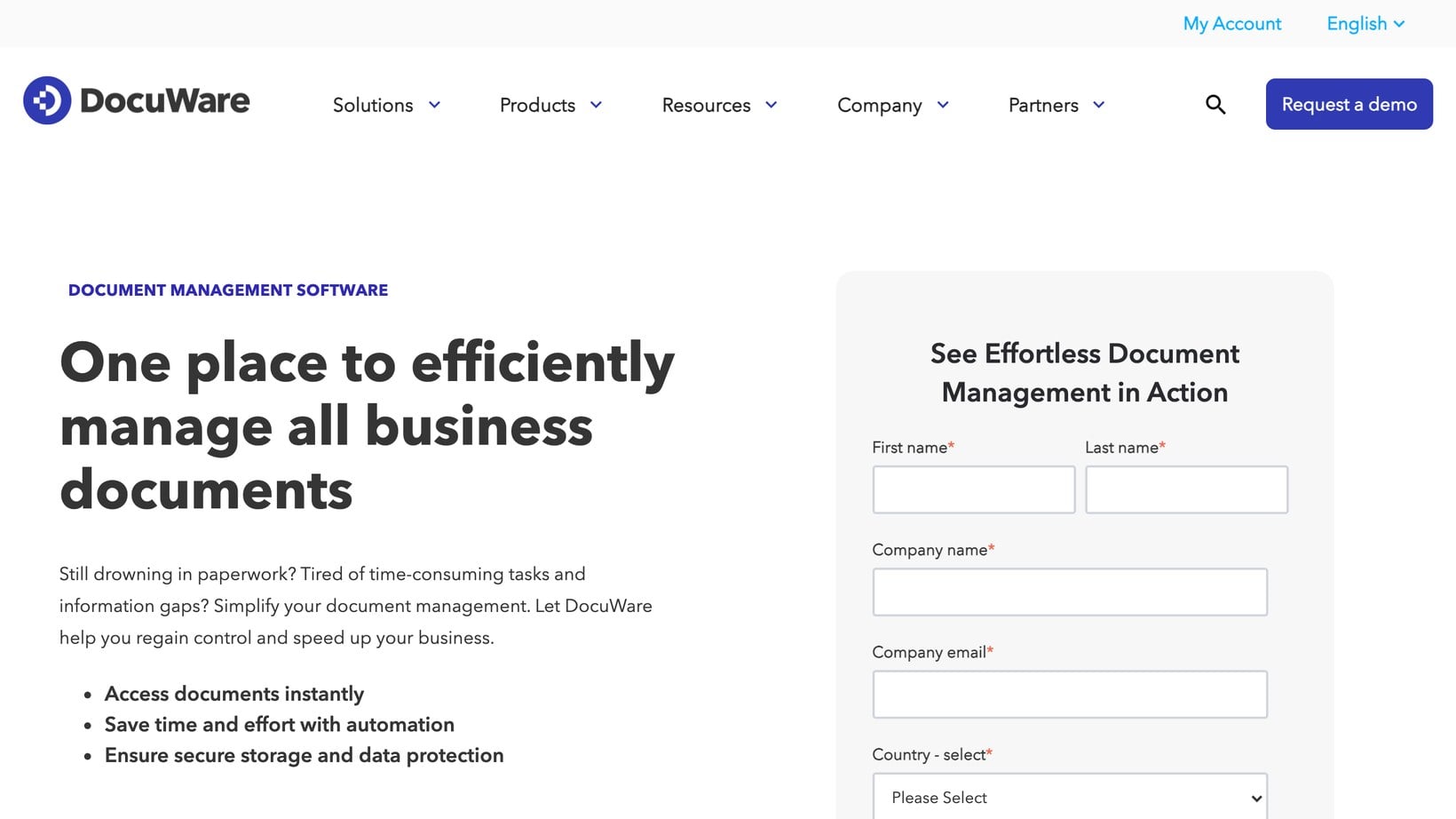
The top two categories are enterprise document management, as they're built for scale, compliance and complex workflows. Most smaller teams and public-facing projects land in one of the other three categories.
Self-hosted vs cloud vs on-premise: the ownership question
Before choosing document management software, it's also important to decide where your files should physically live. The main options are:
- CloudThe vendor hosts everything and you pay a subscription. Fastest to launch and easiest to maintain, but your files and your monthly bill sit with a third party. You also don't own your data and may not be able to easily migrate it to another software platform in future.
- Self-hostedYou install the software on a server you control. Open source document management platforms like OpenKM or Mayan EDMS has no license fee, so you trade money for the work of running it yourself. If your aim is publishing rather than internal archiving, Document Library Pro is self-hosted too: the WordPress version runs on your own site, so your files and your library stay on your own domain. Either way, you own your data and stay in control. The only downside is that you need to take care of hosting the software yourself. If you're adding the software to your organization's existing WordPress website then this isn't a problem. However, it does add an extra task for standalone self-hosted document management software.
- On-premiseA self-hosted system running on hardware inside your own building. On premise document management is the right choice when data can't legally leave your premises, common in healthcare and government. For all other scenarios, this option is inconvenient as most organizations work across multiple locations, support home working or require public-facing documents.
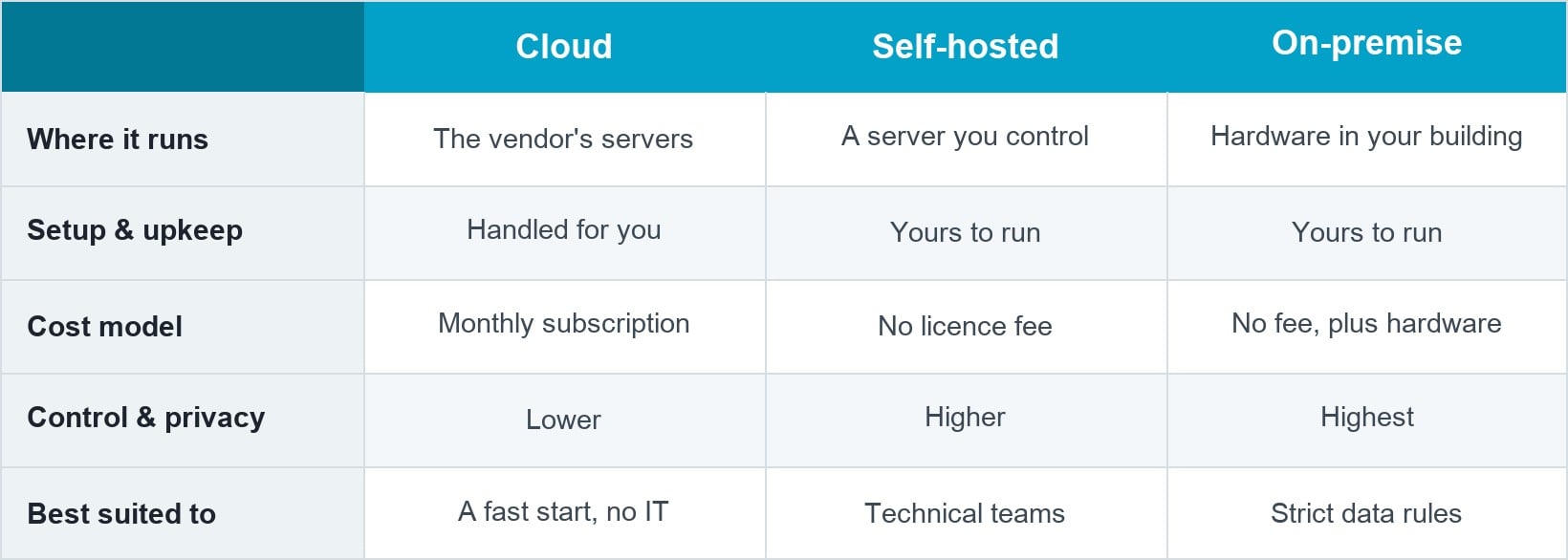
As you can see, there's a trade-off. Cloud-based software buys you convenience and predictable support in exchange for ongoing fees and less control. On the other hand, self-hosted and on-premise software gives you ownership and privacy in exchange for more technical responsibility.
Self hosted document management appeals most to teams that already run their own servers or have strict data rules. An existing self-hosted WordPress site that you can add a "Documents" area to is a good example. If neither describes you, then cloud is usually the calmer path.
For one common version of self-hosted libraries, see how an open source SharePoint replacement compares for teams leaving Microsoft's platform.
Choosing by size and need
Different organizations have different needs. For example, software that suits a freelancer would normally be completely inappropriate for a hospital. As a result, you need to choose document library software that matches your scale:
- Small businessA solo operator or small team rarely needs a full platform. Document management software for small business usually means lightweight cloud tools, or document storage software you already pay for such as Google Workspace. Keep it cheap and simple until a real limit forces you to upgrade.
- Regulated and enterpriseLarger and regulated organizations need audit trails, retention rules and approval workflows. In quality-controlled industries, this extends to document control software with formal sign-off and revision history. This is where cloud DMS and enterprise content management earn their cost.
- Publishing to the publicIf the goal is to let an audience find and download files, then you don't need an internal management platform at all. Adding document management with a front-facing library to your existing website does the job at a fraction of the price and complexity.
Plenty of small teams buy enterprise software because it looks thorough, then only end up using 1/10 of its capabilities. I often see this with organizations that use SharePoint in particular. To find the right balance, I recommend starting from your main constraint - usually budget, compliance or audience - and let that guide the decision.
Choosing by use case and sector
Different departments manage documents in different ways. It's worth understanding how the software will be used across the organization when choosing a platform:
- HR recordsPersonnel files need strict access control and retention. HR document management software, or an HR module inside a wider platform, keeps contracts and reviews private and auditable.
- Legal and accountingFirms handle sensitive client documents and often share them through a secure client portal rather than email or an internal-only tool.
- Schools and nonprofitsBudget matters most here. Many run on free or low-cost tools, and a public resource library often serves them better than an internal DMS. See the options for nonprofits.
- Internal company filesStaff handbooks, policies and shared assets usually live on an intranet or a shared platform like SharePoint.
The decision is also influenced by which sector you operate in. For example, healthcare and government are more likely to use on-premise software in order to meet strict security and data rules. In contrast, marketing and media are more attracted to cloud-based software for easy collaboration. A simple file manager covers basic document management for organizations in which a full system would be overkill.
Adding a document library to your existing website
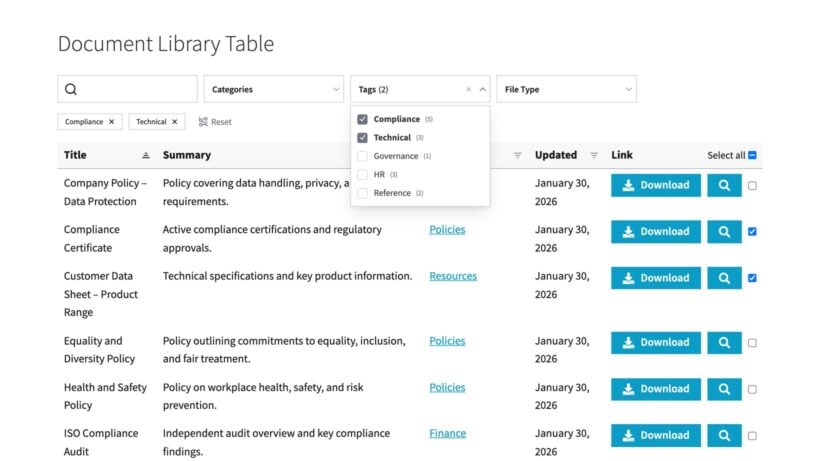
This final type of "document management" is as much about sharing as management. In the back end, it lets you add, import and manage documents. But most importantly, in the front end you publish the files online so an audience can find and download them. This might be the general public, or it might be specific people who you give access to. Think of councils sharing minutes, schools sharing forms, or membership groups sharing resources.
These days, pretty much all organizations have a website. If you need to share documents beyond your immediate colleagues, then it makes sense to incorporate your document management software into your existing website.
You can do this with our Document Library Pro software. You create a searchable, filterable library from any set of files and embed it in any website, whatever platform it runs on. It works the same on WordPress, Shopify, Squarespace or Wix.
You add each document by uploading a file or linking to where it's hosted, then sort it into categories so visitors can filter down to what they need. It displays on the front end as a sortable table or a grid, with live search built in. The access controls let you either keep the library public or restrict it by password, user role, etc.
There's also no per-user fee, so the cost doesn't climb as your audience grows.
Who is it suitable for?
Document Library Pro is a good option if:
- You have a website on any platform, from WordPress to Shopify, Squarespace or Wix.
- You want to create a searchable library of documents, either publicly available or restricted to specific people.
While it comes with document management features such as bulk upload and version control, I don't recommend it if you have particularly strict internal or security compliance needs. In that case, a full DMS without a front end library would be a better solution.
If you do need to publish documents online, I've compared the full range of document library software in a separate article, including cloud and open-source options. On WordPress specifically, you can follow a step-by-step guide to building a document library, or read more on using WordPress for document management.
Frequently asked questions about document management software
What is the difference between document management software and a document management system?
In practice the terms are used interchangeably. "Software" tends to describe the product you buy or install, and "system" describes the whole setup, including your rules and processes. Both point to the same thing: a controlled way to store, find and manage files.
Is there free or open-source document management software?
Yes. OpenKM and Mayan EDMS both offer free, self-hosted editions with full management features, if you can run them on your own server. Google Drive's free tier covers basic storage and sharing for small teams.
Should I choose self-hosted or cloud document management?
Choose cloud if you want the fastest setup, predictable support and no servers to run. Choose self-hosted or on-premise if you need full control of your data, have strict privacy rules, or already manage your own infrastructure.
How to choose
The right document management software is the one that fits your real need, not whichever option looks most thorough on a feature chart. Decide where your files should live, size the system to your team, and respect your sector's conventions. Do that, and the field narrows to a handful of sensible software options.
If your need is internal control, compliance or workflow, then it's worth investing in a cloud or enterprise DMS. If your need is publishing files for an audience, a website library like Document Library Pro does the job better and more cost-effectively. And if you're considering whether to keep using SharePoint for your document management, my comparison of SharePoint alternatives and the WordPress vs SharePoint breakdown are good next reads.
2 Comments
That’s a really good point about tailoring software to different needs. It's easy to get caught up in features but actually focusing on the specific workflow is key.
Hi DocReviewer, Thanks for reading! You hit the nail on the head. It's incredibly easy to get distracted by a long list of shiny features, but if the software doesn't naturally match your daily workflow, it ultimately ends up slowing the team down. Focusing on process first always leads to a much better choice. Thanks for sharing your thoughts! Cheers!