Nonprofit advertising: making the most of your investment

Most nonprofits put off paid advertising because the math feels intimidating. Google Ad Grants, Meta's per-click pricing, LinkedIn cost-per-thousand and YouTube spend caps are all in the mix, so it's tempting to stick with organic outreach instead.
I get the hesitation, but skipping paid ads usually costs you more than it saves. When you run them well, you can bring in new donors at a cost you can predict and repeat. When you run them badly, you burn through restricted budget faster than any other channel, so getting them right really matters.
Below, I'll walk you through the three things that decide whether ads work for a nonprofit: choosing the right platform for the goal you've set, briefing the creative so it connects with real donors, and tracking the right metric so you can pause anything that isn't working before it eats your budget.
What is nonprofit advertising?
Nonprofit advertising is paid promotion of a charity's services, campaigns or fundraising appeals across digital and traditional channels. For most small nonprofits, that means paid search (Google Ads), paid social (Meta, LinkedIn) and video pre-rolls (YouTube). Traditional channels like radio and print still exist, but they're harder to measure and rarely the right starting point for a team with a five-figure annual marketing budget.
Paid advertising amplifies the parts of your website that already convert visitors, like your donation form, your impact stories and your email signup. A good campaign sends pre-qualified traffic to pages you've tested with organic visitors first. A bad campaign sends paid clicks to a homepage that wasn't designed to convert anyone. Don't worry, I'll show you how to stay on the good side of that line throughout the rest of this article.
Why pay for advertising when budget is tight?
People at nonprofits are often tempted to skip paid ads when funds are limited, and I completely understand the instinct. Restricted budget feels like a reason to play it safe with cheap fundraising ideas and organic outreach instead.
Please be aware that skipping paid ads can cost you more than it saves. You miss out on a channel that's both targetable and measurable in ways organic outreach simply isn't. The key is to be smart with every advertising dollar so it pays for itself in donations or signups.
Here are three things paid ads can reliably do for your nonprofit:
- Targeting. Demographics, interests, behaviors and lookalike audiences let you put your message in front of people much more likely to convert into donors or volunteers than a random social-media follower.
- Speed. You can have an ad campaign live in 48 hours. Earning the same reach organically takes months of content production.
- Measurability. Every click and every conversion is tied to a specific ad, audience and creative. The good ones get more budget, the bad ones get paused. You close the loop in a way that most other nonprofit marketing simply doesn't allow.
There is one important caveat. Running nonprofit ads well needs ongoing attention beyond the initial setup. A "set and forget" ad campaign usually underperforms after three or four weeks as ad fatigue sets in and your audience saturates. Plan for an hour or two of optimization per week, per active campaign.
The platforms that work for nonprofit advertising
The right platform mix depends on what you need the campaign to do. A donor recruitment drive looks very different from an event awareness push, and one platform is rarely the right answer for both.

Google Ads (and the Google Ad Grant)
Google Ads put your message in front of people who are actively searching for terms related to your cause. That intent signal is what makes paid search consistently the highest-converting channel for fundraising appeals.
The bigger story for charities is the Google Ad Grants program, which gives eligible nonprofits up to $10,000 a month in free Google search advertising. The grant has real constraints (a $2 maximum cost-per-click bid, a 5% minimum click-through rate requirement), but if you haven't applied yet, the grant alone is worth two months of staff time to set up properly.
Meta (Facebook + Instagram)
Facebook still has the broadest reach for over-35 audiences and the best targeting tools for interest-based prospecting. Instagram, owned by Meta and managed in the same Ads Manager, is the right home for visual storytelling. A short reel of program impact will outperform a static photo three to one in most nonprofit accounts, so it pays to keep approved reels and images ready to share in a nonprofit social media toolkit.
Both platforms now require a verified nonprofit account to access the cheapest ad rates. Set that up before you launch your first campaign.
YouTube
Video pre-rolls work for nonprofits with strong story content. A 30-second beneficiary testimonial that plays before a related search result reaches an audience that already cares about the topic. YouTube ads are managed through Google Ads, though they don't qualify for Ad Grant credit, which limits this channel to your paid budget.
Skippable ads only cost you when the viewer watches past the five-second mark, which makes them surprisingly affordable for testing. Non-skippable 15-second formats land harder but cost more per impression.
LinkedIn's audience is mostly working professionals and senior decision-makers, which makes it the right platform for major-donor prospecting, corporate sponsorship outreach and board recruitment. It's the most expensive channel per click of the four covered here, so I'd reserve it for high-value conversion goals.
The cost only makes sense when your target audience is genuinely a workplace one. For general donor acquisition, Meta and Google will give you better results per dollar.
Planning the campaign before spending the money
Most wasted nonprofit ad spend traces back to one mistake. The team launches a campaign without a clear goal or a clear audience, and then can't tell whether the result is success or failure. Before you commit any budget, please work through these three planning decisions.
Define one primary goal per campaign
A single campaign can really only optimize for one outcome. If you try to drive donations, recruit volunteers, raise awareness and grow the email list with the same ad, you'll hit all four poorly. Pick one. Common single goals include:
- One-time donations during a giving day or appeal week.
- Recurring-donor signups, which have higher lifetime value but are harder to convert cold.
- Email list growth, so you can nurture supporters before the next ask.
- Volunteer recruitment for a specific program.
- Event registrations for a fundraising gala or conference.
A campaign with one goal and one matching nonprofit KPI is far easier to evaluate after the fact than a multi-goal campaign that "did something" across several metrics.
Build the audience deliberately
Start from your existing donor and supporter data, including donor surveys. A simple export from your donation plugin gives you demographics, geographic distribution and giving history. From there, I'd recommend three steps:
- Build a lookalike audience based on your existing donors. Most ad platforms can find similar profiles automatically once you upload a hashed email list of current supporters.
- Layer interest targeting (the cause area, related nonprofits and news topics) on top of the lookalike to narrow it further.
- Exclude existing supporters from the prospecting campaign. There's no point paying to advertise to people who already give.
Set a budget that's enough to learn something
The common rule of thumb is to allocate 5-15% of your total marketing budget to paid ads. That's a starting point, not a target. The more useful question to ask yourself is whether the budget is large enough to produce statistically meaningful data within the campaign window.
If you run a campaign for two weeks with a $300 total spend, you'll generate maybe 30 to 50 clicks. That's not enough to tell which ad is working and which isn't. The minimum useful test budget for a nonprofit ad campaign is around $500-1,000 per audience-and-creative combination. Anything less than that, and you're paying for noise.
Briefing the creative for nonprofit ads
Donors give to causes and to specific people, not to organization names. Your ad creative has to do two things at once:
- Communicate the cause clearly.
- Trigger an emotional response strong enough to overcome the natural friction of opening a wallet on a phone screen.
A few approaches consistently outperform generic charity creative:
- Lead with a single named beneficiary's story, not a statistic. "Maria couldn't afford her son's insulin in March" reads stronger than "300,000 families face medication insecurity each year".
- Show the outcome, not the appeal. An ad that shows the beneficiary holding the meal beats an ad that shows an empty plate with text asking for donations.
- Match the tone to the platform. Facebook tolerates longer-form storytelling. Instagram needs visually tight 15-second pieces. LinkedIn rewards specific data points and named partner brands.
- Refresh your creative every three to four weeks. Ad fatigue is real and measurable in your click-through rate.
If you don't have an in-house designer, Canva for Nonprofits covers the design side at no cost, including templates sized to the major ad platforms' creative specifications.
Centralize the ad assets in a marketing toolkit library
Once you're running more than one campaign at a time, the next problem you'll run into is keeping track of the creative assets, briefs, nonprofit brand identity files and campaign templates your team needs to access. When volunteers start asking the comms team for "that logo file in white" or "the boilerplate paragraph we used last quarter", your asset library has outgrown a shared Dropbox folder.
A searchable marketing toolkit library on your nonprofit's WordPress site fixes this without adding a new platform. Document Library Pro turns a section of your site into a filterable archive that holds your ad creatives, brand assets, brief templates and campaign-recap decks. Categories and tags let you separate public-facing assets (case studies, annual reports) from internal-only ones (rate cards, campaign briefs and donor relationships notes and segmentation data), with role-based access control on the gated section.
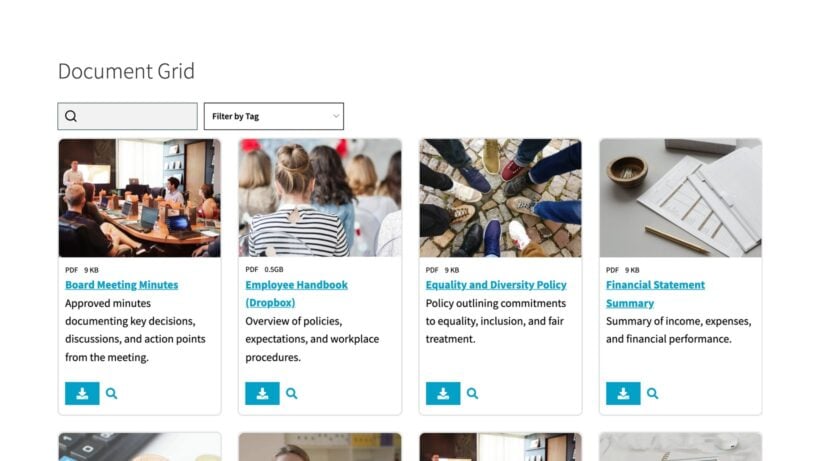
The setup that scales best is one library with multiple campaign-specific sections, not a separate site per campaign. Five real organizations show how they built theirs in the Barn2 roundup of nonprofit resource library examples.
Measuring whether the campaign worked
When you're reporting on a nonprofit ad campaign, it's easy to focus on impressions and clicks because those numbers are the biggest and most flattering. Neither one tells you whether the campaign worked. What matters is whether the click turned into a donation, a volunteer signup or an event registration. That conversion is the only number that pays the bills.
There are four metrics worth tracking. I'd take them in this order of importance:
- Conversion rate. Of the people who clicked, what percentage completed the desired action? A 1-2% conversion rate is normal for cold paid traffic to a nonprofit donation form.
- Cost per acquisition. Your total ad spend divided by the number of completed donations or signups. This is the number that decides whether the campaign breaks even on its own or relies on the donor's second-year giving to be worthwhile.
- Click-through rate. CTR is useful as a diagnostic, not as a goal in itself. If your CTR is high but conversion is low, the ad is doing its job and the landing page is the bottleneck. If your CTR is low, the ad creative or audience is the problem.
- Donor lifetime value, eventually. This is the hardest to measure but the most important number of the four. A donor acquired through paid ads who gives once is rarely profitable. The same donor giving for three years usually is. Plan to track the second and third gifts before declaring a campaign a success or a failure.
Set up conversion tracking on your WordPress site before launching the first campaign. Most ad platforms give you a pixel or tag that drops a cookie on click and fires when the user reaches your thank-you page. Without that, every later analysis is guesswork. The Barn2 guide to WooCommerce analytics covers the same tracking principles for ecommerce stores running on the same site.
Frequently asked questions about nonprofit advertising
How much should a small nonprofit spend on paid advertising?
A reasonable starting range is 5-15% of total marketing budget, but the more useful guide is to spend enough to learn something. The practical minimum per audience-and-creative test is around $500-1,000. Below that, your data is too noisy to make confident decisions from.
Is the Google Ad Grant worth applying for?
Yes, if your nonprofit is eligible to receive it. $10,000 a month in free Google search ads is a substantial channel even with the grant's bid and CTR constraints. The application takes a few hours, and ongoing compliance takes maybe four hours a month once your campaigns are tuned.
Which platform should a nonprofit start with?
Google Ad Grant first, because it's free. Then Meta (Facebook + Instagram) for paid prospecting, because the audience targeting and the unit cost both work for charity budgets. LinkedIn and YouTube come later, when you have a clear high-value use case (major-donor prospecting, video storytelling) and the budget to support a second active channel.
How long does it take to see whether an ad campaign is working?
Two to three weeks of consistent spend at the minimum test budget. Anything shorter risks ad fatigue effects and statistical noise dominating your data.
What's the right metric for ad success in a nonprofit?
Cost per acquisition tied to a real conversion action (donation, volunteer signup or event registration), not impressions or clicks. Anything that measures reach without measuring action is a vanity metric.
Where should the assets live so volunteers can find them?
In a searchable marketing toolkit library on your WordPress site, with public-facing assets in the open library and donor-segmentation or brief documents behind role-based access. Document Library Pro handles this without adding a new platform to your stack.
Final thoughts
My summary on nonprofit advertising is that it works for charities that treat it as a measurable discipline, and doesn't for charities that treat it as a one-off appeal. The platforms that consistently return on the spend are Google Ads (especially through the Ad Grant), Meta and YouTube. LinkedIn earns its keep on major-donor and corporate work.
The supporting infrastructure matters as much as the ad creative. If you're running ads at any scale, you need your brand assets, briefs and creative files in one searchable place that your team can self-serve from. For that, I'd use Document Library Pro. You can see a real-world examples roundup at WordPress nonprofit resource library examples if you want to see how other charities have built theirs.