Open source SharePoint replacements ranked by use case


A guide to the best open source SharePoint replacements, organized by what you actually need to replace: document management, project tracking, intranets, or knowledge bases.
Most people searching for an open source SharePoint replacement are not trying to replace all of SharePoint. They need to replace one specific thing it does. SharePoint bundles four different jobs into one platform, and most organizations only use one or two of them.
An open source SharePoint replacement is a self-hosted tool that covers one or more of those jobs. "Open source" means the source code is publicly available under an approved license. "Self-hosted" means you run it on your own server, giving you full control over your data.
This article ranks the best open source options by use case: document management, project tracking, intranets, and knowledge bases. Each tool listing includes the license type, tech stack, and deployment effort. You also get an honest assessment of what each tool does and does not do well. Finally, I'll provide a dedicated Alfresco vs SharePoint comparison and a section on GDPR considerations for European teams.
For SaaS alternatives, see our SharePoint alternatives comparison. For a broader WordPress vs SharePoint comparison, see our WordPress vs SharePoint guide.
Open source SharePoint replacements for document management
An open source SharePoint replacement for document management handles file storage, version control, metadata tagging, and access permissions. All data stays on your own servers. That's the beauty of self-hosted open source and will be a refreshing change after using SharePoint!
Document Library Pro
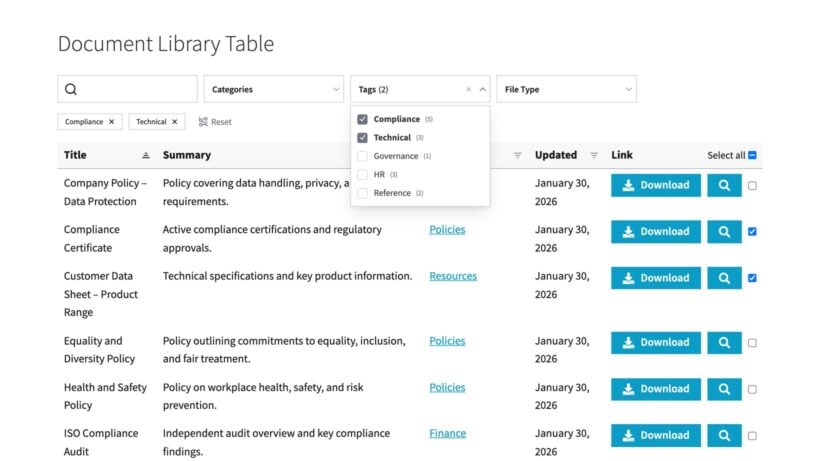
Document Library Pro turns your files into a searchable, filterable library that people browse, filter and download from the front of your site. It covers the document-sharing side of SharePoint, and it works on any platform.
You can run it two ways. The cloud version works on any website: You build the library once, then embed it on a Squarespace, Wix, Google Sites, intranet or custom-CMS page, or have us publish it as a standalone site on your own domain. We host it, so there is nothing for you to install or maintain.
If you already run WordPress, the WordPress plugin is the open-source, self-hosted route. You install it on your own site and keep your files on infrastructure you control, which is the main reason most people want an open source replacement. It also works out far cheaper than the other tools in this list.
Whichever version you choose, you get a document or PDF library with everything you need to replace SharePoint for document management:
- Add documents of any file type including PDF, Word/DOCX, Excel/XLS, PowerPoint/PPT, and more.
- Store documents with the library itself or link to third party storage such as Dropbox, Microsoft OneDrive or Google Drive.
- Use the built-in access controls to restrict who can access the documents.
- Advanced document version control.
- The front-end document upload form allows employees without admin access to add documents (which can optionally be held for moderation).
Deployment effort: Low. The onboarding wizard will guide you setting up the main features, and then you can use the built-in CSV import or drag-and-drop file upload to quickly add documents to the library.
Alfresco Community Edition
Alfresco Community Edition is an open source enterprise content management (ECM) system. It is a feature-rich open source option for organizations that need serious document infrastructure.
Alfresco is licensed under LGPL v3. This means you can use it commercially without publishing your own code.
The platform runs on Java with Spring, Tomcat, PostgreSQL or MySQL, and Solr for search. It requires a dedicated server and someone comfortable with Java administration.
Alfresco handles custom content models, so you can define metadata types for specific document categories. It supports CMIS (an open standard for ECM interoperability), workflow automation built on the Activiti engine, and records management. LDAP and Active Directory integration come built in.
However, Alfresco Community Edition has limitations given its scale. It has no clustering support, no official vendor support, and limited QA testing on the open source stack. Advanced features like mobile device management and enhanced monitoring require the paid Enterprise edition (now owned by Hyland).
Deployment effort: High. This is not a weekend project. Expect a dedicated Java admin for installation and ongoing maintenance.
Nextcloud
Nextcloud is a self-hosted file sync and collaboration platform. It is a popular open source alternative for teams that need file sharing with light document collaboration.
Nextcloud is licensed under AGPL v3. The platform runs on PHP and supports MySQL, MariaDB, or PostgreSQL.
Nextcloud provides desktop and mobile sync clients for all major platforms. Real-time collaborative editing is available through Nextcloud Office (based on LibreOffice) or an ONLYOFFICE integration. The platform includes end-to-end encryption, workflow automation through Nextcloud Flow, and a Tables app for structured data. Active Directory and LDAP integration are supported.
Nextcloud also has a Collectives app for wiki-style knowledge bases. This makes it a reasonable all-in-one tool for small teams. Larger organizations will likely want a dedicated wiki alongside it.
Nextcloud is not a purpose-built document management system. It lacks native records management and offers a limited metadata model compared to Alfresco. It works better as a file platform than a compliance-driven ECM.
Deployment effort: Moderate. PHP shared hosting works for small teams. Docker is recommended for production environments.
LogicalDOC Community Edition
LogicalDOC is a pure document management system. It fills the gap between Alfresco's complexity and Nextcloud's simplicity.
LogicalDOC Community Edition is licensed under LGPL v3. The platform runs on Java.
LogicalDOC provides full-text search with OCR, version control, custom metadata, workflow automation, and WebDAV support. The interface is straightforward and focused on document handling.
The Community Edition has some significant gaps. It lacks LDAP integration and two-factor authentication (both are Enterprise-only). The community is smaller than Alfresco's or Nextcloud's, which means fewer extensions and less online support.
Deployment effort: Moderate. Java-based, so it requires some system administration comfort.
Bonus tool: ONLYOFFICE Docs
ONLYOFFICE Docs is an open source office suite (AGPL v3) that pairs well with several tools on this list. It provides browser-based editing for Word, Excel, and PowerPoint files.
ONLYOFFICE integrates with Nextcloud, Alfresco, and many other platforms. ONLYOFFICE is not a document management system by itself. However, I've added it to this list because it solves the "how do we edit documents collaboratively?" question that often comes up when replacing SharePoint with open source alternatives.
Alfresco vs SharePoint: Metadata vs. folders
This comparison comes up often enough to deserve its own section. The two platforms take fundamentally different approaches to organizing documents:
- SharePoint uses folder hierarchies in which each document lives in one folder. If a document belongs in two categories, you either duplicate it or create a shortcut.
- In contrast, Alfresco uses metadata-driven organization through custom content models. A single document can appear in multiple logical views without duplication. You define content types with specific properties. Alfresco then surfaces documents based on those properties rather than their folder location.
For example, a contract document in Alfresco might have metadata fields for client name, contract type, expiry date, and department. The same contract appears automatically in views filtered by client, by department, and by documents expiring this quarter. In SharePoint, you would need to put it in one folder and hope people find it.
This difference matters most in compliance-heavy environments. Metadata-driven organization handles retention schedules and approval chains more naturally than folder structures. Alfresco's CMIS compliance also means it can exchange content with other ECM systems using an open standard. SharePoint relies on proprietary APIs.
How to choose an open source document management replacement
I recommend that very large organizations choose Alfresco over SharePoint for regulated industries like legal, healthcare, or government. Alfresco also suits teams that need custom content models or already run a Java stack.
However, it's worth knowing that Alfresco is overkill for small teams with simple file-sharing needs. If you just need a searchable document library, then Document Library Pro handles that without any server infrastructure. As always, it's best to choose the simplest solution that fits your requirements.
Open source SharePoint replacements for project tracking
An open source SharePoint replacement for project tracking manages tasks, timelines, and team coordination. These tools replace SharePoint's project site and list features.
OpenProject
OpenProject is the leading open source project management platform. It covers both traditional and agile workflows in one tool.
OpenProject is licensed under GPL v3. The platform runs on Ruby on Rails.
OpenProject includes Gantt charts with dependencies, agile boards (Scrum and Kanban), time and cost tracking, and milestone planning. Each project also gets a built-in wiki. The platform integrates directly with Nextcloud for file management, which creates a strong open source pairing for teams leaving SharePoint.
OpenProject is based in Berlin and is GDPR-compliant by default. All data in the cloud edition stays in the EU. The self-hosted Community Edition is free. OpenProject is also part of openDesk, an open source office suite for the German public sector.
The Community Edition lacks some enterprise features like two-factor authentication and advanced reporting. The interface feels traditional compared to newer tools like Linear or Plane. But the feature set is broad and well-tested.
Deployment effort: Moderate. Docker or package-based install on Linux.
Taiga
Taiga is a visual, lightweight project management tool built for agile teams.
Taiga is licensed under MPL 2.0. The platform runs on Python (Django) with an Angular frontend.
Taiga provides Scrum backlogs, Kanban boards, sprint planning, user stories, and epics. The interface is modern and clean.
Taiga lacks strong Gantt chart and timeline support. Built-in time tracking is limited in the free edition. The tool is not designed for large-scale enterprise project management.
Deployment effort: Moderate. Docker-based deployment is well documented.
Bonus tool: Plane
Plane is also worth mentioning here, although its licensing is more complex. The Community Edition uses an open source license, but Enterprise features are proprietary.
Plane offers a modern interface similar to Linear, with issue tracking, cycles, and project views. If you need something that feels closer to modern SaaS tools, Plane is worth evaluating alongside OpenProject.
Open source SharePoint replacements for intranets
An open source SharePoint replacement for intranets provides internal news feeds, employee directories, and team communication on your own servers.
Document Library Pro
I'll start with the simplest option. We already talked about Document Library Pro as a replacement for SharePoint's document management features. If that's all you share on your intranet, then it falls into this category too.
As we discussed earlier, Document Library Pro comes with built-in access controls which you use to choose who can access your files and resources. Use these to turn it into a replacement for your SharePoint intranet. For example, you can:
- Hide the entire intranet behind a simple password, which you can give to everyone who needs access; or create a unique account for each user.
- Either give employees access to the entire intranet, or give role-based access to different categories. (For example, you might have separate private areas for sharing documents with the marketing team, human resources, etc.)
- Only allow each user to view documents they added to the intranet themselves.
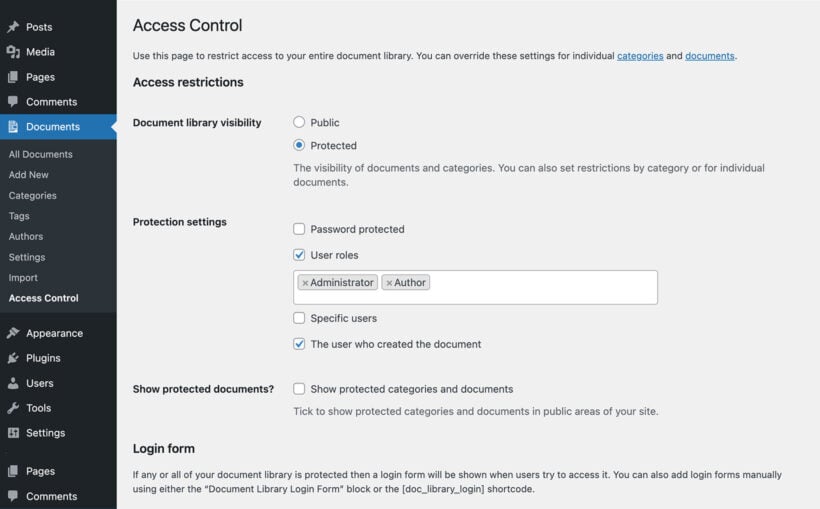
Deployment effort: Low. Use the onboarding wizard to configure the library, then go to the Access Control page to configure access to the intranet.
However, remember that this option is only suitable if you simply need the intranet to share documents and other files. If you need other features such as internal communication then you'll need one of the open source platforms listed below.
There is a free version as well, Document Library Lite, so you can replace a basic SharePoint document store at no cost, then upgrade for folders, permissions, and cloud links.
HumHub
HumHub is an open source social intranet platform. It is the closest open source equivalent to SharePoint's intranet and social features.
HumHub uses dual licensing: AGPL v3 for the open source edition, with a separate commercial license available. The platform runs on PHP using the Yii framework.
The platform provides a social networking experience with activity streams, likes, comments, and follows. Content is organized into 'Spaces', which can represent departments, projects, or topics. The platform includes wiki pages, events, task lists, polls, and file sharing. Around 80 modules are available for extending features. LDAP integration is supported.
HumHub is based in Munich and offers a GDPR-compliant SaaS option with hosting on German or EU servers. The Professional Edition starts at €129/month for 50 users, with the per-user cost dropping significantly at scale.
HumHub is not a document management system. File handling is basic, with no structured metadata or version control comparable to Document Library Pro, Alfresco or Nextcloud.
Deployment effort: Low to moderate. PHP-based, so it works on standard shared hosting. Docker is also supported.
Plone
Plone is a mature, security-focused content management system often used for internal portals and intranets.
Plone is licensed under GPL v2. The platform runs on Python using the Zope application server.
Plone has a strong security track record. The platform provides content workflows with multi-state review chains, built-in search, multilingual support, and LDAP/Active Directory integration. Government agencies including NASA have used Plone for their web infrastructure.
Plone has a steep learning curve for developers unfamiliar with Zope. The community is smaller than PHP-based alternatives, and the interface feels dated without significant theming work.
Deployment effort: High. Requires Python and Zope expertise. This is not a quick setup.
Open source SharePoint replacements for knowledge bases
An open source SharePoint replacement for knowledge bases provides wiki-style documentation, searchable reference content, and collaborative editing.
Document Library Pro
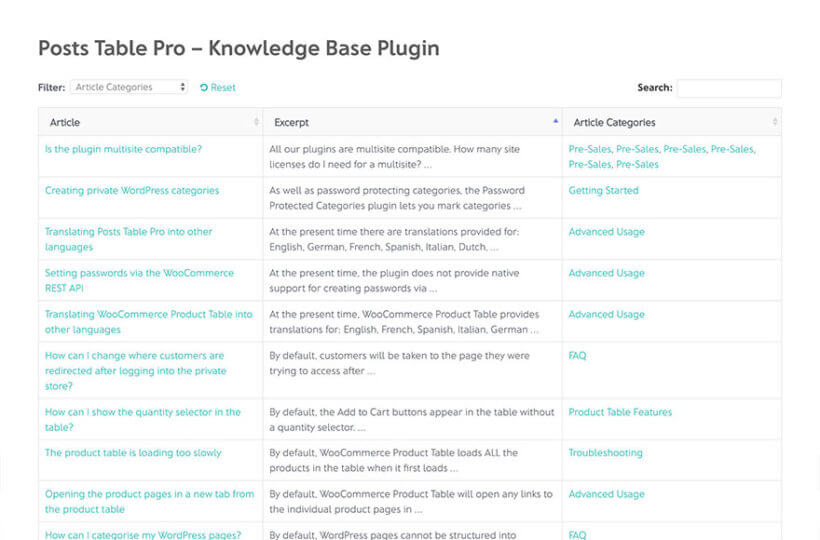
If you're already using Document Library Pro to replace SharePoint's intranet or document management, you can get even more value by also using it as your knowledge base. It works the same whether you run the WordPress plugin or the cloud version:
- Create a set of document categories for your knowledge base articles. If you're also using Document Library Pro for other purposes then you should create a top level knowledge base category and as many levels of sub-categories as you like. This keeps your articles separate from your documents.
- Add each article as a document. Instead of uploading a downloadable file, put the content of the article in the main content field.
- Publish your knowledge base showing that category. On the WordPress plugin, add a shortcode like
[doc_library doc_category="knowledge-base"]to a page (replace "knowledge-base" with your category slug). On the cloud version, embed that filtered library on a page or publish it as its own site. - If required, restrict access using the built-in access controls - for example, if the knowledge base is just for internal contacts.
Deployment effort: Low. Adding an article is as quick as writing any web page, or you can bulk-upload them all via CSV. Save even more time by getting AI to provide the CSV file for you ✨
Wiki.js
Wiki.js is a modern, fast wiki platform built for technical teams.
Wiki.js is licensed under AGPL v3. The platform runs on Node.js.
Wiki.js supports multiple editor modes: Markdown, WYSIWYG, and raw HTML. It works with PostgreSQL, MySQL, MariaDB, MSSQL, or SQLite as the database backend. Authentication options are extensive, including LDAP, SAML, OAuth, Azure AD, and Okta. The platform includes page access controls, a media asset manager, built-in analytics, and multi-language support.
Wiki.js is not ideal for non-technical teams. Setup requires Node.js and database configuration. The platform is better suited for internal team documentation than public-facing content.
Deployment effort: Moderate. Docker makes deployment straightforward for technical teams.
BookStack
BookStack is a clean, simple wiki designed for organizing documentation into a logical structure.
BookStack is licensed under MIT. The platform runs on PHP using Laravel.
BookStack organizes content into a clear hierarchy: Shelves contain Books, Books contain Chapters, and Chapters contain Pages. This structure makes it easy for non-technical users to find and contribute content. The platform supports both WYSIWYG and Markdown editing, LDAP/SAML/OAuth authentication, role-based permissions, full-text search, and page revision history.
BookStack does not support real-time collaborative editing. Its plugin system is limited compared to XWiki. The tool is focused on simplicity, which means fewer advanced features.
Deployment effort: Low to moderate. Standard LAMP stack (Linux, Apache, MySQL, PHP).
XWiki
XWiki is an enterprise-grade wiki that doubles as an application platform.
XWiki is licensed under LGPL v2.1. The platform runs on Java.
XWiki supports real-time collaborative editing and structured data through a class/object model. You can build custom applications, forms, and workflows on top of the wiki using scripting. The extension library is extensive, and REST API access is included. LDAP and Active Directory integration are supported.
XWiki requires more server resources than BookStack or Wiki.js. The learning curve is steeper, and the Java stack adds complexity. This tool makes sense when you need a wiki that can also serve as a low-code application platform.
Deployment effort: Moderate to high. Java stack with WAR deployment or Docker.
Bonus tool: Outline
Outline is a popular team knowledge base that looks and feels similar to Notion. However, Outline uses a Business Source License (BSL), not a true open source license. The BSL prevents you from offering Outline as a hosted service commercially. The license converts to Apache 2.0 after four years. You can self-host it freely for internal use.
If open source licensing is a firm requirement, then the options listed above are more suitable.
Security and GDPR considerations for self-hosted tools
Every tool in this article supports self-hosting. For European teams or any organization under GDPR, this is a major advantage over SharePoint. Your data stays on servers you control, in the jurisdiction you choose.
Self-hosting removes the US cloud subprocessor problem entirely. You do not need to rely on Microsoft's Data Processing Agreements or worry about data transfer mechanisms to the US.
However, not all self-hosted tools are equal when it comes to security features. Here are the practical differences:
- Audit loggingAlfresco and Nextcloud have mature audit trails with detailed activity logging. Wiki.js and BookStack track page revisions but offer less granular user activity logs.
- AuthenticationMost tools support LDAP, Active Directory, and SSO. Check whether two-factor authentication is available in the free or community tier. Alfresco Community Edition and LogicalDOC Community Edition both restrict 2FA to their paid versions.
- Encryption at restNextcloud includes end-to-end encryption built in. Other tools rely on server-level disk encryption, which you configure yourself.
- Security patch cadenceCommunity editions sometimes lag behind enterprise versions on security patches. Alfresco Community Edition releases bug fixes for the current version only, with no backports. Check release frequency before choosing a tool for production use.
One general rule: the more mature the project, the faster critical vulnerabilities get patched. Nextcloud, Alfresco, and XWiki all have dedicated security teams. Smaller projects like BookStack rely on their maintainer and community. If you run Document Library Pro on WordPress, security is largely handled by your web host, such as Kinsta. On the cloud version, we take care of it for you.
How to choose the right open source SharePoint replacement
The right tool depends on which SharePoint job you are replacing. Here is a quick decision guide to save you time on your SharePoint end of life planning:
- You need a searchable document library, document-based intranet or simple knowledge base, on WordPress or any other platform → Document Library Pro.
- You need enterprise document management with compliance workflows → Alfresco Community Edition.
- You need file sync and sharing with light collaboration → Nextcloud.
- You need project management with Gantt charts and agile boards → OpenProject.
- You need a social intranet with activity feeds and team spaces → HumHub.
- You need a developer-friendly wiki with Markdown support → Wiki.js.
- You need a simple, well-organized knowledge base → BookStack.
- You need a wiki that can also build custom applications → XWiki.
These tools can be combined. OpenProject integrates directly with Nextcloud, covering project tracking and file management together. HumHub paired with Wiki.js covers intranets and knowledge bases in one stack.
Document Library Pro adds a searchable, filterable document library to your site, whatever it runs on. Run the WordPress plugin if you already use WordPress, or the cloud version on any other platform. Files can stay on SharePoint, Google Drive, or Dropbox while the library provides the front-end display layer. No migration is required, and there are no per-user fees. For the full comparison, see our WordPress vs SharePoint guide.