Parish council website legal requirements and WCAG 2.2


Parish council website legal requirements cover four separate compliance frameworks: the Accessibility Regulations 2018 (requiring WCAG 2.2 AA), the Transparency Code for Smaller Authorities 2015, UK GDPR, and SAPPP 2025 Assertion 10.
Parish council websites have always carried legal obligations. Most clerks know about the Transparency Code. Fewer realise that WCAG 2.2 AA compliance is also a legal requirement and that from 1 April 2025, digital and data compliance became an auditable item under Assertion 10 of the Practitioners' Guide 2025.
Until this audit cycle, website compliance gaps rarely triggered formal consequences. That changes now. Internal auditors will check your domain, accessibility statement, and IT policy for the first time.
The four frameworks are:
- Public Sector Bodies Accessibility Regulations 2018 - requiring WCAG 2.2 AA compliance and a published accessibility statement.
- Transparency Code for Smaller Authorities 2015 - mandating publication of agendas, minutes, accounts, and councilor details, available via GOV.UK.
- UK GDPR and the Data Protection Act 2018 - with breach reporting governed by the ICO.
- SAPPP 2025 Assertion 10 - covering digital and data compliance, per the Practitioners' Guide 2025.
WordPress plugins like Document Library Pro make it easier to meet guidelines relating to information sharing.
Which legal requirements apply to your parish council?
The obligations that apply to your council depend partly on annual turnover. Here is a summary of each framework before I walk through the detail.
- Accessibility Regulations - WCAG 2.2 AA compliance and a published accessibility statement.
- Transparency Code - publication of agendas, minutes, accounts, and councilor details, with documents remaining accessible online for multiple years.
- UK GDPR - privacy policy, cookie consent, and HTTPS.
- SAPPP Assertion 10 - council-owned domain, adopted IT policy, and accessibility confirmation.
The table below shows which obligations apply at each turnover band.
| Obligation | Under £25k | £25k - £200k | Over £200k |
|---|---|---|---|
| Transparency Code for Smaller Authorities | Required | Best practice (para 5.76, Practitioners' Guide 2025) | Replaced by Local Government Transparency Code 2015 + ICO Model Publication Scheme |
| WCAG 2.2 AA + accessibility statement | Required | Required | Required |
| UK GDPR / DPA 2018 | Required | Required | Required |
| SAPPP 2025 Assertion 10 | Required | Required | Required |
This is current information for the UK, please check directly before making any decisions because it can change at any time.
The key takeaway is that accessibility, GDPR, and Assertion 10 apply regardless of turnover. Only the specific Transparency Code varies by tier. Councils in the £25k - £200k band should follow the larger council code as best practice, per the Practitioners' Guide 2025 para 5.76.
Accessibility standards for parish councils

All parish councils are public sector bodies. That means WCAG 2.2 AA is a legal requirement, not a recommendation. Sites built to WCAG 2.1 AA before 2023 are no longer fully compliant unless your provider has updated the codebase since.
The four new AA-level criteria introduced in WCAG 2.2 are:
- Focus Not Obscured (2.4.11).
- Dragging Movements (2.5.7).
- Target Size Minimum (2.5.8).
- Accessible Authentication (3.3.8).
Your accessibility statement must include the compliance status, any known issues, contact details for alternative formats, and the date of last review. The Central Digital and Data Office publishes the name of any council with a missing or inaccurate statement - so the risk is publicly visible, not just internal.
The disproportionate burden exemption exists but has a high bar. Councils can claim it for specific issues, but only after carrying out and publishing a formal assessment that weighs costs against the impact on disabled users. "Lack of time or knowledge" is not a valid basis under GOV.UK guidance.
One other practical note, many organizations buy accessibility overlay tools, thinking they solve compliance at a stroke. Most accessibility experts warn against them. The A11y Project's guidance explains why they tend to create new issues rather than fix existing ones.
Why scanned pdfs break accessibility and how to fix it
A WCAG 2.2 AA-compliant platform becomes non-compliant the moment an untagged PDF or image-only document is uploaded. This is the most common compliance failure in parish council websites, and it catches councils out because they assume the platform does the heavy lifting.
A survey conducted by Equidox with the help of the National Federation of the Blind found that 67% of PDFs encountered by blind and low-vision assistive technology users were either partially or completely unreadable. For a council publishing dozens of minutes and agendas each year, the cumulative accessibility gap is significant.
Why untagged PDFs fail
- Screen readers cannot read image-based text.
- Table structures are invisible to assistive technology.
- There is no heading hierarchy for navigation.
- The document language is not set.
What makes a PDF accessible
- Tagged structure
- Searchable text
- Alt text on images
- Defined document language
- Correct reading order.
The better approach is to publish key information (financial summaries, meeting dates, councilor details) as HTML text directly on the page, with the full document available as a supplementary accessible download.
The common misconception is "our provider built the site to the standard, so we're fine." That only covers the platform. As Barn2's accessibility documentation makes clear, PDFs within document libraries must themselves be accessible. No plugin can fix inaccessible uploaded files.
The practical challenge councils face is publishing hundreds of documents in a way that is searchable by year and category, and navigable in HTML tables. Document Library Pro creates searchable, filterable document libraries on existing WordPress sites. Adding a document works like adding a WordPress post, drag-and-drop upload, CSV bulk import, and Media Library selection are all available. Plenty of parish councils run on Google Sites, Wix or a supplier's own system rather than WordPress. It works for them just as well: you can embed the same searchable library of agendas and minutes in any website, whatever it's built on.
Albury Parish Council uses Document Library Pro for legal transparency compliance on their .gov.uk site. Councilor Stu Bevan said: "Easy to use with really good documentation. The metadata filters make it easy to maintain current lists."
Document Library Pro addresses document publication and organization. Whole site WCAG 2.2 AA compliance still depends on the theme, hosting environment, and whether uploaded documents themselves are accessible.
Transparency code: What to publish and when
The Transparency Code for Smaller Authorities 2015 is mandatory for councils with annual turnover under £25,000. Under the publication requirements, councils must publish:
- Expenditure over £100.
- End-of-year accounts.
- Annual governance statement.
- AGAR documents.
- Internal audit report.
- Councilor names with contact details and responsibilities.
- Details of public land and building assets.
Timing rules: agendas must be published at least three clear days before a meeting. Draft minutes must follow within one month after. The completed AGAR must be published by 30 September each year, per the Practitioners' Guide 2025.
Retention: financial records should remain published online for a minimum of five years. Six years is prudent given the limitation period under the Accounts and Audit Regulations 2015. All councils must provide a 30-working-day public inspection period.
The Procurement Act 2023, which came into force on 24 February 2025, adds a further obligation. Councils must publish a Contract Details Notice within 30 days of awarding contracts above the relevant threshold. Full contract publication is required for contracts over £5 million.
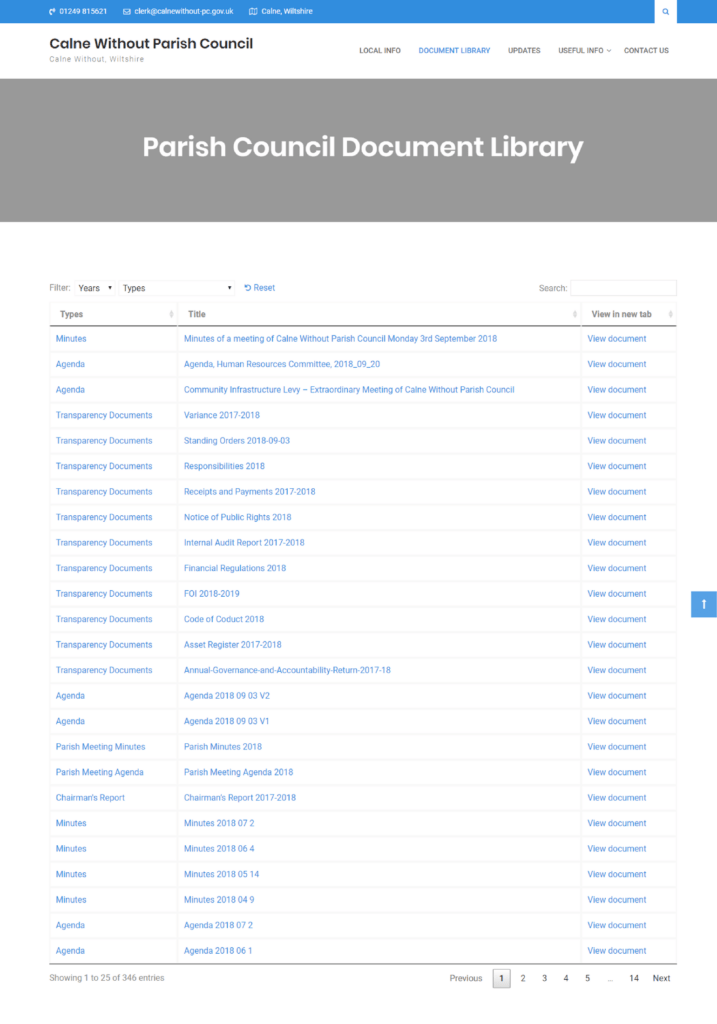
Managing dozens or hundreds of these documents on a council website quickly becomes unwieldy without a dedicated system. Document Library Pro allows clerks to categorise documents by type and year, creating a searchable archive while keeping the main navigation clean. Calne Without Parish Council manages 340+ documents with it, including minutes, agendas, and public notices. The CSV and bulk Media Library import options are a practical win when bringing historical records online.
For councils with turnover over £200,000, the Local Government Transparency Code 2015 and the ICO Model Publication Scheme apply instead of the Smaller Authorities code.
GDPR, privacy policies, and councilor email compliance
Parish councils are data controllers under UK GDPR. The website must use HTTPS with a valid SSL certificate. Beyond that, there are four website-specific obligations.
Your privacy policy must explain:
- What personal data is collected - contact forms, newsletter signups, and meeting attendance records are the most common sources.
- The lawful basis for processing, which is typically "public task" for councils.
- Retention periods for each category of data.
- How individuals can exercise their data rights.
Cookie consent requires active opt-in before analytic or marketing cookies are set. Pre-ticked boxes do not comply. Third-party embeds like Google Maps, YouTube, social media feeds set cookies that must be disclosed or replaced with consent-gated versions.
Data breaches posing a risk to individuals must be reported to the ICO within 72 hours.
There is also a specific issue with councilors using personal email addresses for council business. When council data sits in a personal Gmail or Hotmail account, the council has no legal control over it. Subject Access Requests become impossible to fulfil. This bridges directly to the domain ownership requirement in Assertion 10, covered next.
The practitioners' guide: SAPPP 2025 assertion 10
Assertion 10 appears on the AGAR for the first time in the 2025-26 cycle, per the Practitioners' Guide 2025. It has three requirements.
- Council-owned domain with generic email account (para 1.26, Assertion 3). Gmail, Yahoo, and Outlook are explicitly prohibited for council business email.
- WCAG 2.2 AA compliance with an up-to-date accessibility statement (para 1.49).
- Written IT policy formally adopted by council resolution (para 1.54). The policy must be tailored to the council. A copied template does not satisfy the requirement.
The IT policy must cover email use, website responsibilities, social media, data storage, GDPR, cybersecurity, and BYOD (bring your own device).
On the .gov.uk domain question, a council-owned domain is required. However, .gov.uk specifically is best practice, not law. Para 5.123 states, "it is best practice to use .gov.uk domains for smaller authorities' emails and websites." Acceptable alternatives include .org.uk and .co.uk, provided the council owns and controls the domain. NALC's Parish Council Domains Helper Service provides .gov.uk registration support for councils that want to move to the recommended format.
The policies required on the website are privacy policy, accessibility statement, cookie policy, and IT policy (para 1.54). Good practice is also to publish Standing Orders, Financial Regulations, and the Code of Conduct.
Who enforces compliance and what happens if you fail
Each framework has a different enforcement route.
- Accessibility: GDS monitors annually. The CDDO publishes the names of non-compliant councils. The complaint pathway per GOV.UK and Scope for Business runs: Council accessibility statement → Equality Advisory and Support Service (EASS) → Equality and Human Rights Commission (EHRC), which can investigate, issue unlawful act notices, and pursue court action.
- Transparency code: the Secretary of State can direct non-compliant councils to comply.
- Assertion 10: failure produces an adverse audit opinion. A matter of public record. Auditors will review the website directly, per Internal Audit Checklist item L in the Practitioners' Guide 2025.
- GDPR: the ICO can investigate and take enforcement action.
The practical risk is cumulative. A council with an outdated accessibility statement, councilors using Gmail, and a missing IT policy could face an adverse audit opinion, an EHRC complaint, and an ICO investigation simultaneously, each from a different framework, each with its own enforcement process.
Setting up Document Library Pro for compliant document display
Most council websites publish documents as a long page of PDF links. Often it is worse than that. The list grows every month until nobody can find last year's minutes, and untagged PDFs break accessibility the moment they go up.
We built Document Library Pro for exactly this job. It turns your minutes, agendas, financial records and public notices into a searchable, filterable document library on your existing WordPress site, with no need to rebuild or move anything.
Residents can filter by category and year, search by keyword, and download or preview each file. The list itself is HTML text, so the table headings, links and structure are readable by a screen reader even before you tackle the individual files.
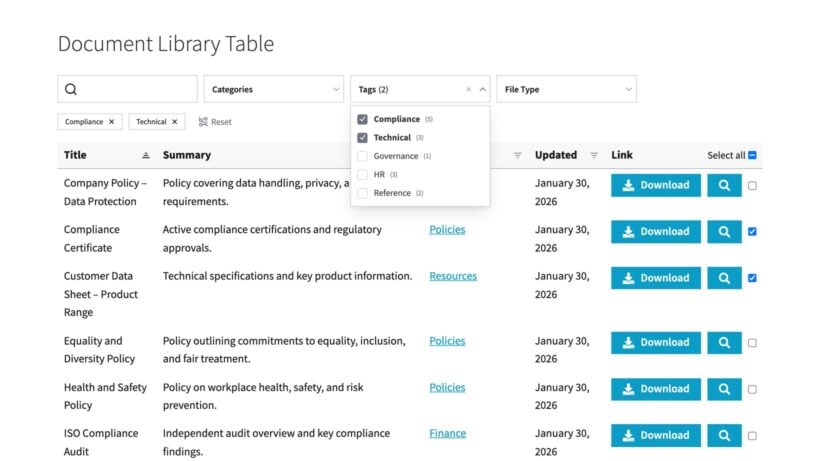
The same approach works for any public body that has to publish documents for the public. Here is how I would set it up to cover the document side of all four frameworks.
1. Install the plugin and choose your settings
After purchase, go to Plugins → Add New → Upload Plugin, upload the document-library-pro.zip file and click 'Activate'. The setup wizard then walks you through entering your license key. You can change any global option later under Settings → Document Library Pro, which sets the defaults for every library on the site. The full process is in the installation guide.
2. Add and import your documents
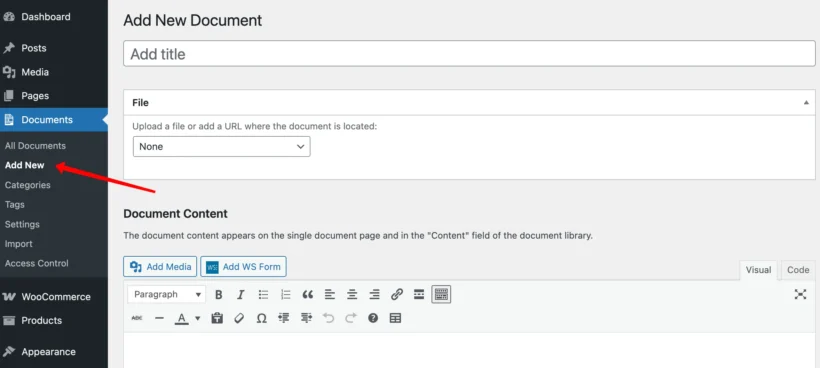
Adding one document works like writing a WordPress post. Go to Documents → Add New, give it a title, and either upload the file or link to an external URL. You can also paste the document text straight into the content field, assign a category and year, and record the document author.
For a council bringing years of records online, the CSV bulk import and direct Media Library import are the faster routes. Calne Without Parish Council manages 340+ documents this way. The adding and importing guide covers each method.
3. Organize documents by category and year
Document categories and tags are separate from your post categories, so they only apply to the library. Set up categories that match how residents look for information, such as Meeting Minutes, Agendas, Finance, Annual Governance and Planning, plus a tag or custom field for the year.
This is what makes the front-end filters work. It also keeps each record easy to find during the five- or six-year retention window the Accounts and Audit Regulations expect.
4. Publish your document library
Document Library Pro creates a 'Document Library' page automatically, listing every document you add. You set the layout (table or grid), the filters, the search box and the columns from the global settings under Settings → Document Library Pro. Once your documents and categories are in place, the page is ready for residents to search, filter and download. The displaying documents guide covers the layout options.
Publishing the key details (meeting dates, councilor contacts and expenditure summaries) as HTML text in the content field, with the full file available as an accessible download, is the approach Barn2's accessibility documentation recommends. It gives you a compliant public display while the underlying files are made accessible over time.
Your parish council website compliance checklist
Here is a prioritised action list to bring to your next council meeting or forward to councilors ahead of the AGAR submission.
- Confirm WCAG 2.2 AA status with your provider - has the codebase been updated from 2.1? Check against W3C WCAG 2.2.
- Audit uploaded documents - scanned PDFs are the most common compliance failure point.
- Verify Transparency Code publications are current and within retention periods, per GOV.UK.
- Ensure the council owns its domain and all official email runs through it - no Gmail, Yahoo, or Outlook, per Practitioners' Guide 2025 para 1.26.
- Draft a tailored IT policy and formally adopt it by council resolution before AGAR submission, per Practitioners' Guide 2025 para 1.54.
For the document publishing component, Document Library Pro helps councils organize minutes, agendas, and financial records into searchable, filterable libraries on existing WordPress sites, making it easier to meet retention requirements without cluttering the main navigation.