How to create a Shopify BOGO offer (3 methods)

This guide covers two ways to create a Shopify BOGO offer: native Buy X Get Y discounts, plus using an app to display eye-catching offers on product pages.
Shopify's built-in Buy X Get Y feature handles BOGO promotions, but it has a visibility problem: The deal doesn't show on product pages. Customers might not realize the offer exists, which completely defeats the purpose of using it to boost your sales 🙃
BOGO promotions work because they tap into the psychology of getting something free. Customers feel like they're winning. But if they can't see the offer while browsing your products, you're losing conversions before they even start.
There are plenty of apps offering BOGO and discount features, but this guide focuses on three routes depending on what you need:
- Native Shopify works for simple promotions when you want to keep things straightforward.
- Barn2 Bulk Quantity Discounts handles volume pricing and BOGO deals with eye-catching product page displays that show customers the savings upfront, inspiring them to add more to their cart.
- And dedicated BOGO apps handle cross-product gifting with auto-add features for stores that need free gifts adding to carts automatically.
I'll walk you through setup steps for each method, plus guidance on which approach fits your situation.
What BOGO means on Shopify
BOGO is a discount where customers get items free when they buy a qualifying product.
The appeal of BOGO comes down to psychology. "Free" is a powerful word that triggers buying behaviour even when the deal isn't objectively better than a straight percentage discount. A "buy one get one free" offer often converts better than "50% off when you buy two," even though the math is identical.
Merchants often confuse three different discount types:
- Classic BOGO - Same-product discounts like "buy one t-shirt, get another t-shirt free." Customers purchase multiples of the same item to trigger the deal.
- Volume-based pricing - Quantity discounts that are equivalent to BOGO, like "Buy 2 pairs of socks and get 50% off both."
- Cross-product promotions - "Buy cleanser, get serum free." A different product is added as the reward. This isn't technically BOGO, but many merchants group it under the same umbrella.
Here's something that catches merchants off guard: Shopify automatically applies discounts to the lower-priced item. When the "buy" and "get" products come from the same collection, the cheaper item gets the discount. This is standard BOGO behaviour, just like supermarket deals where customers have to add both products to their cart, and the less expensive item rings up free.
Method 1: Setting up BOGO with Shopify's native Buy X Get Y
Shopify handles this through the basic Buy X Get Y feature in the Discounts section. It delivers BOGO discounts in two ways:
- Automatic discounts apply at checkout without customer action. They're frictionless, but they can't stack with other automatic discounts.
- Discount codes require entry at checkout. You get more control for targeted campaigns or influencer partnerships.
Both methods require customers to manually add all items to their cart. Shopify won't auto-add the free item for them, or display details of the deal on the product page.
Here's how to set up an automatic Buy One Get One discount in Shopify:
- Go to Discounts in your Shopify admin.
- Click 'Create discount' and select 'Buy X get Y'.
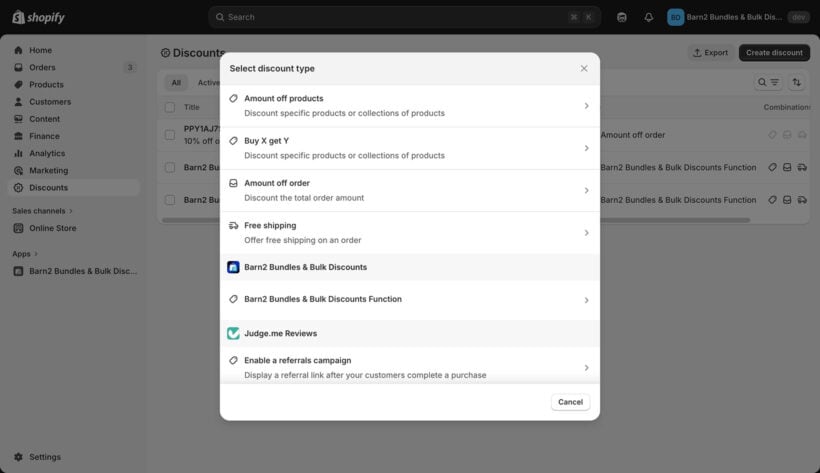
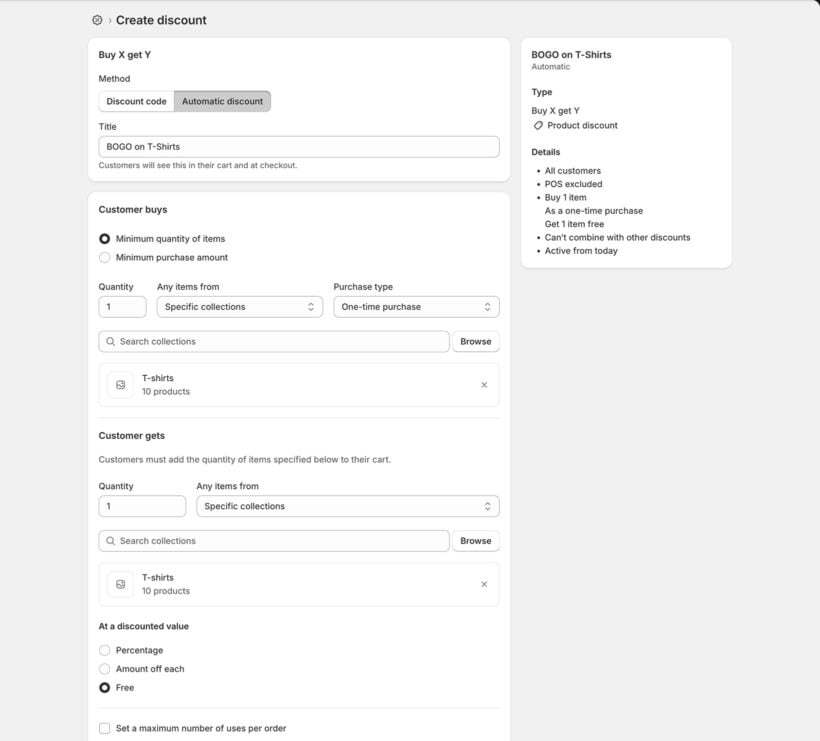
- Choose 'Automatic discount' and enter a name customers will see at checkout.
- Under 'Customer buys', set the minimum quantity or purchase amount that triggers the deal. Select which products or collections qualify.
- Under 'Customer gets', set the quantity of discounted items. Choose specific products or collections, then select the discount value (100% off for free, a percentage, or a fixed amount).
- Set eligibility by selecting customer segments or specific customers who can access the offer.
- Add usage limits to control maximum uses per order.
- Set start and end dates for your promotion.
- Choose how it combines with other discount types, such as product, order, and shipping discounts.
- Save your Shopify BOGO offer.
When native Shopify discounts are the right choice
Native Shopify BOGO works well in specific situations:
- You prefer avoiding additional apps.
- You're running a simple, one-off promotion without complex rules.
- The 25-discount limit isn't a concern for your store.
- You don't need tiered pricing or volume breaks.
- You're planning to manually tell customers about the promotion so they know it exists.
For straightforward "buy X, get Y" deals with minimal setup, native discounts do the job.
Limitations of native discounts
Before relying on Shopify's native tools, you should know the trade-offs. I've seen merchants set up campaigns only to hit walls they didn't expect.
Firstly, Shopify limits stores to 25 active discounts total across codes and automatic discounts. If you run multiple promotions, you'll hit this cap quickly. Stores with seasonal sales, loyalty programs, and ongoing deals often find themselves juggling which discounts to keep active. During peak periods like Black Friday, this constraint becomes particularly frustrating.
Customers also need to add items manually. The discount doesn't auto-add free gifts to the cart, which means some shoppers never discover the offer. They add one item, skip past without knowing they could get a second free, and check out with a smaller order. This is ok and reflects how people buy BOGO deals in the supermarket, but it's a problem if they don't know the deal exists. Which brings me to the biggest issue...
Shopify doesn't display BOGO details on the front end. There's no attractive table showing customers the deal. BOGO offers work because seeing 'get one free' encourages people to buy. If customers can't see the deal, you lose that incentive entirely.
Because of these limitations, many merchants look for Shopify BOGO apps instead of relying on native tools.
Method 2: Setting up BOGO offers with Barn2 Bulk Quantity Discounts
Barn2 Bulk Quantity Discounts takes a different approach to Shopify BOGO. Instead of gamified free-gift mechanics, this app delivers transparent deals and volume pricing that's visible on product pages. Customers see exactly what they'll save before adding anything to their cart.
The app offers two BOGO-style discount types:
Volume bundles
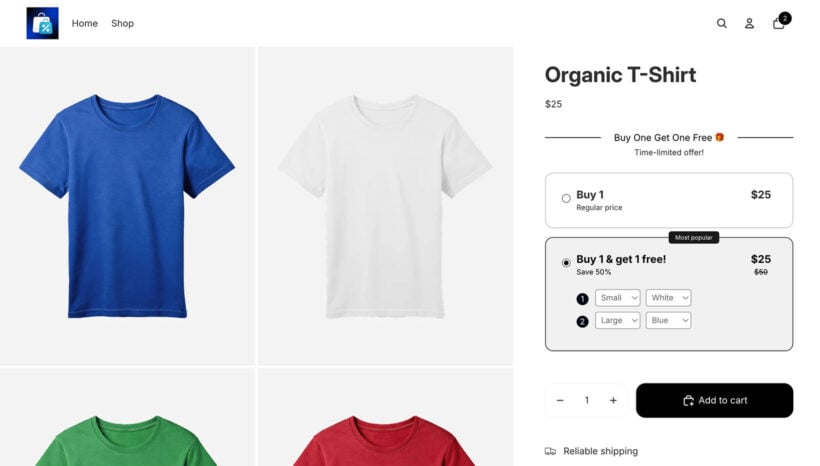
Volume bundles work best for fixed-tier offers displayed as selectable options. Create a 2-tier bundle where Tier 1 (quantity 1) is full price and Tier 2 (quantity 2) applies 100% off the second unit. Customers see "1 for $25" and "2 for $25" as clickable tiles on the product page. The visual layout makes it obvious what they'll save.
For example, a supplement brand might offer "1 bottle $45" or "2 bottles $45" with clear savings shown. You can mix and match variants on a product to get the cheapest item free. A customer could select one vanilla and one chocolate protein powder, and the cheaper variant gets the discount automatically.
Bulk pricing
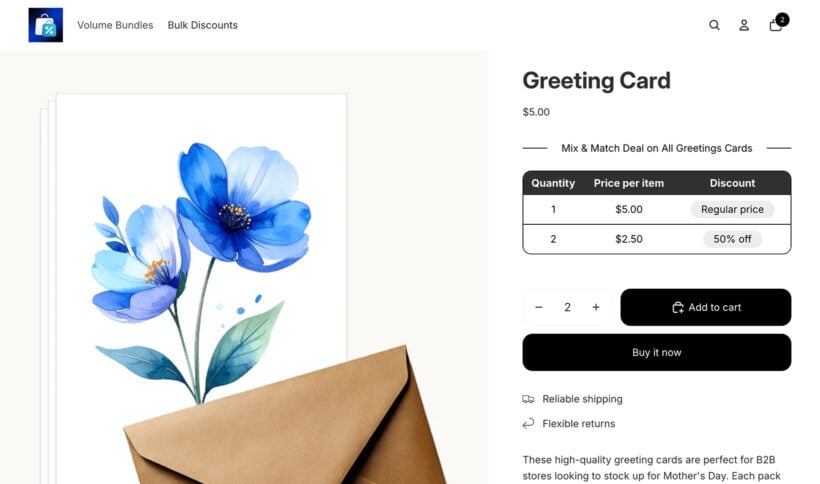
Bulk pricing suits threshold-based discounts across product ranges. Set quantity thresholds that trigger discounts automatically. Apply 100% off the 2nd item when customers add 2+ units to cart. This works across multiple products in a collection, with the cheapest item receiving the discount.
A clothing store might set "Buy any 2 items from Winter Collection, get the cheaper one free." This encourages customers to browse the entire collection rather than just grabbing one item.
Setup instructions
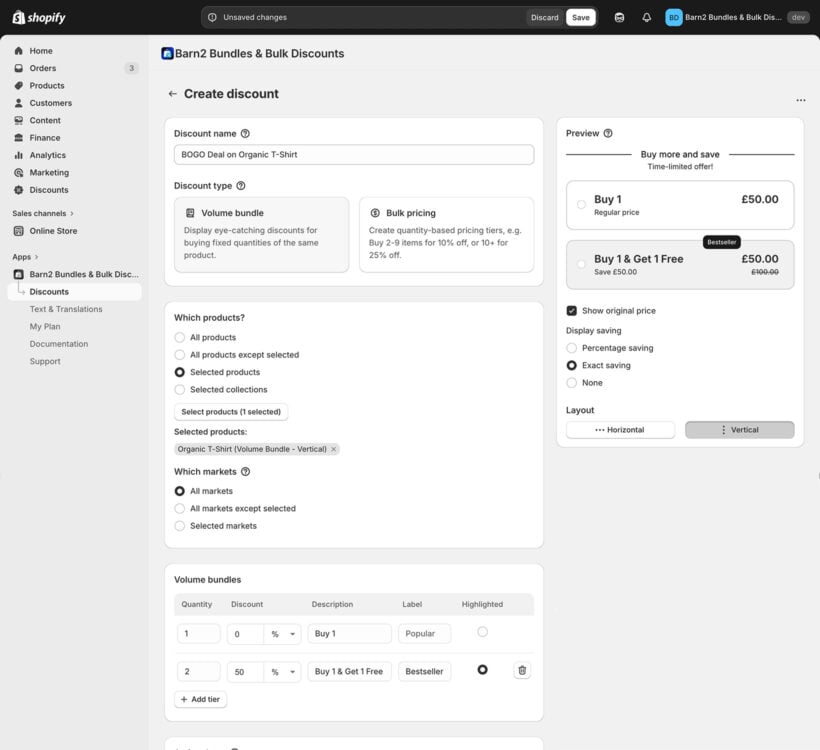
Setting up a BOGO discount takes just a few steps, whichever type of deal you're creating:
- Open the Bulk Quantity Discounts app in your Shopify admin.
- Click 'Create New Discount'.
- Enter a name and choose either 'Volume bundle' or 'Bulk pricing'.
- Select which products, collections or markets the discount applies to.
- Add your pricing tiers. For a true BOGO, set Tier 2 at 100% off the second unit. You can also set it up with other types of discount logic like "Buy 2 and get 50% off".
- Customize how the deal displays on product pages.
- Save and preview your BOGO deal.
Key advantages over native Shopify
Barn2 solves several problems that native Shopify BOGO can't handle, particularly for B2B stores or merchants selling in multiples.
- Unlimited discount rulesBarn2 bypasses Shopify's 25-discount constraint. Run as many volume bundles and bulk discounts as you need without hitting limits.
- Drag-and-drop priority managementControl which discounts apply first when multiple rules affect the same products. This prevents margin erosion from conflicting promotions.
- Shopify Markets integrationSet different volume pricing tiers by geographic market for international operations.
- Built-in analyticsTrack overall orders and revenue generated through your discounts. Confirm the app is driving results and adjust your strategy accordingly.
- Transparent BOGO dealsHigh-volume sellers can show BOGO deals and tiered quantity-based savings upfront. Deals like "Buy 2, save 20%" appear directly on the product page, encouraging larger orders.
Method 3: Free gifts and cross-product promotions
Neither native Shopify nor Barn2 supports cross-product BOGO like "buy a laptop, get a mouse free." You can calculate deals across multiple products using the "Bulk pricing" option in Barn2 Bulk Quantity Discounts, but the customer has to manually add the free product to their cart - it won't happen automatically. This is like in the supermarket, where if you offer a free product then customers still have to put it in their cart.
If your Shopify BOGO strategy involves pairing different products together or automatically adding free items when customers meet certain conditions, a dedicated free gift app is a better choice:
- Auto-add items to cart when conditions are met.
- Cross-product flexibility (different items as rewards).
- Gift selectors where customers choose their reward.
- Cart progress bars showing how close customers are to earning gifts.
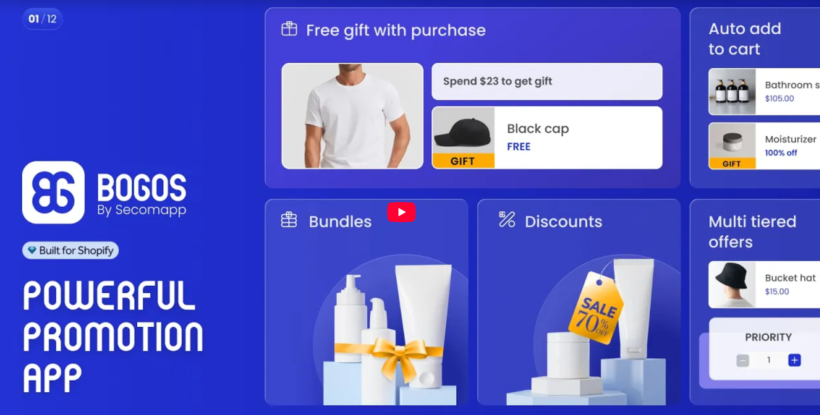
BOGOS is a popular option that handles these use cases. It starts with a free plan for development stores, with paid plans from $29.99/month for live stores. The app offers gift sliders, headless commerce support, and comprehensive promotional tools. If you're running campaigns like "Spend $100, get a free tote bag," this is the type of app you need.
Best practices for BOGO and volume discount campaigns
Setting up your BOGO deals is just the start. These strategies will help you get more from your Shopify BOGO promotions.
Keep deal terms crystal clear. Specify "equal or lesser value," which products qualify, and whether customers must add items manually. Ambiguous BOGO terms can generate a lot of support tickets faster than almost anything else. Of course, customers who feel misled won't come back.
Apply strategically to clear inventory. For same-product volume BOGO, target slow-moving SKUs rather than bestsellers. This moves stock while the aggressive discount justifies lower sales velocity. Pair a slow mover with a popular item in the same collection for maximum impact.
Set maximum uses to protect margins. Limit BOGO to "one per customer" or "maximum 2 sets per order" to prevent abuse. This matters most on high-margin items where customers might try gaming the system. Without limits, some shoppers will stock up beyond what's profitable for you.
Use urgency to drive conversions. BOGO works best as a limited-time offer. Add countdown timers and "Ends Sunday" messaging to push faster decisions. Time pressure turns browsers into buyers. Combine this with email reminders as the deadline approaches.
Make the offer visible before checkout. Display "BOGO" badges on product pages and collection listings. Customers discovering deals only at checkout often abandon to "think about it." The deal visibility that Barn2 provides is one of its strongest selling points. When customers see the savings while browsing, they're more likely to act.
Track performance consistently. Monitor which Shopify BOGO offers convert best. Barn2's analytics show orders and revenue per discount rule. This data helps you refine your approach over time. Test different thresholds and percentages to find what resonates with your audience.
Start offering effective Shopify BOGO discounts today
Shopify's native Buy X Get Y handles simple BOGO promotions, but it comes with trade-offs. For example, the 25-discount limit constrains active stores. The lack of product page visibility means customers may never see your offers.
The Barn2 Bulk Quantity Discounts BOGO app suits merchants needing same-product volume pricing, unlimited discount rules, or B2B-style quantity breaks. The eye-catching displays on product pages help boost your sales by showing customers exactly what they'll save. Instead of hoping customers discover your Shopify BOGO deal at checkout, you're putting the savings right in front of them while they shop.
Get started with Bulk Quantity Discounts today for easy-to-manage Shopify BOGO discounts that actually get noticed.