Best WordPress LMS plugins compared


A WordPress LMS plugin turns your site into a full e-learning platform, with courses, quizzes, certificates, and student management, without forcing you onto a third-party platform like Teachable or Thinkific.
I've compared the seven WordPress LMS plugins worth considering, with the strengths and trade-offs of each. The list covers everything from established premium platforms to free starters, plus a bonus way to add a searchable resource library to any LMS course using Document Library Pro.
Quick verdict
- Best overallLifterLMS has a fully usable free core, an active founder team still on the WP.org forum, and 10 releases shipped in the six months to May 2026.
- Best free optionMasteriyo is the only WordPress LMS whose free tier ships Stripe, PayPal, Mollie, Razorpay, and Lemon Squeezy natively, with no WooCommerce or paid add-ons required to take payment.
- Best for WooCommerce storesSensei LMS is the only LMS made by Automattic, so its WooCommerce, Subscriptions, and Payments hooks are first-party rather than a third-party bridge.
What is a WordPress LMS plugin?
A Learning Management System (LMS) is software that manages, delivers, and tracks online learning. A WordPress LMS plugin adds that capability directly to your site, with course creation, student enrolment, progress tracking, assessments, and communication tools all running inside your WordPress dashboard.
You don't have to be a developer to use one. The plugins below let you build an e-learning platform without writing code, and they work in any setting: corporate training, schools, universities running on WordPress, and independent educators.
Compared to a third-party LMS platform, you keep your content on your own domain, your branding stays consistent, and your long-term costs stay predictable.
How we evaluated these LMS plugins
I looked at each plugin against the factors that decide whether an LMS plugin really works for course creators. That covers the course builder, quiz and assessment tools, student progress tracking, and certification options. It also covers payment gateway support for selling courses, and how cleanly the plugin integrates with the rest of your WordPress stack. I weighed release activity, support responsiveness, and security history alongside the feature set, since all of those matter once a course business is past the pilot stage.
When you're comparing options yourself, here's the checklist:
- Course builder: drag-and-drop, intuitive, suitable for non-developers?
- Quizzes and assessments: multiple question types, grading, time limits, and assignment support?
- Student management: enrolments, progress tracking, gradebook, and reports?
- Certification: certificates and gamification (badges, points)?
- Monetization: payment gateways, one-time and recurring payments, memberships, bundles?
- Integrations: WooCommerce, page builders, email marketing, and forms?
- Pricing model: free, freemium, or premium-only, and what sits in each tier?
- Vendor health: release frequency, support responsiveness, and any pattern of security advisories?
At-a-glance comparison
| Plugin | Free version | Standout strength | Best for |
|---|---|---|---|
| LifterLMS | Yes | Fully usable free core, visible founder team, 10 releases in the last six months | Most course creators wanting a complete free-to-start platform |
| Masteriyo | Yes | Five native payment gateways in the free tier, no WooCommerce needed | Fresh sites wanting to sell courses without buying a Pro plugin |
| Tutor LMS | Yes | 40+ releases in 12 months and a highly-praised drag-and-drop builder | Solo creators happy on default Tutor templates |
| Sensei LMS | Yes (cannot sell on its own) | First-party WooCommerce, Subscriptions, and Payments integration from Automattic | Existing WooCommerce stores adding courses |
| WP Courseware | No | Quizzes, drip, and shopping cart built in from $159/year for two sites | Solo creators on a budget who can live with a dated admin |
| LearnPress | Yes | Most-installed free LMS, but a heavy 2024-2026 security record | Side-project pilots where security stakes are low |
| LearnDash | No | Deepest add-on ecosystem in the category, now absorbed into Liquid Web | Existing LearnDash sites that are working well |
The 7 best WordPress LMS plugins
Below are the seven LMS plugins worth considering, ordered by how well they suit most course creators. The list starts with the strongest all-in-one option, then specialist picks, then the older or more risk-laden options after that.
1. LifterLMS

LifterLMS is the WordPress LMS I'd reach for first. The free core is genuinely usable for course delivery, with unlimited courses, unlimited students, no revenue cap, and a drag-and-drop course builder on a single screen. It's also the only LMS in this list where the founder still personally replies to feature requests on the WordPress.org support forum, and the company runs a public weekly "Office Hours" mastermind. That level of visibility is unusual in this category and shows up in long-term product direction.
LifterLMS is shipping faster than it has in years. 10 releases landed in the six months to May 2026, with v10.0.0 adding in-Course-Builder lesson editing, a learner-facing "focus mode", and a new lesson navigation shortcode. Three security patches followed in the next 18 days, a healthy sign that vulnerabilities get triaged quickly rather than batched.
The trade-off is that the free core won't take money on its own. Payment gateways (Stripe, PayPal) are paid add-ons, and the cheapest path to a working sales funnel is the Earth bundle, which starts at $199 for the first year and renews at $398/year. Anyone arriving expecting "free LMS that sells courses" should plan for that.
A real gap worth knowing about: free-course signups don't require email verification, which means anyone can be enrolled using someone else's email address. A reviewer flagged this as a GDPR concern in October 2025; the founder acknowledged the issue but only committed to "consider for future development". If you're running EU lead-magnet courses, this matters.
Pros:
- Free core is genuinely usable for course delivery, with no revenue caps and no per-student fees.
- 10 releases in the last six months including v10.0.0 (May 2026), with security patches typically shipped within days.
- Founder Chris Badgett still answers feature requests on the WP.org forum personally.
- Strong membership tooling, with native Paid Memberships Pro integration.
- Multiple payment gateways and global currency support in paid bundles.
Cons:
- Stripe and PayPal sit behind the Earth bundle (from $199/yr, renews at $398/yr), so the free version cannot sell courses on its own.
- Free-course signups have no email verification, which the founder has acknowledged but not yet committed to fix.
- Built-in admin reporting feels thin. Serious analytics usually means bolting on a separate tool.
Best for: course creators who want to own their stack, scale without per-student fees, and are happy paying for a Pro bundle once they need payments.
2. Masteriyo
Masteriyo is the LMS I'd pick for anyone starting fresh on WordPress who wants to sell courses today. Its free tier is the only one in this list that ships Stripe, PayPal, Mollie, Razorpay, and Lemon Squeezy natively, with no WooCommerce dependency and no paid add-ons required. Every other plugin here either gates payments behind a paid bundle (LifterLMS, Tutor LMS, and Sensei) or requires you to layer WooCommerce on top.
The course builder is a Gutenberg-isolated React experience on a single screen with no constant page reloads, and the learner-side "distraction-free" page hides headers, footers, and sidebars to focus students on the content. Themeisle now co-contributes to the plugin on the WP.org listing, and the release pace is genuinely high. 17 releases landed between September 2025 and May 2026. v2.2.0 (May 2026) added a full WP Abilities API integration and a "View as Student" preview, and v2.2.1 is already WordPress 7.0 compatible.
The biggest thing to know before you install: the setup wizard's "Import Starter Template" step has destroyed menus, branding, and pages on at least two production sites in the last four months. Two reviewers (in February 2026 and January 2026) both reported their existing site layouts being overwritten by the template import. The team has acknowledged the warning copy needs to be clearer, but the change hasn't shipped yet. Decline the starter-template step on any existing site.
Support is responsive but Asia-timezone; US-based reviewers report 8 to 24 hour first-reply delays on the live-chat widget. Founder Sanjip Shah and the team handle the WP.org forum personally. On security, Patchstack lists 13 disclosed vulnerabilities since 2023, including a critical 9.8-CVSS unauthenticated privilege escalation in April 2024. The team has patched consistently within days to weeks, so the volume reflects an actively-monitored surface rather than a neglected one. It's still worth keeping the plugin updated.
Pro pricing starts at $99/year for the Basic single-site tier and runs to $399/year for Elite with 10 sites and white labelling. A $499 lifetime Elite single-site option is also offered, making it one of the cheapest "complete" WordPress LMS Pro plans in the category.
Pros:
- Five native payment gateways (Stripe, PayPal, Mollie, Razorpay, and Lemon Squeezy) in the free tier, with no WooCommerce dependency.
- 17 releases between September 2025 and May 2026, with v2.2.0 (May 2026) adding "View as Student" and a WP Abilities API integration.
- Single-page React course builder that doesn't reload between actions.
- Pro from $99/year Basic, with a $499 lifetime Elite single-site option.
- Vulnerabilities get patched fast (days to weeks) when disclosed.
Cons:
- The setup wizard's "Import Starter Template" step has overwritten menus, branding, and pages on existing sites as recently as February 2026. Decline it on any existing site.
- 4,000+ active installs is small relative to LearnDash, Tutor LMS, and LearnPress, which limits social proof for production at scale.
- Patchstack lists 13 disclosed vulnerabilities since 2023; patching has been fast but the volume means admins should keep the plugin updated.
Best for: fresh course sites that want native payments in the free tier and don't want to layer WooCommerce on top.
3. Tutor LMS

Tutor LMS is the highest-velocity WordPress LMS on this list. Themeum shipped roughly 40 releases in the 12 months to May 2026. The mix was real features (Content Bank, Gift Course, course import/export, AI Studio quiz generation, and certificate downloads) alongside frequent security and bug-fix patches. Install count is 100,000+, the rating is 4.4 out of 5 from 581 reviews, and 15 of the last 23 support threads have been resolved in the most recent two months.
The drag-and-drop frontend course builder is the single most-praised feature, even by reviewers who left low ratings for other reasons. One user said he tested every LMS plugin for three months before picking Tutor specifically for that builder.
Two recurring 2026 complaints are worth weighing:
- Major version jumps have broken working integrations without notice. The 3.0 release broke Google Drive, manual enrolment, and the frontend course builder for paying Pro customers, leaving them locked into a workflow they didn't buy.
- The support pattern is templated. Tickets auto-close after 72 hours regardless of resolution, response times of three or more days are common, and fixes are often pushed back to the user as code snippets to apply themselves.
The other divisive recent direction is the Droip page-builder integration introduced in v3.6.0 (May 2025) and refined through v3.8.3. It pushes users toward a Themeum-owned visual editor instead of native Gutenberg blocks, which paying customers in 2025-2026 reviews argued forces another page builder onto sites that already use native blocks.
AI Studio is Pro-only, requires the user to bring their own OpenAI API key, and currently generates course outlines, lessons, quiz questions, summaries, titles, and feature images. Pro pricing starts at $199/year for the Individual single-site tier, with a 30-day refund policy that reviewers consistently report is honoured.
Pros:
- 40+ releases in the 12 months to May 2026, with real features and prompt security patches.
- The drag-and-drop frontend course builder is the most-praised feature in third-party reviews.
- 100,000+ active installs and 4.4 / 5 stars from 581 reviews.
- AI Studio (Pro) for generating outlines, lessons, quiz questions, and images.
Cons:
- Major version jumps have broken working integrations without notice; the 3.0 release broke Google Drive, manual enrolment, and the frontend course builder for paying Pro customers.
- Support tickets auto-close after 72 hours regardless of resolution, with fixes often handed back to the user as code snippets to apply themselves.
- The Droip page-builder integration pushes users toward a Themeum-owned visual editor instead of native Gutenberg blocks, which has been a divisive recent direction.
Best for: solo creators and small course sites that can stay on default Tutor templates and tolerate occasional upgrade friction.
4. Sensei LMS
Sensei LMS is the only WordPress LMS made by Automattic, the company behind WooCommerce, WordPress.com, and Jetpack. That means its WooCommerce, Subscriptions, Payments, Memberships, and Affiliates integrations are first-party rather than third-party bridges. LearnDash and LifterLMS both need additional add-ons (or third-party plugins) for the same job, so anyone already deep in the WooCommerce stack gets the cleanest integration here.
The honest position in 2026 is that Sensei is being maintained but development has slowed noticeably. The most recent WordPress.org release is 4.25.2 from December 2025, which is over five months stale as of late May 2026, and only three releases shipped in the preceding year. The free version cannot sell courses on its own; paid selling is gated behind Sensei Pro plus WooCommerce, and free certificates were moved into the paid tier some releases back.
Recent paid-support reports are concerning. A WP.org support thread running from December 2025 to May 2026 from a paying Sensei Pro customer who bought Sensei Interactive Blocks reads: "I've sent multiple emails to Sensei regarding these issues. Crickets. Initially, I was at least receiving automatic AI responses, but when I tried to follow up, my emails were no longer returned." A second paying customer on the same thread reported the same pattern. The official 3.5 / 5 rating on WordPress.org is unusually polarised for an Automattic product, with 10 one-star reviews against 21 five-star reviews from a base of 40.
The 2026 positioning has also shifted. Sensei Pro now leads its landing page with AI tooling (Quiz AI, Tutor AI block, and Course Outline AI), pushing the WooCommerce integration story further down the page. Sensei Pro starts at $179/year, which undercuts LearnDash ($259/year) and most LifterLMS bundles. A $60/year Interactive Blocks tier is available separately.
Pros:
- First-party WooCommerce, Subscriptions, Payments, Memberships, and Affiliates integration from Automattic.
- Sensei Pro pricing ($179/year) undercuts LearnDash and most LifterLMS bundles.
- Owned by a financially stable, well-resourced company.
Cons:
- Last release on WordPress.org is 4.25.2 from December 2025, over five months stale at the time of writing.
- The free version cannot sell courses on its own; selling requires Sensei Pro plus WooCommerce.
- Paying Sensei Pro customers have reported support tickets going unanswered after the initial AI auto-response, including a thread that ran from December 2025 to May 2026.
Best for: existing WooCommerce stores that want their courses to slot into the same cart, subscription, and membership stack they already run.
5. WP Courseware
WP Courseware is the quiet veteran of WordPress LMS plugins. Fly Plugins has been shipping it since 2011, the admin is unfussy WordPress-native, the drag-and-drop course builder is straightforward, and seven quiz question types are built in without paid add-ons. Capterra rates it 4.5 / 5 from 21 verified reviews, with "best customer support" and "easy and simple to create courses" the recurring praise.
The honest 2026 picture: WP Courseware is still maintained but unmistakably coasting. Only one release shipped in the 12 months to May 2026 (v4.18.2 on 14 March 2026). It was pure bug fixes (404s after update and course-outline borders), with no new features in the changelog for well over a year. Co-founder Ben Arellano was still publicly active as recently as January 2026, so this is "low-velocity vendor on a mature codebase" rather than "abandoned plugin".
The recurring product complaint is the admin UI: multiple independent 2025-2026 reviews (FatLab, LMS Crafter) call it "outdated" and "lacking modern polish" compared to Tutor LMS or recent LearnDash updates. The ecosystem of add-ons, themes, and tutorials is also markedly smaller than for LearnDash, LifterLMS, or Tutor LMS.
What WP Courseware has over the bigger names is price. The Teacher tier is $159/year for 2 sites, Professor is $199/year for 10 sites, and Guru is $279/year for 25 sites, all with a 30-day money-back guarantee. That undercuts LearnDash ($259/year for one site) and the LifterLMS Universal Bundle ($299/year) by a meaningful margin.
Pros:
- Seven quiz question types built in to the core, no paid add-ons required for quizzes.
- Pricing materially below the LearnDash and LifterLMS tier, from $159/year for two sites.
- Capterra 4.5 / 5 from 21 verified reviews; ease of setup and support are the recurring praise.
- Built-in shopping cart and payment gateway functionality without WooCommerce.
Cons:
- Only one release shipped in the 12 months to May 2026, and it contained no new features.
- The admin UI looks dated next to Tutor LMS or recent LearnDash versions.
- Smaller ecosystem of add-ons, themes, and integrations than the bigger names.
Best for: solo creators, coaches, and small training departments who want a simple, WordPress-native LMS and don't need bleeding-edge UX.
6. LearnPress
LearnPress is the most-installed free WordPress LMS plugin and the only one in this list whose free core can sell courses out of the box via PayPal or Offline Payment. The interface is beginner-friendly, the install base is 80,000+, and on price alone it's hard to beat for someone just starting out.
The honest reason it sits this low in our ranking is the security record. Patchstack lists 36 disclosed LearnPress vulnerabilities across 2025 and the first five months of 2026, on top of 11 in 2024. The two standouts are CVE-2024-8522 and CVE-2024-8529, unauthenticated SQL injection flaws with CVSS scores of 10.0 that exposed 90,000+ sites before being patched in v4.2.7.1. ThimPress does patch its disclosed vulnerabilities, and Patchstack shows zero open as of May 2026. The volume itself is the red flag. 17 of the last 19 LearnPress releases contain the bare changelog entry "Fixed: security" with no further detail.
Release stability is the other recurring complaint. A WP.org reviewer reported in April 2026 that v4.3.5 "breaks the entire database", with wishlists wiped and courses missing from the homepage. ThimPress's own changelog shows a follow-up emergency "Fixed: error enroll course" in 4.3.2.5 after 4.3.2.4 broke enrolment. Support resolution is currently 2 of 9 threads in the last two months.
The "free LMS" positioning is also less generous than it looks. Essential commercial features (certificates, gradebook, content drip, assignments, Stripe, and WooCommerce integration) all sit behind paid add-ons. Anyone who needs more than PayPal ends up at the $299 Pro Bundle (one site, renews at $209.30/year). The "regular" price quoted alongside the perpetual 58% discount is a long-running ThimPress sales pattern rather than a genuine promotion.
Pros:
- Free core sells courses out of the box via PayPal and Offline Payment.
- Largest install base (80,000+) of any plugin in this list, which means the most-tested code in terms of community size.
- Add-ons are one-time-purchase eligible per site, so long-term total cost can undercut subscription-based competitors for solo instructors.
Cons:
- 36 disclosed vulnerabilities in 2025-2026 (plus 11 in 2024), including two CVSS 10.0 unauthenticated SQL injection flaws in 2024 that exposed 90,000+ sites.
- Release stability has been poor: v4.3.5 (April 2026) was reported to break the entire database, and 4.3.2.4 broke enrolment before an emergency patch.
- Most commercial essentials (certificates, gradebook, content drip, Stripe, and WooCommerce) sit behind a $299 Pro Bundle, eroding the "free LMS" positioning.
Best for: side-project pilots and low-stakes training sites where a 24-48 hour exposure window between a vulnerability disclosure and a patch would not be material. Not the right pick for sites handling sensitive student data, payments at scale, or regulated training.
7. LearnDash
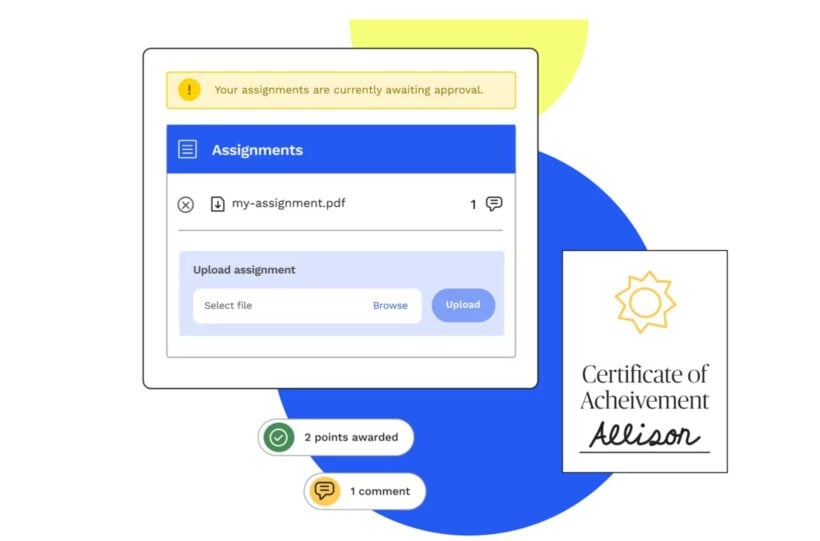
LearnDash was for years the most established premium WordPress LMS, with a drag-and-drop course builder, drip content, progress tracking, gamification, and the deepest add-on ecosystem in the category. If you're already running LearnDash, the core LMS feature set is still hard to match plugin-for-plugin in WordPress, and Fortune 500 universities still run multi-instructor enterprise deployments on it.
The future is where I'd be more cautious. LearnDash was acquired by Liquid Web (now operating as StellarWP) and in May 2026 the standalone learndash.com site was retired and redirected to a product page on liquidweb.com. The product is now positioned as one tile in Liquid Web's broader software portfolio rather than as a flagship product with its own roadmap.
The post-acquisition picture has hardened over the last six months. In November 2025, around 25% of the StellarWP team (about 36 people) were laid off, including Taylor Walden, LearnDash's Product Owner. Pricing rose with the consolidation: a single-site licence went from $199 to $259 per year, and multi-site licences are gone, so the previous $399 ten-site plan now requires ten separate $259 licences. Of the four LearnDash point releases that shipped in May 2026, three were purely administrative rebrands to Nexcess licensing rather than user-facing features. Recent Capterra reviews include reports of LearnDash App bugs unresolved for 90+ days.
That doesn't make the plugin worse today, but it does change the calculation if you're choosing an LMS for the next five years. Independently-owned plugins like LifterLMS and Masteriyo have founders and teams whose entire focus is the LMS itself, which usually translates into faster updates, more attentive support, and clearer long-term direction.
Pros:
- Mature, feature-rich premium LMS with the deepest add-on ecosystem in the category.
- Used at scale by enterprise and Fortune 500 customers; the core feature set is still hard to match plugin-for-plugin.
- Wide range of payment gateway integrations through the established extension catalogue.
Cons:
- StellarWP laid off ~25% of staff in November 2025, including LearnDash's Product Owner; the standalone learndash.com site was retired in May 2026 and now redirects to a product tile on liquidweb.com.
- Pricing rose from $199 to $259 per year, and multi-site licences were eliminated, so a ten-site deployment now requires ten separate licences.
- Three of the four May 2026 LearnDash point releases were purely administrative rebrands to Nexcess licensing rather than user-facing features.
- Premium-only with no free tier; pricing stacks up once you add the popular extensions.
Best for: existing LearnDash sites that are working well. For new builds, consider LifterLMS or Masteriyo first.
Bonus: add a searchable resource library to your LMS courses with Document Library Pro
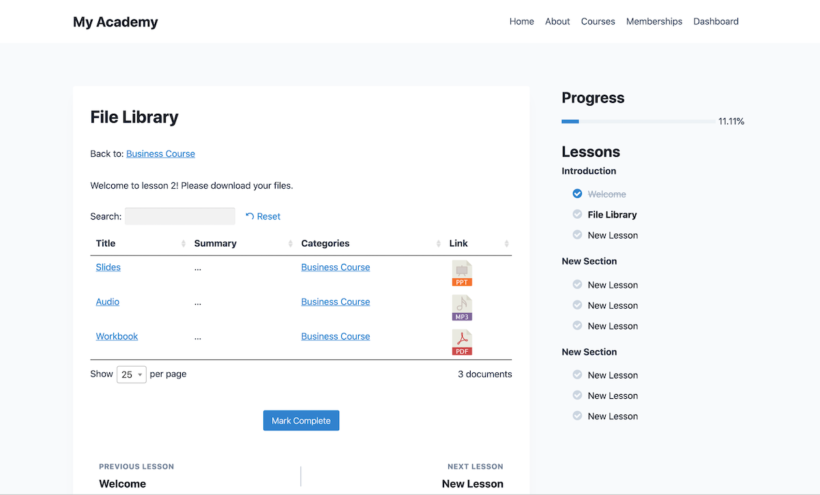
Our own Document Library Pro plugin fills a gap that every LMS plugin above shares: a real, searchable resource library inside the course. Most LMS plugins have a basic Course assets tab where you can drop in links to handbooks or further reading. None of them give you a properly searchable, filterable resource section.
Document Library Pro pairs with any of the LMS plugins above to add exactly that. You can:
- Add a list of course resources to the main course page in your LMS.
- Build a dedicated Resources module at the end of a course, with downloadable handouts, worksheets, audio, and video.
- Share any file type or external link to support each lesson, with categories visitors can filter by.
The setup is simple. Add your resources, structure them into categories, and drop a shortcode into the course or lesson page. Students get a searchable, sortable, filterable library inside the course they're studying.
To start simply, the free Document Library Lite plugin lists course files in a searchable table, with access control and grid layouts saved for the paid version.
Which WordPress LMS plugin should you choose?
For most course creators, LifterLMS is the best choice. The free core is genuinely usable, the founder team is still personally responsive on the WP.org forum, and the company shipped 10 releases in the six months to May 2026. The membership and payment tooling are strong enough to grow into, and the roadmap is focused entirely on the LMS rather than competing for attention inside a larger portfolio.
If you want native payments in the free tier without buying a Pro bundle, pick Masteriyo. If you're already deep in WooCommerce, a WooCommerce LMS like Sensei LMS gives you first-party Automattic integration. If you're an existing LearnDash customer with a working stack, there's no urgent reason to move; just keep an eye on release substance over the next year.
Whichever LMS you settle on, pair it with our own Document Library Pro if you want a searchable resource library inside your courses. That's the one feature every LMS plugin is missing, and adding it transforms a course into a proper resource hub for your students.
2 Comments
I miss Thrive Apprentice in your article; super plugin!
Hi, Charles. Thanks for your comment and for mentioning the Thrive Apprentice course and membership plugin by Thrive Themes! I've had the opportunity to use it before and agree that it's a brilliant plugin. I'll relay your recommendation to our marketing team. Cheers.