The best WordPress podcast plugins compared


WordPress can't publish a podcast on its own. It won't generate the RSS feed that Apple Podcasts and Spotify need, so the right plugin does the heavy lifting and lets you host episodes under your own brand.
Podcasting keeps growing, with over 380 million listeners worldwide, and more creators want their show on a site they own. Hosting a podcast on WordPress gives you that control, but the plugin you choose decides how well you can host episodes, embed a player, and grow your audience. The wrong one boxes you in fast.
I'll compare the best dedicated podcast plugins for WordPress, with the pros and cons of each. As a bonus, I'll also show you how to make your podcast site even more effective with Posts Table Pro, our own plugin. It turns a long episode archive into a searchable, filterable list, either alongside a dedicated podcast plugin or as a simpler alternative once your back catalog grows.
Quick verdict
- Best overallSeriously Simple Podcasting is free, quick to set up, and built by a dedicated podcast host.
- Best for advanced feedsPowerPress gives you full Podcasting 2.0 support and granular feed control.
- Best for full controlPodlove Podcast Publisher is open source, with chapters and multi-format feeds.
- Best for beginnersBuzzsprout handles hosting for you, with a simple WordPress embed.
- Best for a polished playerPresto Player is the nicest on-page audio and video player here.
How we evaluated these podcast plugins
I compared these plugins on the factors that matter most when you publish a podcast. That means feed reliability for Apple Podcasts and Spotify, how the player looks on mobile, how much episode data you can store, and pricing. I weighted feed reliability and ease of setup most heavily, because those decide whether you can launch at all.
I've ordered the list by how well each plugin suits most podcasters, starting with the strongest all-round choice. Specialist tools that only cover part of the job are ranked lower, even when they shine in a specific niche.
The best WordPress podcast plugins
These are the dedicated podcast and audio plugins I'd consider, ranked by how well they suit most podcasters. If you mainly want a player rather than a full podcast system, my WordPress audio player roundup goes deeper on that angle.
1. Seriously Simple Podcasting
Seriously Simple Podcasting is the plugin I recommend to most people starting a podcast on WordPress. It's free, made by the podcast host Castos, and it does the core job without overwhelming you.

It generates an RSS feed for Apple Podcasts, Spotify, and other directories, and you publish episodes from the WordPress admin. Episodes use a dedicated podcast post type, so they slot into your normal workflow, and a built-in importer pulls an existing show across from another host.
You control the title, description, categories, cover art, and explicit rating, and you can even password-restrict a feed for premium members. A free stats add-on tracks listeners by date, source, and episode.
Pros:
- Free, with no episode limit on your own hosting.
- The setup is clean, so you can publish a first episode quickly.
- Optional Castos hosting adds analytics and transcripts when you need them.
Cons:
- Advanced analytics need a paid Castos plan, from $19/month.
- The default player is functional rather than beautiful.
2. PowerPress by Blubrry
PowerPress is the most feature-complete free podcasting plugin. Blubrry built it for serious podcasters, and the depth of the feed settings shows it.

It supports Podcasting 2.0 tags, multiple feeds, and distribution to Apple Podcasts, Spotify, YouTube Music, and Amazon Music. You also get a responsive audio and video player, plus subscribe widgets and shortcodes. The trade-off is the dense settings screen, so it rewards podcasters who know what they want.
Pros:
- Free, with the deepest feed control of any plugin here.
- Full Podcasting 2.0 support, including transcripts and chapters.
- Works with any host, with optional Blubrry hosting from $10/month.
Cons:
- The interface overwhelms first-time podcasters.
- Player styling is basic without extra work.
3. Podlove Podcast Publisher
Podlove Podcast Publisher suits podcasters who want to own every detail. It's open source, community built, and goes further than most on customization.

It handles multi-format feeds and a wide range of audio and video codecs, so you avoid converting files. It also installs a second plugin, the Podlove Web Player, which you configure separately from the main publisher. That split adds setup steps, but nothing else here gives you this much control for free.
Pros:
- Free and open source.
- Chapters, multi-format feeds, and a capable HTML5 player.
- Highly customizable templates.
Cons:
- The setup is steeper than Seriously Simple Podcasting.
- Documentation can get technical.
4. Buzzsprout
Buzzsprout is a managed podcast host rather than a pure plugin, but its WordPress integration earns it a place. You upload episodes to Buzzsprout, then embed them on your site.

It lists your show on Apple Podcasts, Spotify, iHeartRadio, and more, and its Magic Mastering feature cleans up your audio automatically. Because the audio lives on Buzzsprout, your WordPress site only holds the embed, not the files, so it stays light. You drop the player in with a shortcode. You trade some control for a much gentler learning curve.
Pros:
- Very beginner friendly, with guided setup.
- Hosting, analytics, and distribution in one tool.
- The embeddable player is attractive and responsive.
Cons:
- It's a paid host, and the free tier removes episodes after 90 days.
- Less control than a self-hosted plugin.
5. Presto Player
Presto Player is the best on-page player in this roundup, though it handles presentation rather than generating your feed. If your priority is how an episode looks and feels when someone presses play, it's hard to beat.

It gives you a polished audio and video player with chapters, custom design, and email opt-in gates. You can mark content as premium so only paying members hear it. Pair it with a feed plugin like Seriously Simple Podcasting, and let Presto Player handle presentation.
Pros:
- The most polished player design of the group.
- Audio and video, with chapters and lead-capture gates.
- Works well alongside a feed-generating plugin.
Cons:
- No RSS feed generation, so it isn't a standalone podcast solution.
- The best features need the paid version.
6. Simple Podcast Press
Simple Podcast Press automates the publishing side. It pulls from your existing feed and creates a page for each episode on your WordPress site.

It works from your existing RSS feed, so you keep managing episodes in your host and the plugin mirrors them into WordPress as pages. Each page includes a responsive player, your full episode description, and images from your feed. You also get clickable timestamps, custom buttons, and email opt-in integrations. It suits podcasters who'd rather not build episode pages by hand.
Pros:
- Creates and updates episode pages automatically from your feed.
- Clickable timestamps and email opt-in tools.
Cons:
- It's a paid plugin with no free version.
- You depend on an external feed as the source of truth.
7. FuseBox FM
FuseBox FM (formerly Smart Podcast Player) focuses on the listening experience and the marketing around it.

It pairs a feature-rich player with a transcript editor that sits right in the WordPress dashboard, so you format transcripts without leaving the post. An analytics dashboard tracks how each episode performs. The player sits anywhere on your site and keeps playing as visitors browse.
Pros:
- Strong player plus a built-in transcript editor.
- Clear analytics dashboard.
Cons:
- It's a paid subscription.
- More of a player and marketing tool than a full host.
8. Libsyn Publisher Hub
Libsyn is one of the oldest podcast hosts, and its Publisher Hub plugin publishes episodes directly to your WordPress site.

The plugin publishes from a Libsyn account, so it's a companion to Libsyn hosting rather than a standalone host. You create episodes with a drag-and-drop builder and show them in a responsive player. Batch publishing and scheduling help if you produce in bursts, and you can reuse descriptions and settings across episodes to save time.
Pros:
- Backed by a long-established podcast host.
- Batch publishing and scheduling.
Cons:
- You need a paid Libsyn hosting account.
- The interface feels dated next to newer tools.
9. AudioIgniter
AudioIgniter is a free, lightweight audio player. It won't generate your feed, but it's a simple way to put a clean playlist of episodes on a page.

You add episodes to a playlist and show it anywhere on your site, and it integrates with a wide range of themes. It has no RSS or episode-metadata fields, though, so it's purely a front-end playlist rather than a podcast manager. It's responsive, so the player looks right on mobile.
Pros:
- Free and lightweight.
- Simple playlist player that drops into any page.
Cons:
- No feed generation or distribution.
- Limited episode metadata.
Bonus: display a large episode archive with Posts Table Pro
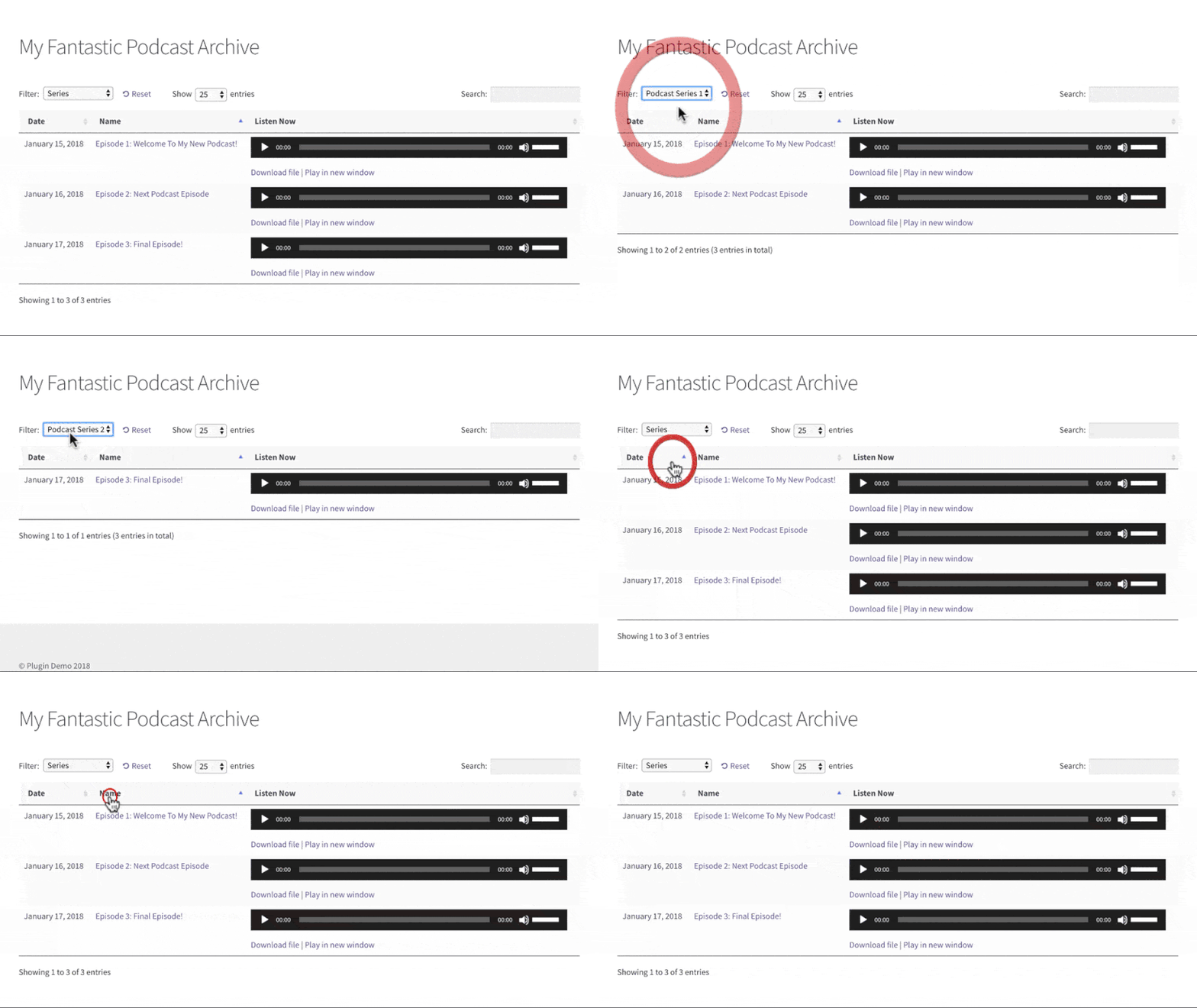
Our own Posts Table Pro plugin solves a different problem, one that grows with your show. It isn't a podcast host, so it doesn't replace the plugins above. Instead, it fixes navigation: once you have dozens of episodes, a plain list gets hard to browse.
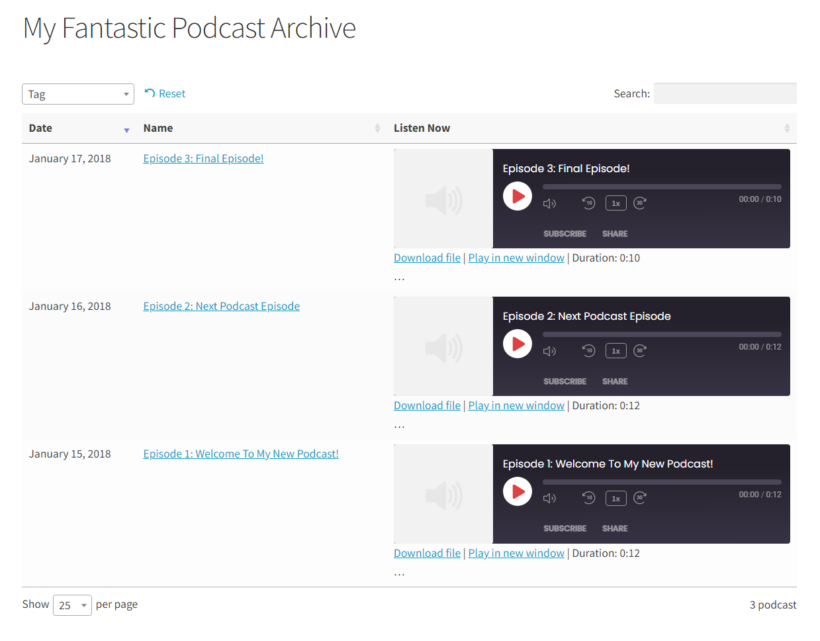
Posts Table Pro turns your episodes into a searchable, sortable, filterable table. Listeners can search by guest or topic, sort by date, and play or download an episode without scrolling a long page. AJAX lazy loading keeps it fast even with hundreds of episodes. You can run it alongside Seriously Simple Podcasting, which handles the feed, while Posts Table Pro handles the on-site archive. For a simple show that publishes to Apple and Spotify and just needs a clean episode index on the site, it can also stand on its own.
Here's how to set it up:
- Keep publishing episodes with your podcast plugin. Seriously Simple Podcasting, for example, stores each episode under its own 'podcast' post type automatically.
- Install Posts Table Pro and point it at that podcast post type.
- Go to Post Tables → Add New and build a table with columns for the date, episode name, and a listen or download column.
- Publish the page and view it on the front end.
It takes a few minutes and scales to your whole back catalog. For more on the audio, video, and playlist columns, see the latest Posts Table Pro features.
Pros:
- Makes a large back catalog searchable, sortable, and filterable on one page.
- Works alongside any podcast plugin, or on its own for a simple show.
- Loads one page at a time to keep big archives fast.
Cons:
- It isn't a podcast host, so you still need a feed plugin for Apple Podcasts and Spotify.
- A free plugin, Posts Data Table, lists ordinary posts, while episodes stored as a custom post type call for Posts Table Pro.
Why host your podcast on WordPress?
Host your podcast on your own site, instead of only on a third-party platform, and you control how it looks and how you grow it. Here's what you gain:
- Better SEOProperly structured episode pages build your site's authority and help search engines find your content.
- Full control over designYou decide how your episode pages, landing pages, and player look, so they match your brand.
- Your own analyticsYou track listener data and your wider site metrics in one place, then improve based on what you see.
- More ways to monetizeYou can run sponsored content, ads, or memberships against your own traffic.
- Room to extendYou can add email opt-ins, memberships, and more with other plugins as your show grows.
Features to look for in a podcast plugin
As you compare options, check each one against how you plan to publish. Weigh these features:
- Audio playerA built-in player so visitors listen without leaving your site.
- Subscription optionsRSS feeds and easy links to Apple Podcasts, Spotify, and other directories.
- AnalyticsListener numbers, sources, and per-episode performance.
- SEO and metadataTranscripts, structured data, and clean episode pages.
- CustomizationPlayer colors, fonts, and layout that match your site.
- Easy managementSimple episode uploads and updates without technical friction.
Common issues and how to fix them
Even with a solid plugin, a few problems come up often. Here's how to handle them:
- Audio won't playCheck the plugin is compatible with your WordPress version, confirm your files are a supported format, and clear your browser cache.
- RSS feed errorsConfirm your podcast title, description, and episode details are filled in, then regenerate the feed and run it through a podcast validator.
- Slow pagesCompress your audio files and serve them through a CDN.
- Plugin conflictsDisable other plugins, then re-enable them one by one to find the culprit.
Which podcast plugin should you choose?
- If you want a free, reliable starting point, choose Seriously Simple Podcasting.
- If you need advanced feed control and Podcasting 2.0, choose PowerPress.
- If you want maximum control for free, choose Podlove Podcast Publisher.
- If you'd rather have hosting handled for you, choose Buzzsprout.
- If player design matters most, choose Presto Player.
- If you want episode pages built automatically from your feed, choose Simple Podcast Press.
- If transcripts and a marketing-focused player matter most, choose FuseBox FM.
- If you already host with Libsyn, choose Libsyn Publisher Hub.
- If you just need a simple, free episode playlist, choose AudioIgniter.
- Once your archive passes 20 or 30 episodes, add Posts Table Pro so listeners can search and filter the whole back catalog instead of scrolling.
Start your WordPress podcast
Most podcasters should start with Seriously Simple Podcasting, then layer on a polished player or a searchable episode table with Posts Table Pro as the show grows. Pick the dedicated plugin that matches your feed needs first, and build presentation on top of it.