Best 15+ WooCommerce bulk edit plugins in 2026


Managing a WooCommerce store, especially if you have a healthy number of products, can take time. Especially if you need to edit or update large numbers of these in one sitting. The good news is that you can easily get this time back by installing a plugin to bulk edit WooCommerce products.
Below, I'll go through the 15+ best WooCommerce bulk edit product plugins that save you time when you need to update lots of products at once. If you've been editing products one by one, these tools can make the whole job much faster.
Quick verdict: the best WooCommerce bulk edit plugin for you
Short on time? Here's the 10-second answer before the full list below.
- Best overallSetary edits the widest range of product data, handles multiple stores and runs outside WordPress so it won't slow your site.
- Best free optionSmart Manager for WooCommerce gives you spreadsheet-style editing inside wp-admin at no cost.
- Best for working in Google SheetsWooCommerce Google Sheet Connector syncs your products to a spreadsheet you already know.
- Best for product variationsour WooCommerce Bulk Variations plugin is the specialist for editing variable products in bulk.
My criteria for comparing bulk edit plugins
Bulk edit tools work in different ways, so I compared them on what decides which one fits your store:
- Where you edit - whether that's inside wp-admin, in an external app or in Google Sheets.
- Range of data - whether it edits every field and custom data, or just core fields like price and stock.
- Variation support - whether it can bulk edit variable products, not just simple ones.
- Filtering, undo and preview - how easily you can target the right products and recover from mistakes.
- Free vs paid - what the free version covers and what the upgrade costs.
Two of the tools below are ours, so I've flagged that in their sections and listed their limitations alongside everyone else's.
Our #1 recommendation: Setary

Setary lets you manage, update and bulk edit all of your WooCommerce products in one spreadsheet-like environment. It's a tool we co-own at Barn2, and we recommend it first because it's built specifically for this job and handles the widest range of product data. Here's what it does:
- It's not a plugin!Unlike all the other WooCommerce bulk edit tools in this article, Setary is a hosted tool rather than a WordPress plugin. The bulk editing takes place in your account on the Setary website. There are several advantages to bulk editing WooCommerce products outside of WordPress. The process is faster and doesn't weigh down your site. You don't have to import or export your product data in a CSV file because Setary retrieves the products automatically using the REST API. Simply filter and bulk edit products in the Setary dashboard, click Save, and the changes will appear automatically on your WooCommerce store 😎
- Update all product dataSetary lets you update literally all types of data about your products and variations. You can update everything from the product's name to bulk editing prices, product type, bulk manage stock levels, and more. If you've added custom data via custom fields or taxonomies, then you can select your chosen custom field plugin in the settings and edit its data too. To keep things tidy in the bulk edit interface, simply choose which columns to show and hide.
- Quickly select products and variationsBefore making bulk changes, use the search box and filters to only view the products you're interested in bulk editing.
- 2 ways to bulk edit product dataEither make inline changes via the spreadsheet editor, or apply a wide range of bulk actions to selected products.
- Bulk update product variationsAs well as editing entire products, you can use Setary to edit product variations. The variants appear in the spreadsheet just like full products, so you can easily make updates to them too.
- Time-saving 'Views' featureIf you often need to bulk update products with similar criteria (e.g. all Large products in the Clothing category) then you can pre-save views to return to later. This saves time comparing to repeating the same filters every time.
- Manage inventory across multiple storesIf you run multiple stores (either for your company or a client), then you can easily switch between them within the Setary interface. You can even copy products and updates between stores!
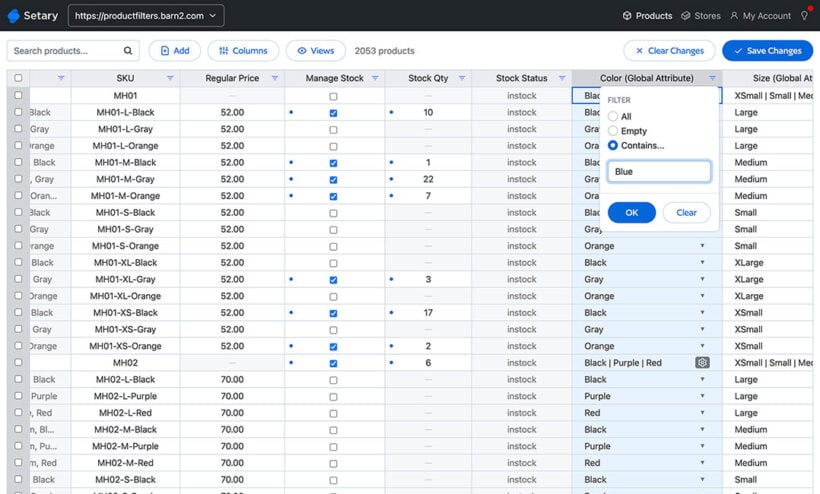
Setary can save you countless hours updating products and importing CSV files. If you have multiple stores or a large number of products, then Setary is particularly worth the investment.
It isn't the right fit for everyone, though, so here's the other side:
- ConsIt's a subscription SaaS rather than a one-off plugin, so there's an ongoing cost. You edit in a separate Setary account instead of inside wp-admin, and it relies on your store's REST API being accessible, so a locked-down or heavily firewalled site may need configuration first.
If you'd rather keep everything inside WordPress, or you only edit occasionally, one of the plugins below may suit you better.
Other WooCommerce bulk editor plugins
While Setary is our no. 1 pick, there are plenty of other WooCommerce bulk editor plugins to consider. Keep reading for our selection of the next best WooCommerce bulk edit plugins.
#1: Woocommerce Bulk Variations
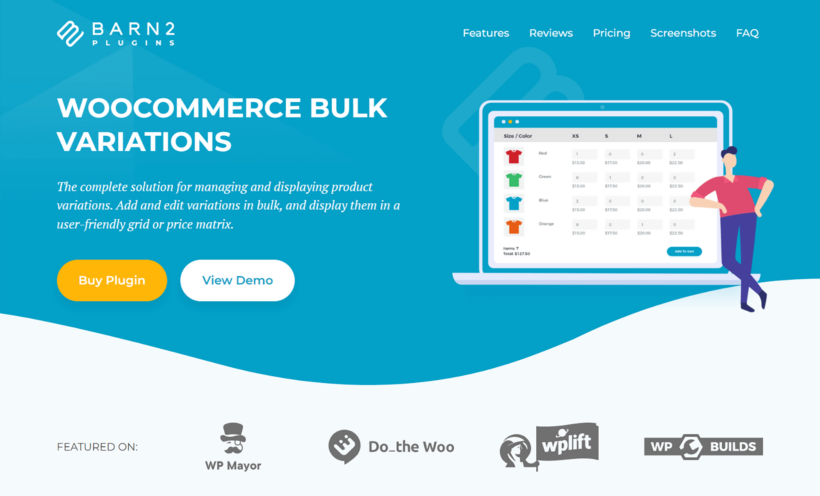
Our WooCommerce Bulk Variations plugin is the specialist option here. Rather than editing every product field, it focuses on making it easier to edit variable products in bulk. It does this by upgrading the bulk edit options in the 'Variations' tab of the Add/Edit Product screen.
You can select specific variations and edit them together without applying those changes to your other variations. It also allows you to add variation images in bulk.
When using this plugin, you'll be able to filter variable products using the variations tab on the edit products page. You can then select the variations you want to edit and click the bulk actions dropdown (Add variation) to edit all the selected variations.
Once clicked, you'll be able to bulk-edit the following:
- Delete all variations.
- Change the product status.
- Change the product pricing including regular price (fixed or percentage).
- Set and change the sale price (fixed or percentage).
- Set scheduled sale dates.
- Change the stock status, backorder status, out-of-stock, and low stock threshold (& SKU).
- Adjust the length, width, height, and weight.
- Adjust downloadable product information.
- Change, set, and remove product image thumbnails.
As a bonus, the plugin can also display your variations in a grid on the front end of your store. You control the columns, their order and the swatch sizes and colors, which makes it easier for customers to compare and choose.
Cons: It's focused on variable products, so it isn't a general-purpose editor for the rest of your catalog. If you need to bulk edit simple products and every field, pair it with Setary or one of the full editors below.
#2: YITH WooCommerce bulk product editing

YITH WooCommerce Bulk Product Editing is a bulk editing plugin that allows you to edit and update your products within WordPress itself.
With this plugin, you'll be able to edit any product field, from the URL to the stock quantity, product type, product title, and more.
YITH WooCommerce Bulk Product Editing also comes with a whole host of useful filtering options. By using this, you'll be able to search and find the products you're looking for and change the selected WooCommerce bulk edit products quickly.
As a bonus, it also lets you create a new product quickly, all within the plugin's interface. That makes it a useful option if you want to make a lot of updates in very little time.
Cons: It's premium only, with no free version to trial first, and the editing interface is functional rather than polished.
#3: WP sheet editor (Free & Pro)

Price: Free or from $29.99
Free version - Bulk edit posts and products in spreadsheet
Bulk Edit Posts and Products in Spreadsheet is a free WordPress plugin that allows you to edit posts, pages, and WooCommerce products in a spreadsheet.
Where this one differs from Setary however, is that this spreadsheet is within WordPress. By doing this, the plugin also allows you to edit posts, page content, and WooCOmmerce bulk variations using the Gutenberg editor.
The free version of this product does limit the ways in which you can update WooCommerce products though. You'll be able to bulk update the product title, product status, SKU, regular price, and sale price.
If you want to have the ability to update more product properties, you'll need to invest in the pro version.
Pro version - WooCommerce products spreadsheet
WooCommerce Products Spreadsheet is the pro version of Bulk Edit Posts and Products specifically for WooCommerce products.
This plugin is an in-built spreadsheet made specifically for WooCommerce products. You can update all product fields within the spreadsheet while working in WordPress, so it sits naturally alongside the media library and product editor. That tight integration makes it easy to update every field without leaving your dashboard.
The spreadsheet itself allows for advanced searches and formulas. So if you're a more advanced user, this plugin lets you go into detail.
Cons: The free version only edits a handful of fields (title, status, SKU, regular and sale price), so you'll need the Pro version for full editing.
#4: WooCommerce Google Sheet Connector

If you link to manage bulk editing WooCommerce data in an external spreadsheet, WooCommerce Google Sheet Connector is a powerful companion plugin.
It enables you to sync WooCommerce orders, products, product variations, and customer data directly with Google Sheets, where you can manage variations and apply bulk updates in real time. Changes are instantly reflected in the spreadsheet and can be synced back to WooCommerce, keeping your store data accurate and organized.
This makes WooCommerce Google Sheet Connector fully compatible with bulk-editing workflows, including stores that already use WooCommerce bulk editor plugins.
Cons: It's a sync tool rather than an in-WordPress editor, so you do the editing in Google Sheets, and the two-way sync takes a little setting up.
#5: WooCommerce Products Bulk Edit

Price: Free or $49
The WooCommerce Products Bulk Edit plugin supports all WooCommerce fields, both for filtering and bulk editing. You can find the products you need quickly, view them in a searchable, sortable table, and bulk edit fields like prices, product type, attributes and categories through a simple form.
It has an easy-to-use interface with plenty of tools for managing simple and variable products. One standout feature is inline editing, which lets you update product fields directly from the table. That saves time when you only need to make a minor change across multiple products.
It is also possible to duplicate some selected products with just one click. The duplicate button simplifies the process of adding similar products.
Bulk removing products is another popular feature that is very helpful when you want to delete out-of-stock or discontinued products from your store and replace them with a new collection.

Also, if you are a busy manager and also need to bulk edit orders, variations, coupons, and WordPress posts and pages, then you can install the XBulk editing bundle. This is a combination of 5 bulk edit plugins.
Cons: With so many fields and filters on show, the interface can feel busy at first, and the more advanced editing sits behind the paid version.
#6: Bulk edit products

Price: $79.00
Bulk Edit Products, Prices, and Attributes allow store managers to bulk edit, create and update products in their store - including updating attribute values.
Where it differs though, is its scheduling functionality. WooCommerce bulk edit attributes have an in-built scheduler. This means if you want to update a specific set of products at a future date, you can do so.
This feature is particularly useful if you have an upcoming sale or a product line that needs to be updated. Just set your scheduled updates and the plugin will execute them for you.
Cons: It's premium only, and it's focused on products, prices and attributes rather than offering a full spreadsheet-style view of your whole catalog.
#7: WooCommerce Advanced Bulk Edit

Price: $34
WooCommerce Advanced Bulk Edit is another plugin that works within WordPress itself. With WooCommerce Advanced Bulk Edit you're able to use the in-built filtering options to find the exact products you wish to bulk edit.
WooCommerce Advanced Bulk Edit lets you filter products and edit all fields, including meta fields, custom fields, SKU and taxonomies from third-party plugins. It also lets you duplicate, delete and create new variations in just a few clicks.
Cons: It's premium only, and the interface is more functional than polished, so it takes a little getting used to.
#8: Bulk Table Editor for WooCommerce

Price: $79
Bulk Table Editor for WooCommerce's main goal is to help you set up sales in your WooCommerce store. For this reason, the plugin makes sure editing prices, selling prices, modifying stock, and generating SKUs are all as simple as possible.
Bulk Table Editor has a vast number of in-built functions that allow you to increase prices by % amounts, fixed amounts, round upwards, downwards, and more.
It also has a scheduling function. Set a sale start and end date, do the work upfront, and the store updates itself when you need it to.
Of course, this plugin doesn't just allow you to update product prices. With Bulk Table Editor, you can change the product status, measurements, visibility, and more.
Cons: It's premium only, and it's built mainly around pricing and sales, so it's less of an all-round product editor than some others here.
#9: WOOBE - Bulk editor and products manager professional

Price: Free or $34
Free version - BEAR – Bulk editor and products manager professional for WooCommerce
The free version of WOOBE, also known as BEAR has all the functionality you'd expect from a WooCommerce bulk edit plugin.
The difference between this plugin and the others in this list is that WOOBE allows you to see the history of your bulk updates and allows you to roll back should you need to. This feature alone is incredibly useful and will save a lot of time if mistakes are made.
This WordPress plugin also allows you to create and save profiles of filter combinations. This means when making future bulk edit WooCommerce products, you'll be able to load your set filters and make changes even faster.
However, the free version of the plugin does restrict you to only being able to edit a few of the product fields. If you want to edit more, you'll need the pro version.
Pro version - WOOBE - Bulk editor and products manager professional
WOOBE - WooCommerce Bulk Editor and Products Manager Professional is the pro version of BEAR.
If you pay for the premium version of this plugin, you'll get all the features the free version offers, and you'll have full access to every product field available.
Cons: The free version only edits a few product fields, so you'll need the Pro version for full access to everything.
#10: Bulk product sync with Google Sheets

Price: $49
Bulk Product Sync with Google Sheets is a WordPress plugin that uses Google Sheets to import and export your products and categories.
It works by connecting your store to a created Google Sheet. When the sheet is updated and you sync the sheet with your store, your products will be updated too.
This plugin allows you to export your current products to a formatted Google Sheet and then edit from there. You can also add custom meta columns to your sheet and add and remove columns as you see fit.
This plugin would be particularly useful for someone who is used to working with CSV files and wants more control of what they can and can't do.
Cons: It's premium only, and as with the other sheet tools you work outside WordPress in a synced Google Sheet rather than editing directly in your store.
#11: Smart manager for WooCommerce – Stock management, bulk edit & more… (Free & Pro)

Price: Free and from $149/yr
Free version - Smart manager for WooCommerce – Stock management, bulk edit & more…
Smart Manager For WooCommerce allows you to manage and edit your WooCommerce products in an excel-like spreadsheet within WordPress.
Like the other spreadsheet-like plugins on this list, the free version of Smart Manager allows you to edit all product fields but it does restrict you to performing 3 inline edits in one go.
Where it differs from the other plugins in this list, is the live preview option. The free version of Smart Manager allows you to see the changes you're about to make before saving - which could be a huge time-saver.
Pro version - Smart manager
Smart Manager is the pro version of the above plugin and while it has all the features of the free version - it also has some big benefits.
This version of the plugin not only allows you to make as many edits as you like before saving. It also lets you switch between tasks without losing progress, which is useful if you need to make several different edits at once before saving.
Cons: The free version caps you at three inline edits at a time, and the Pro plan is one of the pricier options on this list.
#12: Product Bulk Editor for WooCommerce

Price: $79
Product Bulk Editor for WooCommerce is a plugin that allows you to make efficient bulk edits to your products in a user-friendly edit table.
This plugin simplifies bulk editing by using a table that lets you customize which fields you edit and see, with easy-to-use filter options. That makes it a good fit for store owners who prefer not to work in a spreadsheet environment.
Cons: It's premium only, and the table-based approach is more limited than a full spreadsheet if you need to make lots of edits at once.
#13: ELEX bulk edit products, prices & attributes for WooCommerce

Price: Free and from $149/yr
Free version - ELEX WooCommerce advanced bulk edit products, prices & attributes
The free version of ELEX WooCommerce Advanced Bulk Edit Products, Prices & Attributes allows store owners to bulk edit simple products.
You can adjust stock information, regular and sale prices, change categories and product types, and more, as well as access advanced options for increasing or decreasing prices.
This version of the plugin only allows you to bulk edit simple products, so if you want to edit variable products and their product attributes, then you'll need to upgrade to the pro version.
Pro version - ELEX WooCommerce advanced bulk edit products, prices & attributes
The pro version of ELEX WooCommerce Advanced Bulk Edit Products, Prices & Attributes allows you to bulk edit your variable products. It also enables you to bulk update external products and schedule these updates for a later date/time.
ELEX allows you to filter products to make detailed edits and gives you the option to immediately undo the last WooCommerce bulk update you did. That's a major bonus should you need to redo or change anything you've already done.
Cons: The free version only edits simple products, so you'll need the (fairly pricey) Pro version to handle variations and scheduling.
#14: PW WooCommerce Bulk Edit Plugin

Price: Free and from $149/yr
Free version - PW WooCommerce bulk edit
The free version of PW WooCommerce Bulk Edit is a WordPress plugin that allows the store manager to make product changes in bulk within WordPress itself.
The interface is both spreadsheet-like and table-like. Making updates to your WooCommerce product fields quickly, and easily. The PW WooCommerce Bulk Edit plugin lets you see a live preview of your changes before saving, which can be a lifesaver. The pro version offers even more options than the free version.
Pro version - PW WooCommerce bulk edit pro
The pro version of PW WooCommerce Bulk Edit Pro gives you a few additional options. With this version of the plugin, you'll be able to create new variable products automatically.
You can save time by using the option to save and load your custom product filters. This version is also compatible with many third-party plugins.
Cons: The free version covers the basics, but creating variable products and saving filter sets need the Pro version.
What features do I need in a Woocommerce bulk edit plugin?
Before you make a final decision, it's worth writing a list of which features you're looking for. You might need a way to filter products based on multiple criteria, or to edit multiple fields, variations and custom data all at once.
Perhaps you'd like the convenience of undoing changes and exporting and importing product details and data from your WordPress website. By understanding what makes a good WooCommerce bulk edit plugin, you'll be able to select the right one that meets your specific needs and preferences in real time.
Here are some of the features that you might look for in a WooCommerce bulk edit plugin:
Bulk edit the price
If you've been managing a WooCommerce store for a while, you may find yourself in a position where you need to make significant changes to your product prices. Perhaps you're planning a sale, or maybe you want to adjust the prices of all of your products to reflect changes in the costs of market demand.
Using a WooCommerce advanced bulk edit plugin can help save time and reduce errors compared to manually updating each product individually. With this plugin, you can select the products you want to update and set a new price that applies to all of them.
Edit the product description and product short description
Bulk editing your WooCommerce product description or short description saves time. If you're introducing a new product line and want to add a common phrase or SEO keyword to each description, editing them manually would be tedious. With a bulk edit product descriptions plugin, you can make the same change to multiple products in minutes.
Bulk edit the categories
Managing your WooCommerce store categories keeps your products organized and easy for customers to find. Changing each category one by one takes time, though, especially with a large inventory.
That's where bulk editing your categories comes in. With a bulk edit plugin, you can change multiple categories at once: renaming them, deleting them, or moving them to a different parent category.
Bulk edit the attributes and product variations
Bulk updating your WooCommerce products shouldn't be left to simple products alone. If you're looking to update all your products then this, of course, should include variable products and product attributes.
Product variations are notoriously time-intensive to update, so the plugin you select should have WooCommerce bulk edit attributes and product variations. Without this feature, you'll have a solution that only does half a job.
This isn't all, your WooCommerce bulk-edit plugin should also allow you to:
- Bulk edit the SKU of your WooCommerce products.
- Bulk update the product images.
- Change the stock status or stock quantity and product type.
- Update the product fields, custom fields, and more.
Those are the main features to weigh up when choosing a WooCommerce bulk edit products plugin.
Editing multiple products without a bulk edit plugin
You should also be aware that some WooCommerce stores don't really need a bulk editing plugin. WooCommerce itself provides a tool you can use to make certain bulk updates.
To bulk edit your products using WooCommerce's default options, take the following steps:
- From your WordPress dashboard, go to Products → All Products.
- Select the checkbox of all the products you want to update on the left.
- Then in the Bulk Actions dropdown menu, select Edit and click the Apply button next to the dropdown.
- Once clicked, an edit screen will appear with various product fields you can change.

On this page you'll be able to update the following:
- Product categories
- Allow or Do not allow comments
- The product status (Published, Private, Pending, Draft and more)
- Product Tags
- Product price. This includes changing the product price by fixed or % amounts and changing the product sale price.
- Changing the tax status
- Making changes to the product weight, measurements, and more
- Changing the product's shipping class, stock quantities, stock status, backorders, and more

This built-in tool can be helpful, but it does have some limitations. For example, you can't pre-filter which products you wish to update. You can't update variations from this screen. It also doesn't support all types of product data.
If you're struggling with these limitations or seeing performance issues, then turn to one of the best WooCommerce bulk edit plugins which I listed above.
Bulk edit your products and variations today
As you can see, there are plenty of choices when it comes to WooCommerce bulk editors. The choice of plugin depends on your goals for your ecommerce store and how you prefer to edit.
For most stores, I would recommend Setary as the best WooCommerce bulk edit plugin. I love the way it lets you make bulk edits directly in the Setary app, outside of the WordPress admin. This avoids the performance problems you can get with other plugins, and it makes inventory management much easier for you and your team.
If you only need to edit product variations, our WooCommerce Bulk Variations plugin is the specialist choice.
If you'd rather not spend anything, start with a free option like Smart Manager. And if you prefer to work in a spreadsheet you already know, sync your store with WooCommerce Google Sheet Connector. Whichever route you take, the right WooCommerce bulk edit products plugin will save you hours of manual work.
Setary comes with a free trial and a 30-day money-back guarantee, so you can see how much time it saves on your own store before committing.