8+ best WooCommerce product search plugins (2026)


The product search and filters that come with WooCommerce are pretty basic. On top of this, they don’t make it easy for customers to find products on your online store. Fortunately, there's an easy solution - the best WooCommerce product search plugin!
You need a solid WooCommerce product search plugin that lets you enhance the default search options on your online store. This way, you can make it much easier for customers to find exactly what they’re looking for. As a result, you’ll be able to increase product visibility and boost sales in your WooCommerce store.
The best WooCommerce product search plugins are WooCommerce Product Filters for faceted filtering, SearchWP for advanced search logic, and YITH WooCommerce AJAX Search for instant search boxes. For most stores, combining a filter plugin with a search box plugin gives the best results. Below I compare eight plugins by features, pricing and best-fit use case.
How I picked these plugins
Dozens of WooCommerce product search plugins claim to improve the default search. I narrowed the list to eight based on what matters most to a store owner:
- AJAX or live search - does the plugin show results as the customer types, or only after a page reload?
- Filter types - dropdowns, checkboxes, sliders, color swatches and category-specific filters are all useful, but most plugins only do a few.
- Compatibility - whether the plugin works with the block editor, page builders and modern WooCommerce themes.
- Pricing and free tier - whether a usable free version exists, and what you give up versus the paid plan.
- Active installs and support - how widely the plugin is used, and how recently it has been updated.
The list below covers the eight plugins that score best across these five points, plus one newer entry worth knowing about.
Top 8 WooCommerce product search plugins
Different search plugins work in different ways, and which one to use depends on the features you need. As you can see from the comparison table below, no single plugin is strictly better than the others - they have different features which you can mix and match to get the right combination for your store:
| Product Filters | Product Table | YITH AJAX Search | SearchWP | Advanced Woo Search | Smart Woo Search | Fibo Search | Advanced Product Search | |
|---|---|---|---|---|---|---|---|---|
| AJAX keyword search | ❌ | ✅ | ✅ | ❌ | ✅ | ✅ | ✅ | ✅ |
| Product filters | ✅ | ❌ | ❌ | ❌ | ❌ | ❌ | ❌ | ❌ |
| Search within categories | ✅ | ✅ | ✅ | ❌ | ❌ | ❌ | ❌ | ❌ |
| Predictive search results | ❌ | ❌ | ✅ | ✅ | ✅ | ✅ | ✅ | ✅ |
| Customize search logic | ❌ | ❌ | ❌ | ✅ | ❌ | ❌ | ❌ | ❌ |
| Customize search results display | ✅ | ✅ | ✅ | ❌ | ❌ | ✅ | ❌ | ❌ |
#1. WooCommerce Product Filters

Our WooCommerce Product Filters plugin lets you create and add different types of product filters to any WooCommerce store. It has everything you need to help customers find products in the most efficient way.
Features
- Find products by anything - categories, attributes, colors, tags, custom taxonomies, price, ratings, stock status, and even whether or not products are on sale.
- Excellent customer experience with multiple filter styles - dropdowns, checkboxes, radio buttons, images, color swatches, tag clouds, labels, sliders, and more.
- Structure filters into groups and quickly display them anywhere on your site.
- Choose between instant AJAX method or traditional button-click.
- No risk 30-day money back guarantee.
Pros and cons
While WooCommerce Product Filters is more of a filter plugin than a search plugin, it's an essential addition to any store which has lots of products. That's because if you just install a WooCommerce product search plugin then customers might type the wrong thing in the search box and find no results. In contrast, a filter gives customers pre-set options to choose from. That way, they can't possibly make a mistake, so they always find products that match.
The trade-offs worth knowing about: it's filter-only, so you'll still want one of the AJAX search plugins below for customers who'd rather type a keyword than click through options. And there's no free tier - the plugin starts at $79/year.
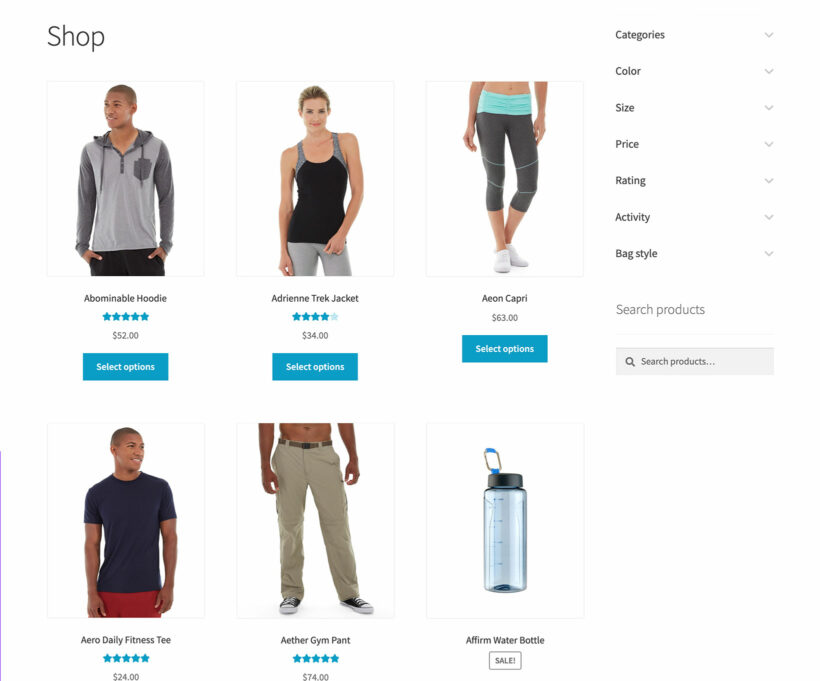
As you can see, the best product search plugin makes it easy for customers to narrow down their WooCommerce search and find products quickly. Use it on its own, or with any of the following plugins to add an advanced WooCommerce product search box. Using filters and a search box provides the best possible user experience. That's because customers have a choice of typing their own key phrase, or searching from pre-defined options. Different people find products in different ways, so this gives you the best possible chance of success.
Pricing
WooCommerce Product Filters comes with a range of price options, starting at $79. You can choose from annual or lifetime licenses, and choose the number of sites you wish to use it on.
It's also available as a standalone plugin or as a 2-plugin bundle with its sister plugin, WooCommerce Product Table (featured below). This brings significant savings compared to buying both plugins together.
#2. WooCommerce Product Table

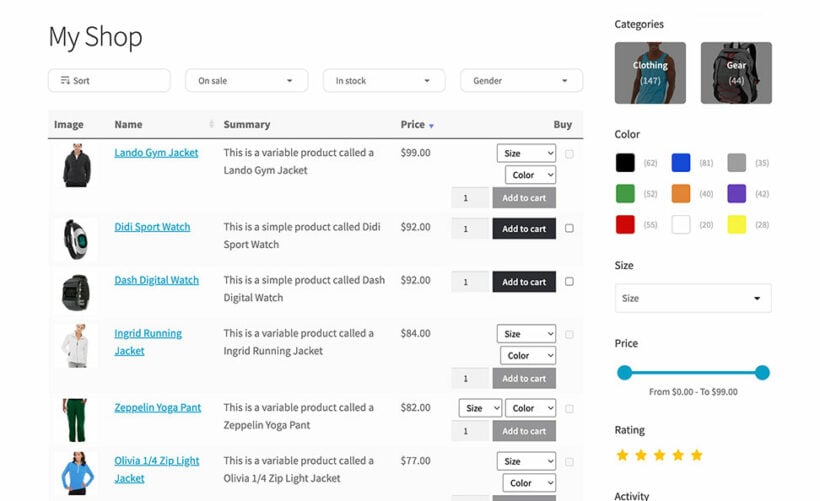
The WooCommerce Product Table plugin helps you increase sales on your WooCommerce store by letting you showcase your products in attractive one-page order forms.
WooCommerce Product Table is a search plugin that lets you display WooCommerce products in a user-friendly order form, on top of adding search options to your online store. You can change the layout of your WooCommerce products and add an instant AJAX search box along with filters above product tables.
You can just use the WooCommerce product search box that comes with the Product Table plugin. Or use it alongside the following plugins for more advanced search:
- WooCommerce Product Filters (featured above)For more advanced filtering, you can use WooCommerce Product Table with WooCommerce Product Filters.
- SearchWP (featured below)Similarly, the AJAX-powered WooCommerce Product Table search box uses exact match search. You can add advanced search conditional logic by using it together with SearchWP. The two plugins integrate perfectly with the WooCommerce Product Table plugin by Barn2 and let you display a custom advanced search box above the product table.
Features
- AJAX-powered instant search box.
- Quick product order form layout.
- Customizable table columns - choose which information to display about each product.
- Filter dropdowns which work in combination with the search box.
- Allow customers to choose quantities, variations and add to the cart directly from the product table view.
Pros and cons
The biggest strength of WooCommerce Product Table as a search plugin is also its biggest weakness. It changes your store's layout, replacing the default product grid with an interactive product table/order form. If this layout suits the type of products you sell, then it's perfect because it enhances the WooCommerce search and your store layout at the same time. However, it's not suitable for products that need large images.
One more thing to note: the built-in AJAX search uses exact match, so a customer searching for 'tshirt' won't find products labeled 't-shirt'. For synonyms, misspellings or weighted results, pair it with SearchWP (covered next).
Pricing
WooCommerce Product Filters is available on its own, or as a 2-plugin bundle with WooCommerce Product Filters. For the best savings, get it from the WooCommerce Product Filters sales page.
Or if you just need the product table view with search box, then it's available from $99. Choose from 1, 5 or 20 site licenses, either annual or lifetime.
#3. YITH WooCommerce AJAX Search

The YITH WooCommerce AJAX Search plugin offers an all-in-one solution for integrating an effective search engine on your WooCommerce store.
Features
- Add advanced search boxes above your main shop pages.
- Search for products within specific categories or tags.
- Display prices and badges in search results. These are good for promoting sales and discounted products on your WooCommerce store.
Pros and cons
YITH WooCommerce AJAX search offers one of the most sophisticated search boxes that are available for WooCommerce. I like the fact that customers can choose categories or tags as well as typing a keyword search term. However, it doesn't add any more advanced filtering capabilities to WooCommerce - for example, the ability to filter by product attributes or other product data.
It's still an excellent WooCommerce search plugin though. You can easily get around the above limitation by using it with WooCommerce Product Filters (our #1 pick). This way, you can offer customers a choice when they need to find specific products.
Further reading: How to use YITH WooCommerce AJAX Search.
Pricing
From €89.99/year
#4. SearchWP

SearchWP is a robust plugin dedicated to enhancing the search options on WordPress sites. It doesn't change how the search box or search results look. Instead, it makes the WooCommerce product search logic much more sophisticated - with synonyms, weighted relevance and custom search engines for different parts of your site.
Features
- Configure multiple search engines for different parts of your WooCommerce store.
- Customize the search algorithm, for example by adding negative keywords, synonyms (useful for common misspellings), including or excluding specific pages from search, etc.
- Built-in WooCommerce search analytics, letting you monitor search statistics and insights.
Pros and cons
If you're using the built-in WooCommerce Product Search widget then I'd definitely recommend installing SearchWP. It makes it significantly more advanced.
I love the analytics and reporting feature because it lets you analyze how customers are using it. For example, you can see what people are searching for and make sure your pages are optimized for the right keywords etc. You can also discover what failed searches people are doing and make changes to minimize these in future. For instance, if you sell t-shirts and see a lot of failed searches for 'tshirt' then you can add it as a synonym so that it displays products containing the phrase 't-shirt'.
The only disadvantages of SearchWP are that it doesn't change the appearance of the WooCommerce search, and it doesn't provide any filtering options. You'd need to use it alongside WooCommerce Product Filters to add an advanced search box in addition to advanced product filters.
Pricing
From $99/year
#5. Advanced Woo Search
Advanced Woo Search is a powerful WooCommerce product search plugin that offers quick AJAX search boxes.
Features
- Replace the default WooCommerce product search with a more user-friendly search box.
- Search within a specific category.
- Predictive search.
- Custom search results page layout, complete with badges to draw attention to products on sale.
- Works with WooCommerce Product Filters to add filters alongside the search box.
Pros and cons
WooCommerce Advanced Search is a neat plugin, but isn't as sophisticated as YITH's WooCommerce AJAX Search. For example, it has fewer features. As a result, I'd recommend YITH's solution instead.
The plugin offers a lightweight solution for implementing an advanced search engine on your WooCommerce site. You can let customers search products by product title, products tags, IDs, and SKUs. The plugin is easy to set up and use. Paste the shortcode or use the widget to display an advanced search box anywhere on your online store.
The best part about WooCommerce Advanced Search is that it can be used with the WooCommerce Product Filters plugin to add advanced product finding options to your store along with an advanced search box.
Pricing
Free
#6. Smart WooCommerce Search

The Smart WooCommerce Search plugin offers a robust solution that helps you improve the customer experience and boost sales on your online store.
Features
- Add a predictive search box to the top of your WooCommerce shop and category pages.
- Comes with its own product search results layout.
- Option to exclude out-of-stock products from search results.
- Search within a specific category only.
- Works with WooCommerce Product Filters to add filters alongside the search box.
- Integrates with page builder plugins such as Elementor, Divi, and WPBakery Page Builder.
Pros and cons
Just like Advanced Woo Search, the Smart WooCommerce Search Plugin is quite good at what it does. However, it's not quite as fully-featured or easy to use as YITH's WooCommerce AJAX Search.
Pricing
Free
#7. FiboSearch

FiboSearch is a WooCommerce product search plugin designed to help you integrate a responsive, fast search box in your WooCommerce store.
Features
- Search WooCommerce and find products by product title, long and short descriptions, and by product SKU.
- Predictive search.
- Display product images, product prices, and product descriptions in search results.
- Works with the WooCommerce Product Filters plugin for adding filters to the page sidebar.
Pros and cons
Fibosearch is a well coded plugin with an interactive search form and a lot of customizations options for a free plugin.
Pricing
Free
#8. Advanced Product Search For WooCommerce

The Advanced Product Search plugin offers an intuitive way to set up advanced search boxes and lets customers search WooCommerce and find products quickly.
Features
- Adds an eye-catching search bar to the top of your WooCommerce shop pages.
- Search globally or within a selected category.
- Use widgets and shortcodes to display search boxes anywhere on your WordPress site.
- Displays the best results in a dropdown before the full search results loads.
- Works with WooCommerce Product Filters plugin to add filter widgets on the same pages as your search boxes.
Pros and cons
This WooCommerce advanced search plugin is a well designed option with lots of features. While it's just a search and doesn't contain any type of product filtering, that doesn't matter if you use it with WooCommerce Product Filters. I like its flexibility and how easy it is to add search boxes to any page or widget.
Pricing
Free
#9. Advance Product Search by ThemeHunk

Advance Product Search by ThemeHunk is a newer free plugin focused on AJAX-powered instant search for WooCommerce. Worth a look if you want predictive search without paying for a premium plugin.
Features
- AJAX search box with autocomplete.
- Searches product title, SKU, categories and tags.
- Mobile-responsive search box.
- Built-in search analytics.
- Configurable search widget.
Pros and cons
A solid free option for stores that just need an AJAX search box. The search is fast and the analytics view is a nice extra. On the downside, the plugin is newer and has a smaller install base than the alternatives above, so the long-term support picture is less clear. It also doesn't include filtering - pair it with WooCommerce Product Filters if you need both.
Pricing
Free
Free vs paid WooCommerce search plugins
Roughly half of the WooCommerce product search plugins above are free, and half are paid:
- Free options: Advanced Woo Search, Smart WooCommerce Search and FiboSearch all have free versions on WordPress.org. They handle AJAX search, predictive results and category-specific search.
- Paid options: WooCommerce Product Filters, WooCommerce Product Table, YITH WooCommerce AJAX Search and SearchWP are paid. They add features the free plugins don't - shop-page filter types, customizable search logic, analytics and integrations with each other.
Start with a free plugin if your store is small and the default search has only just started to fall short. Move to a paid plugin once you need real filters on the shop page or smarter search logic (synonyms, weights, category restrictions) - the free options don't cover those.
Which plugin is right for your store?
There isn't a single best WooCommerce product search plugin because most stores need both searching and filtering. The right pick depends on what's wrong with your current search setup:
- Large catalog stores: WooCommerce Product Filters for proper faceted filtering on the shop page. You can display it horizontally or vertically above the products or in a sidebar.
- Stores needing smarter search logic (synonyms, weights, custom rules): SearchWP.
- Stores wanting an instant AJAX search box: YITH WooCommerce AJAX Search for a full-featured paid option, or Advanced Woo Search for a solid free one.
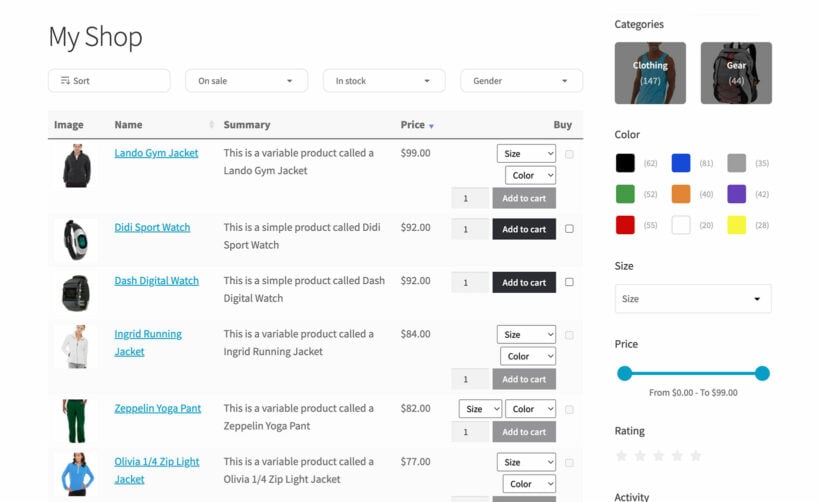
- Stores wanting a product-table layout with built-in search and filters: WooCommerce Product Table paired with WooCommerce Product Filters. Use both together to create quick one-page order forms with advanced search filtering.
- Stores on a tight budget: Advanced Woo Search or Smart WooCommerce Search free, with the default WooCommerce sidebar filter widget.
Tutorial: How to set up advanced search in WooCommerce
The best way to enhance WooCommerce product search on your online store is by using filter widgets with an advanced search bar. I'm assuming that you're using the YITH plugin for adding advanced search to WooCommerce, but you can equally use WooCommerce Product Table instead.
Step #1: Add a product filter widget
The first thing you need to do is get the WooCommerce Product Filters plugin. Install and activate it on your WordPress site. Once that’s done, follow these steps to add the widget to your WooCommerce store:
- Firstly, go to Products → Filters from the WordPress admin.
- Secondly, open or create a group. Fill in the details on the Add new form.
- Add the widget on the front-end. To do this, go to Appearance → Widget and drag the Product Filters widget to the sidebar you want it to appear in.
That’s it! You’ve added a product search filtering widget to your online store. You can stop there if that's all you need. Alternatively, you can use the plugin with any of the search plugins we talked about earlier. These will add an advanced keyword search box to your store.
Step #2: Add an advanced search bar
To get started, get the YITH WooCommerce AJAX Search plugin and install it on your WordPress site.

- Go to YITH → Ajax Search from the admin panel to configure the plugin’s settings.
- Fill out the General settings, Search settings, and Output settings based on your preferences. The plugin lets you choose which metadata to search and how to display search results on the front-end.
- Click the Save changes button to continue.
Customers can use the search box to search WooCommerce, find a product or use the filtering options to narrow down their search.
Get started with a better WooCommerce search
The fastest improvement most stores see is from pairing a filter plugin with an AJAX search box. WooCommerce Product Filters handles the filter side, and any of the WooCommerce product search plugins above can handle the search box. Pick the combination that fits your store and your budget, and your customers will find what they're looking for in fewer clicks.
2 Comments
Interesting article, I also point out this plugin just released: SF Autosuggest Product Search
Hi, Simone. Thanks for your suggestion! I hope it helps other customers who might be looking for alternatives.